From SimplyBook.me
Marked this version for translation |
No edit summary |
||
| (4 intermediate revisions by the same user not shown) | |||
| Line 1: | Line 1: | ||
<languages/> | <languages/> | ||
{{#seo: | |||
|title=Custom Features - SimplyBook.me | |||
<translate> | <translate> | ||
<!--T:3--> | |||
|description=Self-service check-in kiosk for tablets. Contactless client check-in at your location. Reduce reception workload, improve efficiency. | |||
</translate> | </translate> | ||
|titlemode=append | |titlemode=append | ||
|keywords=faq, frequently asked questions, booking software, appointment system questions, appointments online, calendar software, booking system, booking calendar, scheduling software, online appointment scheduling, online scheduling, plugins, custom features, additional functionality, kiosk, automatic redirect, public place booking, common booking | |keywords=faq, frequently asked questions, booking software, appointment system questions, appointments online, calendar software, booking system, booking calendar, scheduling software, online appointment scheduling, online scheduling, plugins, custom features, additional functionality, kiosk, automatic redirect, public place booking, common booking | ||
| Line 21: | Line 23: | ||
;How to use | ;How to use | ||
:1. Enable this feature on your <span style="background-color:#d4f8e5; padding:5px; border-radius:5px;">Custom features</span> page, <span style="background-color:#d4f8e5; padding:5px; border-radius:5px;">Other</span> section. | :1. Enable this feature on your <span style="background-color:#d4f8e5; padding:5px; border-radius:5px;">Custom features</span> page, <span style="background-color:#d4f8e5; padding:5px; border-radius:5px;">Other</span> section. | ||
[[File:Kiosk enable path.png |border|center]] | [[File:Kiosk enable path redesigned.png|1200px |border|center|link=https://help.simplybook.me/images/a/a4/Kiosk_enable_path_redesigned.png]] | ||
<br><br> | <br><br> | ||
:2. Select if you wish to clear client data with each new booking, set redirect time for after booking completion and in case of inactivity on the booking site on the settings side of the page. | :2. Select if you wish to clear client data with each new booking, set redirect time for after booking completion and in case of inactivity on the booking site on the settings side of the page. You can also add your own url for the custom redirect if needed. | ||
[[File:Kiosk settings | [[File:Kiosk settings redesigned.png|1200px|border|center|link=https://help.simplybook.me/images/1/12/Kiosk_settings_redesigned.png]] | ||
<br><br> | <br><br> | ||
Save your preferences and you are done! | Save your preferences and you are done! | ||
<br><br> | <br><br> | ||
</translate> | </translate> | ||
Latest revision as of 13:43, 16 February 2026

The Kiosk Custom Feature allows you to accept bookings on your client booking site so in between bookings, data gets cleared. This makes privacy issues less of a concern.
You can set the time when the customer will be redirected to home page of the booking site or to the beginning of the services booking steps in case you use widget after he/she completes the booking or if the page is left inactive.
Please note! This feature is not compatible with Take me Back Home, Telegram Notifications and Online Video Meetings custom features.
- How to use
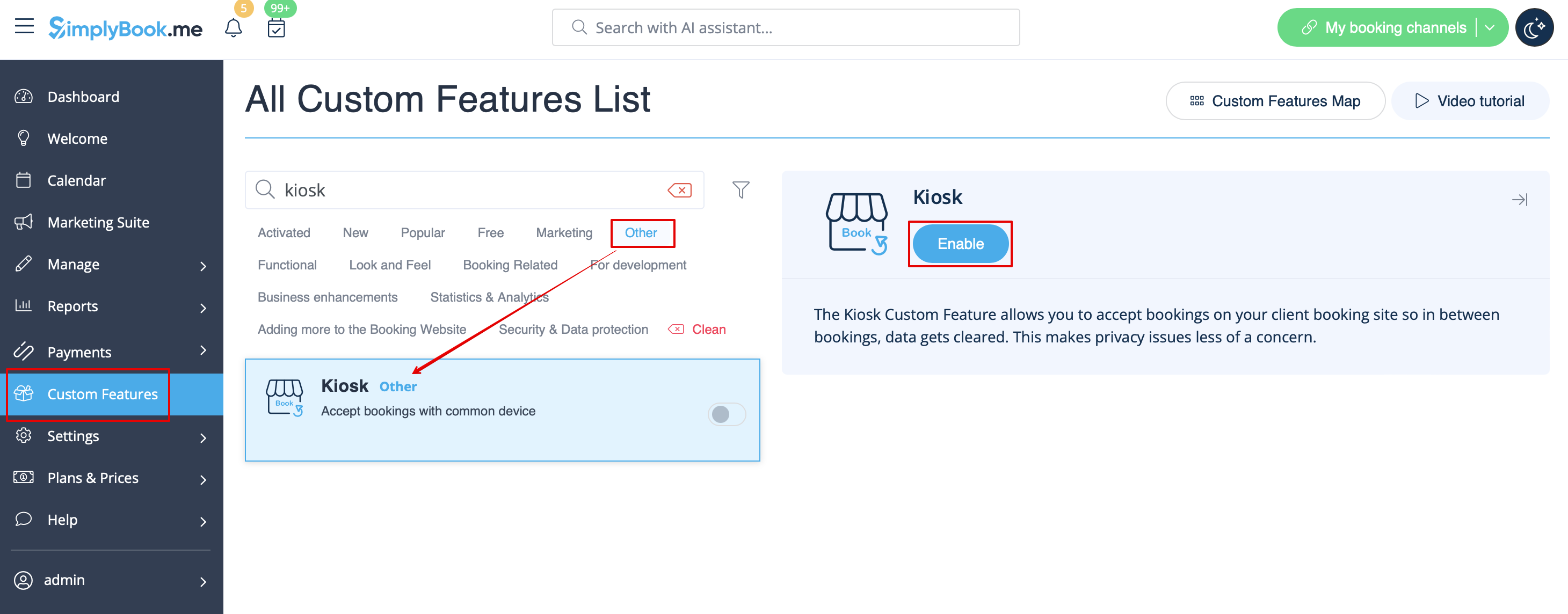
- 1. Enable this feature on your Custom features page, Other section.
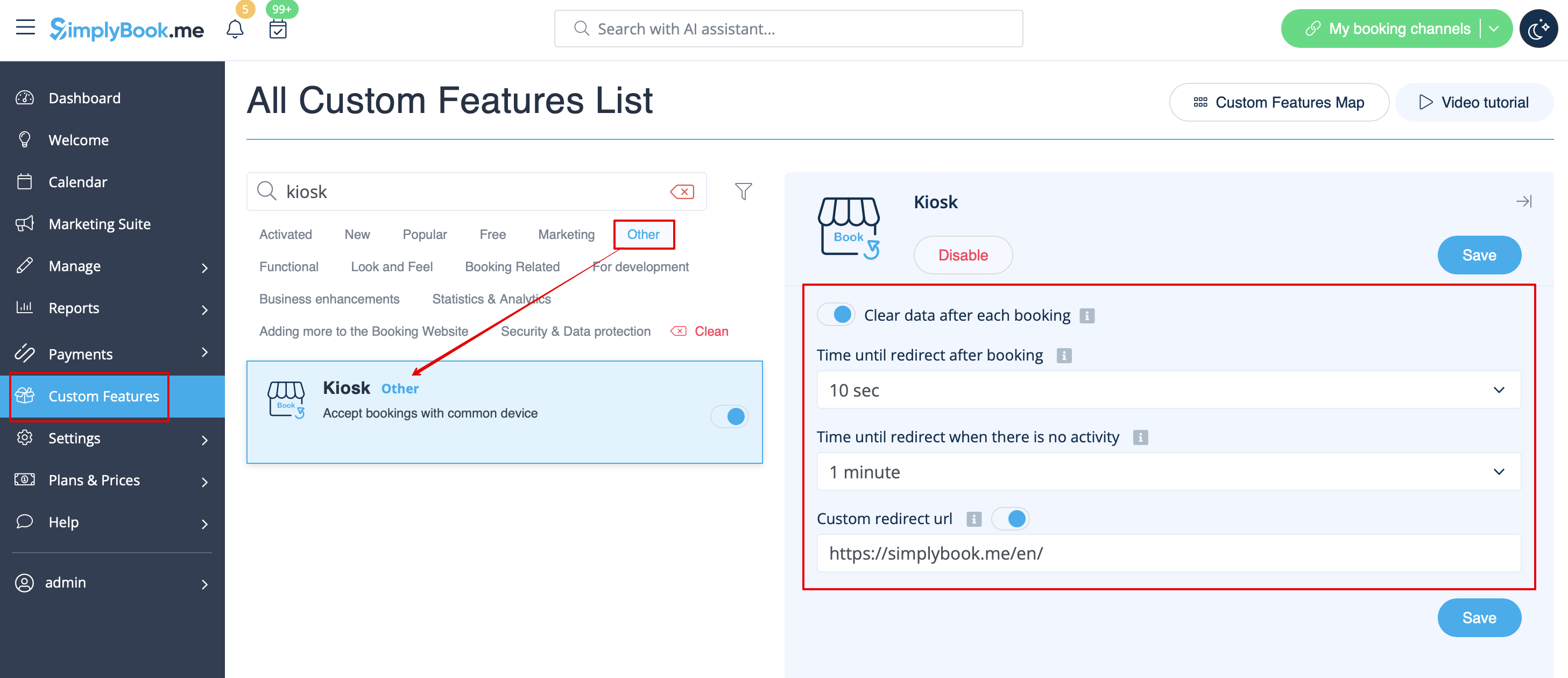
- 2. Select if you wish to clear client data with each new booking, set redirect time for after booking completion and in case of inactivity on the booking site on the settings side of the page. You can also add your own url for the custom redirect if needed.
Save your preferences and you are done!
