No edit summary |
No edit summary |
||
| (7 intermediate revisions by 2 users not shown) | |||
| Line 1: | Line 1: | ||
<languages/> | <languages/> | ||
{{#seo: | {{#seo: | ||
|title=Client mobile app - SimplyBook.me | |title=Client mobile app - SimplyBook.me | ||
|description=Gebrandete Mobile App für iOS und Android. Kunden verwalten Buchungen über Ihre App. White-Label-Lösung mit Ihrem Branding. | |||
|titlemode=append | |titlemode=append | ||
|keywords=faq, frequently asked questions, booking software, appointment system questions, appointments online, calendar software, booking system, booking calendar, scheduling software, online appointment scheduling, online scheduling, plugins, custom features, additional functionality, client application, mobile application, client mobile app, client app, client mobile application, add to home screen | |keywords=faq, frequently asked questions, booking software, appointment system questions, appointments online, calendar software, booking system, booking calendar, scheduling software, online appointment scheduling, online scheduling, plugins, custom features, additional functionality, client application, mobile application, client mobile app, client app, client mobile application, add to home screen | ||
| Line 21: | Line 21: | ||
'''Video-Tutorials verfügbar''' | '''Video-Tutorials verfügbar''' | ||
* Einrichten der Mobilen Kunden-App | * Einrichten der Mobilen Kunden-App <p><youtube>_3pW171iAjA</youtube></p> | ||
* Verwendung der Mobilen Kunden-App | * Verwendung der Mobilen Kunden-App <p><youtube>SElfM29hWOo</youtube></p> | ||
<br><br> | <br><br> | ||
;'''Wie benutzt man die Mobile Kunden-App''' | ;'''Wie benutzt man die Mobile Kunden-App''' | ||
| Line 54: | Line 54: | ||
*Von der '''Verwaltungsseite''' aus ist es möglich, alle an Kunden gesendeten Push-Benachrichtigungen unter <span style="background-color:#d4f8e5; padding:5px; border-radius:5px;">Berichte</span> -> <span style="background-color:#d4f8e5; padding:5px; border-radius:5px;">Push-Benachrichtigungen</span> zu sehen, sowie ob sie vom Kunden empfangen und angeklickt wurden. | *Von der '''Verwaltungsseite''' aus ist es möglich, alle an Kunden gesendeten Push-Benachrichtigungen unter <span style="background-color:#d4f8e5; padding:5px; border-radius:5px;">Berichte</span> -> <span style="background-color:#d4f8e5; padding:5px; border-radius:5px;">Push-Benachrichtigungen</span> zu sehen, sowie ob sie vom Kunden empfangen und angeklickt wurden. | ||
[[File:Client app push notifications report redesigned.png|1200px|border|center|link=https://help.simplybook.me/images/c/cc/Client_app_push_notifications_report_redesigned.png]] | [[File:Client app push notifications report redesigned.png|1200px|border|center|link=https://help.simplybook.me/images/c/cc/Client_app_push_notifications_report_redesigned.png]] | ||
<br><br><br><br> | <br><br><br><br><span style="background-color:#cdeffc; padding:5px; border-radius:5px;"></span> | ||
Latest revision as of 17:28, 20 February 2026

Lassen Sie Ihre Kunden Ihre eigene personalisierte Kunden-App herunterladen. Mit der App auf ihrem Handy können sie ganz einfach buchen, Termine verschieben, Pakete, Mitgliedschaften und Geschenkkarten kaufen und direkt von ihrem Handy aus auf Ihr Unternehmen zugreifen.
Die Kunden-App steht allen zahlenden SimplyBook.me-Nutzern zur Verfügung, die den Kunden-Login verwenden, und wenn Sie ein Premium-Abonnement haben, können Sie sie mit Ihrem eigenen Logo und Ihren Markenfarben personalisieren. Bitten Sie Ihre Kunden, Ihre Buchungswebsite mit einem mobilen Gerät aufzurufen, und von dort aus werden sie eingeladen, die App auf ihr Handy herunterzuladen.
So einfach ist das!
Die Mobile Kunden-App funktioniert als Progressive Web App (PWA), d. h. sie kann nicht aus herkömmlichen App-Stores wie dem App Store oder Play Market heruntergeladen werden. Stattdessen können Ihre Kunden die Funktionen der App direkt über einen Webbrowser auf ihren mobilen Geräten aufrufen. Dieser Ansatz bietet Flexibilität, einfache Aktualisierungen und Kompatibilität über verschiedene Geräte hinweg.
Bitte beachten Sie!
- Wenn Sie diese Funktion aktivieren, wird auch die individuelle Funktion Kunden-Login aktiviert;
- Diese Funktion funktioniert derzeit nur mit wöchentlichen Klassen, modernen und flexiblen Kalenderlayouts;
- Die folgenden Funktionen sind derzeit nicht in der Kunden-App vorhanden: Nachrichten, Fotogalerie, Bewertungen, Benutzerdefinierte Seite, Google-Übersetzung, Änderung des Hauptseitenmodus, Anzeige der Endzeit, Ausblenden von Bildern auf Buchungsschritten, RTL-Ausrichtung, Kontakt-Widget, Farbanpassungen für belegte und verfügbare Slots.
Video-Tutorials verfügbar
- Einrichten der Mobilen Kunden-App
- Verwendung der Mobilen Kunden-App
- Wie benutzt man die Mobile Kunden-App
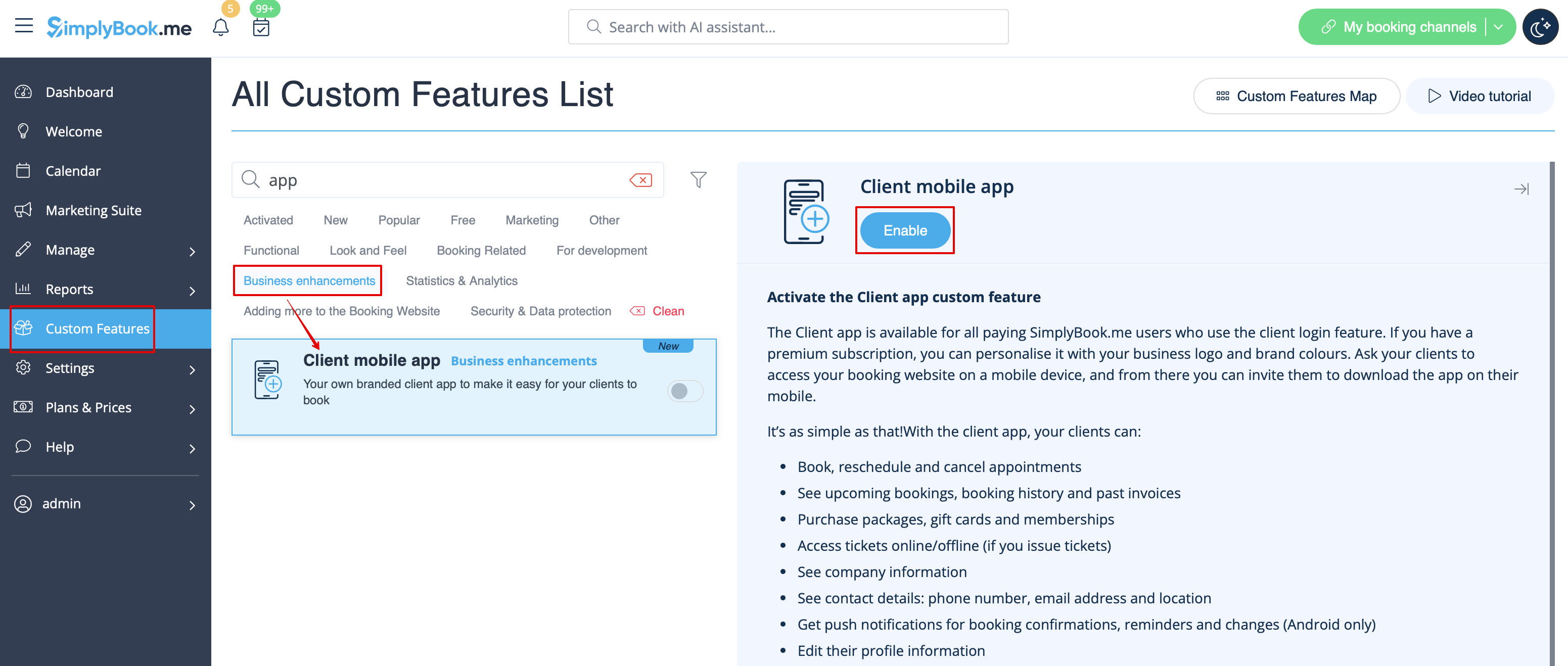
1. Aktivieren Sie die Funktion Mobile Kunden-App auf Ihrer Seite Individuelle Funktionen im Abschnitt Geschäftsverbesserungen.
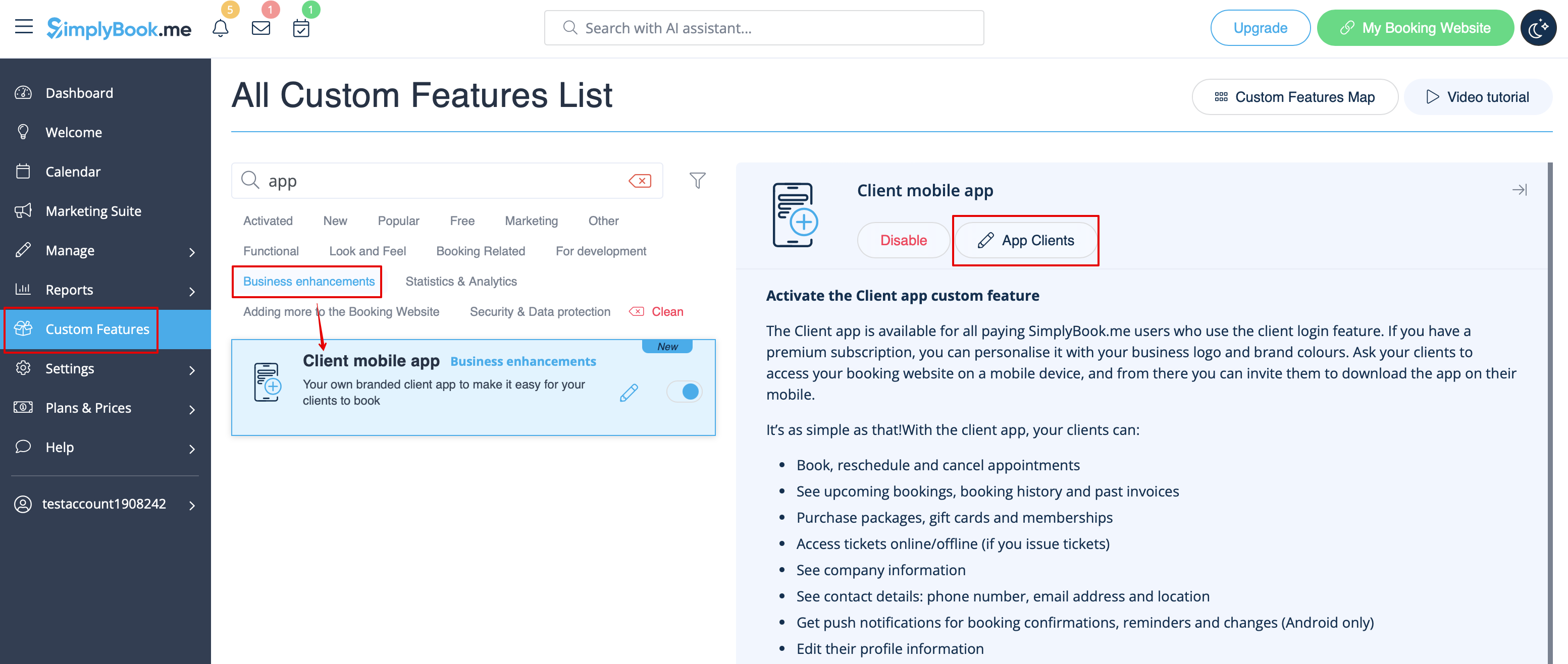
2. Und schon ist sie einsatzbereit. Einige Berichtsoptionen werden für Sie verfügbar.
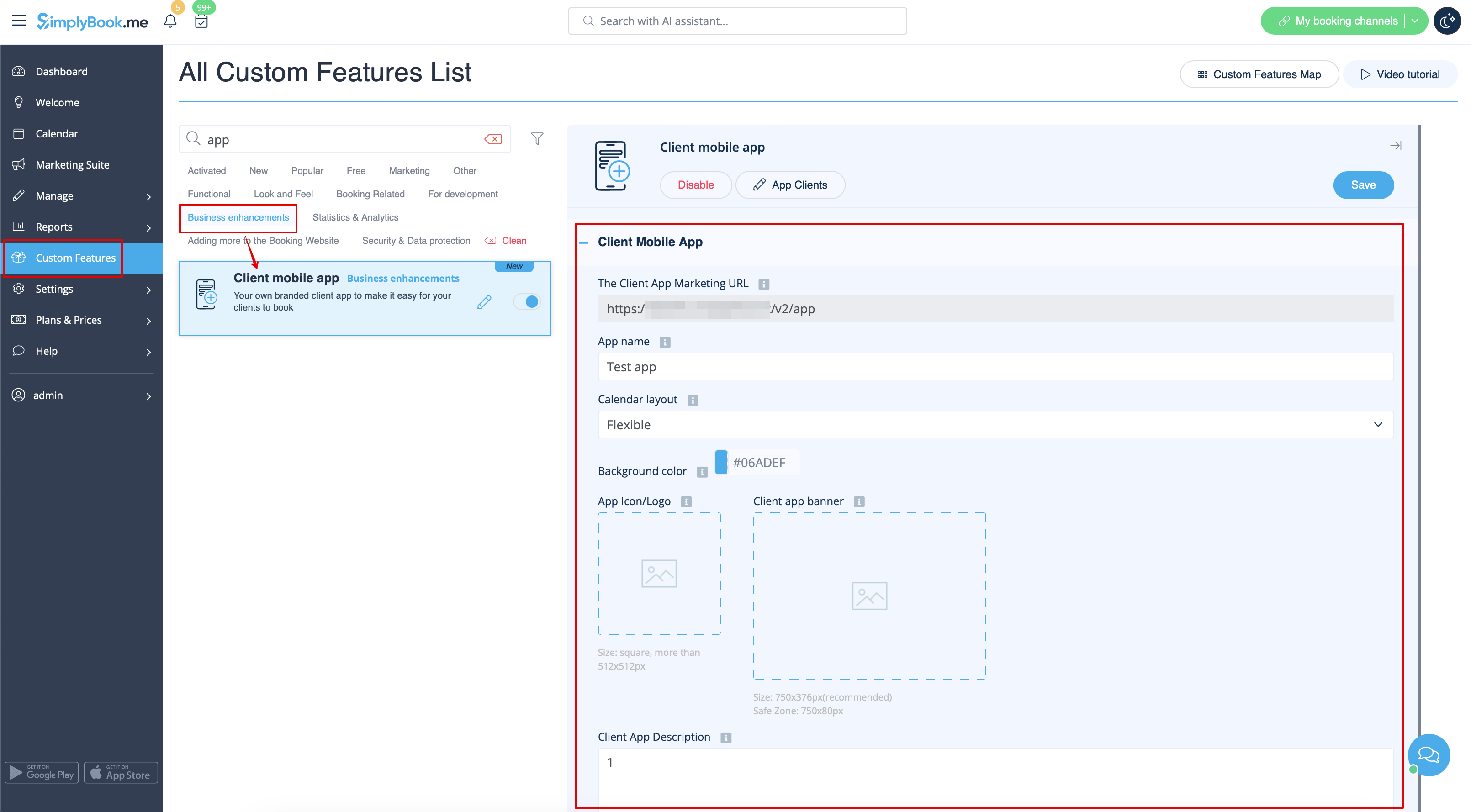
3. (nur für Premium-Abonnements verfügbar) Fügen Sie einen eigenen Anwendungsnamen hinzu, legen Sie die Markenfarbe fest, wählen Sie das bevorzugte Kalenderlayout, laden Sie das Logo und die Banner hoch.
Es ist wichtig, dass Sie ein quadratisches Bild für das Logo verwenden, andere Abmessungen werden nicht gespeichert.
Außerdem empfehlen wir die Verwendung von helleren und/oder dunkleren Farben für den Hintergrund, um die Kundenerfahrung zu verbessern.
4. Schicken Sie Ihren Kunden die URL Ihrer Buchungswebsite (das Banner wird nicht auf den Widgets angezeigt), damit sie die Anwendung auf ihren Handys installieren können, indem sie auf das entsprechende Banner klicken.
(Das Banner für die Einladung zur Installation wird möglicherweise nicht in den integrierten mobilen Browsern angezeigt, es wird empfohlen, stattdessen Chrome zu verwenden)
Bitte beachten Sie! Benutzer von IOS-Geräten müssen Ihre Buchungswebsite in der Vollversion von Safari öffnen, um den Einladungsbanner zur Installation zu erhalten, und dann einfach die Option Zum Startbildschirm hinzufügen verwenden.

5. Als Ergebnis werden sie in der Lage sein, online zu buchen, ihre Termine zu sehen (diese Option ist auch im Offline-Modus verfügbar), sie zu verschieben oder zu stornieren, Geschenkkarten, Mitgliedschaften und Pakete zu kaufen, Rechnungen einzusehen und eigene Daten zu aktualisieren, falls erforderlich.

- Push-Benachrichtigungen
- Nutzer können auch Push-Benachrichtigungen über neue Buchungen oder Stornierungen auf ihren Geräten erhalten.
Dazu ist es lediglich erforderlich, die Benachrichtigungen in der Anwendung nach der Anmeldung/Sign-in und in einem Standard-Systemdialog zu aktivieren.

Falls die Benachrichtigungen eingeschaltet sind, aber die Push-Nachrichten nicht ankommen, muss in den Geräteeinstellungen überprüft werden, ob die Chrome-Systembenachrichtigungen (Android) oder Safari (IOS) aktiviert sind.

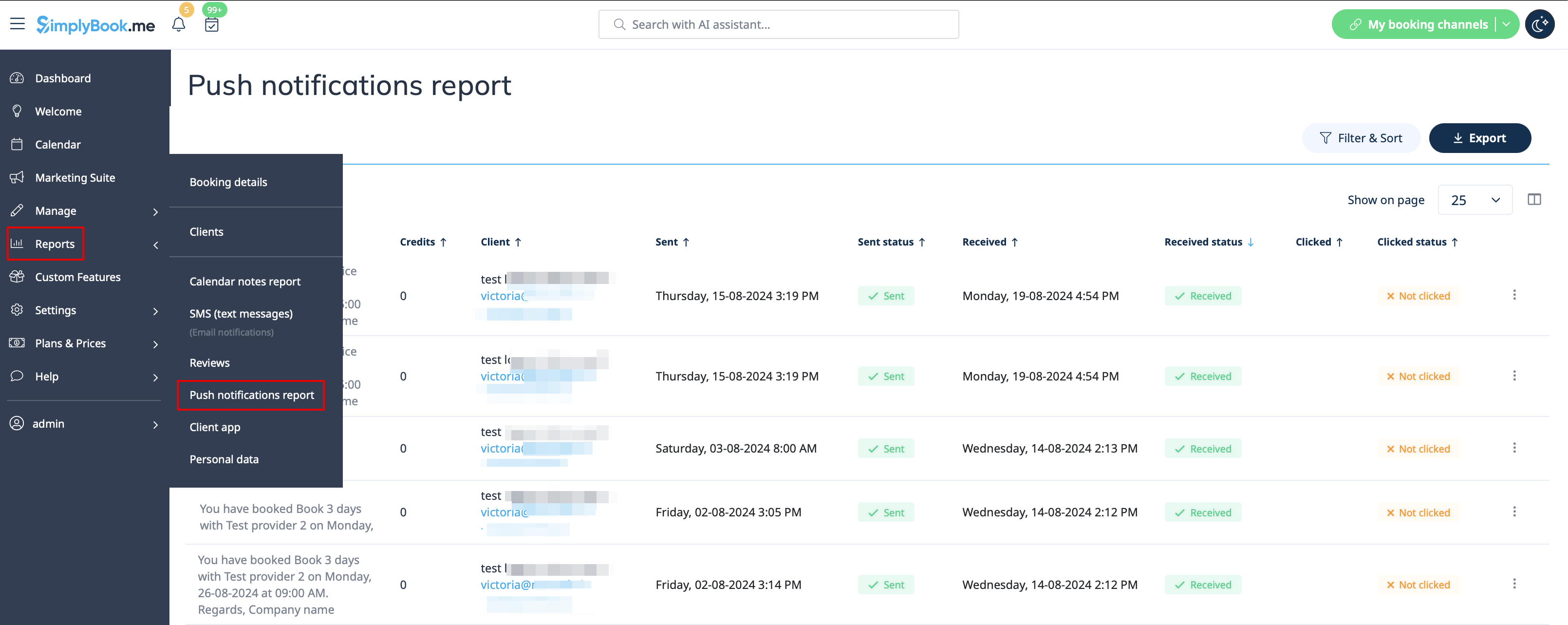
- Von der Verwaltungsseite aus ist es möglich, alle an Kunden gesendeten Push-Benachrichtigungen unter Berichte -> Push-Benachrichtigungen zu sehen, sowie ob sie vom Kunden empfangen und angeklickt wurden.