From SimplyBook.me
No edit summary |
No edit summary |
||
| (2 intermediate revisions by the same user not shown) | |||
| Line 1: | Line 1: | ||
<languages/> | <languages/> | ||
<translate> | <translate> | ||
<!--T:1--> | |||
{{#seo: | {{#seo: | ||
|title=I have clients in different time zones - SimplyBook.me | |title=I have clients in different time zones - SimplyBook.me | ||
|description= | |description= Handle international clients across timezones. System auto-converts times, displays local time to each client. Configure timezone settings properly. | ||
|titlemode=append | |titlemode=append | ||
|keywords=faq, frequently asked questions, booking software, appointment system questions, appointments online, calendar software, booking system, booking calendar, scheduling software, online appointment scheduling, online scheduling, plugins, custom features, custom booking page link, domain name, custom domain name, custom url | |keywords=faq, frequently asked questions, booking software, appointment system questions, appointments online, calendar software, booking system, booking calendar, scheduling software, online appointment scheduling, online scheduling, plugins, custom features, custom booking page link, domain name, custom domain name, custom url | ||
}} | }} | ||
</translate> | </translate> | ||
<translate> | |||
<!--T:2--> | |||
<br><br> | <br><br> | ||
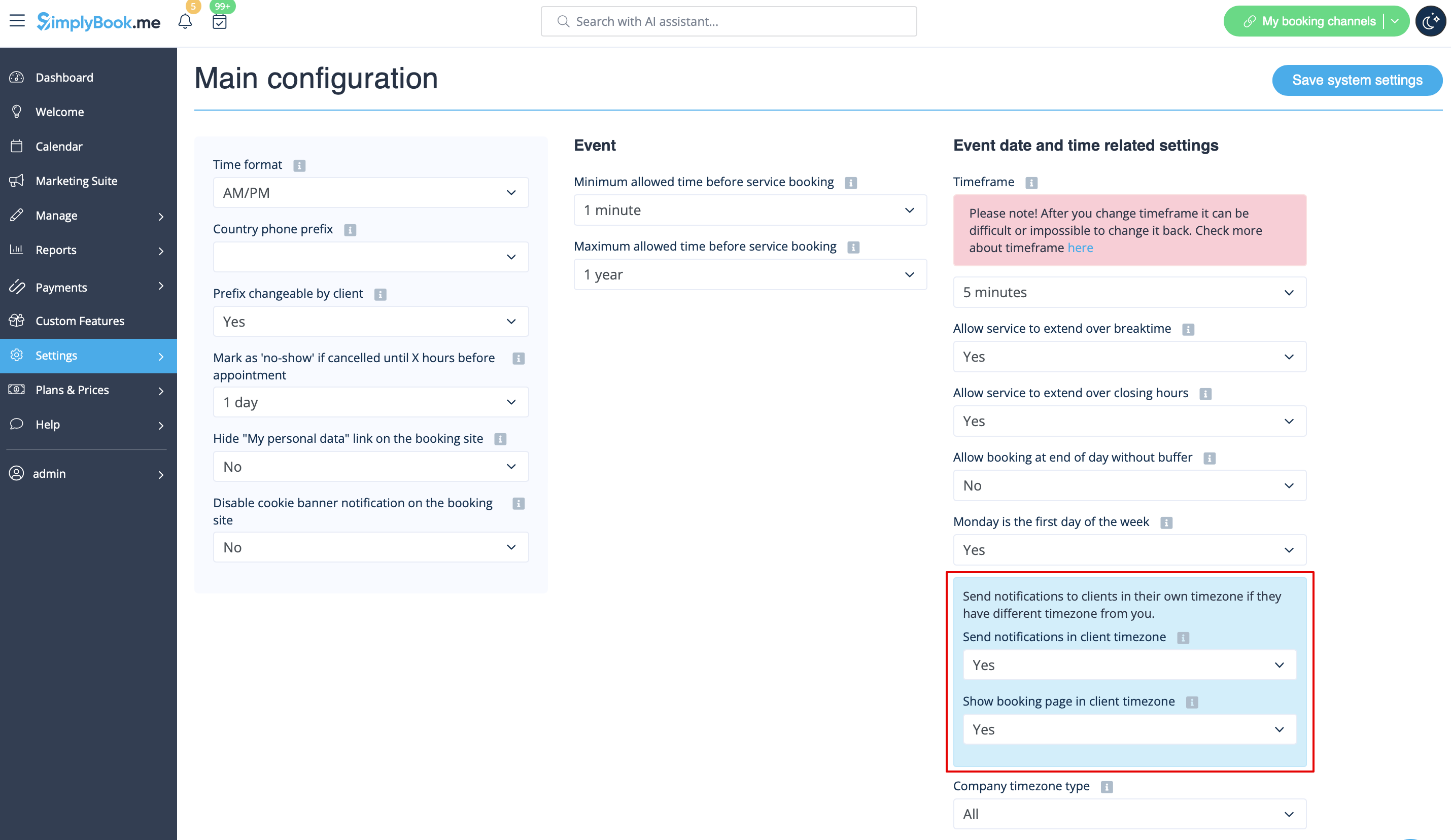
:If you have clients in different time zones, set <span style="background-color:#d4f8e5; padding:5px; border-radius:5px;">Show booking page in client timezone</span> and <span style="background-color:#d4f8e5; padding:5px; border-radius:5px;">Send notifications in client timezone</span> in <span style="background-color:#d4f8e5; padding:5px; border-radius:5px;">Settings</span> -> <span style="background-color:#d4f8e5; padding:5px; border-radius:5px;">Main configuration</span> to <span style="background-color:#d4f8e5; padding:5px; border-radius:5px;">Yes</span>, so that your clients see booking page in their time zone. <br> | :If you have clients in different time zones, set <span style="background-color:#d4f8e5; padding:5px; border-radius:5px;">Show booking page in client timezone</span> and <span style="background-color:#d4f8e5; padding:5px; border-radius:5px;">Send notifications in client timezone</span> in <span style="background-color:#d4f8e5; padding:5px; border-radius:5px;">Settings</span> -> <span style="background-color:#d4f8e5; padding:5px; border-radius:5px;">Main configuration</span> to <span style="background-color:#d4f8e5; padding:5px; border-radius:5px;">Yes</span>, so that your clients see booking page in their time zone. <br> | ||
:For example: You are in UK, London and your client is in US, Washington. Your opening hours are 9a.m-5p.m GMT, but for your American client the schedule will be 2a.m-10a.m PDT. <br><br> | :For example: You are in UK, London and your client is in US, Washington. Your opening hours are 9a.m-5p.m GMT, but for your American client the schedule will be 2a.m-10a.m PDT. <br><br> | ||
</translate> | |||
<translate> | |||
<!--T:3--> | |||
:If all your clients are in the same time zone, just set NO in both fields.<br/> | :If all your clients are in the same time zone, just set NO in both fields.<br/> | ||
[[File:Timezone settings redesigned.png|1200px|border| center|link=https://help.simplybook.me/images/3/35/Timezone_settings_redesigned.png]] | [[File:Timezone settings redesigned.png|1200px|border| center|link=https://help.simplybook.me/images/3/35/Timezone_settings_redesigned.png]] | ||
<br><br> | <br><br> | ||
</translate> | |||
Latest revision as of 18:01, 30 January 2026
- If you have clients in different time zones, set Show booking page in client timezone and Send notifications in client timezone in Settings -> Main configuration to Yes, so that your clients see booking page in their time zone.
- For example: You are in UK, London and your client is in US, Washington. Your opening hours are 9a.m-5p.m GMT, but for your American client the schedule will be 2a.m-10a.m PDT.
- If all your clients are in the same time zone, just set NO in both fields.