Updating to match new version of source page |
No edit summary |
||
| (4 intermediate revisions by 2 users not shown) | |||
| Line 2: | Line 2: | ||
{{#seo: | {{#seo: | ||
|title=Any Employee Selector Custom Feature - SimplyBook.me | |title=Any Employee Selector Custom Feature - SimplyBook.me | ||
|description=System weist automatisch Anbieter für Buchungen zu. Kunden buchen Service ohne bestimmten Anbieter auszuwählen. Buchungsprozess vereinfachen, Arbeitsbelastun... | |||
|description= | |||
|titlemode=append | |titlemode=append | ||
|keywords=faq, frequently asked questions, booking software, appointment system questions, appointments online, calendar software, booking system, booking calendar, scheduling software, online appointment scheduling, online scheduling, setup, setup help, support, help content, any employee, any employee selector, hide providers, hide provider step, any provider, any performer | |keywords=faq, frequently asked questions, booking software, appointment system questions, appointments online, calendar software, booking system, booking calendar, scheduling software, online appointment scheduling, online scheduling, setup, setup help, support, help content, any employee, any employee selector, hide providers, hide provider step, any provider, any performer | ||
| Line 15: | Line 13: | ||
<br><br> | <br><br> | ||
[[File:Any employee client side view.png|1200px|border| center]] | [[File:Any employee client side view.png|1200px|border| center]] | ||
<br><br> | <br><br> | ||
| Line 33: | Line 30: | ||
3. Wenn Sie Anbieter von der Buchungsseite ausblenden und/oder sie zufällig zuweisen möchten, markieren Sie bitte die entsprechenden Kästchen dort. | 3. Wenn Sie Anbieter von der Buchungsseite ausblenden und/oder sie zufällig zuweisen möchten, markieren Sie bitte die entsprechenden Kästchen dort. | ||
<br><br> | <br><br> | ||
Latest revision as of 17:26, 20 February 2026

Mit dieser individuellen Funktion können Sie der Buchungsseite einen Dienstleister namens "Beliebiger Mitarbeiter" hinzufügen. Wenn der Kunde diesen Dienstleister auswählt, werden alle Zeiten der verfügbaren Dienstleister angezeigt.

Sie können diese individuelle Funktion auch verwenden, um:
- Dienstleisterschritte auf der Buchungsseite ausblenden.
- Automatisch jeden verfügbaren Anbieter für den ausgewählten Service zufällig zuzuweisen.
Auf diese Weise wählt der Kunde nur die Dienstleistung und die Zeit aus, was den Buchungsprozess vereinfacht.
- Wie man es benutzt
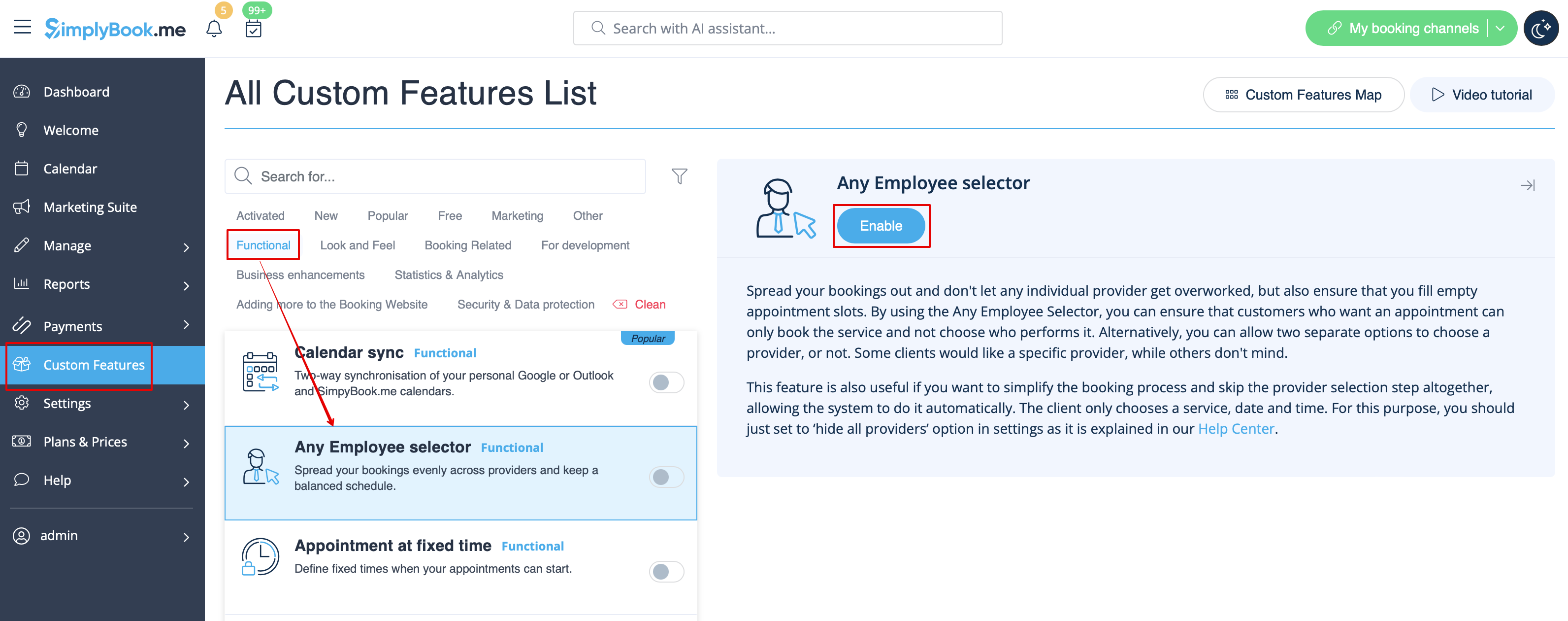
1. Aktivieren Sie die individuelle Funktion " Beliebiger Mitarbeiter" im Abschnitt Individuelle Funktionen.
2. Gehen Sie zu den Einstellungen auf der rechten Seite, um den Titel und die Beschreibung der Option "Beliebiger Mitarbeiter" an Ihre Bedürfnisse anzupassen.
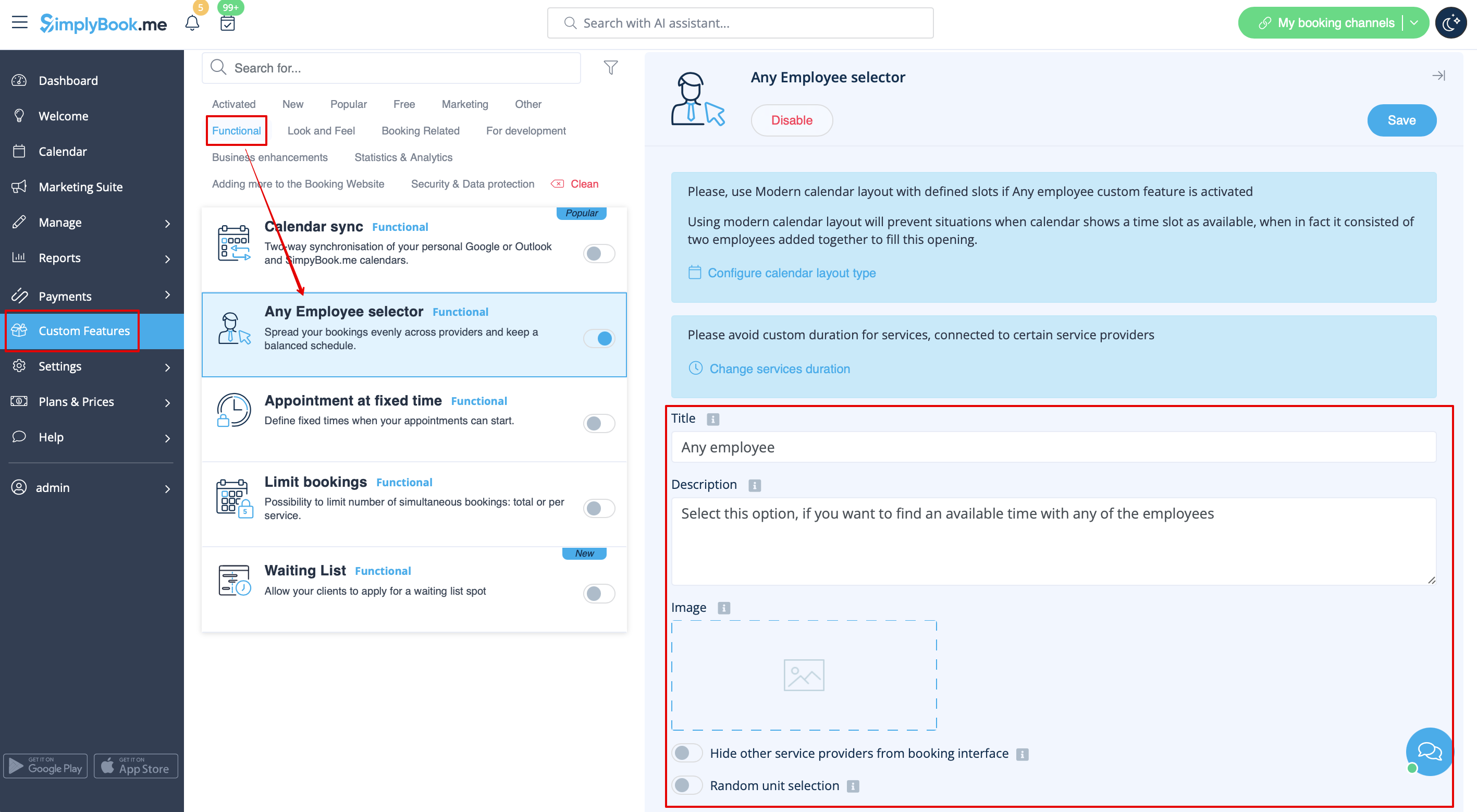
3. Wenn Sie Anbieter von der Buchungsseite ausblenden und/oder sie zufällig zuweisen möchten, markieren Sie bitte die entsprechenden Kästchen dort.
