No edit summary |
No edit summary Tags: Mobile edit Mobile web edit |
||
| (4 intermediate revisions by 2 users not shown) | |||
| Line 2: | Line 2: | ||
{{#seo: | {{#seo: | ||
|title=Google Authenticator custom feature - SimplyBook.me | |title=Google Authenticator custom feature - SimplyBook.me | ||
|description=Zwei-Faktor-Authentifizierung für erhöhte Sicherheit aktivieren. Google Authenticator für Admin-Zugriff erforderlich. Zusätzliche Kontoschutzebene. | |||
|titlemode=append | |titlemode=append | ||
|keywords=faq, frequently asked questions, booking software, appointment system questions, appointments online, calendar software, booking system, booking calendar, scheduling software, online appointment scheduling, online scheduling, plugins, custom features, 2-step authentication, 2-step auth, account access, secure access | |keywords=faq, frequently asked questions, booking software, appointment system questions, appointments online, calendar software, booking system, booking calendar, scheduling software, online appointment scheduling, online scheduling, plugins, custom features, 2-step authentication, 2-step auth, account access, secure access | ||
| Line 47: | Line 45: | ||
''Wenn Sie Ihren Mitarbeitern die Möglichkeit geben möchten, sich selbst anzumelden, erstellen Sie diese bitte vorher als Benutzer und erlauben Sie ihnen die Anmeldung ohne 2-Stufen-Authentifizierung unter "Benutzerdefinierte Funktionen//Google Authenticator//Einstellungen//Einstellungen".'' | |||
''Wenn Sie Ihren Mitarbeitern | |||
[[File:Google auth allow to login without 2fa redesigned.png|1200px | center|link=https://help.simplybook.me/images/e/e4/Google_auth_allow_to_login_without_2fa_redesigned.png]] | [[File:Google auth allow to login without 2fa redesigned.png|1200px | center|link=https://help.simplybook.me/images/e/e4/Google_auth_allow_to_login_without_2fa_redesigned.png]] | ||
<br><br> | <br><br> | ||
Latest revision as of 15:40, 17 February 2026

Erhöhen Sie die Sicherheit Ihres Kontos. Sie können eine 2-Schritt-Authentifizierung verwenden, wenn Sie sich bei Ihrem Konto anmelden, um unbefugten Zugriff zu verhindern. Nach Eingabe des Passworts werden Sie aufgefordert, einen 6-stelligen Anmeldecode von Ihrem Google Authenticator oder einer Drittanbieter-App einzugeben.
Sie können diese individuelle Funktion mit oder ohne HIPAA-Funktion verwenden, je nach Ihren Bedürfnissen und Geschäftsanforderungen.
Bitte beachten Sie!
- Falls Sie diese Funktion aktiviert haben, können unsere Support-Mitarbeiter nicht auf Ihre Kontoeinstellungen zugreifen.
- Außerdem ist es dann nicht möglich, das Konto mit Zapier zu verbinden.
Wie man es als Admin-Benutzer verwendet
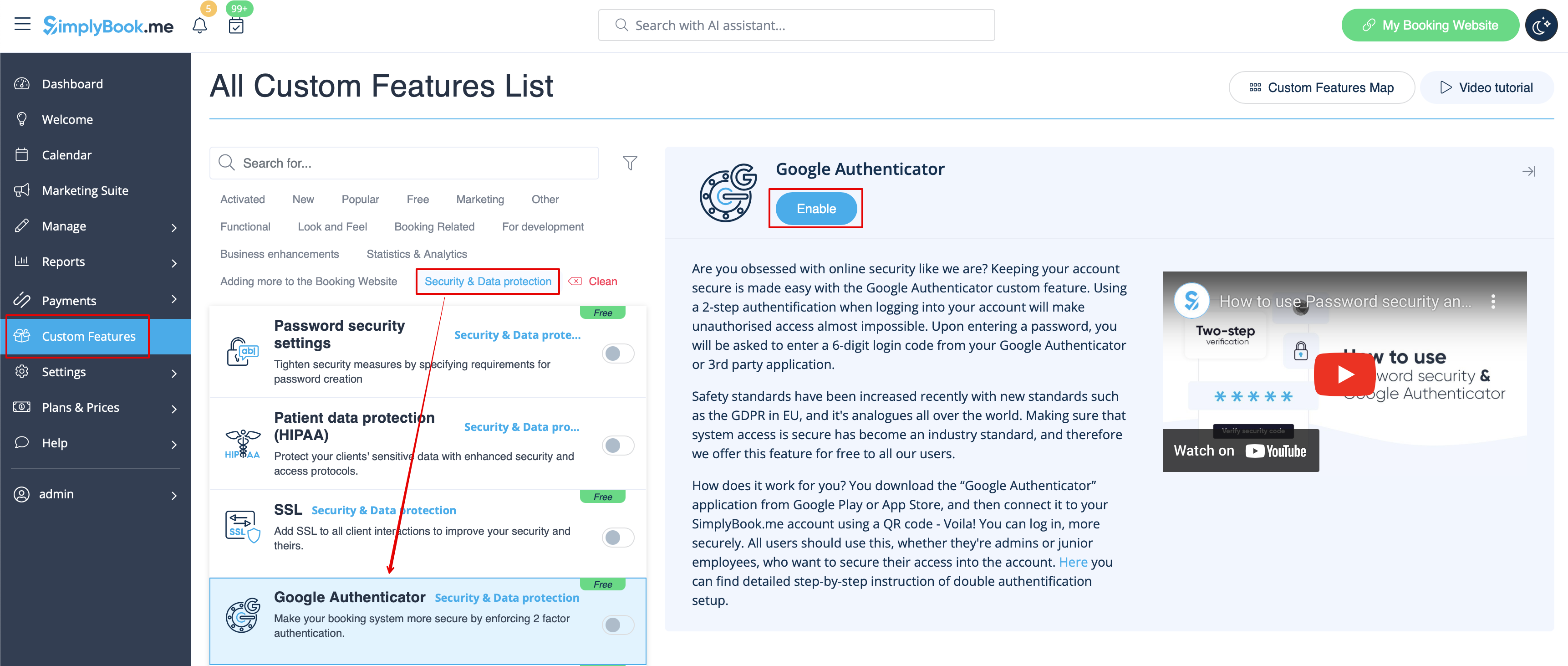
1. Öffnen Sie die Seite "Individuelle Funktionen" über das Menü auf der linken Seite Ihrer Verwaltungsoberfläche und suchen Sie den Abschnitt "Sicherheit". Klicken Sie einfach auf "Aktivieren" neben "Google Authenticator".
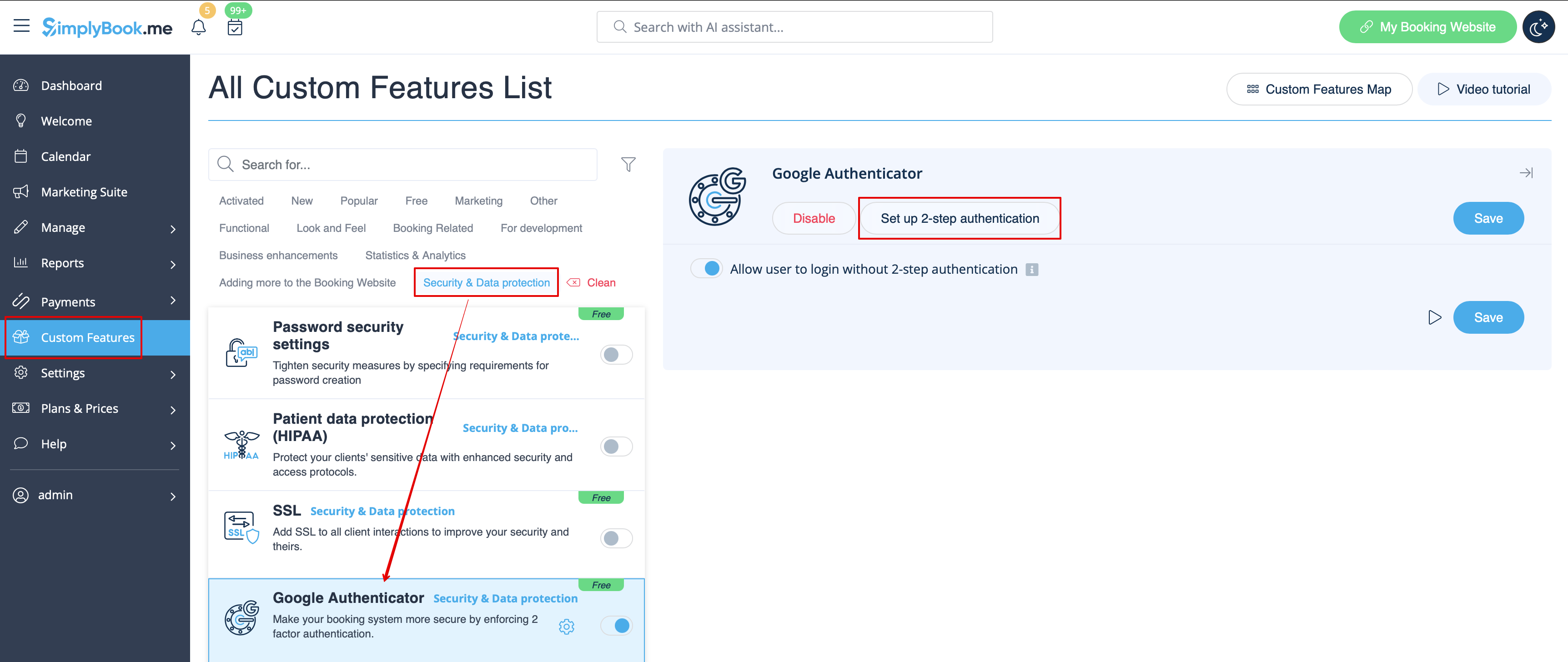
2. Um die 2-Schritt-Authentifizierung einzurichten, gehen Sie bitte über das Menü auf der linken Seite zu Verwalten/Benutzer oder klicken Sie auf "2-Schritt-Authentifizierung einrichten" neben dieser individuellen Funktion.
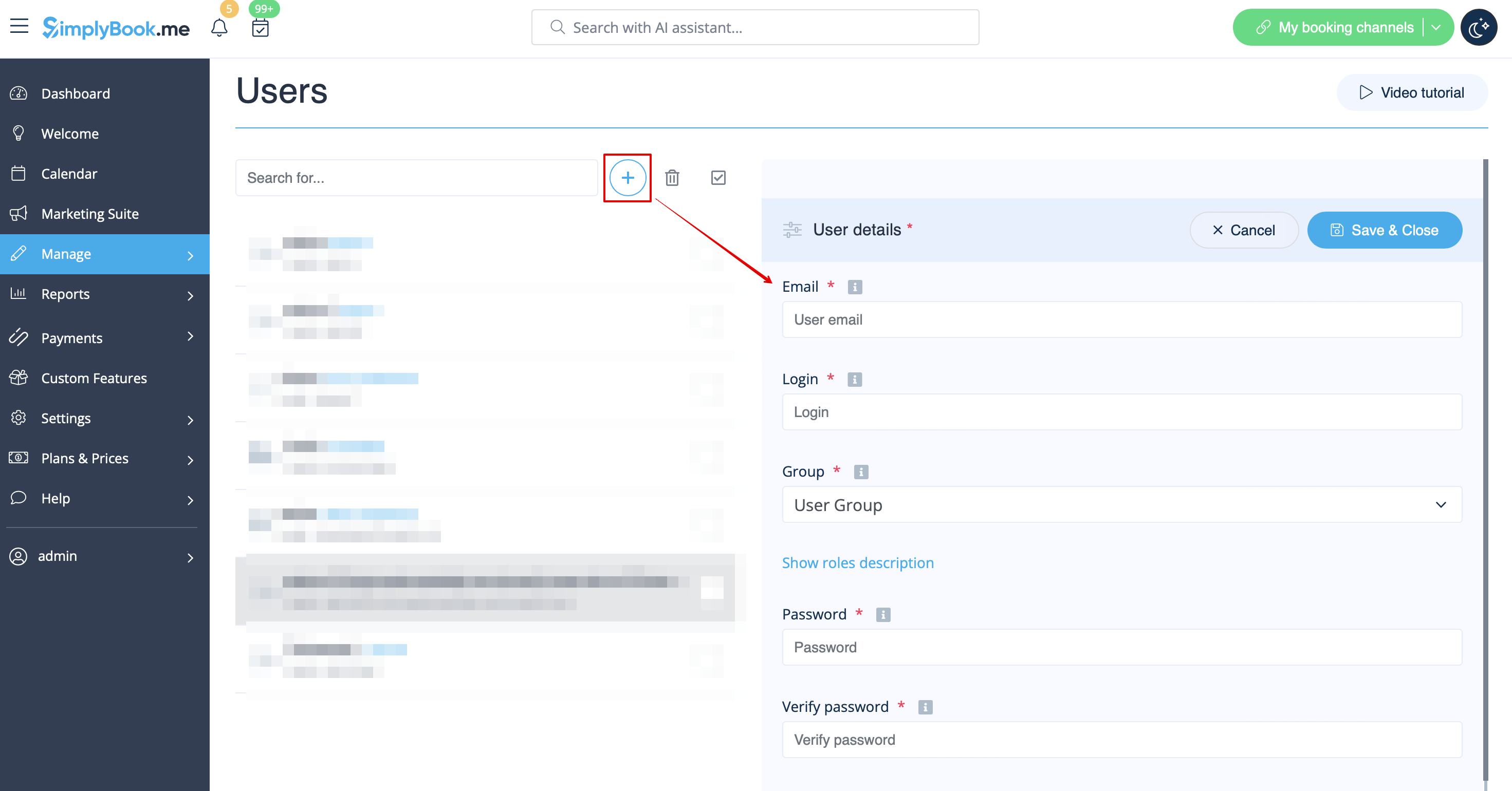
3. Klicken Sie auf der Seite Verwalten -> Benutzer auf "+" und legen Sie alle gewünschten Systembenutzer an, damit jeder mit der 2-Stufen-Authentifizierung verbunden werden kann.
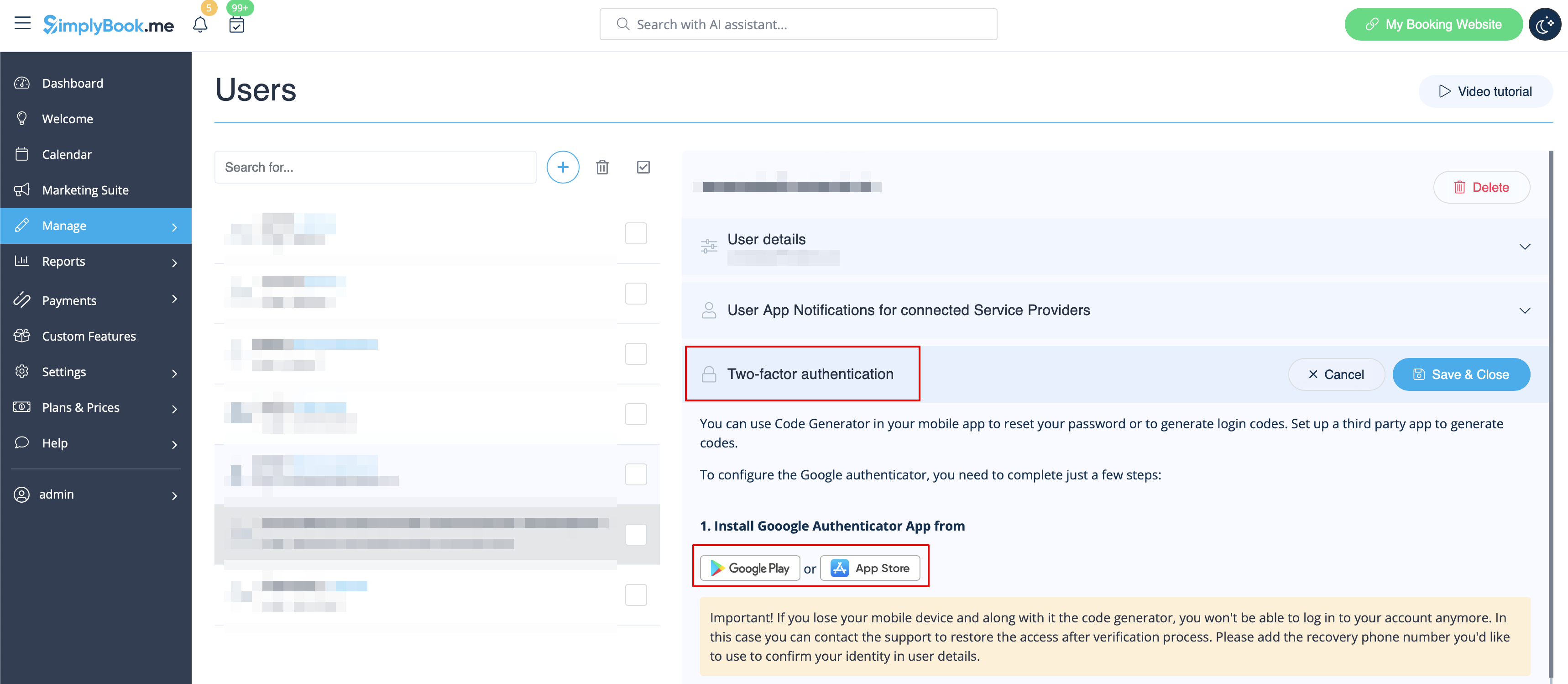
4. Laden Sie die Anwendung "Google Authenticator" von Google Play oder aus dem App Store herunter. Sie können einfach den QR-Code auf der Seite Verwalten -> Benutzer -> Benutzer auswählen -> Google Authenticator scannen und gelangen sofort zur Anwendungsseite.
5. Scannen Sie im gleichen Abschnitt den QR-Code mit der Google Authenticator-Anwendung auf Ihrem Smartphone, geben Sie den Code ein, den Sie in der App sehen, und klicken Sie auf die Schaltfläche "Verbinden".
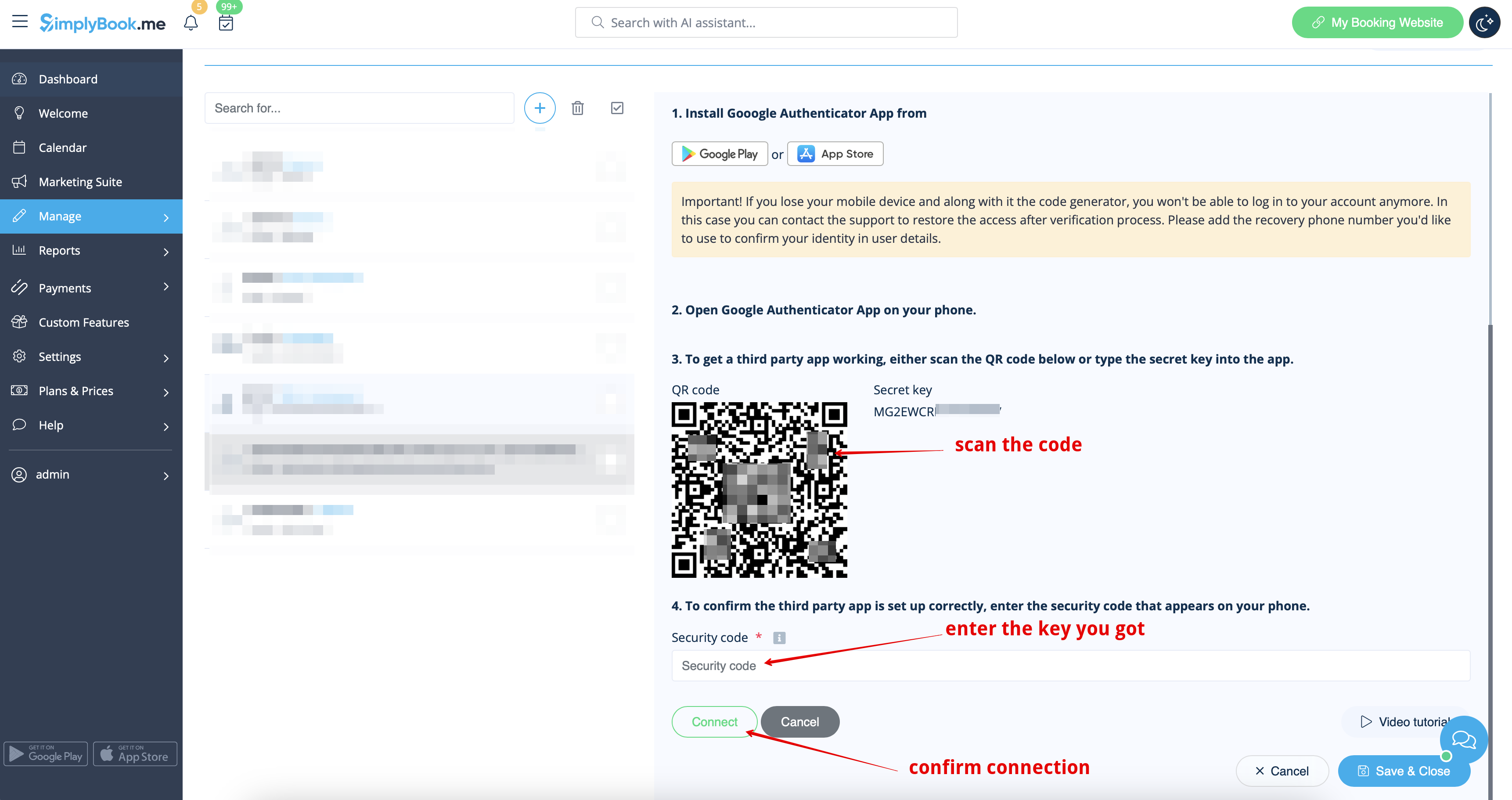
6. Das war's! Dieser Benutzer kann sich nun auf sicherere Weise anmelden!
Der Login-Prozess sieht wie folgt aus:
- Öffnen Sie die Seite Simplybook.me oder den direkten Link unternehmensname.simplybook.me
- Geben Sie alle notwendigen Details und das Passwort ein
- Geben Sie den 6-stelligen Code der Google Authenticator-Funktion ein

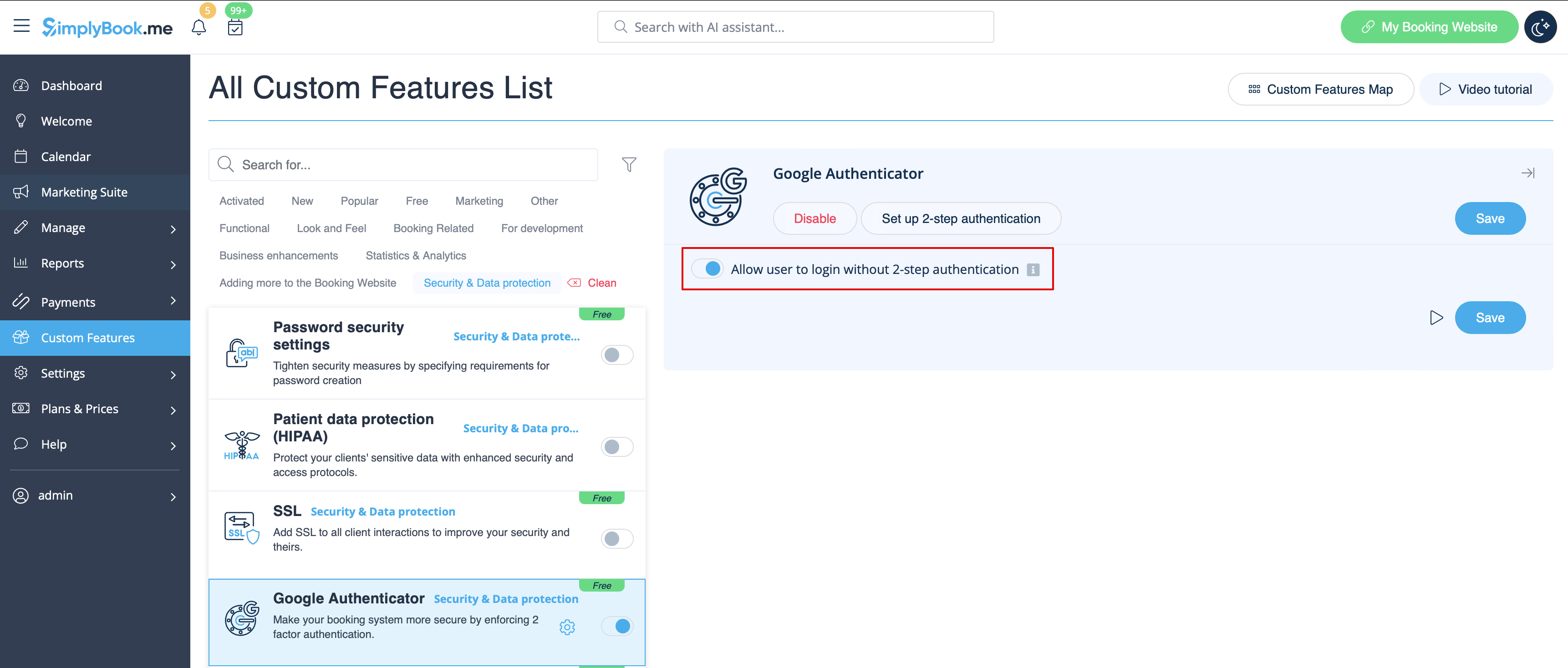
Wenn Sie Ihren Mitarbeitern die Möglichkeit geben möchten, sich selbst anzumelden, erstellen Sie diese bitte vorher als Benutzer und erlauben Sie ihnen die Anmeldung ohne 2-Stufen-Authentifizierung unter "Benutzerdefinierte Funktionen//Google Authenticator//Einstellungen//Einstellungen".
So verbinden Sie Google Authenticator als Nutzer
1. Die individuelle Funktion Google Authenticator sollte zuvor vom Administrator wie oben beschrieben aktiviert werden.
2. Öffnen Sie die Seite "Willkommen" über das Menü auf der linken Seite und scannen Sie den Code, um die Anwendung herunterzuladen, falls Sie dies noch nicht getan haben.
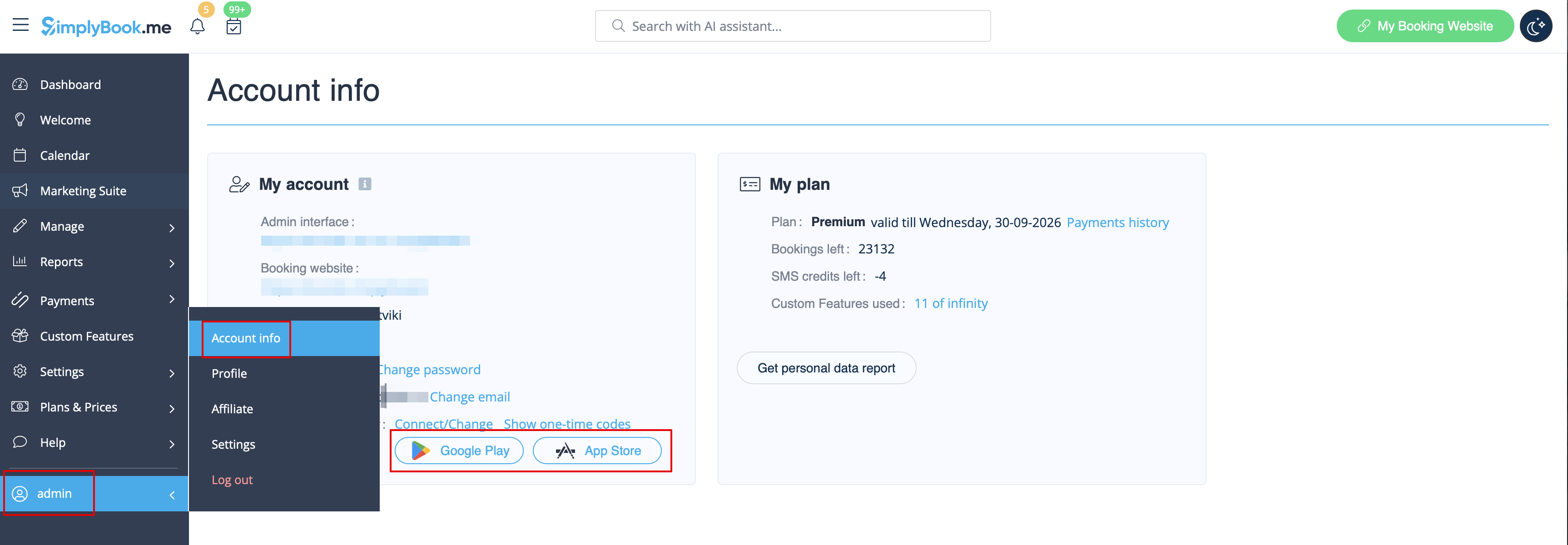
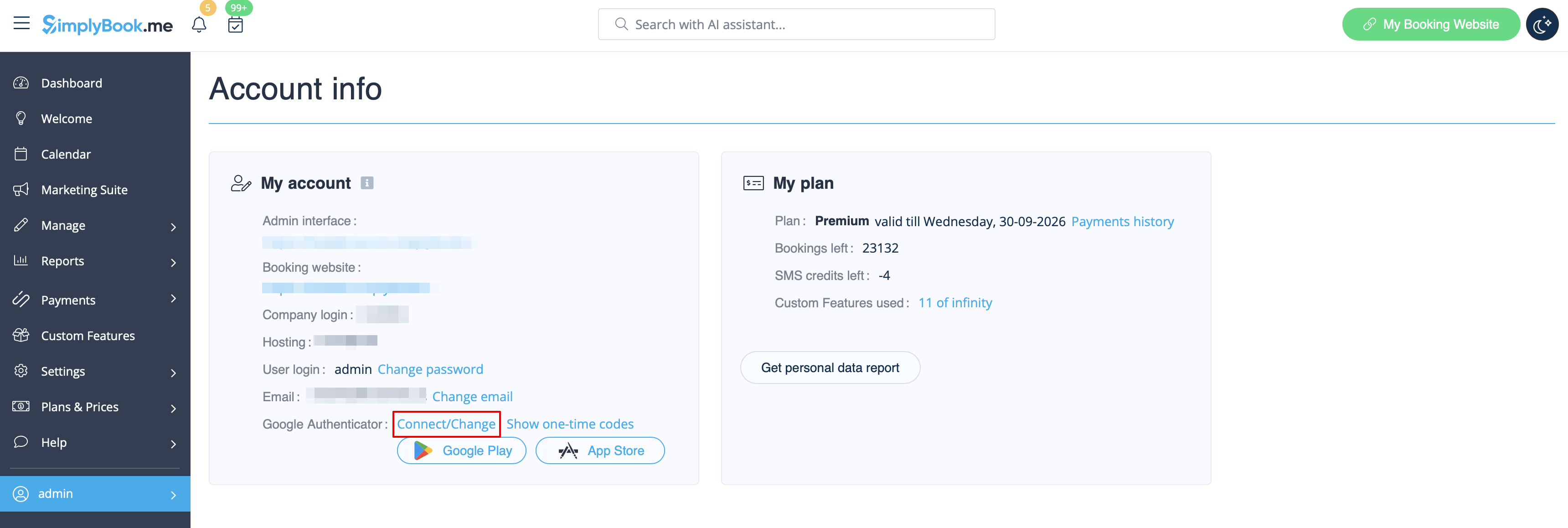
3. Klicken Sie auf den Link "Verbinden/Ändern", scannen Sie den Code, geben Sie den erhaltenen Code ein und speichern Sie die Einstellungen.
4. Von nun an können Sie sich auf eine sicherere Weise anmelden!
Der Login-Prozess sieht wie folgt aus:
- Öffnen Sie die Website von Simplybook.me oder den direkten Link https://unternehmensname.simplybook.me
- Geben Sie alle notwendigen Details und das Passwort ein
- Geben Sie den 6-stelligen Code der Google Authenticator-Funktion ein
