Created page with "Client Mobile App werkt als een Progressive Web App (PWA), wat betekent dat de app niet kan worden gedownload uit traditionele app stores zoals de App Store of Play Market. In plaats daarvan hebben je klanten rechtstreeks toegang tot de functies van de app via een webbrowser op hun mobiele apparaten. Deze aanpak biedt flexibiliteit, eenvoudige updates en compatibiliteit op verschillende apparaten. <br><br><br><br>" Tags: Mobile edit Mobile web edit |
No edit summary |
||
| (5 intermediate revisions by 2 users not shown) | |||
| Line 2: | Line 2: | ||
{{#seo: | {{#seo: | ||
|title=Client mobile app - SimplyBook.me | |title=Client mobile app - SimplyBook.me | ||
|description= | |description=Een mobiele app in eigen huisstijl voor klanten. Progressive Web App die via de browser toegankelijk is. Klanten kunnen afspraken boeken, hun afspraken bekijken en pushmeldingen ontvangen op mobiele apparaten. | ||
|titlemode=append | |titlemode=append | ||
|keywords=faq, frequently asked questions, booking software, appointment system questions, appointments online, calendar software, booking system, booking calendar, scheduling software, online appointment scheduling, online scheduling, plugins, custom features, additional functionality, client application, mobile application, client mobile app, client app, client mobile application, add to home screen | |keywords=faq, frequently asked questions, booking software, appointment system questions, appointments online, calendar software, booking system, booking calendar, scheduling software, online appointment scheduling, online scheduling, plugins, custom features, additional functionality, client application, mobile application, client mobile app, client app, client mobile application, add to home screen | ||
| Line 20: | Line 20: | ||
<br><br><br><br> | <br><br><br><br> | ||
:'''Beschikbare video-tutorials ''' | :'''Beschikbare video-tutorials ''' | ||
:*Hoe de mobiele app voor de klant instellen | :*Hoe de mobiele app voor de klant instellen <p><youtube>_3pW171iAjA</youtube></p> | ||
:*Hoe de mobiele app voor de klant gebruiken | :*Hoe de mobiele app voor de klant gebruiken <p><youtube>SElfM29hWOo</youtube></p> | ||
<br><br> | <br><br> | ||
''';Hoe te gebruiken''' | ''';Hoe te gebruiken''' | ||
| Line 27: | Line 27: | ||
[[File:Client app enable path redesigned.png|1200px|border|center|link=https://help.simplybook.me/images/c/cb/Client_app_enable_path_redesigned.png]] | [[File:Client app enable path redesigned.png|1200px|border|center|link=https://help.simplybook.me/images/c/cb/Client_app_enable_path_redesigned.png]] | ||
<br><br> | <br><br> | ||
2. En het is klaar voor gebruik. Sommige rapportage-opties worden voor jou beschikbaar. | |||
[[File:Client app free verion redesigned.png|1200px|border|center|link=https://help.simplybook.me/images/e/ef/Client_app_free_verion_redesigned.png]] | [[File:Client app free verion redesigned.png|1200px|border|center|link=https://help.simplybook.me/images/e/ef/Client_app_free_verion_redesigned.png]] | ||
<br><br> | <br><br> | ||
| Line 43: | Line 43: | ||
[[File:Start page client app upd.jpg|border|center]] | [[File:Start page client app upd.jpg|border|center]] | ||
<br><br><br><br> | <br><br><br><br> | ||
''' | '''Push notificaties''' | ||
*Gebruikers kunnen ook push notificaties over nieuwe boekingen of annuleringen op hun apparaten ontvangen. | *Gebruikers kunnen ook push notificaties over nieuwe boekingen of annuleringen op hun apparaten ontvangen. | ||
:Hiervoor is het alleen nodig om notificaties in de applicatie in te schakelen na het aanmelden/aanmelden en in een standaard systeemdialoog. | :Hiervoor is het alleen nodig om notificaties in de applicatie in te schakelen na het aanmelden/aanmelden en in een standaard systeemdialoog. | ||
Latest revision as of 17:06, 30 January 2026

Laat uw klanten uw eigen gepersonaliseerde klanten-app downloaden. Met de app op hun mobiel kunnen ze eenvoudig boeken, verzetten, pakketten, lidmaatschappen en cadeaubonnen kopen en hebben ze rechtstreeks vanaf hun telefoon toegang tot uw bedrijf.
De klantenapp is beschikbaar voor alle betalende SimplyBook.me-gebruikers die Client Login gebruiken , en als u een premium abonnement hebt, kunt u de app personaliseren met uw eigen logo en merkkleur. Vraag uw klanten om naar uw boekingswebsite te gaan op een mobiel apparaat en vanaf daar worden ze uitgenodigd om de app te downloaden op hun mobiel.
Zo simpel is het!
Client Mobile App werkt als een Progressive Web App (PWA), wat betekent dat de app niet kan worden gedownload uit traditionele app stores zoals de App Store of Play Market. In plaats daarvan hebben je klanten rechtstreeks toegang tot de functies van de app via een webbrowser op hun mobiele apparaten. Deze aanpak biedt flexibiliteit, eenvoudige updates en compatibiliteit op verschillende apparaten.
- Let op!
- Alsje deze functie inschakelt, wordt de aangepaste Client Login-functie ook ingeschakeld;
- Hetwerkt momenteel alleen met wekelijkse lessen, moderne en flexibele kalenderlay-outs;
- Devolgende functionaliteit is momenteel niet aanwezig in de clienttoepassing: Nieuws, Fotogalerij, Recensies, Aangepaste pagina, Google vertalen, wijzigen van de modus van de hoofdpagina, weergave eindtijd, verbergen van afbeeldingen bij boekingsstappen, RTL-oriëntatie, Contact-widget, kleuraanpassingen voor bezette en beschikbare plaatsen.
- Beschikbare video-tutorials
- Hoe de mobiele app voor de klant instellen
- Hoe de mobiele app voor de klant gebruiken
;Hoe te gebruiken
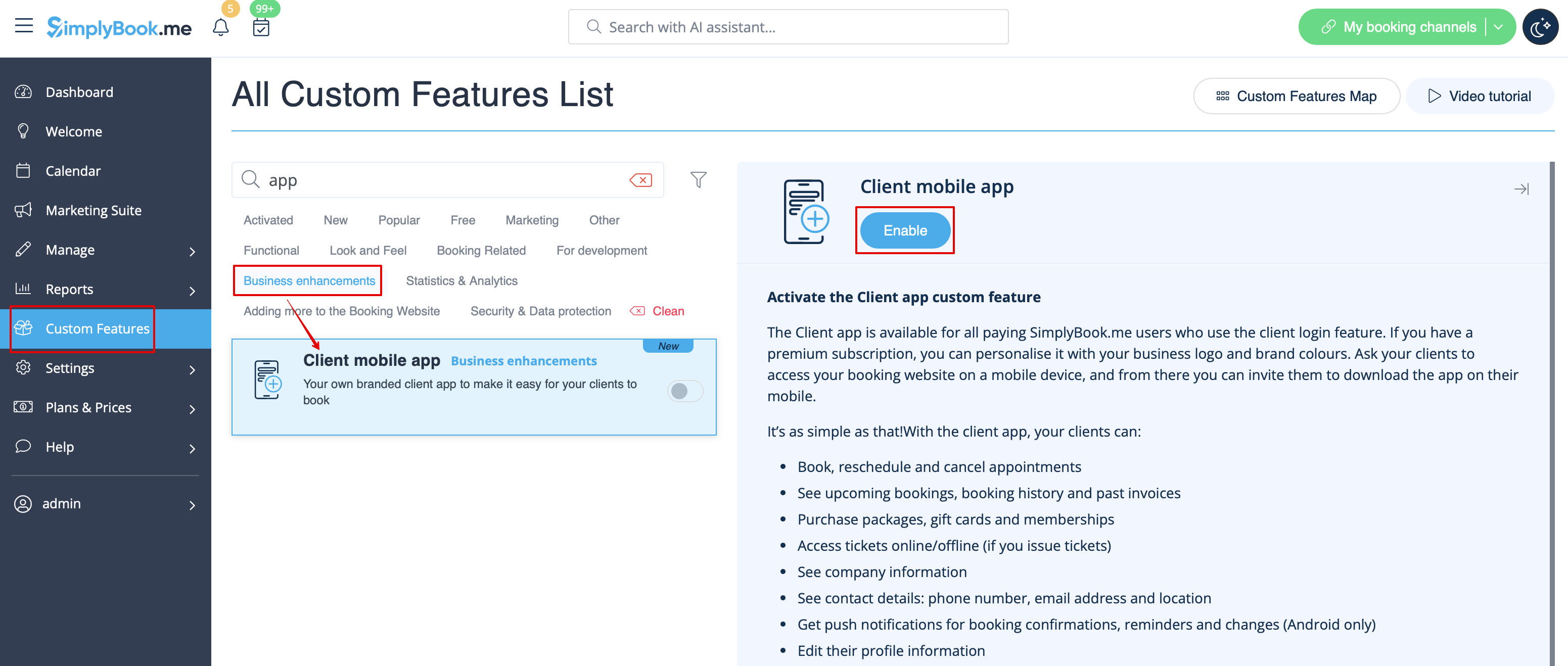
- 1. Schakel de mobiele app voor de klant in op je mobiele app. Schakel de functie Client mobile app in op je pagina Aangepaste functies in de sectie Bedrijfsuitbreidingen.
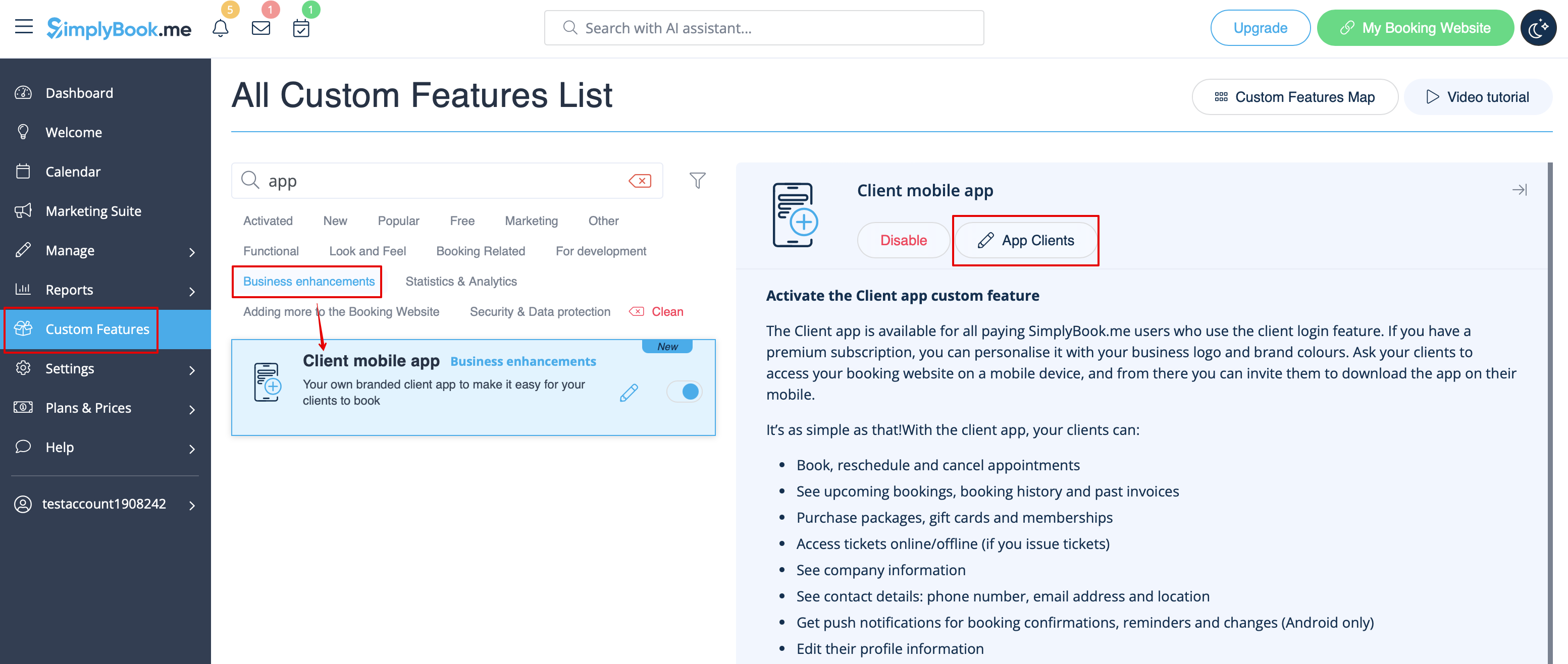
2. En het is klaar voor gebruik. Sommige rapportage-opties worden voor jou beschikbaar.
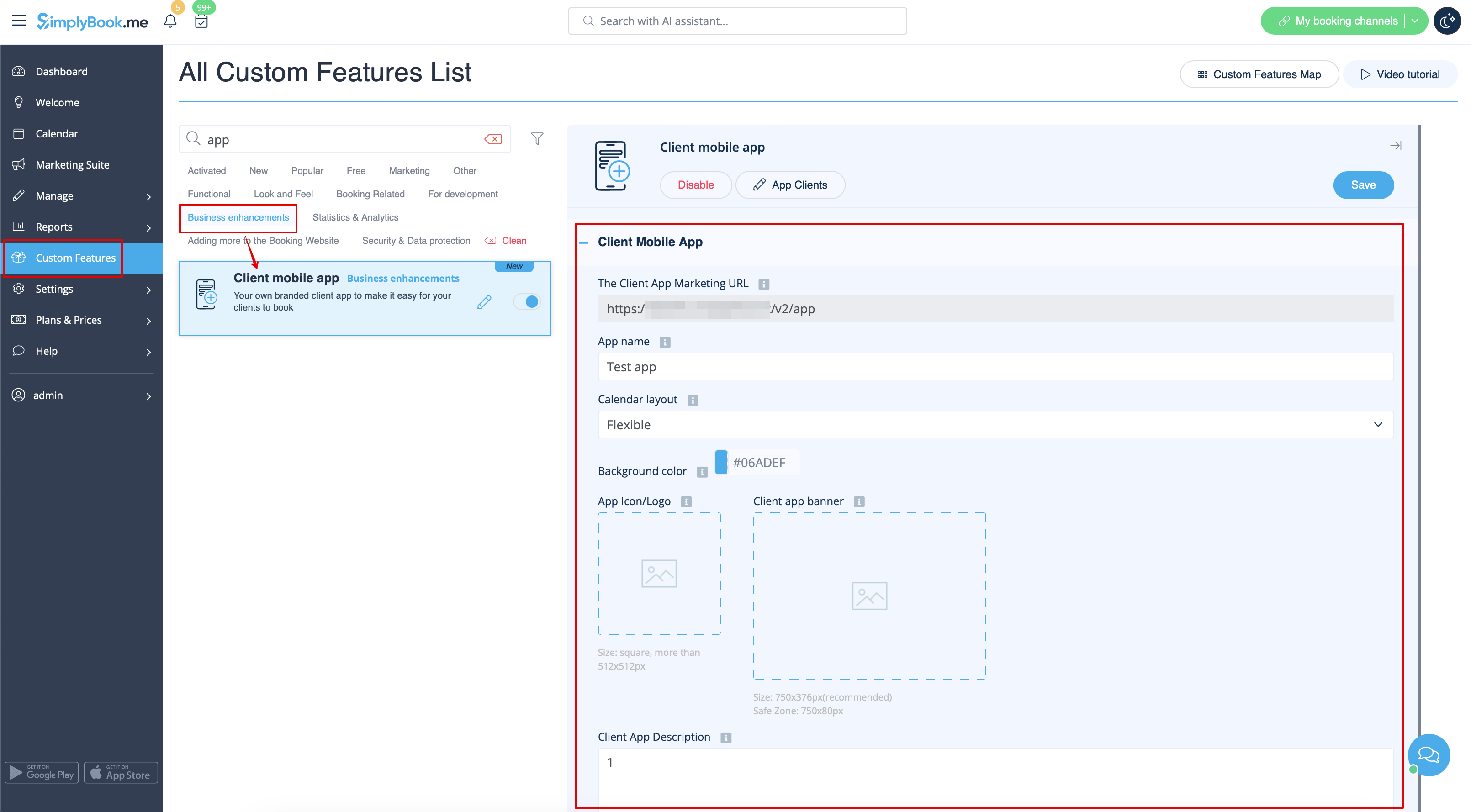
- 3.(alleen beschikbaar voor Premium abonnementen) Voeg uw eigen applicatienaam toe, stel de merkkleur in, selecteer de gewenste kalenderlay-out, upload het logo en de bannerafbeeldingen.
- Het is belangrijk om een vierkante afbeelding te gebruiken voor het logo, afwijkende afmetingen worden niet opgeslagen.
- Ook raden we aan om heldere en/of donkere kleuren te gebruiken voor de achtergrond voor een betere klantervaring.
- 4.(alleen beschikbaar voor Premium abonnementen) Voeg uw eigen applicatienaam toe, stel de merkkleur in, selecteer de gewenste kalenderlay-out, upload het logo en de bannerafbeeldingen. Stuur de URL van je boekingswebsite (banner wordt niet getoond op widgets) naar je klanten zodat ze de applicatie op hun telefoon kunnen installeren door op de bijbehorende banner te klikken .
- (Uitnodiging installatie banner wordt mogelijk niet weergegeven in ingebouwde mobiele browsers, het wordt aanbevolen om in plaats daarvan Chrome te gebruiken)
- Let op! Gebruikers van IOS-apparaten moeten je boekingswebsite openen in de volledige Safari-versie om de installatie-uitnodigingsbanner te zien en dan gewoon de optie Toevoegen aan beginscherm gebruiken.

- 5. Klik op de uitnodigingsbanner. Het resultaat is dat ze online kunnen boeken, hun afspraken kunnen bekijken (deze optie is zelfs beschikbaar in offline modus), deze kunnen verzetten of annuleren, cadeaubonnen, lidmaatschappen en pakketten kunnen kopen , facturen kunnen bekijken en indien nodig hun eigen gegevens kunnen bijwerken.

Push notificaties
- Gebruikers kunnen ook push notificaties over nieuwe boekingen of annuleringen op hun apparaten ontvangen.
- Hiervoor is het alleen nodig om notificaties in de applicatie in te schakelen na het aanmelden/aanmelden en in een standaard systeemdialoog.

- In het geval dat de meldingen zijn ingeschakeld, maar de pushberichten niet komen, is het nodig om te controleren of Chrome systeemmeldingen (Android) of Safari (IOS) zijn ingeschakeld in de apparaatinstellingen.

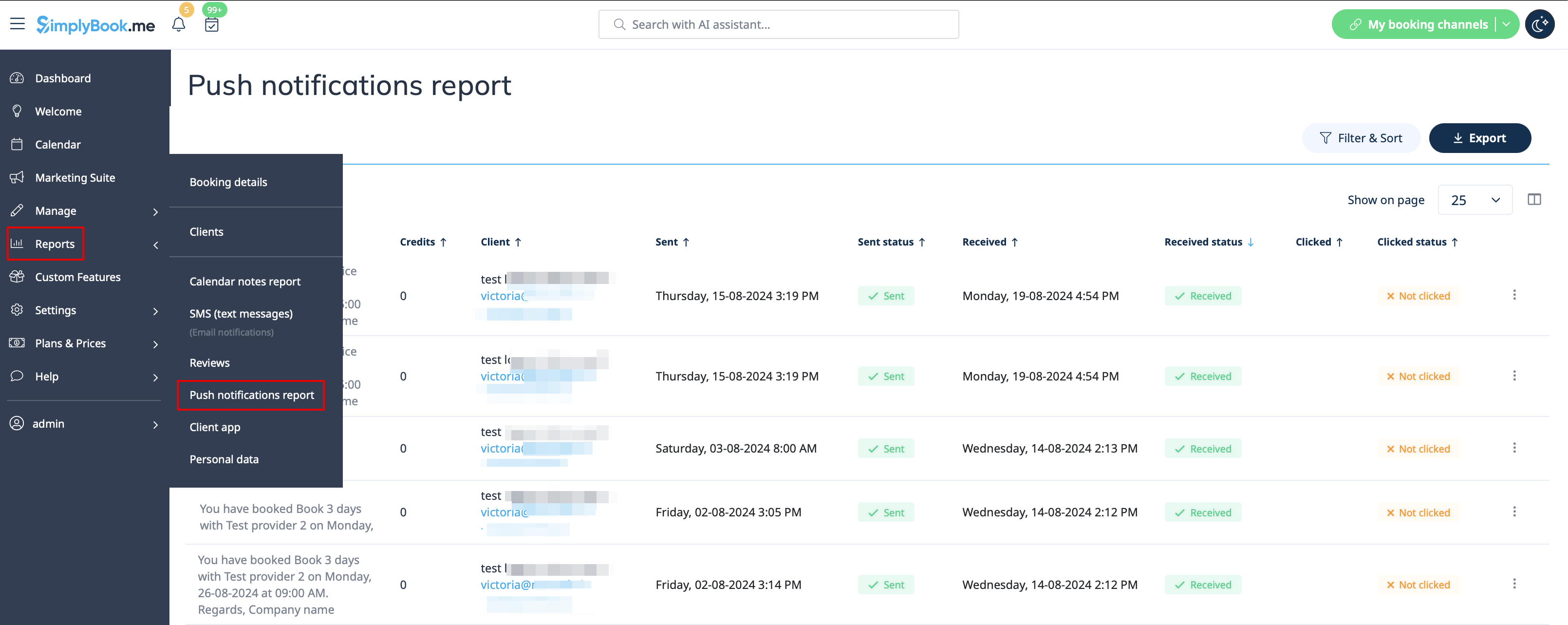
- Vanuit de beheerderskant is het mogelijk om alle pushberichten die naar klanten zijn verzonden te zien in Rapporten -> Pushberichten en of ze zijn ontvangen en aangeklikt door de klant.