From SimplyBook.me
Created page with "= Fjernelse med brugerdefineret CSS = :<span style="background-color:#ffe9e9; padding:5px; border-radius:5px;">'''Bemærk venligst!''' Tilføj koden(e) for at justere stilarterne til fanen "Booking pages CSS", hvis du ønsker at redigere bookingwebstedet</span><br> :<span style="background-color:#ffe9e9; padding:5px; border-radius:5px;">eller "Widget CSS", hvis du redigerer en widget på din hjemmeside.</span> File:Custom css tabs redesigned.png|1200px| center|link=htt..." |
No edit summary |
||
| Line 5: | Line 5: | ||
<br><br> | <br><br> | ||
== Telefonfelt == | == Telefonfelt == | ||
<span style="background-color:#cdeffc; padding:5px; border-radius:5px;">([[ | <span style="background-color:#cdeffc; padding:5px; border-radius:5px;">([[Special:MyLanguage/Client_Login_custom_feature |Klientens login-funktion]]</span> er deaktiveret)<br> | ||
:1. Gå til <span style="background-color:#d4f8e5; padding:5px; border-radius:5px;">Indstillinger</span> -> E-mail- <span style="background-color:#d4f8e5; padding:5px; border-radius:5px;">og SMS-indstillinger</span> -> Indstillinger for e-mail- <span style="background-color:#d4f8e5; padding:5px; border-radius:5px;">og SMS-meddelelser</span> -> <span style="background-color:#d4f8e5; padding:5px; border-radius:5px;">Obligatoriske registreringsfelter</span> -> <span style="background-color:#d4f8e5; padding:5px; border-radius:5px;">E-mail</span> (for at gøre telefon ikke obligatorisk). | :1. Gå til <span style="background-color:#d4f8e5; padding:5px; border-radius:5px;">Indstillinger</span> -> E-mail- <span style="background-color:#d4f8e5; padding:5px; border-radius:5px;">og SMS-indstillinger</span> -> Indstillinger for e-mail- <span style="background-color:#d4f8e5; padding:5px; border-radius:5px;">og SMS-meddelelser</span> -> <span style="background-color:#d4f8e5; padding:5px; border-radius:5px;">Obligatoriske registreringsfelter</span> -> <span style="background-color:#d4f8e5; padding:5px; border-radius:5px;">E-mail</span> (for at gøre telefon ikke obligatorisk). | ||
Latest revision as of 11:00, 6 August 2025
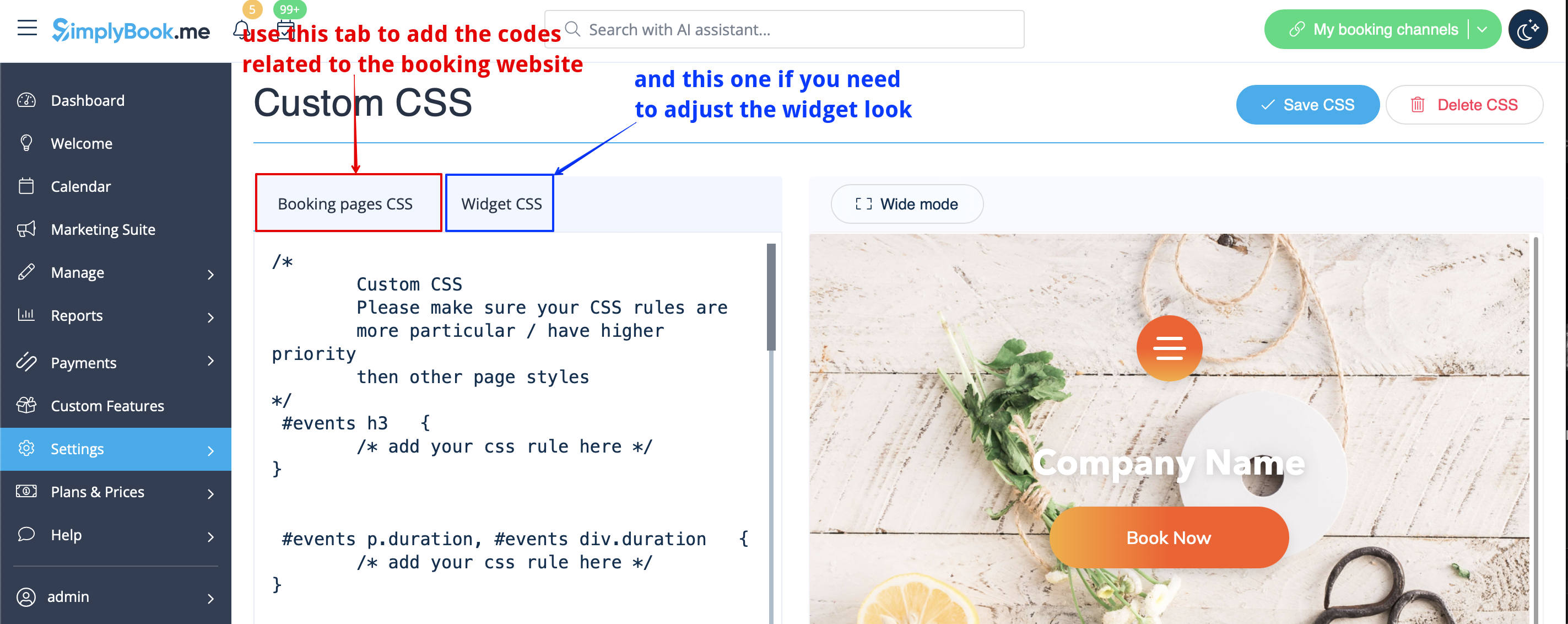
Fjernelse med brugerdefineret CSS
- Bemærk venligst! Tilføj koden(e) for at justere stilarterne til fanen "Booking pages CSS", hvis du ønsker at redigere bookingwebstedet
- eller "Widget CSS", hvis du redigerer en widget på din hjemmeside.
Telefonfelt
(Klientens login-funktion er deaktiveret)
- 1. Gå til Indstillinger -> E-mail- og SMS-indstillinger -> Indstillinger for e-mail- og SMS-meddelelser -> Obligatoriske registreringsfelter -> E-mail (for at gøre telefon ikke obligatorisk).
