No edit summary |
Marked this version for translation |
||
| (9 intermediate revisions by the same user not shown) | |||
| Line 1: | Line 1: | ||
;For admin or user | <languages/> | ||
In | <translate> | ||
;For client | <!--T:1--> | ||
To cancel their bookings, clients can click "cancel link | <br><br> | ||
;*For admin or user | |||
In <span style="background-color:#d4f8e5; padding:5px; border-radius:5px;">Calendar</span> (left-side menu) or in in <span style="background-color:#d4f8e5; padding:5px; border-radius:5px;">Reports</span> -> <span style="background-color:#d4f8e5; padding:5px; border-radius:5px;">Booking details.</span> Click on the booking to open the details or use <span style="background-color:#d4f8e5; padding:5px; border-radius:5px;">View</span> option if in <span style="background-color:#d4f8e5; padding:5px; border-radius:5px;">Reports</span> and then press <span style="background-color:#d4f8e5; padding:5px; border-radius:5px;">Cancel booking</span> button. <br/> | |||
[[File:Cancel booking in the booking info form.png|600px| center |link=https://help.simplybook.me/images/9/95/Cancel_booking_in_the_booking_info_form.png]] | |||
<br/><br/> | |||
In case you need to cancel many bookings at once you can do that in <span style="background-color:#d4f8e5; padding:5px; border-radius:5px;">Reports</span> -> <span style="background-color:#d4f8e5; padding:5px; border-radius:5px;">Booking details.</span><br> | |||
You can use the <span style="background-color:#d4f8e5; padding:5px; border-radius:5px;">filter</span> if necessary, <span style="background-color:#d4f8e5; padding:5px; border-radius:5px;">check the boxes</span> with the bookings to cancel and click on <span style="background-color:#d4f8e5; padding:5px; border-radius:5px;">Cancel selected</span> button at the top.<br> | |||
<span style="background-color:#ffe9e9; padding:5px; border-radius:5px;">'''Please note!''' It is possible to cancel the appointments from one report page at a time.</span> | |||
[[File:Cancel several bookings from report redesigned.png|1200px|border|center|link=https://help.simplybook.me/images/a/ac/Cancel_several_bookings_from_report_redesigned.png]] | |||
<br/><br/> | |||
;*For client | |||
To cancel their bookings, clients can click <span style="background-color:#d4f8e5; padding:5px; border-radius:5px;">cancel link</span> in their confirmation emails. | |||
[[File:CancelBookingLink750.png | center ]] | |||
<br/><br/> | |||
Or use <span style="background-color:#d4f8e5; padding:5px; border-radius:5px;">Cancel</span> button on the booking website, <span style="background-color:#d4f8e5; padding:5px; border-radius:5px;">My bookings</span> tab.<br> | |||
(If you want to prohibit clients from cancelling the appointments, you may need <span style="background-color:#d4f8e5; padding:5px; border-radius:5px;">[[Custom_Features#Cancellation_Policy| Cancellation Policy Custom Feature]]</span>.</span>) | |||
<br><br> | |||
<br><br> | |||
</translate> | |||
Latest revision as of 13:10, 23 June 2025
- For admin or user
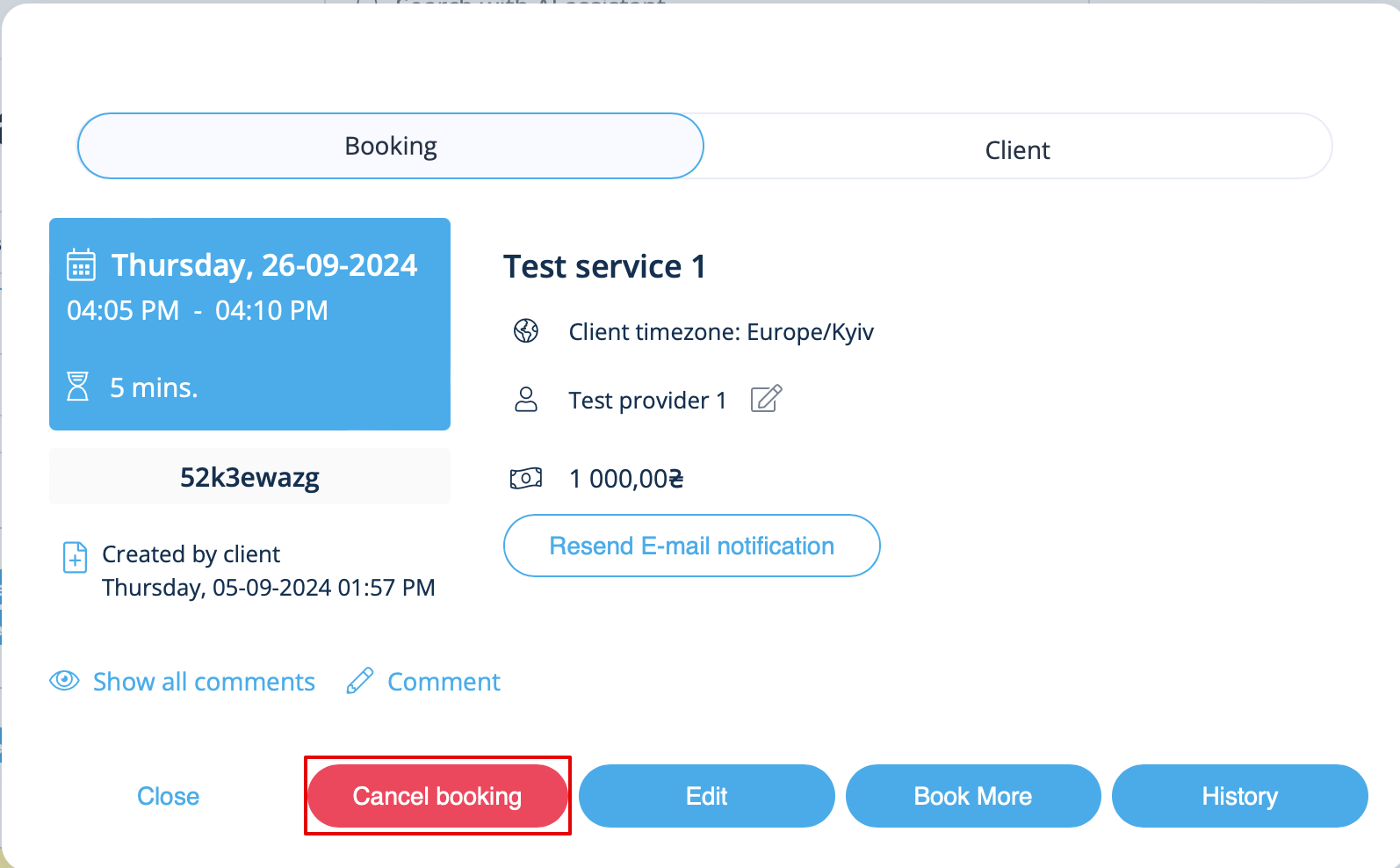
In Calendar (left-side menu) or in in Reports -> Booking details. Click on the booking to open the details or use View option if in Reports and then press Cancel booking button.
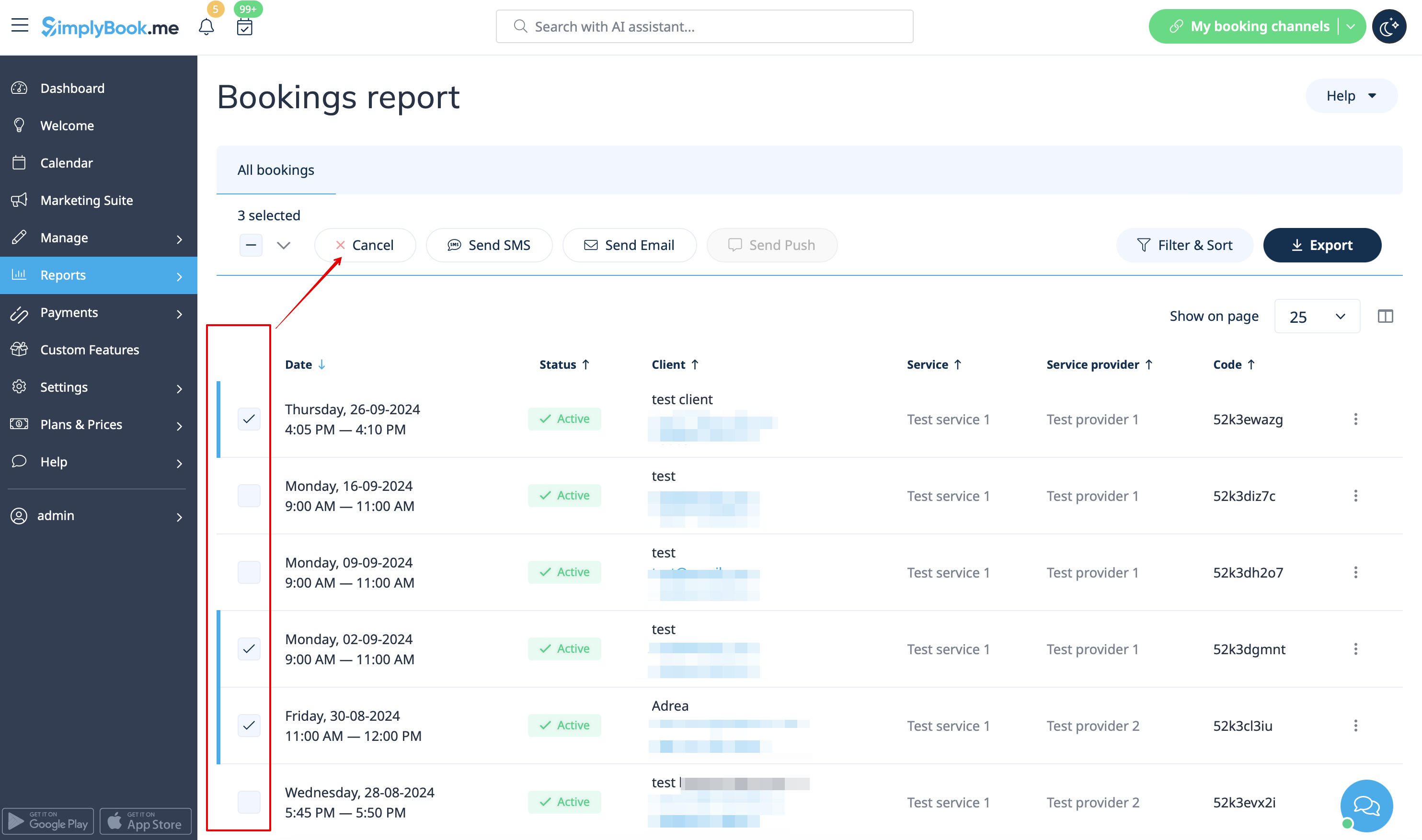
In case you need to cancel many bookings at once you can do that in Reports -> Booking details.
You can use the filter if necessary, check the boxes with the bookings to cancel and click on Cancel selected button at the top.
Please note! It is possible to cancel the appointments from one report page at a time.
- For client
To cancel their bookings, clients can click cancel link in their confirmation emails.

Or use Cancel button on the booking website, My bookings tab.
(If you want to prohibit clients from cancelling the appointments, you may need Cancellation Policy Custom Feature.)
