Created page with "Sådan slettes en konto" Tags: Mobile edit Mobile web edit |
No edit summary |
||
| (9 intermediate revisions by 2 users not shown) | |||
| Line 1: | Line 1: | ||
<languages/> | <languages/> | ||
{{#seo: |title=Sådan sletter du din SimplyBook.me-konto - SimplyBook.me |description=Slet konto permanent. Trin-for-trin-vejledning til sletning af konto. Eksportér data, før du fjerner dit bookingsystem. Effektiviser administrationen af aftaler.|titlemode=tilføj |keywords=faq, ofte stillede spørgsmål, reservationssoftware, spørgsmål om aftalesystem, onlineaftaler, kalendersoftware, reservationssystem, reservationskalender, planlægningssoftware, online aftaleplanlægning, online planlægning, plugins, tilpassede funktioner, link til tilpasset reservationsside, domænenavn, tilpasset domænenavn, tilpasset url }} | |||
{{#seo: | |||
|title= | |||
|description= | |||
|titlemode= | |||
|keywords=faq, | |||
}} | |||
< | <br><br> | ||
<br><br><br><br> | <br> | ||
Inden du sletter kontoen, kan du også overveje at annullere abonnementet for ikke at blive opkrævet betaling, hvis du holder pause i din virksomhed eller har en sæsonbetonet beskæftigelse, i stedet for at slette det.<br><br> | |||
Hvis det er tilfældet, skal du tjekke <span style="background-color:#cdeffc; padding:5px; border-radius:5px;">[[Special:MyLanguage/How_to_Cancel_SimplyBook.me_subscription#How_to_cancel_the_paid_subscription|trinene for annullering af tilbagevendende betaling]].</span> | |||
<br><br> | |||
Eller, hvis abonnementet ikke passer til dine behov i øjeblikket, kan du købe et andet i henhold til <span style="background-color:#cdeffc; padding:5px; border-radius:5px;">[[Special:MyLanguage/How_to_Cancel_SimplyBook.me_subscription#How_to_downgrade_the_subscription|dette]].</span> | |||
<br><br> | |||
Du kan selvfølgelig altid kontakte vores support for at få hjælp til at vælge en ny abonnementsplan, der passer bedst til dine nuværende forretningsbehov. | |||
<br><br> | |||
Hvis du er sikker på, at du vil slette kontoen, skal du følge disse enkle trin:<br> | |||
Gå til <span style="background-color:#d4f8e5; padding:5px; border-radius:5px;">Kontooplysninger</span> -> <span style="background-color:#d4f8e5; padding:5px; border-radius:5px;">Slet konto.</span><br> | |||
Vi beder dig venligst angive årsagen til, at du har besluttet at slette din virksomhed. Husk, at den ikke kan gendannes. Hvis du registrerer en ny virksomhed i fremtiden, kan din gamle virksomheds navn i URL'en ikke bruges igen. | |||
[[File:Sb delete account path new flow.png|1200px|1200px| center|link=https://help.simplybook.me/images/b/b0/Sb_delete_account_path_new_flow.png]] | |||
[[File: | |||
<br><br> | <br><br> | ||
Hvis du har brug for at gendanne den konto, du tidligere har slettet, skal du følge [[How_to_unblock_account|denne vejledning]]. | |||
<br><br><br><br> | <br><br><br><br> | ||
Latest revision as of 08:11, 19 May 2026
Inden du sletter kontoen, kan du også overveje at annullere abonnementet for ikke at blive opkrævet betaling, hvis du holder pause i din virksomhed eller har en sæsonbetonet beskæftigelse, i stedet for at slette det.
Hvis det er tilfældet, skal du tjekke trinene for annullering af tilbagevendende betaling.
Eller, hvis abonnementet ikke passer til dine behov i øjeblikket, kan du købe et andet i henhold til dette.
Du kan selvfølgelig altid kontakte vores support for at få hjælp til at vælge en ny abonnementsplan, der passer bedst til dine nuværende forretningsbehov.
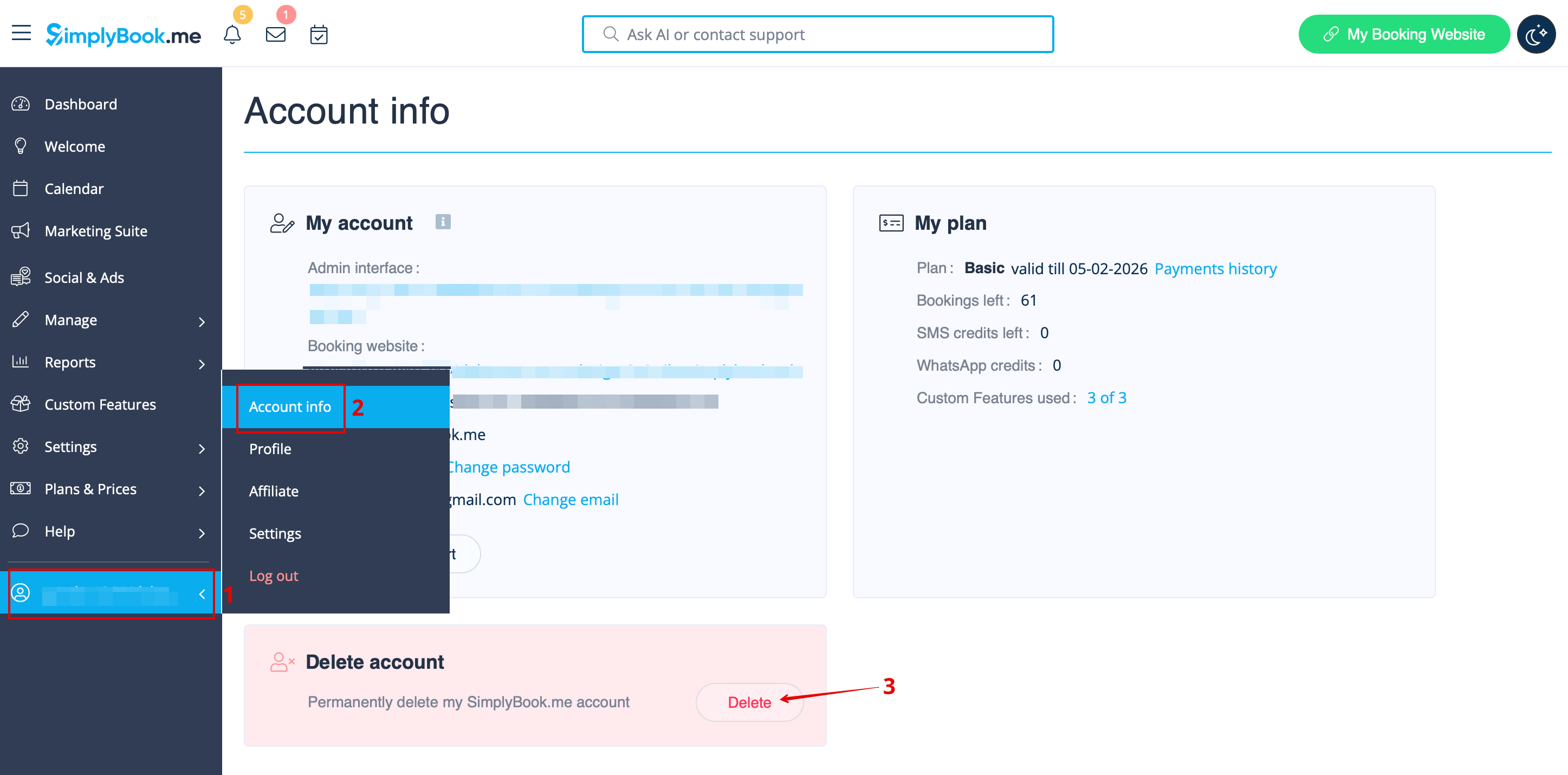
Hvis du er sikker på, at du vil slette kontoen, skal du følge disse enkle trin:
Gå til Kontooplysninger -> Slet konto.
Vi beder dig venligst angive årsagen til, at du har besluttet at slette din virksomhed. Husk, at den ikke kan gendannes. Hvis du registrerer en ny virksomhed i fremtiden, kan din gamle virksomheds navn i URL'en ikke bruges igen.
Hvis du har brug for at gendanne den konto, du tidligere har slettet, skal du følge denne vejledning.
