Created page with "У міру розвитку вашого бізнесу ваш план передплати може перестати відповідати вашим вимогам. Не хвилюйтеся! Ви маєте право: <br>" |
No edit summary |
||
| (18 intermediate revisions by 2 users not shown) | |||
| Line 1: | Line 1: | ||
<languages/> | <languages/> | ||
{{#seo: |title=Як скасувати підписку на SimplyBook.me SimplyBook.me |description= | {{#seo: |title=Як скасувати підписку на SimplyBook.me SimplyBook.me |description=Інструкції щодо скасування підписки. Кроки для припинення виставлення рахунків та експорту даних перед скасуванням. Важлива інформація про процес закриття облікового запису.|titlemode=додати |keywords=fAQ, поширені запитання, програмне забезпечення для бронювання, запитання щодо системи запису на прийом, онлайн-запис на прийом, програмне забезпечення для календаря, система бронювання, календар бронювання, програмне забезпечення для планування, онлайн-планування запису на прийом, онлайн-планування, налаштування, допомога з налаштуванням, підтримка, довідкова інформація, скасування підписки, зміна плану, скасування плану, зміна плану, пониження плану, пониження підписки, видалення облікового запису }} | ||
| Line 6: | Line 6: | ||
<br> | <br> | ||
*Легко скасуйте профіль оплати періодичної передплати. | |||
* | *Оберіть інший план, який краще відповідає вашим потребам. | ||
* | *Заблокуйте свій обліковий запис, доки він не знадобиться знову. | ||
* | *Отримайте більш спрощене рішення для бронювання <span style="background-color:#cdeffc; padding:5px; border-radius:5px;">[https://simplymeet.me/ SimplyMeet.me]</span>, якщо SimplyBook.me занадто розширений для ваших потреб | ||
* | |||
Ми тут, щоб забезпечити вам безперебійну та гнучку роботу. Якщо у вас є питання або вам потрібна допомога, наша команда підтримки готова допомогти. | |||
__FORCETOC__ | __FORCETOC__ | ||
== | == Як скасувати платну підписку == | ||
Якщо ви хоча б один раз придбали платний план, обліковий запис не буде автоматично видалено після скасування передплати, навіть якщо ви не користуєтеся ним протягом певного періоду.<br> | |||
<br> | <br> | ||
Щоб скасувати регулярні платежі, виконайте такі дії:<br> | |||
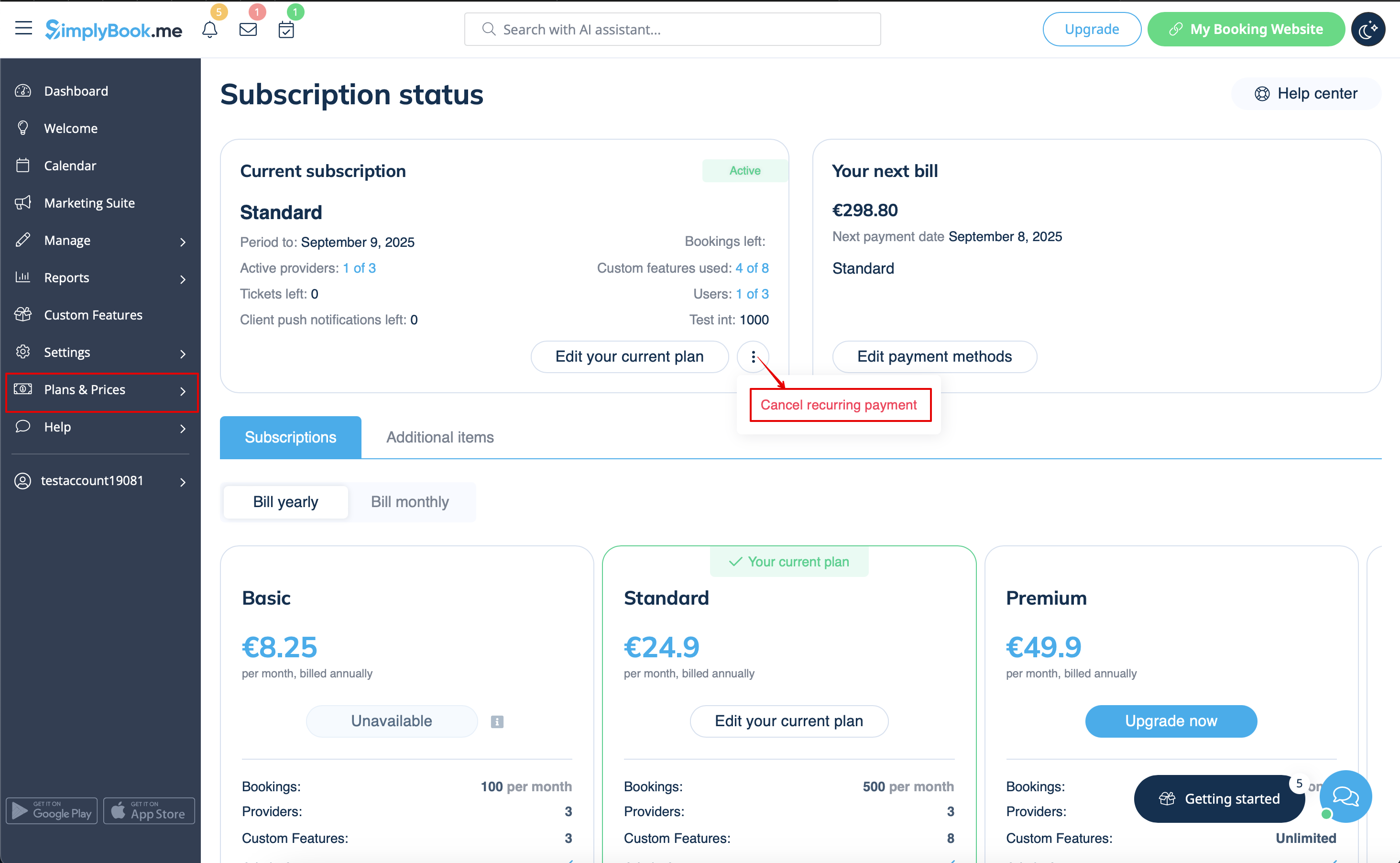
:1. | :1. Перейдіть на сторінку <span style="background-color:#d4f8e5; padding:5px; border-radius:5px;">«Тарифи та ціни»</span> -> <span style="background-color:#d4f8e5; padding:5px; border-radius:5px;">«Підписки»</span> у вашому обліковому записі. | ||
:2. У <span style="background-color:#d4f8e5; padding:5px; border-radius:5px;">верхньому блоці з деталями підписки</span> натисніть на меню дій <span style="background-color:#d4f8e5; padding:5px; border-radius:5px;">з трьома крапками</span>. | |||
:2. | |||
:3. Виберіть <span style="background-color:#d4f8e5; padding:5px; border-radius:5px;">«Скасувати повторення</span> » та підтвердіть дію. | |||
:3. | |||
:4. Це не призведе до жодних додаткових витрат. Ви можете продовжувати користуватися всіма опціями до закінчення поточного періоду.<br> | |||
:4. | :Ви можете в будь-який час придбати бажану підписку в <span style="background-color:#d4f8e5; padding:5px; border-radius:5px;">Підписки & ціни</span> -> <span style="background-color:#d4f8e5; padding:5px; border-radius:5px;">Підписки</span> та налаштувати новий recurring профіль для безперебійного використання системи. | ||
: | |||
[[File:Cancel recurring payment path redesigned.png|1200px|center|link=https://help.simplybook.me/images/b/b8/Cancel_recurring_payment_path_redesigned.png]] | [[File:Cancel recurring payment path redesigned.png|1200px|center|link=https://help.simplybook.me/images/b/b8/Cancel_recurring_payment_path_redesigned.png]] | ||
<br><br> | <br><br> | ||
< | <span id="How_to_downgrade_the_subscription"></span> | ||
== Як понизити рівень передплати == | |||
== | |||
'''Зверніть увагу!''' Повернення до безкоштовного тарифу неможливе. | |||
''' | |||
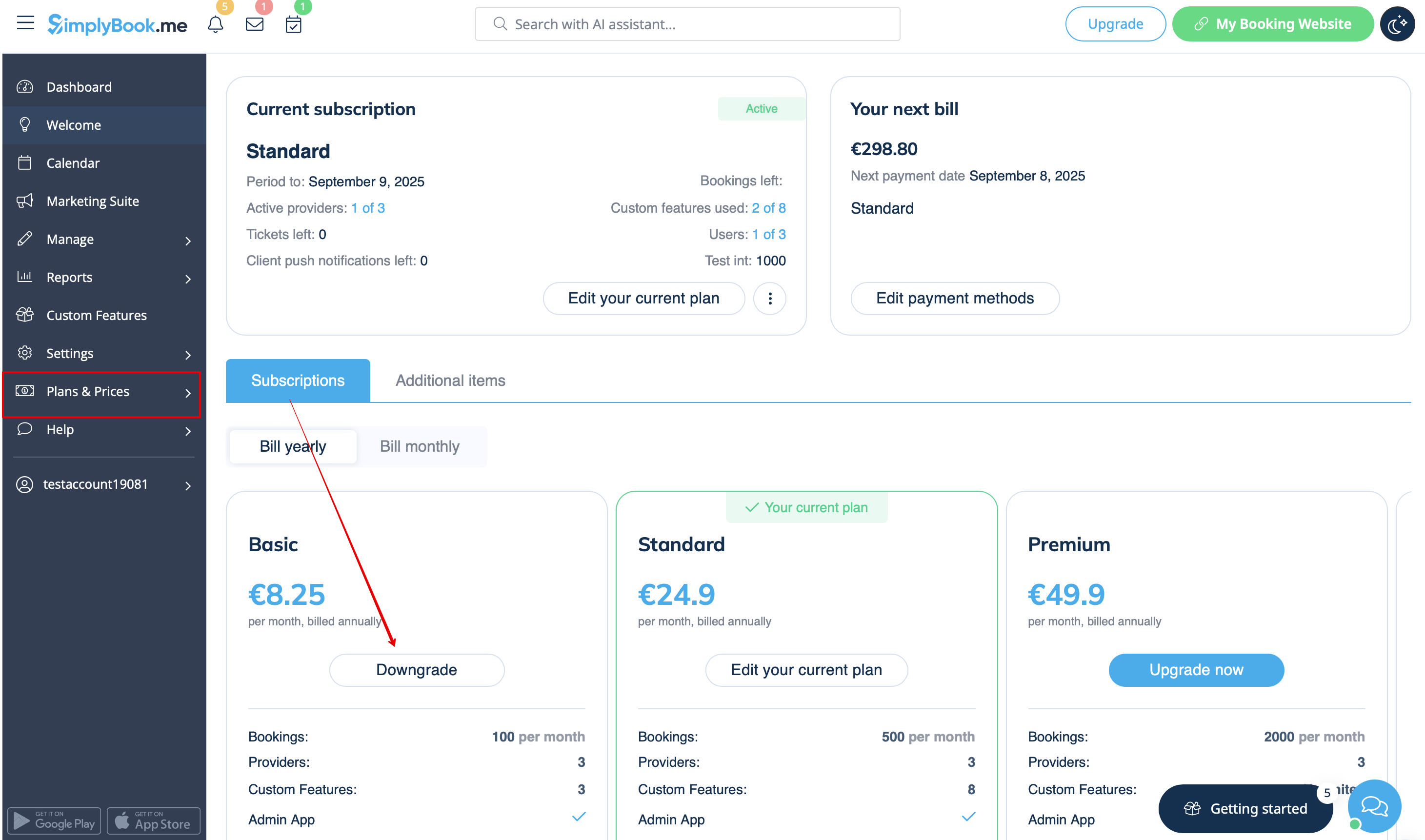
:1. Перейдіть до сторінки <span style="background-color:#d4f8e5; padding:5px; border-radius:5px;">«Плани та ціни»</span> -> <span style="background-color:#d4f8e5; padding:5px; border-radius:5px;">«Підписки»</span> у своєму обліковому записі. | |||
:1. | |||
:2. У <span style="background-color:#d4f8e5; padding:5px; border-radius:5px;">блоці опцій планів</span> натисніть <span style="background-color:#d4f8e5; padding:5px; border-radius:5px;">«Понизити»</span> під бажаним планом. | |||
:2. | (Зверніть увагу! Понизити тариф можна, якщо нижчий тарифний план відповідає всім активованим у вашому обліковому записі пунктам) | ||
( | |||
[[File:Downgrade plan path redesigned.png|1200px|center|link=https://help.simplybook.me/images/f/f4/Downgrade_plan_path_redesigned.png]] | [[File:Downgrade plan path redesigned.png|1200px|center|link=https://help.simplybook.me/images/f/f4/Downgrade_plan_path_redesigned.png]] | ||
<br><br> | <br><br> | ||
:3. | :3. Перевірте дані компанії в лівій частині сторінки (вони будуть використані для виставлення рахунку) і виберіть спосіб оплати. | ||
[[File:Confirm subscription update redesigned.png|1200px|center|link=https://help.simplybook.me/images/e/e3/Confirm_subscription_update_redesigned.png]] | [[File:Confirm subscription update redesigned.png|1200px|center|link=https://help.simplybook.me/images/e/e3/Confirm_subscription_update_redesigned.png]] | ||
<br><br> | <br><br> | ||
:4. | :4. Після здійснення оплати та її успішного отримання системою новий тарифний план почне діяти. | ||
<br><br> | <br><br> | ||
== Потрібне простіше рішення? == | |||
== | <span style="background-color:#d4f8e5; padding:5px; border-radius:5px;">Зверніться до нашої служби підтримки</span> в LiveChat безпосередньо з вашого облікового запису або надішліть електронний лист на <span style="background-color:#cdeffc; padding:5px; border-radius:5px;"> адресу [mailto:support@simplybook.me support@simplybook.me]</span>, і ми з радістю допоможемо вам вибрати план, який найкраще підходить для вашого бізнесу.<br><br> | ||
Ви також можете ознайомитися з нашим рішенням <span style="background-color:#cdeffc; padding:5px; border-radius:5px;">[https://simplymeet.me/ SimplyMeet.me]</span> — простим інструментом для планування зустрічей з легким налаштуванням та різноманітними інструментами у вашому розпорядженні. | |||
<br><br> | <br><br> | ||
== Як видалити обліковий запис == | |||
<br> | <br> | ||
Перед видаленням облікового запису ви також можете розглянути можливість скасування передплати, щоб не платити, якщо у вас є перерва в роботі або сезонна зайнятість, замість того, щоб видаляти його.<br><br> | |||
У такому випадку, будь ласка, ознайомтеся <span style="background-color:#cdeffc; padding:5px; border-radius:5px;">[[Special:MyLanguage/How_to_Cancel_SimplyBook.me_subscription#How_to_cancel_the_paid_subscription|з кроками для скасування періодичних платежів]].</span> | |||
<br><br> | <br><br> | ||
Або, якщо підписка наразі не відповідає вашим потребам, ви можете придбати іншу відповідно до <span style="background-color:#cdeffc; padding:5px; border-radius:5px;">[[Special:MyLanguage/How_to_Cancel_SimplyBook.me_subscription#How_to_downgrade_the_subscription|цього]].</span> | |||
<br><br> | <br><br> | ||
Звичайно, ви завжди можете звернутися до нашої служби підтримки, щоб отримати допомогу у виборі нового тарифного плану, який найкраще відповідає поточним потребам вашого бізнесу. | |||
<br><br> | <br><br> | ||
Якщо ви впевнені, що хочете видалити обліковий запис, виконайте такі прості кроки: | |||
<br><br> | <br><br> | ||
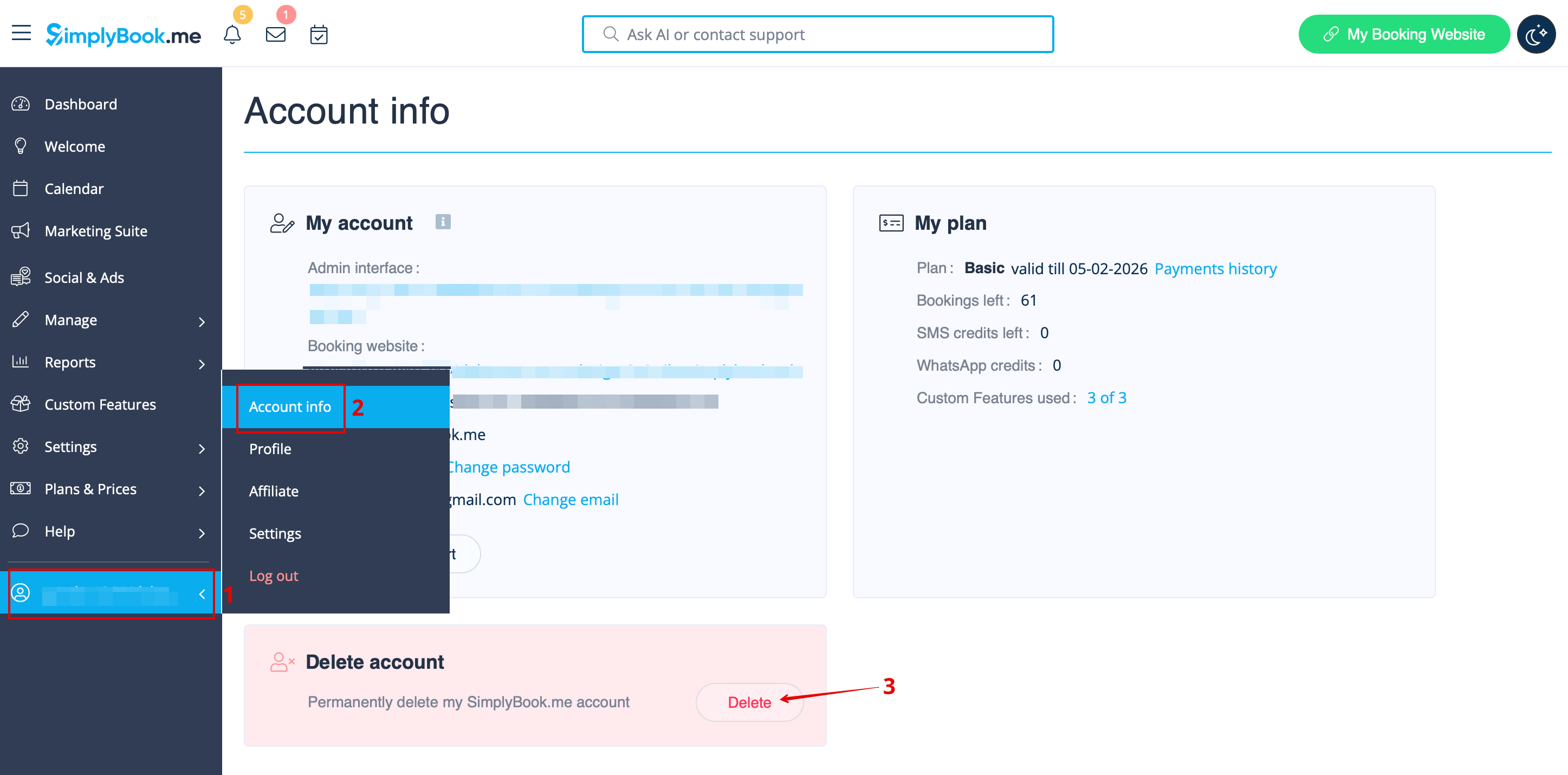
:1. | :1. Перейдіть до <span style="background-color:#d4f8e5; padding:5px; border-radius:5px;">Інформація облікового запису</span> та натисніть <span style="background-color:#d4f8e5; padding:5px; border-radius:5px;">Видалити обліковий запис.</span><br> | ||
:2. Просимо вас вказати причину, з якої ви вирішили видалити свою компанію. Зверніть увагу, що відновлення неможливе. Якщо ви зареєструєте нову компанію в майбутньому, стару назву компанії в URL не можна буде використати повторно. | |||
:2. | [[File:Sb delete account path new flow.png|1200px|1200px| center|link=https://help.simplybook.me/images/b/b0/Sb_delete_account_path_new_flow.png]] | ||
[[File: | Після завершення ваш обліковий запис буде видалено. Протягом певного періоду ви матимете можливість [[Special:MyLanguage/How_to_unblock_account|відновити]] його. Якщо цього не буде зроблено, він буде назавжди видалено з наших баз даних. | ||
<br><br> | <br><br> | ||
Latest revision as of 07:53, 19 May 2026
У міру розвитку вашого бізнесу ваш план передплати може перестати відповідати вашим вимогам. Не хвилюйтеся! Ви маєте право:
- Легко скасуйте профіль оплати періодичної передплати.
- Оберіть інший план, який краще відповідає вашим потребам.
- Заблокуйте свій обліковий запис, доки він не знадобиться знову.
- Отримайте більш спрощене рішення для бронювання SimplyMeet.me, якщо SimplyBook.me занадто розширений для ваших потреб
Ми тут, щоб забезпечити вам безперебійну та гнучку роботу. Якщо у вас є питання або вам потрібна допомога, наша команда підтримки готова допомогти.
Як скасувати платну підписку
Якщо ви хоча б один раз придбали платний план, обліковий запис не буде автоматично видалено після скасування передплати, навіть якщо ви не користуєтеся ним протягом певного періоду.
Щоб скасувати регулярні платежі, виконайте такі дії:
- 1. Перейдіть на сторінку «Тарифи та ціни» -> «Підписки» у вашому обліковому записі.
- 2. У верхньому блоці з деталями підписки натисніть на меню дій з трьома крапками.
- 3. Виберіть «Скасувати повторення » та підтвердіть дію.
- 4. Це не призведе до жодних додаткових витрат. Ви можете продовжувати користуватися всіма опціями до закінчення поточного періоду.
- Ви можете в будь-який час придбати бажану підписку в Підписки & ціни -> Підписки та налаштувати новий recurring профіль для безперебійного використання системи.
Як понизити рівень передплати
Зверніть увагу! Повернення до безкоштовного тарифу неможливе.
- 1. Перейдіть до сторінки «Плани та ціни» -> «Підписки» у своєму обліковому записі.
- 2. У блоці опцій планів натисніть «Понизити» під бажаним планом.
(Зверніть увагу! Понизити тариф можна, якщо нижчий тарифний план відповідає всім активованим у вашому обліковому записі пунктам)
- 3. Перевірте дані компанії в лівій частині сторінки (вони будуть використані для виставлення рахунку) і виберіть спосіб оплати.
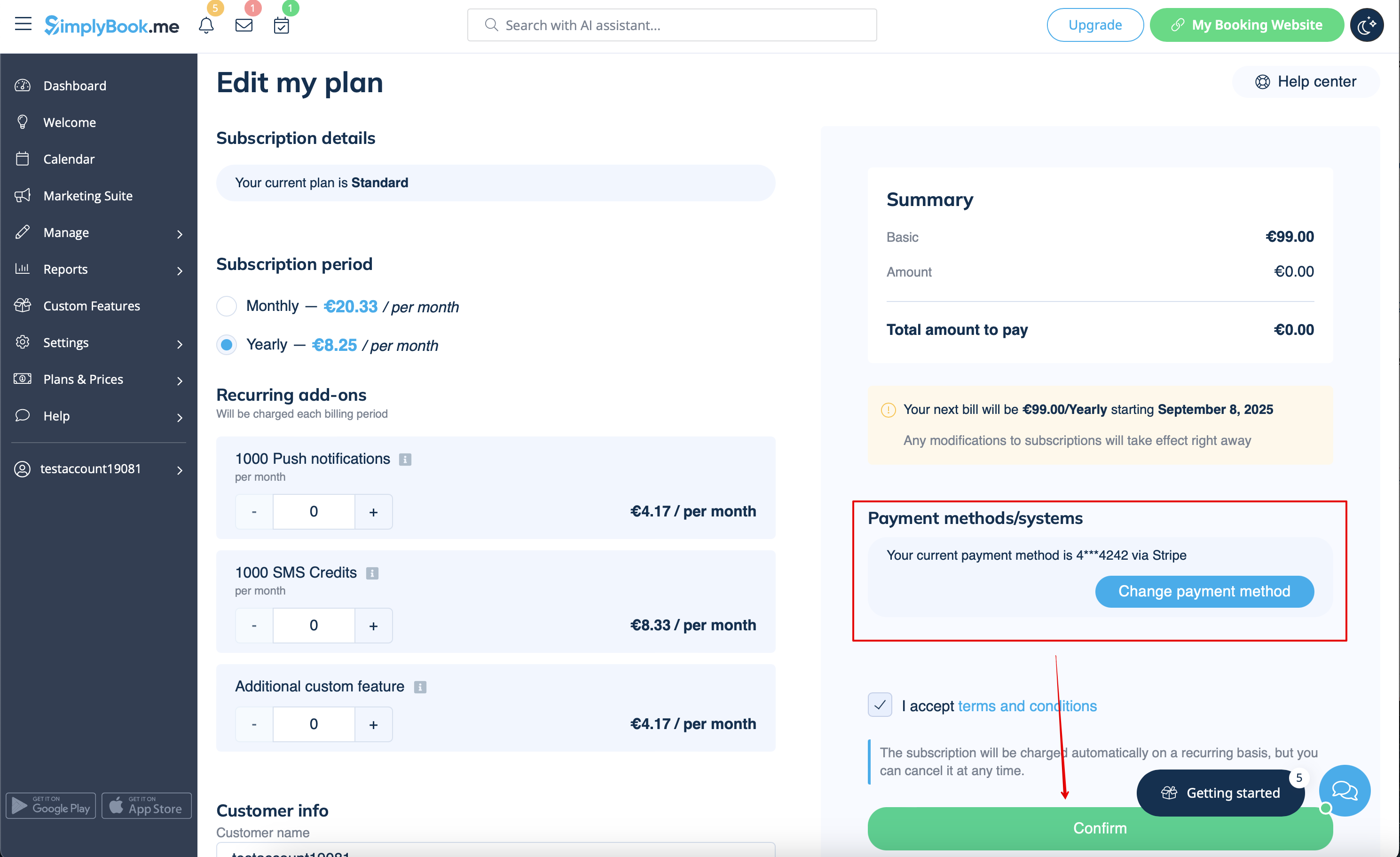
- 4. Після здійснення оплати та її успішного отримання системою новий тарифний план почне діяти.
Потрібне простіше рішення?
Зверніться до нашої служби підтримки в LiveChat безпосередньо з вашого облікового запису або надішліть електронний лист на адресу support@simplybook.me, і ми з радістю допоможемо вам вибрати план, який найкраще підходить для вашого бізнесу.
Ви також можете ознайомитися з нашим рішенням SimplyMeet.me — простим інструментом для планування зустрічей з легким налаштуванням та різноманітними інструментами у вашому розпорядженні.
Як видалити обліковий запис
Перед видаленням облікового запису ви також можете розглянути можливість скасування передплати, щоб не платити, якщо у вас є перерва в роботі або сезонна зайнятість, замість того, щоб видаляти його.
У такому випадку, будь ласка, ознайомтеся з кроками для скасування періодичних платежів.
Або, якщо підписка наразі не відповідає вашим потребам, ви можете придбати іншу відповідно до цього.
Звичайно, ви завжди можете звернутися до нашої служби підтримки, щоб отримати допомогу у виборі нового тарифного плану, який найкраще відповідає поточним потребам вашого бізнесу.
Якщо ви впевнені, що хочете видалити обліковий запис, виконайте такі прості кроки:
- 1. Перейдіть до Інформація облікового запису та натисніть Видалити обліковий запис.
- 2. Просимо вас вказати причину, з якої ви вирішили видалити свою компанію. Зверніть увагу, що відновлення неможливе. Якщо ви зареєструєте нову компанію в майбутньому, стару назву компанії в URL не можна буде використати повторно.
Після завершення ваш обліковий запис буде видалено. Протягом певного періоду ви матимете можливість відновити його. Якщо цього не буде зроблено, він буде назавжди видалено з наших баз даних.
