From SimplyBook.me
Created page with "Extra boekingen" |
No edit summary Tags: Mobile edit Mobile web edit |
||
| (2 intermediate revisions by 2 users not shown) | |||
| Line 1: | Line 1: | ||
<languages/> | <languages/> | ||
{{#seo: |title=Extra boekingen - SimplyBook.me |description=Koop extra boekingscapaciteit boven de limieten van het abonnement. Schaal op voor periodes met hoge vraag. Koop extra boekingen indien nodig in de sectie Plannen & Prijzen.|titlemode=toevoegen |keywords=faq, veelgestelde vragen, boekingssoftware, vragen over het afspraken systeem, online afspraken, kalendersoftware, boekingssysteem, boekingskalender, planningssoftware, online afspraken plannen, online planning, installatie, hulp bij installatie, ondersteuning, helpinhoud }} | |||
{{#seo: | |||
|title= | |||
|description= | |||
|titlemode= | |||
|keywords=faq, | |||
}} | |||
<br><br> | <br><br> | ||
Extra boekingen kunnen worden aangeschaft in <span style="background-color:#d4f8e5; padding:5px; border-radius:5px;">Plannen en prijzen</span> -> <span style="background-color:#d4f8e5; padding:5px; border-radius:5px;">Extra items</span>. In tegenstelling tot boekingen die bij het abonnement zijn inbegrepen, hebben extra boekingen geen vervaldatum (tenzij ze samen met het abonnement zijn aangeschaft als onderdeel van een terugkerend profiel of als dit in de pakketbeschrijving staat vermeld). Als u dergelijke extra boekingen aanschaft, vervallen ze pas wanneer u ze allemaal hebt gebruikt. | |||
[[File:Additional items path.png|1200px| border| center|link=https://help.simplybook.me/images/c/c9/Additional_items_path.png]] | |||
[[File:Additional items path.png |1200px| border| center|link=https://help.simplybook.me/images/c/c9/Additional_items_path.png]] | |||
<br><br> | <br><br> | ||
:<span style="background-color:#ffe9e9; padding:5px; border-radius:5px;">'''Let op!''' De prijzen op de schermafbeelding zijn slechts voorbeelden. Controleer de prijzen die voor uw account gelden in <span style="background-color:#d4f8e5; padding:5px; border-radius:5px;">Plannen en prijzen</span> -> <span style="background-color:#d4f8e5; padding:5px; border-radius:5px;">Extra items</span> in uw systeem.</span> | |||
:<span style="background-color:#ffe9e9; padding:5px; border-radius:5px;">''' | |||
<br><br> | <br><br> | ||
Latest revision as of 19:28, 2 February 2026
Extra boekingen kunnen worden aangeschaft in Plannen en prijzen -> Extra items. In tegenstelling tot boekingen die bij het abonnement zijn inbegrepen, hebben extra boekingen geen vervaldatum (tenzij ze samen met het abonnement zijn aangeschaft als onderdeel van een terugkerend profiel of als dit in de pakketbeschrijving staat vermeld). Als u dergelijke extra boekingen aanschaft, vervallen ze pas wanneer u ze allemaal hebt gebruikt.
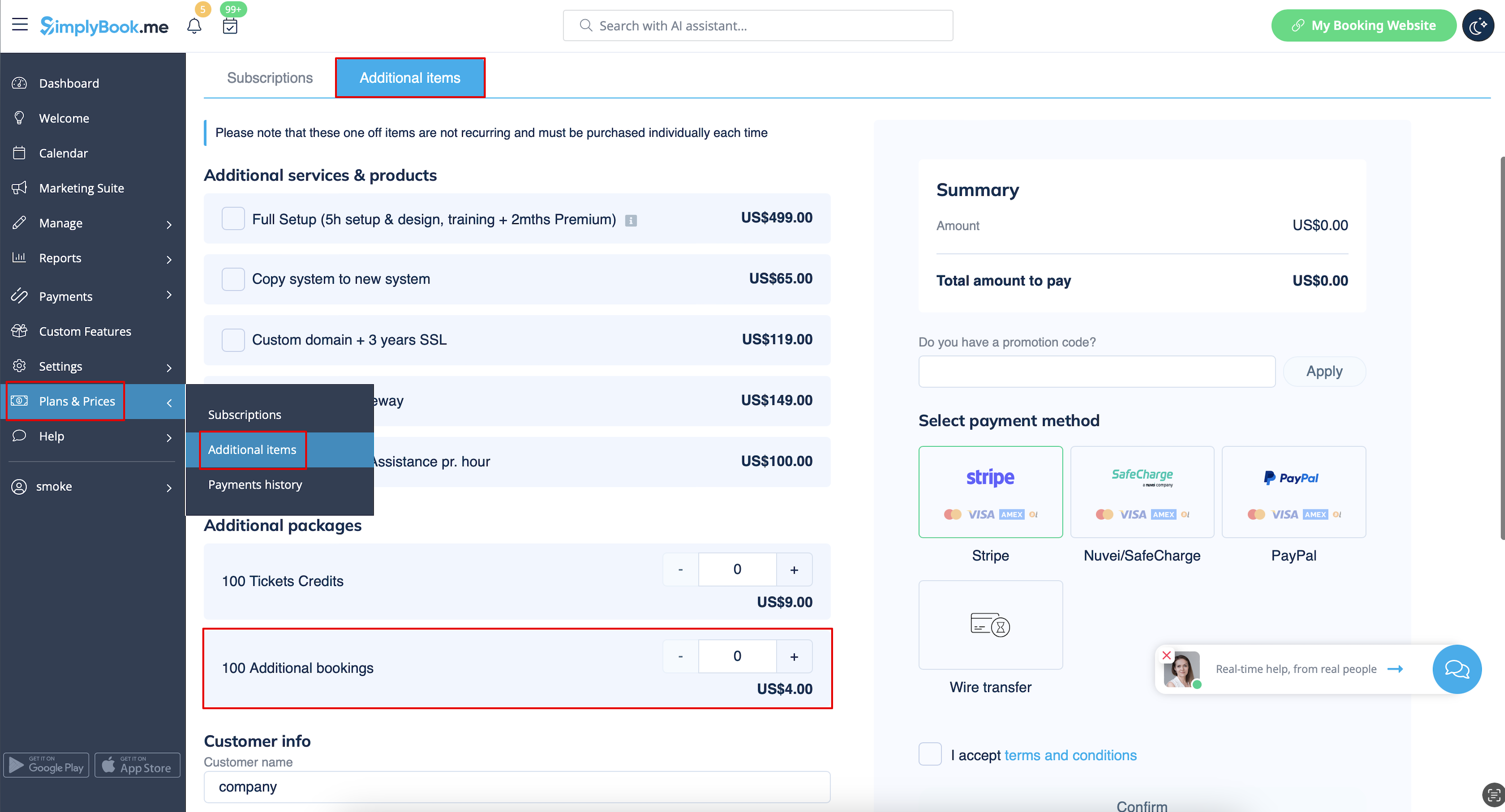
- Let op! De prijzen op de schermafbeelding zijn slechts voorbeelden. Controleer de prijzen die voor uw account gelden in Plannen en prijzen -> Extra items in uw systeem.
