From SimplyBook.me
Created page with "Квест-кімнати" Tags: Mobile edit Mobile web edit |
No edit summary |
||
| (5 intermediate revisions by 2 users not shown) | |||
| Line 1: | Line 1: | ||
<languages/> | <languages/> | ||
{{#seo: |title=Квест-кімнати з використанням системи бронювання зустрічей Scheduler SimplyBook.me |description=Налаштуйте бронювання escape room. Налаштуйте кімнати як постачальників, фіксований час і місткість групи. Збирайте відгуки. Рішення, адаптоване для розважальних закладів з обмеженим у часі досвідом…|titlemode=додати |keywords=fAQ, поширені запитання, програмне забезпечення для бронювання, запитання щодо системи бронювання, онлайн-бронювання, календарне програмне забезпечення, система бронювання, календар бронювання, програмне забезпечення для планування, онлайн-планування зустрічей, онлайн-планування, налаштування, допомога з налаштуванням, підтримка, довідкова інформація }} | |||
{{#seo: | |||
|title= | |||
|description= | |||
|titlemode= | |||
|keywords= | |||
}} | |||
<br><br> | <br><br> | ||
[https://simplybook.me/ Simplybook] | [https://simplybook.me/ Simplybook] — це ідеальна система онлайн-бронювання для квест-кімнат та квест-квестів різних типів. Вона дозволяє клієнтам вибрати кімнату та забронювати конкретний час, коли відбудеться гра. Клієнти можуть залишити відгук на сторінці бронювання компанії після отримання електронного листа з нагадуванням. | ||
Для ефективного використання [https://simplybook.me/ Simplybook.me] ми рекомендуємо наступні налаштування: | |||
<br><br> | <br><br> | ||
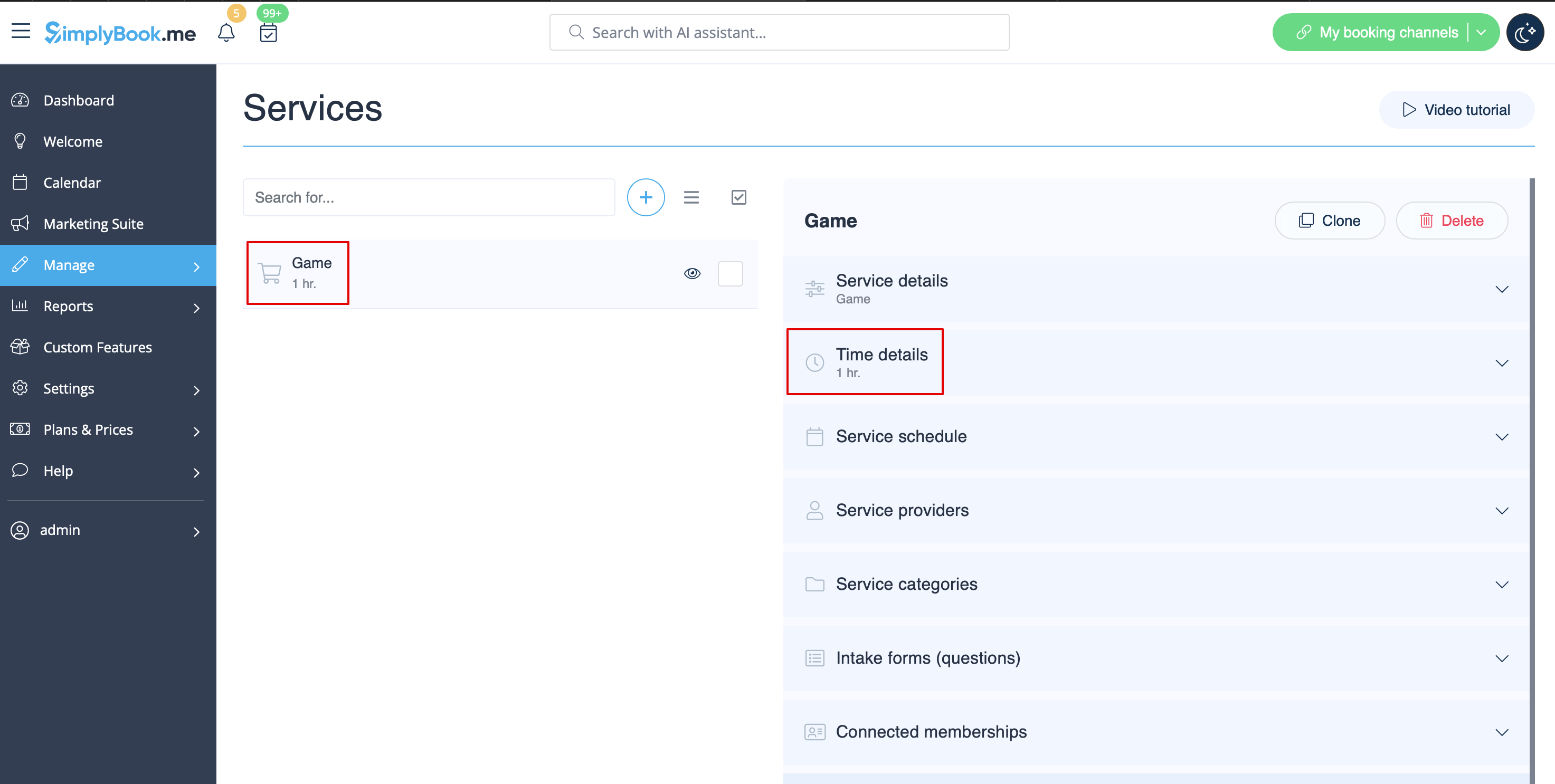
:1. Створіть послугу як гру з відповідною тривалістю в «Управління» // «Послуги» // «+». Використовуйте «Управління» // «Послуги» // «Деталі часу», щоб редагувати тривалість послуги.<br> | |||
[[File:Quest rooms service redesigned.png|1200px | center|link=https://help.simplybook.me/images/2/2f/Quest_rooms_service_redesigned.png]]<br><br> | |||
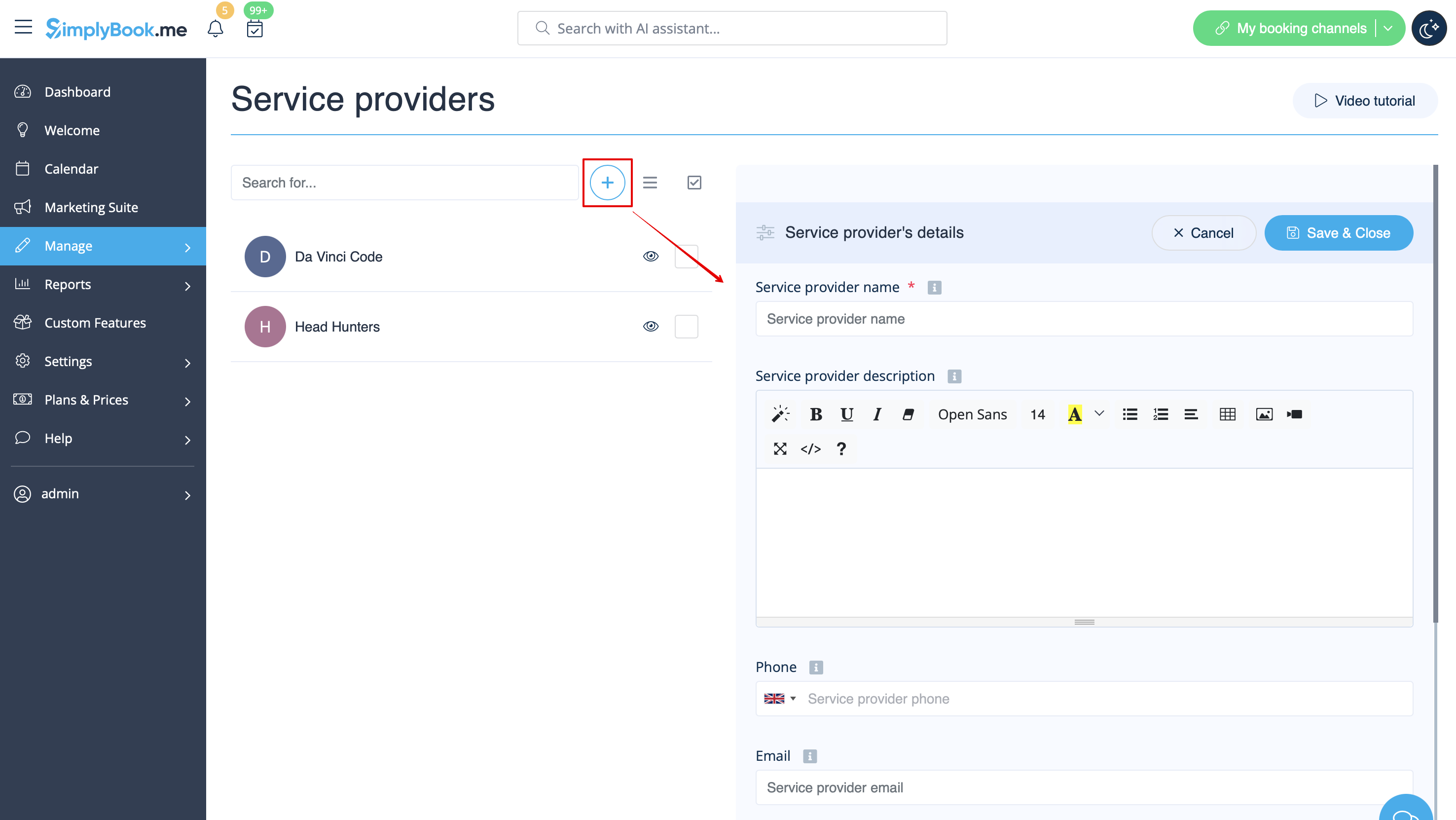
:1. | :2. Створіть постачальників як кімнати. У «Керування» // «Постачальники послуг» // «+» додайте нового постачальника послуг — створіть кількість постачальників, рівну кількості кімнат, які ви маєте.<br> | ||
[[File:Quest rooms service redesigned.png|1200px | center|link=https://help.simplybook.me/images/2/2f/Quest_rooms_service_redesigned.png ]]<br><br> | [[File:Quest rooms add provider redesigned.png|1200px | center|link=https://help.simplybook.me/images/6/6f/Quest_rooms_add_provider_redesigned.png]]<br><br> | ||
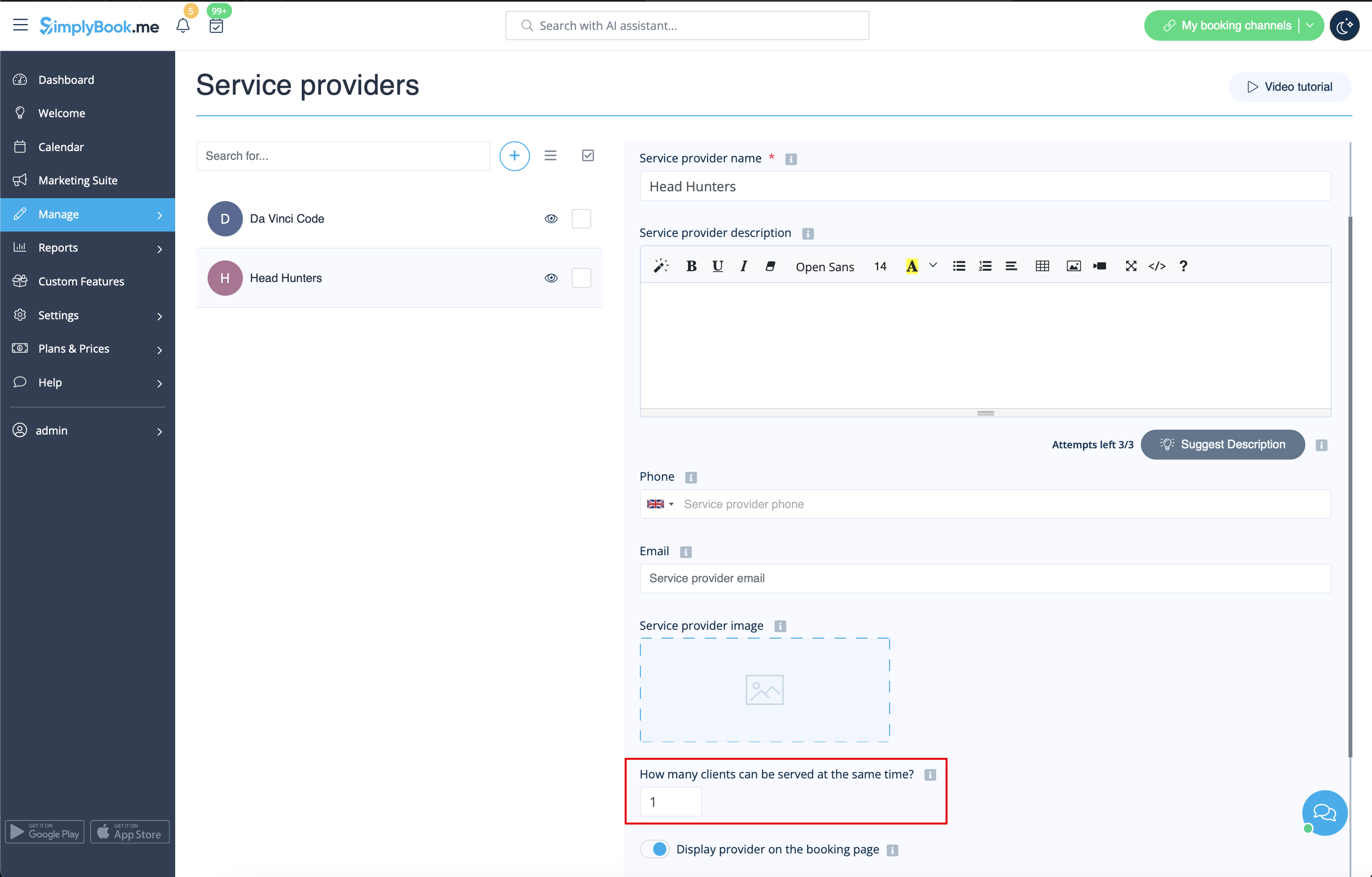
:2. | :3. Переконайтеся, що кожен постачальник може обслуговувати 1 клієнта одночасно. <br> | ||
[[File:Quest rooms add provider redesigned.png|1200px | center|link=https://help.simplybook.me/images/6/6f/Quest_rooms_add_provider_redesigned.png ]]<br><br> | [[File:Quest rooms 1 client per provider redesigned.png|1200px | center|link=https://help.simplybook.me/images/2/20/Quest_rooms_1_client_per_provider_redesigned.png]]<br><br> | ||
:3. | :4. Ви також можете встановити конкретну доступність для цієї кімнати, натиснувши «Налаштувати параметри часу для цього постачальника» на вкладці «Розклад постачальника послуг» в розділі «Керування // Постачальники послуг».<br><br> | ||
[[File:Quest rooms 1 client per provider redesigned.png|1200px | center|link=https://help.simplybook.me/images/2/20/Quest_rooms_1_client_per_provider_redesigned.png ]]<br><br> | :5. Перейменуйте слово «Співробітник» на сторінці бронювання на «Кімната» або «Гра» в Налаштування // Налаштування слів та переклади. | ||
:4. | [[File:Quest rooms booking page view v3.png|center]]<br><br> | ||
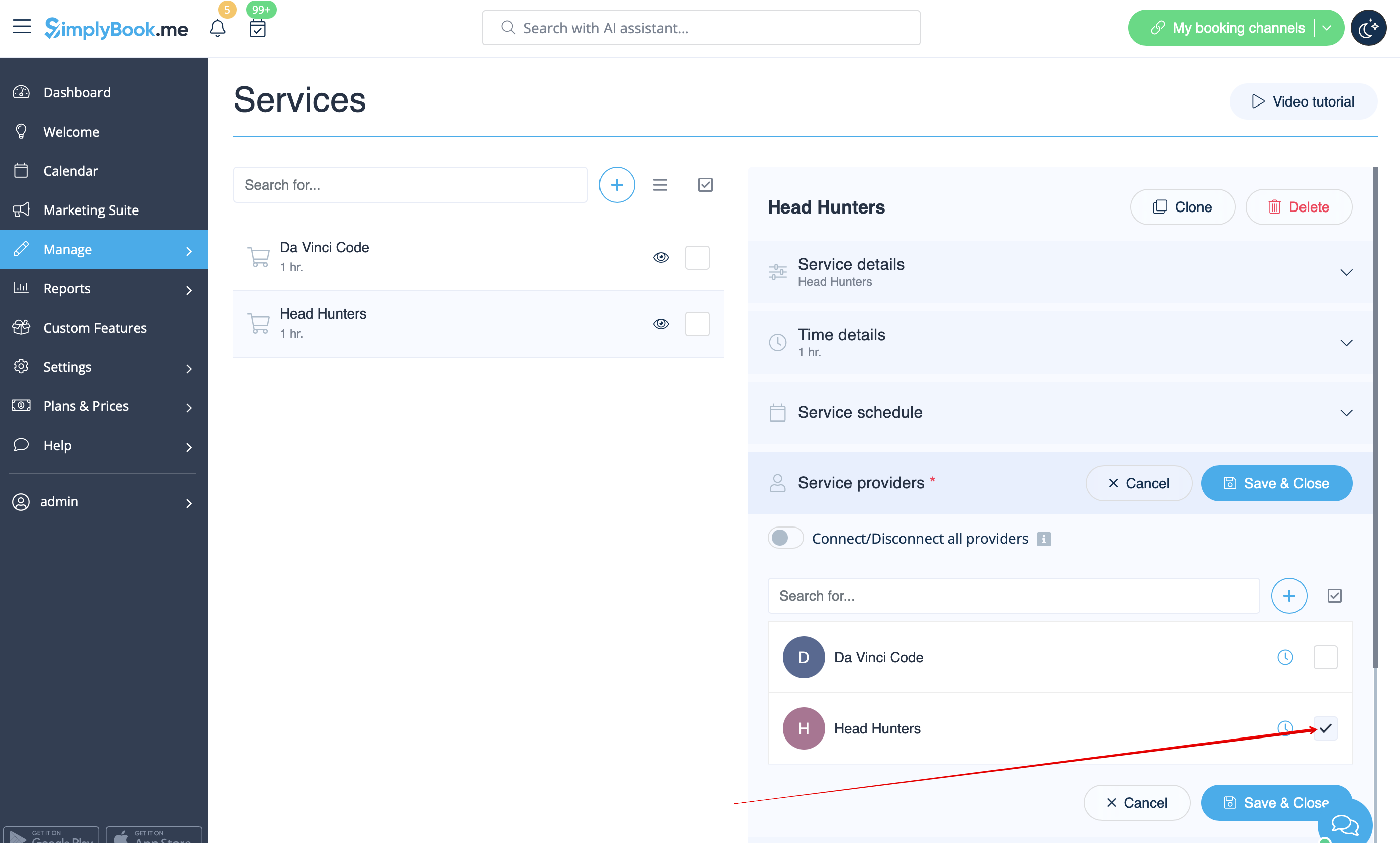
:5. | :6. Якщо кожна кімната має різну ціну і ви плануєте приймати оплату онлайн за допомогою нашої спеціальної функції [[Custom_Features#Accept_Payments| «Приймати оплату»]], створіть більше послуг в розділі «Управління» // «Послуги» // «Додати послугу», встановіть ціну для цих послуг і пов'яжіть їх з кімнатами, встановивши відповідні прапорці на вкладці «Постачальники послуг».<br> | ||
[[File:Quest rooms booking page view v3.png | center ]]<br><br> | [[File:Quest rooms connect service to provider.png|1200px| center|link=https://help.simplybook.me/images/2/2f/Quest_rooms_connect_service_to_provider.png]]<br><br> | ||
:6. | :7. Якщо ціни на ігри вранці відрізняються від цін на ігри ввечері/у вихідні, додайте послуги «Ігри вранці» та «Ігри ввечері/у вихідні» в розділі «Управління // Послуги» та встановіть відповідну ціну для кожної послуги. Потім у розділі «Управління // Постачальники послуг» створіть 2 постачальників для кожної гри та встановіть доступні години для постачальників у вкладці «Розклад постачальника послуг».<br> | ||
[[File:Quest rooms morning and evening redesigned.png|1200px | center |link=https://help.simplybook.me/images/a/a8/Quest_rooms_morning_and_evening_redesigned.png]]<br><br> | |||
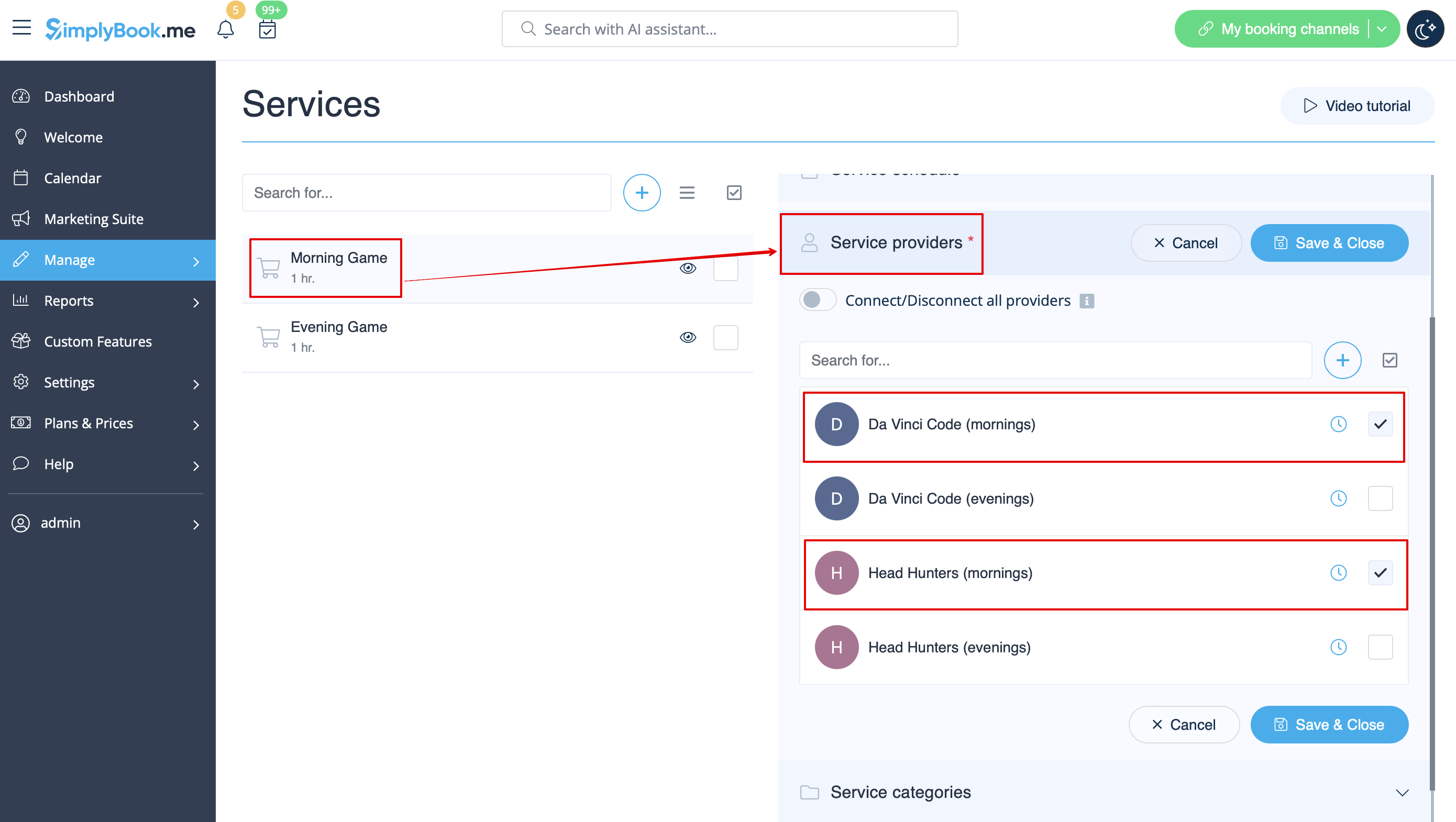
:8. Підключіть постачальників до відповідних послуг<br> | |||
[[File:Quest rooms connect service to provider.png|1200px| center|link=https://help.simplybook.me/images/2/2f/Quest_rooms_connect_service_to_provider.png ]]<br><br> | [[File:Quest rooms connect mornig game to morning providers redesigned.png|1200px | center|link=https://help.simplybook.me/images/d/d2/Quest_rooms_connect_mornig_game_to_morning_providers_redesigned.png]]<br><br> | ||
:7. | :9. На сторінці бронювання клієнти виберуть ранкові/вихідні години, виберуть гру - і потім побачать доступні слоти.<br> | ||
[[File:Quest rooms morning and evening redesigned.png|1200px | center |link=https://help.simplybook.me/images/a/a8/Quest_rooms_morning_and_evening_redesigned.png ]]<br><br> | [[File:Quest room booking new.png|1200px| center]]<br><br> | ||
:8. | :10. Якщо у вас фіксований графік, вам може знадобитися спеціальна функція [[Custom_Features#Appointment_at_Fixed_Time| «Призначення на фіксований час»]], за допомогою якої ви можете встановити конкретний час початку для кожної з ваших послуг. <br><br> | ||
[[File:Quest rooms connect mornig game to morning providers redesigned.png|1200px | center|link=https://help.simplybook.me/images/d/d2/Quest_rooms_connect_mornig_game_to_morning_providers_redesigned.png ]]<br><br> | :11. За допомогою спеціальної функції [[Custom_Features#Intake_Forms| «Форми для реєстрації»]] ви можете запитувати додаткову інформацію від клієнтів, наприклад, скільки клієнтів буде в групі. | ||
:9. | |||
[[File:Quest room booking new.png|1200px| center ]]<br><br> | |||
:10. | |||
:11. | |||
<br><br> | <br><br> | ||
Latest revision as of 19:13, 2 February 2026
Simplybook — це ідеальна система онлайн-бронювання для квест-кімнат та квест-квестів різних типів. Вона дозволяє клієнтам вибрати кімнату та забронювати конкретний час, коли відбудеться гра. Клієнти можуть залишити відгук на сторінці бронювання компанії після отримання електронного листа з нагадуванням.
Для ефективного використання Simplybook.me ми рекомендуємо наступні налаштування:
- 1. Створіть послугу як гру з відповідною тривалістю в «Управління» // «Послуги» // «+». Використовуйте «Управління» // «Послуги» // «Деталі часу», щоб редагувати тривалість послуги.
- 2. Створіть постачальників як кімнати. У «Керування» // «Постачальники послуг» // «+» додайте нового постачальника послуг — створіть кількість постачальників, рівну кількості кімнат, які ви маєте.
- 3. Переконайтеся, що кожен постачальник може обслуговувати 1 клієнта одночасно.
- 4. Ви також можете встановити конкретну доступність для цієї кімнати, натиснувши «Налаштувати параметри часу для цього постачальника» на вкладці «Розклад постачальника послуг» в розділі «Керування // Постачальники послуг».
- 5. Перейменуйте слово «Співробітник» на сторінці бронювання на «Кімната» або «Гра» в Налаштування // Налаштування слів та переклади.

- 6. Якщо кожна кімната має різну ціну і ви плануєте приймати оплату онлайн за допомогою нашої спеціальної функції «Приймати оплату», створіть більше послуг в розділі «Управління» // «Послуги» // «Додати послугу», встановіть ціну для цих послуг і пов'яжіть їх з кімнатами, встановивши відповідні прапорці на вкладці «Постачальники послуг».
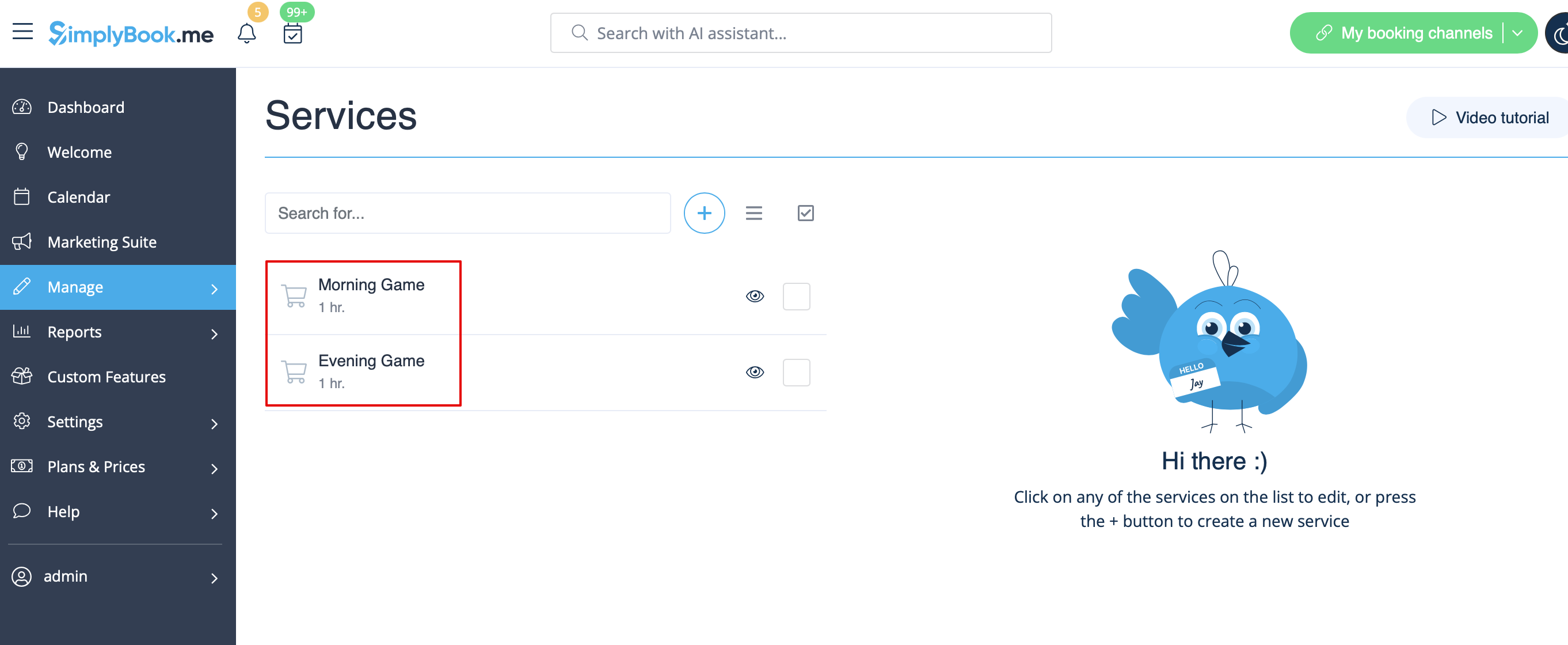
- 7. Якщо ціни на ігри вранці відрізняються від цін на ігри ввечері/у вихідні, додайте послуги «Ігри вранці» та «Ігри ввечері/у вихідні» в розділі «Управління // Послуги» та встановіть відповідну ціну для кожної послуги. Потім у розділі «Управління // Постачальники послуг» створіть 2 постачальників для кожної гри та встановіть доступні години для постачальників у вкладці «Розклад постачальника послуг».
- 8. Підключіть постачальників до відповідних послуг
- 9. На сторінці бронювання клієнти виберуть ранкові/вихідні години, виберуть гру - і потім побачать доступні слоти.

- 10. Якщо у вас фіксований графік, вам може знадобитися спеціальна функція «Призначення на фіксований час», за допомогою якої ви можете встановити конкретний час початку для кожної з ваших послуг.
- 11. За допомогою спеціальної функції «Форми для реєстрації» ви можете запитувати додаткову інформацію від клієнтів, наприклад, скільки клієнтів буде в групі.
