Created page with "<br> left <br> De aangepaste functie voor agendasynchronisatie wordt gebruikt voor tweerichtingssynchronisatie met Google- en Outlook-agenda's. U kunt boekingen exporteren van [https://simplybook.me/ SimplyBook] naar Google- of Outlook-agenda's en ook tijden blokkeren die bezet zijn door Google/Outlook-agenda-evenementen in uw [https://simplybook.me/ SimplyBook-dashboard]. <br><br> ''''' Let op''''' *: deze functie werkt alleen me..." |
No edit summary |
||
| (4 intermediate revisions by 2 users not shown) | |||
| Line 2: | Line 2: | ||
{{#seo: | {{#seo: | ||
|title= Calendar Sync custom feature - SimplyBook.me | |title= Calendar Sync custom feature - SimplyBook.me | ||
|beschrijving=Synchroniseer | |beschrijving=Synchroniseer bidirectioneel met Google Calendar en Outlook. Voorkom dubbele boekingen. Exporteer afspraken en importeer persoonlijke gebeurtenissen automatisch. | ||
|titlemode=append | |titlemode=append | ||
|keywords=faq, frequently asked questions, booking software, appointment system questions, appointments online, calendar software, booking system, booking calendar, scheduling software, online appointment scheduling, online scheduling, plugins, custom features, calendar synchronization, sync with google calendar, sync with outlook calendar, 2-way sync, 2-way synchronization, sync bookings, sync appointments | |keywords=faq, frequently asked questions, booking software, appointment system questions, appointments online, calendar software, booking system, booking calendar, scheduling software, online appointment scheduling, online scheduling, plugins, custom features, calendar synchronization, sync with google calendar, sync with outlook calendar, 2-way sync, 2-way synchronization, sync bookings, sync appointments | ||
| Line 11: | Line 11: | ||
[[File:Calendar sync new icon.png |left]] | [[File:Calendar sync new icon.png |left]] | ||
<br> | <br> | ||
De aangepaste functie voor agendasynchronisatie wordt gebruikt voor tweerichtingssynchronisatie met Google- en Outlook-agenda's. U kunt boekingen exporteren van [https://simplybook.me/ SimplyBook] naar Google- of Outlook-agenda's en ook tijden blokkeren die bezet zijn door Google/Outlook-agenda-evenementen in uw [https://simplybook.me/ SimplyBook-dashboard]. | De aangepaste functie voor agendasynchronisatie wordt gebruikt voor tweerichtingssynchronisatie met Google- en Outlook-agenda's. U kunt boekingen exporteren van [https://simplybook.me/ SimplyBook] naar Google- of Outlook-agenda's en ook tijden blokkeren die bezet zijn door Google/Outlook-agenda-evenementen in uw [https://simplybook.me/nl SimplyBook-dashboard]. | ||
<br><br> | <br><br> | ||
''''' Let op''''' | ''''' Let op''''' | ||
*: deze functie werkt alleen met webagenda's - deze werkt mogelijk niet met Microsoft Exchange-agenda's. | *: deze functie werkt alleen met webagenda's - deze werkt mogelijk niet met Microsoft Exchange-agenda's. | ||
*Als de aangepaste functie [[Display Remaining Spaces|'Resterende plaatsen weergeven']] is ingeschakeld, heeft de tijd die is geblokkeerd door Agenda synchronisatie geen invloed op het aantal weergegeven tijdvakken. | *Als de aangepaste functie [[Special:MyLanguage/Display Remaining Spaces|'Resterende plaatsen weergeven']] is ingeschakeld, heeft de tijd die is geblokkeerd door Agenda synchronisatie geen invloed op het aantal weergegeven tijdvakken. | ||
<br><br> | <br><br> | ||
:'''Videohandleiding beschikbaar ''' | :'''Videohandleiding beschikbaar '''<p><youtube>DCdvRQVzWDA</youtube></p> | ||
<br><br> | <br><br> | ||
__TOC__ | __TOC__ | ||
| Line 65: | Line 65: | ||
<br><br> | <br><br> | ||
= SimplyBook.me-evenementen worden twee keer weergegeven in Google Agenda = | |||
=SimplyBook.me | Dit kan komen door de instelling van Google Agenda om automatisch evenementen uit uw e-mails toe te voegen. Als u bevestigingsmails met boekingsgegevens ontvangt, voegt Google deze automatisch toe aan uw agenda. Om deze optie uit te schakelen: klik op het pictogram Instellingen in de rechterbovenhoek van Google Agenda//Instellingen en schakel het selectievakje naast de optie "Evenementen uit Gmail automatisch toevoegen aan mijn agenda" uit. | ||
<br><br> | <br><br> | ||
Latest revision as of 17:35, 30 January 2026

De aangepaste functie voor agendasynchronisatie wordt gebruikt voor tweerichtingssynchronisatie met Google- en Outlook-agenda's. U kunt boekingen exporteren van SimplyBook naar Google- of Outlook-agenda's en ook tijden blokkeren die bezet zijn door Google/Outlook-agenda-evenementen in uw SimplyBook-dashboard.
Let op
- deze functie werkt alleen met webagenda's - deze werkt mogelijk niet met Microsoft Exchange-agenda's.
- Als de aangepaste functie 'Resterende plaatsen weergeven' is ingeschakeld, heeft de tijd die is geblokkeerd door Agenda synchronisatie geen invloed op het aantal weergegeven tijdvakken.
- Videohandleiding beschikbaar
Hoe
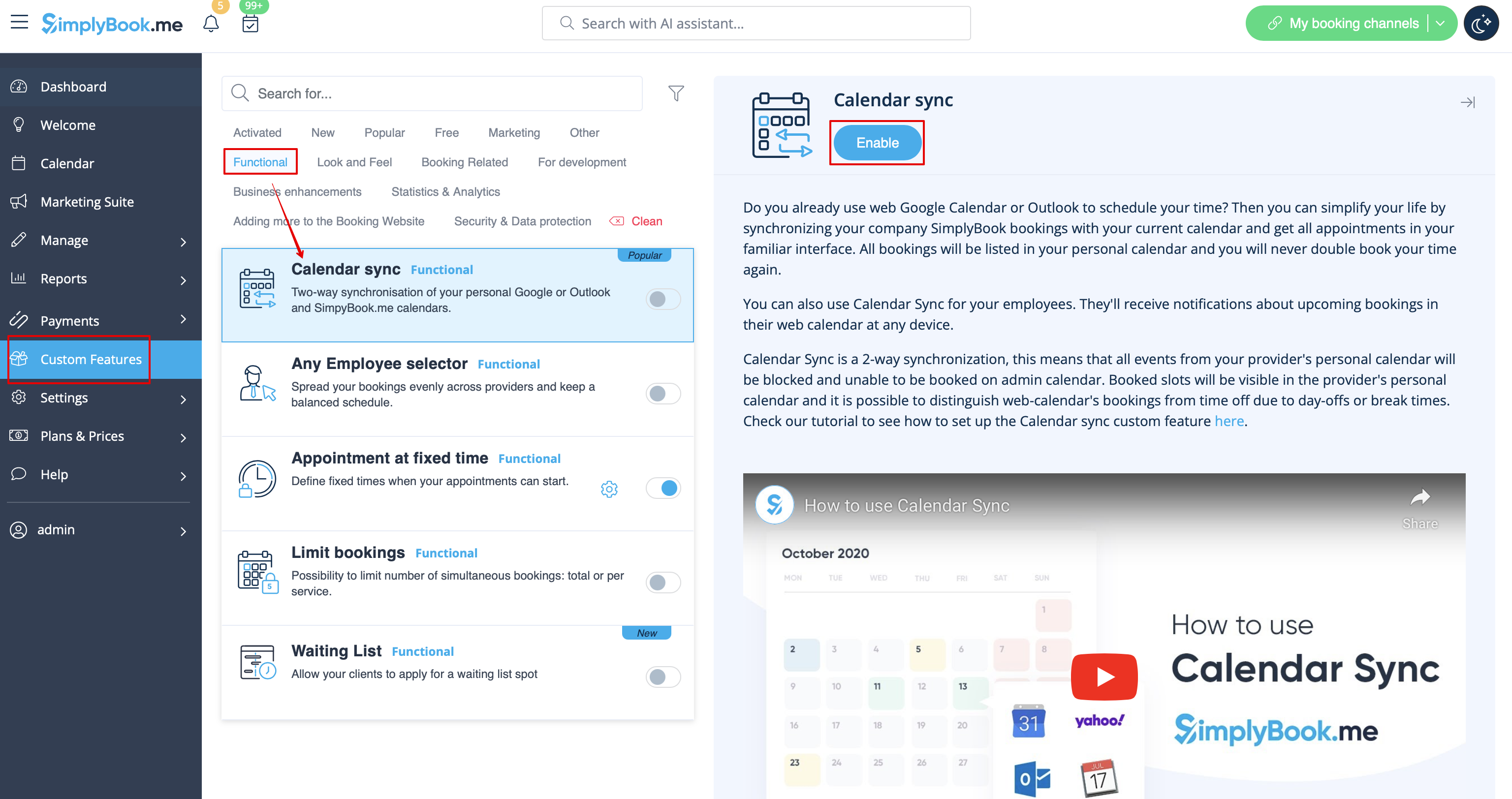
- 1. Schakel de functie Agenda synchroniseren in het gedeelte Aangepaste functies in.
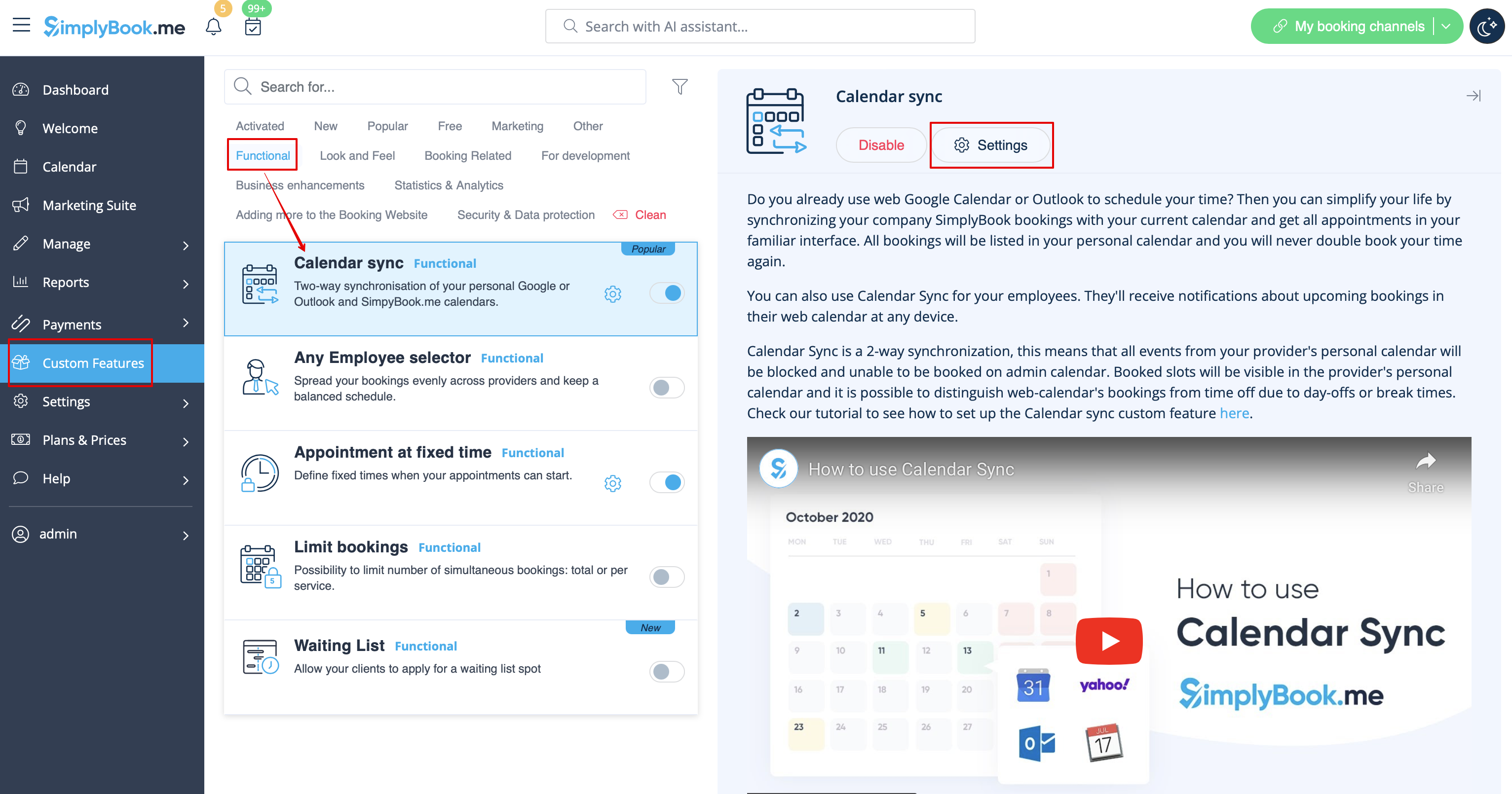
- 2. Ga naar "Instellingen" naast deze optie.
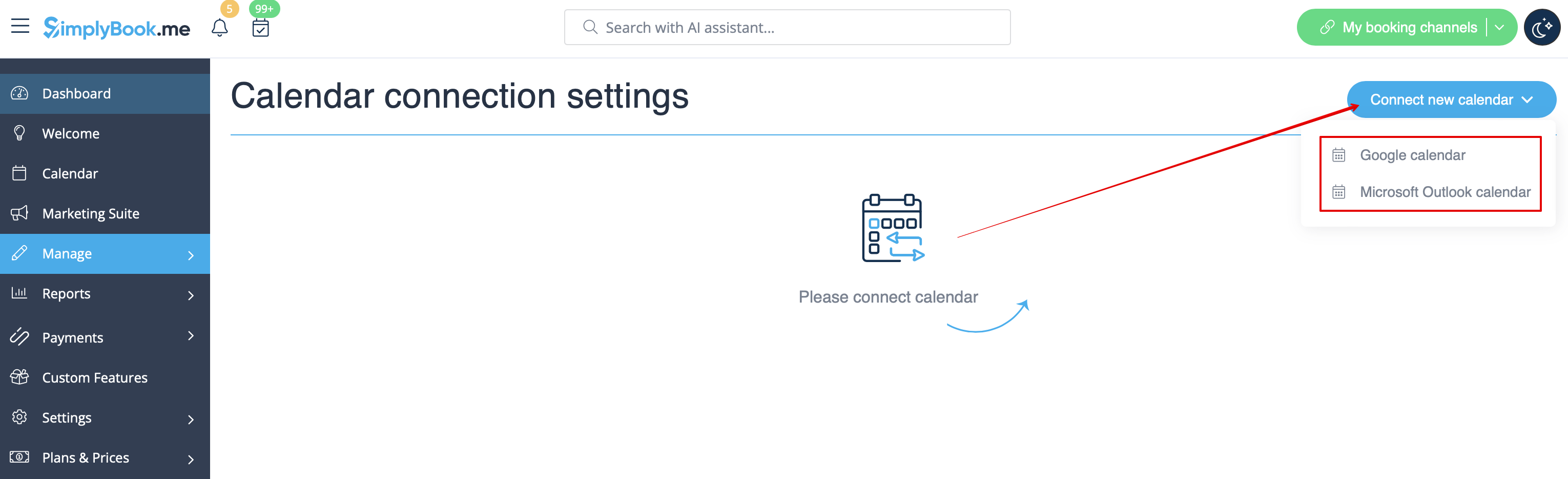
- 3. Klik op "Nieuwe agenda koppelen" en koppel uw Google- of Outlook-account.
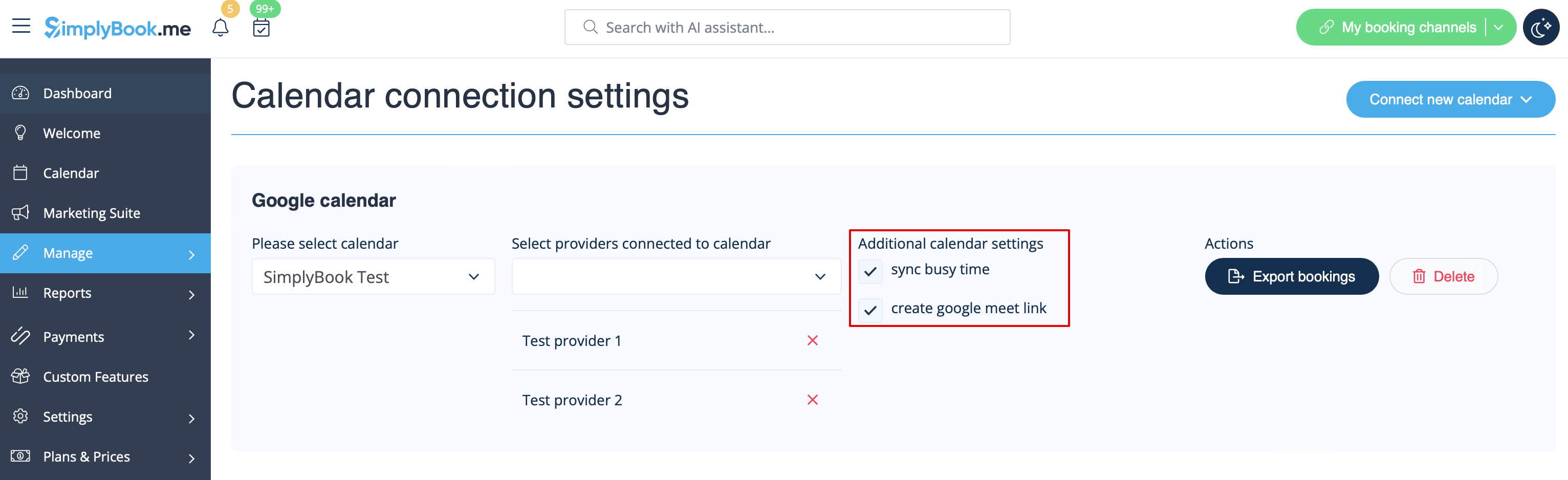
- 4. Selecteer de gewenste agenda en koppel de benodigde providers eraan.
- 5. Druk op "Exporteren" om uw oude boekingen naar Google of Outlook Agenda te exporteren, zodat het synchronisatieproces kan beginnen.
- 6. Vink het vakje "Bezet tijd synchroniseren" aan als u tijden in het Simplybook-d ashboard wilt blokkeren die bezet zijn door Google/Outlook Agenda-afspraken.
- (Alleen Google-agenda) Schakel 'Google Meet-link maken' in als u wilt dat het systeem Google Meet-vergaderingen voor afspraken genereert en uitnodigingen naar uw klanten verstuurt.
Let op: als 'bezettijden synchroniseren' is aangevinkt en u uw provider hebt ingesteld om meer dan 1 klant tegelijk te accepteren, is het niet mogelijk om meer dan 1 boeking te maken, omdat de boeking naar Google/Outlook wordt geëxporteerd als 'bezette tijd' en die tijd wordt geblokkeerd voor boekingen.
Als u meer dan één boeking tegelijk moet accepteren voor uw provider, schakelt u het selectievakje 'bezettijden synchroniseren' uit.
- 7. U kunt Google/Outlook-agenda-afspraken die tijd blokkeren alleen in SimplyBook zien in de weergave 'Serviceprovider' in de agenda (omdat u de agenda koppelt aan de provider). Er is niets zichtbaar in de dag- en weekweergave, omdat die weergaven voor alle providers zijn (als u meerdere providers hebt, zou het onmogelijk zijn om alle Google/Outlook-afspraken in één agenda weer te geven).
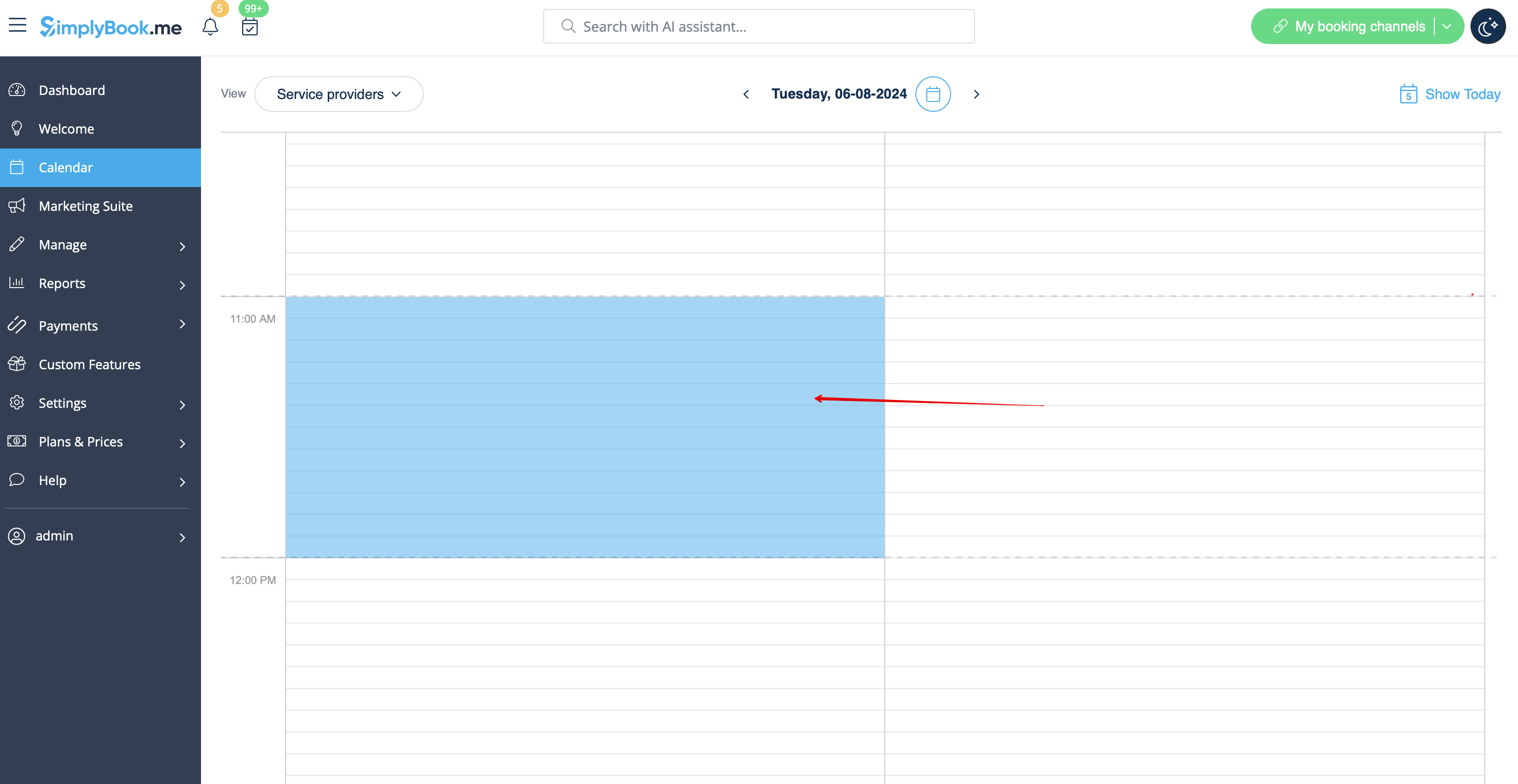
Let op: Tijdens het synchronisatieproces worden geen afspraakdetails geïmporteerd uit uw externe agenda. De afspraken worden alleen weergegeven als blauwe blokken op de agendapagina.
Simplybook synchroniseert niet met Google/Outlook-agenda
Mogelijke oorzaken:
- 1. Houd er rekening mee dat synchronisatie tot 10 minuten kan duren;
- 2. Als Google/Outlook de agenda-app bijwerkt, druk dan nogmaals op de knop "Exporteren" om te synchroniseren;
- 3. Er is een verkeerde agenda geselecteerd (in Aangepaste functies//Agendasynchronisatie//Instellingen//Selecteer agenda) of u gebruikt de agenda van Microsoft Exchange Server;
- 4. De tijdzones in uw Google/Outlook-agenda en SimplyBook.me-account komen niet overeen.
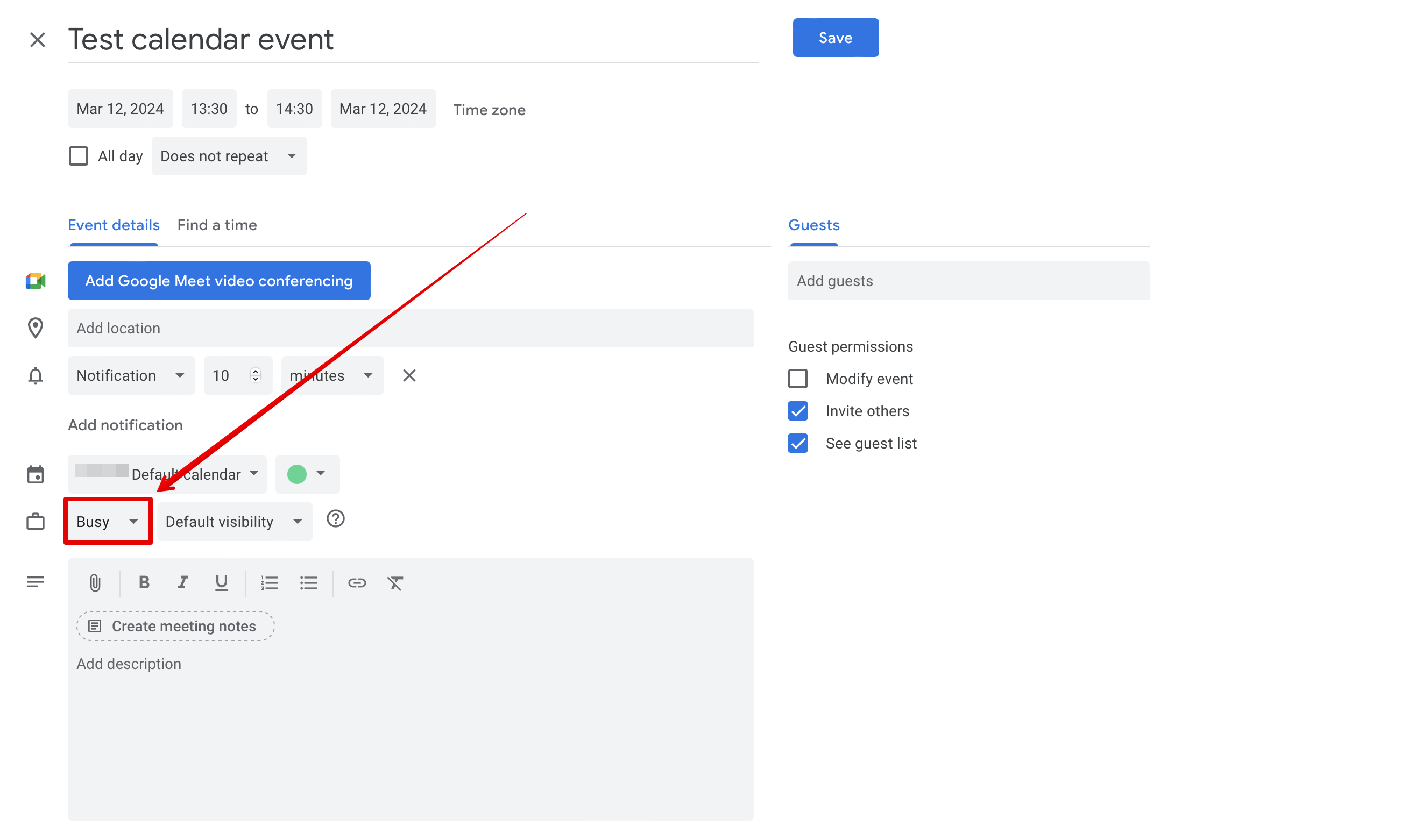
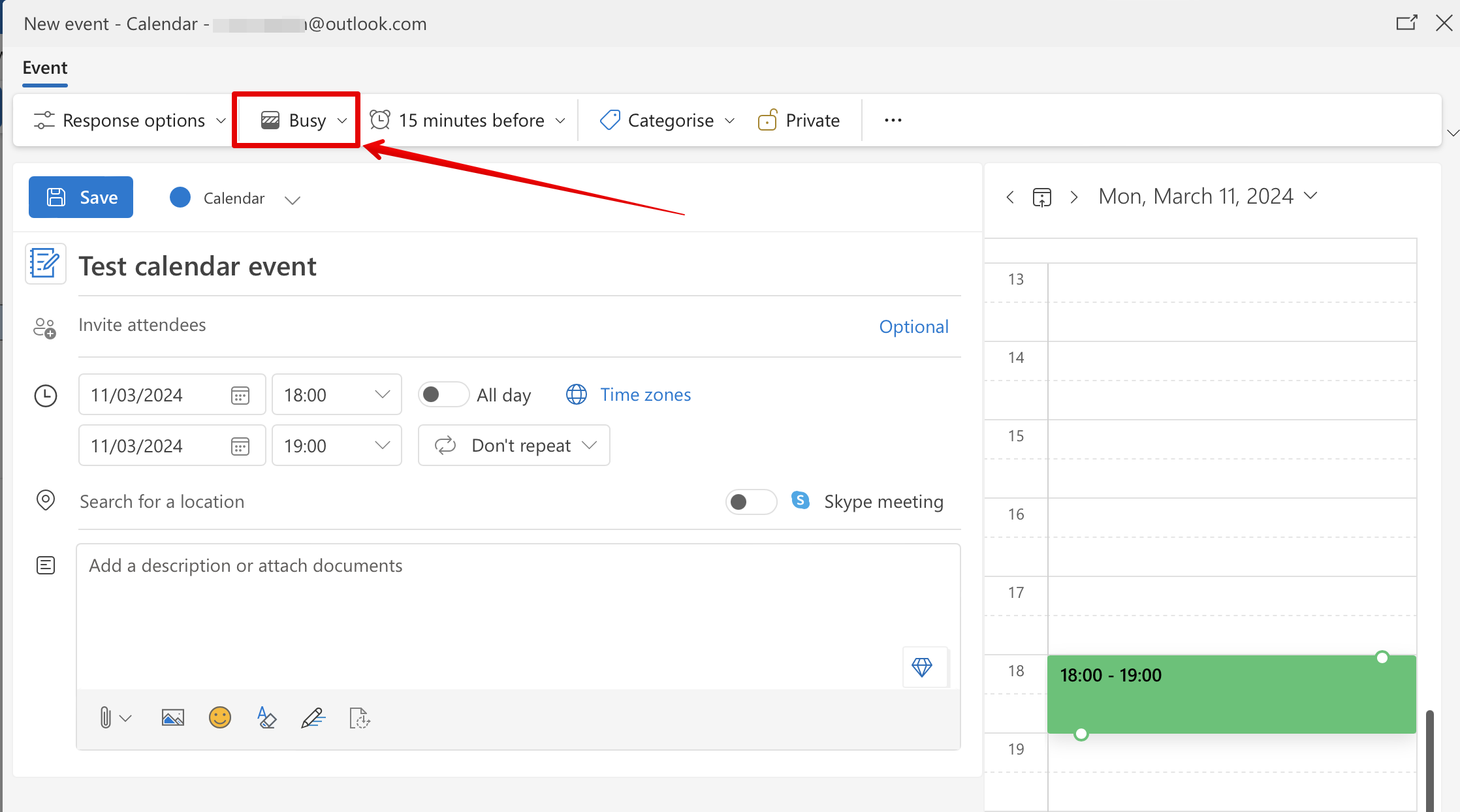
- 5. Google-agenda-afspraken moeten worden gemarkeerd als 'bezet' voor tweerichtingssynchronisatie. Outlook-agenda-afspraken mogen niet worden gemarkeerd als 'vrij' om tijden op de boekingspagina te blokkeren.
Voorbeeld uit Google-agenda:
Voorbeeld uit Outlook-agenda:
SimplyBook.me-evenementen worden twee keer weergegeven in Google Agenda
Dit kan komen door de instelling van Google Agenda om automatisch evenementen uit uw e-mails toe te voegen. Als u bevestigingsmails met boekingsgegevens ontvangt, voegt Google deze automatisch toe aan uw agenda. Om deze optie uit te schakelen: klik op het pictogram Instellingen in de rechterbovenhoek van Google Agenda//Instellingen en schakel het selectievakje naast de optie "Evenementen uit Gmail automatisch toevoegen aan mijn agenda" uit.
