From SimplyBook.me
Created page with ";Sådan bruges :1. Aktivér funktionen Afbestillingspolitik på siden Brugerdefinerede funktioner. 1200px| center|link=https://help.simplybook.me/images/e/ec/Cancellation_policy_enable_path_redesigned.png <br><br> :2. Gå til indstillingerne til højre. File:Cancellation poilicy settings path redesigned.png|1200px | center|link=https://help.simplybook.me/images/f/f9/Cancellation_poilicy_settings_path_redesigned.pn..." Tags: Mobile edit Mobile web edit |
No edit summary |
||
| (One intermediate revision by one other user not shown) | |||
| Line 2: | Line 2: | ||
{{#seo: | {{#seo: | ||
|title=Cancellation Policy custom feature - SimplyBook.me | |title=Cancellation Policy custom feature - SimplyBook.me | ||
|beskrivelse= | |beskrivelse=Indstil aflysningsfrister før aftaler. Begræns eller forbyd aflysninger inden for X timer. Beskyt omsætningen mod aflysninger i sidste øjeblik. Gratis fun... | ||
|titlemode=append | |titlemode=append | ||
|keywords=faq, frequently asked questions, booking software, appointment system questions, appointments online, calendar software, booking system, booking calendar, scheduling software, online appointment scheduling, online scheduling, plugins, custom features, cancellations, prohibit booking cancellation, prohibit appointment cancellation, do not allow cancellations, set cancellation time, cancel booking, cancel appointment | |keywords=faq, frequently asked questions, booking software, appointment system questions, appointments online, calendar software, booking system, booking calendar, scheduling software, online appointment scheduling, online scheduling, plugins, custom features, cancellations, prohibit booking cancellation, prohibit appointment cancellation, do not allow cancellations, set cancellation time, cancel booking, cancel appointment | ||
Latest revision as of 16:41, 5 February 2026

Du kan begrænse det tidsrum, hvor kunder kan aflyse aftaler, ved hjælp af den tilpassede funktion Afbestillingspolitik. Du skal blot angive det antal timer før aftalen, hvor aflysning er mulig, eller helt forbyde aflysninger. Hvis en kunde forsøger at aflyse en aftale efter fristen, vil vedkommende se en advarsel om, at bookingen ikke kan aflyses.
Gratis tilpasningsfunktion!
- Sådan bruges
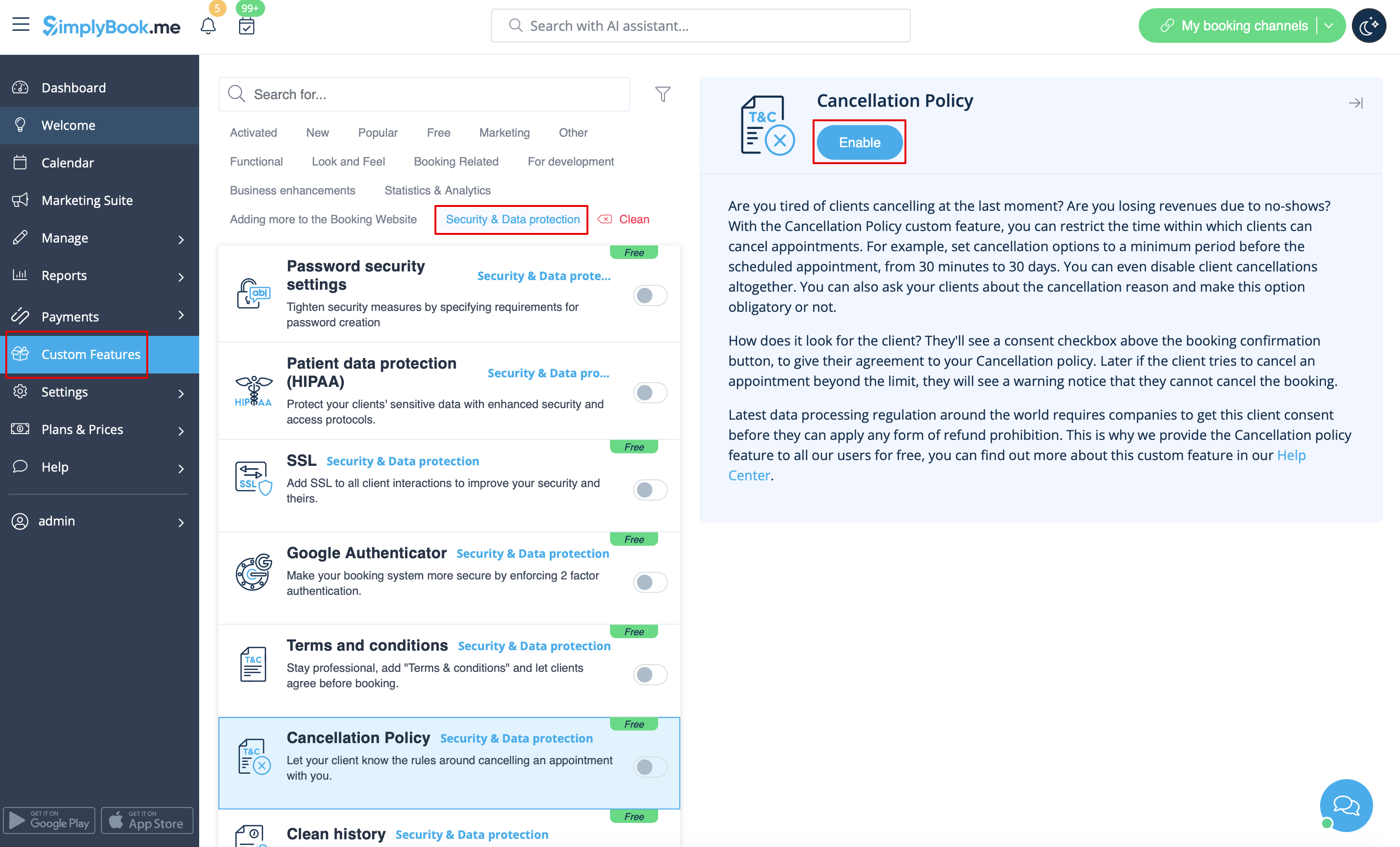
- 1. Aktivér funktionen Afbestillingspolitik på siden Brugerdefinerede funktioner.
- 2. Gå til indstillingerne til højre.
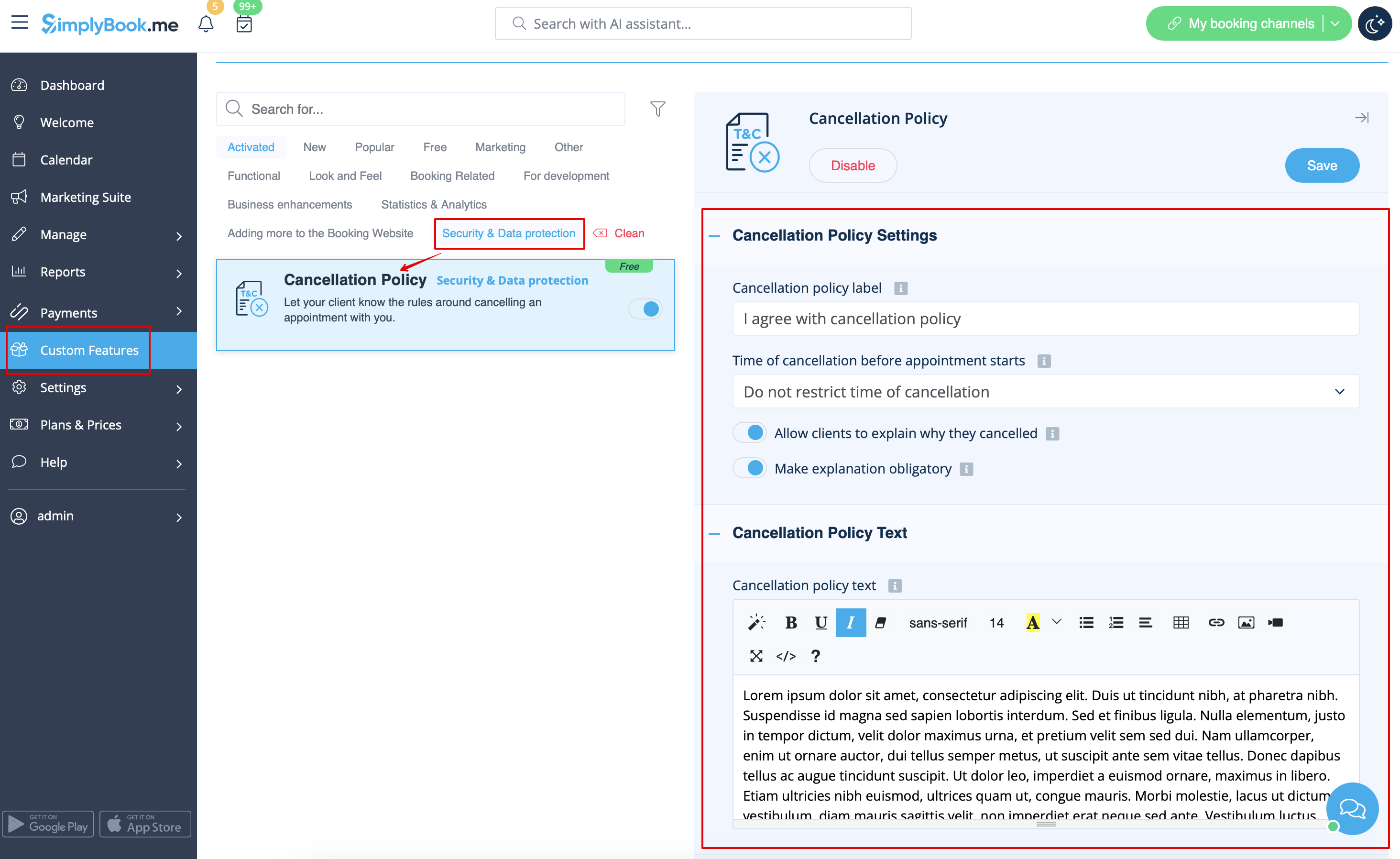
- 3. Tilføj din tekst i det relevante felt og vælg den periode, hvor bookinger kan afbestilles
- (du kan bruge HTML-tags til at formatere teksten efter dine behov).
- 4. Du kan også spørge dine kunder om årsagen til afbestillingen og gøre denne mulighed obligatorisk eller ej.

