From SimplyBook.me
Created page with "<br><br> :<span style="background-color:#ffe9e9; padding:5px; border-radius:5px;">'''Remarque importante :'''</span> *<span style="background-color:#ffe9e9; padding:5px; border-radius:5px;">Les clients peuvent uniquement modifier la date et/ou l'heure du rendez-vous ;</span> *<span style="background-color:#ffe9e9; padding:5px; border-radius:5px;">Si vous avez activé la fonctionnalité personnalisée</span> «<span style="background-color:#ffe9e9; padding:5px; border-rad..." |
No edit summary |
||
| Line 5: | Line 5: | ||
*<span style="background-color:#ffe9e9; padding:5px; border-radius:5px;">Cette fonctionnalité n'est pas compatible avec la fonctionnalité personnalisée « <span style="background-color:#cdeffc; padding:5px; border-radius:5px;">[[Special:MyLanguage/Approve_Bookings_custom_feature|Approuver les réservations]]</span> » ;</span> | *<span style="background-color:#ffe9e9; padding:5px; border-radius:5px;">Cette fonctionnalité n'est pas compatible avec la fonctionnalité personnalisée « <span style="background-color:#cdeffc; padding:5px; border-radius:5px;">[[Special:MyLanguage/Approve_Bookings_custom_feature|Approuver les réservations]]</span> » ;</span> | ||
*<span style="background-color:#ffe9e9; padding:5px; border-radius:5px;">Il n'est pas possible de reprogrammer des rendez-vous récurrents et groupés ;</span> | *<span style="background-color:#ffe9e9; padding:5px; border-radius:5px;">Il n'est pas possible de reprogrammer des rendez-vous récurrents et groupés ;</span> | ||
*<span style="background-color:#ffe9e9; padding:5px; border-radius:5px;">Si <span style="background-color:#cdeffc; padding:5px; border-radius:5px;">[[Special:MyLanguage/Coupons_and_Gift_Cards_custom_feature|une carte cadeau | *<span style="background-color:#ffe9e9; padding:5px; border-radius:5px;">Si <span style="background-color:#cdeffc; padding:5px; border-radius:5px;">[[Special:MyLanguage/Coupons_and_Gift_Cards_custom_feature|une carte cadeau]]</span> ou <span style="background-color:#cdeffc; padding:5px; border-radius:5px;">[[Special:MyLanguage/Membership_custom_feature|un abonnement]]</span> a été utilisé lors du processus de réservation initial, il n'est pas possible de reprogrammer par le client ;</span> | ||
*<span style="background-color:#ffe9e9; padding:5px; border-radius:5px;">Si <span style="background-color:#cdeffc; padding:5px; border-radius:5px;">[[Special:MyLanguage/Coupons_and_Gift_Cards_custom_feature|un coupon]]</span> sans restrictions de durée de campagne a été utilisé lors du processus de réservation, il peut être possible de reprogrammer depuis le côté client;</span> | |||
*<span style="background-color:#ffe9e9; padding:5px; border-radius:5px;">Certaines <span style="background-color:#cdeffc; padding:5px; border-radius:5px;">[[Special:MyLanguage/How_to_change_the_way_time_slots_are_shown|dispositions du calendrier]]</span> changent sur la page de reprogrammation (''le prestataire flexible'' devient ''flexible''; ''le prestataire moderne'' devient ''moderne''; ''les cours hebdomadaires'' deviennent ''des créneaux hebdomadaires''; ''les cours quotidiens'' sont remplacés par ''modernes'').</span> | *<span style="background-color:#ffe9e9; padding:5px; border-radius:5px;">Certaines <span style="background-color:#cdeffc; padding:5px; border-radius:5px;">[[Special:MyLanguage/How_to_change_the_way_time_slots_are_shown|dispositions du calendrier]]</span> changent sur la page de reprogrammation (''le prestataire flexible'' devient ''flexible''; ''le prestataire moderne'' devient ''moderne''; ''les cours hebdomadaires'' deviennent ''des créneaux hebdomadaires''; ''les cours quotidiens'' sont remplacés par ''modernes'').</span> | ||
<br><br> | <br><br> | ||
Latest revision as of 11:35, 13 January 2026
- Remarque importante :
- Les clients peuvent uniquement modifier la date et/ou l'heure du rendez-vous ;
- Si vous avez activé la fonctionnalité personnalisée « N'importe quel employé »et qu'elle a été utilisée lors du processus de réservation, le prestataire ne sera pas modifié lors de la reprogrammation du côté client. Si le changement de prestataire (ou une sélection aléatoire) est nécessaire, veuillez demander aux clients d'annuler et de réserver à nouveau.
- Cette fonctionnalité n'est pas compatible avec la fonctionnalité personnalisée « Approuver les réservations » ;
- Il n'est pas possible de reprogrammer des rendez-vous récurrents et groupés ;
- Si une carte cadeau ou un abonnement a été utilisé lors du processus de réservation initial, il n'est pas possible de reprogrammer par le client ;
- Si un coupon sans restrictions de durée de campagne a été utilisé lors du processus de réservation, il peut être possible de reprogrammer depuis le côté client;
- Certaines dispositions du calendrier changent sur la page de reprogrammation (le prestataire flexible devient flexible; le prestataire moderne devient moderne; les cours hebdomadaires deviennent des créneaux hebdomadaires; les cours quotidiens sont remplacés par modernes).
- Comment utiliser
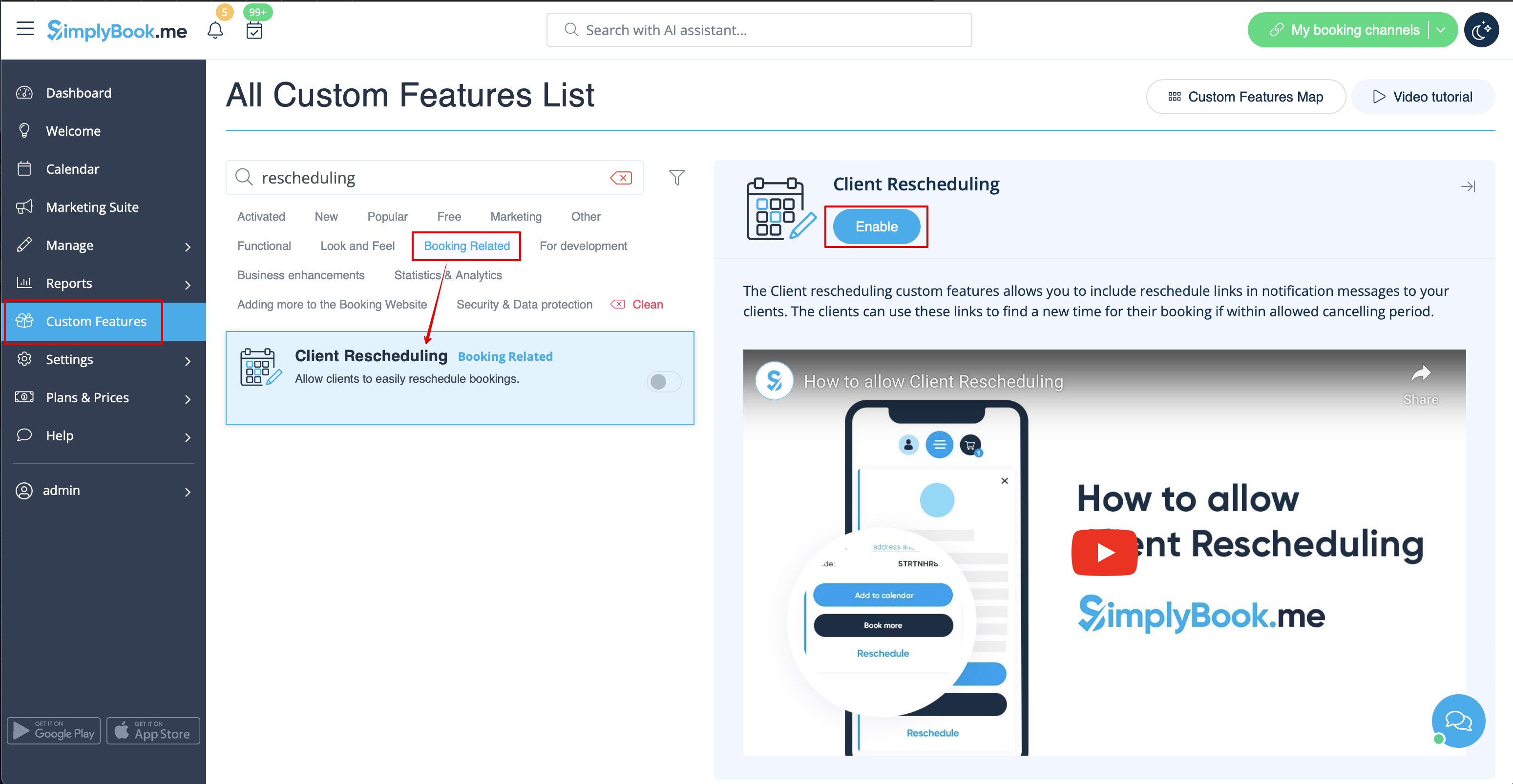
- 1. Activez la modification des rendez-vous par le client sur votre page Fonctionnalités personnalisées.
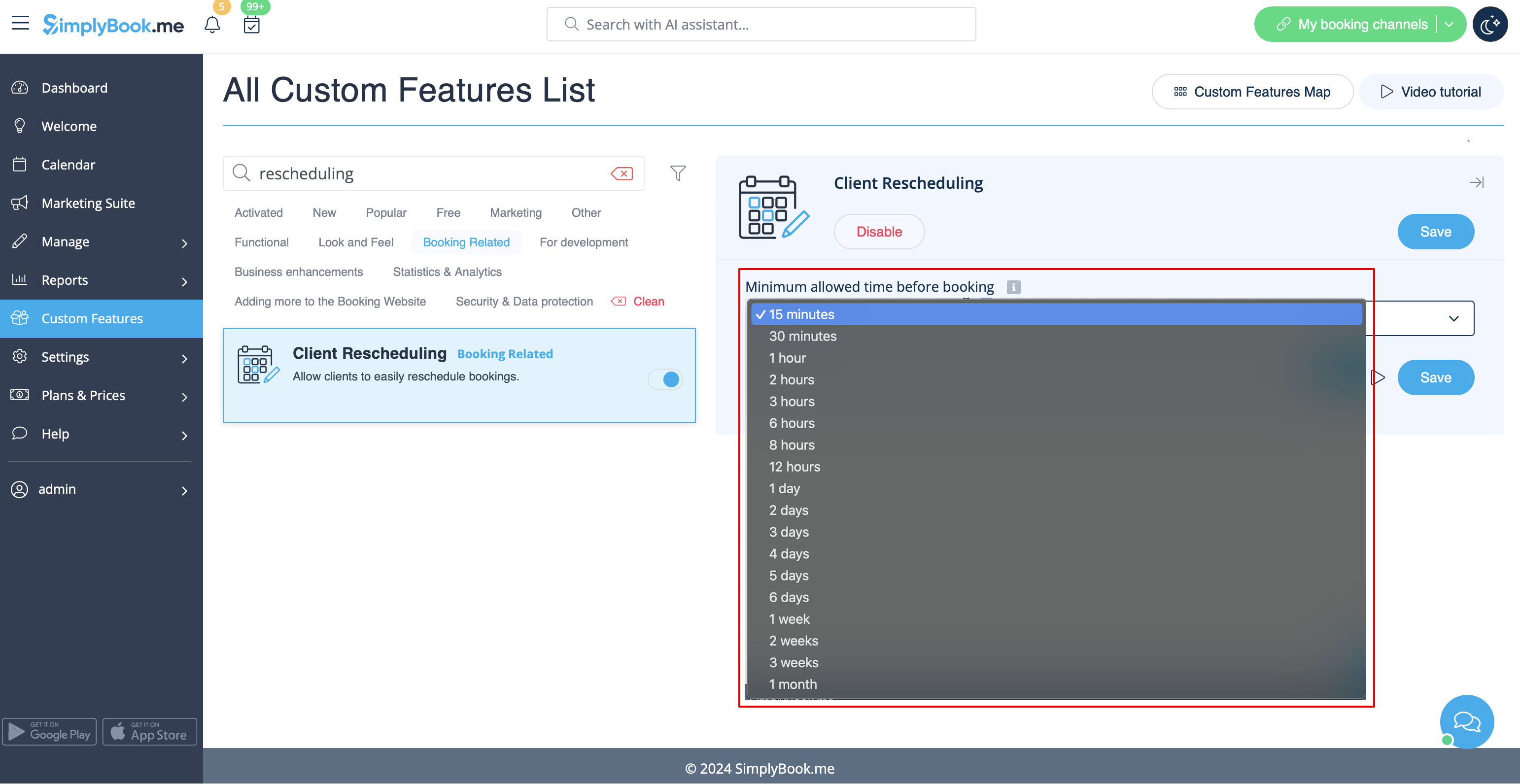
- 2. Sélectionnez la période de restriction de reprogrammation souhaitée dans ses paramètres.
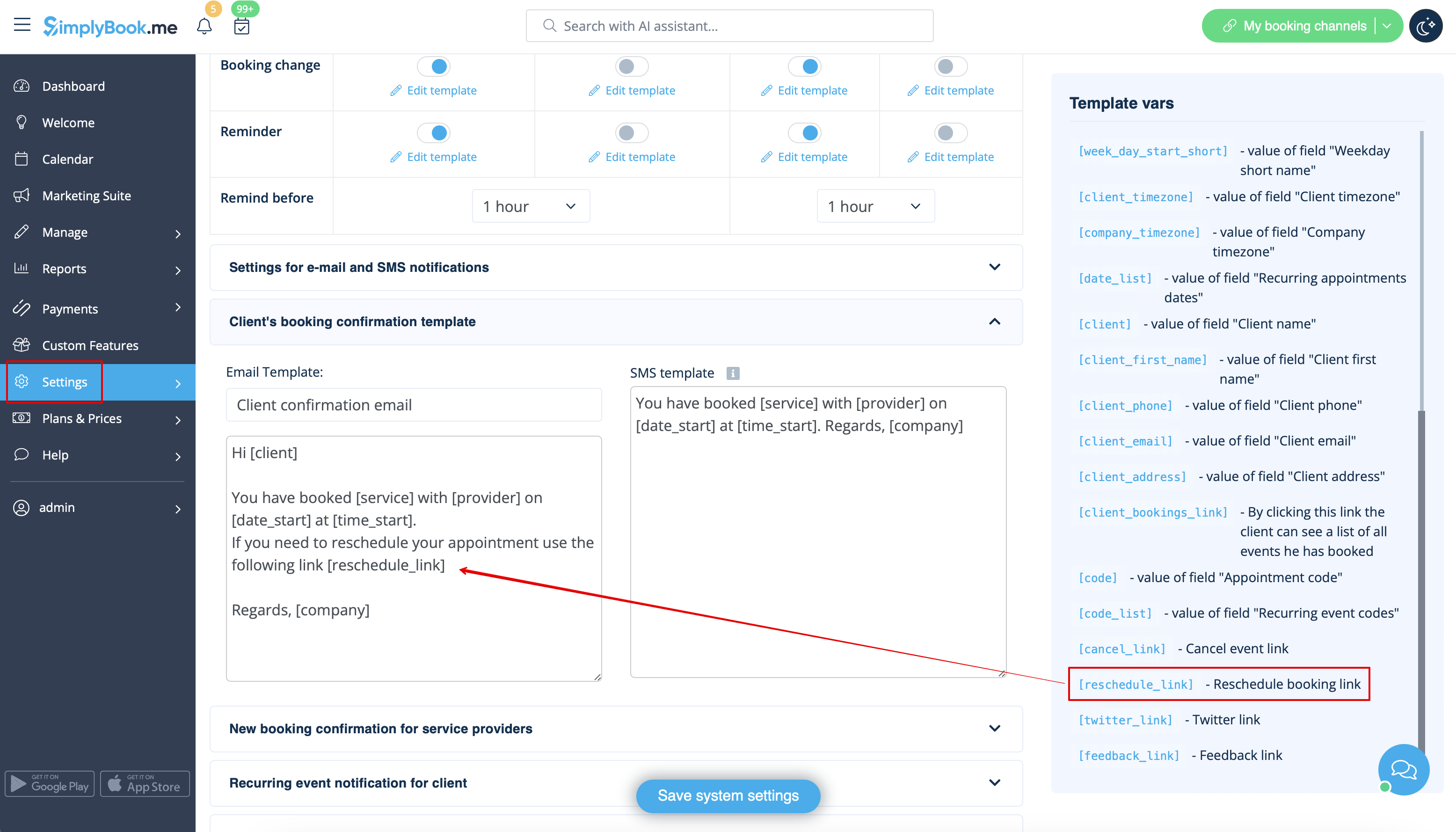
- 3. (facultatif) Ajoutez la variable [reschedule_link] aux notifications client dans Paramètres -> Paramètres e-mail et SMS(ou Paramètres de notifications flexibles si vous disposez de modèles personnalisés par service/prestataire).
- 4. Les clients pourront ainsi utiliser le bouton « Reschedule » (Reprogrammer) sur la page « My Bookings » (Mes réservations) du site de réservation ou via le lien figurant dans les notifications par e-mail.


