Created page with "Brugerdefineret CSS-funktion" Tags: Mobile edit Mobile web edit |
No edit summary |
||
| (5 intermediate revisions by 2 users not shown) | |||
| Line 2: | Line 2: | ||
{{#seo: | {{#seo: | ||
|title=Custom Features - SimplyBook.me | |title=Custom Features - SimplyBook.me | ||
|description=Tilføj brugerdefineret CSS for at ændre bookingsidens udseende. Skift farver, skrifttyper og layouts. Avanceret styling for udviklere. Skjul elementer og tilpas designet. Gratis funktion. | |||
|description= | |||
|titlemode=append | |titlemode=append | ||
|keywords=faq, frequently asked questions, booking software, appointment system questions, appointments online, calendar software, booking system, booking calendar, scheduling software, online appointment scheduling, online scheduling, plugins, custom features, CSS, adjusting design, adjusting colors, adjusting font, adjusting look, CSS coding | |keywords=faq, frequently asked questions, booking software, appointment system questions, appointments online, calendar software, booking system, booking calendar, scheduling software, online appointment scheduling, online scheduling, plugins, custom features, CSS, adjusting design, adjusting colors, adjusting font, adjusting look, CSS coding | ||
| Line 10: | Line 8: | ||
<br> | <br> | ||
[[File:Custom css new icon.png |left]] | [[File:Custom css new icon.png |left]] | ||
<div | <div class="mw-translate-fuzzy"> | ||
Lav din egen bookinggrænseflade med denne CSS-tilpasningsfunktion. Den giver mulighed for at ændre stilen på forskellige elementer, skjule dem, ændre skrifttyper, farver, skriftstørrelser osv. Hvis du kender CSS-kodning, kan du bruge browserens værktøjer til at finde identifikatorer for elementer og skrive regler i indstillingerne for tilpasningsfunktionen. Hvis du ikke har indgående kendskab til CSS, kan du kontakte support, som vil forsøge at finde den bedste løsning til dig. | |||
<br><br> | <br><br> | ||
<span style="background-color: #26dd7d; padding:5px; border-radius:5px;"> | Bemærk venligst! <br>Et stort antal eller komplekse CSS-forespørgsler kan blive betragtet som opsætningshjælp, og du kan blive bedt om at købe "Opsætningshjælp"-muligheden for yderligere CSS-kodeopsætning. Dette er et betalt tilbud, som du kan finde under Planer & priser → Ekstra elementer → Timebaseret assistance. <br>For at planlægge et opkald til evaluering af opsætningshjælp, klik venligst på [https://bigaccounts.simplybook.it/v2/#book/service/3/count/1 følgende link]: | ||
<span style="background-color: #26dd7d; padding:5px; border-radius:5px;">Gratis tilpasset funktion!</span> | |||
<br><br> | <br><br> | ||
; | </div> | ||
:1. | |||
;Sådan bruges | |||
:1. Aktivér denne indstilling på siden Tilpassede funktioner. | |||
[[File:Custom css enable path redesigned.png|1200px| center|link=https://help.simplybook.me/images/9/93/Custom_css_enable_path_redesigned.png]] | [[File:Custom css enable path redesigned.png|1200px| center|link=https://help.simplybook.me/images/9/93/Custom_css_enable_path_redesigned.png]] | ||
<br><br> | <br><br> | ||
:2. | :2. Klik på "Indstillinger" for denne funktion. | ||
[[File:Custom css settings path redesigned.png|1200px | center|link=https://help.simplybook.me/images/3/35/Custom_css_settings_path_redesigned.png]] | [[File:Custom css settings path redesigned.png|1200px | center|link=https://help.simplybook.me/images/3/35/Custom_css_settings_path_redesigned.png]] | ||
<br><br> | <br><br> | ||
:3. | :3. Tilføj koden eller koderne for at justere stilarterne til fanen "CSS for reservationssider", hvis du ønsker at redigere reservationssiden<br> | ||
: | :eller "Widget CSS", hvis du redigerer widget på din hjemmeside. | ||
[[File:Custom css tabs redesigned.png|1200px| center|link=https://help.simplybook.me/images/1/1c/Custom_css_tabs_redesigned.png]] | [[File:Custom css tabs redesigned.png|1200px| center|link=https://help.simplybook.me/images/1/1c/Custom_css_tabs_redesigned.png]] | ||
<br><br> | <br><br> | ||
'''[[Special:MyLanguage/Remove_Elements_from_booking_page#Removing_with_Custom_CSS| | '''[[Special:MyLanguage/Remove_Elements_from_booking_page#Removing_with_Custom_CSS| Se de mest almindelige anmodninger om, hvordan du fjerner elementer med CSS her (telefon, e-mail-felter, sociale faner, vores tid osv.)]]''' | ||
<br><br> | <br><br> | ||
Latest revision as of 14:44, 13 February 2026

Lav din egen bookinggrænseflade med denne CSS-tilpasningsfunktion. Den giver mulighed for at ændre stilen på forskellige elementer, skjule dem, ændre skrifttyper, farver, skriftstørrelser osv. Hvis du kender CSS-kodning, kan du bruge browserens værktøjer til at finde identifikatorer for elementer og skrive regler i indstillingerne for tilpasningsfunktionen. Hvis du ikke har indgående kendskab til CSS, kan du kontakte support, som vil forsøge at finde den bedste løsning til dig.
Bemærk venligst!
Et stort antal eller komplekse CSS-forespørgsler kan blive betragtet som opsætningshjælp, og du kan blive bedt om at købe "Opsætningshjælp"-muligheden for yderligere CSS-kodeopsætning. Dette er et betalt tilbud, som du kan finde under Planer & priser → Ekstra elementer → Timebaseret assistance.
For at planlægge et opkald til evaluering af opsætningshjælp, klik venligst på følgende link:
Gratis tilpasset funktion!
- Sådan bruges
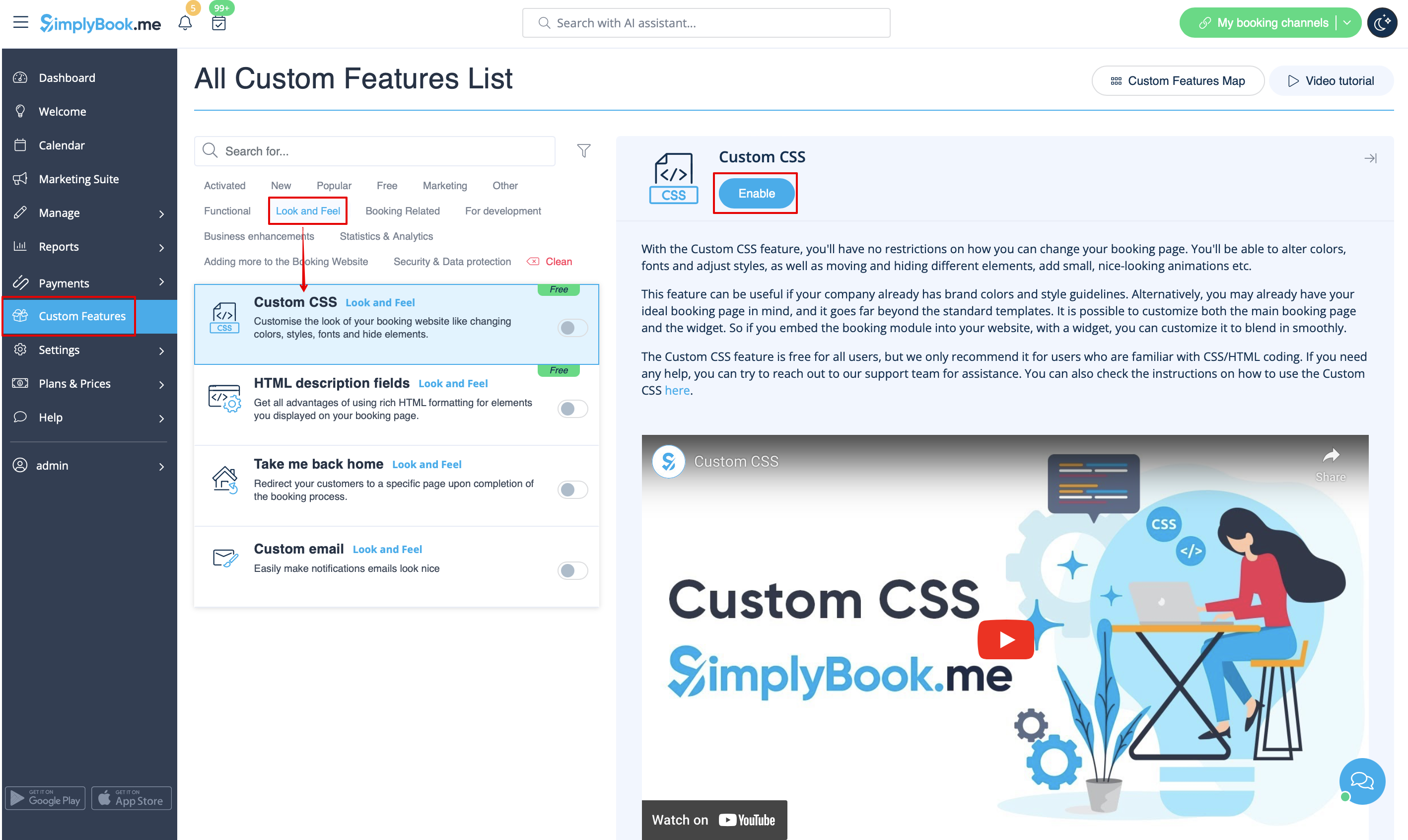
- 1. Aktivér denne indstilling på siden Tilpassede funktioner.
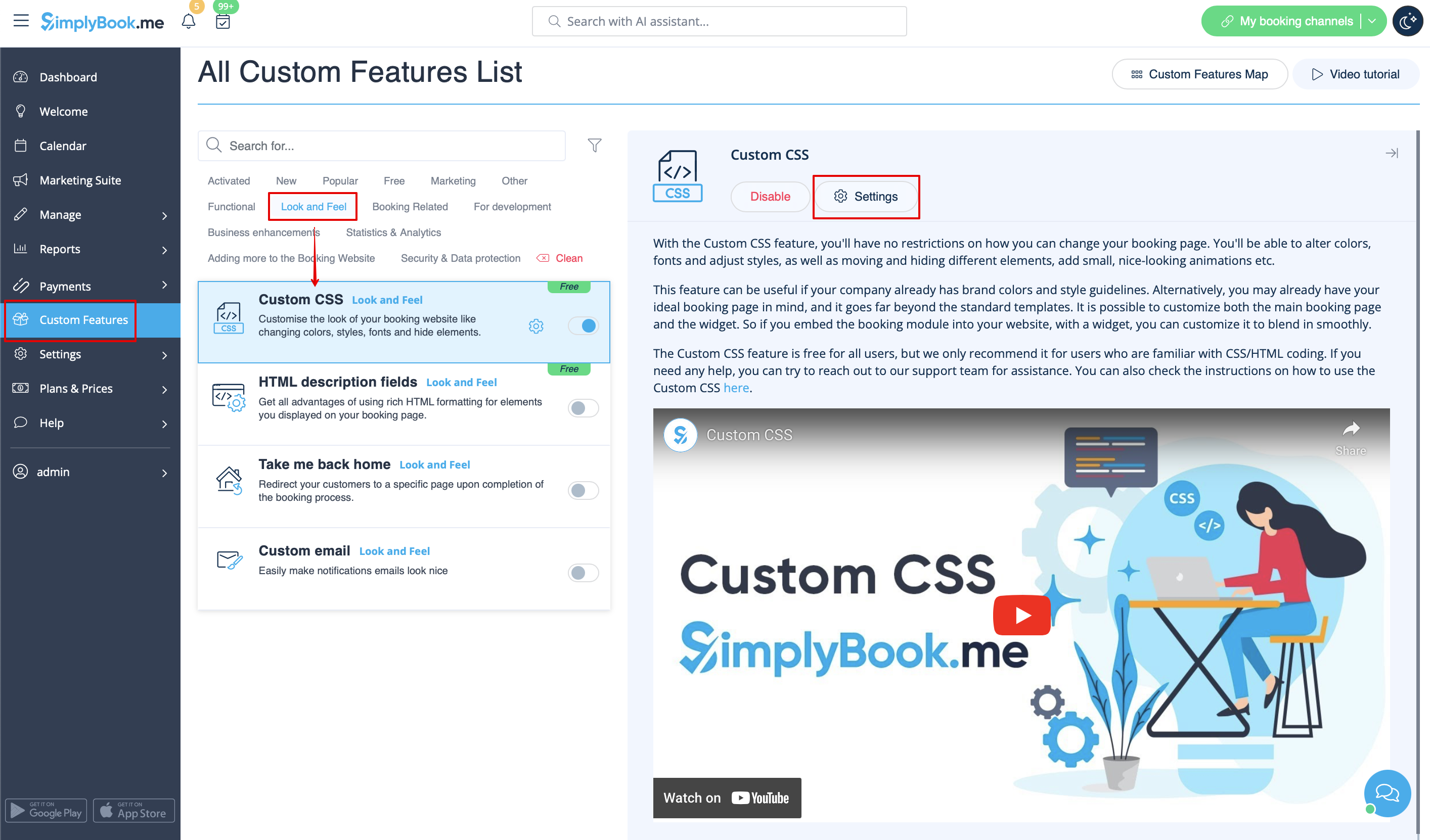
- 2. Klik på "Indstillinger" for denne funktion.
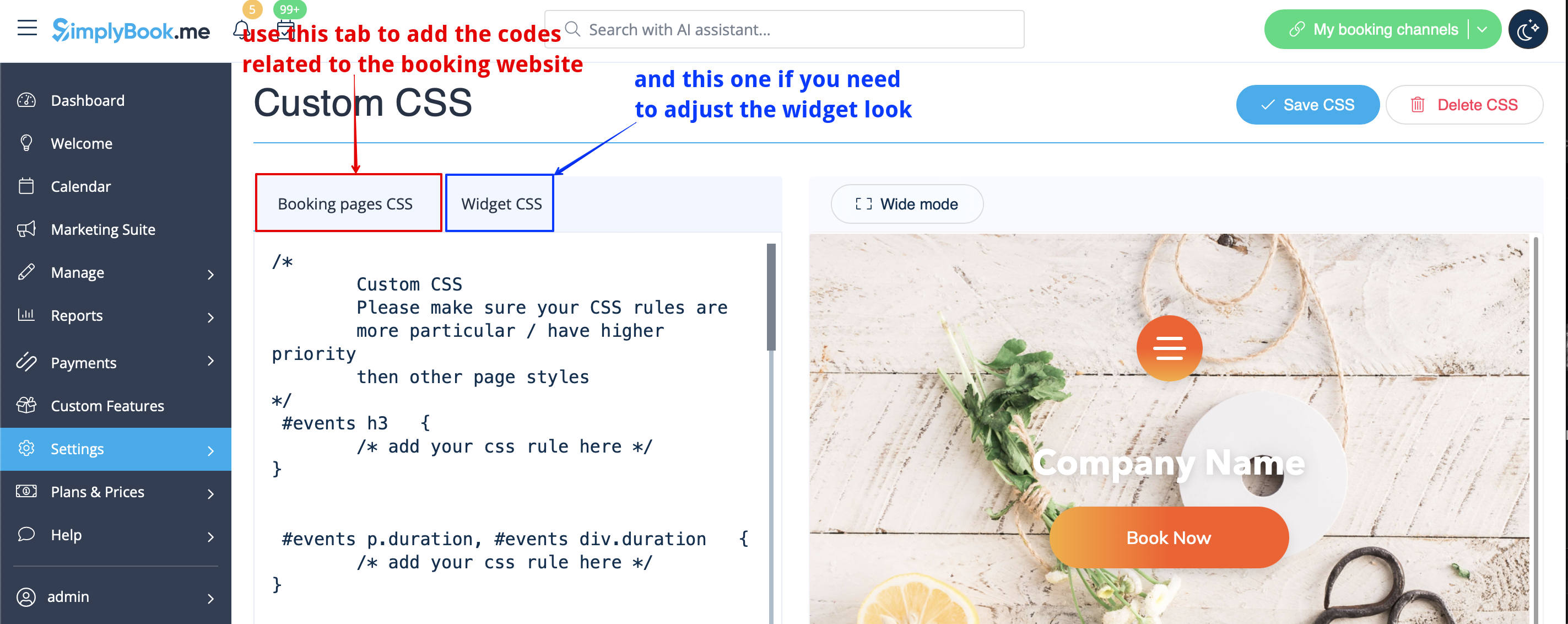
- 3. Tilføj koden eller koderne for at justere stilarterne til fanen "CSS for reservationssider", hvis du ønsker at redigere reservationssiden
- eller "Widget CSS", hvis du redigerer widget på din hjemmeside.