From SimplyBook.me
Created page with "left<br><br>Показує, скільки місць залишилося, коли ви приймаєте декількох клієнтів на один слот, наприклад, для класів та подій. Ви також можете вибрати, чи показувати загальну кількість місць, а також кількість вільних місць. <br><br> <br><br> '''Зверніть у..." |
No edit summary |
||
| (One intermediate revision by the same user not shown) | |||
| Line 6: | Line 6: | ||
*Працює тільки для таких [[Special:MyLanguage/How_to_change_the_way_time_slots_are_shown#Calendar_Layouts|макетів календаря]]: слоти щотижня, сучасний, щотижневі та щоденні класи, сучасний постачальник. | *Працює тільки для таких [[Special:MyLanguage/How_to_change_the_way_time_slots_are_shown#Calendar_Layouts|макетів календаря]]: слоти щотижня, сучасний, щотижневі та щоденні класи, сучасний постачальник. | ||
*Час, заблокований [[Special:MyLanguage/Calendar_Sync_custom_feature|синхронізацією календаря]], не впливає на кількість слотів. | *Час, заблокований [[Special:MyLanguage/Calendar_Sync_custom_feature|синхронізацією календаря]], не впливає на кількість слотів. | ||
*Якщо ви активуєте цю функцію разом із [[Special:MyLanguage/Any Employee Selector custom feature|Будь-який співробітник]] та [[Special:MyLanguage/Appointment at Fixed Time custom feature|Запис на фіксований час]] (з інтервалом, коротшим за тривалість послуги), кількість доступних місць може відображатися некоректно, якщо до тієї самої послуги прив’язано кількох надавачів. | |||
<br><br> | <br><br> | ||
:Відеоінструкція доступна | :Відеоінструкція доступна <p><youtube>Dn0tNJhOToE</youtube></p> | ||
<br><br> | <br><br> | ||
;Як користуватися | ;Як користуватися | ||
Latest revision as of 07:41, 2 October 2025

Показує, скільки місць залишилося, коли ви приймаєте декількох клієнтів на один слот, наприклад, для класів та подій. Ви також можете вибрати, чи показувати загальну кількість місць, а також кількість вільних місць.
Зверніть увагу!
- Ця функція не сумісна з обмеженням бронювань;
- Працює тільки для таких макетів календаря: слоти щотижня, сучасний, щотижневі та щоденні класи, сучасний постачальник.
- Час, заблокований синхронізацією календаря, не впливає на кількість слотів.
- Якщо ви активуєте цю функцію разом із Будь-який співробітник та Запис на фіксований час (з інтервалом, коротшим за тривалість послуги), кількість доступних місць може відображатися некоректно, якщо до тієї самої послуги прив’язано кількох надавачів.
- Відеоінструкція доступна
- Як користуватися
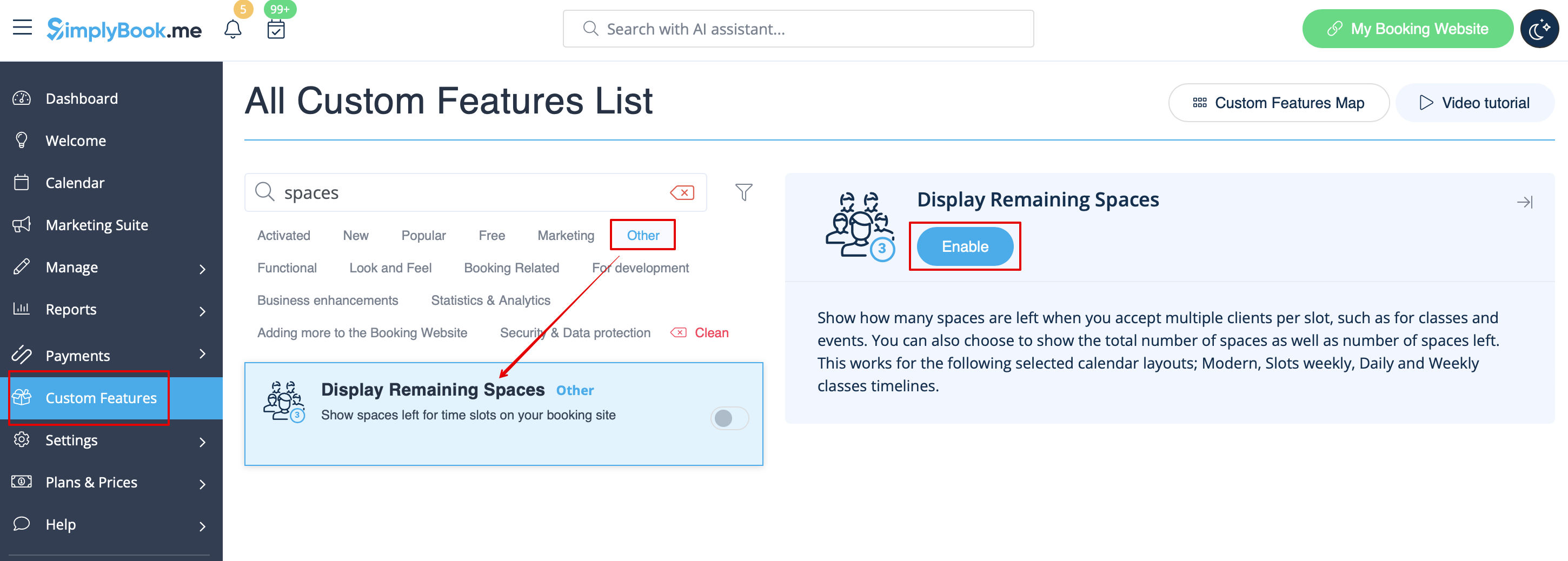
- 1. Увімкніть відображення вільних місць у розділі «Налаштування».
- 2. (опціонально) Увімкніть відповідну опцію, щоб відображати загальну кількість місць разом із залишковими.
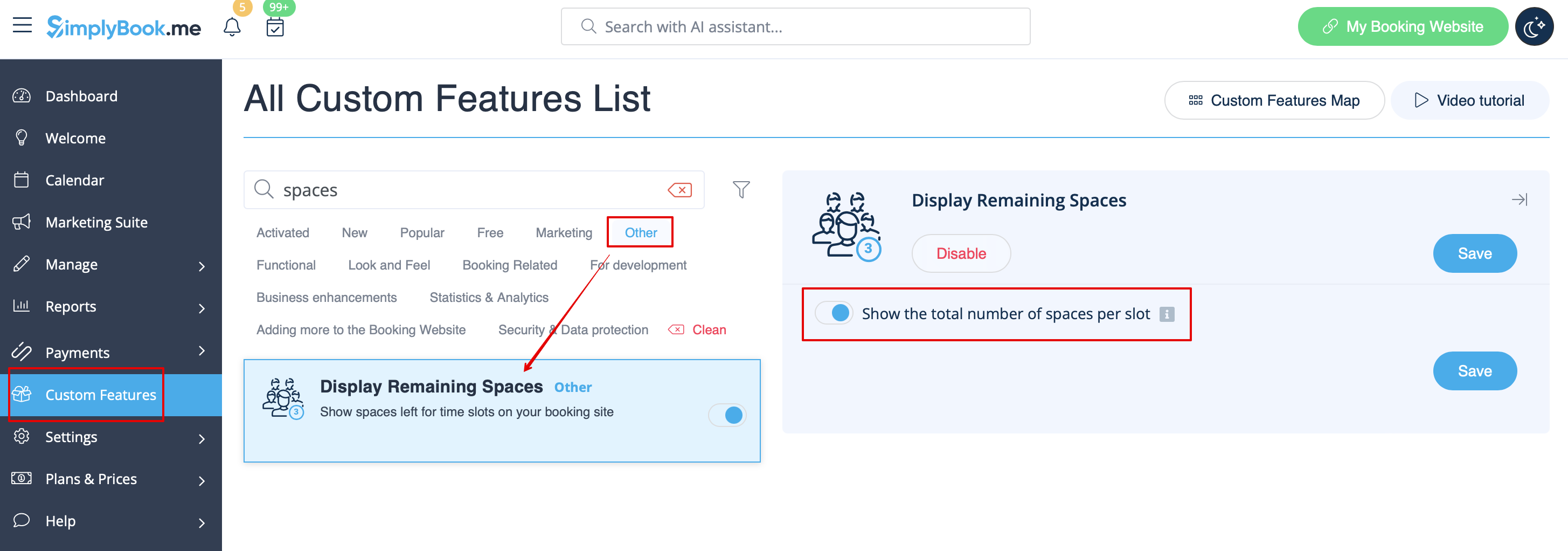
- 3. В результаті клієнти зможуть бачити кількість місць, що залишилися для кожного часового слоту (а також загальну кількість, якщо увімкнено опцію «Show the total number of spaces per slot»).

