From SimplyBook.me
No edit summary |
No edit summary |
||
| (One intermediate revision by the same user not shown) | |||
| Line 1: | Line 1: | ||
<languages/> | <languages/> | ||
<translate> | <translate> | ||
<!--T:1--> | |||
{{#seo: | {{#seo: | ||
|title=Custom Features - SimplyBook.me | |title=Custom Features - SimplyBook.me | ||
|description=Organize | |description=Organize services into categories for easier client navigation. Create groups with titles, images, descriptions. Improve booking site structure and user expe... | ||
|titlemode=append | |titlemode=append | ||
|keywords=faq, frequently asked questions, booking software, appointment system questions, appointments online, calendar software, booking system, booking calendar, scheduling software, online appointment scheduling, online scheduling, plugins, custom features, additional functionality, categories, group services, create categories, services categories | |keywords=faq, frequently asked questions, booking software, appointment system questions, appointments online, calendar software, booking system, booking calendar, scheduling software, online appointment scheduling, online scheduling, plugins, custom features, additional functionality, categories, group services, create categories, services categories | ||
| Line 11: | Line 12: | ||
<!--T:2--> | |||
<br> | <br> | ||
[[File:Service category new icon.png | left]] | [[File:Service category new icon.png | left]] | ||
| Line 23: | Line 25: | ||
<!--T:3--> | |||
;How to use | ;How to use | ||
<!--T:4--> | |||
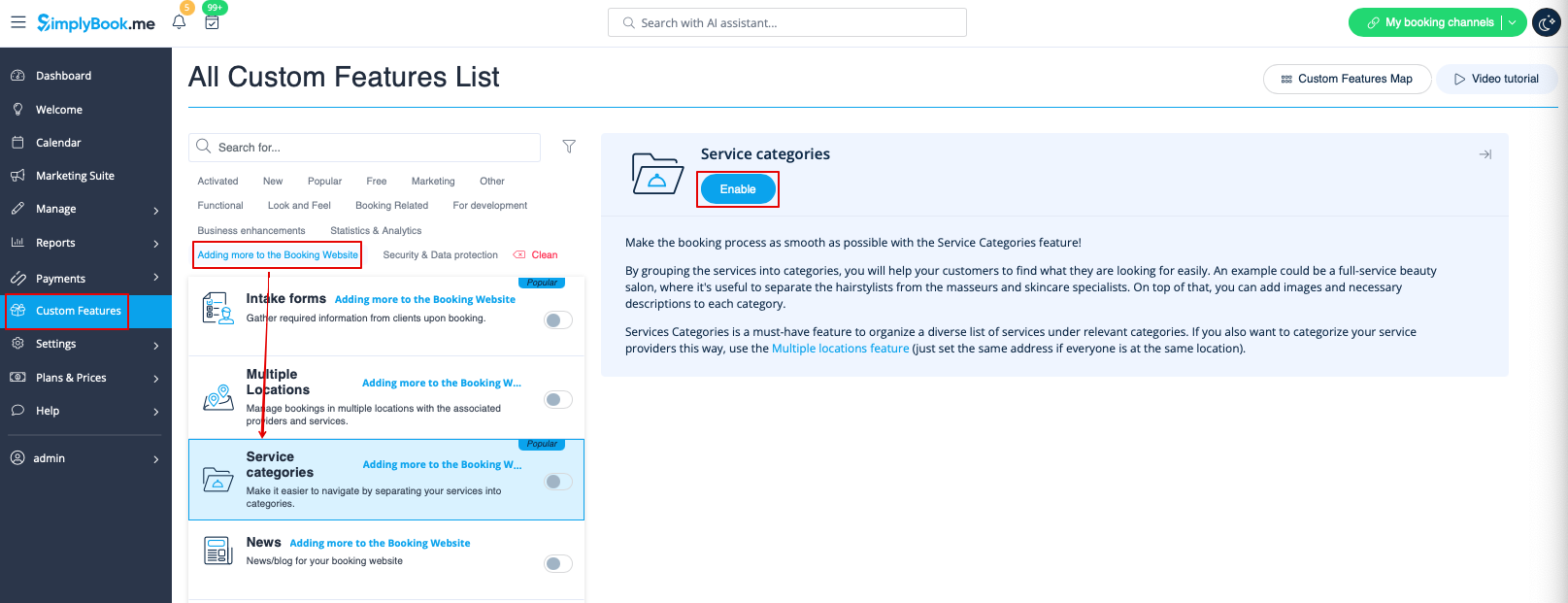
:1. Enable Service Categories custom feature in the Custom Feature section//Adding more to booking page. | :1. Enable Service Categories custom feature in the Custom Feature section//Adding more to booking page. | ||
[[File:Service categories enable path redesigned.png|1200px | center|link=https://help.simplybook.me/images/1/1b/Service_categories_enable_path_redesigned.png]] | [[File:Service categories enable path redesigned.png|1200px | center|link=https://help.simplybook.me/images/1/1b/Service_categories_enable_path_redesigned.png]] | ||
| Line 33: | Line 37: | ||
</translate> | </translate> | ||
<translate> | <translate> | ||
<!--T:5--> | |||
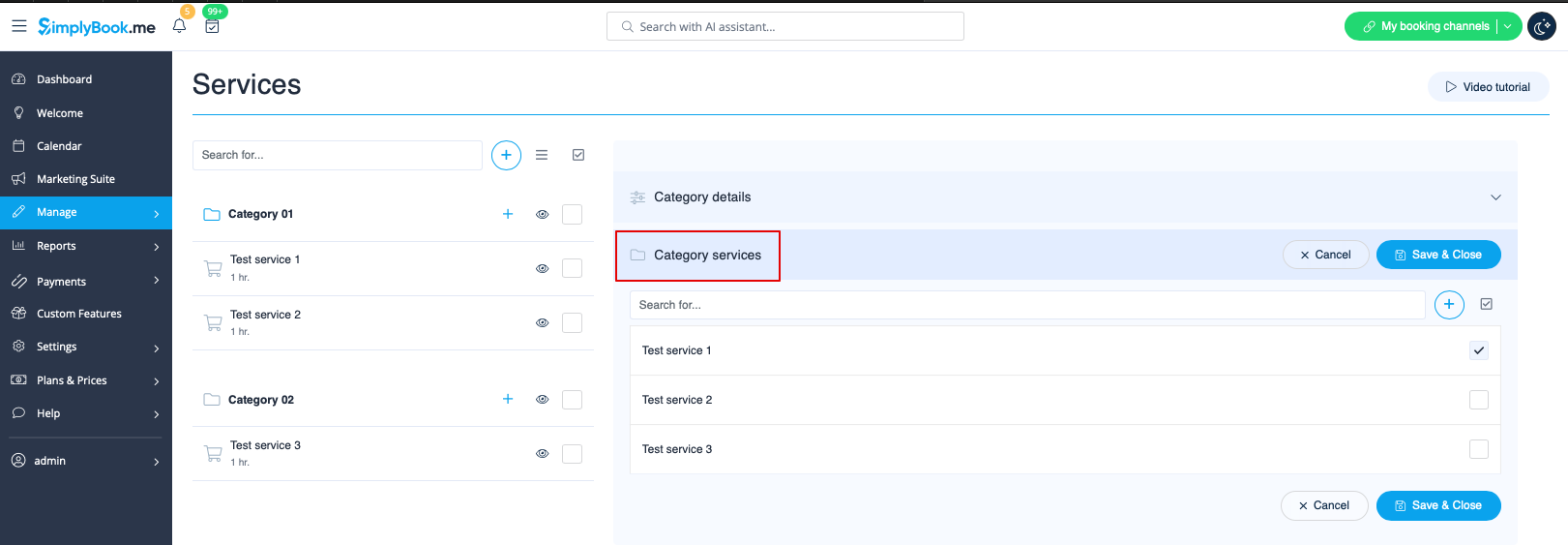
:3. Click on "Category details" tab of the category to edit any information. To connect services please choose "Category services" tab and check corresponding boxes. | :3. Click on "Category details" tab of the category to edit any information. To connect services please choose "Category services" tab and check corresponding boxes. | ||
[[File:Connect category to services redesinged.png|1200px | center|link=https://help.simplybook.me/images/9/96/Connect_category_to_services_redesinged.png]] | [[File:Connect category to services redesinged.png|1200px | center|link=https://help.simplybook.me/images/9/96/Connect_category_to_services_redesinged.png]] | ||
Latest revision as of 15:25, 4 February 2026

With the help of this Custom Feature you can create categories and group your services to make it easier and faster for your clients to find the necessary service.
- How to use
- 1. Enable Service Categories custom feature in the Custom Feature section//Adding more to booking page.
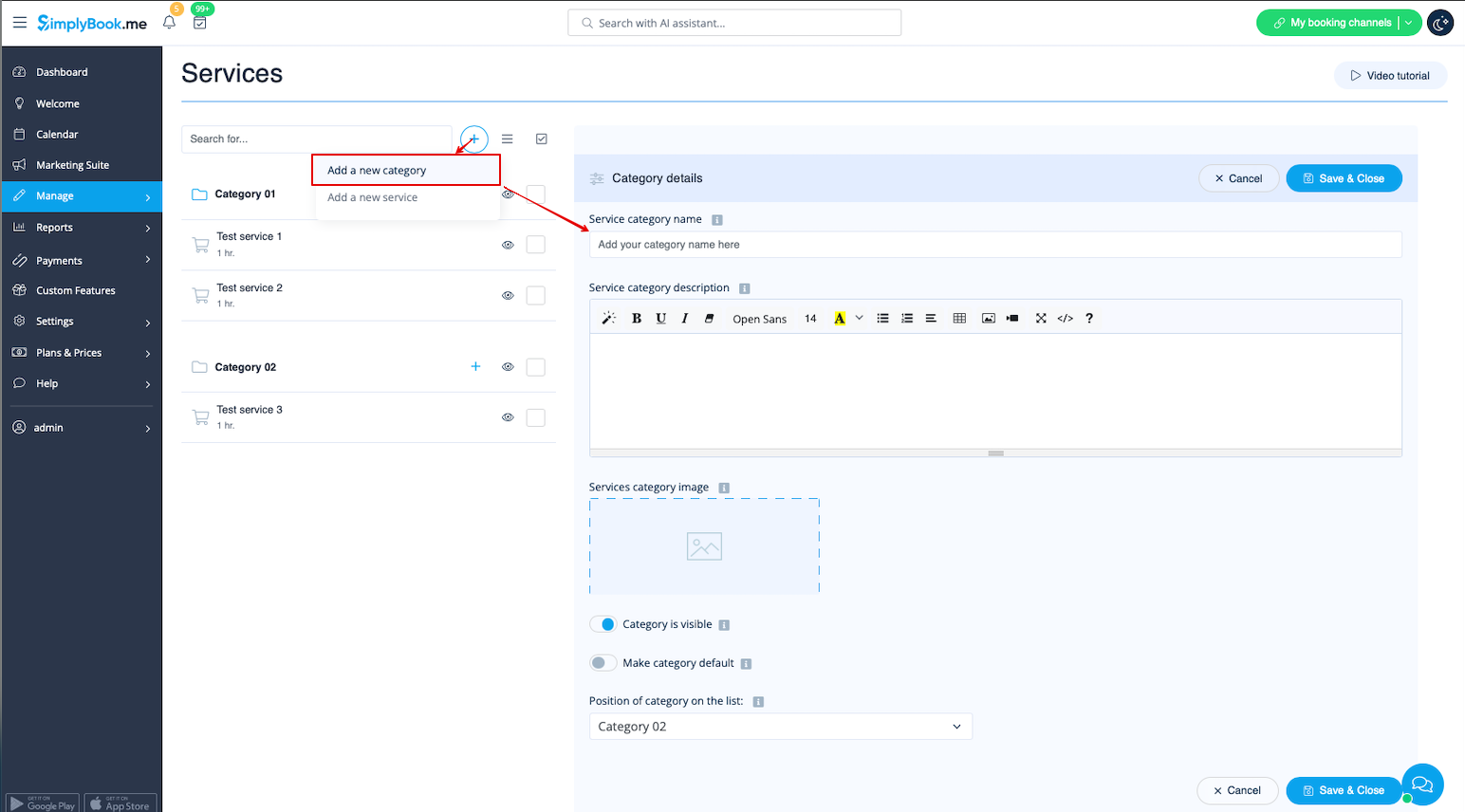
- 2. In Manage//Services click on "+" and choose "Add category" to create all necessary categories. Insert title, picture, description and assign services to category.
- 3. Click on "Category details" tab of the category to edit any information. To connect services please choose "Category services" tab and check corresponding boxes.
- 4. Here you can see how categories can look like on the booking page using one of the themes avilable.

