From SimplyBook.me
Created page with "Dans certaines conditions, il peut arriver qu'une période apparaisse comme disponible dans l'interface d'administration de votre entreprise, mais que ces créneaux horaires ne s'affichent pas sur le site web de réservation et ne puissent donc pas être réservés. Il s'agit d'une particularité du système et il n'existe actuellement aucun moyen de modifier son fonctionnement. <br><br>" |
No edit summary Tags: Mobile edit Mobile web edit |
||
| (5 intermediate revisions by 2 users not shown) | |||
| Line 1: | Line 1: | ||
<languages/> | <languages/> | ||
{{#seo: |title=Les créneaux horaires ne sont pas réservables - SimplyBook.me |description=Dépannage des créneaux | {{#seo: |title=Les créneaux horaires ne sont pas réservables - SimplyBook.me |description=Dépannage des créneaux non réservables. Corrigez les problèmes de configuration empêchant les réservations clients. Vérifiez les paramètres de réservation anticipée et la disponibilité des prestataires.|titlemode=ajouter |keywords=faq, foire aux questions, logiciel de réservation, questions sur le système de rendez-vous, rendez-vous en ligne, logiciel de calendrier, système de réservation, calendrier de réservation, logiciel de planification, planification de rendez-vous en ligne, planification en ligne, configuration, aide à la configuration, assistance, contenu d'aide }} | ||
| Line 6: | Line 6: | ||
Il s'agit d'une particularité du système et il n'existe actuellement aucun moyen de modifier son fonctionnement. | Il s'agit d'une particularité du système et il n'existe actuellement aucun moyen de modifier son fonctionnement. | ||
<br><br> | <br><br> | ||
;Conditions préalables : | |||
; | :1. <span style="background-color:#cdeffc; padding:5px; border-radius:5px;">[[Adding_services,_providers_and_availability(new_interface)#How_to_add_a_provider|Le ou les prestataires]]</span> sont configurés pour servir plusieurs clients à la fois. | ||
:1. <span style="background-color:#cdeffc; padding:5px; border-radius:5px;">[[Adding_services,_providers_and_availability(new_interface)#How_to_add_a_provider| | |||
[[File:Many clients per povider redesigned.png|1200px|border|center|link=https://help.simplybook.me/images/b/b0/Many_clients_per_povider_redesigned.png]] | [[File:Many clients per povider redesigned.png|1200px|border|center|link=https://help.simplybook.me/images/b/b0/Many_clients_per_povider_redesigned.png]] | ||
<br><br>:2. <span style="background-color:#cdeffc; padding:5px; border-radius:5px;">[[Need_to_change_interval_(timeframe)|La période]]</span> sélectionnée dans le système est inférieure à <span style="background-color:#cdeffc; padding:5px; border-radius:5px;">[[Adding_services,_providers_and_availability(new_interface)#How_to_set_service_duration|la durée du service]].</span> | |||
:Par exemple, vous avez sélectionné une période <span style="background-color:#d4f8e5; padding:5px; border-radius:5px;">de 10 minutes</span> et défini une durée de service <span style="background-color:#d4f8e5; padding:5px; border-radius:5px;">de 30 minutes</span>. | |||
:(Si ces deux périodes sont égales, ce cas ne peut pas se produire). | |||
<br><br> | <br><br> | ||
;Exemple de cas : | |||
*Les créneaux sont réservés de <span style="background-color:#d4f8e5; padding:5px; border-radius:5px;">12h00 à 12h30</span> et <span style="background-color:#d4f8e5; padding:5px; border-radius:5px;">de 12h40 à 13h10.</span> | |||
*Les créneaux sont réservés de <span style="background-color:#d4f8e5; padding:5px; border-radius:5px;">11h40 à 12h10</span> et <span style="background-color:#d4f8e5; padding:5px; border-radius:5px;">de 12h30 à 12h50.</span> | |||
*Il peut donc sembler que la période <span style="background-color:#d4f8e5; padding:5px; border-radius:5px;">de 12h10 à 12h40</span> est libre, mais en réalité, elle est représentée par deux créneaux horaires indépendants : <span style="background-color:#d4f8e5; padding:5px; border-radius:5px;">12h10-12h30</span> et <span style="background-color:#d4f8e5; padding:5px; border-radius:5px;">12h30-12h40</span>, il n'est donc pas possible de réserver 30 minutes de service à ce moment-là. | |||
* | |||
* | |||
[[File:Stairs redesigned.png|1200px|border|center|link=https://help.simplybook.me/images/b/b6/Stairs_redesigned.png]] | [[File:Stairs redesigned.png|1200px|border|center|link=https://help.simplybook.me/images/b/b6/Stairs_redesigned.png]] | ||
<br><br> | <br><br> | ||
comment éviter ce genre de cas : | |||
:1. Essayez si possible de faire correspondre la durée du service au créneau horaire | |||
:2. Utilisez une mise en page moderne pour le calendrier du site web de réservation et la fonctionnalité personnalisée « <span style="background-color:#cdeffc; padding:5px; border-radius:5px;">[[Custom_Features#Appointment_at_Fixed_Time|Rendez-vous à heure fixe]]</span> » pour limiter les décalages entre les créneaux horaires et éviter d'éventuels intervalles. | |||
:1. | |||
:2. | |||
<br><br><br><br> | <br><br><br><br> | ||
Latest revision as of 13:49, 16 February 2026
Dans certaines conditions, il peut arriver qu'une période apparaisse comme disponible dans l'interface d'administration de votre entreprise, mais que ces créneaux horaires ne s'affichent pas sur le site web de réservation et ne puissent donc pas être réservés.
Il s'agit d'une particularité du système et il n'existe actuellement aucun moyen de modifier son fonctionnement.
- Conditions préalables
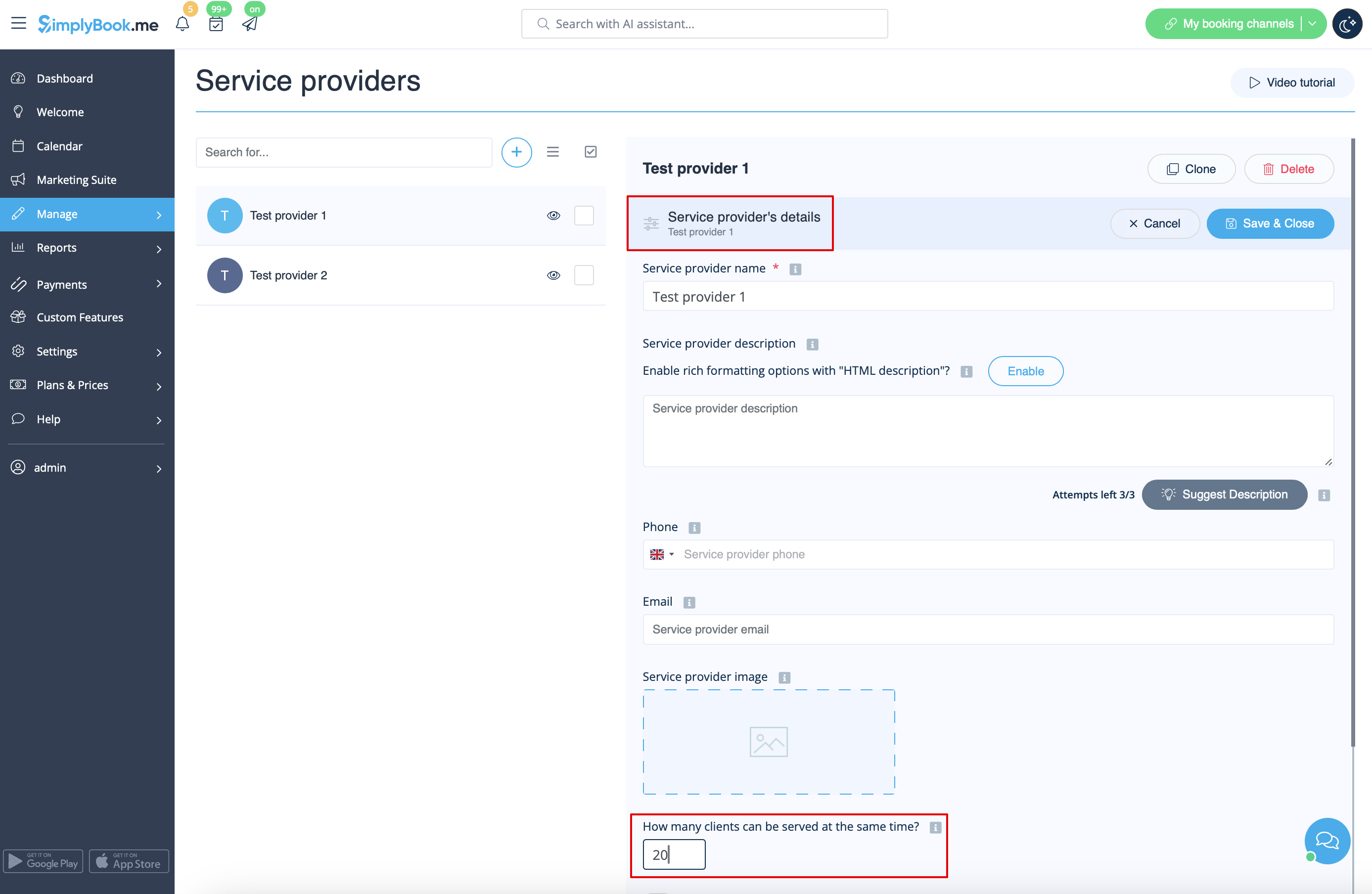
- 1. Le ou les prestataires sont configurés pour servir plusieurs clients à la fois.
:2. La période sélectionnée dans le système est inférieure à la durée du service.
- Par exemple, vous avez sélectionné une période de 10 minutes et défini une durée de service de 30 minutes.
- (Si ces deux périodes sont égales, ce cas ne peut pas se produire).
- Exemple de cas
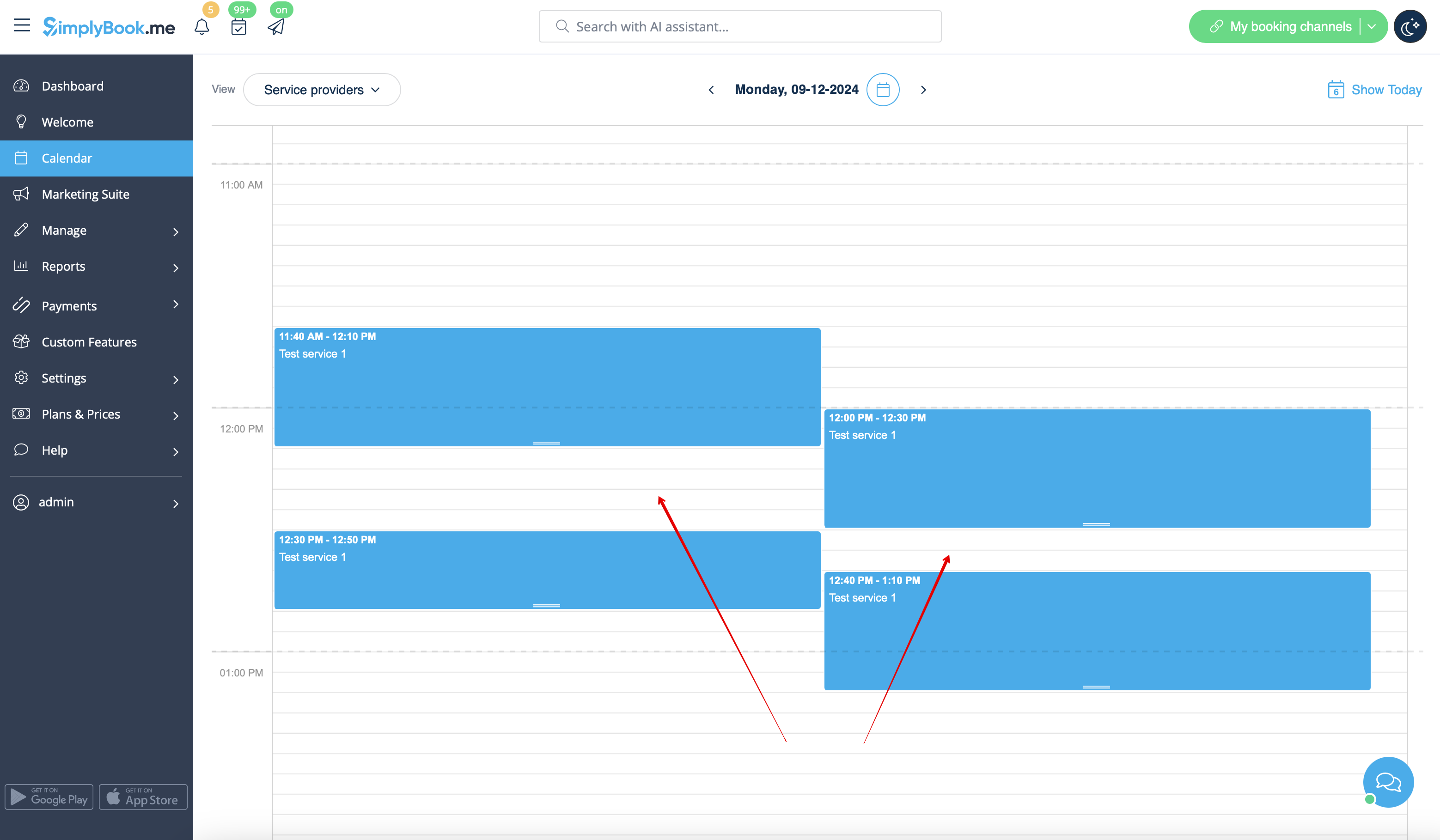
- Les créneaux sont réservés de 12h00 à 12h30 et de 12h40 à 13h10.
- Les créneaux sont réservés de 11h40 à 12h10 et de 12h30 à 12h50.
- Il peut donc sembler que la période de 12h10 à 12h40 est libre, mais en réalité, elle est représentée par deux créneaux horaires indépendants : 12h10-12h30 et 12h30-12h40, il n'est donc pas possible de réserver 30 minutes de service à ce moment-là.
comment éviter ce genre de cas :
- 1. Essayez si possible de faire correspondre la durée du service au créneau horaire
- 2. Utilisez une mise en page moderne pour le calendrier du site web de réservation et la fonctionnalité personnalisée « Rendez-vous à heure fixe » pour limiter les décalages entre les créneaux horaires et éviter d'éventuels intervalles.
