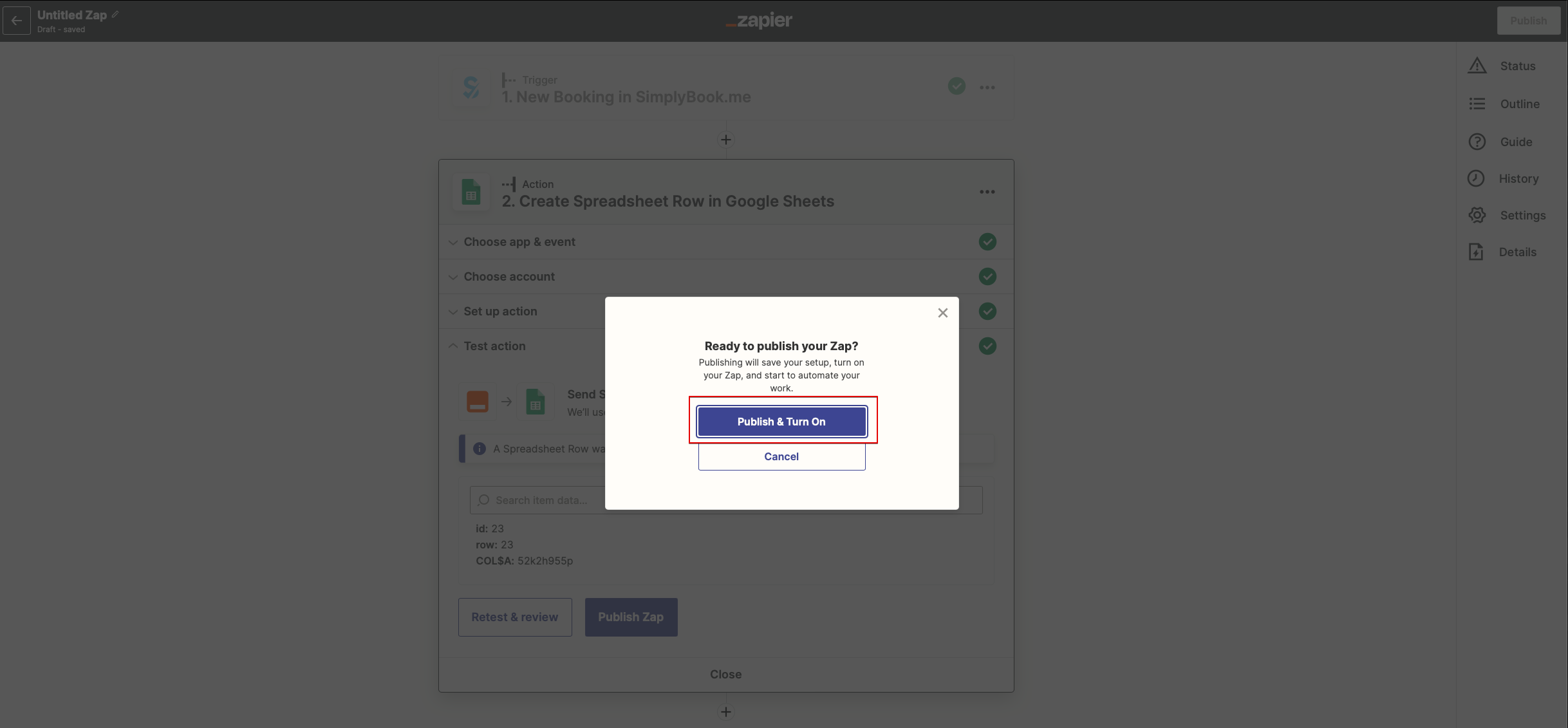
Updating to match new version of source page |
Created page with "==Як використовувати ручне підключення== :1. Ви можете вибрати ручне підключення за допомогою облікових даних. Але в цьому випадку можливість керувати зепами в інтерфейсі SimplyBook.me буде недоступна. :2. Перейдіть на Zapier.com -> сторінку підключення застосунків і натис..." Tags: Mobile edit Mobile web edit |
||
| (15 intermediate revisions by 2 users not shown) | |||
| Line 1: | Line 1: | ||
<languages/> | <languages/> | ||
{{#seo: |title=Функція «Приймати платежі» — SimplyBook.me |description= | {{#seo: |title=Функція «Приймати платежі» — SimplyBook.me |description=Підключіть SimplyBook.me до понад 1000 додатків через Zapier. Автоматизуйте робочі процеси за допомогою тригерів: нове бронювання, скасування, доданий клієнт. Передавайте дані до CRM, таблиць та інших інструментів.|titlemode=додати |keywords=fAQ, поширені запитання, програмне забезпечення для бронювання, запитання про систему бронювання, онлайн-бронювання, програмне забезпечення для календаря, система бронювання, календар бронювання, програмне забезпечення для планування, онлайн-планування зустрічей, онлайн-планування, налаштування, допомога з налаштуванням, підтримка, довідкова інформація, Zapier, інтеграція Zapier, підключення Zapier, тригер }} | ||
[[File:Zapier icon.png|left]] | [[File:Zapier icon.png|left]] | ||
| Line 8: | Line 8: | ||
<div style="background-color:#ffe9e9; padding:5px; border-radius:5px;"> | <div style="background-color:#ffe9e9; padding:5px; border-radius:5px;"> | ||
''' | '''Увага!''' | ||
* | * Доступні дані залежать від <span style="background-color:#cdeffc; padding:5px; border-radius:5px;">[[Custom_Features | активованих функцій]]</span>; | ||
* | * Не працює, якщо увімкнена двоетапна автентифікація (<span style="background-color:#cdeffc; padding:5px; border-radius:5px;">[[Custom_Features#HIPAA |HIPAA]]</span> або <span style="background-color:#cdeffc; padding:5px; border-radius:5px;">[[Custom_Features#Google_Authenticator | Google Authenticator]]</span>); | ||
* | * Тригер "Новий клієнт" не працює з функцією <span style="background-color:#cdeffc; padding:5px; border-radius:5px;">[[Custom_Features#Import_Clients |Імпорт клієнтів]]</span>, але працює, якщо клієнта додано вручну через адмін-панель; | ||
* | * Дані про <span style="background-color:#cdeffc; padding:5px; border-radius:5px;">[[Custom_Features#Membership |абонементи]]</span>, <span style="background-color:#cdeffc; padding:5px; border-radius:5px;">[[Custom_Features#Coupons_.26_Gift_Cards |промоакції]]</span>, <span style="background-color:#cdeffc; padding:5px; border-radius:5px;">[[Custom_Features#Packages |пакети]]</span> та <span style="background-color:#cdeffc; padding:5px; border-radius:5px;">[[Custom_Features#Products_for_Sale |товари]]</span> не надсилаються, оскільки вони стосуються рахунку, а не бронювання; | ||
* | * Зміна коментаря не запускає тригер; | ||
* | * Щоб використовувати тригери зміни/скасування бронювання для оновлення записів у додатку дій, потрібен платний акаунт Zapier (перевірте їхню поточну ціну та підтримку багатокрокових zaps), оскільки необхідний крок пошуку; | ||
* | * Якщо після створення zap ви додаєте нові елементи в адмін-панелі, натисніть "Get more samples" в Zapier на кроці тригера → "Test this step", щоб завантажити нові поля (потрібно оновити шаблон zap); | ||
* | * Дані рахунку можна передавати з тригером "Новий рахунок"; | ||
* <span style="background-color:#cdeffc; padding:5px; border-radius:5px;">[[SOAP_with_Encryption_custom_feature |SOAP]]</span> | * Дані <span style="background-color:#cdeffc; padding:5px; border-radius:5px;">[[SOAP_with_Encryption_custom_feature |SOAP]]</span> не надсилаються; | ||
* <span style="background-color:#cdeffc; padding:5px; border-radius:5px;">[[Custom_Features#Accept_Payments | | * Податки <span style="background-color:#cdeffc; padding:5px; border-radius:5px;">[[Custom_Features#Accept_Payments |Accept Payments]]</span> не передаються, ціна послуги надсилається без урахування податків; | ||
* | * Не працює, якщо увімкнені <span style="background-color:#cdeffc; padding:5px; border-radius:5px;">[[Custom_Features#Accept_Payments |Прийом платежів]]</span> і <span style="background-color:#cdeffc; padding:5px; border-radius:5px;">[[Custom_Features#Approve_Bookings |Підтвердження бронювань]]</span>, а групове бронювання частково підтверджене. | ||
</div> | </div> | ||
<br><br> | <br><br> | ||
'''6 | '''Доступно 6 тригерів:'''<br> | ||
• '' | • ''Нове бронювання'' – запускається при створенні нового бронювання;<br> | ||
• '' | • ''Зміна бронювання'' – запускається при зміні бронювання (дата/час/послуга/спеціаліст/статус/форми);<br> | ||
• '' | • ''Скасування бронювання'' – запускається при скасуванні бронювання;<br> | ||
• '' | • ''Новий клієнт'' – запускається, коли додано нового клієнта (через бронювання або вручну);<br> | ||
• '' | • ''Нова пропозиція'' – запускається при створенні нової пропозиції (потрібно активувати <span style="background-color:#cdeffc; padding:5px; border-radius:5px;">[[Custom_Features#Accept_Payments |Прийом платежів]]</span>);<br> | ||
• '' | • ''Новий рахунок'' – запускається при створенні та оплаті рахунку (також потребує <span style="background-color:#cdeffc; padding:5px; border-radius:5px;">[[Custom_Features#Accept_Payments |Прийом платежів]]</span>). | ||
<br><br> | <br><br> | ||
< | '''Доступні 6 дій:'''<br> | ||
- ''Get booking'' – отримати деталі бронювання за id<br> | |||
- ''Get client'' – отримати деталі клієнта за id<br> | |||
- ''Create booking'' – створити новий запис бронювання<br> | |||
- ''Create client'' – створити новий запис клієнта<br> | |||
- ''Cancel booking'' – скасувати бронювання за id<br> | |||
<br><br> | <br><br> | ||
;'''Доступні дані:''' | |||
<span style="background-color:#fef3de; padding:5px; border-radius:5px;">Для тригерів, пов’язаних із бронюваннями (New booking, Booking change, Booking cancellation):</span><br> | |||
<span style="background-color: #e1fdfd; padding:5px; border-radius:5px;">Базова функціональність (без увімкнених кастомних функцій)</span>: | |||
*Компанія (login, назва, email, телефон), | |||
* | *Послуга (назва, опис, тривалість, буферний час), | ||
* | *Постачальник (ім’я, опис, email, телефон), | ||
* | *Інформація про клієнта (ім’я, email, телефон, адреса, часовий пояс), | ||
* | *Код бронювання (якщо бронювання підтверджене, дата/час початку і кінця). | ||
<br><br> | <br><br> | ||
<span style="background-color:# | <span style="background-color: #e1fdfd; padding:5px; border-radius:5px;">Дані, пов’язані з кастомними функціями</span>: | ||
* | * <span style="background-color:#cdeffc; padding:5px; border-radius:5px;">[[Custom_Features#Accept_Payments |Accept payments]]</span> (ціна послуги, валюта); | ||
* | * <span style="background-color:#cdeffc; padding:5px; border-radius:5px;">[[Custom_Features#Status |Status]]</span> (назва, опис, колір); | ||
* | * <span style="background-color:#cdeffc; padding:5px; border-radius:5px;">[[Custom_Features#Approve_Bookings |Approve bookings]]</span> (статус підтвердження: approved, canceled); | ||
* | * <span style="background-color:#cdeffc; padding:5px; border-radius:5px;">[[Custom_Features#Multiple_Locations |Multiple Locations]]</span> (назва локації, адреса (з координатами), телефон, опис); | ||
* | * <span style="background-color:#cdeffc; padding:5px; border-radius:5px;">[[Custom_Features#Service_Categories |Service Categories]]</span> (назва категорії, опис категорії); | ||
* | * <span style="background-color:#cdeffc; padding:5px; border-radius:5px;">[[Custom_Features#Service_Add-ons |Service Add-ons]]</span> (назва додаткової послуги, ціна); | ||
* | * <span style="background-color:#cdeffc; padding:5px; border-radius:5px;">[[Custom_Features#Intake_Forms |Intake Forms]]</span> (відповіді). | ||
<br><br> | <br><br> | ||
<span style="background-color:#fef3de; padding:5px; border-radius:5px;"> | <span style="background-color:#fef3de; padding:5px; border-radius:5px;">Для тригера New client</span>: | ||
* | * ID клієнта; | ||
* | * Ім’я клієнта; | ||
* | * Email клієнта; | ||
* | * Телефон клієнта; | ||
* | * Адреса клієнта; | ||
* | * Чи заблокований клієнт для входу (якщо увімкнено кастомну функцію <span style="background-color:#cdeffc; padding:5px; border-radius:5px;">[[Custom_Features#Client_Login |Client login]]</span>); | ||
* | * Дата реєстрації клієнта. | ||
* | <br><br> | ||
* | <span style="background-color:#fef3de; padding:5px; border-radius:5px;">Для тригерів New Offer/Invoice</span>: | ||
* ID замовлення; | |||
* Ім’я / email / телефон клієнта; | |||
* Опис пропозиції/рахунку (список замовлених товарів, інформація про знижку: подарунковий сертифікат/купон/пакет); | |||
* Сума замовлення та валюта; | |||
* Сума знижки; | |||
* Дата та час замовлення; | |||
* Номер пропозиції/рахунку в системі SimplyBook.me (O-XXXXXX або I-XXXXXX); | |||
* Платіжний процесор (delay, cash, credit card, wire transfer); | |||
* Статус оплати (paid, pending) та чи отримано оплату. | |||
<br><br> | <br><br> | ||
__FORCETOC__ | |||
:1. | ==Як використовувати вбудовану версію== | ||
:1. Увімкніть <span style="background-color:#d4f8e5; border-radius:5px;">Zapier connector</span> custom feature у сторінці <span style="background-color:#d4f8e5; border-radius:5px;">Custom features</span> у SimplyBook.me. | |||
[[File:Zapier enable path redesigned.png|1200px|border | center|link=https://help.simplybook.me/images/b/b9/Zapier_enable_path_redesigned.png]] | [[File:Zapier enable path redesigned.png|1200px|border | center|link=https://help.simplybook.me/images/b/b9/Zapier_enable_path_redesigned.png]] | ||
<br><br> | <br><br> | ||
:2. | |||
[[File:Zapier | :2. Підключіться до свого акаунту Zapier за допомогою опції '''Швидке підключення''' | ||
[[File:Quick connect zapier.png|1200px|border | center|link=https://help.simplybook.me/images/8/84/Quick_connect_zapier.png]] | |||
<br><br> | |||
:3. Тепер ви можете керувати всіма своїми зепами, не виходячи з акаунту SimplyBook.me. | |||
[[File:Zapier manage zaps in sb.png|1200px|border | center|link=https://help.simplybook.me/images/b/bd/Zapier_manage_zaps_in_sb.png]] | |||
<br><br> | |||
:4. Натисніть '''Редагувати''' біля того, який ви створили раніше. Ви можете перейменовувати їх, редагувати потоки, вмикати або вимикати, видаляти за потреби. Після кожної дії сторінка оновлюватиметься та відображатиме актуальну інформацію про зепи. | |||
[[File:Edit zaps in sb.png|1200px|border | center|link=https://help.simplybook.me/images/c/cb/Edit_zaps_in_sb.png]] | |||
<br><br> | |||
:5. Якщо вам потрібно створити новий, натисніть кнопку '''+ Створити зеп'''. | |||
[[File:Create zap path.png|1200px|border | center|link=https://help.simplybook.me/images/2/24/Create_zap_path.png]] | |||
<br><br> | |||
:6. У спливаючому вікні знайдіть SimplyBook.me у списку застосунків для підключення. | |||
[[File:Zapier new sb as trigger.png|1200px|border | center|link=https://help.simplybook.me/images/1/13/Zapier_new_sb_as_trigger.png]] | |||
<br><br> | <br><br> | ||
:3. | :7. Оберіть потрібний тригер та акаунт, який ви раніше підключили. Натисніть «Продовжити». | ||
[[File:Zapier new choose trigger event.png|1200px|border | center|link=https://help.simplybook.me/images/4/45/Zapier_new_choose_trigger_event.png]] | |||
<br><br> | |||
:8. Протестуйте свій тригер, оберіть зразковий запис і перейдіть до кроку дії. | |||
<br><br> | |||
:9. Знайдіть потрібний застосунок, підключіть його, протестуйте крок. Опублікуйте свій зеп і закрийте спливаюче вікно. Тепер сторінка оновиться, і ви побачите його активним (із зеленою крапкою) у списку ваших зепів. | |||
<br><br><br><br> | |||
==Як використовувати ручне підключення== | |||
:1. Ви можете вибрати ручне підключення за допомогою облікових даних. Але в цьому випадку можливість керувати зепами в інтерфейсі SimplyBook.me буде недоступна. | |||
:2. Перейдіть на Zapier.com -> сторінку підключення застосунків і натисніть кнопку «Додати підключення»<br> | |||
[[File:Add connection zapeir side.png|1200px|border | center|link=https://help.simplybook.me/images/c/c2/Add_connection_zapeir_side.png]] | |||
<br><br> | |||
:3. Оберіть SimplyBook.me<br> | |||
:4. Скопіюйте логін компанії, логін користувача, згенеруйте та скопіюйте API-ключ зі свого акаунту SimplyBook.me<br> | |||
[[File:Zapier manual connection new.png|1200px|border | center|link=https://help.simplybook.me/images/c/c3/Zapier_manual_connection_new.png]] | |||
<br><br> | |||
:5. Вставте їх у відповідні поля на стороні Zapier.com і натисніть там опцію «Продовжити». Акаунт буде підключено. | |||
[[File:Credentials on zapier side new.png|1200px|border | center|link=https://help.simplybook.me/images/e/e9/Credentials_on_zapier_side_new.png]] | |||
<br><br> | |||
:6. Тепер ви можете створити новий зеп, натиснувши кнопку <span style="background-color:#d4f8e5; padding:5px; border-radius:5px;">Створити</span> в інтерфейсі Zapier. | |||
[[File:Create new zap updated.png|1200px|border| center|link=https://help.simplybook.me/images/6/60/Create_new_zap_updated.png]] | |||
<br><br> | |||
:7. Знайдіть Simplybook на <span style="background-color:#d4f8e5; padding:5px; border-radius:5px;">кроці тригера.</span> | |||
[[File:Zapier redesigned select trigger app.png|1200px|border | center|link=https://help.simplybook.me/images/c/c1/Zapier_redesigned_select_trigger_app.png]] | [[File:Zapier redesigned select trigger app.png|1200px|border | center|link=https://help.simplybook.me/images/c/c1/Zapier_redesigned_select_trigger_app.png]] | ||
<br><br> | <br><br> | ||
: | :8. Оберіть потрібний тригер. | ||
[[File:Zapier redesigned choose trigger event.png|1200px|border | center|link=https://help.simplybook.me/images/9/94/Zapier_redesigned_choose_trigger_event.png]] | [[File:Zapier redesigned choose trigger event.png|1200px|border | center|link=https://help.simplybook.me/images/9/94/Zapier_redesigned_choose_trigger_event.png]] | ||
<br><br> | <br><br> | ||
: | :9. Оберіть акаунт SimplyBook.me, який ви підключили раніше. | ||
<br><br> | <br><br> | ||
: | :10. Натисніть <span style="background-color:#d4f8e5; padding:5px; border-radius:5px;">Продовжити</span>, щоб протестувати цей крок. | ||
[[File:Zapier redesigned continue to test trigger step.png|1200px|border | center|link=https://help.simplybook.me/images/b/be/Zapier_redesigned_continue_to_test_trigger_step.png]] | [[File:Zapier redesigned continue to test trigger step.png|1200px|border | center|link=https://help.simplybook.me/images/b/be/Zapier_redesigned_continue_to_test_trigger_step.png]] | ||
<br><br> | <br><br> | ||
: | :11. Перейдіть до додавання кроку дії та знайдіть застосунок, до якого ви хочете підключити SimplyBook.me. | ||
[[File:Zapier redesigned search for the action app.png|1200px|border | center|link=https://help.simplybook.me/images/9/95/Zapier_redesigned_search_for_the_action_app.png]] | [[File:Zapier redesigned search for the action app.png|1200px|border | center|link=https://help.simplybook.me/images/9/95/Zapier_redesigned_search_for_the_action_app.png]] | ||
<br><br> | <br><br> | ||
: | :12. Підключіть акаунт цього застосунку та налаштуйте шаблон, використовуючи доступні дані, зазначені вище. | ||
<br><br> | <br><br> | ||
: | :13. За потреби ви також можете протестувати роботу цього кроку або пропустити його. | ||
<br><br> | <br><br> | ||
: | :14. Завершіть налаштування, додайте назву зепу та увімкніть його. | ||
[[File:Zapier redesigned enable zap.png|1200px|border | center|link=https://help.simplybook.me/images/9/9b/Zapier_redesigned_enable_zap.png]] | [[File:Zapier redesigned enable zap.png|1200px|border | center|link=https://help.simplybook.me/images/9/9b/Zapier_redesigned_enable_zap.png]] | ||
<br><br> | <br><br> | ||
Latest revision as of 13:35, 15 April 2026

Підключіть SimplyBook.me до сотень інших рішень за допомогою цієї функції. Вона містить різноманітні тригери, які можна використовувати для надсилання інформації до інших рішень, просто використовуючи один із доступних zap або створивши новий zap. Zapier дозволяє інтегрувати 2 або більше веб-додатків через їх API за допомогою «тригерів» і «дій». SimplyBook.me доступний в Zapier як додаток-тригер, це означає, що тільки інформація з SimplyBook.me надсилається до Zapier (одностороння інтеграція) і через Zapier до будь-якого додатка, який має дії.
Увага!
- Доступні дані залежать від активованих функцій;
- Не працює, якщо увімкнена двоетапна автентифікація (HIPAA або Google Authenticator);
- Тригер "Новий клієнт" не працює з функцією Імпорт клієнтів, але працює, якщо клієнта додано вручну через адмін-панель;
- Дані про абонементи, промоакції, пакети та товари не надсилаються, оскільки вони стосуються рахунку, а не бронювання;
- Зміна коментаря не запускає тригер;
- Щоб використовувати тригери зміни/скасування бронювання для оновлення записів у додатку дій, потрібен платний акаунт Zapier (перевірте їхню поточну ціну та підтримку багатокрокових zaps), оскільки необхідний крок пошуку;
- Якщо після створення zap ви додаєте нові елементи в адмін-панелі, натисніть "Get more samples" в Zapier на кроці тригера → "Test this step", щоб завантажити нові поля (потрібно оновити шаблон zap);
- Дані рахунку можна передавати з тригером "Новий рахунок";
- Дані SOAP не надсилаються;
- Податки Accept Payments не передаються, ціна послуги надсилається без урахування податків;
- Не працює, якщо увімкнені Прийом платежів і Підтвердження бронювань, а групове бронювання частково підтверджене.
Доступно 6 тригерів:
• Нове бронювання – запускається при створенні нового бронювання;
• Зміна бронювання – запускається при зміні бронювання (дата/час/послуга/спеціаліст/статус/форми);
• Скасування бронювання – запускається при скасуванні бронювання;
• Новий клієнт – запускається, коли додано нового клієнта (через бронювання або вручну);
• Нова пропозиція – запускається при створенні нової пропозиції (потрібно активувати Прийом платежів);
• Новий рахунок – запускається при створенні та оплаті рахунку (також потребує Прийом платежів).
Доступні 6 дій:
- Get booking – отримати деталі бронювання за id
- Get client – отримати деталі клієнта за id
- Create booking – створити новий запис бронювання
- Create client – створити новий запис клієнта
- Cancel booking – скасувати бронювання за id
- Доступні дані:
Для тригерів, пов’язаних із бронюваннями (New booking, Booking change, Booking cancellation):
Базова функціональність (без увімкнених кастомних функцій):
- Компанія (login, назва, email, телефон),
- Послуга (назва, опис, тривалість, буферний час),
- Постачальник (ім’я, опис, email, телефон),
- Інформація про клієнта (ім’я, email, телефон, адреса, часовий пояс),
- Код бронювання (якщо бронювання підтверджене, дата/час початку і кінця).
Дані, пов’язані з кастомними функціями:
- Accept payments (ціна послуги, валюта);
- Status (назва, опис, колір);
- Approve bookings (статус підтвердження: approved, canceled);
- Multiple Locations (назва локації, адреса (з координатами), телефон, опис);
- Service Categories (назва категорії, опис категорії);
- Service Add-ons (назва додаткової послуги, ціна);
- Intake Forms (відповіді).
Для тригера New client:
- ID клієнта;
- Ім’я клієнта;
- Email клієнта;
- Телефон клієнта;
- Адреса клієнта;
- Чи заблокований клієнт для входу (якщо увімкнено кастомну функцію Client login);
- Дата реєстрації клієнта.
Для тригерів New Offer/Invoice:
- ID замовлення;
- Ім’я / email / телефон клієнта;
- Опис пропозиції/рахунку (список замовлених товарів, інформація про знижку: подарунковий сертифікат/купон/пакет);
- Сума замовлення та валюта;
- Сума знижки;
- Дата та час замовлення;
- Номер пропозиції/рахунку в системі SimplyBook.me (O-XXXXXX або I-XXXXXX);
- Платіжний процесор (delay, cash, credit card, wire transfer);
- Статус оплати (paid, pending) та чи отримано оплату.
Як використовувати вбудовану версію
- 1. Увімкніть Zapier connector custom feature у сторінці Custom features у SimplyBook.me.

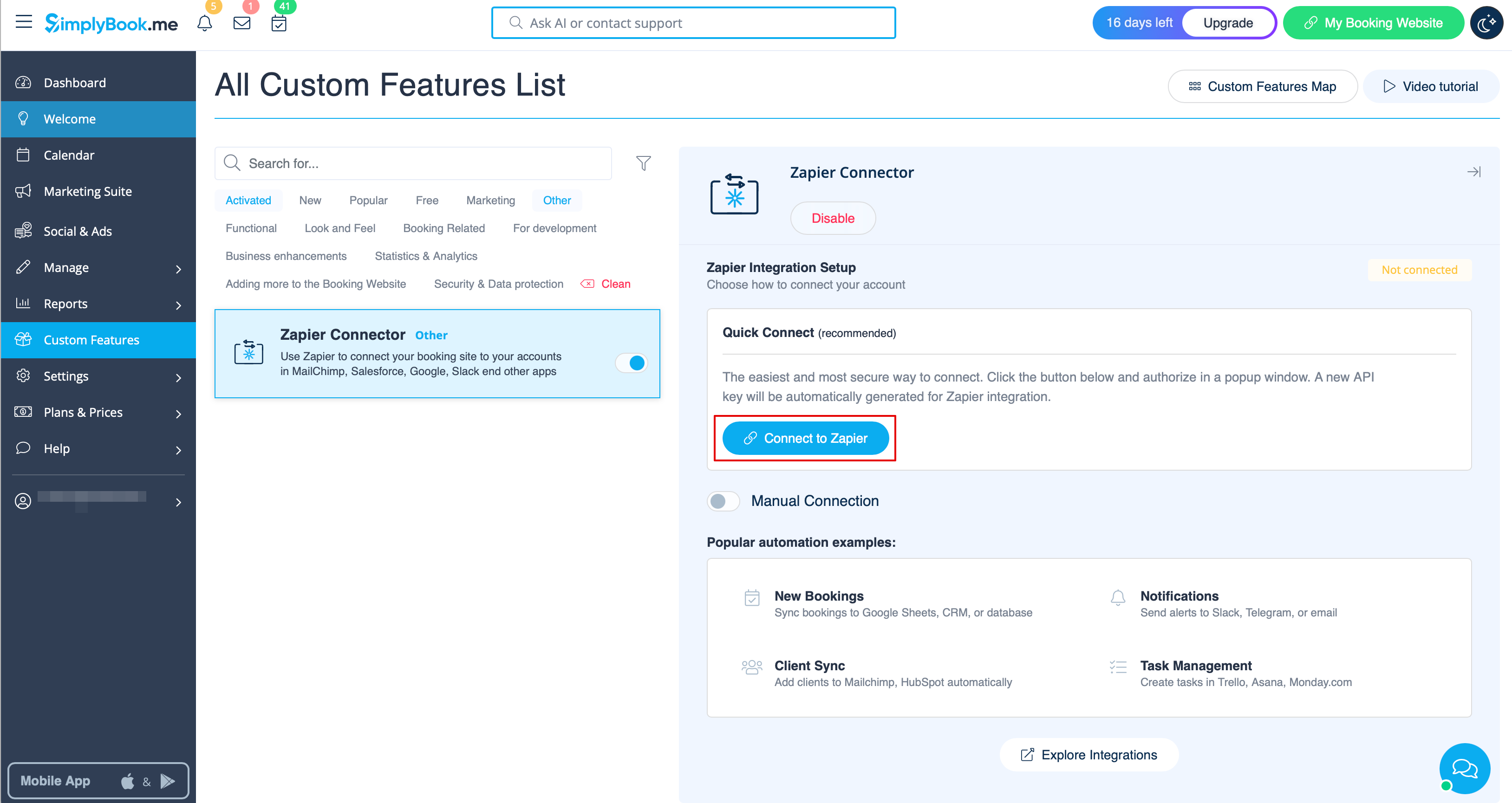
- 2. Підключіться до свого акаунту Zapier за допомогою опції Швидке підключення
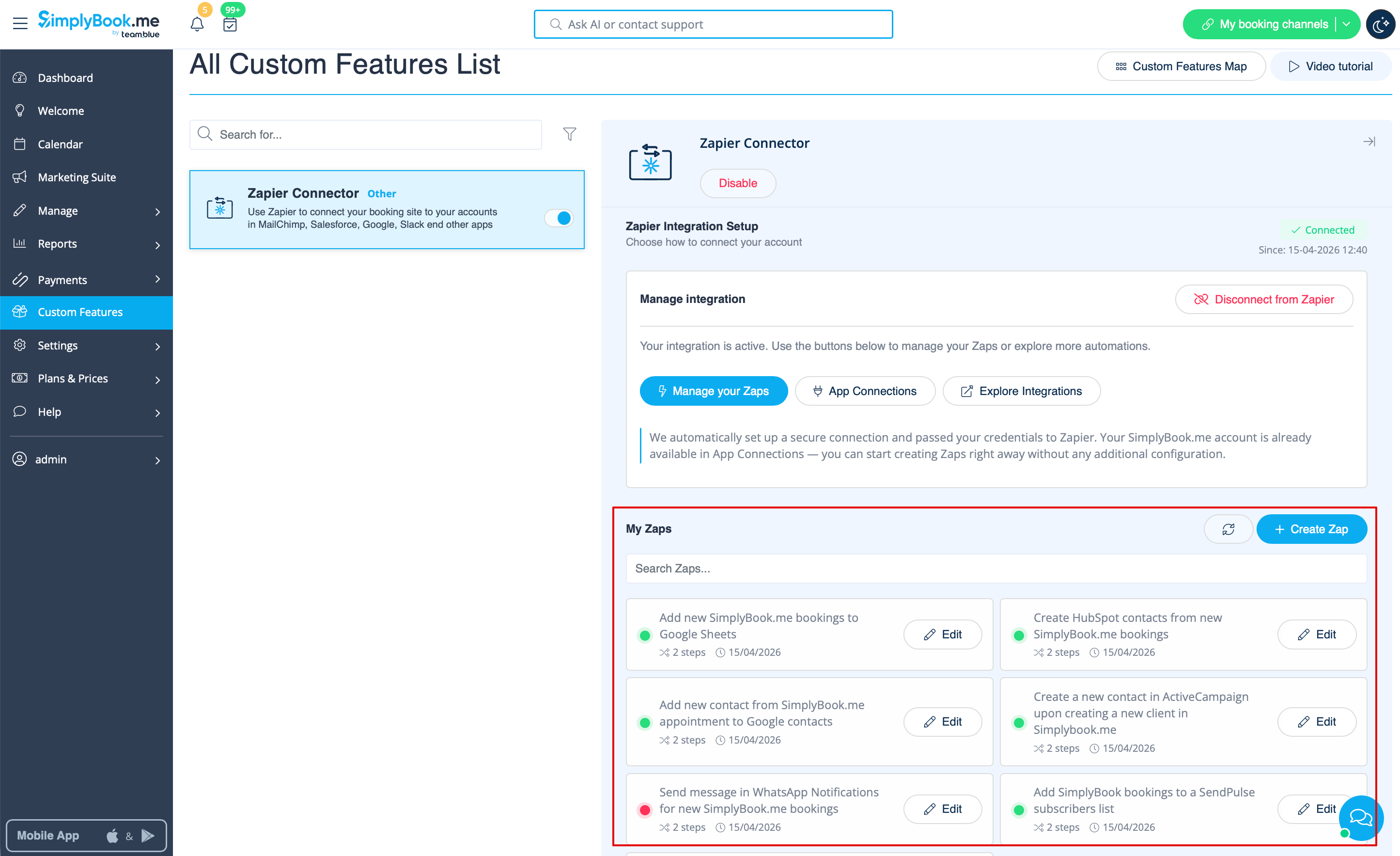
- 3. Тепер ви можете керувати всіма своїми зепами, не виходячи з акаунту SimplyBook.me.
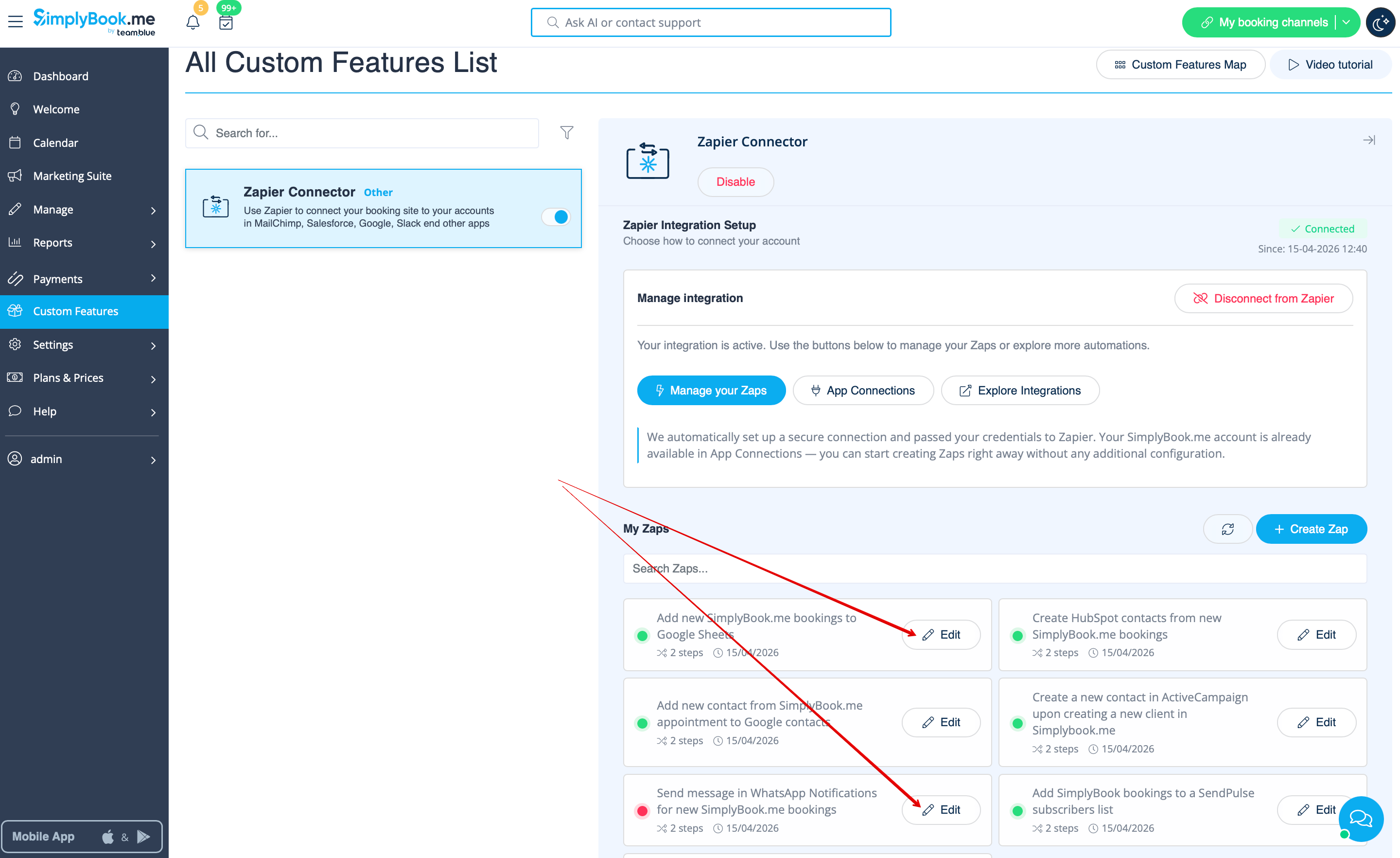
- 4. Натисніть Редагувати біля того, який ви створили раніше. Ви можете перейменовувати їх, редагувати потоки, вмикати або вимикати, видаляти за потреби. Після кожної дії сторінка оновлюватиметься та відображатиме актуальну інформацію про зепи.
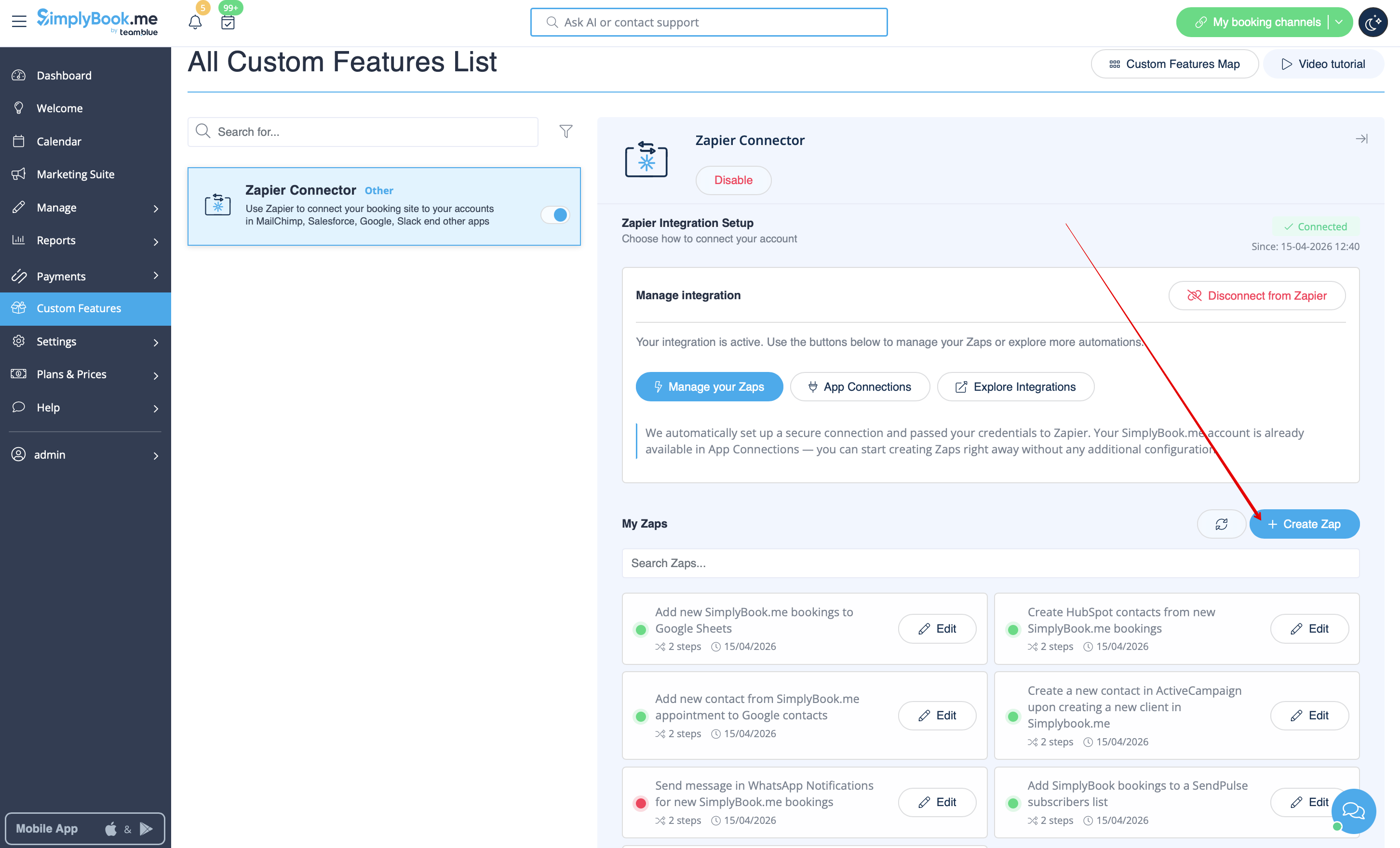
- 5. Якщо вам потрібно створити новий, натисніть кнопку + Створити зеп.
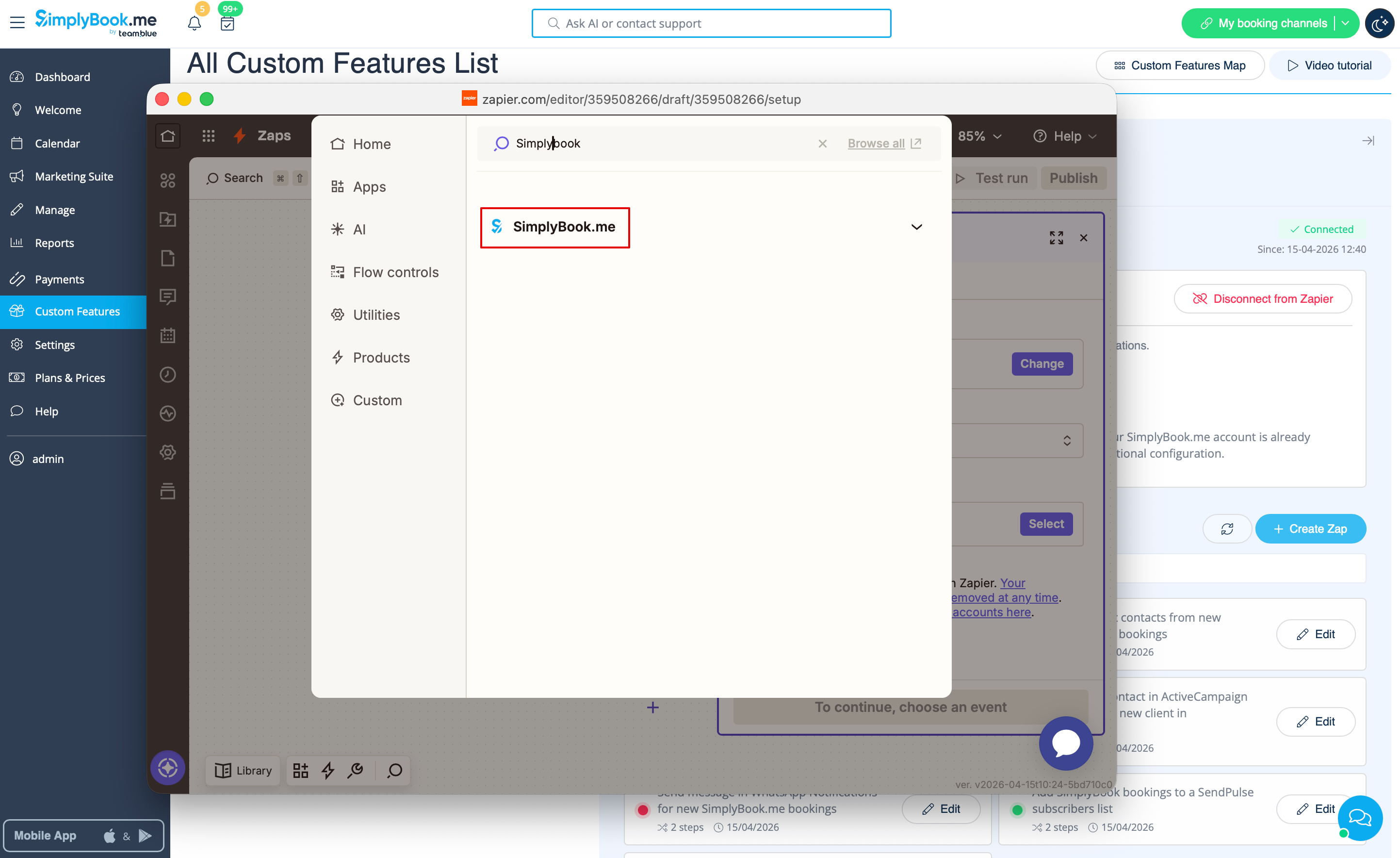
- 6. У спливаючому вікні знайдіть SimplyBook.me у списку застосунків для підключення.
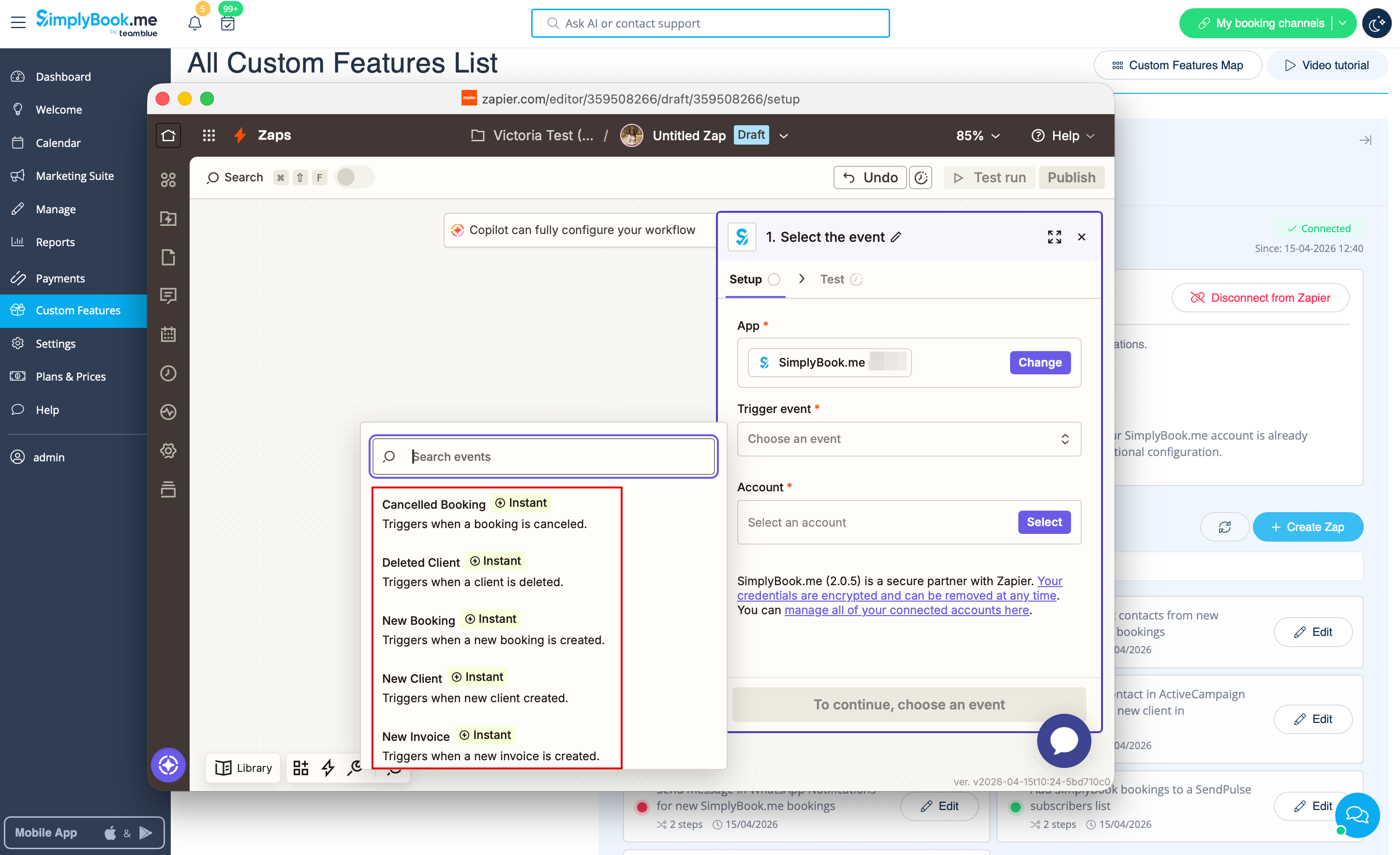
- 7. Оберіть потрібний тригер та акаунт, який ви раніше підключили. Натисніть «Продовжити».
- 8. Протестуйте свій тригер, оберіть зразковий запис і перейдіть до кроку дії.
- 9. Знайдіть потрібний застосунок, підключіть його, протестуйте крок. Опублікуйте свій зеп і закрийте спливаюче вікно. Тепер сторінка оновиться, і ви побачите його активним (із зеленою крапкою) у списку ваших зепів.
Як використовувати ручне підключення
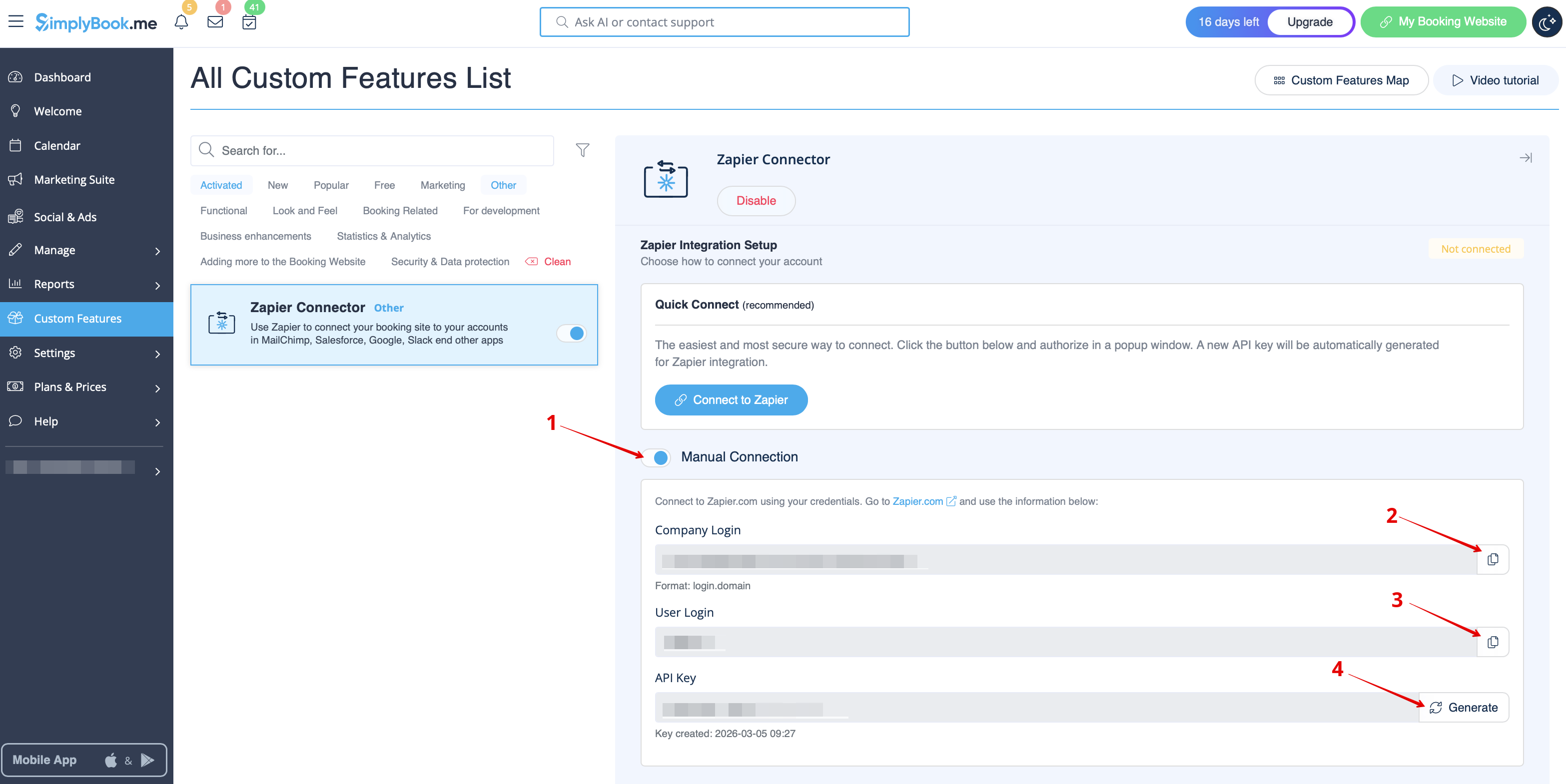
- 1. Ви можете вибрати ручне підключення за допомогою облікових даних. Але в цьому випадку можливість керувати зепами в інтерфейсі SimplyBook.me буде недоступна.
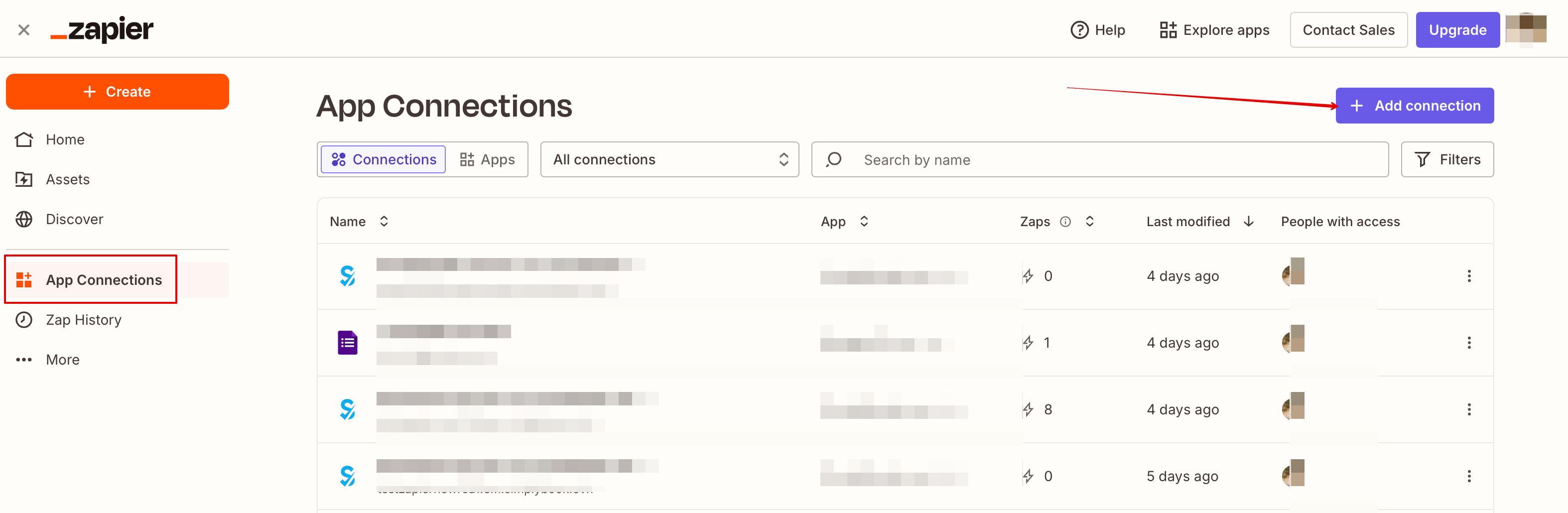
- 2. Перейдіть на Zapier.com -> сторінку підключення застосунків і натисніть кнопку «Додати підключення»
- 3. Оберіть SimplyBook.me
- 4. Скопіюйте логін компанії, логін користувача, згенеруйте та скопіюйте API-ключ зі свого акаунту SimplyBook.me
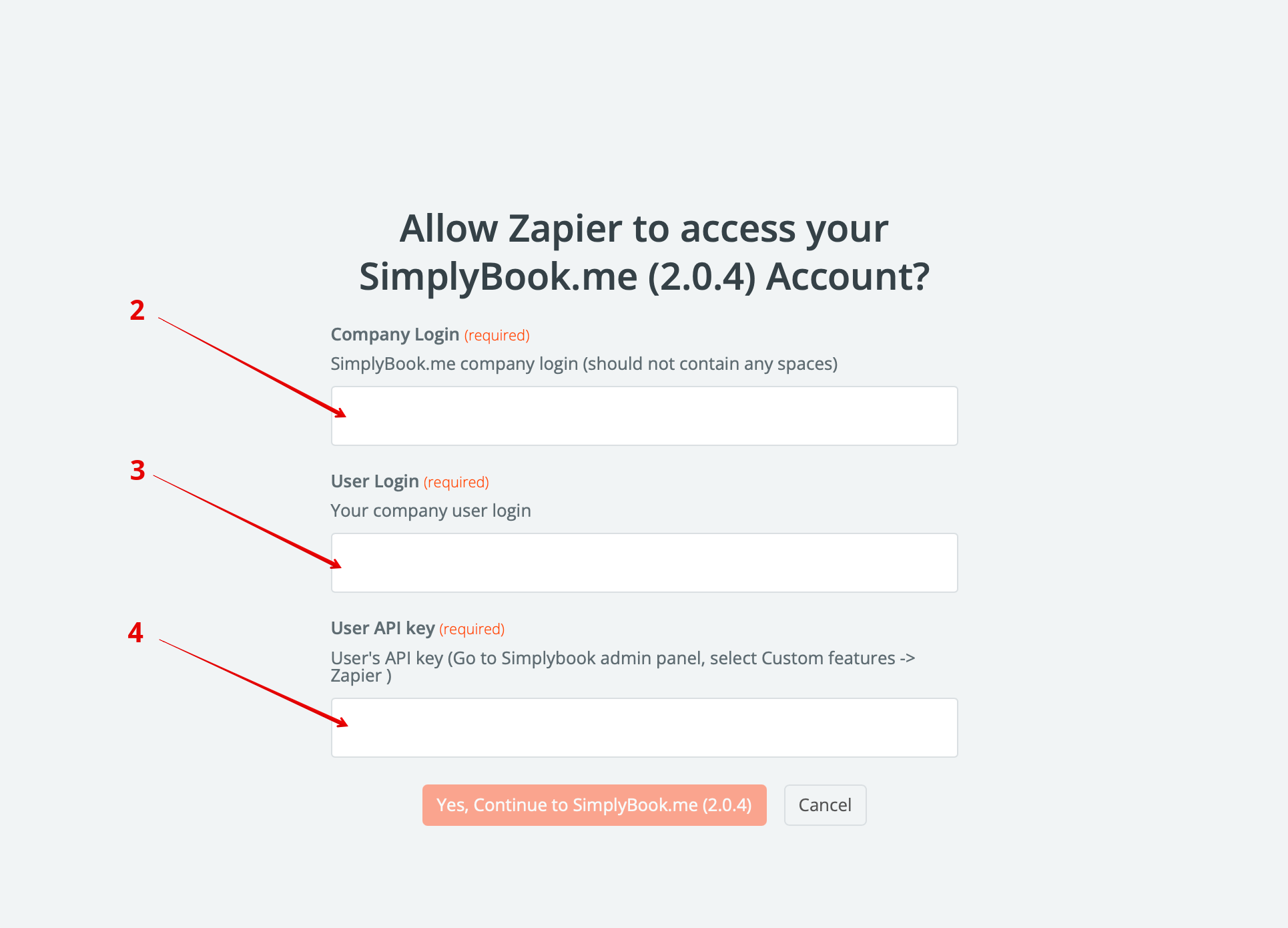
- 5. Вставте їх у відповідні поля на стороні Zapier.com і натисніть там опцію «Продовжити». Акаунт буде підключено.
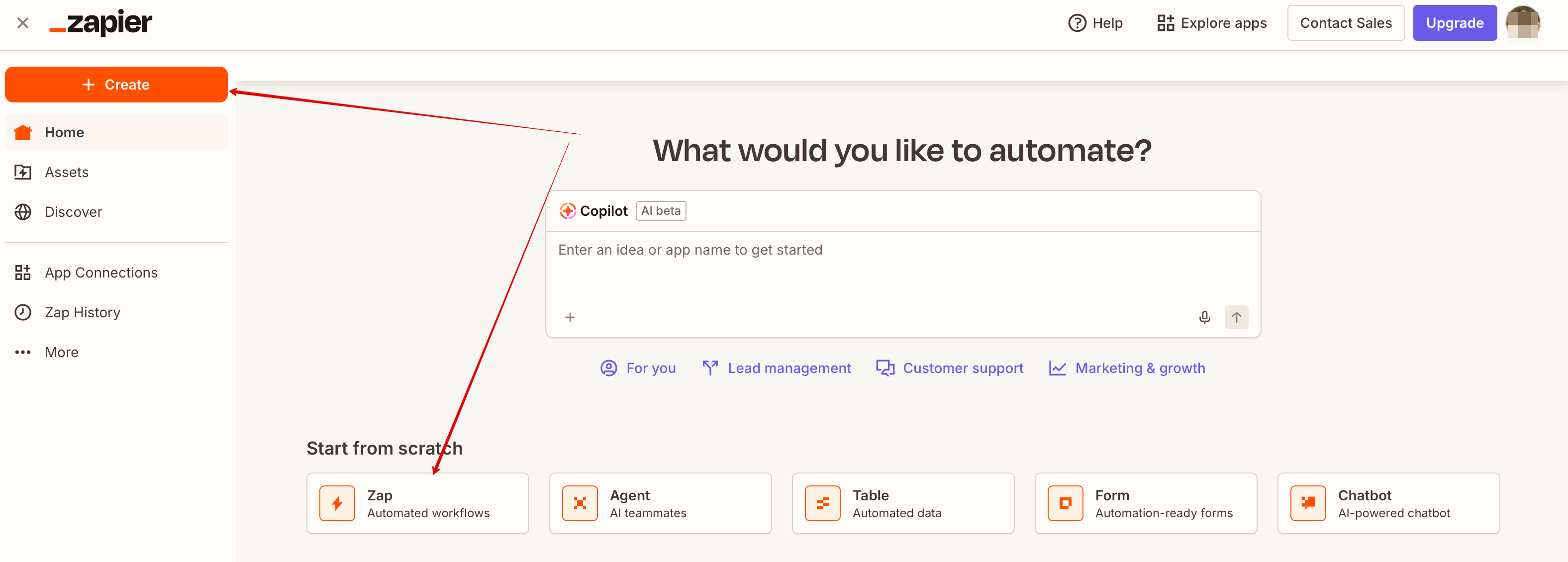
- 6. Тепер ви можете створити новий зеп, натиснувши кнопку Створити в інтерфейсі Zapier.
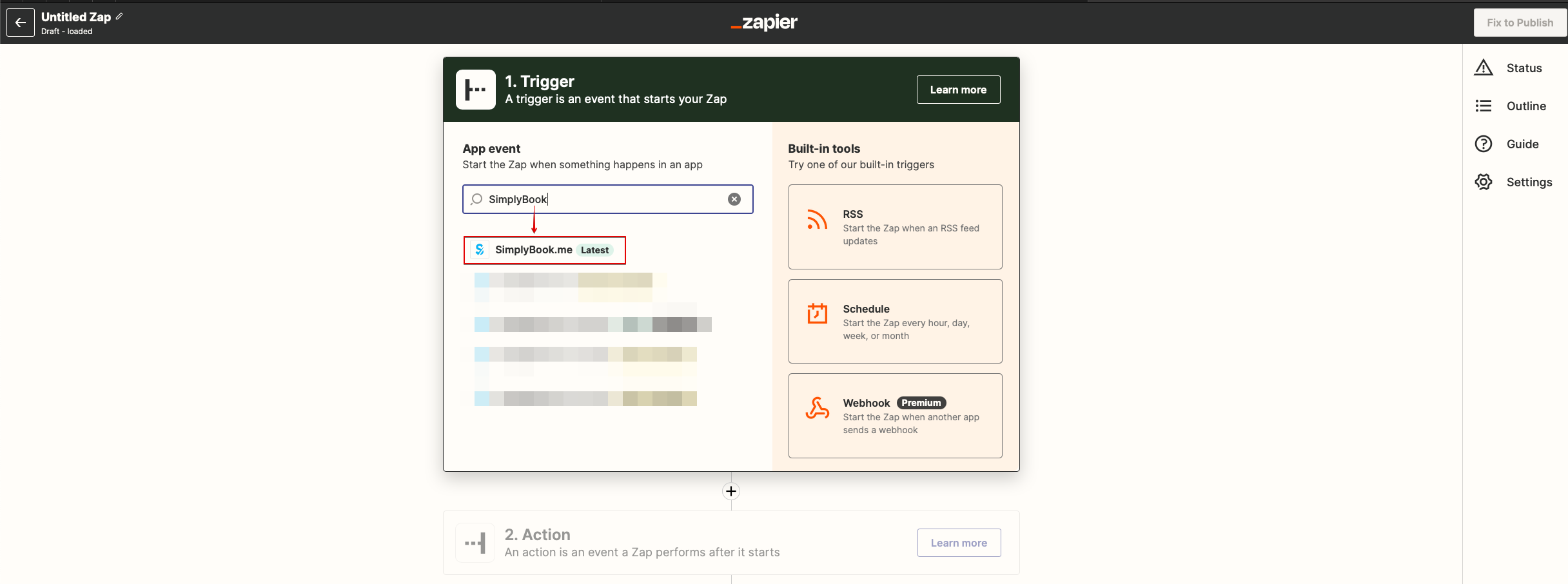
- 7. Знайдіть Simplybook на кроці тригера.
- 8. Оберіть потрібний тригер.
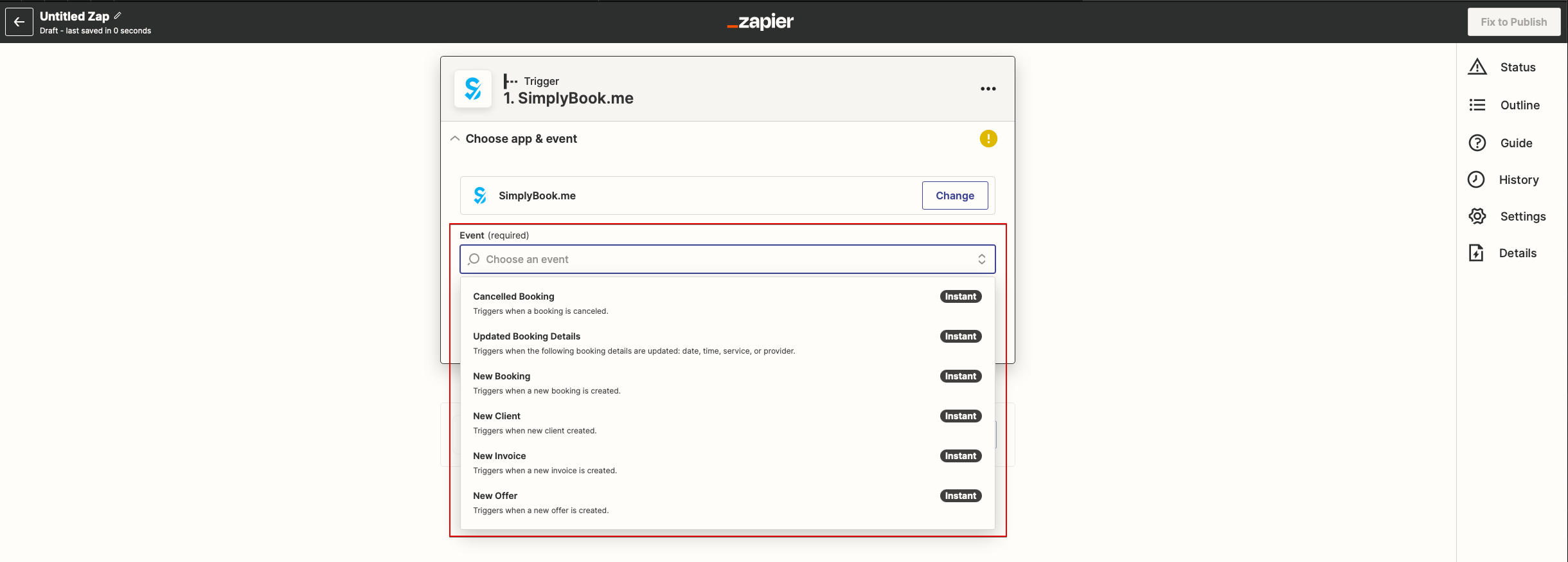
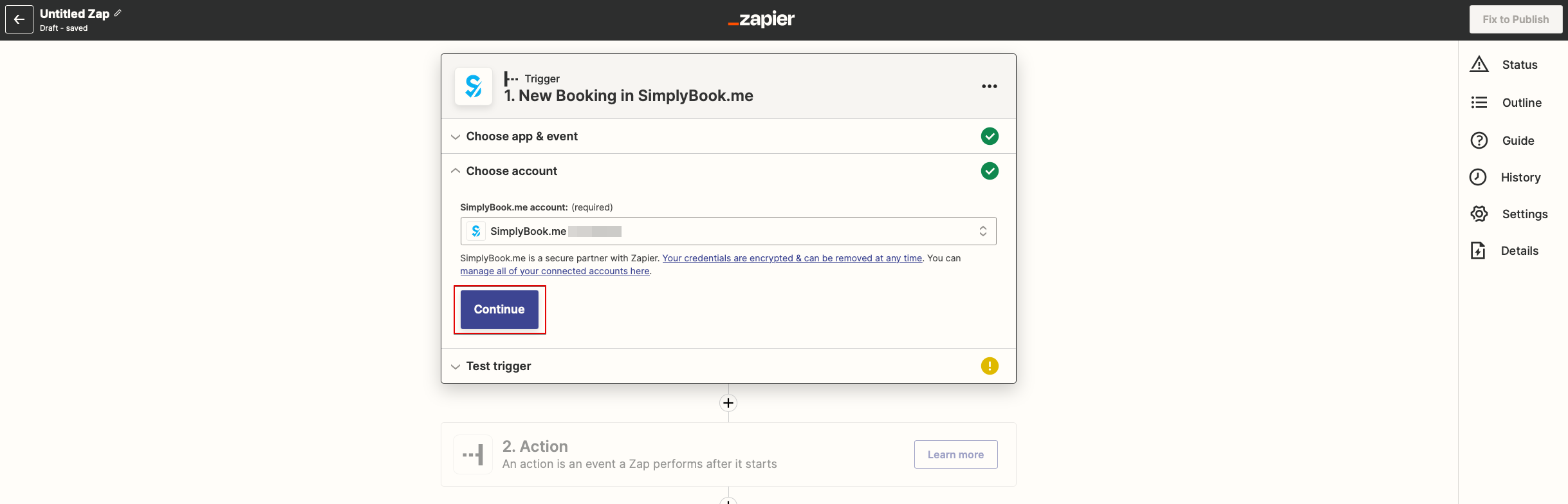
- 9. Оберіть акаунт SimplyBook.me, який ви підключили раніше.
- 10. Натисніть Продовжити, щоб протестувати цей крок.
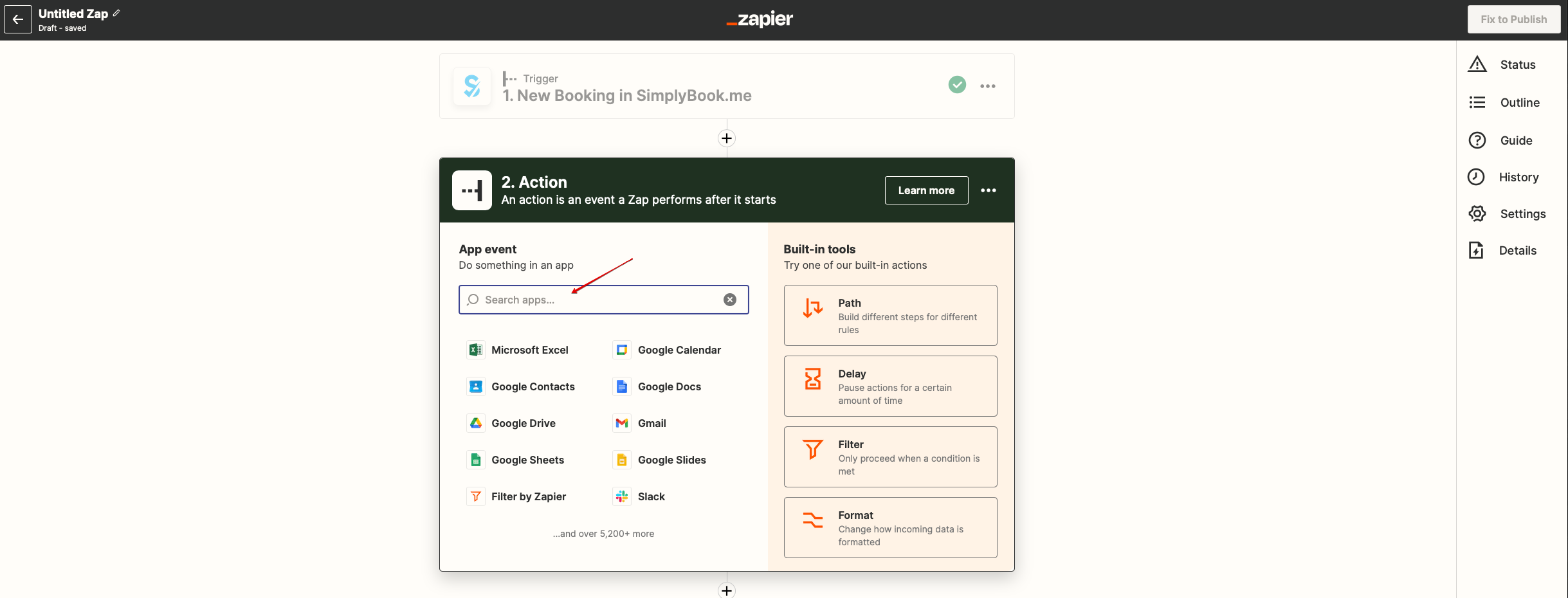
- 11. Перейдіть до додавання кроку дії та знайдіть застосунок, до якого ви хочете підключити SimplyBook.me.
- 12. Підключіть акаунт цього застосунку та налаштуйте шаблон, використовуючи доступні дані, зазначені вище.
- 13. За потреби ви також можете протестувати роботу цього кроку або пропустити його.
- 14. Завершіть налаштування, додайте назву зепу та увімкніть його.