From SimplyBook.me
No edit summary |
No edit summary |
||
| (3 intermediate revisions by 2 users not shown) | |||
| Line 1: | Line 1: | ||
<languages/> | <languages/> | ||
{{#seo: |title=Boekingen op Facebook - SimplyBook.me |description= | {{#seo: |title=Boekingen op Facebook - SimplyBook.me |description=Accepteer boekingen rechtstreeks via uw Facebook-bedrijfspagina. Voeg een Boek-knop toe en synchroniseer afspraken automatisch. Klanten kunnen boeken zonder het Facebook-platform te verlaten.|titlemode=toevoegen |keywords=faq, veelgestelde vragen, boekingssoftware, vragen over het afspraken systeem, online afspraken, kalendersoftware, boekingssysteem, boekingskalender, planningssoftware, online afspraken plannen, online planning, installatie, hulp bij installatie, ondersteuning, helpinhoud }} | ||
<br><br> | <br><br> | ||
| Line 74: | Line 74: | ||
[[File:Fb new add action button.png|1200px|center|link=https://help.simplybook.me/images/b/b3/Fb_new_add_action_button.png]] | [[File:Fb new add action button.png|1200px|center|link=https://help.simplybook.me/images/b/b3/Fb_new_add_action_button.png]] | ||
<br><br> | <br><br> | ||
:2. Je kunt de opties 'Nu boeken' of 'Reserveren' kiezen als call-to-action en vervolgens [https://simplybook.me/nl/ SimplyBook.me] selecteren. Op die manier schakel je de aangepaste functie [[Special:MyLanguageFacebook and Instagram Bookings|voor Facebook- en Instagram-boekingen]] in | |||
:2. Je kunt de opties 'Nu boeken' of 'Reserveren' kiezen als call-to-action en vervolgens [https://simplybook.me/ | |||
[[File:Fb action button new book.png|1200px|center|link=https://help.simplybook.me/images/6/64/Fb_action_button_new_book.png]] | [[File:Fb action button new book.png|1200px|center|link=https://help.simplybook.me/images/6/64/Fb_action_button_new_book.png]] | ||
<br><br> | <br><br> | ||
| Line 81: | Line 80: | ||
[[File:Fb new contact us action.png|1200px|center|link=https://help.simplybook.me/images/4/49/Fb_new_contact_us_action.png]] | [[File:Fb new contact us action.png|1200px|center|link=https://help.simplybook.me/images/4/49/Fb_new_contact_us_action.png]] | ||
<br><br> | <br><br> | ||
:3. Plak de link naar uw boekingswebsite in het daarvoor bestemde veld en sla de instellingen op. | :3. Plak de link naar uw boekingswebsite in het daarvoor bestemde veld en sla de instellingen op. | ||
[[File:Add link to fb button.png|1200px|center|link=https://help.simplybook.me/images/0/03/Add_link_to_fb_button.png]] | [[File:Add link to fb button.png|1200px|center|link=https://help.simplybook.me/images/0/03/Add_link_to_fb_button.png]] | ||
| Line 89: | Line 87: | ||
<br><br> | <br><br> | ||
= Hoe voeg je een Facebook Messenger-chat toe aan je boekingspagina = | = Hoe voeg je een Facebook Messenger-chat toe aan je boekingspagina = | ||
:'''Videohandleiding beschikbaar ''' | :'''Videohandleiding beschikbaar '''<p><youtube>PuFFtCOksc8</youtube></p> | ||
<br><br> | <br><br> | ||
Latest revision as of 17:51, 30 January 2026
Aangepaste functie voor Facebook- en Instagram-boekingen
Let op!
- Het is mogelijk om de boekingsoptie te koppelen aan Facebook Business- en Instagram Business-pagina's. Deze functionaliteit kan niet worden toegevoegd aan een persoonlijke pagina.
- De boekingsoptie wordt niet weergegeven op de desktopversie van Instagram en kan alleen worden gebruikt via mobiele apps.
- Voor de boekingswidget wordt standaard het Bookingtroll-thema gebruikt. Als u de stijl wilt wijzigen, upgrade dan naar Premium om het gewenste thema te selecteren en aangepaste CSS-instellingen te kunnen gebruiken.
- Het uiterlijk van de widget kan verschillen afhankelijk van de Facebook-voorkeuren voor verschillende apparaten en applicaties
- Videotutorial beschikbaar
Hoe voeg je een boekingsoptie toe aan je Facebook-/Instagram-bedrijfspagina en hoe gebruik je deze?
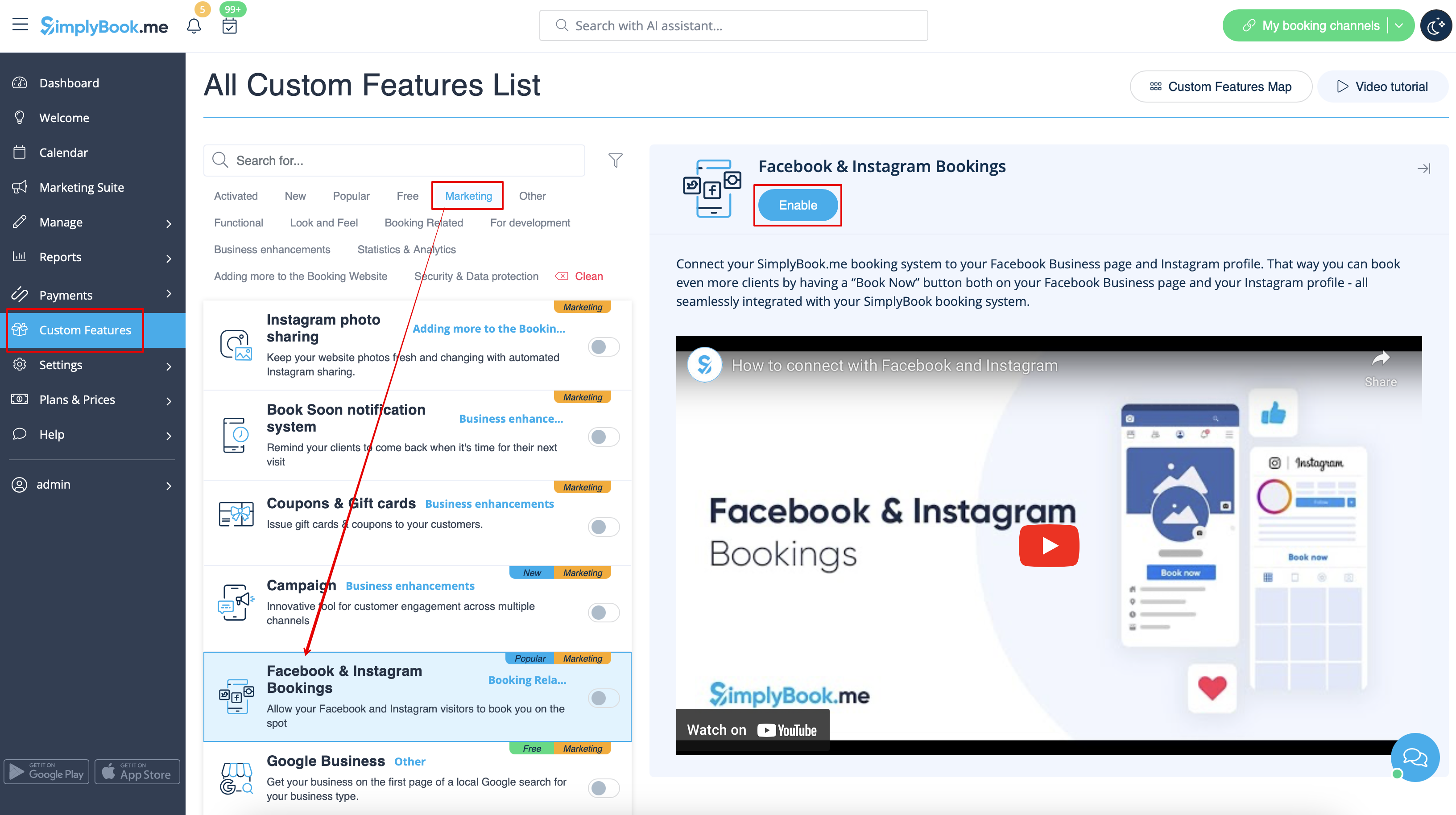
- 1. Schakel de aangepaste functie Facebook- en Instagram-boekingen in op uw pagina Aangepaste functies.
- 2. Log in op uw Facebook/Instagram-zakelijke account(s) in een ander browsertabblad.
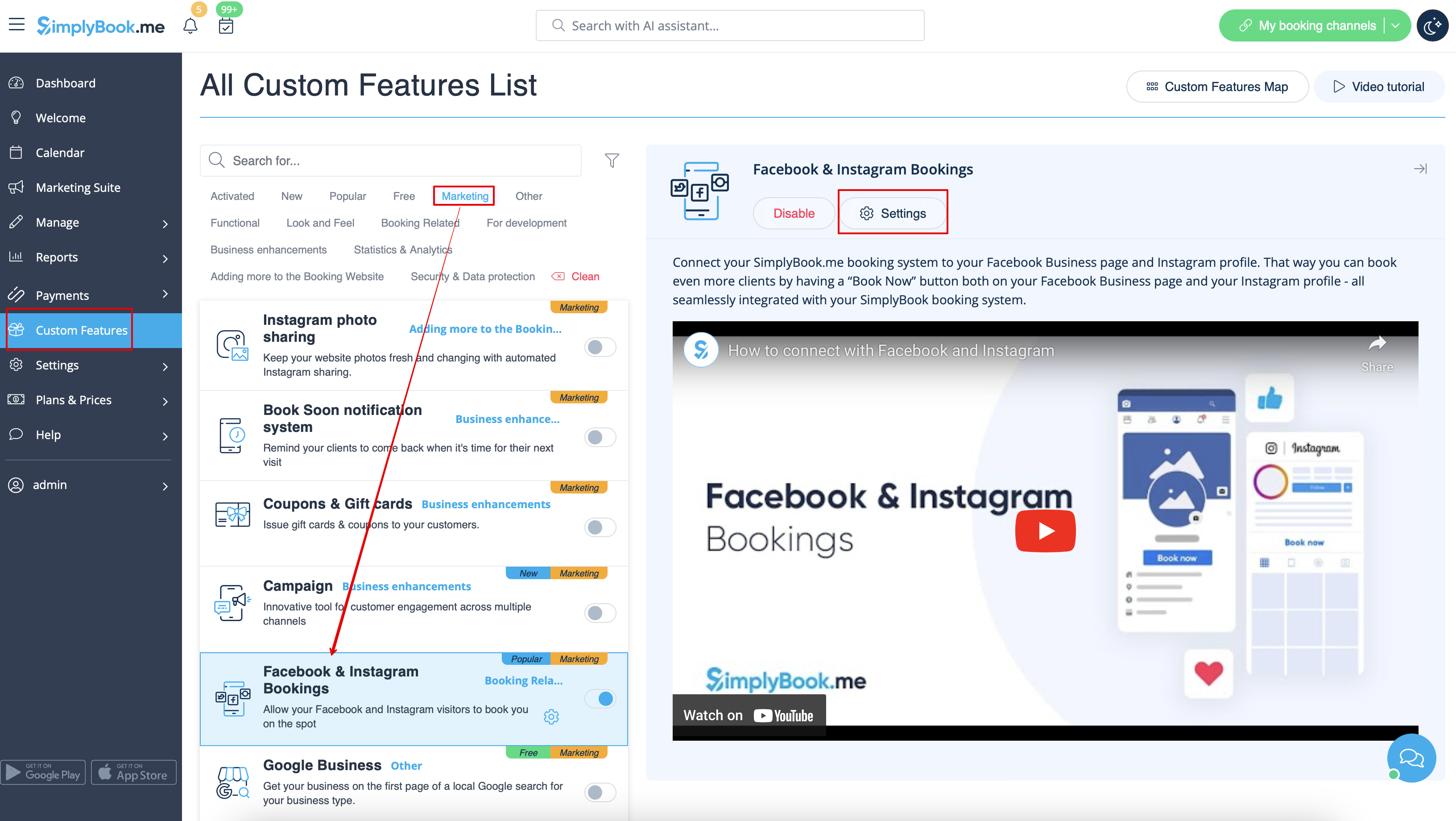
- 3. Ga terug naar de SimplyBook.me-interface en klik op Instellingen naast Facebook- en Instagram-boekingen.
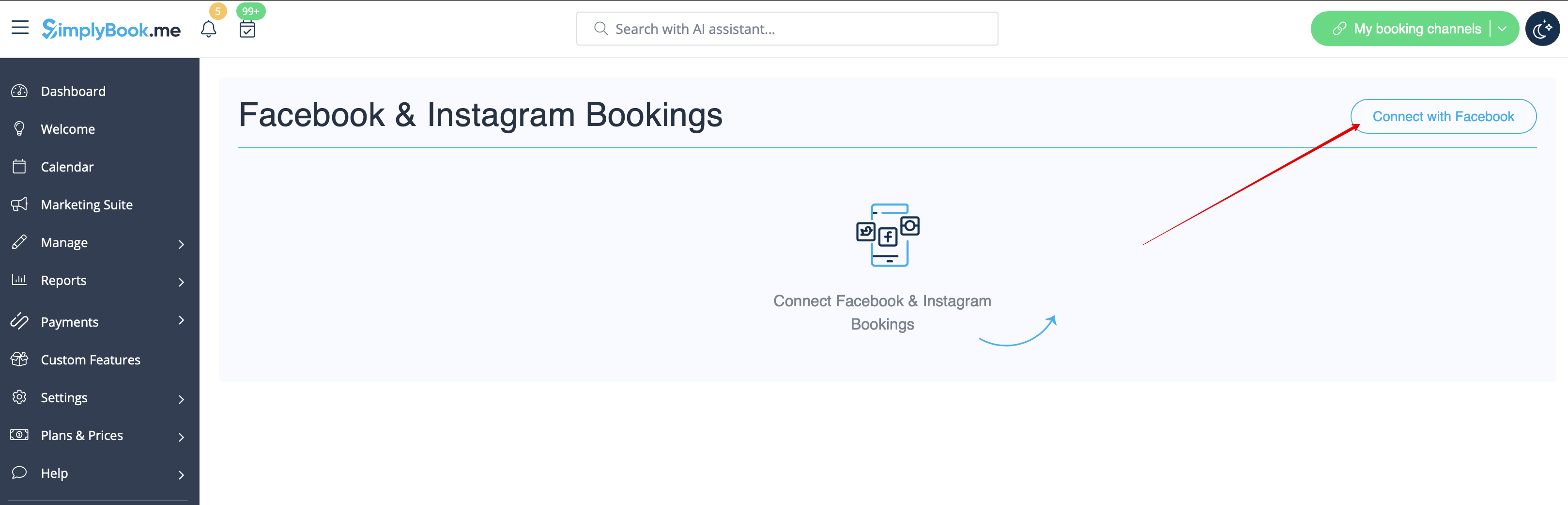
- 4. Klik op de knop Verbinden met Facebook op de pagina die u ziet.
- 5. U wordt doorgestuurd naar de Facebook- interface om de machtigingen en de verbinding met SimplyBook.me te beheren.
- Volg de onderstaande stappen 1-5.
- (Als u een Instagram-bedrijfsprofiel hebt dat is gekoppeld aan uw Facebook-bedrijfspagina, kunt u het daar ook koppelen
- en de knop 'Boeken' verschijnt daar automatisch)

- 6. Nu worden uw diensten op uw Facebook-pagina weergegeven met een knop 'Boeken' ernaast of een knop 'Nu boeken' onder de paginabanner, die uw klanten doorverwijst naar uw boekingssite.
- (de weergaveopties zijn afhankelijk van uw Facebook-bedrijfspagina)

- 7. U kunt ook een boekingsoptie toevoegen aan uw Facebook-berichten, zodat klanten snel uw diensten kunnen boeken.

Hoe verwijder ik de knop Boeken van Facebook/Instagram-pagina's?
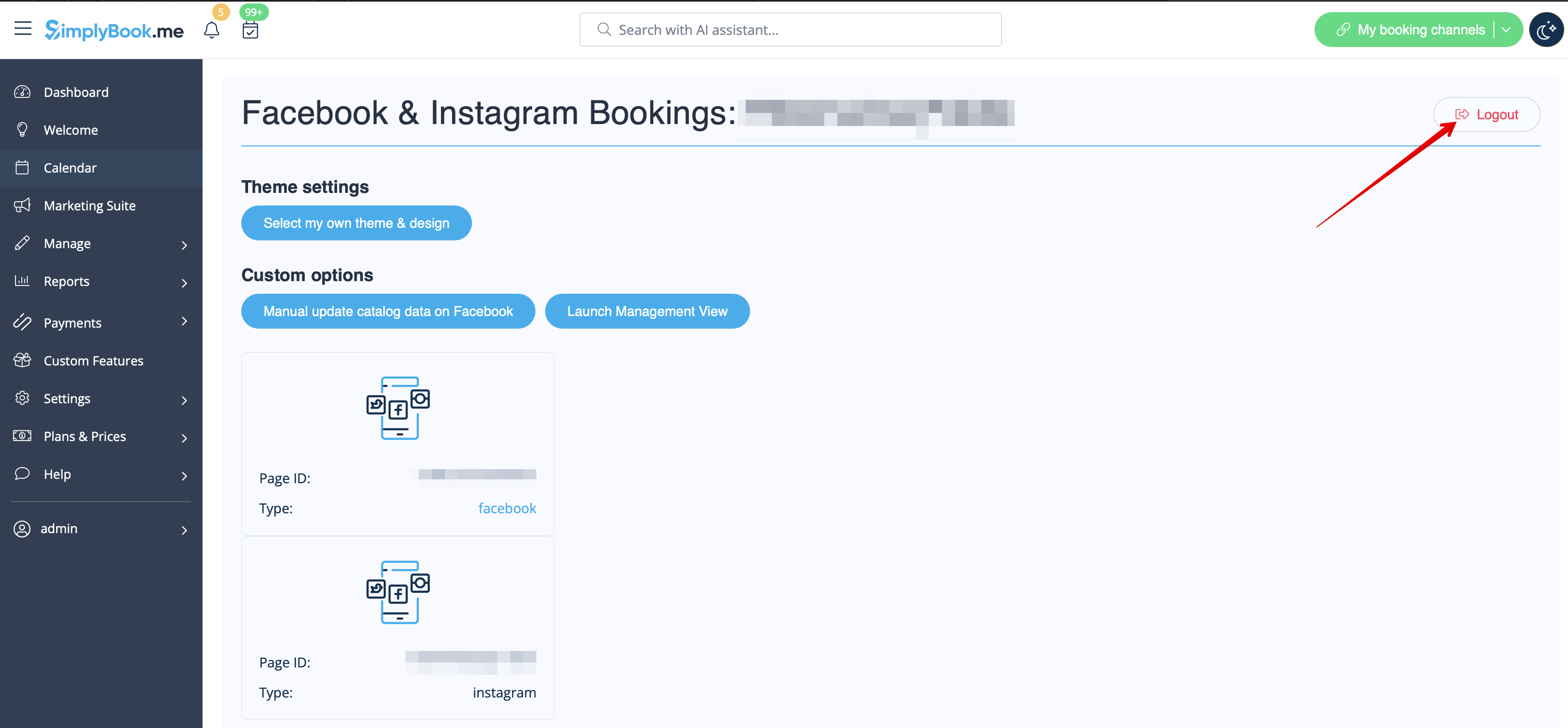
- 1. Ga naar Aangepaste functies -> Facebook- en Instagram-boekingen -> Instellingen aan de kant van SimplyBook.me.
- 2. Klik op Uitloggen bovenaan de pagina.
Hoe u de boekingsoptie alleen op Instagram kunt toevoegen en gebruiken
- 1. Open uw mobiele Instagram-app en log in op uw bedrijfspagina.
- 2. Ga naar uw profiel en selecteer deze om te bewerken.
- 3. Volg de onderstaande stappen 1-8 om de knop 'Boeken' toe te voegen die klanten naar uw boekingssite leidt:

Hoe verwijder je de optie 'Boeken' van je Instagram-bedrijfspagina?
- 1. Open uw mobiele Instagram -app en ga naar het bewerken van uw profiel.
- Volg de onderstaande stappen 1-5 om de knop 'Boeken' te verwijderen:

Call-to-action-knop voor Facebook-fanpagina
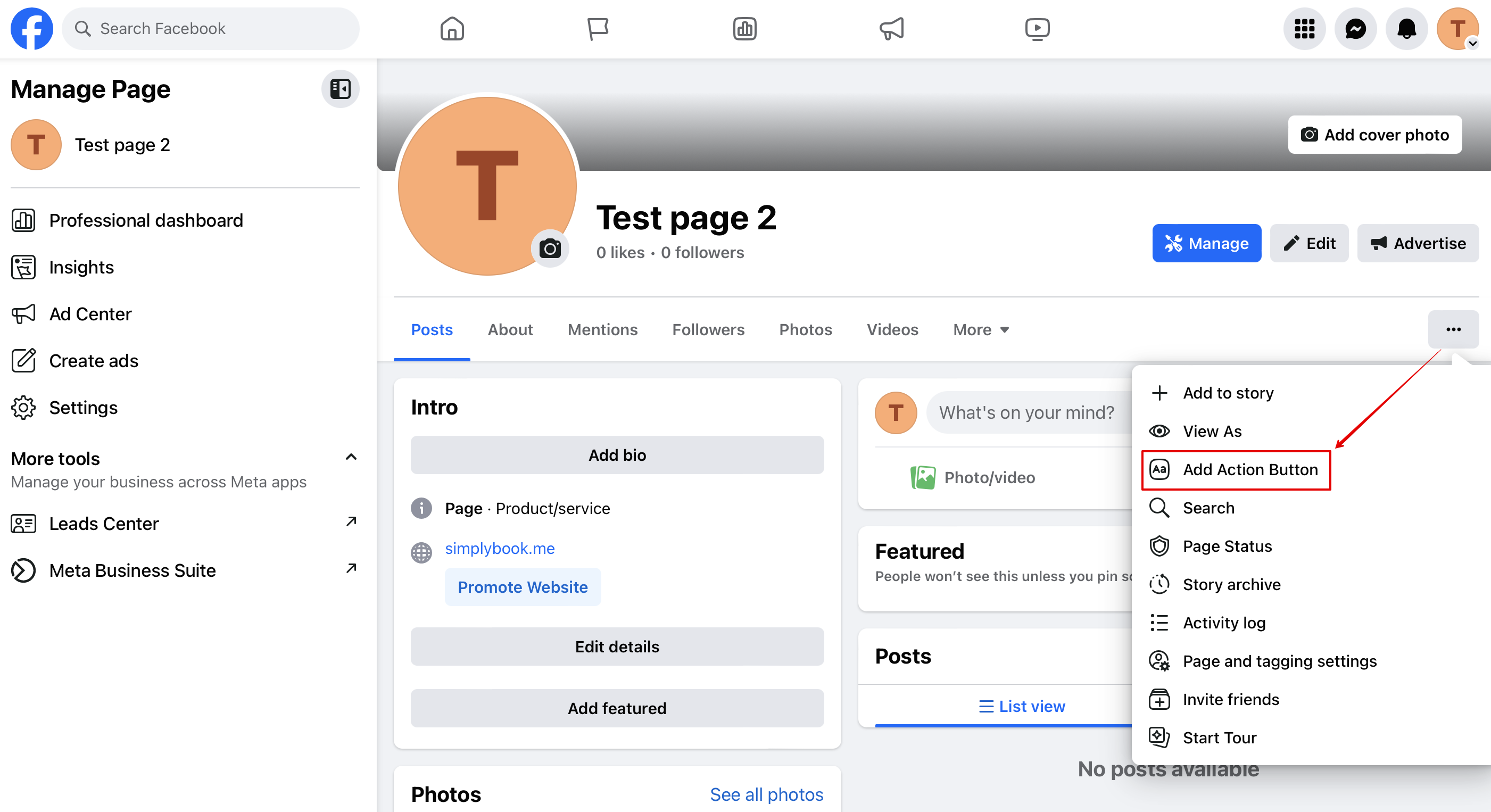
- 1. Ga naar de omslagfoto van uw Facebook-bedrijfspagina, klik op de drie puntjes onder de omslagafbeelding en selecteer 'Actieknop toevoegen'
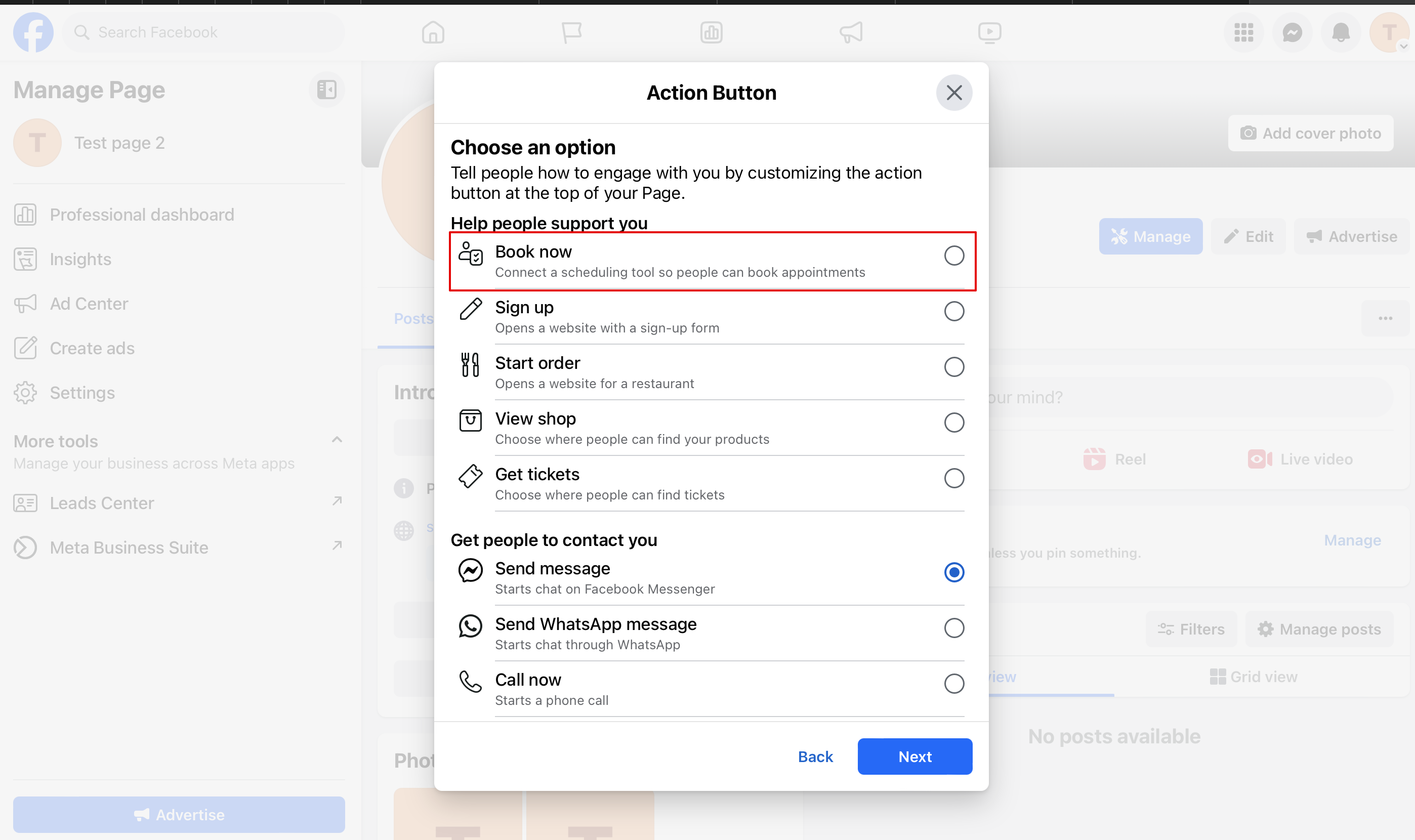
- 2. Je kunt de opties 'Nu boeken' of 'Reserveren' kiezen als call-to-action en vervolgens SimplyBook.me selecteren. Op die manier schakel je de aangepaste functie voor Facebook- en Instagram-boekingen in
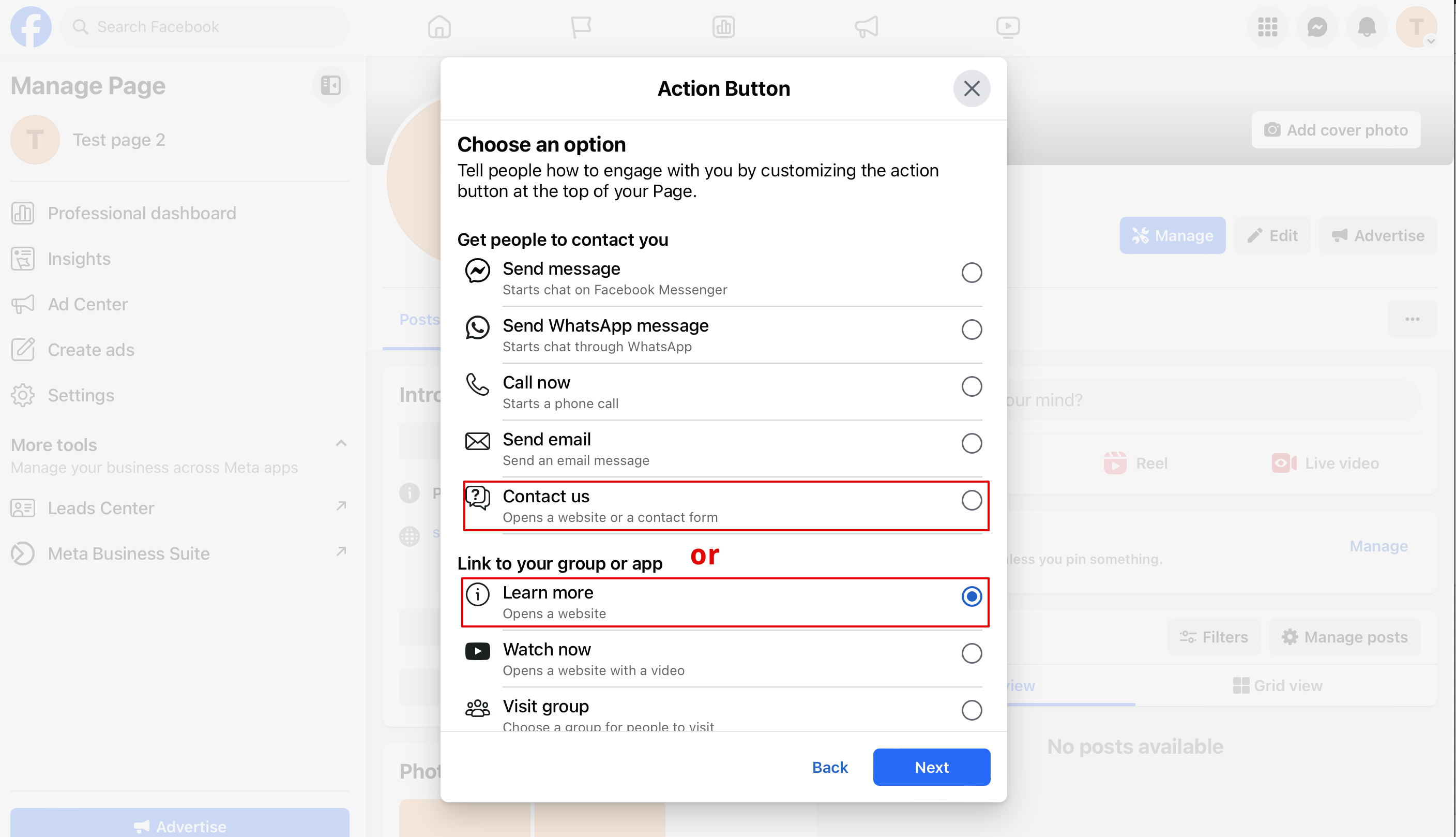
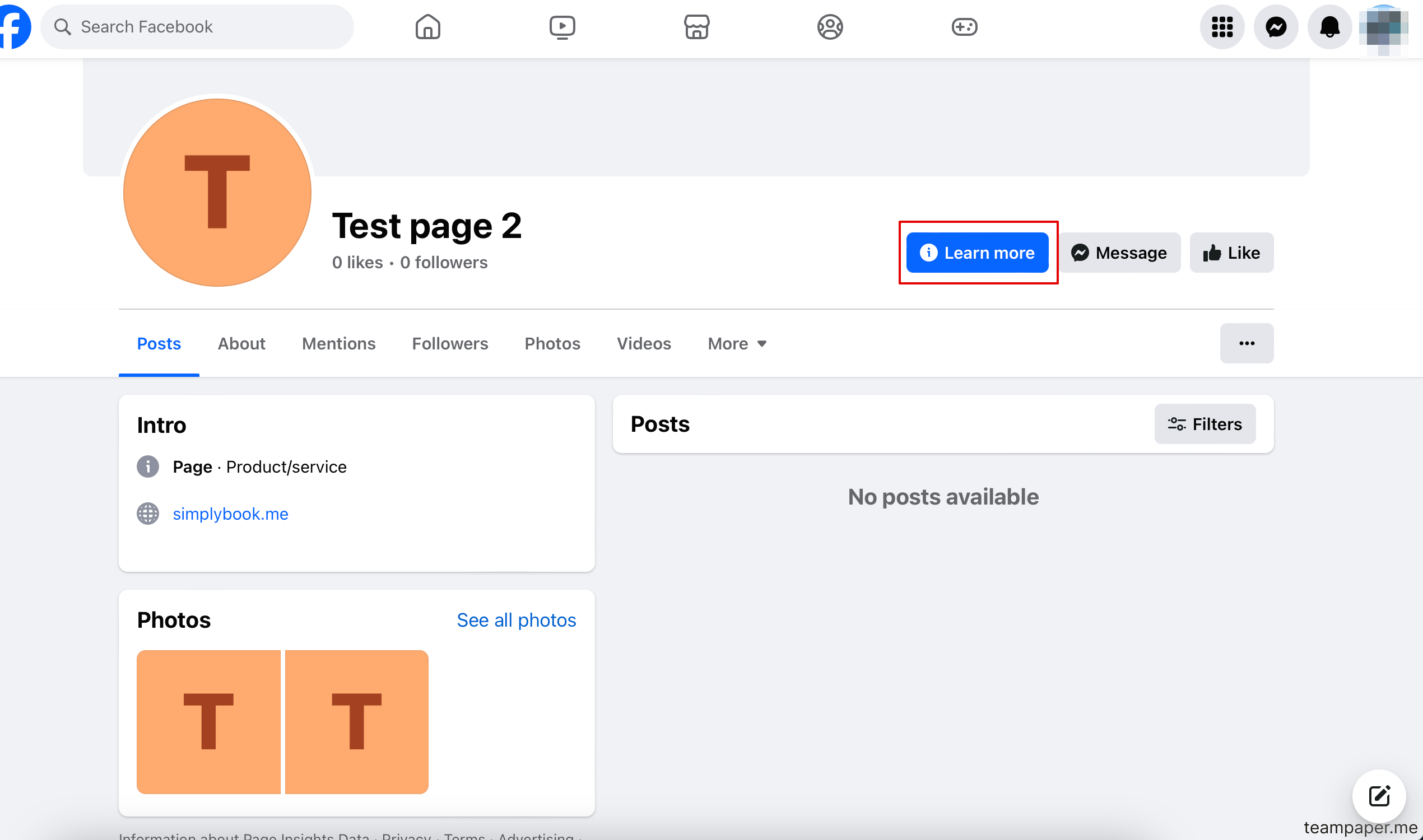
- 3. Als je een knop nodig hebt die naar je boekingswebsite leidt, kun je 'Contact' of 'Meer informatie' selecteren in dat pop-upvenster
- 3. Plak de link naar uw boekingswebsite in het daarvoor bestemde veld en sla de instellingen op.
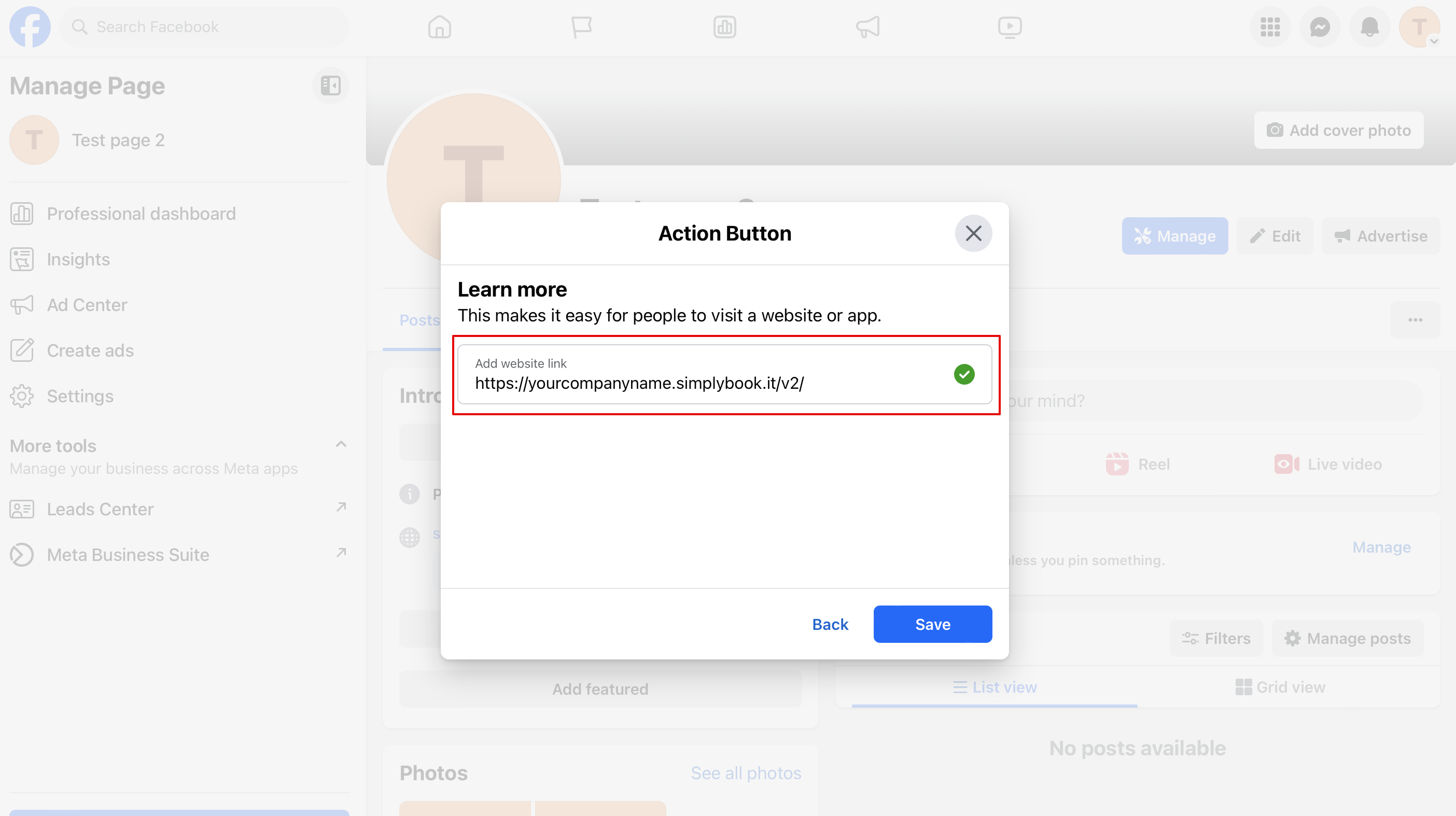
- 4. Het resultaat is een actieknop met de tekst "Contact" of "Meer informatie" die naar uw boekingswebsite leidt.
Hoe voeg je een Facebook Messenger-chat toe aan je boekingspagina
- Videohandleiding beschikbaar
