From SimplyBook.me
No edit summary Tags: Mobile edit Mobile web edit |
No edit summary |
||
| (7 intermediate revisions by 2 users not shown) | |||
| Line 2: | Line 2: | ||
{{#seo: | {{#seo: | ||
|title=Google Business custom feature - SimplyBook.me | |title=Google Business custom feature - SimplyBook.me | ||
|description= | |description=Verbind met Google Business Profile. Vergroot de zichtbaarheid in Google Zoeken en Maps. Voeg de knop ‘Reserve with Google’ toe. Gratis functie die de online aanwezigheid versterkt. | ||
|titlemode=append | |titlemode=append | ||
|keywords=faq, frequently asked questions, booking software, appointment system questions, appointments online, calendar software, booking system, booking calendar, scheduling software, online appointment scheduling, online scheduling, plugins, custom features, additional functionality, add business to google, show business on map, show business on google map, increase visibility, improve search resuts | |keywords=faq, frequently asked questions, booking software, appointment system questions, appointments online, calendar software, booking system, booking calendar, scheduling software, online appointment scheduling, online scheduling, plugins, custom features, additional functionality, add business to google, show business on map, show business on google map, increase visibility, improve search resuts | ||
| Line 68: | Line 68: | ||
Voeg een | Voeg een <span style="background-color:#d4f8e5; padding:5px; border-radius:5px;">Online boeken</span>-optie toe aan je Google Bedrijfsvermelding. Laat je klanten je gemakkelijk vinden op Google en je diensten direct boeken via Google Zoeken, Google Maps of Google Assistant — mogelijk gemaakt door het SimplyBook.me-boekingssysteem. | ||
| Line 79: | Line 79: | ||
*<span style="background-color:#ffe9e9; padding:5px; border-radius:5px;">Als een dienst <span style="background-color:#d4f8e5; padding:5px; border-radius:5px;">[[Special:MyLanguage/Recurring_services(packs)|terugkerend]]</span> is of gekoppeld is aan <span style="background-color:#cdeffc; padding:5px; border-radius:5px;">[[Special:MyLanguage/Membership custom feature|een lidmaatschap]]</span>, wordt deze niet weergegeven in Reserve met Google;</span> | *<span style="background-color:#ffe9e9; padding:5px; border-radius:5px;">Als een dienst <span style="background-color:#d4f8e5; padding:5px; border-radius:5px;">[[Special:MyLanguage/Recurring_services(packs)|terugkerend]]</span> is of gekoppeld is aan <span style="background-color:#cdeffc; padding:5px; border-radius:5px;">[[Special:MyLanguage/Membership custom feature|een lidmaatschap]]</span>, wordt deze niet weergegeven in Reserve met Google;</span> | ||
*<span style="background-color:#ffe9e9; padding:5px; border-radius:5px;">Als u de verouderde aangepaste functie Google Agenda-synchronisatie gebruikt, is het niet mogelijk om Reserve met Google te gebruiken.</span> | *<span style="background-color:#ffe9e9; padding:5px; border-radius:5px;">Als u de verouderde aangepaste functie Google Agenda-synchronisatie gebruikt, is het niet mogelijk om Reserve met Google te gebruiken.</span> | ||
*<span style="background-color:#ffe9e9; padding:5px; border-radius:5px;">Om te synchroniseren met Google en deze optie te laten werken, is het vereist dat het bedrijfsadres op de boekingswebsite wordt gepubliceerd.</span> | |||
*<span style="background-color: | |||
#ffe9e9; padding:5px; border-radius:5px;">De knop verschijnt niet als u het Blank-page-thema gebruikt met een doorverwijzing naar uw eigen website</span> | |||
<br><br> | <br><br> | ||
;Gebruiksaanwijzing: | ;Gebruiksaanwijzing: | ||
| Line 91: | Line 93: | ||
:3. (optioneel) Als u de aangepaste functie <span style="background-color:#cdeffc; padding:5px; border-radius:5px;">[[Special:MyLanguage/Custom_Features#Multiple_Locations|'Meerdere locaties']]</span> gebruikt, koppelt u uw <span style="background-color:#d4f8e5; padding:5px; border-radius:5px;">Google Bedrijven</span> aan <span style="background-color:#d4f8e5; padding:5px; border-radius:5px;">de</span> gewenste <span style="background-color:#d4f8e5; padding:5px; border-radius:5px;">SimplyBook.me-locaties.</span> | :3. (optioneel) Als u de aangepaste functie <span style="background-color:#cdeffc; padding:5px; border-radius:5px;">[[Special:MyLanguage/Custom_Features#Multiple_Locations|'Meerdere locaties']]</span> gebruikt, koppelt u uw <span style="background-color:#d4f8e5; padding:5px; border-radius:5px;">Google Bedrijven</span> aan <span style="background-color:#d4f8e5; padding:5px; border-radius:5px;">de</span> gewenste <span style="background-color:#d4f8e5; padding:5px; border-radius:5px;">SimplyBook.me-locaties.</span> | ||
:<span style="background-color:#ffe9e9; padding:5px; border-radius:5px;">'''Let op!''' Het is mogelijk om één SimplyBook.me-locatie te koppelen aan één Google Bedrijven.</span> | :<span style="background-color:#ffe9e9; padding:5px; border-radius:5px;">'''Let op!''' Het is mogelijk om één SimplyBook.me-locatie te koppelen aan één Google Bedrijven.</span> | ||
:<span style="background-color:#ffe9e9; padding:5px; border-radius:5px;">Als u geen gebruik maakt van <span style="background-color:#cdeffc; padding:5px; border-radius:5px;">[[Special:MyLanguage/ | :<span style="background-color:#ffe9e9; padding:5px; border-radius:5px;">Als u geen gebruik maakt van <span style="background-color:#cdeffc; padding:5px; border-radius:5px;">[[Special:MyLanguage/Multiple Locations custom feature|meerdere locaties]]</span>, kan <span style="background-color:#cdeffc; padding:5px; border-radius:5px;">[[Special:MyLanguage/Multiple Locations custom feature|uw]]</span> hoofdlocatie worden gekoppeld aan één Google Bedrijven.</span> | ||
[[File:Reserve with google select location redesigned.png|1200px|border|center|link=https://help.simplybook.me/images/1/14/Reserve_with_google_select_location_redesigned.png]] | [[File:Reserve with google select location redesigned.png|1200px|border|center|link=https://help.simplybook.me/images/1/14/Reserve_with_google_select_location_redesigned.png]] | ||
<br><br> | <br><br> | ||
| Line 99: | Line 101: | ||
<br><br> | <br><br> | ||
<br><br> | <br><br> | ||
Latest revision as of 11:11, 18 June 2026

png
Vergroot eenvoudig de zichtbaarheid van uw bedrijf op internet via de functie Google Mijn Bedrijf. Het kost niets, maar vergroot de zichtbaarheid in zoekresultaten en maakt uw bedrijf zichtbaar op Google Maps.
Gratis aangepaste functie!
Video-tutorial
Google Business
- Gebruiksaanwijzing
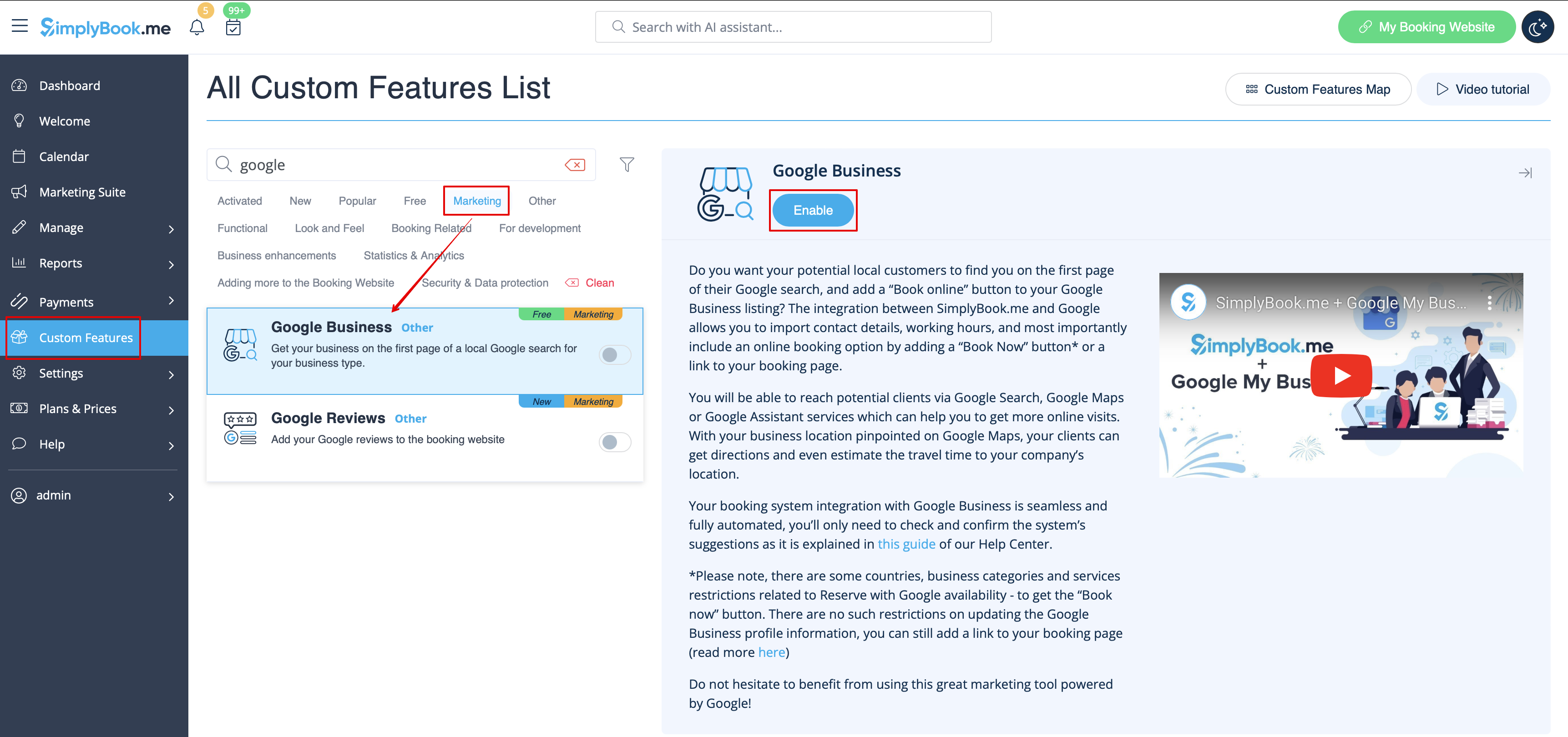
- 1. Schakel deze aangepaste functie in op uw pagina Aangepaste functies.
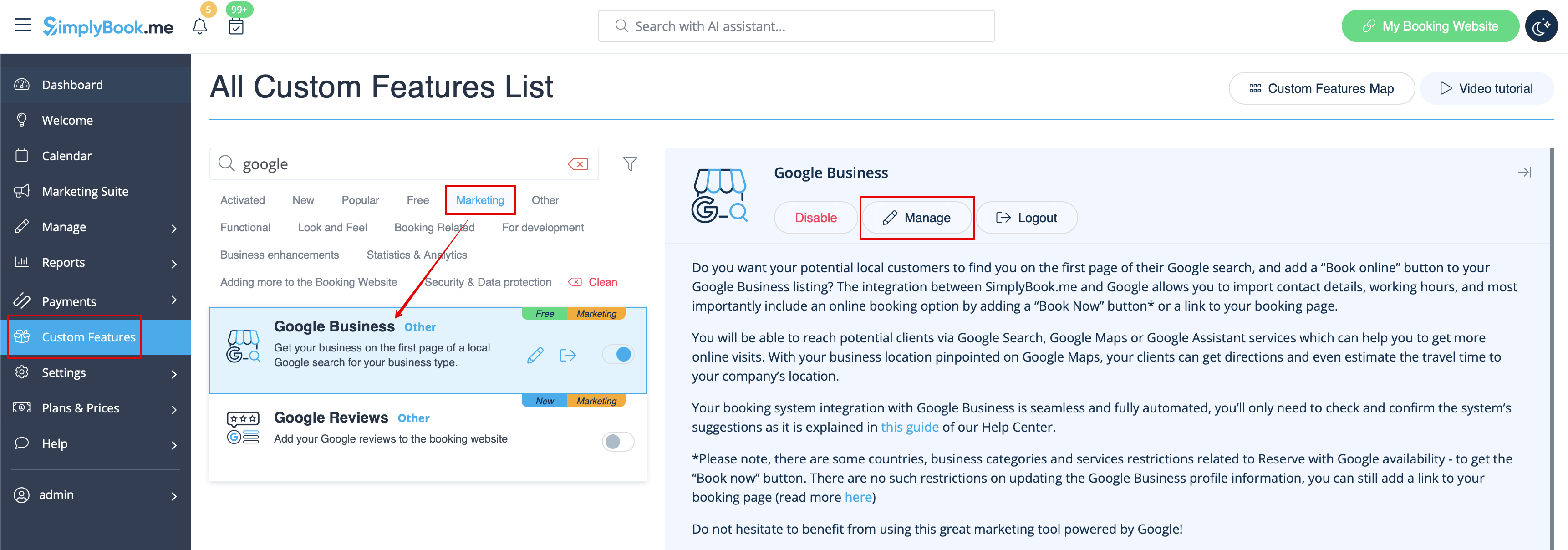
- 2. Ga naar Instellingen om een Google Business-account aan te maken als u er nog geen hebt, of koppel een bestaand Google Business-account.

- 3. Verleen de nodige machtigingen zodat uw locatie(s) in SimplyBook.me kunnen worden bekeken en bewerkt.
- 4. Als u al locaties in Google Business hebt, kunt u deze aan de linkerkant van de pagina zien.
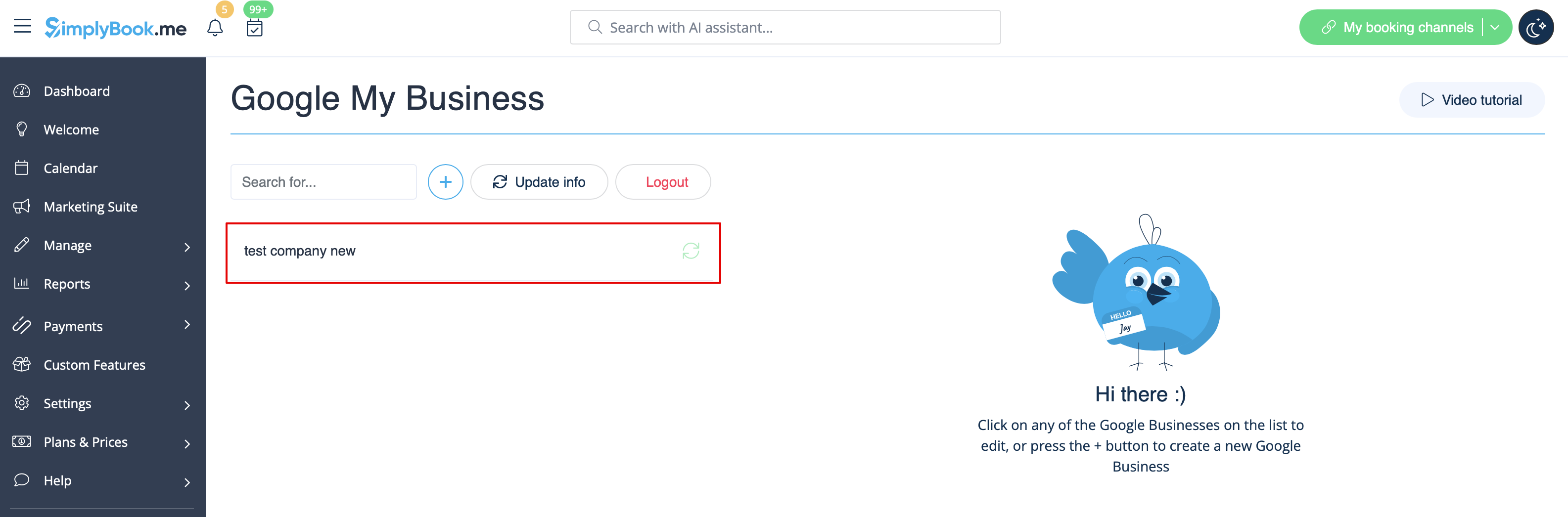
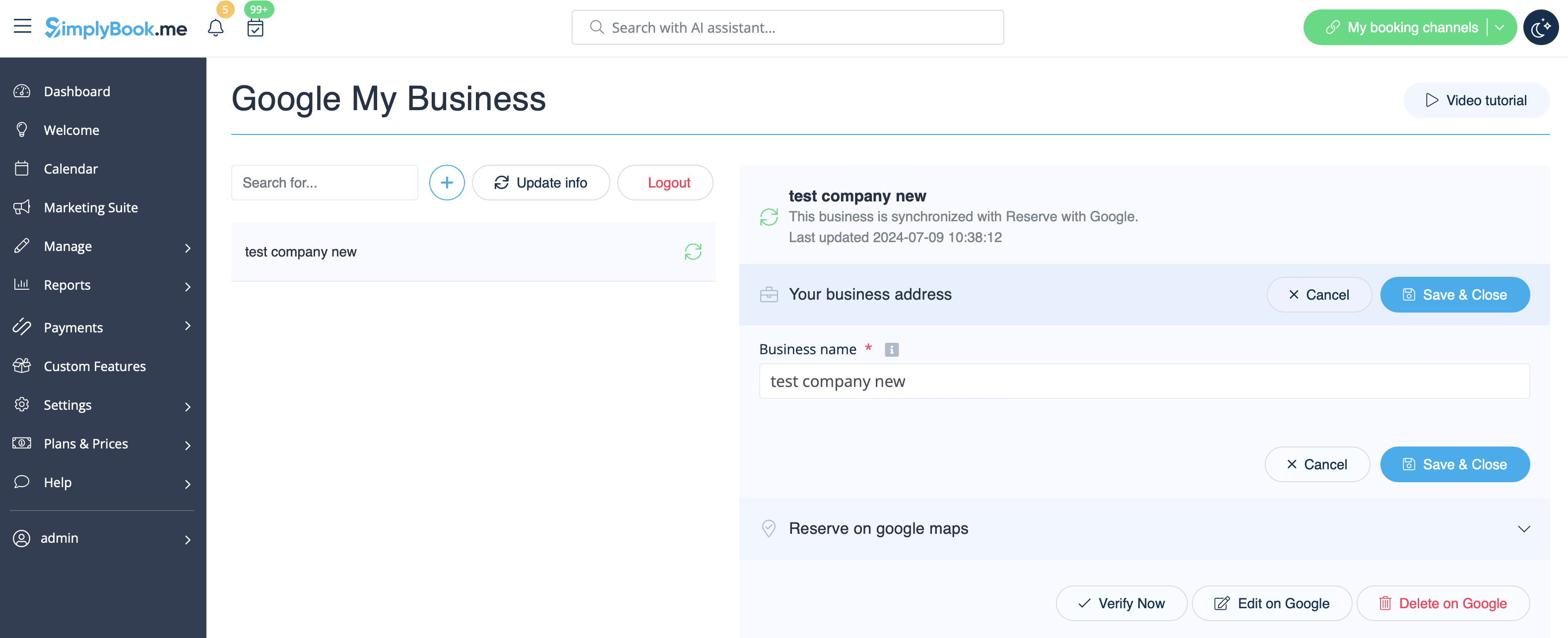
- 5. Klik op een van deze locaties als u wijzigingen wilt aanbrengen en schakel de optie Adres bijwerken in het profiel in, breng de nodige wijzigingen aan en sla de locatie opnieuw op, zodat de informatie op Google wordt bijgewerkt

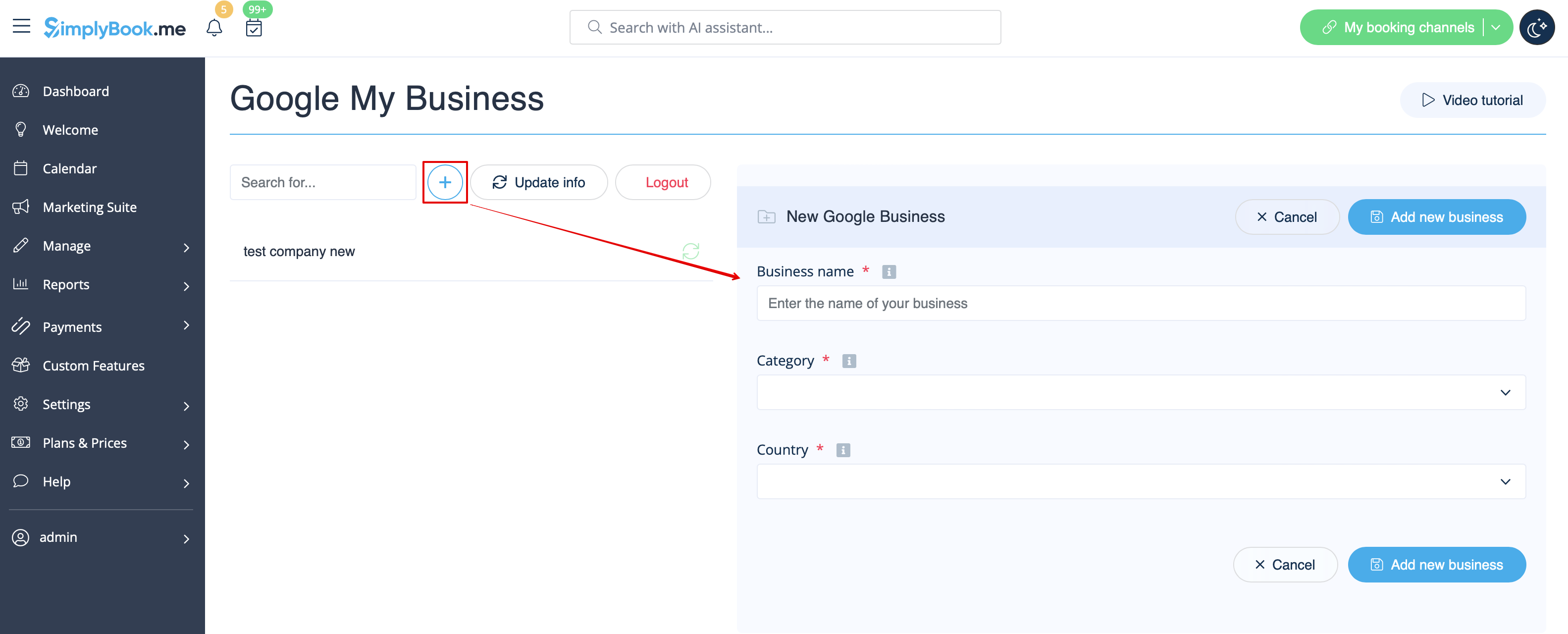
- of kies de optie + om een nieuw bedrijfsadres toe te voegen.
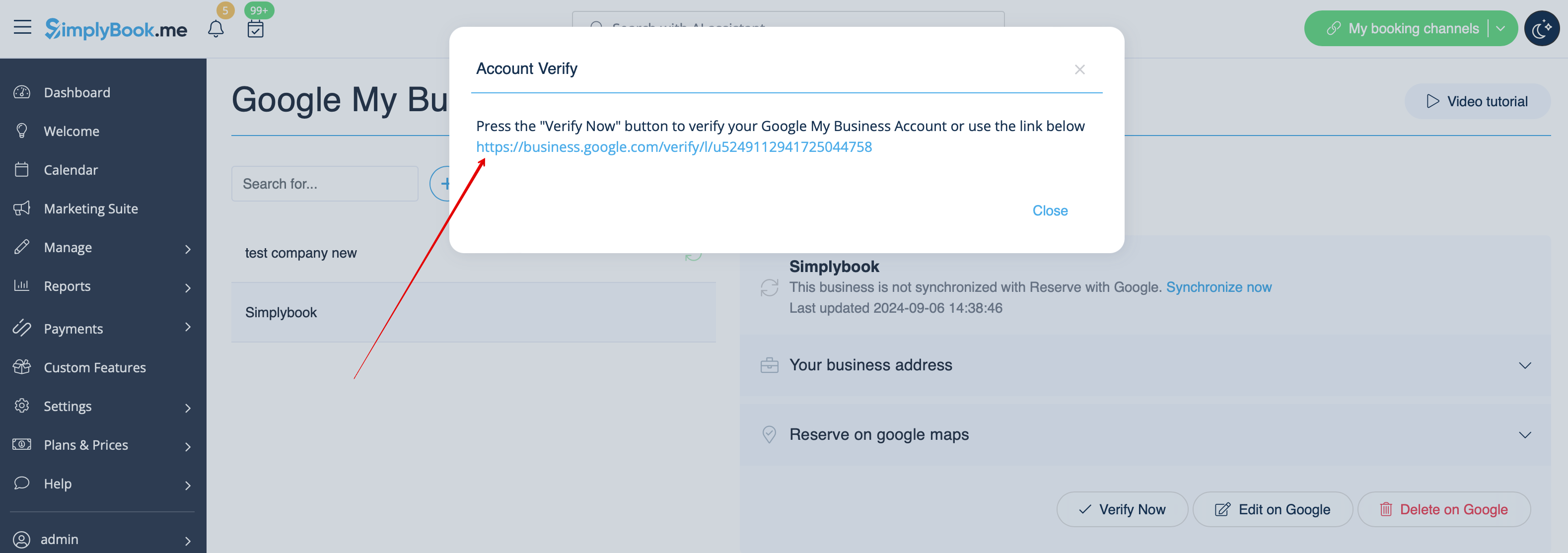
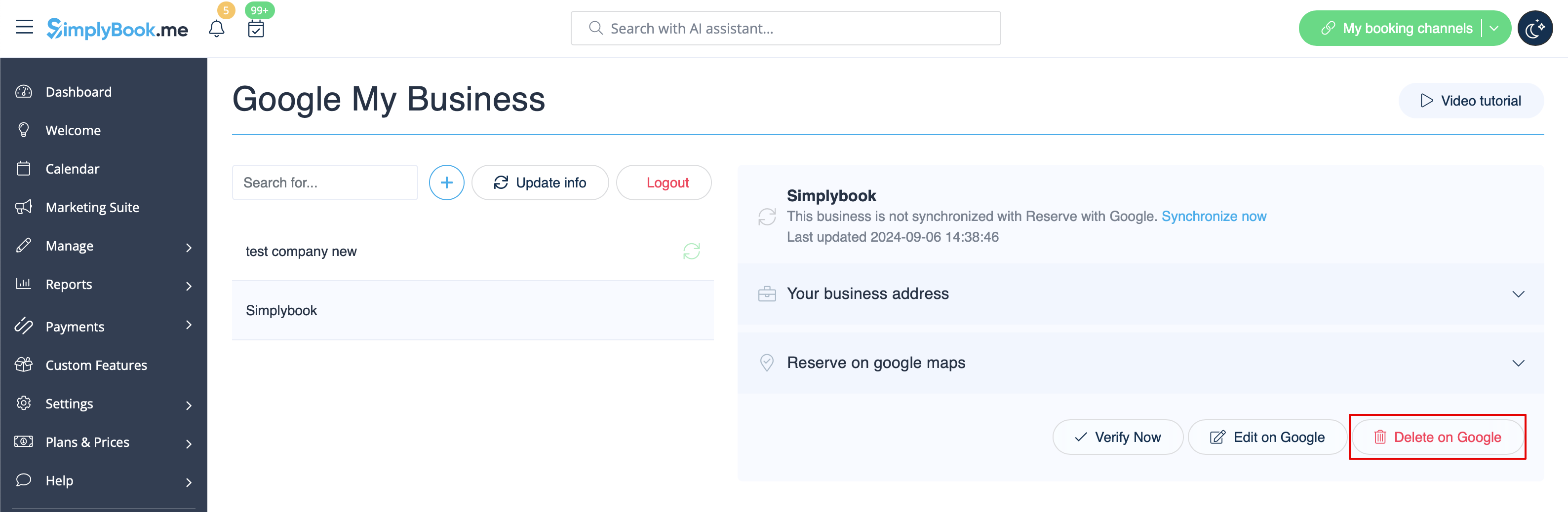
- 6. Nadat u het adres hebt toegevoegd, klikt u op Opslaan en sluiten. U kunt dan doorgaan met de verificatie van de bedrijfs locatie door Google (dit kan even duren).
- U kunt ook het pop-upvenster sluiten en later terugkeren naar de verificatiestap (er is een knop Nu verifiëren voor elke opgeslagen en gesynchroniseerde bedrijfsadres).
- Zodra uw locatie door Google is geverifieerd (u ziet de stappen van het verificatieproces terwijl u de instructies van Google volgt), verschijnt uw bedrijf in de zoekresultaten en op Google Maps.
- 7. Wanneer u de locatie opslaat, wordt de volgende informatie over uw bedrijf doorgegeven aan Google:
- naam van de bedrijfslocatie;
- openingstijden van het bedrijf;
- telefoonnummer van het bedrijf;
- link naar de boekingssite;
- bedrijfscategorie (aangezien de categorieën van Google verschillen, wordt de meest geschikte categorie gezocht).

- Let op: als u enkele van deze gegevens in uw SimplyBook.me-account hebt gewijzigd, moet u het bedrijfsadres opnieuw opslaan in de instellingen van Google Bedrijven om de gegevens bij te werken in Google.
- 8. U kunt uw bedrijfsadresgegevens indien nodig ook in Google bewerken. Klik gewoon op de knop Bewerken op GMB bovenaan (verschijnt voor opgeslagen en gesynchroniseerde locaties).
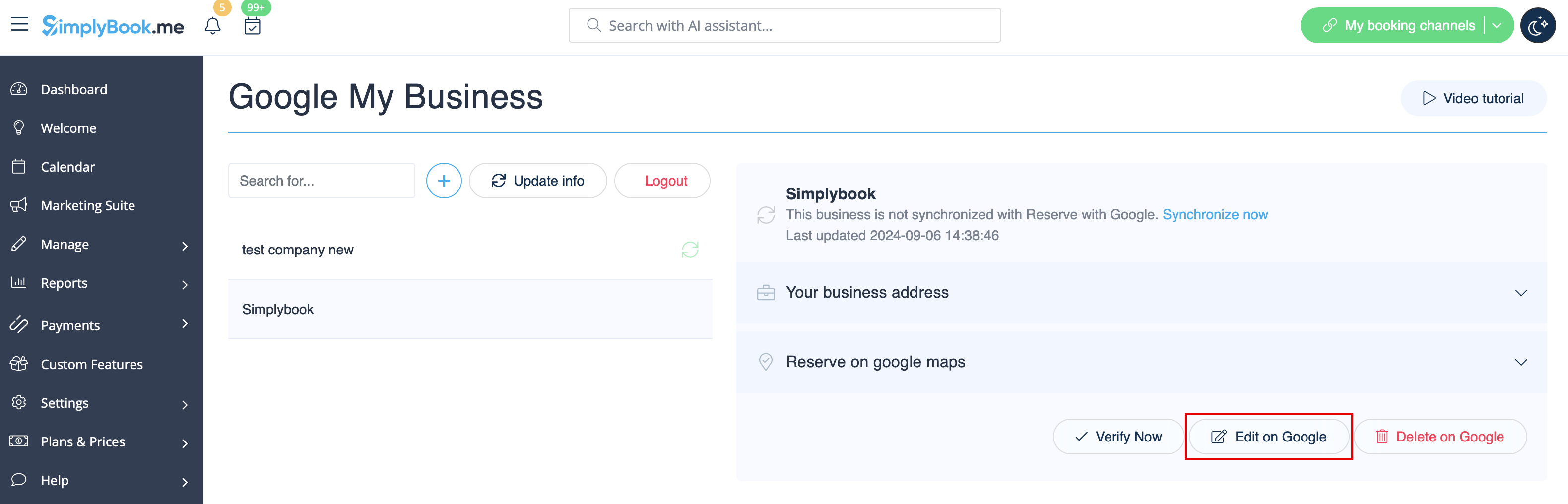
- 9. Als sommige locaties niet meer relevant zijn voor uw bedrijf, kunt u ze eenvoudig verwijderen in deze functie-instellingen. Klik gewoon op de optie Verwijderen op GMB.
Reserveren met Google
Voeg een Online boeken-optie toe aan je Google Bedrijfsvermelding. Laat je klanten je gemakkelijk vinden op Google en je diensten direct boeken via Google Zoeken, Google Maps of Google Assistant — mogelijk gemaakt door het SimplyBook.me-boekingssysteem.
- Let op!:
- Reserve met Google is momenteel alleen beschikbaar voor ondersteunde landen die hier worden vermeld:
- Momenteel is het niet mogelijk om deze optie te gebruiken voor de volgende bedrijfscategorieën: medisch centrum, onderwijsinstelling, overheidsinstantie, ingenieur, medische kliniek, tandarts, medisch kantoor, onderwijscentrum, evenementenbureau, stadsbestuur, ambassade, algemeen advocaat, kinderopvang, universiteit, hogeschool, school, bibliotheek, financiële instelling.
- De aangepaste functie 'Betalingen accepteren' moet zijn ingeschakeld (de optie'Later betalen (uitstel van betaling toestaan)' moet altijd zijn ingeschakeld) en er moeten prijzen worden toegevoegd voor alle diensten/lessen die u wilt weergeven en boekbaar wilt maken via Google Maps;
- Alle diensten/lessen moeten een beschrijving hebben die op Google wordt weergegeven;
- Als u de functie 'Intakeformulieren' gebruikt, mogen er geen verplichte formulieren worden toegevoegd aan de diensten die u beschikbaar wilt maken voor boekingen;
- Als een dienst terugkerend is of gekoppeld is aan een lidmaatschap, wordt deze niet weergegeven in Reserve met Google;
- Als u de verouderde aangepaste functie Google Agenda-synchronisatie gebruikt, is het niet mogelijk om Reserve met Google te gebruiken.
- Om te synchroniseren met Google en deze optie te laten werken, is het vereist dat het bedrijfsadres op de boekingswebsite wordt gepubliceerd.
- De knop verschijnt niet als u het Blank-page-thema gebruikt met een doorverwijzing naar uw eigen website
- Gebruiksaanwijzing
- 1. Voeg uw Google Business-locatie(s) toe en controleer deze via het SimplyBook.me-platform (vorig deel van deze tutorial) of via uw Google Business-interface en sla deze opnieuw op in de aangepaste instellingen van Google Business.
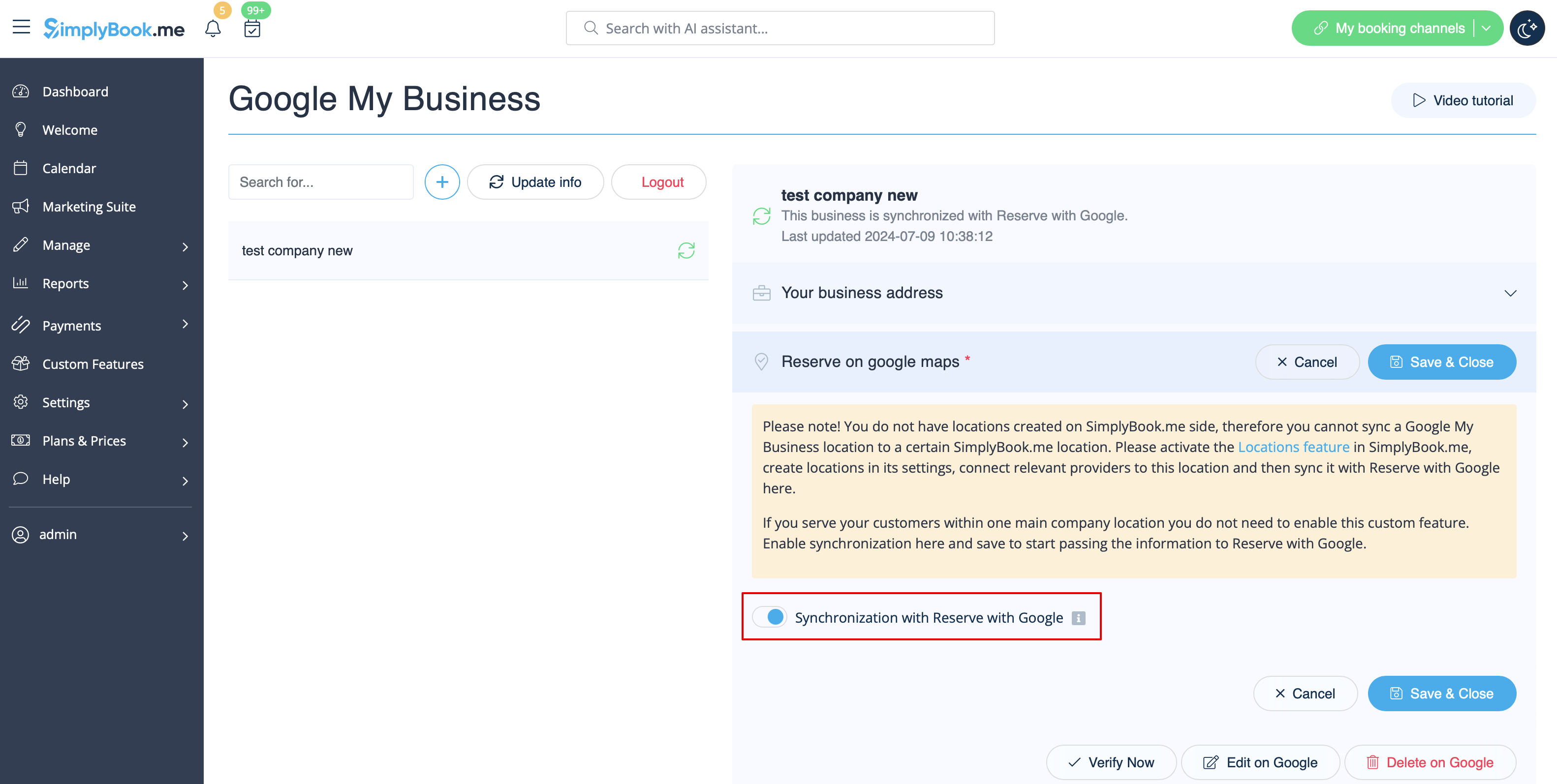
- 2. Ga naar het tabblad 'Reserveren op Google Maps' en zet de schakelaar 'Synchronisatie met Reserveren met Google' in de actieve stand.
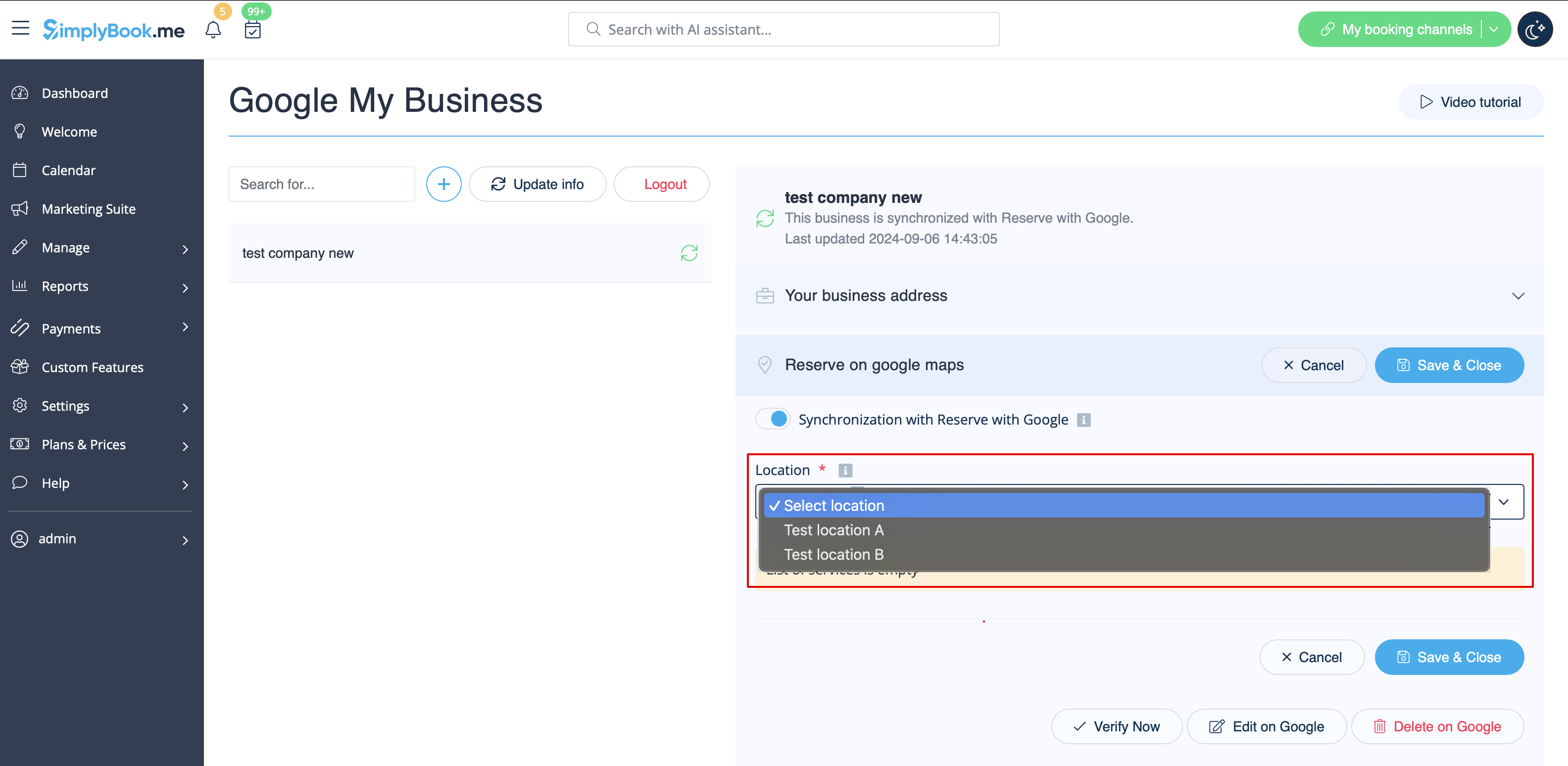
- 3. (optioneel) Als u de aangepaste functie 'Meerdere locaties' gebruikt, koppelt u uw Google Bedrijven aan de gewenste SimplyBook.me-locaties.
- Let op! Het is mogelijk om één SimplyBook.me-locatie te koppelen aan één Google Bedrijven.
- Als u geen gebruik maakt van meerdere locaties, kan uw hoofdlocatie worden gekoppeld aan één Google Bedrijven.
- 4. Sla de instellingen op. Nu vindt de synchronisatie plaats en nadat u de pagina opnieuw hebt geladen, kunt u de lijst met diensten zien die worden doorgegeven aan Reserve met Google voor boekingen.
- Standaard verzamelen we alle informatie en geven we de update één keer per dag door aan Google, maar u kunt de knop Info bijwerken gebruiken om de informatie handmatig voor te bereiden voor overdracht als er instellingen in uw account zijn gewijzigd (bijvoorbeeld als u een nieuwe dienst hebt aangemaakt).