From SimplyBook.me
No edit summary |
No edit summary |
||
| (5 intermediate revisions by 2 users not shown) | |||
| Line 2: | Line 2: | ||
{{#seo: | {{#seo: | ||
|title=Google Business custom feature - SimplyBook.me | |title=Google Business custom feature - SimplyBook.me | ||
|description= | |description=Connectez-vous au profil Google Business. Augmentez la visibilité dans la recherche Google et sur Maps. Ajoutez le bouton « Reserve with Google ». Fonction gratuite pour renforcer la présence en ligne. | ||
|titlemode=append | |titlemode=append | ||
|keywords=faq, frequently asked questions, booking software, appointment system questions, appointments online, calendar software, booking system, booking calendar, scheduling software, online appointment scheduling, online scheduling, plugins, custom features, additional functionality, add business to google, show business on map, show business on google map, increase visibility, improve search resuts | |keywords=faq, frequently asked questions, booking software, appointment system questions, appointments online, calendar software, booking system, booking calendar, scheduling software, online appointment scheduling, online scheduling, plugins, custom features, additional functionality, add business to google, show business on map, show business on google map, increase visibility, improve search resuts | ||
| Line 68: | Line 68: | ||
Ajoutez une option <span style="background-color:#d4f8e5; padding:5px; border-radius:5px;">Réserver en ligne</span> à votre fiche d’établissement Google. Permettez à vos clients de vous trouver facilement sur Google et de réserver vos services directement via la recherche Google, Google Maps ou Google Assistant, grâce au système de réservation SimplyBook.me. | |||
:'''<span style="background-color:#ffe9e9; padding:5px; border-radius:5px;">Remarque importante :</span>''' | :'''<span style="background-color:#ffe9e9; padding:5px; border-radius:5px;">Remarque importante :</span>''' | ||
*<span style="background-color:#ffe9e9; padding:5px; border-radius:5px;">Reserve with Google n'est actuellement disponible que dans les pays pris en charge répertoriés <span style="background-color:#cdeffc; padding:5px; border-radius:5px;">[https://developers.google.com/maps-booking/policies/criteria ici]</span>:</span> | *<span style="background-color:#ffe9e9; padding:5px; border-radius:5px;">Reserve with Google n'est actuellement disponible que dans les pays pris en charge répertoriés <span style="background-color:#cdeffc; padding:5px; border-radius:5px;">[https://developers.google.com/maps-booking/policies/criteria ici]</span>:</span> | ||
| Line 80: | Line 79: | ||
*<span style="background-color:#ffe9e9; padding:5px; border-radius:5px;">Si un service est <span style="background-color:#d4f8e5; padding:5px; border-radius:5px;">[[Special:MyLanguage/Recurring_services(packs)|récurrent]]</span> ou lié à <span style="background-color:#cdeffc; padding:5px; border-radius:5px;">[[Special:MyLanguage/Membership custom feature|un abonnement]]</span>, il ne sera pas affiché dans Reserve with Google ;</span> | *<span style="background-color:#ffe9e9; padding:5px; border-radius:5px;">Si un service est <span style="background-color:#d4f8e5; padding:5px; border-radius:5px;">[[Special:MyLanguage/Recurring_services(packs)|récurrent]]</span> ou lié à <span style="background-color:#cdeffc; padding:5px; border-radius:5px;">[[Special:MyLanguage/Membership custom feature|un abonnement]]</span>, il ne sera pas affiché dans Reserve with Google ;</span> | ||
*<span style="background-color:#ffe9e9; padding:5px; border-radius:5px;">Si vous utilisez une fonctionnalité personnalisée Google Calendar Sync obsolète, il ne sera pas possible d'utiliser Reserve with Google.</span> | *<span style="background-color:#ffe9e9; padding:5px; border-radius:5px;">Si vous utilisez une fonctionnalité personnalisée Google Calendar Sync obsolète, il ne sera pas possible d'utiliser Reserve with Google.</span> | ||
</ | *<span style="background-color:#ffe9e9; padding:5px; border-radius:5px;">Pour synchroniser avec Google et permettre à cette option de fonctionner, il est nécessaire de publier l’adresse de l’entreprise sur le site de réservation.</span> | ||
*<span style="background-color:#ffe9e9; padding:5px; border-radius:5px;">Le bouton n'apparaîtra pas si vous utilisez le thème Blank page avec une redirection vers votre propre site web</span> | |||
<br><br> | <br><br> | ||
Latest revision as of 11:12, 18 June 2026

png
Augmentez facilement la visibilité de votre entreprise sur Internet grâce à la fonctionnalité Google My Business. Elle est gratuite et améliore la visibilité dans les résultats de recherche tout en rendant votre entreprise visible sur Google Maps.
Fonctionnalité personnalisée gratuite !
Tutoriel vidéo
Google Business
- Comment utiliser
- 1. Activez cette fonctionnalité personnalisée sur votre page Fonctionnalités personnalisées.
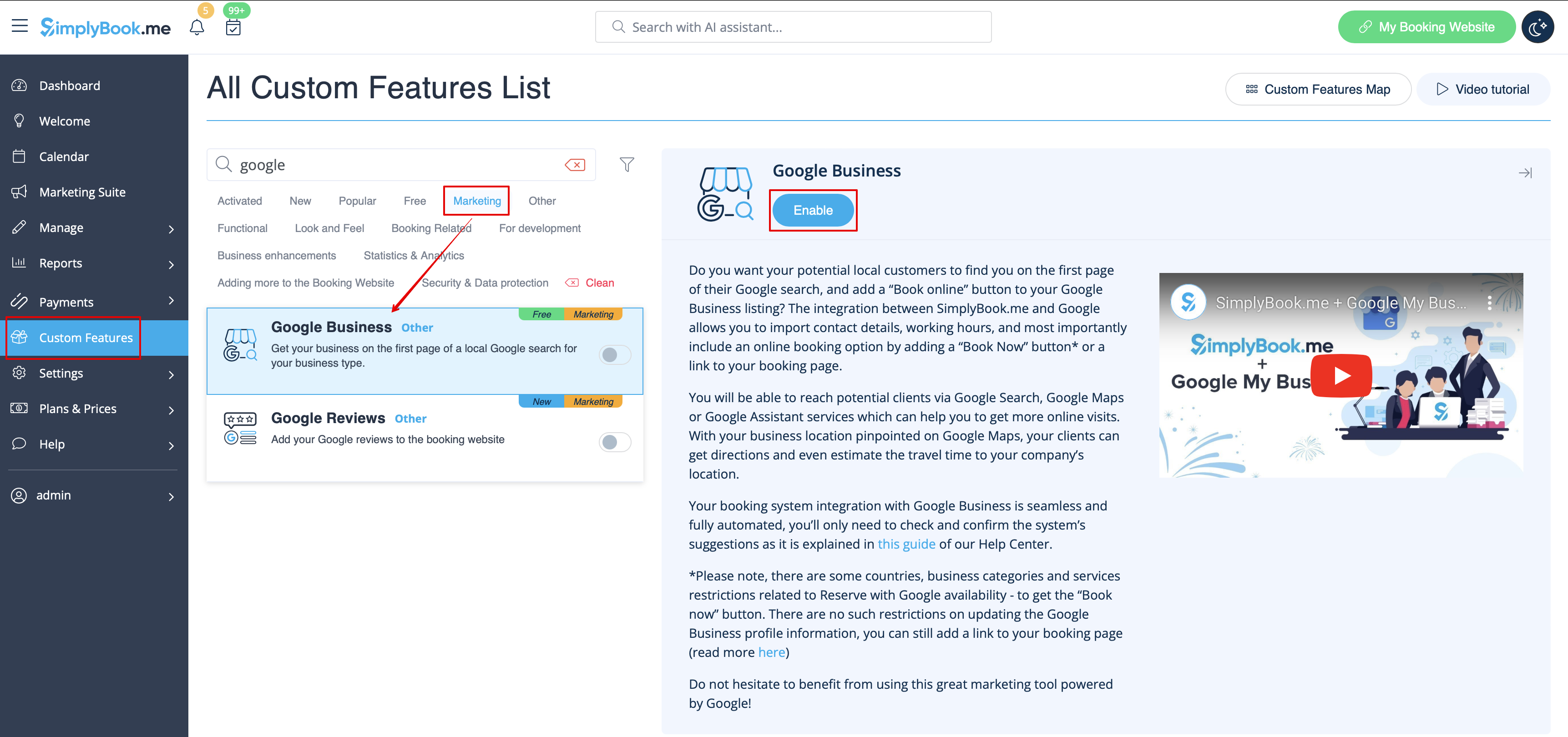
- 2. Accédez à Paramètres pour créer un compte Google Business si vous n'en avez pas encore, ou connectez-vous à un compte Google Business existant.
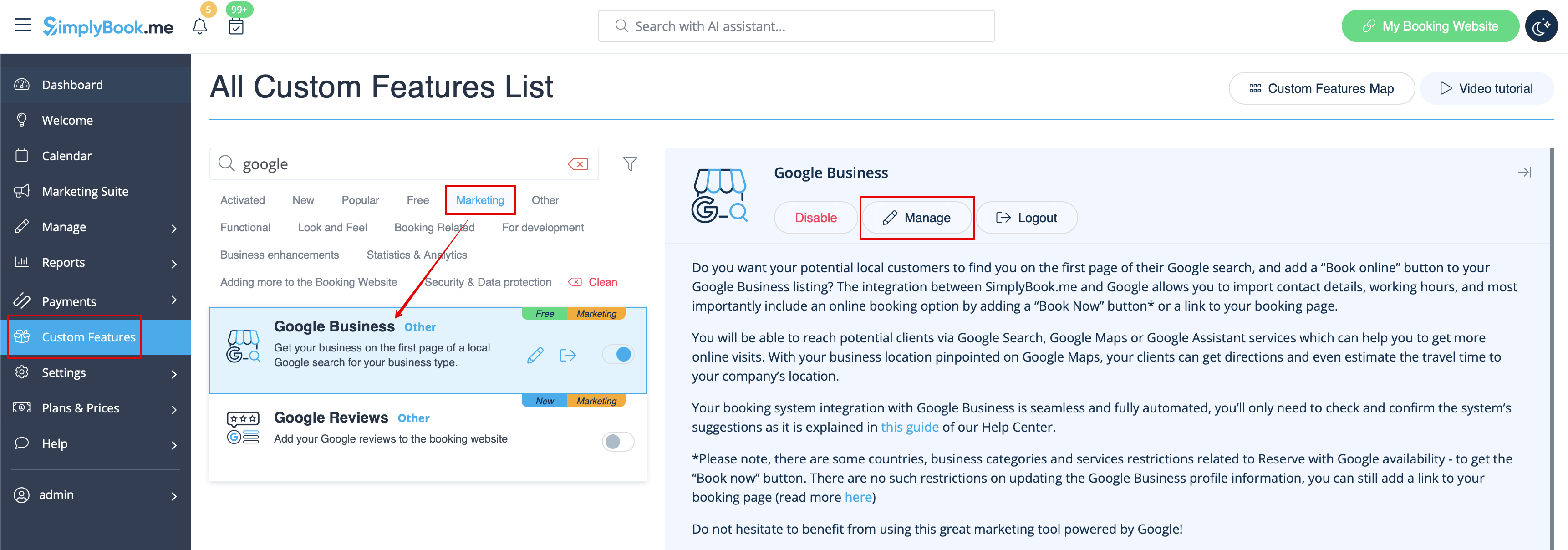

- 3. Accordez les autorisations nécessaires afin de pouvoir voir et modifier vos emplacements dans SimplyBook.me.
- 4. Si vous avez déjà des emplacements dans Google Business, vous pourrez les voir sur le côté gauche de la page.
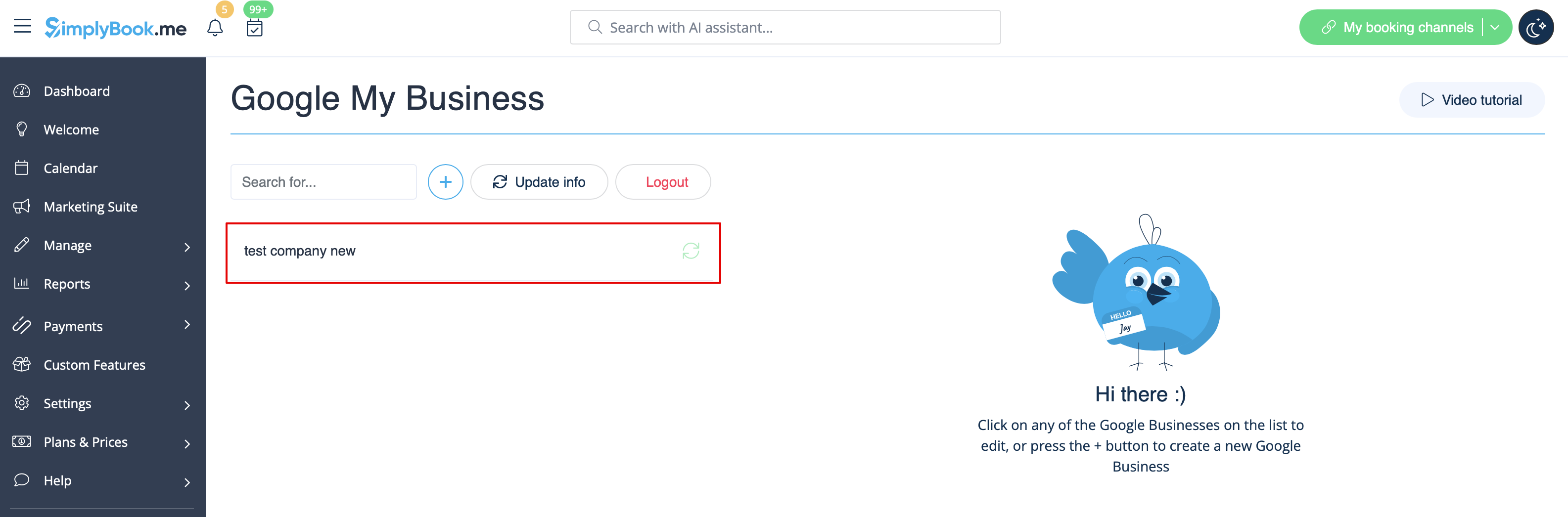
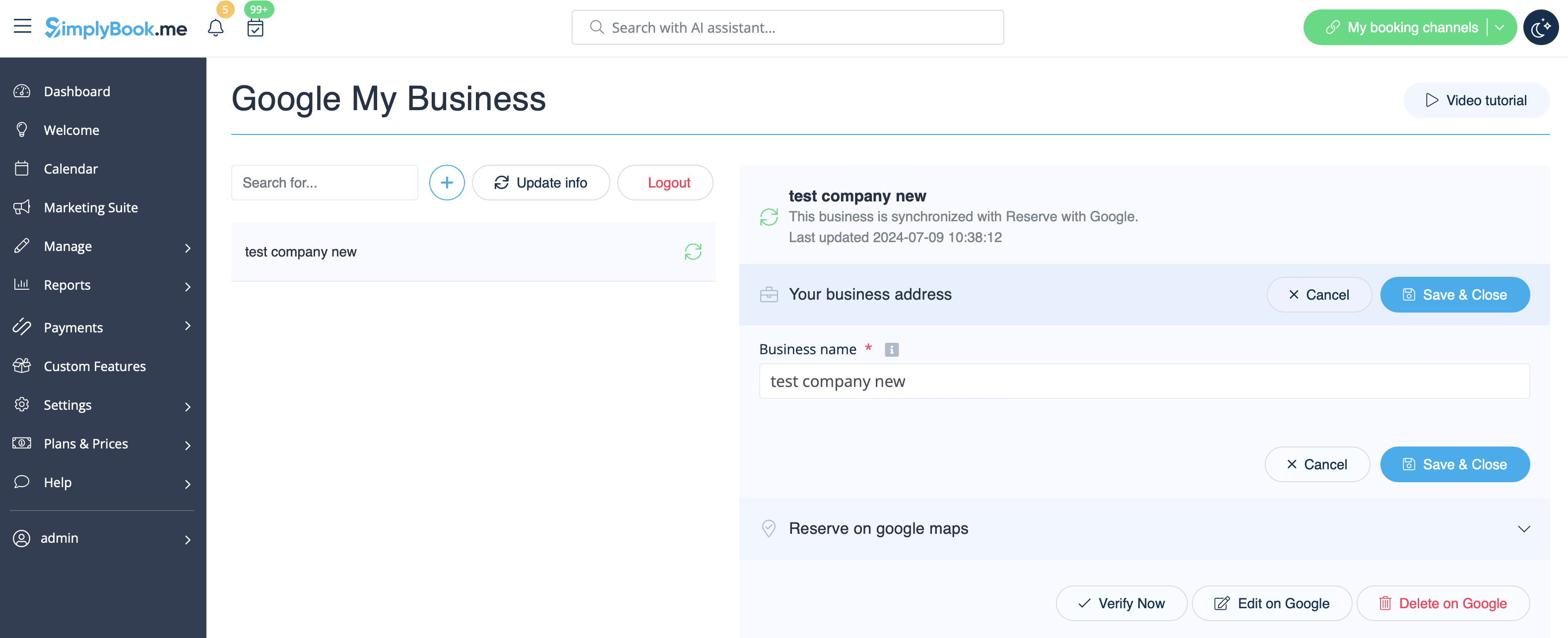
- 5. Il vous suffit de cliquer sur l'un d'entre eux si vous devez apporter des modifications et d'activer l'option Mettre à jour l'adresse dans le profil, d'effectuer les modifications nécessaires et de réenregistrer l'emplacement pour que les informations soient mises à jour sur Google

- ou choisissez l'option + pour ajouter une nouvelle adresse professionnelle.
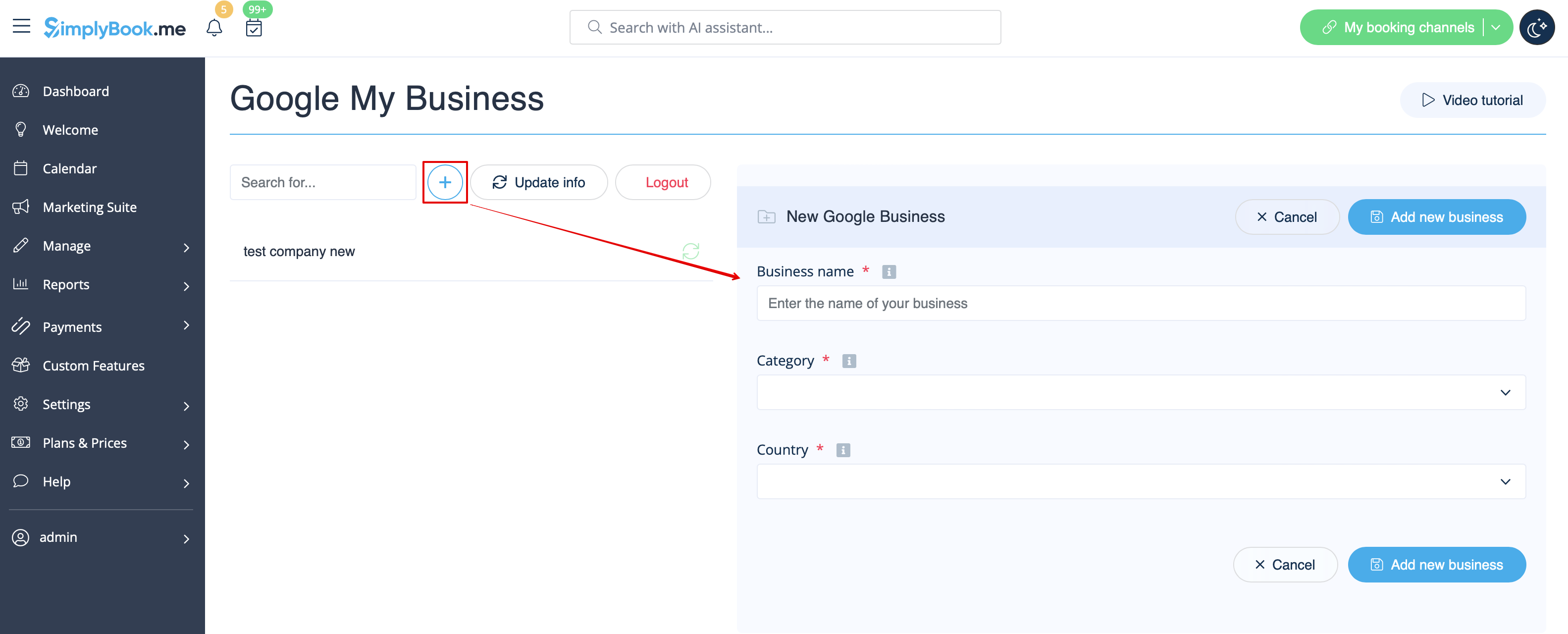
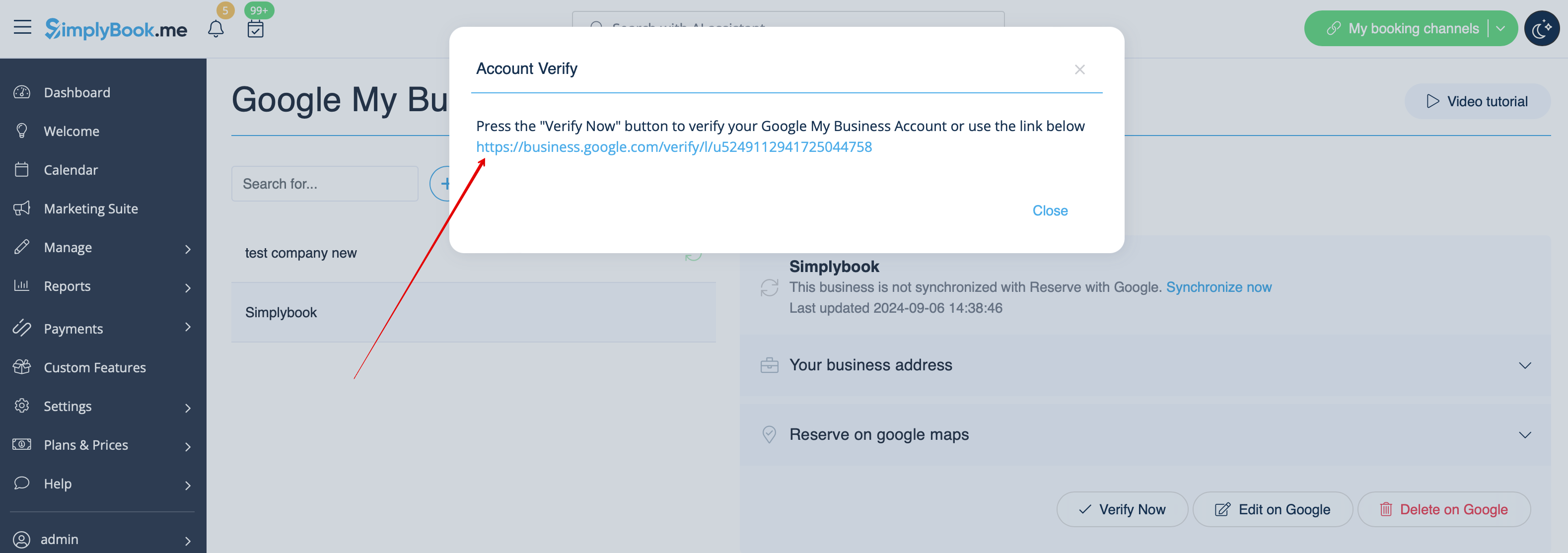
- 6. Après avoir ajouté l'adresse, cliquez sur Enregistrer et fermer. Vous pourrez alors procéder à la vérification de l'emplacement de l'entreprise sur Google (cela peut prendre un certain temps).
- Vous pouvez également fermer la fenêtre contextuelle et revenir à l'étape de vérification plus tard (un bouton Vérifier maintenant sera disponible pour chaque emplacement d'entreprise enregistré et synchronisé).
- Dès que votre emplacement aura été vérifié par Google (vous verrez les étapes du processus de vérification en suivant les instructions de Google), votre entreprise apparaîtra dans les résultats de recherche et sur Google Maps.
- 7. Lorsque vous enregistrez l'emplacement, les informations suivantes concernant votre entreprise sont transmises à Google :
- nom de l'entreprise ;
- heures d'ouverture de l'entreprise ;
- numéro de téléphone de l'entreprise ;
- lien vers le site de réservation ;
- catégorie de l'entreprise (les catégories Google pouvant différer, la catégorie la plus appropriée sera sélectionnée).

- Veuillez noter que si vous avez modifié certaines de ces informations dans votre compte SimplyBook.me, vous devrez enregistrer à nouveau l'emplacement de l'entreprise dans les paramètres de la fonctionnalité Google Business pour que les informations soient mises à jour sur Google.
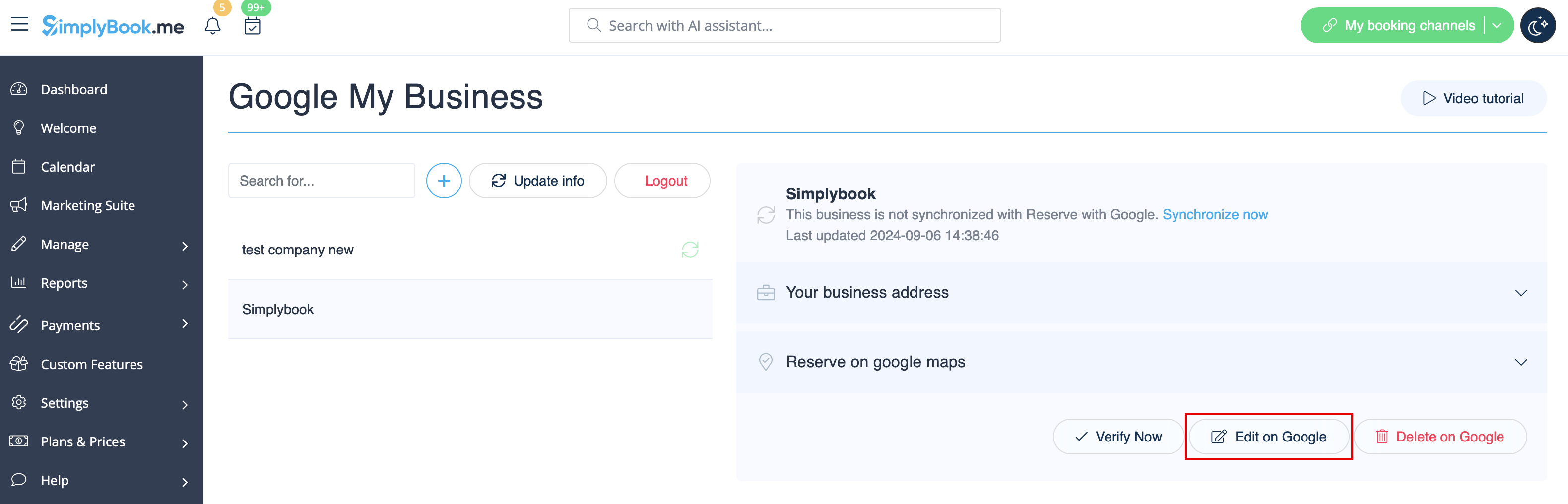
- 8. Vous pouvez également modifier les informations relatives à l'emplacement de votre entreprise sur Google si nécessaire. Il vous suffit de cliquer sur le bouton Modifier sur GMB en haut (apparaît pour les emplacements enregistrés et synchronisés).
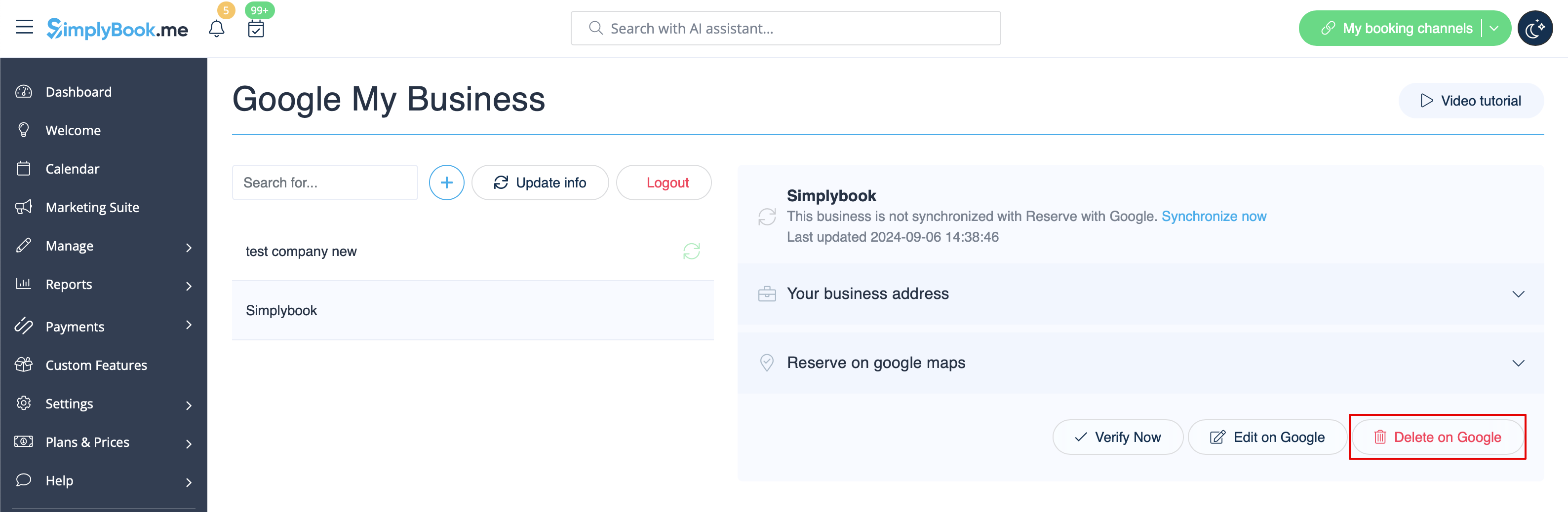
- 9. Si certains emplacements ne sont plus pertinents pour votre entreprise, vous pouvez facilement les supprimer dans les paramètres de cette fonctionnalité. Il vous suffit de cliquer sur l'option Supprimer sur GMB.
Réserver avec Google
Ajoutez une option Réserver en ligne à votre fiche d’établissement Google. Permettez à vos clients de vous trouver facilement sur Google et de réserver vos services directement via la recherche Google, Google Maps ou Google Assistant, grâce au système de réservation SimplyBook.me.
- Remarque importante :
- Reserve with Google n'est actuellement disponible que dans les pays pris en charge répertoriés ici:
- Actuellement, il n'est pas possible d'utiliser cette option pour les catégories d'entreprises suivantes : centre médical, établissement d'enseignement, administration publique, ingénieur, clinique médicale, dentiste, cabinet médical, centre de formation, société d'événementiel, administration municipale, ambassade, avocat généraliste, agence de garde d'enfants, université, collège, école, bibliothèque, institution financière.
- La fonctionnalité personnalisée « Accepter les paiements »doit être activée (l'option« Payer plus tard (autoriser le paiement différé) » doit toujours être activée) et les prix doivent être ajoutés pour tous les services/cours que vous souhaitez afficher et rendre réservables via Google Maps ;
- Tous les services/cours doivent être accompagnés d'une description qui sera affichée sur Google ;
- Si vous utilisez la fonctionnalité « Formulaires d'inscription », aucun formulaire obligatoire ne doit être ajouté aux services que vous souhaitez rendre réservables ;
- Si un service est récurrent ou lié à un abonnement, il ne sera pas affiché dans Reserve with Google ;
- Si vous utilisez une fonctionnalité personnalisée Google Calendar Sync obsolète, il ne sera pas possible d'utiliser Reserve with Google.
- Pour synchroniser avec Google et permettre à cette option de fonctionner, il est nécessaire de publier l’adresse de l’entreprise sur le site de réservation.
- Le bouton n'apparaîtra pas si vous utilisez le thème Blank page avec une redirection vers votre propre site web
comment utiliser :
- 1. Ajoutez et vérifiez votre ou vos emplacements Google Business via la plateforme SimplyBook.me (partie précédente de ce tutoriel) ou à l'aide de votre interface Google Business, puis enregistrez-les à nouveau dans les paramètres personnalisés de Google Business.
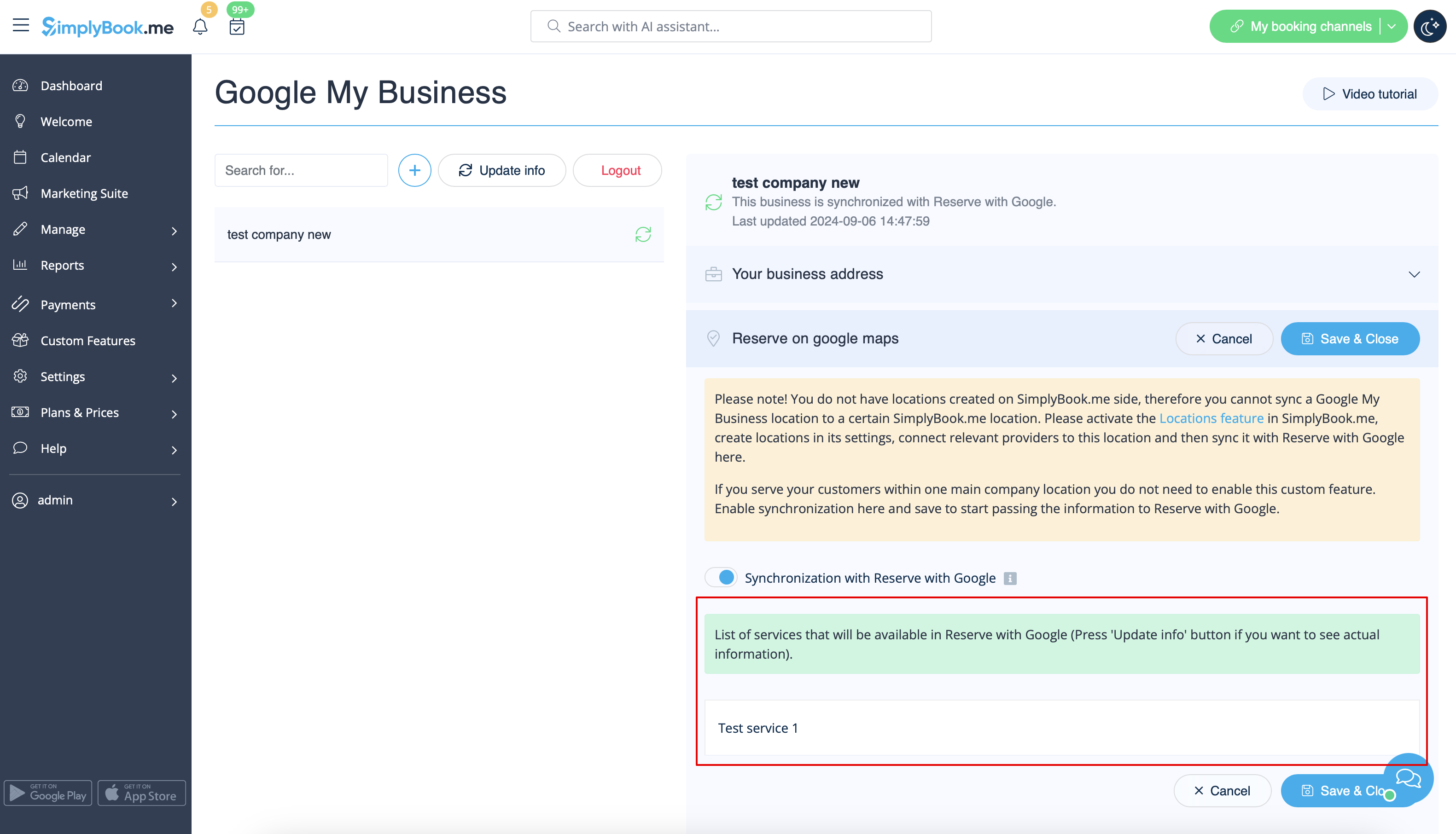
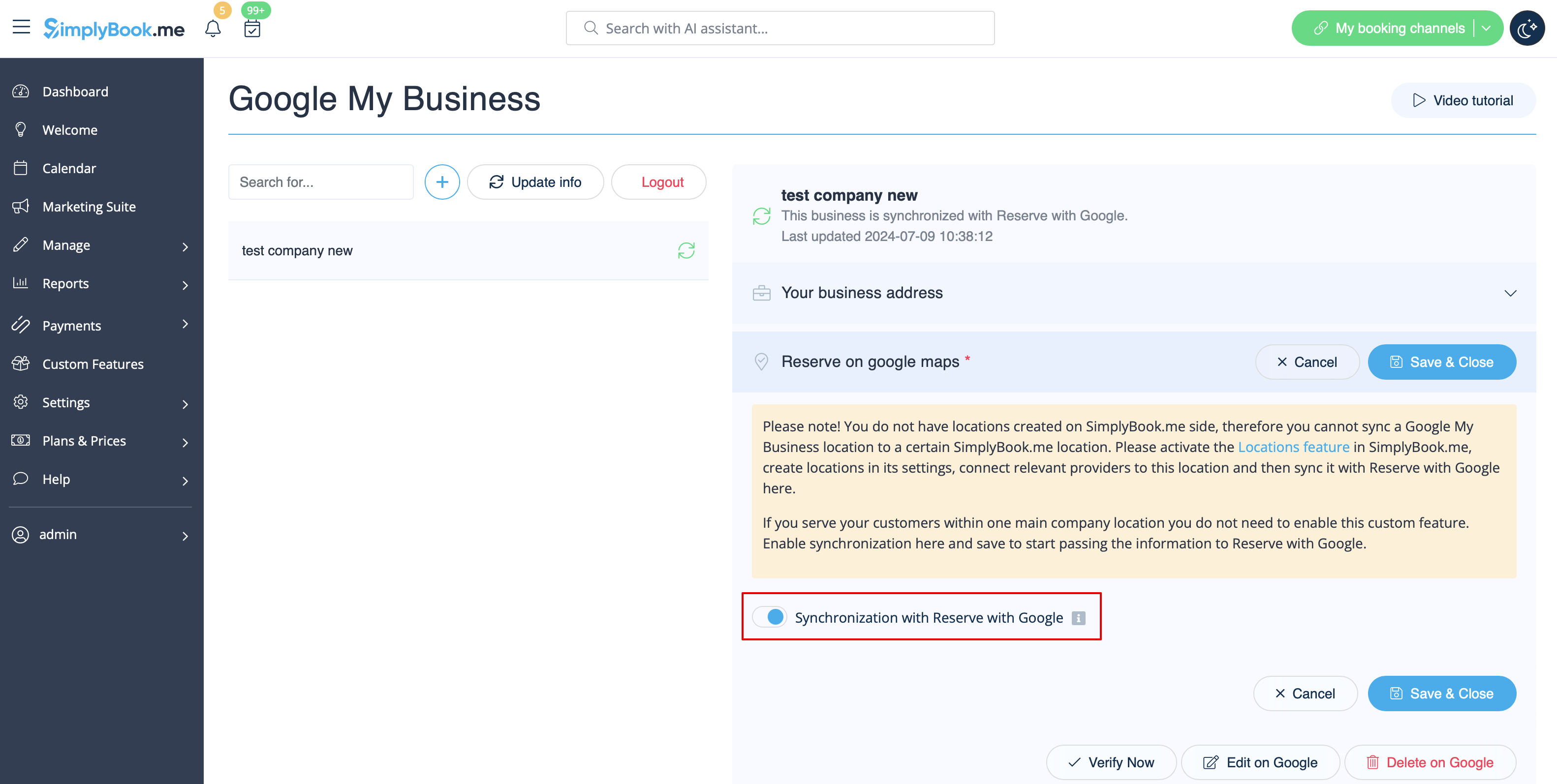
- 2. Accédez à l'onglet « Réserver sur Google Maps » et activez l'option « Synchronisation avec Réserver avec Google ».
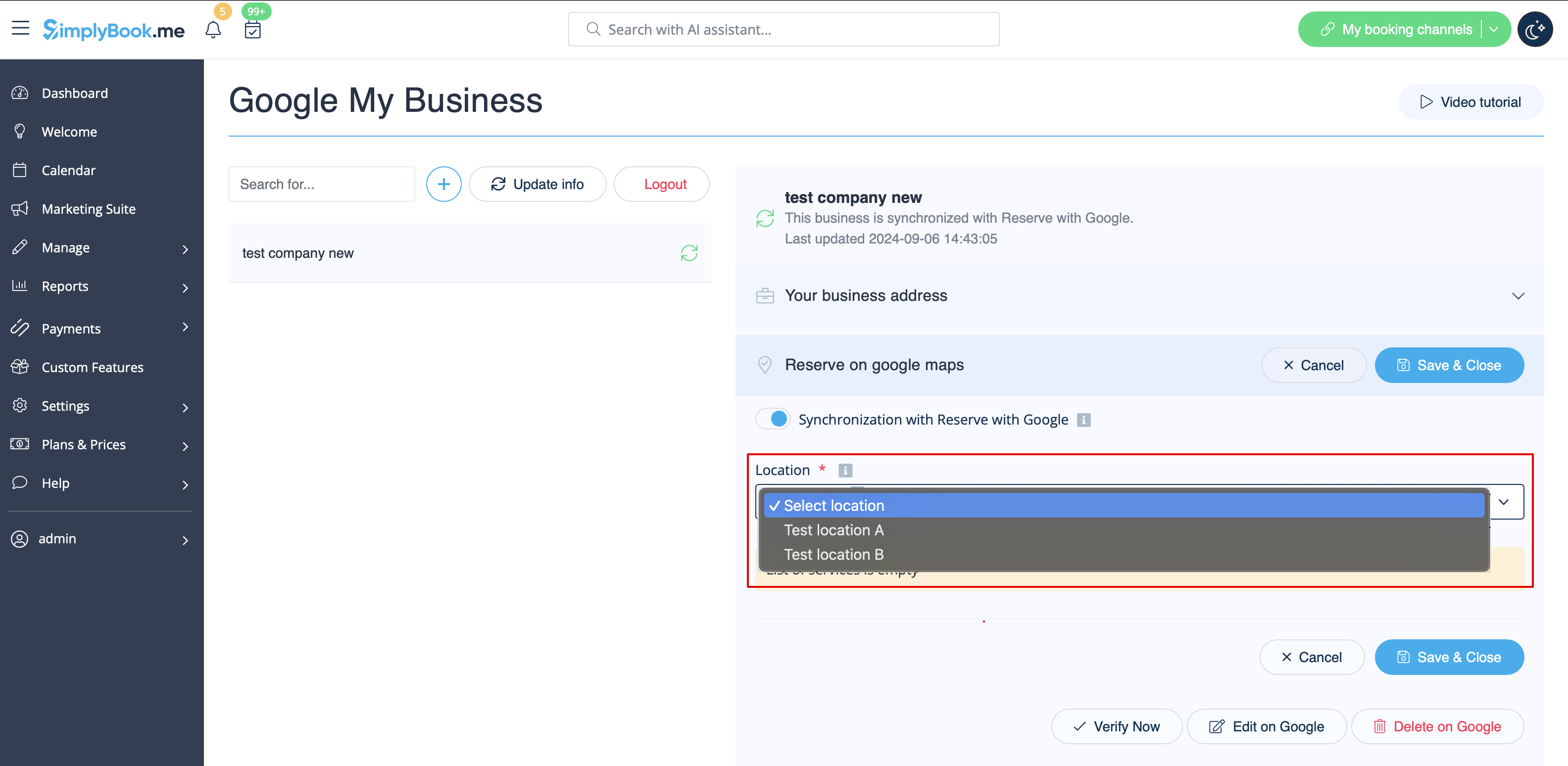
- 3. (facultatif) Si vous utilisez la fonctionnalité personnalisée « Emplacements multiples », connectez vos Google Business aux emplacements SimplyBook.me souhaités .
- Remarque importante ! Il est possible de connecter un emplacement SimplyBook.me à un seul Google Business.
- Si vous n'utilisez pas la fonctionnalité « Emplacements multiples », l'emplacement principal de votre entreprise peut être connecté à un seul Google Business.
- 4. Enregistrez les paramètres. La synchronisation est maintenant en cours et, après avoir rechargé la page, vous pourrez voir la liste des services qui seront transmis à « Réserver avec Google » pour la réservation.
- Par défaut, nous recueillons toutes les informations et transmettons la mise à jour à Google une fois par jour, mais vous pouvez utiliser le bouton « Mettre à jour les informations » pour préparer manuellement les informations à transférer si des modifications ont été apportées à votre compte (par exemple, si vous avez créé un nouveau service).