From SimplyBook.me
Updating to match new version of source page Tags: Mobile edit Mobile web edit |
Created page with "<br><br> ;Hoe het werkt<br> Wanneer een klant een boeking indient, stuurt SimplyBook.me de boekingsgegevens naar uw externe URL als een JSON POST-verzoek. Uw script controleert de gegevens en geeft een JSON-respons terug. Als de validatie slaagt, wordt de boeking opgeslagen. Als deze faalt, ziet de klant een foutmelding zonder dat de boeking wordt bevestigd. <br><br>" |
||
| (2 intermediate revisions by 2 users not shown) | |||
| Line 2: | Line 2: | ||
{{#seo: | {{#seo: | ||
|title=External Booking Validator custom feature - SimplyBook.me | |title=External Booking Validator custom feature - SimplyBook.me | ||
|description=Valideer boekingen met een aangepast script. Controleer intakeformulier-voorwaarden vóór het boeken. Vereist ontwikkelvaardigheden. Maakt externe validatielogica mogelijk. | |||
|description=Valideer | |||
|titlemode=append | |titlemode=append | ||
|keywords=faq, frequently asked questions, booking software, appointment system questions, appointments online, calendar software, booking system, booking calendar, scheduling software, online appointment scheduling, online scheduling, plugins, custom features, additional functionality, validation, validation script, customization, appointment validation, booking validation | |keywords=faq, frequently asked questions, booking software, appointment system questions, appointments online, calendar software, booking system, booking calendar, scheduling software, online appointment scheduling, online scheduling, plugins, custom features, additional functionality, validation, validation script, customization, appointment validation, booking validation | ||
| Line 18: | Line 16: | ||
*<span style="background-color:#ffe9e9; padding:5px; border-radius:5px;">De aangepaste functie<span style="background-color:#cdeffc; padding:5px; border-radius:5px;">[[Special:MyLanguage/Intake_Forms_custom_feature|Intake Forms]]</span> wordt samen met deze functie ingeschakeld.</span> | *<span style="background-color:#ffe9e9; padding:5px; border-radius:5px;">De aangepaste functie<span style="background-color:#cdeffc; padding:5px; border-radius:5px;">[[Special:MyLanguage/Intake_Forms_custom_feature|Intake Forms]]</span> wordt samen met deze functie ingeschakeld.</span> | ||
<br><br> | |||
;Hoe het werkt<br> | |||
Wanneer een klant een boeking indient, stuurt SimplyBook.me de boekingsgegevens naar uw externe URL als een JSON POST-verzoek. Uw script controleert de gegevens en geeft een JSON-respons terug. Als de validatie slaagt, wordt de boeking opgeslagen. Als deze faalt, ziet de klant een foutmelding zonder dat de boeking wordt bevestigd. | |||
<br><br> | |||
;Hoe te gebruiken | ;Hoe te gebruiken | ||
Latest revision as of 15:29, 5 April 2026

U kunt boekingen valideren met behulp van een extern script. Het script kan variabelen uit de boeking controleren en alleen als aan de voorwaarden is voldaan, wordt de boeking verwerkt. Bovendien kan het validatiescript informatie teruggeven die in de variabelen van het intakeformulier kan worden ingevoegd.
Let op!
- Voor het gebruik van deze functie zijn ontwikkelingsvaardigheden vereist.
- De aangepaste functieIntake Forms wordt samen met deze functie ingeschakeld.
- Hoe het werkt
Wanneer een klant een boeking indient, stuurt SimplyBook.me de boekingsgegevens naar uw externe URL als een JSON POST-verzoek. Uw script controleert de gegevens en geeft een JSON-respons terug. Als de validatie slaagt, wordt de boeking opgeslagen. Als deze faalt, ziet de klant een foutmelding zonder dat de boeking wordt bevestigd.
- Hoe te gebruiken
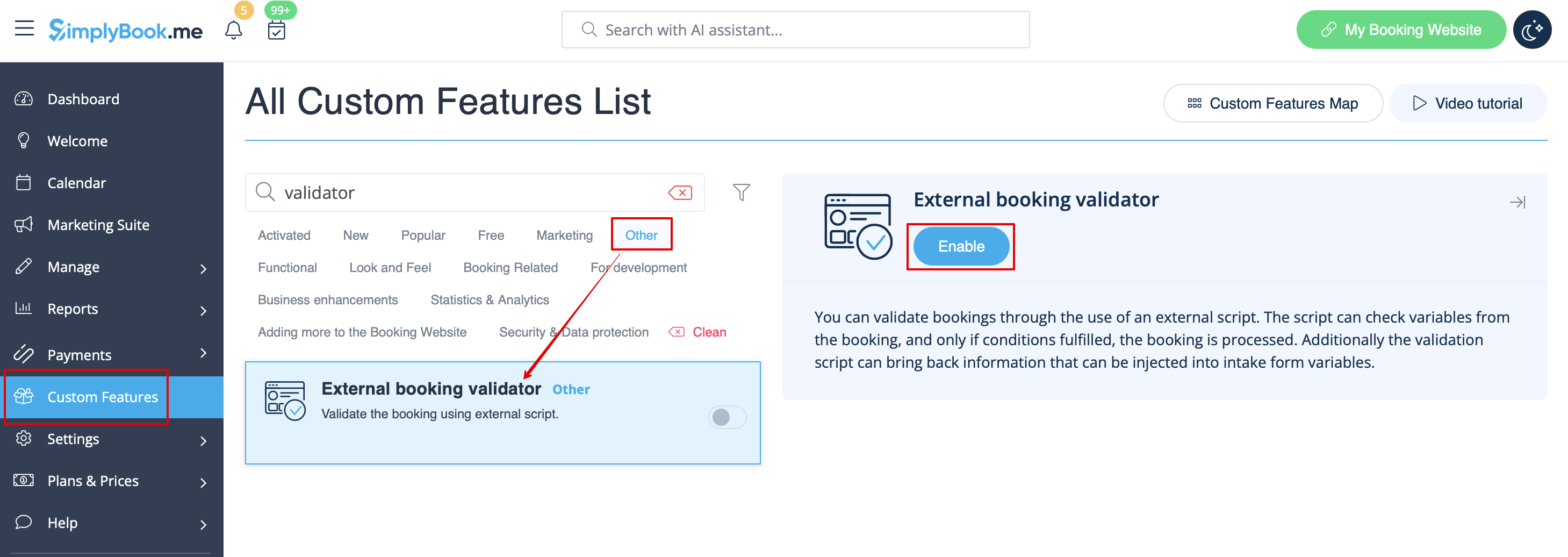
- 1. Schakel de aangepaste functie Externe boekingsvalidator in op de pagina Aangepaste functies, sectie Overig.
- 2. Maak uw eigen validatiescript met de door u gewenste voorwaarden.
- U kunt bijvoorbeeld bepaalde antwoorden van klanten op een of meer intakeformulieren vereisen voordat de boeking naar uw systeem wordt verzonden.
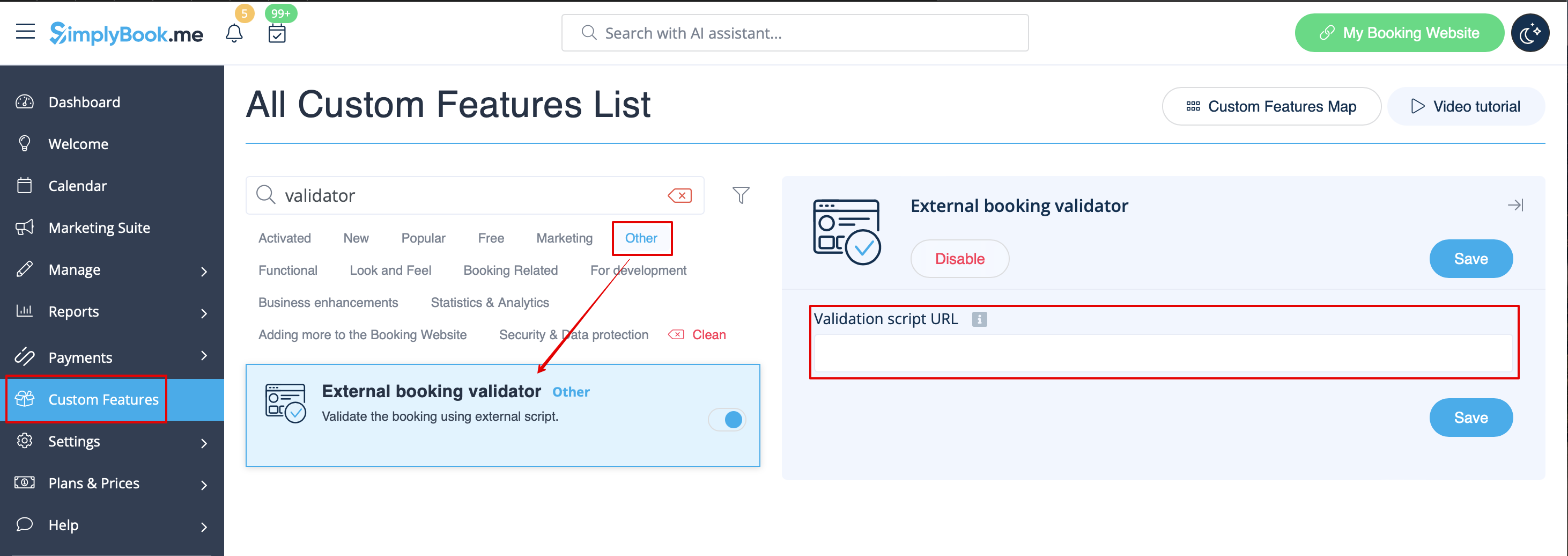
- 3. Voeg uw script toe aan de instellingen van deze functie op de pagina Aangepaste functies en sla op.
- Een voorbeeld van een script vindt u hier.
