No edit summary |
No edit summary |
||
| (10 intermediate revisions by 2 users not shown) | |||
| Line 1: | Line 1: | ||
<languages/> | |||
{{#seo: | {{#seo: | ||
|title=Custom Features - SimplyBook.me | |title=Custom Features - SimplyBook.me | ||
<translate> | |||
<!--T:3--> | |||
|description=Add custom CSS to modify booking page appearance. Change colors, fonts, layouts. Advanced styling for developers. Hide elements, adjust design. Free feature. | |||
</translate> | |||
|titlemode=append | |titlemode=append | ||
|keywords=faq, frequently asked questions, booking software, appointment system questions, appointments online, calendar software, booking system, booking calendar, scheduling software, online appointment scheduling, online scheduling, plugins, custom features, CSS, adjusting design, adjusting colors, adjusting font, adjusting look, CSS coding | |keywords=faq, frequently asked questions, booking software, appointment system questions, appointments online, calendar software, booking system, booking calendar, scheduling software, online appointment scheduling, online scheduling, plugins, custom features, CSS, adjusting design, adjusting colors, adjusting font, adjusting look, CSS coding | ||
}} | }} | ||
<translate> | |||
<!--T:1--> | |||
<br> | <br> | ||
[[File:Custom css new icon.png |left]] | [[File:Custom css new icon.png |left]] | ||
<!--T:2--> | |||
Make your own booking interface with this CSS Custom Feature. It allows to change the styles of different elements, hide them, change fonts, colors, font-sizes, etc. If you know CSS coding, please use tools of browser to find identifiers of elements and write rules in the settings of Custom Feature, if you have no deep knowledge of CSS, please contact support and they will try to find the best solution for you. | Make your own booking interface with this CSS Custom Feature. It allows to change the styles of different elements, hide them, change fonts, colors, font-sizes, etc. If you know CSS coding, please use tools of browser to find identifiers of elements and write rules in the settings of Custom Feature, if you have no deep knowledge of CSS, please contact support and they will try to find the best solution for you. | ||
<br><br> | <br><br> | ||
<p> | |||
<span style="background-color:#ffe9e9; padding:5px; border-radius:5px;"> | |||
Please note! <br>A great number or complex CSS requests may be considered as set up assistance and you may be asked to purchase Set up assistance option for further CSS code set up. It is a paid offer which you can find under plans&prices -> additional items -> hourly assistance. To schedule a call for Set-up Assistance evaluation, please click on the following link: https://bigaccounts.simplybook.it/v2/#book/service/3/count/1 | |||
</span> | |||
</p> | |||
<!--T:4--> | |||
<br> | |||
<span style="background-color: #26dd7d; padding:5px; border-radius:5px;">Free custom feature!</span> | <span style="background-color: #26dd7d; padding:5px; border-radius:5px;">Free custom feature!</span> | ||
<br><br> | <br><br> | ||
;How to use | ;How to use | ||
:1. Enable this option on your Custom Features page. | :1. Enable this option on your Custom Features page. | ||
[[File:Custom css enable path | [[File:Custom css enable path redesigned.png|1200px| center|link=https://help.simplybook.me/images/9/93/Custom_css_enable_path_redesigned.png]] | ||
<br><br> | <br><br> | ||
:2. Click on "Settings" for this feature. | :2. Click on "Settings" for this feature. | ||
[[File:Custom css settings path | [[File:Custom css settings path redesigned.png|1200px | center|link=https://help.simplybook.me/images/3/35/Custom_css_settings_path_redesigned.png]] | ||
<br><br> | <br><br> | ||
:3. Add the code(s) to adjust the styles to "Booking pages CSS" tab if you wish to edit the booking page<br> | :3. Add the code(s) to adjust the styles to "Booking pages CSS" tab if you wish to edit the booking page<br> | ||
:or "Widget CSS" if you are editing widget on your website. | :or "Widget CSS" if you are editing widget on your website. | ||
[[File:Custom css | [[File:Custom css tabs redesigned.png|1200px| center|link=https://help.simplybook.me/images/1/1c/Custom_css_tabs_redesigned.png]] | ||
<br><br> | |||
'''[[Special:MyLanguage/Remove Elements from booking page#Removing with Custom CSS| See most common requests how to remove elements with CSS here (phone, email fields, social tabs, our time, etc)]]''' | |||
<br><br> | <br><br> | ||
'''[[ | '''[[Special:MyLanguage/Changing Fonts with Custom CSS| Changing Fonts with Custom CSS]]''' | ||
<br><br> | <br><br> | ||
</translate> | |||
Latest revision as of 08:36, 28 July 2026

Make your own booking interface with this CSS Custom Feature. It allows to change the styles of different elements, hide them, change fonts, colors, font-sizes, etc. If you know CSS coding, please use tools of browser to find identifiers of elements and write rules in the settings of Custom Feature, if you have no deep knowledge of CSS, please contact support and they will try to find the best solution for you.
Please note!
A great number or complex CSS requests may be considered as set up assistance and you may be asked to purchase Set up assistance option for further CSS code set up. It is a paid offer which you can find under plans&prices -> additional items -> hourly assistance. To schedule a call for Set-up Assistance evaluation, please click on the following link: https://bigaccounts.simplybook.it/v2/#book/service/3/count/1
Free custom feature!
- How to use
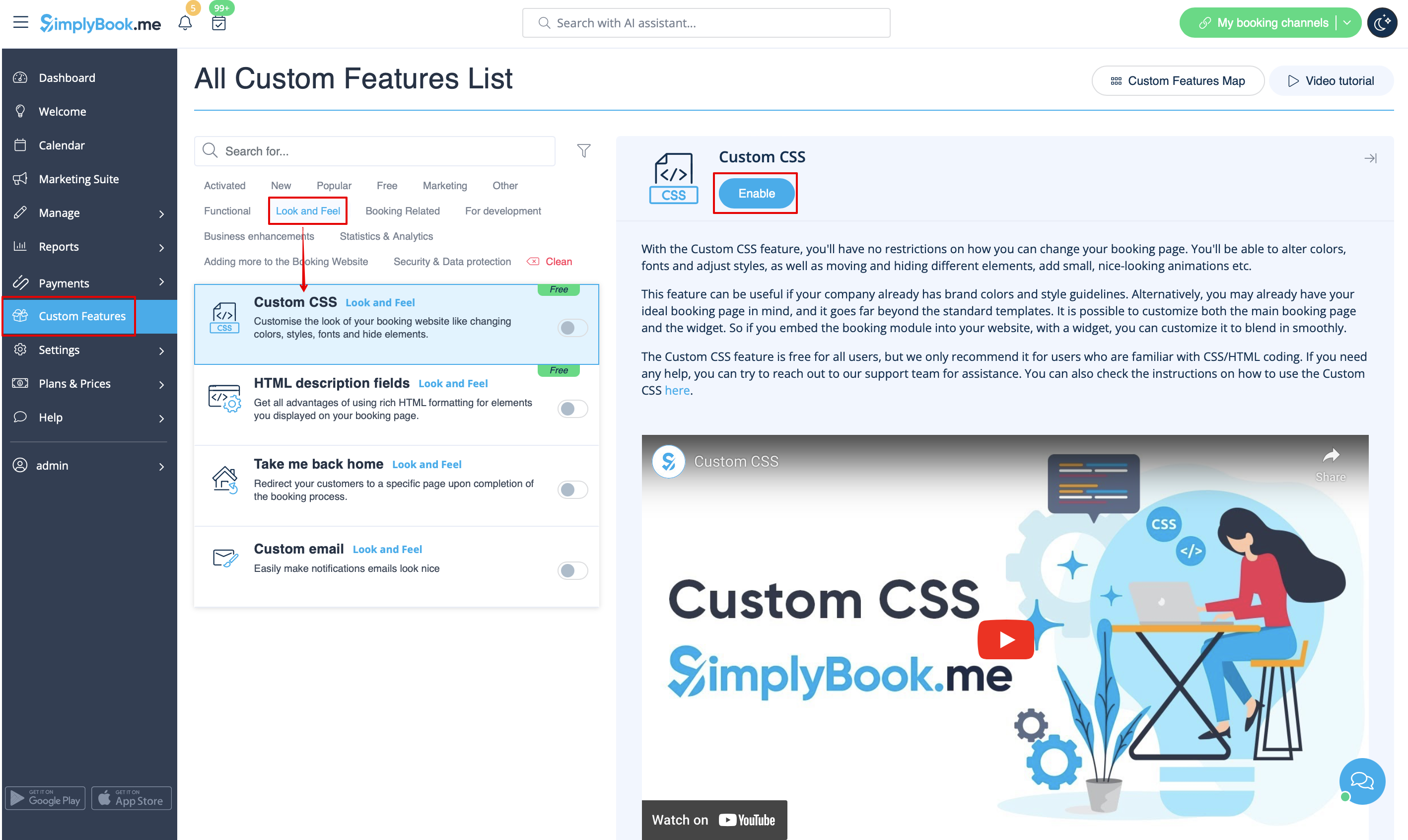
- 1. Enable this option on your Custom Features page.
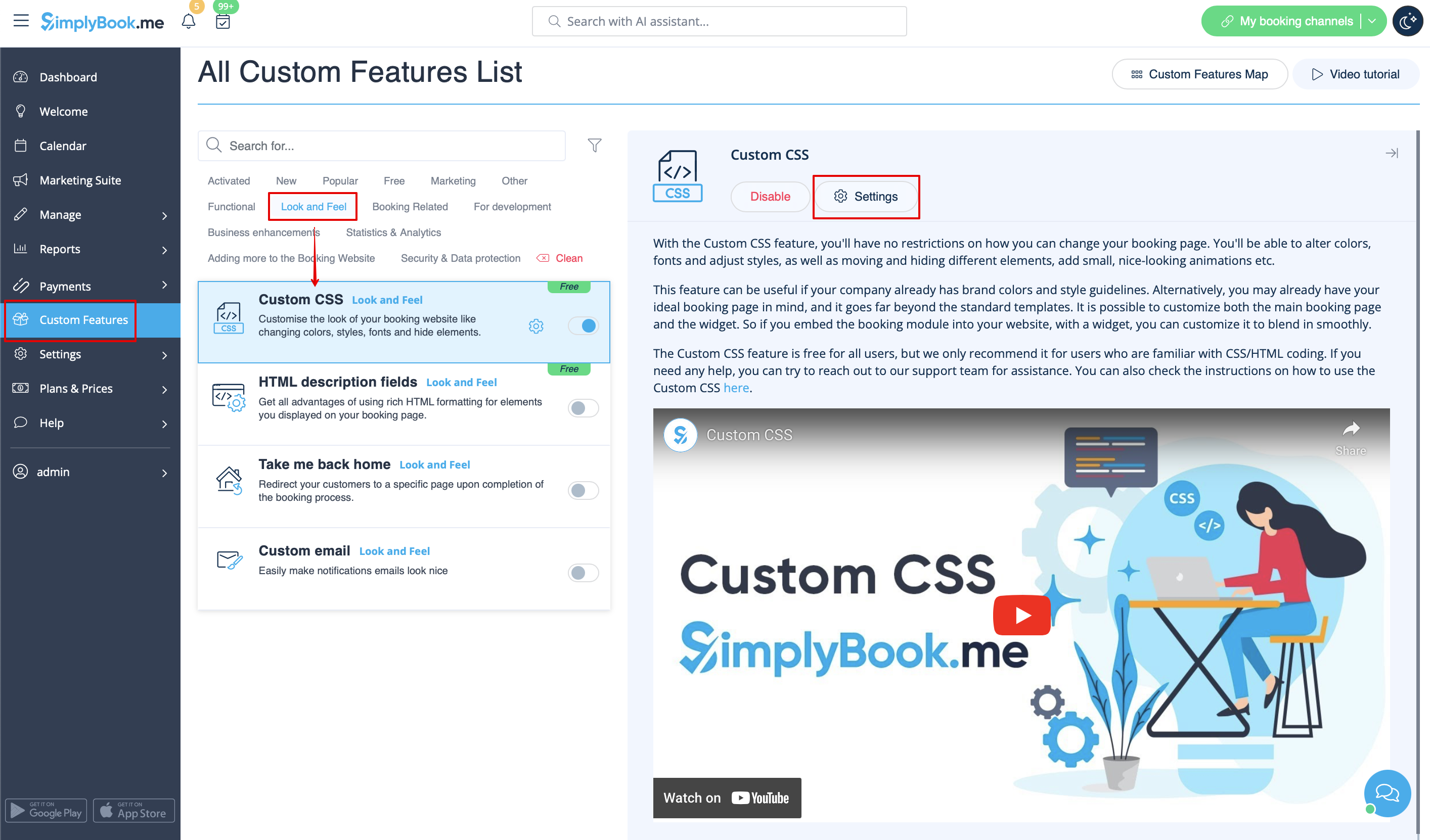
- 2. Click on "Settings" for this feature.
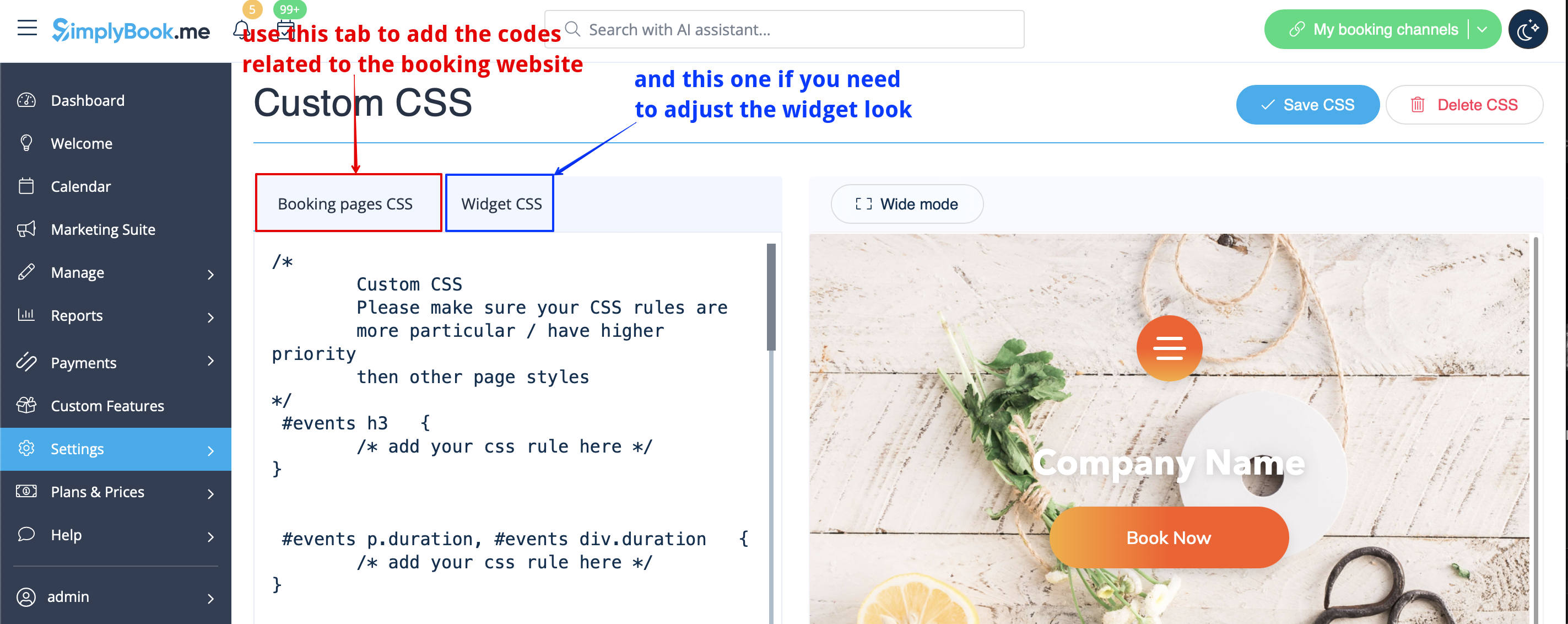
- 3. Add the code(s) to adjust the styles to "Booking pages CSS" tab if you wish to edit the booking page
- or "Widget CSS" if you are editing widget on your website.
See most common requests how to remove elements with CSS here (phone, email fields, social tabs, our time, etc)
Changing Fonts with Custom CSS
