No edit summary |
Marked this version for translation |
||
| (4 intermediate revisions by the same user not shown) | |||
| Line 1: | Line 1: | ||
<languages/> | |||
<translate> | |||
<!--T:1--> | |||
<br><br> | <br><br> | ||
You can have up to 99 clients per 1 timeslot per provider. To set the number of clients per time slot, go to Manage // Service providers // select the necessary provider // Service provider details // How many clients can be served at the same time? and set the number of clients there. <br/> | You can have up to 99 clients per 1 timeslot per provider. To set the number of clients per time slot, go to Manage // Service providers // select the necessary provider // Service provider details // How many clients can be served at the same time? and set the number of clients there. <br/> | ||
[[File:Number of clients per provider.png | center]] | [[File:Number of clients per provider redesigned.png|1200px | center|link=https://help.simplybook.me/images/a/a6/Number_of_clients_per_provider_redesigned.png]] | ||
<br><br> | <br><br> | ||
If you need more clients to be able to book the same time please create several providers and set number of clients they can serve so that the total of these values will be the desired number. | If you need more clients to be able to book the same time please create several providers and set number of clients they can serve so that the total of these values will be the desired number. | ||
<br> | <br> | ||
For example, if you need 150 clients to be able to book you can create two providers and set 99 clients per one of them and 51 per another one. Then connect both providers to the desired service. | For example, if you need 150 clients to be able to book you can create two providers and set 99 clients per one of them and 51 per another one. Then connect both providers to the desired service. | ||
<br><br> | <br><br></translate> | ||
<translate> | |||
<!--T:2--> | |||
--------- | --------- | ||
<br><br> | <br><br> | ||
| Line 18: | Line 23: | ||
[[File:Group bookings participants select.png|1200px| center]] | [[File:Group bookings participants select.png|1200px| center]] | ||
<br><br> | <br><br> | ||
</translate> | |||
Latest revision as of 08:01, 1 July 2025
You can have up to 99 clients per 1 timeslot per provider. To set the number of clients per time slot, go to Manage // Service providers // select the necessary provider // Service provider details // How many clients can be served at the same time? and set the number of clients there.
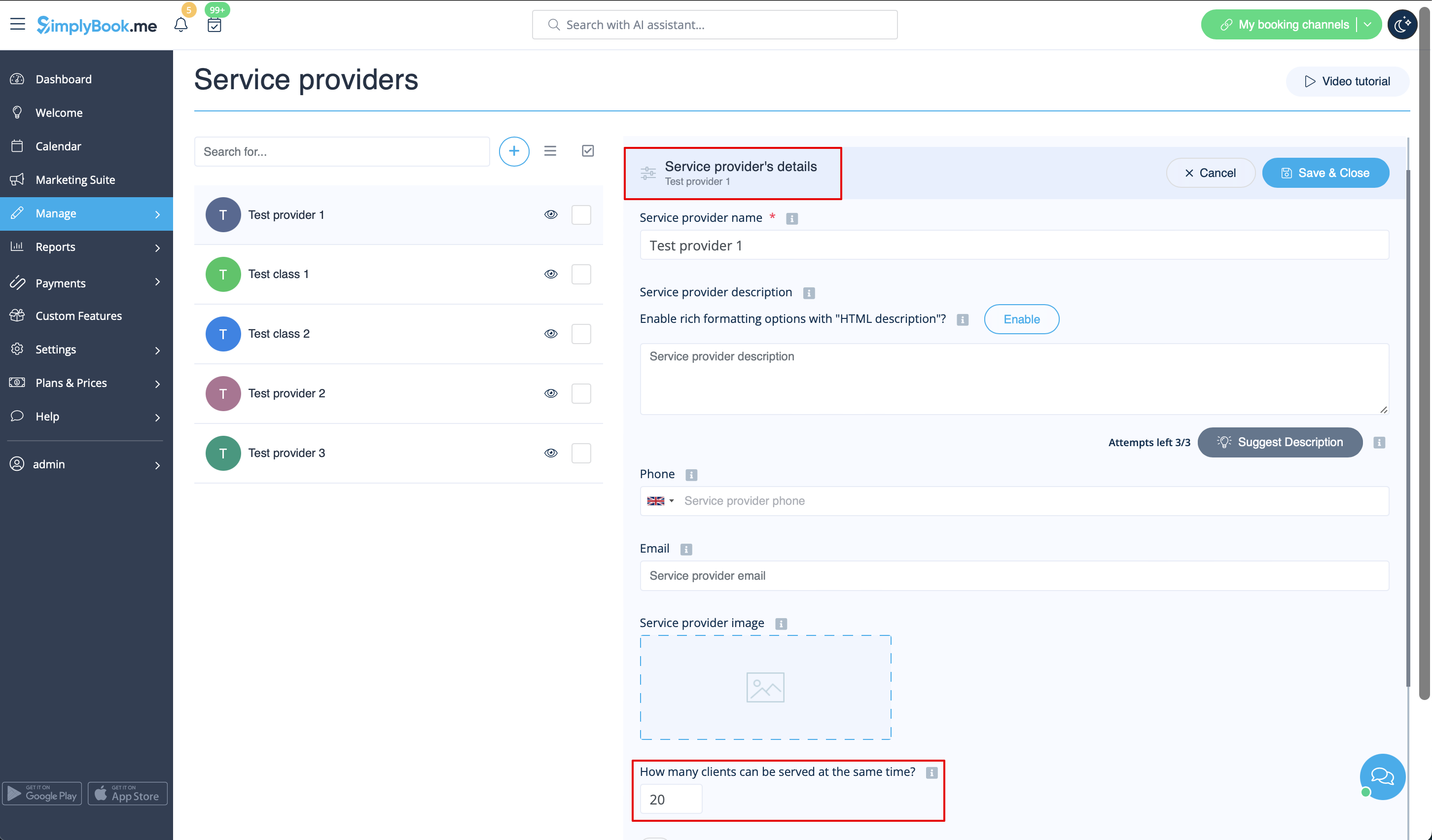
If you need more clients to be able to book the same time please create several providers and set number of clients they can serve so that the total of these values will be the desired number.
For example, if you need 150 clients to be able to book you can create two providers and set 99 clients per one of them and 51 per another one. Then connect both providers to the desired service.
If you wish clients to book several people at once (to book a group of people), you can use our Group Bookings custom feature.
- How to use
- 1. Make sure that the Service provider is set able to accept X many clients at same time. For this go Manage// Providers//Service provider details tab on the service provider//How many clients can this provider serve at same time? and set the X number of clients.
- 2. Activate Group bookings custom feature, and in it you can specify how many people can be booked in same booking, by same client.
- How it will look like on the booking page
- The clients will be able to use the arrows to choose the number of participants.

