No edit summary |
No edit summary |
||
| (4 intermediate revisions by the same user not shown) | |||
| Line 1: | Line 1: | ||
<languages/> | |||
<translate> | |||
<!--T:1--> | |||
{{#seo: | |||
|title=Buffer time - SimplyBook.me | |||
|description=Add buffer between appointments. Set preparation/cleanup time before/after bookings. Prevents back-to-back scheduling, ensures adequate service time. | |||
|titlemode=append | |||
|keywords=faq, frequently asked questions, booking software, appointment system questions, appointments online, calendar software, booking system, booking calendar, scheduling software, online appointment scheduling, online scheduling, setup, setup help, support, help content | |||
}} | |||
</translate> | |||
<translate> | |||
<!--T:2--> | |||
<br><br> | <br><br> | ||
It may happen that you need to have some buffer time in-between bookings to prepare for the next client, to travel or simply have a couple of minutes rest. <br> | It may happen that you need to have some buffer time in-between bookings to prepare for the next client, to travel or simply have a couple of minutes rest. <br> | ||
Now we have an option to add some time after each booking. | Now we have an option to add some time after each booking. | ||
<br><br> | <br><br> | ||
</translate> | |||
<translate> | |||
<!--T:3--> | |||
1. Go to Manage // Services or Manage//Classes depending on the option you need to edit and click on service/class name to select it. | 1. Go to Manage // Services or Manage//Classes depending on the option you need to edit and click on service/class name to select it. | ||
[[File:Click to select service redesigned.png|1200px | center|link=https://help.simplybook.me/images/c/c8/Click_to_select_service_redesigned.png]] | |||
<br><br> | <br><br> | ||
2. Choose “Time details” tab and click on “Add buffer time” button. | 2. Choose “Time details” tab and click on “Add buffer time” button. | ||
[[File:Add buffer time path redesigned.png|1200px| center|link=https://help.simplybook.me/images/c/cc/Add_buffer_time_path_redesigned.png]] | |||
<br><br> | <br><br> | ||
</translate> | |||
<translate> | |||
<!--T:4--> | |||
3. From the selection options choose the time you need to add as a gap between bookings for this service/class.<br> | 3. From the selection options choose the time you need to add as a gap between bookings for this service/class.<br> | ||
'''Please note''', that this time will be added after each booking. | '''Please note''', that this time will be added after each booking. | ||
[[File:Buffer time selected redesigned.png|1200px | center|link=https://help.simplybook.me/images/8/81/Buffer_time_selected_redesigned.png]] | |||
<br><br> | <br><br> | ||
</translate> | |||
<translate> | |||
<!--T:5--> | |||
4. In some cases you may need to allow the clients to book the services that contain the buffer times at the end of the day,<br> | 4. In some cases you may need to allow the clients to book the services that contain the buffer times at the end of the day,<br> | ||
despite the schedule can fit only the service duration, but not the buffer time.<br> | despite the schedule can fit only the service duration, but not the buffer time.<br> | ||
| Line 21: | Line 40: | ||
Let's imagine that the service has 1hr duration + 30mins buffer time, but the working period in your settings ends at 6pm and you wish the last client to book at 5pm.<br> | Let's imagine that the service has 1hr duration + 30mins buffer time, but the working period in your settings ends at 6pm and you wish the last client to book at 5pm.<br> | ||
To make it possible please set the option Allow booking at end of day without buffer to Yes in Settings -> Main configuration and save. | To make it possible please set the option Allow booking at end of day without buffer to Yes in Settings -> Main configuration and save. | ||
[[File: | [[File:Extend buffer redesigned.png|1200px|border|center|link=https://help.simplybook.me/images/f/f0/Extend_buffer_redesigned.png]] | ||
<br><br> | <br><br> | ||
</translate> | |||
<translate> | |||
<!--T:6--> | |||
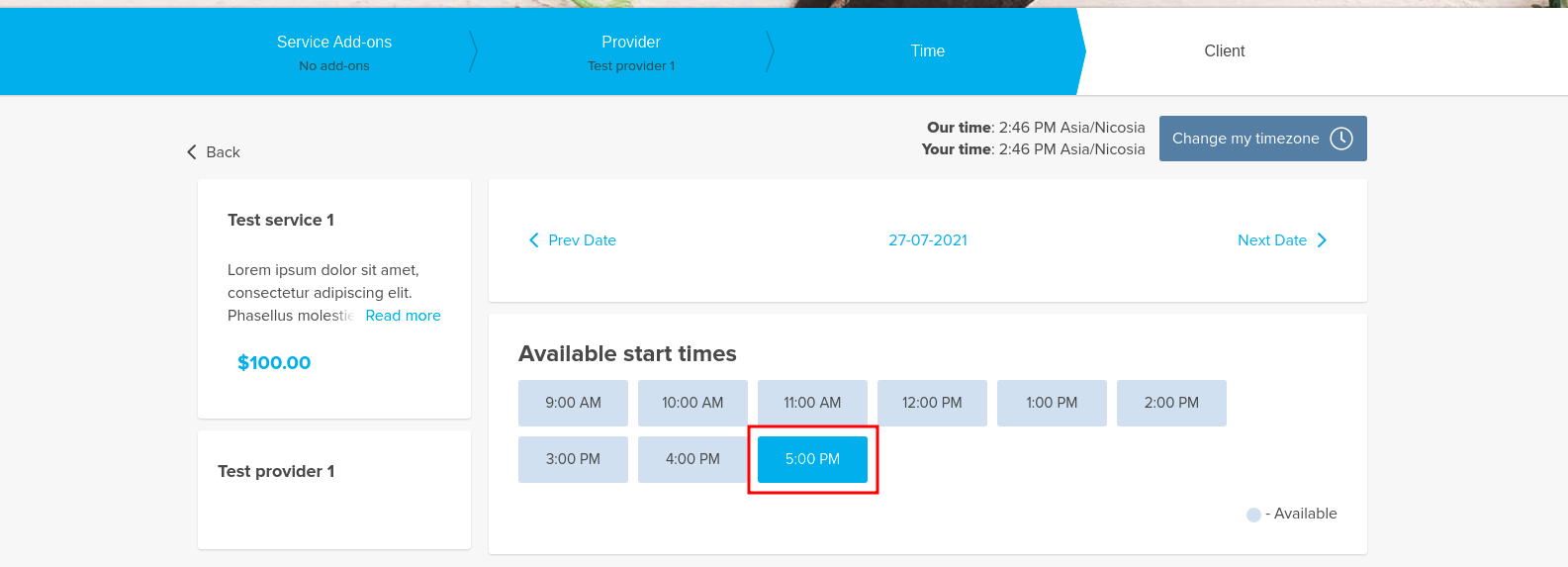
As the result such times will be available on the client side(schedule and other custom features may also have their influence) | As the result such times will be available on the client side(schedule and other custom features may also have their influence) | ||
[[File:Buffertime at the end of the day client side slots.png|1200px|border|center]] | [[File:Buffertime at the end of the day client side slots.png|1200px|border|center|link=https://help.simplybook.me/images/7/77/Buffertime_at_the_end_of_the_day_client_side_slots.png]] | ||
<br><br> | <br><br> | ||
<br><br> | <br><br> | ||
</translate> | |||
Latest revision as of 17:44, 30 January 2026
It may happen that you need to have some buffer time in-between bookings to prepare for the next client, to travel or simply have a couple of minutes rest.
Now we have an option to add some time after each booking.
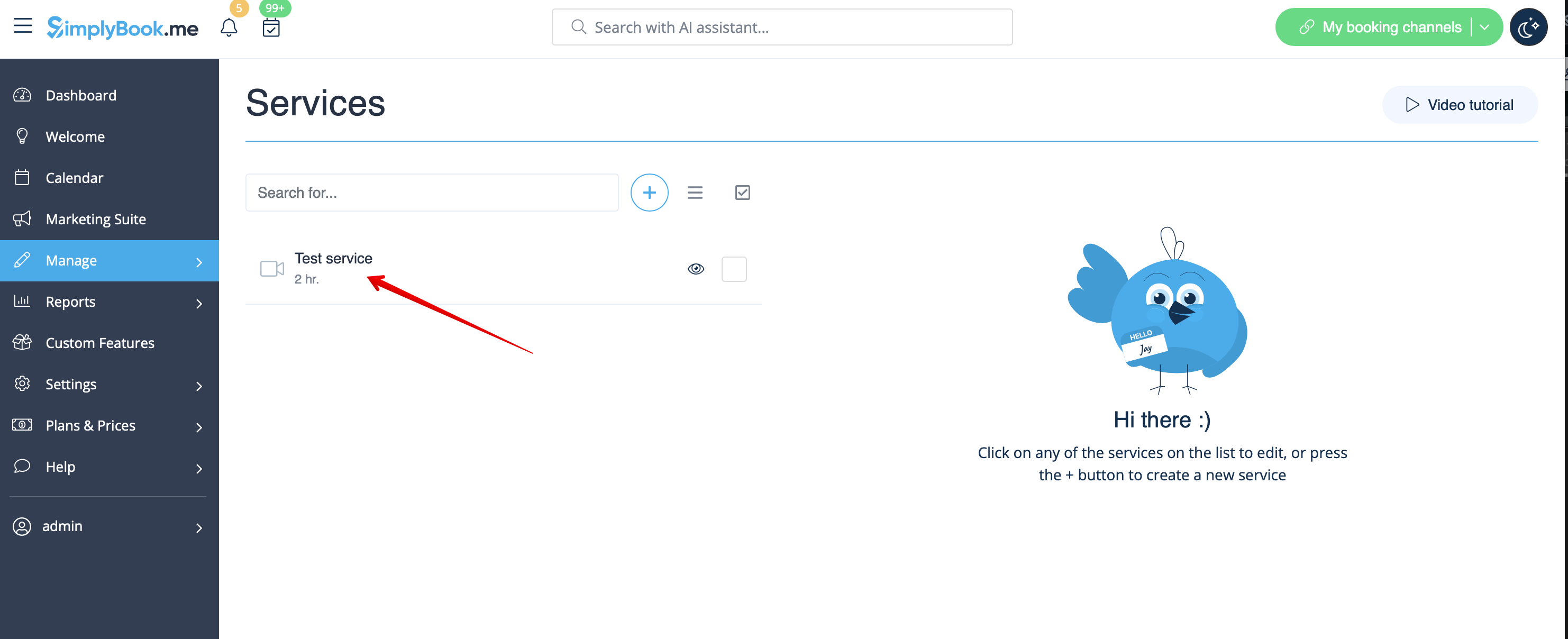
1. Go to Manage // Services or Manage//Classes depending on the option you need to edit and click on service/class name to select it.
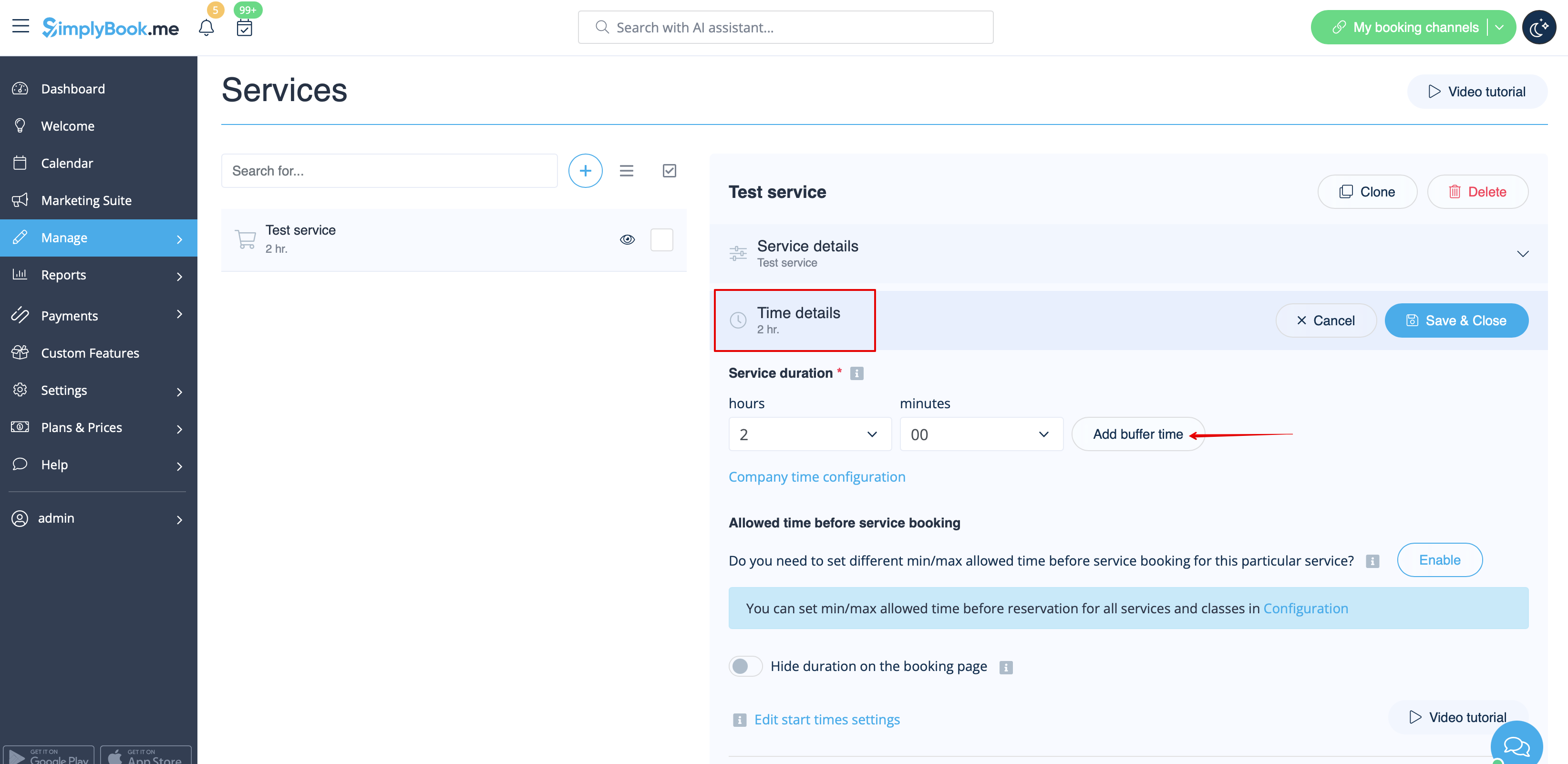
2. Choose “Time details” tab and click on “Add buffer time” button.
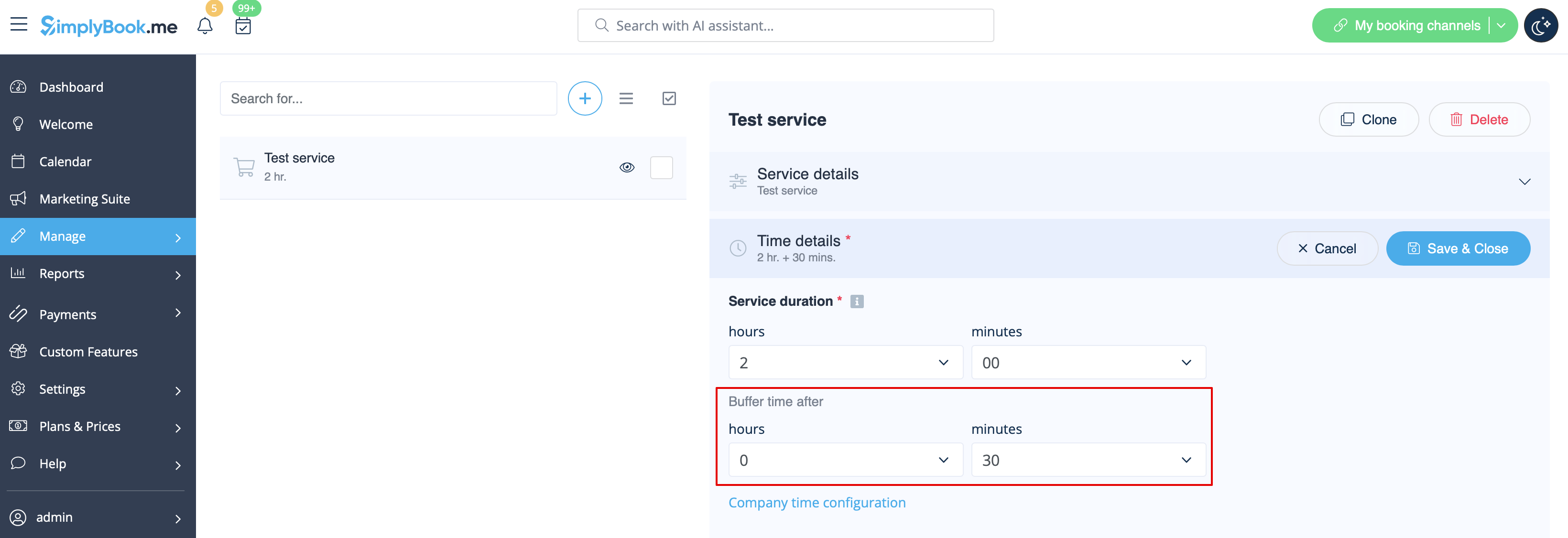
3. From the selection options choose the time you need to add as a gap between bookings for this service/class.
Please note, that this time will be added after each booking.
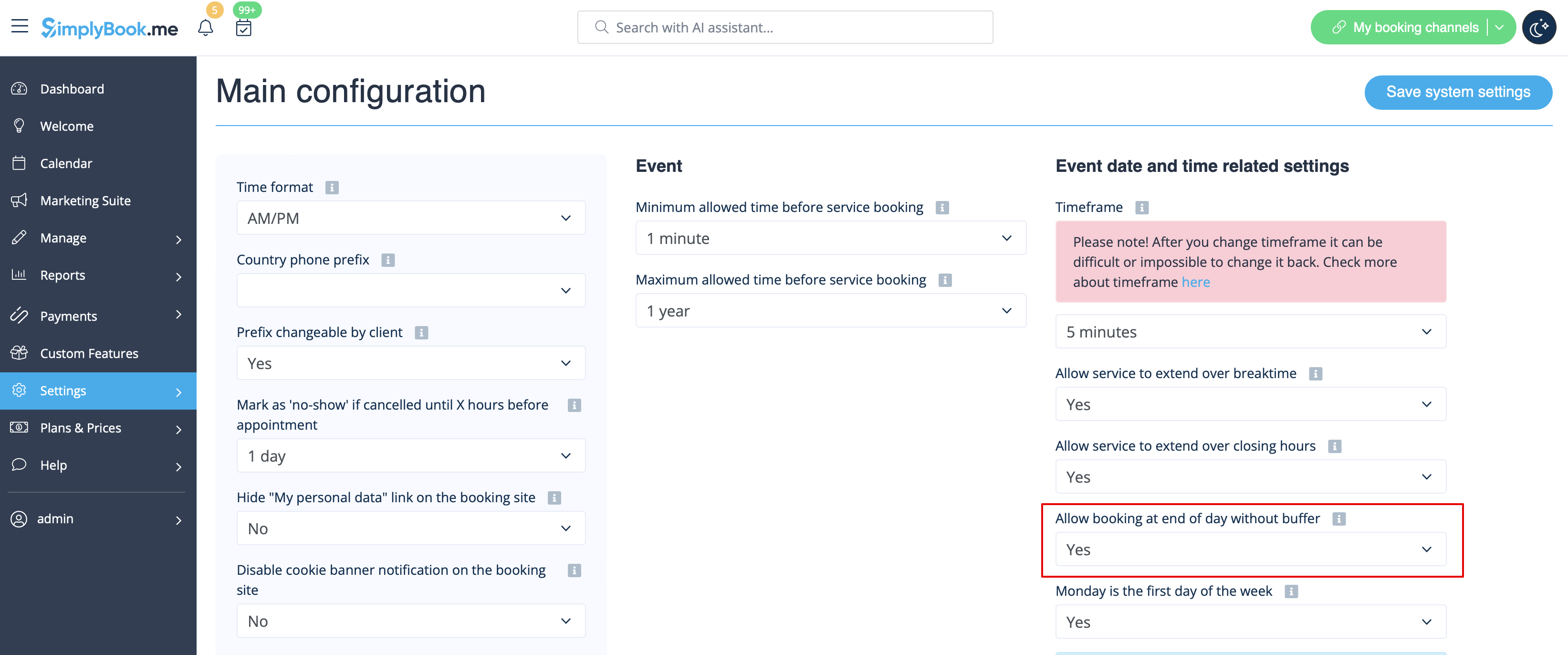
4. In some cases you may need to allow the clients to book the services that contain the buffer times at the end of the day,
despite the schedule can fit only the service duration, but not the buffer time.
There may be no need for travel time or you can stay for that period at the working place if needed and do not wish to edit the availability accordingly.
Let's imagine that the service has 1hr duration + 30mins buffer time, but the working period in your settings ends at 6pm and you wish the last client to book at 5pm.
To make it possible please set the option Allow booking at end of day without buffer to Yes in Settings -> Main configuration and save.
As the result such times will be available on the client side(schedule and other custom features may also have their influence)