From SimplyBook.me
Importing a new version from external source |
Importing a new version from external source |
||
| Line 1: | Line 1: | ||
:1. Add the necessary taxes options in <span style="background-color:#d4f8e5; padding:5px; border-radius:5px;">Manage</span> -> <span style="background-color:#d4f8e5; padding:5px; border-radius:5px;">Taxes</span> -> <span style="background-color:#d4f8e5; padding:5px; border-radius:5px;">+</span> | :1. Add the necessary taxes options in <span style="background-color:#d4f8e5; padding:5px; border-radius:5px;">Manage</span> -> <span style="background-color:#d4f8e5; padding:5px; border-radius:5px;">Taxes</span> -> <span style="background-color:#d4f8e5; padding:5px; border-radius:5px;">+</span> | ||
:Choose the default one if necessary - it will be automatically set for each new sale item that you will create in the system. | :Choose the default one if necessary - it will be automatically set for each new sale item that you will create in the system. | ||
[[File: | [[File:Add new tax path redesigned.png|1200px| border| center|link=https://help.simplybook.me/images/8/84/Add_new_tax_path_redesigned.png]] | ||
<br><br> | <br><br> | ||
:2. Navigate to <span style="background-color:#d4f8e5; padding:5px; border-radius:5px;">Manage</span> -> <span style="background-color:#d4f8e5; padding:5px; border-radius:5px;">Services</span> and select the tax option per each service. | :2. Navigate to <span style="background-color:#d4f8e5; padding:5px; border-radius:5px;">Manage</span> -> <span style="background-color:#d4f8e5; padding:5px; border-radius:5px;">Services</span> and select the tax option per each service. | ||
:If you have other items like <span style="background-color:#cdeffc; padding:5px; border-radius:5px;">[[Special:MyLanguage/Classes_custom_feature|Classes]],</span> <span style="background-color:#cdeffc; padding:5px; border-radius:5px;">[[Special:MyLanguage/Packages_custom_feature|Packages]],</span> <span style="background-color:#cdeffc; padding:5px; border-radius:5px;">[[Special:MyLanguage/Membership_custom_feature|Memberships]],</span> <span style="background-color:#cdeffc; padding:5px; border-radius:5px;">[[Special:MyLanguage/Products_for_Sale_custom_feature|Products for sale]],</span> <span style="background-color:#cdeffc; padding:5px; border-radius:5px;">[[Special:MyLanguage/Service_Add-Ons_custom_feature|Service add-ons]],</span> <span style="background-color:#cdeffc; padding:5px; border-radius:5px;">[[Special:MyLanguage/Coupons_and_Gift_Cards_custom_feature|Gift cards]]</span> and need taxes to be applied there as well please go to the corresponding management page and select from the pre-created taxes for each item. | :If you have other items like <span style="background-color:#cdeffc; padding:5px; border-radius:5px;">[[Special:MyLanguage/Classes_custom_feature|Classes]],</span> <span style="background-color:#cdeffc; padding:5px; border-radius:5px;">[[Special:MyLanguage/Packages_custom_feature|Packages]],</span> <span style="background-color:#cdeffc; padding:5px; border-radius:5px;">[[Special:MyLanguage/Membership_custom_feature|Memberships]],</span> <span style="background-color:#cdeffc; padding:5px; border-radius:5px;">[[Special:MyLanguage/Products_for_Sale_custom_feature|Products for sale]],</span> <span style="background-color:#cdeffc; padding:5px; border-radius:5px;">[[Special:MyLanguage/Service_Add-Ons_custom_feature|Service add-ons]],</span> <span style="background-color:#cdeffc; padding:5px; border-radius:5px;">[[Special:MyLanguage/Coupons_and_Gift_Cards_custom_feature|Gift cards]]</span> and need taxes to be applied there as well please go to the corresponding management page and select from the pre-created taxes for each item. | ||
[[File: | [[File:Assign tax to service path redesigned.png |1200px| border| center|link=https://help.simplybook.me/images/e/eb/Assign_tax_to_service_path_redesigned.png]] | ||
<br><br> | <br><br> | ||
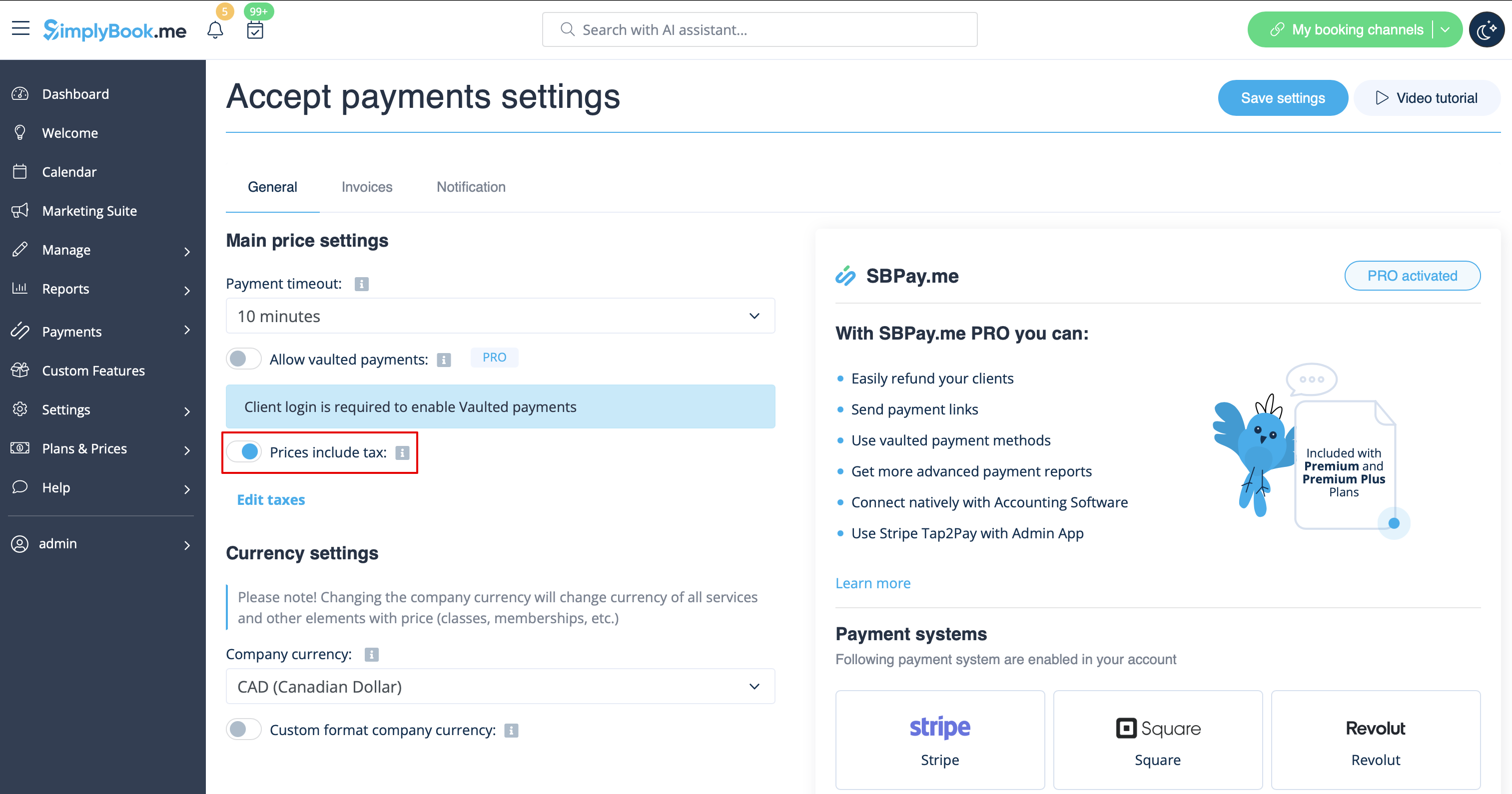
:3. In <span style="background-color:#d4f8e5; padding:5px; border-radius:5px;">Custom features</span> -> <span style="background-color:#d4f8e5; padding:5px; border-radius:5px;">Accept payments</span> -> <span style="background-color:#d4f8e5; padding:5px; border-radius:5px;">Settings</span> choose whether the tax amount should be added to the price that you have set per service(or other item) or it is already included by using the switcher <span style="background-color:#d4f8e5; padding:5px; border-radius:5px;">Prices include tax.</span><br> | :3. In <span style="background-color:#d4f8e5; padding:5px; border-radius:5px;">Custom features</span> -> <span style="background-color:#d4f8e5; padding:5px; border-radius:5px;">Accept payments</span> -> <span style="background-color:#d4f8e5; padding:5px; border-radius:5px;">Settings</span> choose whether the tax amount should be added to the price that you have set per service(or other item) or it is already included by using the switcher <span style="background-color:#d4f8e5; padding:5px; border-radius:5px;">Prices include tax.</span><br> | ||
:If you enable the switcher it will mean that the amount that you have set per service is already with taxes.<br> | :If you enable the switcher it will mean that the amount that you have set per service is already with taxes.<br> | ||
:In case you disable the switcher the system will automatically add the selected tax percentage to the items prices<br> | :In case you disable the switcher the system will automatically add the selected tax percentage to the items prices<br> | ||
[[File:Prices include tax | [[File:Prices include tax redesigned.png|1200px|border|center|link=https://help.simplybook.me/images/d/dd/Prices_include_tax_redesigned.png]] | ||
<br><br> | <br><br> | ||
Latest revision as of 15:44, 8 January 2025
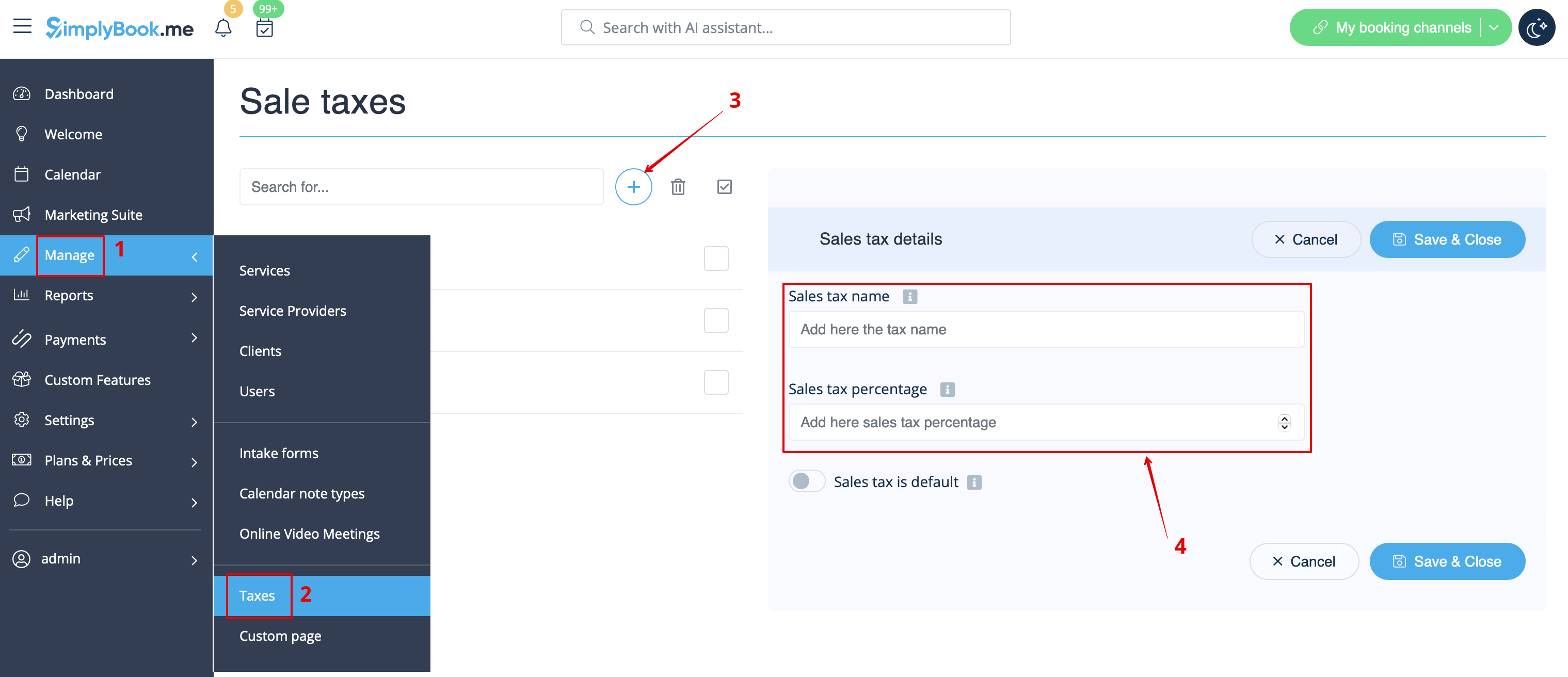
- 1. Add the necessary taxes options in Manage -> Taxes -> +
- Choose the default one if necessary - it will be automatically set for each new sale item that you will create in the system.
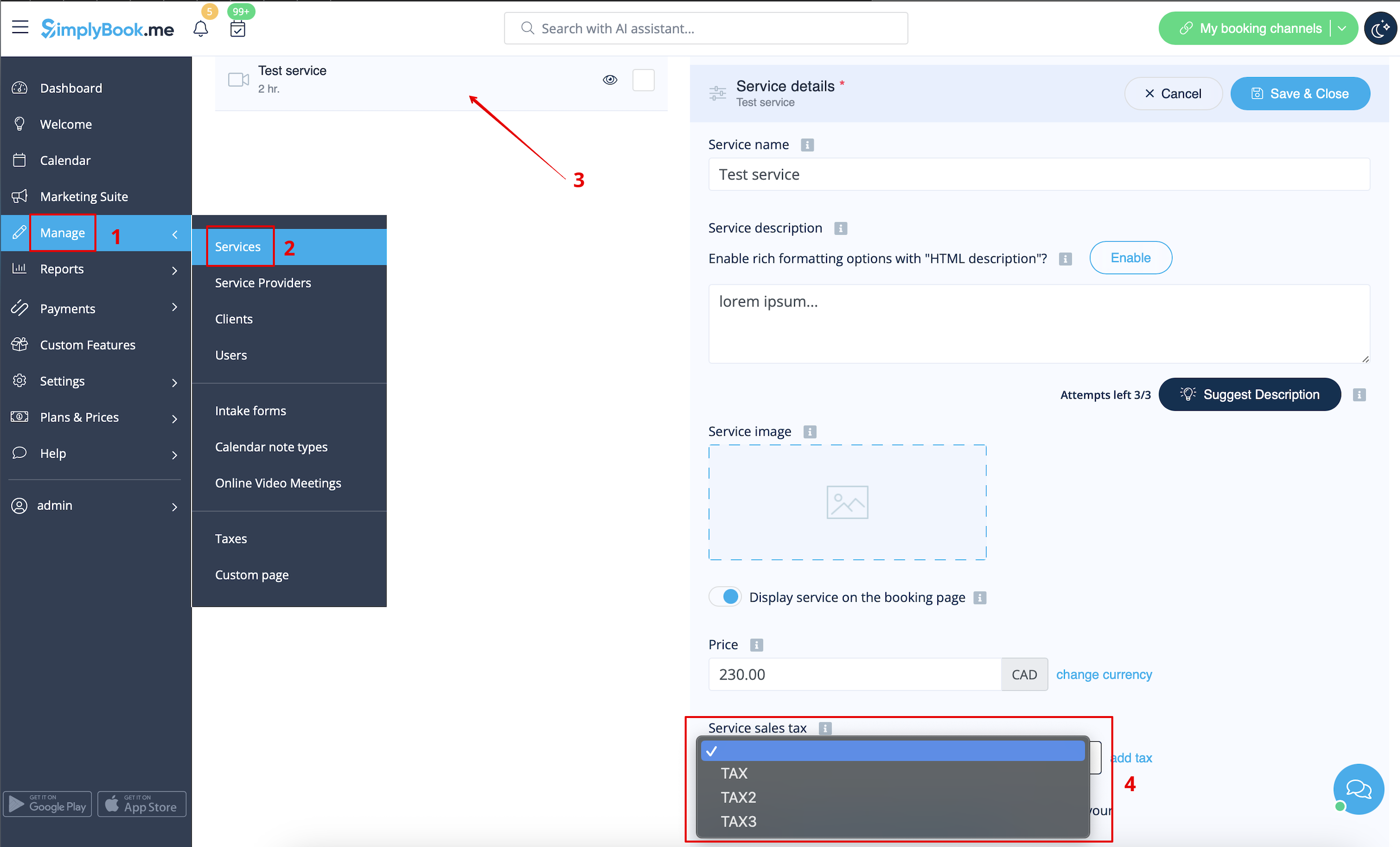
- 2. Navigate to Manage -> Services and select the tax option per each service.
- If you have other items like Classes, Packages, Memberships, Products for sale, Service add-ons, Gift cards and need taxes to be applied there as well please go to the corresponding management page and select from the pre-created taxes for each item.
- 3. In Custom features -> Accept payments -> Settings choose whether the tax amount should be added to the price that you have set per service(or other item) or it is already included by using the switcher Prices include tax.
- If you enable the switcher it will mean that the amount that you have set per service is already with taxes.
- In case you disable the switcher the system will automatically add the selected tax percentage to the items prices