No edit summary |
|||
| Line 7: | Line 7: | ||
In this case you can set your availability in Settings//Company opening hours (for regular weekly schedule) and in Settings//Company opening hours//Special days schedule (for specific date schedule). Use the sliders to adjust available time (bright blue line). | In this case you can set your availability in Settings//Company opening hours (for regular weekly schedule) and in Settings//Company opening hours//Special days schedule (for specific date schedule). Use the sliders to adjust available time (bright blue line). | ||
[[File:Company | [[File:Company weekly schedule overview redesigned.png|1200px | center|link=https://help.simplybook.me/images/1/1e/Company_weekly_schedule_overview_redesigned.png]] | ||
<br><br> | <br><br> | ||
;You may also need: | ;You may also need: | ||
| Line 13: | Line 13: | ||
*[[How_to_change_the_way_time_slots_are_shown| Change the way time slots are shown on the booking page]] | *[[How_to_change_the_way_time_slots_are_shown| Change the way time slots are shown on the booking page]] | ||
<br><br> | <br><br> | ||
=I have schedules for services= | =I have schedules for services= | ||
<br><br> | <br><br> | ||
Revision as of 10:31, 13 September 2024
Video tutorial 
I am alone and perform only 1 service
In this case you can set your availability in Settings//Company opening hours (for regular weekly schedule) and in Settings//Company opening hours//Special days schedule (for specific date schedule). Use the sliders to adjust available time (bright blue line).
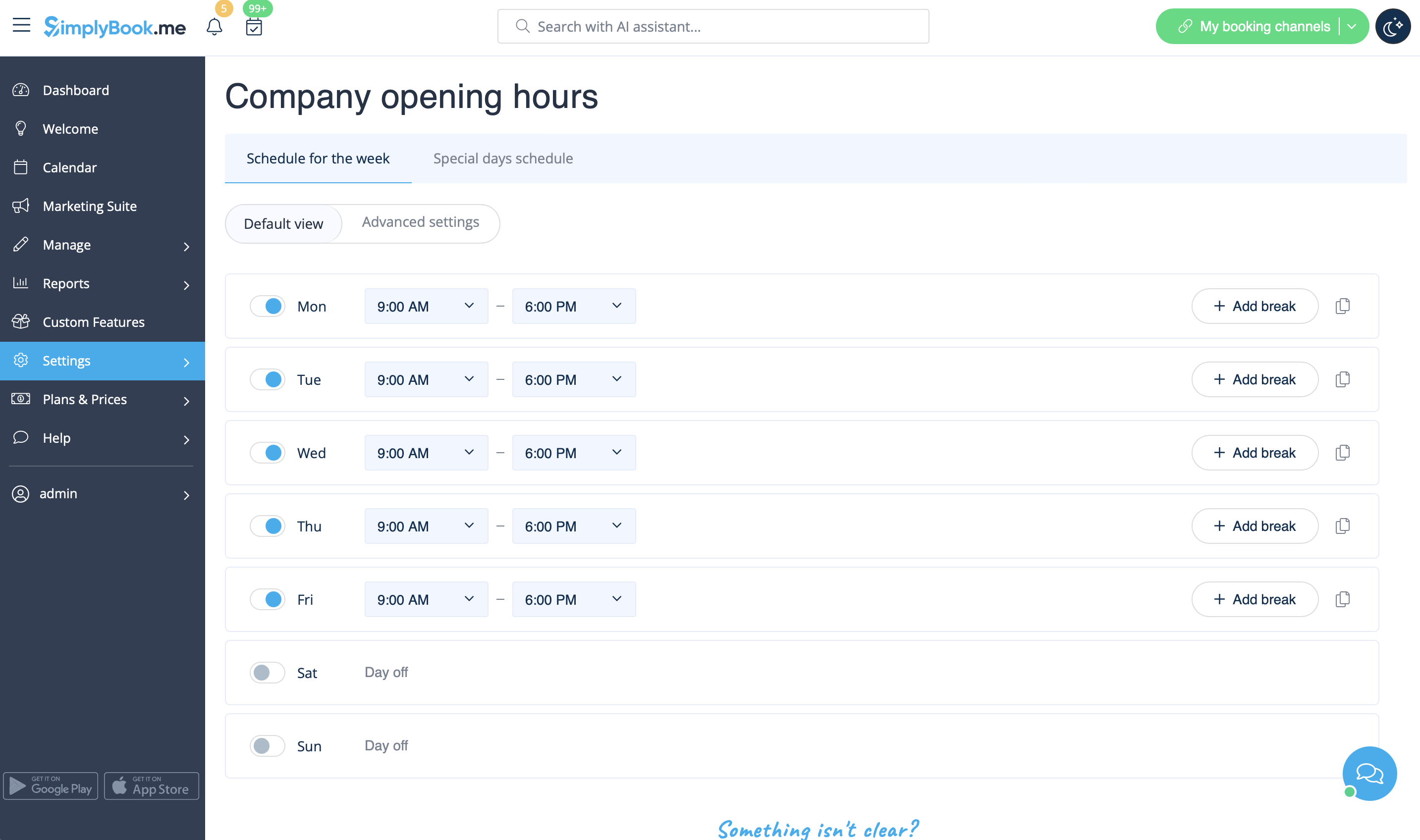
- You may also need
I have schedules for services
In Manage//Services//Service schedule tab move the sliders to set open times for this service if it differs from usual company schedule.

If the service has the same schedule as company you do not have to change anything there, it will be applied automatically.
If you need to set some exceptions in service schedule for holidays or other needs please choose "Show advanced settings" and then “Special days schedule” tab.

- You may also need
I have schedules for providers
You can set regular schedule for providers in Manage//Service providers//Service provider schedule or in Settings // Provider schedule. For example, if you work Monday-Friday 9a.m - 5p.m you simply set schedule for those dates by clicking on the corresponding slots to make them available (bright blue)/not available (light blue or white). To make day of the week working/off use switcher near the weekday names

You can set schedule for some specific date for providers in Settings // Providers schedule // Special days schedule tab. For example, if you work differently on certain date or have day off, you can click on the date and set schedule by clicking on the corresponding slots to make them available (bright blue)/not available (light blue or white).

To make some date working/offday, click on the date and use switcher "Is working day?". If you need to remove special day settings for some date, click on the date and press white button "clear special day".

I have both schedules for services and for providers
If you have both schedules for services and for providers, then only intersection of available time for service and for provider will be available for booking. For example, service is available 9-12, provider is available 11-17, then only time 11-12 will be available for booking because earlier provider is not working and no one can perform the service and later, the service is not available.
Please note! Providers'/Services' working hours should be within opening hours of the company! If you can't open specific times for provider/service, please open those times for the company first and then for provider/service.
- Please check our video tutorial on setting up the availability
Opening hours vs special days
There are 2 types of time settings:
- Opening hours.
It is regular schedule you have on a weekly basis. If you are the only provider, you can set it in Settings // Company opening hours. If you have several providers, you can set their regular schedule in Settings // Provider schedule. For example, if you work Monday-Friday 9a.m - 5p.m you simply set schedule for those dates by clicking on the corresponding slots. To make day of the week working/off use switchers near weekday names.

- Special days
Contrary to Opening hours, which is regular schedule, Special Days is schedule by date. If you do not have regular schedule or plan one-time event, you can use Special days to open/close only specific dates. To set specific schedule for company (Settings // Company opening hours // Special days schedule) or provider (Settings // Providers schedule // Special days schedule) click on the date and insert the schedule you need or make it a day off. This feature can be used if you plan to open in months and want to prevent bookings until then (make all days off before the opening date) or to insert national holidays in your schedule. Special days of the company are highlighted with yellow, providers' special days are highlighted with red.

Please note! Providers'/Services' working hours should be within opening hours of the company! If you can't open specific times for provider/service, please open those times for the company first and then for provider/service.
Special Days Use Guide
There are cases where you or one of your employees may need a day off or wish to adjust working hours for a specific date without affecting other scheduled days.
Simplybook.me provides a simple solution for this.
- How to use
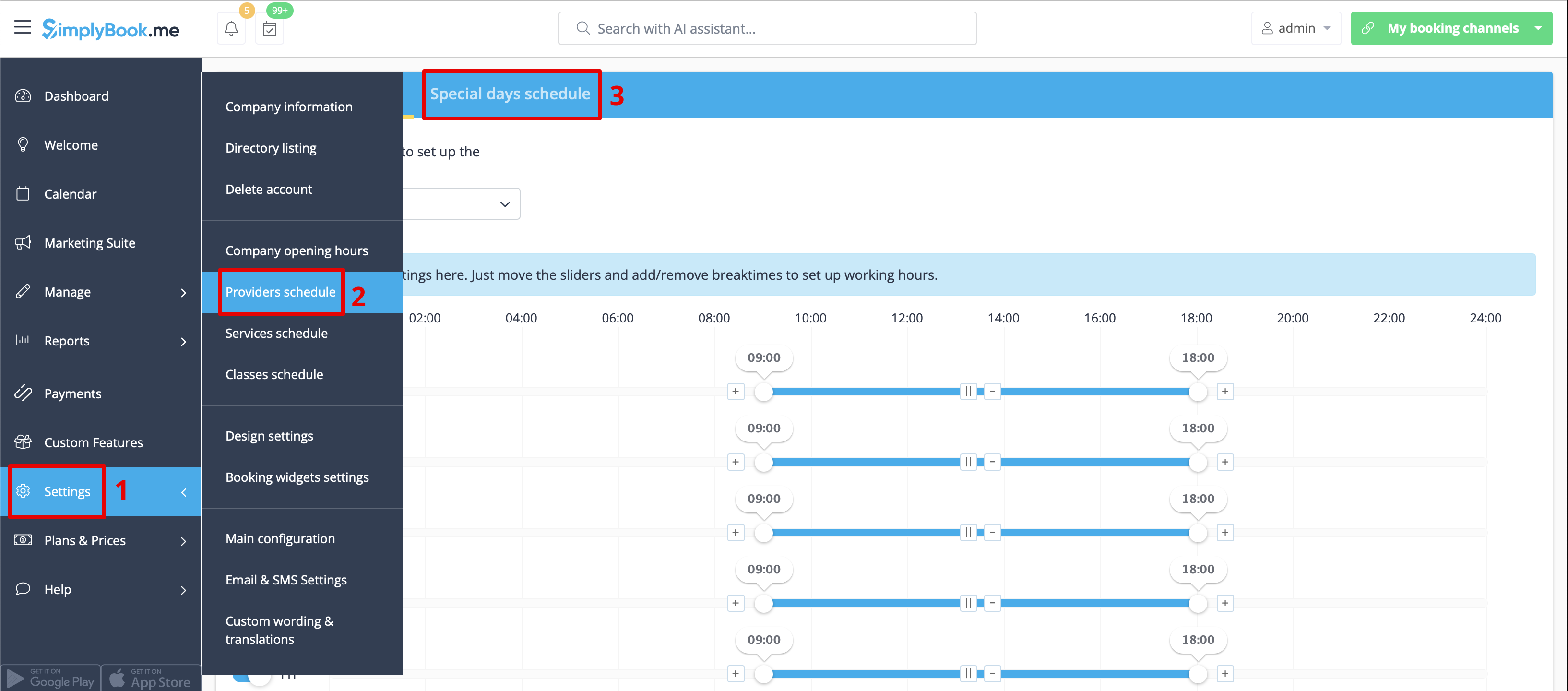
1. To set up a special day schedule for a specific provider, navigate to Settings > Providers schedule > Special days schedule section (located at the top of the page).
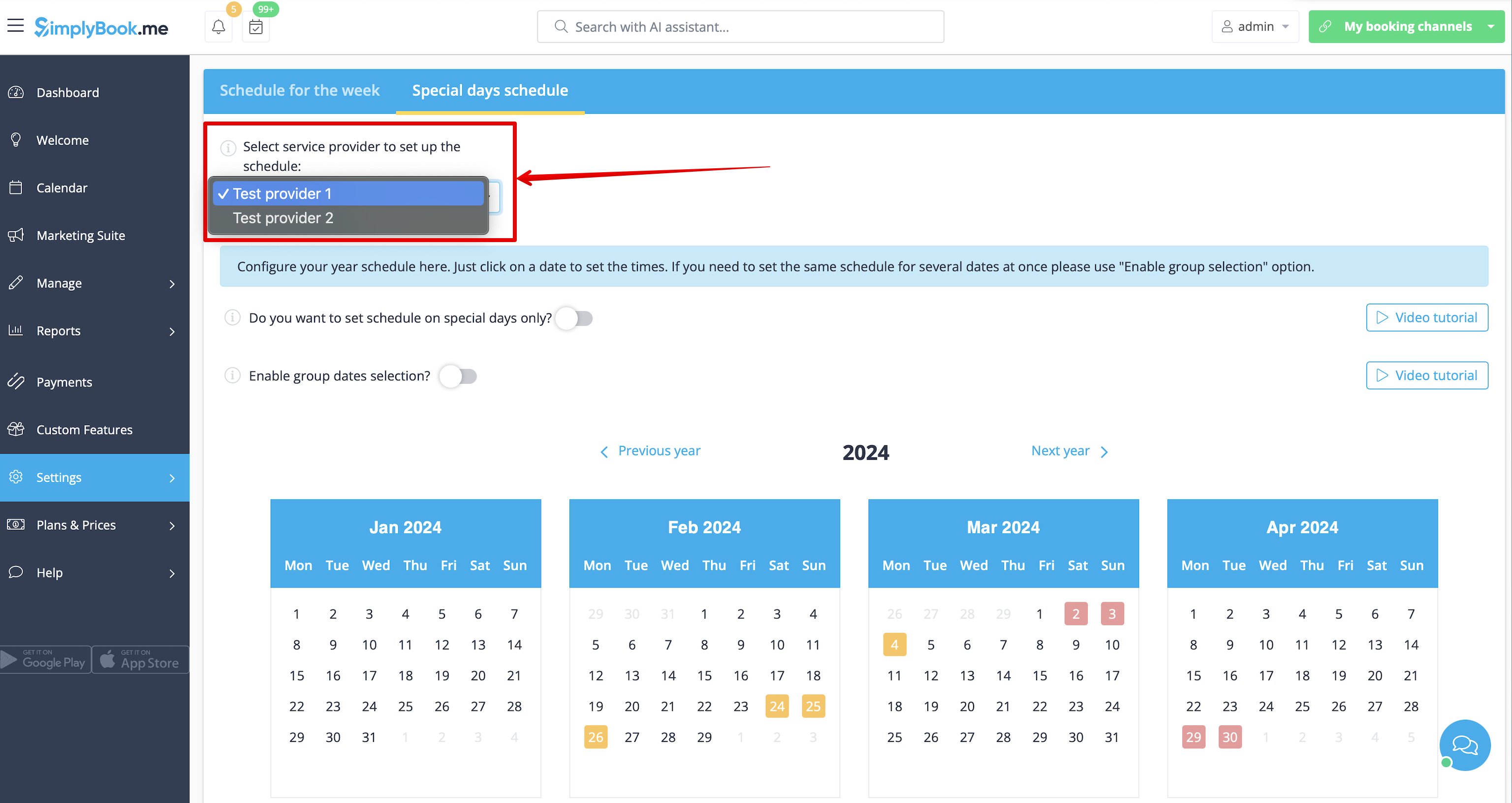
2. Choose the service provider on this page to set up the special days schedule.
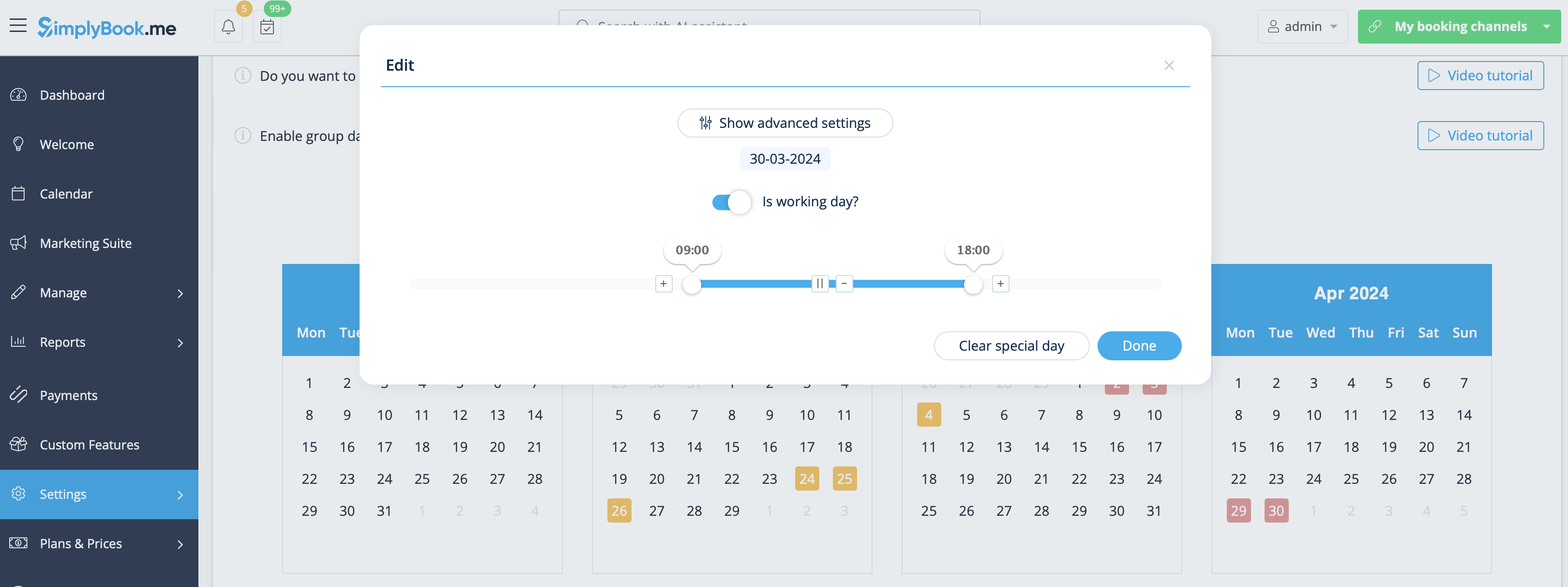
3. Clicking on the desired date opens a window for setting up the schedule for that provider on a specific date. You can adjust the working hours or create a day-off by toggling “Is working day?” and clicking the “Done” button.
4. If there's a need to adjust several dates for a particular provider with the same schedule, use the toggle “Enable group dates selection.” Click on it, choose the dates, and click the “Edit schedule” button.
You'll see the same window with options to adjust the schedule or create a day-off for the provider. The calendar will display special days highlighted in red.
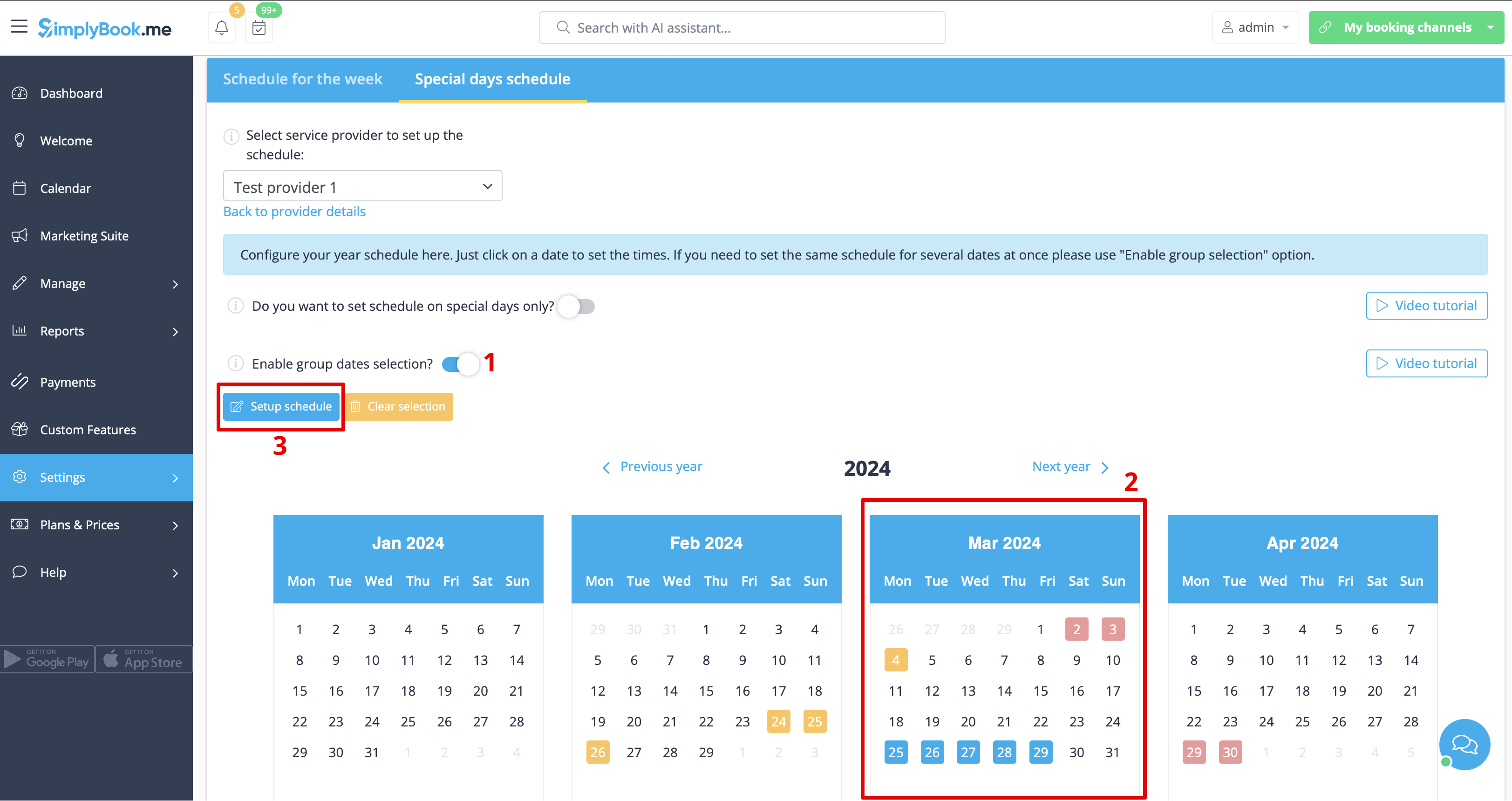
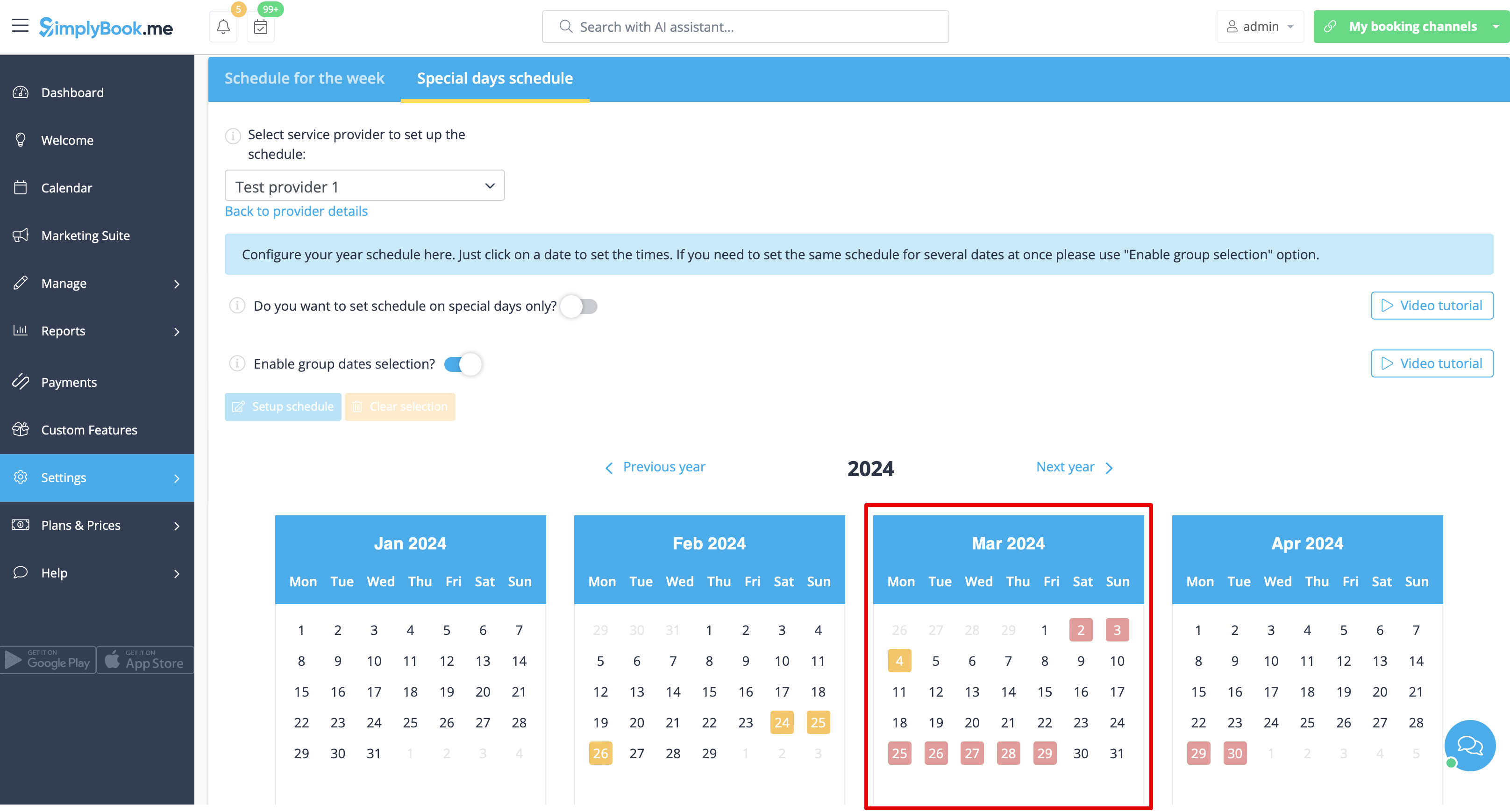
Similar actions can be performed for a particular service on a special day in Settings > Service schedule > Special days schedule section, following the steps described in this guide.
