No edit summary |
Updating to match new version of source page |
||
| Line 1: | Line 1: | ||
<languages/> | <languages/> | ||
{{#seo: | {{#seo: | ||
|title=Book Soon Notification System custom feature - SimplyBook.me | |title=Book Soon Notification System custom feature - SimplyBook.me | ||
<div lang="en" dir="ltr" class="mw-content-ltr"> | |||
|description=Remind clients to book before slots fill up. Send timely notifications and increase bookings. Enable this feature now! | |||
</div> | |||
|titlemode=append | |titlemode=append | ||
|keywords=faq, frequently asked questions, booking software, appointment system questions, appointments online, calendar software, booking system, booking calendar, scheduling software, online appointment scheduling, online scheduling, plugins, custom features, book soon, book again, come again, book again reminder, come again reminder, notification, reminder | |keywords=faq, frequently asked questions, booking software, appointment system questions, appointments online, calendar software, booking system, booking calendar, scheduling software, online appointment scheduling, online scheduling, plugins, custom features, book soon, book again, come again, book again reminder, come again reminder, notification, reminder | ||
| Line 19: | Line 21: | ||
*<span style="background-color:#ffe9e9; padding:5px; border-radius:5px;">Die Kunden müssen Ihre Marketingmaterialien abonniert haben, um solche Benachrichtigungen erhalten zu können.</span> | *<span style="background-color:#ffe9e9; padding:5px; border-radius:5px;">Die Kunden müssen Ihre Marketingmaterialien abonniert haben, um solche Benachrichtigungen erhalten zu können.</span> | ||
<div class="mw-translate-fuzzy"> | |||
;Wie man sie benutzt | ;Wie man sie benutzt | ||
1. Aktivieren Sie diese individuelle Funktion auf Ihrer Seite Individuelle Funktionen. | 1. Aktivieren Sie diese individuelle Funktion auf Ihrer Seite Individuelle Funktionen. | ||
| Line 37: | Line 40: | ||
7. Wählen Sie die Dienstleistung und den Dienstleister, für die die Benachrichtigung gelten soll (optional). | 7. Wählen Sie die Dienstleistung und den Dienstleister, für die die Benachrichtigung gelten soll (optional). | ||
<br><br> | <br><br> | ||
</div> | |||
Revision as of 15:51, 8 January 2025

Sorgen Sie dafür, dass Ihre Kunden wiederkommen! Mit dieser individuellen Funktion können Sie Ihre Kunden daran erinnern, wiederzukommen, indem Sie ihnen eine Nachricht x-Tage nach ihrem Termin schicken. Sie können zum Beispiel Ihre eigene Nachricht verfassen und eine Erinnerung immer 30 Tage nach einem Termin senden.
Bitte beachten Sie!
- Diese individuelle Funktion ist nur bei bezahlten Abonnements verfügbar.
- Die Kunden müssen Ihre Marketingmaterialien abonniert haben, um solche Benachrichtigungen erhalten zu können.
- Wie man sie benutzt
1. Aktivieren Sie diese individuelle Funktion auf Ihrer Seite Individuelle Funktionen.
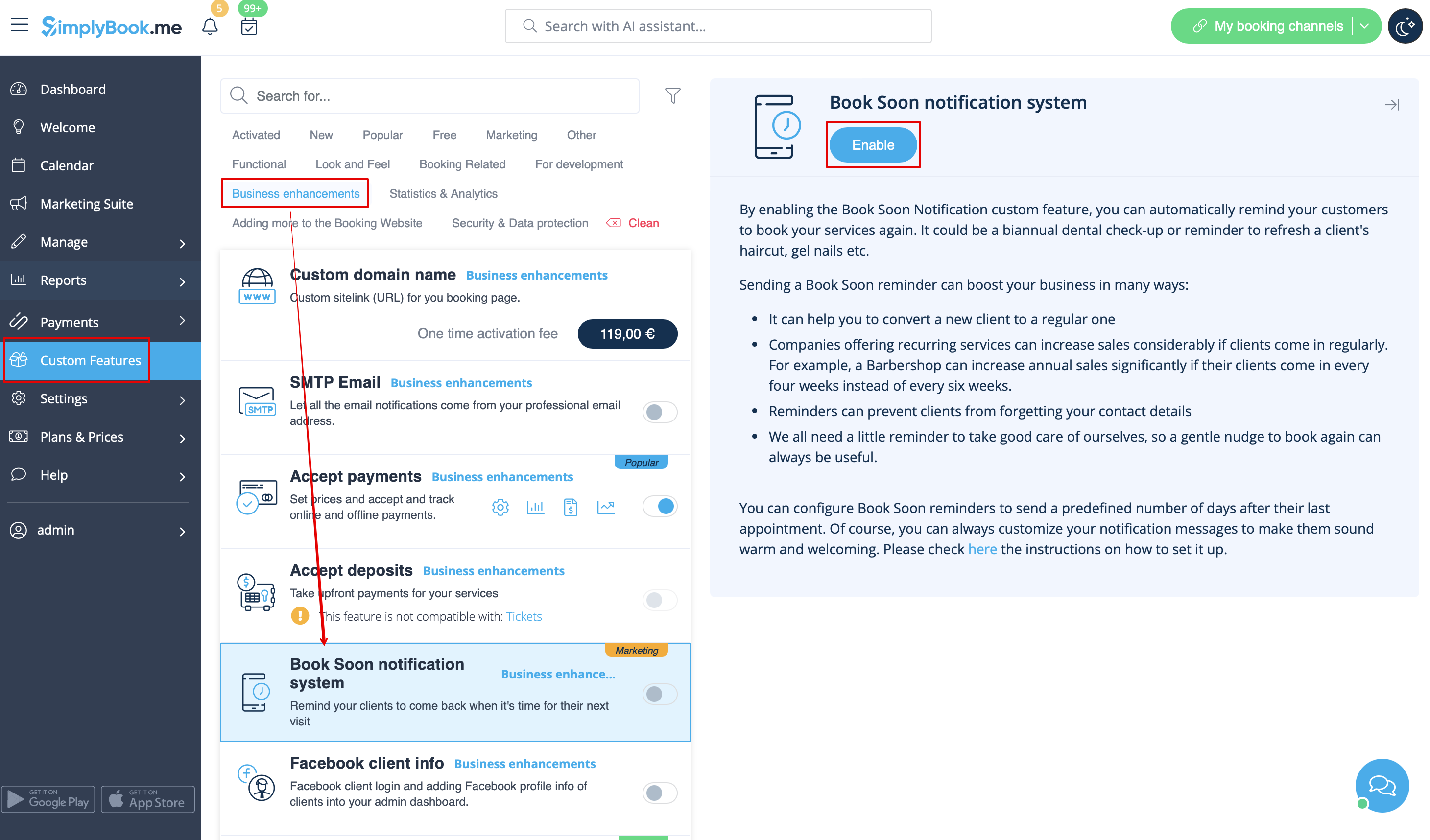
2. Gehen Sie zu "Einstellungen" in der Nähe dieser Option.
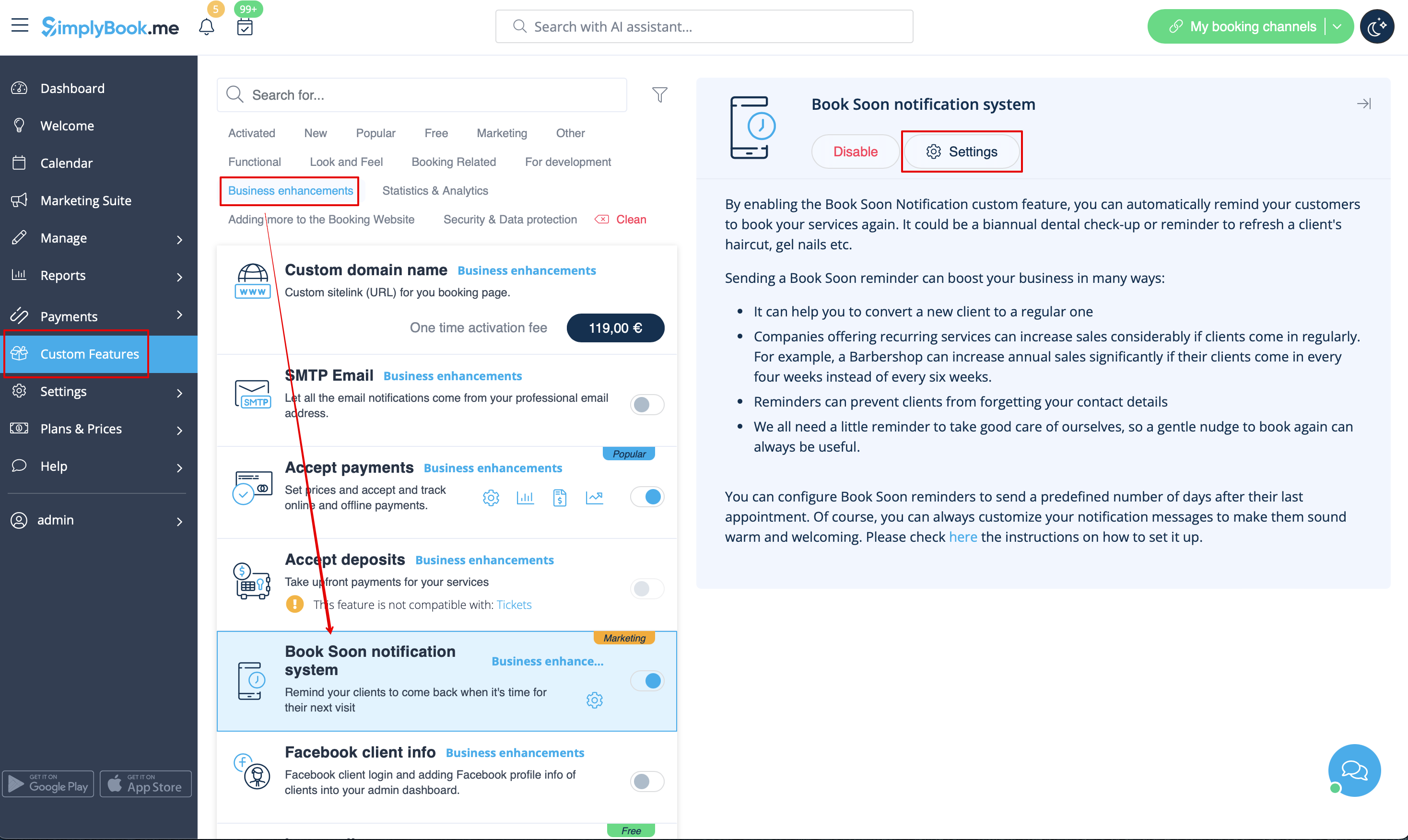
3. Klicken Sie in den Einstellungen auf "Neu hinzufügen".

4. Konfigurieren Sie E-Mail- und/oder SMS-Benachrichtigungen, indem Sie den Betreff und den Text eingeben.
Sie können die folgenden Variablen in Ihrer Nachricht verwenden: [client_name], [client_phone], [client_email], [event](für den Namen der Dienstleistung), [unit](für den Namen des Anbieters), [code], [date_start], [time_start].
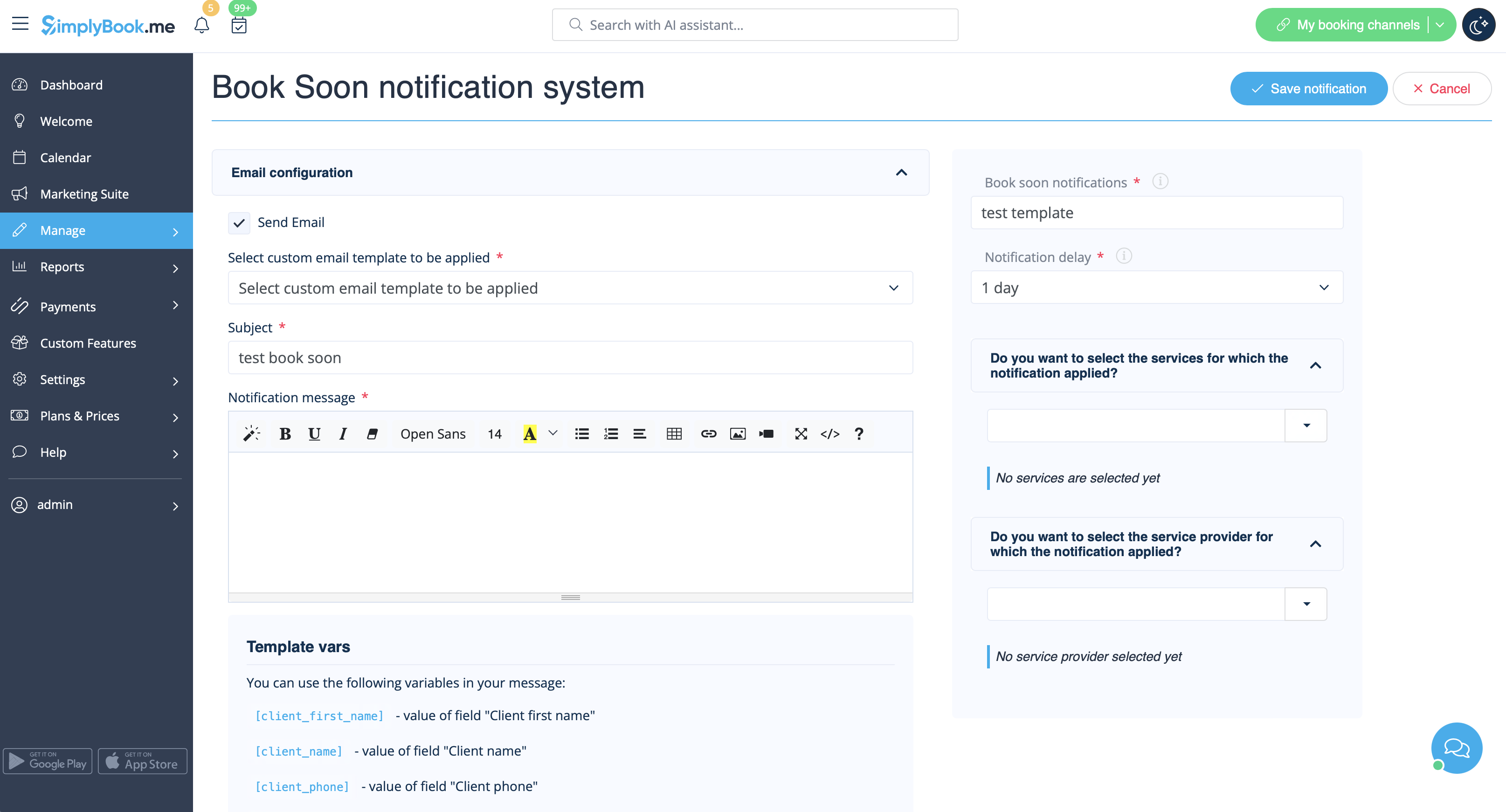
5. Benennen Sie diese Benachrichtigung im Feld "Bald buchen'-Benachrichtigungs- system", um sie von anderen Benachrichtigungen zu unterscheiden, die Sie in Zukunft erstellen möchten.
6. Legen Sie die Verzögerungstage für die Benachrichtigung fest (Anzahl der Tage nach dem Termin, an dem die Benachrichtigung gesendet werden soll).
7. Wählen Sie die Dienstleistung und den Dienstleister, für die die Benachrichtigung gelten soll (optional).
