Created page with "= Робочі години = Якщо ви хочете видалити цей розділ для нових тем, перейдіть до <span style="background-color:#d4f8e5; padding:5px; border-radius:5px;">Налаштування</span> -> Налаштування <span style="background-color:#d4f8e5; padding:5px; border-radius:5px;">дизайну</span> -> <span style="background-color:#d4f8e5; padding:5px; border-radius:5px;">Інші налашту..." Tags: Mobile edit Mobile web edit |
Created page with "== Дозвольте нам надсилати вам рекламні акції та актуальну інформацію ==" |
||
| Line 99: | Line 99: | ||
:2. Будь ласка, перейдіть до <span style="background-color:#d4f8e5; padding:5px; border-radius:5px;">Налаштувань</span> -> Налаштовані <span style="background-color:#d4f8e5; padding:5px; border-radius:5px;">функції</span> та увімкніть функцію <span style="background-color:#d4f8e5; padding:5px; border-radius:5px;">Налаштований CSS</span>. Потім у <span style="background-color:#d4f8e5; padding:5px; border-radius:5px;">Налаштуваннях</span> цієї функції або в <span style="background-color:#d4f8e5; padding:5px; border-radius:5px;">Налаштуваннях</span> -> Кастомний <span style="background-color:#d4f8e5; padding:5px; border-radius:5px;">CSS</span> вставте у вікно <span style="background-color:#d4f8e5; padding:5px; border-radius:5px;">CSS сторінок бронювання</span> в самому верху наступний код: | |||
:2. | |||
<br> | <br> | ||
<pre> | <pre> | ||
.form-group.form-client-phone{ | .form-group.form-client-phone{ | ||
display: none; | |||
} | </pre> }<pre> | ||
</pre> | </pre> | ||
| Line 113: | Line 111: | ||
== Поле електронної пошти == | |||
<span style="background-color:#cdeffc; padding:5px; border-radius:5px;">(</span> Функція входу для<span style="background-color:#cdeffc; padding:5px; border-radius:5px;">[[Custom_Features#Client_Login |клієнтів]]</span> відключена)<br> | |||
<span style="background-color:#cdeffc; padding:5px; border-radius:5px;"> | :1. Перейдіть в <span style="background-color:#d4f8e5; padding:5px; border-radius:5px;">Налаштування</span> -> <span style="background-color:#d4f8e5; padding:5px; border-radius:5px;">Налаштування</span> електронної пошти <span style="background-color:#d4f8e5; padding:5px; border-radius:5px;">та SMS</span> -> <span style="background-color:#d4f8e5; padding:5px; border-radius:5px;">Налаштування сповіщень електронною поштою та SMS</span> -> <span style="background-color:#d4f8e5; padding:5px; border-radius:5px;">Обов'язкові поля реєстрації</span> -> <span style="background-color:#d4f8e5; padding:5px; border-radius:5px;">Телефон</span> (щоб зробити електронну пошту необов'язковою). | ||
:1. | |||
:2. Будь ласка, перейдіть в <span style="background-color:#d4f8e5; padding:5px; border-radius:5px;">Налаштування</span> -> <span style="background-color:#d4f8e5; padding:5px; border-radius:5px;">Налаштування</span> та увімкніть функцію <span style="background-color:#d4f8e5; padding:5px; border-radius:5px;">Налаштування CSS</span>. Потім у <span style="background-color:#d4f8e5; padding:5px; border-radius:5px;">Налаштуваннях</span> цієї функції або в <span style="background-color:#d4f8e5; padding:5px; border-radius:5px;">Кастомних</span> функціях -> Кастомний <span style="background-color:#d4f8e5; padding:5px; border-radius:5px;">CSS</span> вставте у вікно <span style="background-color:#d4f8e5; padding:5px; border-radius:5px;">CSS сторінок бронювання</span> в самому верху наступний код: | |||
:2. | |||
<br> | <br> | ||
<pre>.form-group.form-client-email{ | <pre>.form-group.form-client-email{ | ||
display: none; | |||
} | </pre> }<pre> | ||
</pre> | </pre> | ||
| Line 133: | Line 127: | ||
== Наш час == | |||
Будь ласка, перейдіть в <span style="background-color:#d4f8e5; padding:5px; border-radius:5px;">Налаштування</span> -> <span style="background-color:#d4f8e5; padding:5px; border-radius:5px;">Налаштування</span> і увімкніть функцію <span style="background-color:#d4f8e5; padding:5px; border-radius:5px;">Налаштування CSS</span>. Потім в <span style="background-color:#d4f8e5; padding:5px; border-radius:5px;">налаштуваннях</span> цієї функції або в <span style="background-color:#d4f8e5; padding:5px; border-radius:5px;">Custom Features</span> -> <span style="background-color:#d4f8e5; padding:5px; border-radius:5px;">Custom CSS</span> вставте у вікно <span style="background-color:#d4f8e5; padding:5px; border-radius:5px;">CSS сторінки бронювання</span> в самому верху наступний код:<br> | |||
<pre> | <pre> | ||
div#sb_booking_company_time { | div#sb_booking_company_time { | ||
display: none; | |||
} | } | ||
</pre> | </pre> | ||
< | <span id="May_we_send_you_promotions_and_relevant_information"></span> | ||
== | == Дозвольте нам надсилати вам рекламні акції та актуальну інформацію == | ||
Будь ласка, перейдіть до <span style="background-color:#d4f8e5; padding:5px; border-radius:5px;">Кастомних функцій</span> -> <span style="background-color:#d4f8e5; padding:5px; border-radius:5px;">Кастомні функції</span> та увімкніть функцію <span style="background-color:#d4f8e5; padding:5px; border-radius:5px;">Кастомний CSS</span>. Потім в <span style="background-color:#d4f8e5; padding:5px; border-radius:5px;">налаштуваннях</span> цієї функції або в <span style="background-color:#d4f8e5; padding:5px; border-radius:5px;">Custom Features</span> -> <span style="background-color:#d4f8e5; padding:5px; border-radius:5px;">Custom CSS</span> вставте у вікно <span style="background-color:#d4f8e5; padding:5px; border-radius:5px;">CSS сторінки бронювання</span> в самому верху наступний код:<br><br> | |||
::''Функція входу клієнта увімкнена:'' | |||
::'' | |||
<pre> | <pre> | ||
#main #client-login .custom-form #sb_terms_and_conditions .promotions-letter-flag label[role=button]{ | #main</pre><pre>#client-login .custom-form #sb_terms_and_conditions .promotions-letter-flag label[role=button]{ | ||
display: none; | |||
} | </pre> }<pre> | ||
</pre> | </pre> | ||
::'' | ::''Функція входу клієнта вимкнена:'' | ||
<pre> | <pre> | ||
#sb-main-container #main #sb-timeline #steps #details .detail-step-wrap .detail-step .license-links-container .promotions-letter-flag label[role=button]{ | #sb-main-container</pre><pre>#main #sb-timeline #steps #details .detail-step-wrap .detail-step .license-links-container .promotions-letter-flag label[role=button]{ | ||
display: none; | |||
} | } | ||
</pre> | </pre> | ||
Revision as of 10:07, 15 May 2025
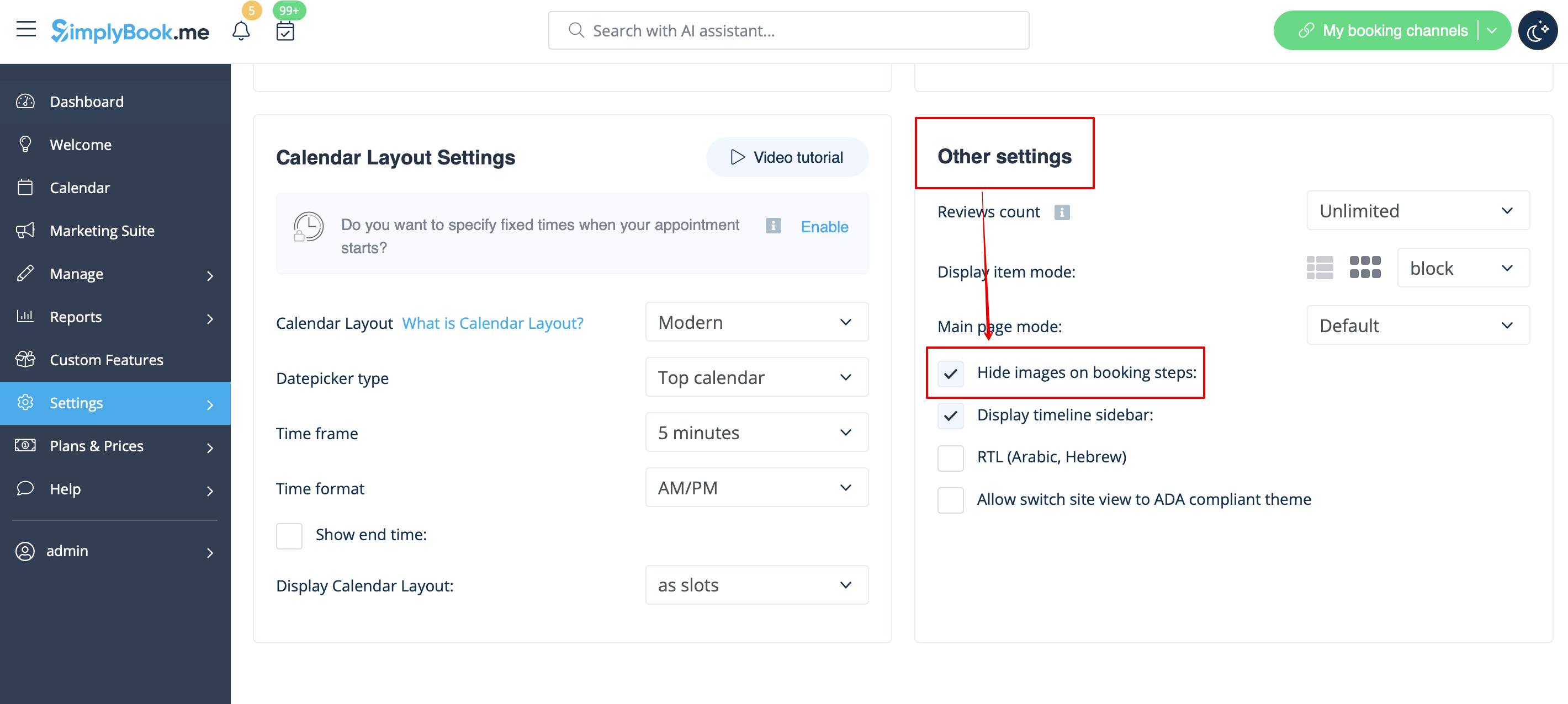
Зображення для кроків "Послуга", "Постачальник послуг", "Категорія" та "Місцезнаходження
Перейдіть до Налаштування -> Налаштування дизайну -> Інші налаштування і встановіть прапорець Приховувати зображення на кроках бронювання. Збережіть налаштування.
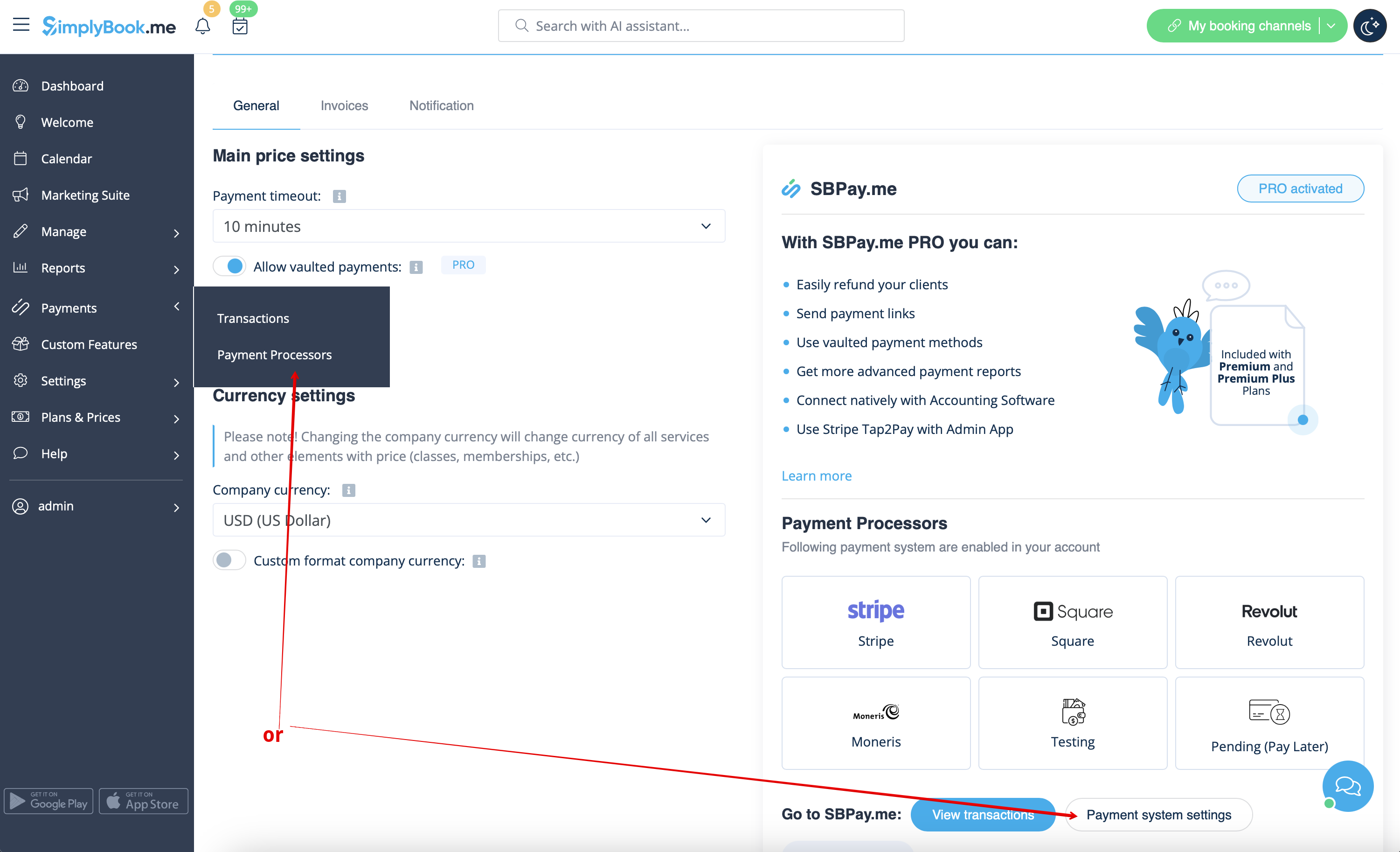
Можливість сплатити пізніше
Перейдіть до Платежі -> Платіжні системи або користувацькі функції -> Приймати платежі -> Налаштування -> Налаштування платіжної системи, щоб перейти до інтерфейсу SBPay.me і вимкнути там опцію Сплатити пізніше.
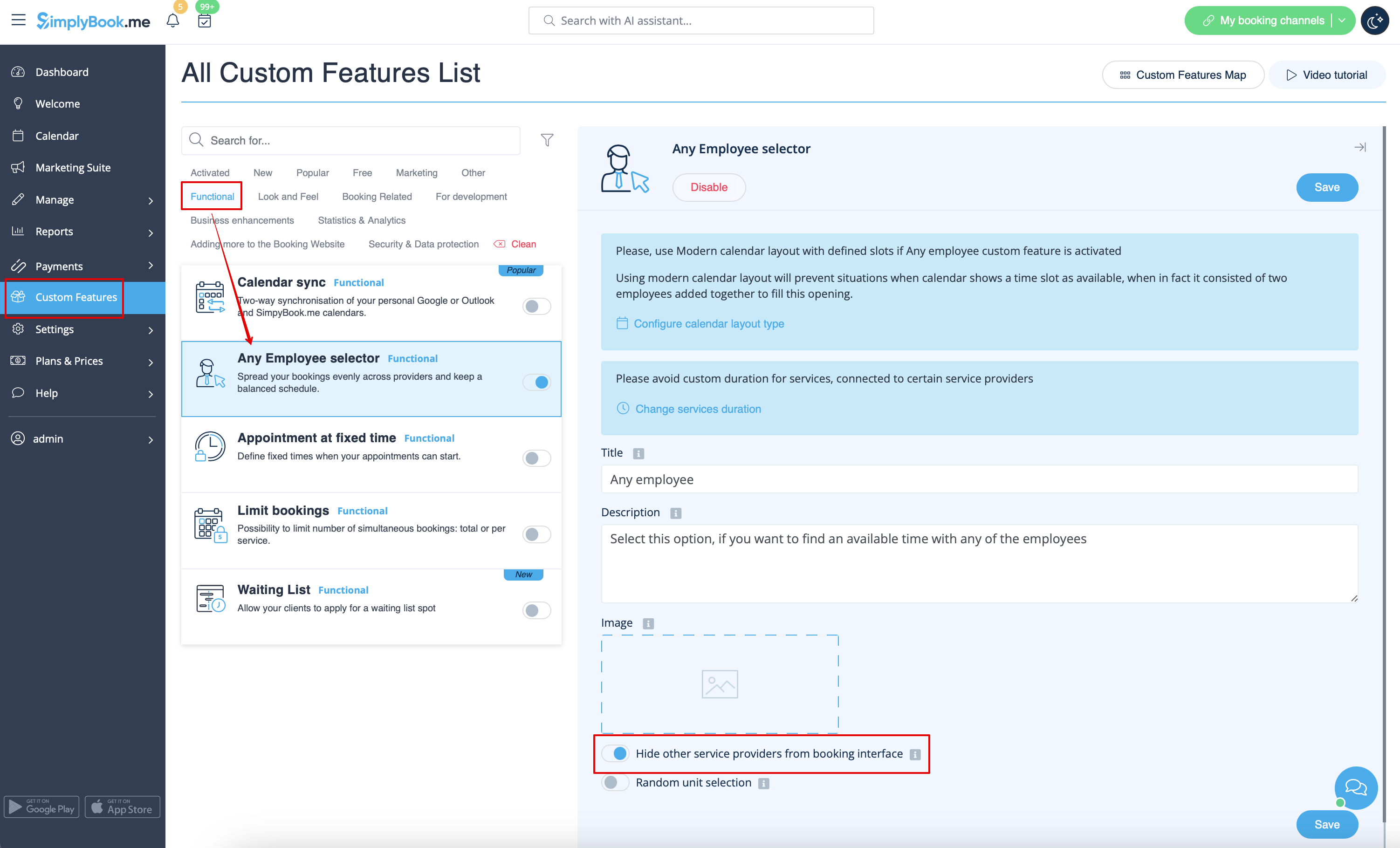
Крок для співробітника
Увімкніть селектор "Будь-який працівник " у розділі "Користувацькі функції " та в його налаштуваннях з правого боку сторінки увімкніть опцію " Приховати інших постачальників послуг з інтерфейсу бронювання
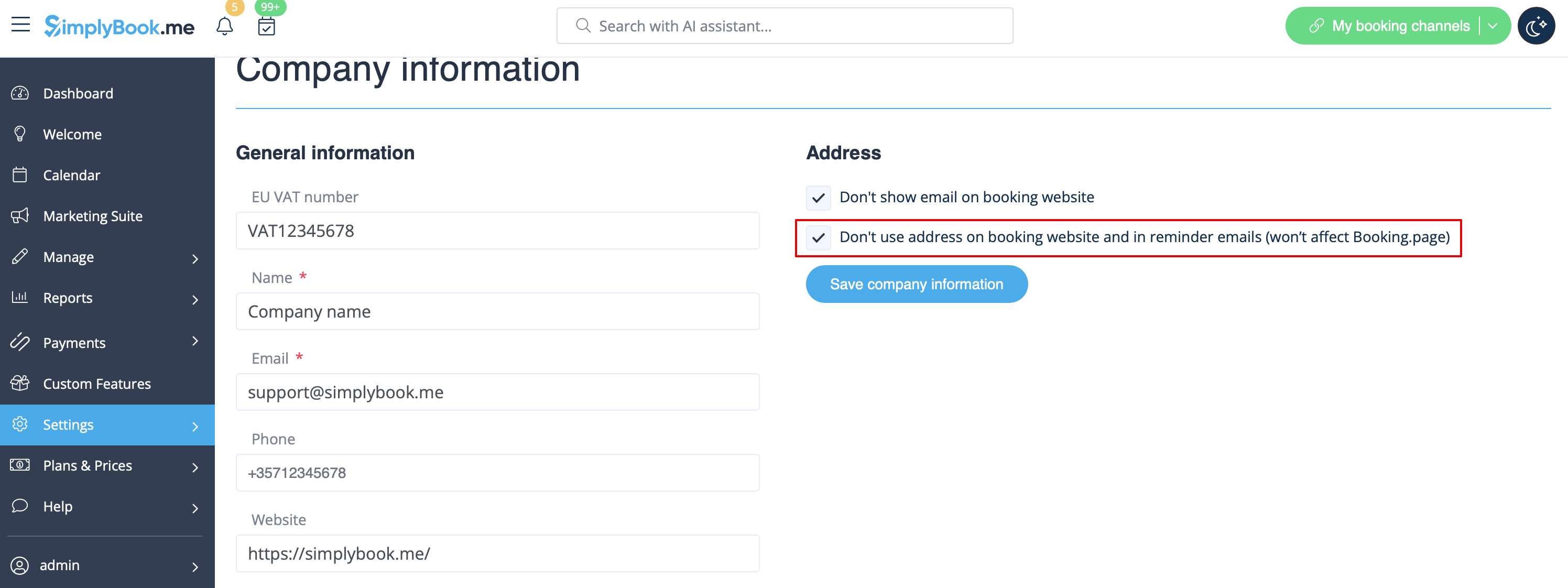
Карта
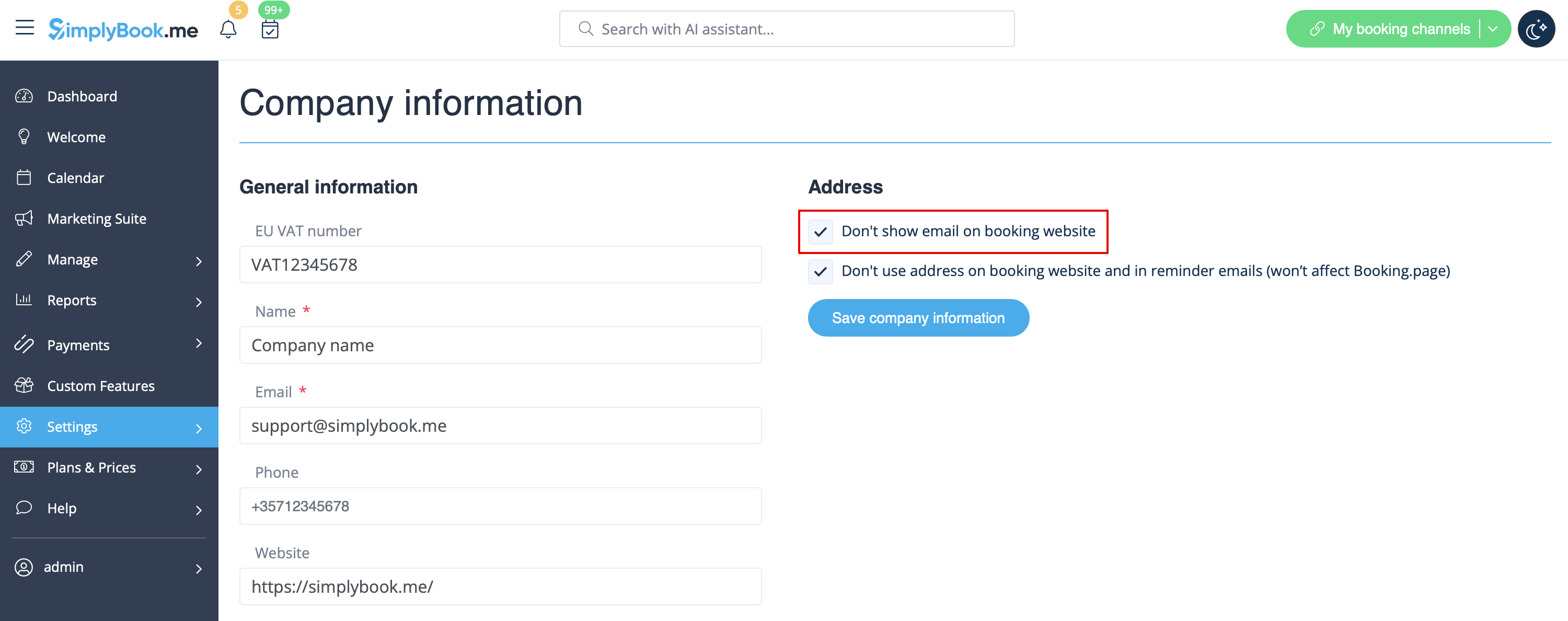
В Налаштуваннях -> Інформація про компанію -> Не використовувати адресу.
Адреса електронної пошти компанії
У Налаштуваннях -> Інформація про компанію -> Не показувати електронну пошту на сторінці бронювання встановіть прапорець.
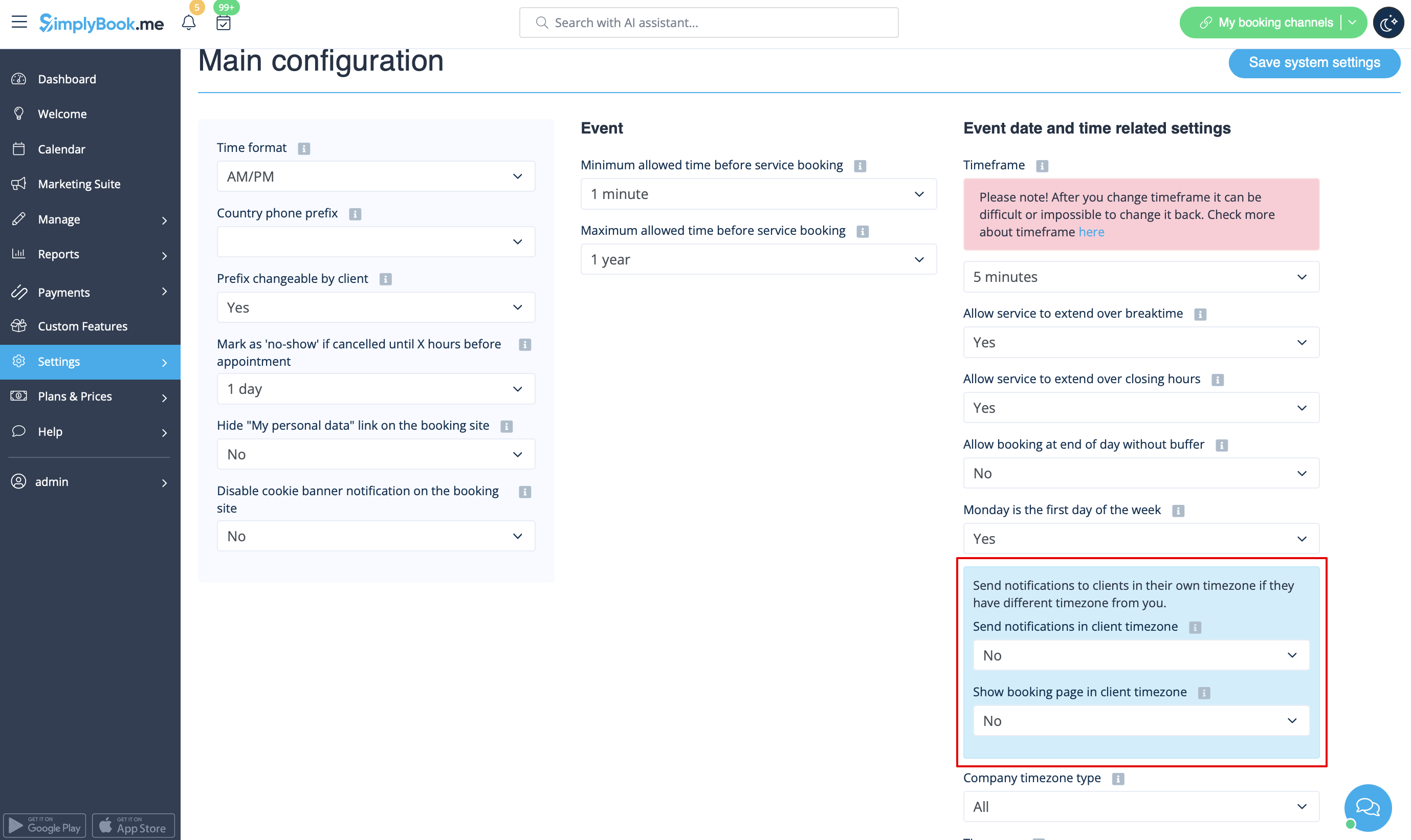
Опція "Змінити часовий пояс"
У розділі Налаштування -> Основна конфігурація встановіть для параметрів Показувати сторінку бронювання в часовому поясі клієнта та Надсилати сповіщення в часовому поясі клієнта значення Ні та збережіть налаштування.
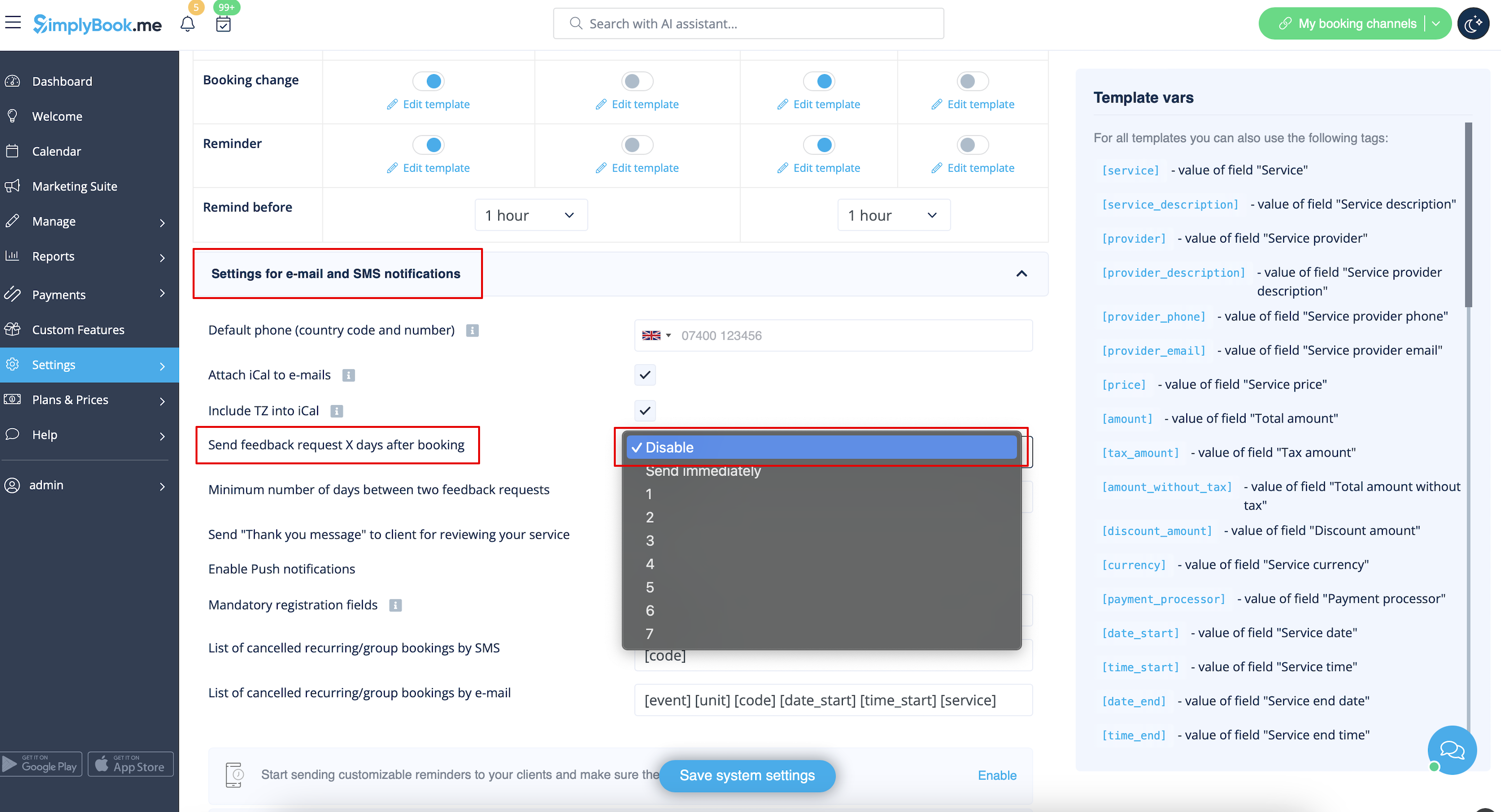
Відгуки
Ви можете переглянути всі свої відгуки на вкладці " Відгуки " в лівому боковому меню в розділі " Звіти". Там же ви можете видалити відгуки, якщо це необхідно. Якщо ви хочете видалити можливість залишити відгук на вашому сайті бронювання і не надсилати запит на відгук, то в Налаштуваннях -> Налаштування електронної пошти та SMS -> Налаштування сповіщень електронною поштою та SMS -> встановіть для опції Надсилати запит на відгук через X днів після бронювання значення Вимкнути.
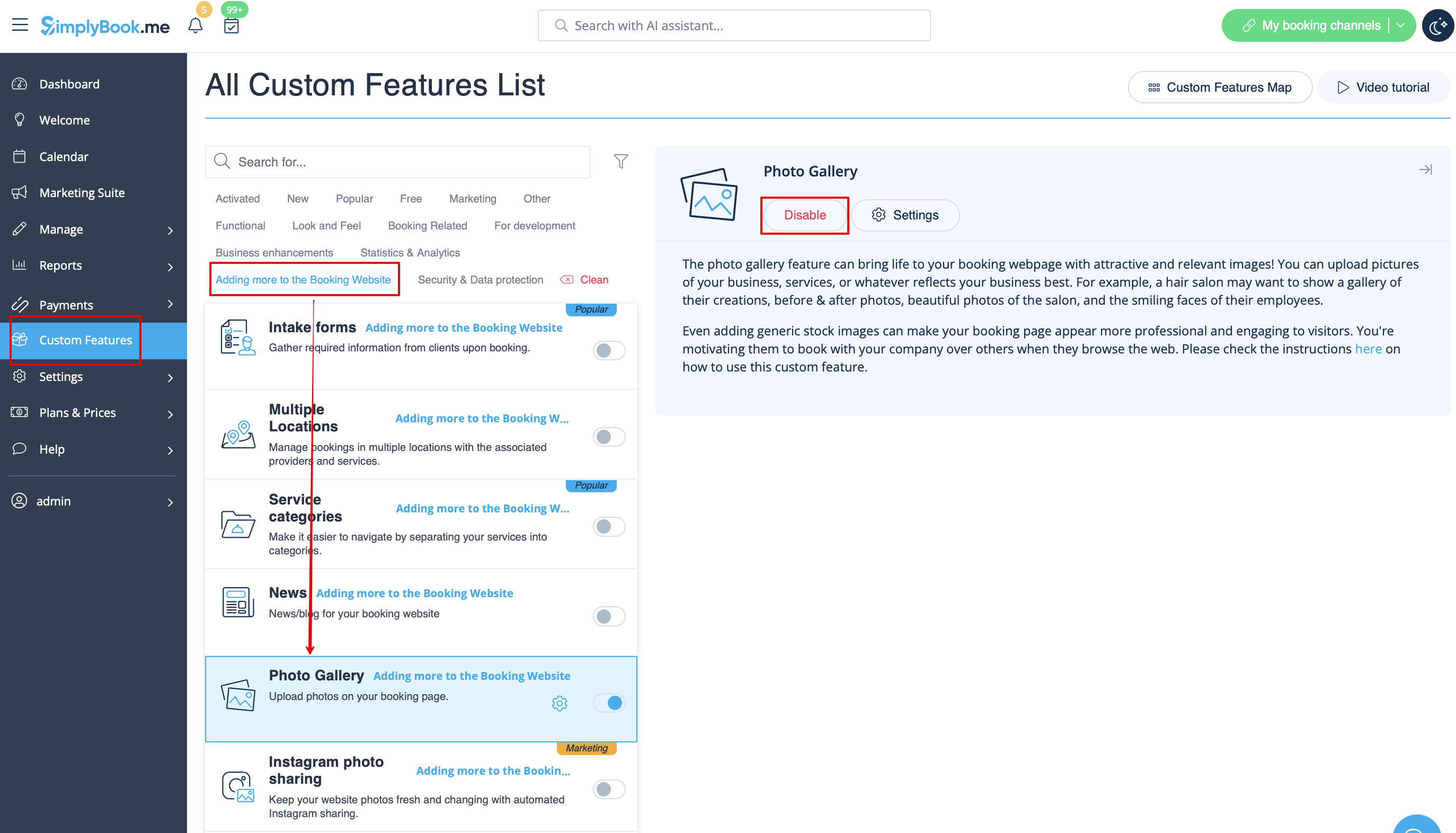
Фотогалерея
У розділі Користувацькі можливості вимкніть Фотогалерею
Робочі години
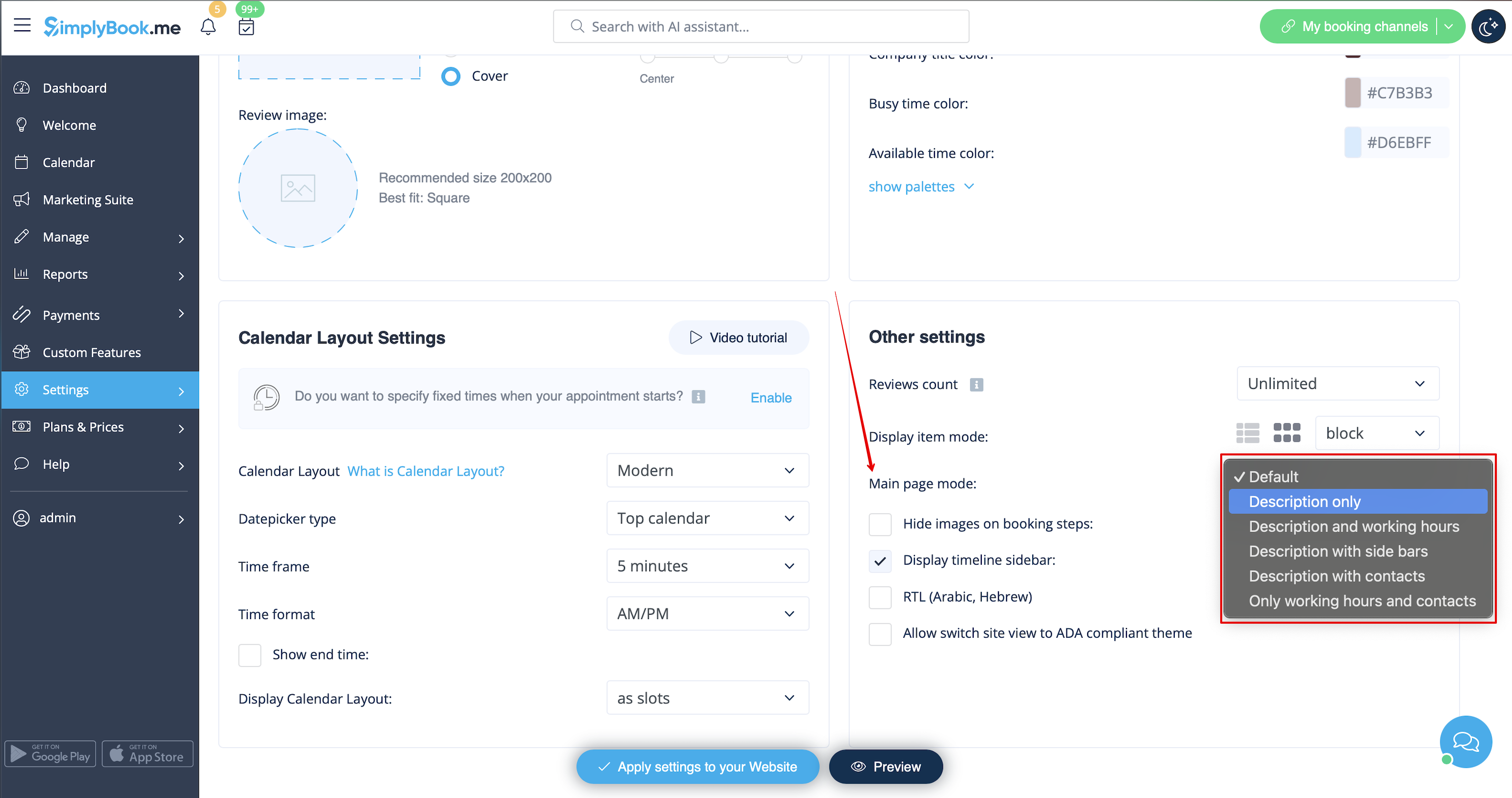
Якщо ви хочете видалити цей розділ для нових тем, перейдіть до Налаштування -> Налаштування дизайну -> Інші налаштування -> Режим головної сторінки і виберіть режим без робочого часу.
Загальні положення та умови SimplyBook.me
- Зверніть увагу, що вам необхідно підтвердити, що ви додали інформацію про SimplyBook.me Ltd. як постачальника до ваших Умов та положень.
Щоб зняти прапорець, вам необхідно увімкнути та правильно налаштувати всі згадані опції:
Або:
1. SMTP + Власний домен + Загальні положення та умови + тема, відмінна від порожньої.
Або:
2. SMTP + Умови та положення + порожня тема + віджет на вашому сайті.
Після цього ви зможете увімкнути опцію Я підтверджую, що я додав інформацію про SimplyBook.me Ltd. як постачальника до моїх Умов та положень у розділі Спеціальні функції -> Умови та положення, і після того, як ви збережете там налаштування, прапорець Умови та положення SimplyBook.me буде видалено з сайту бронювання.

Посилання "Мої персональні дані
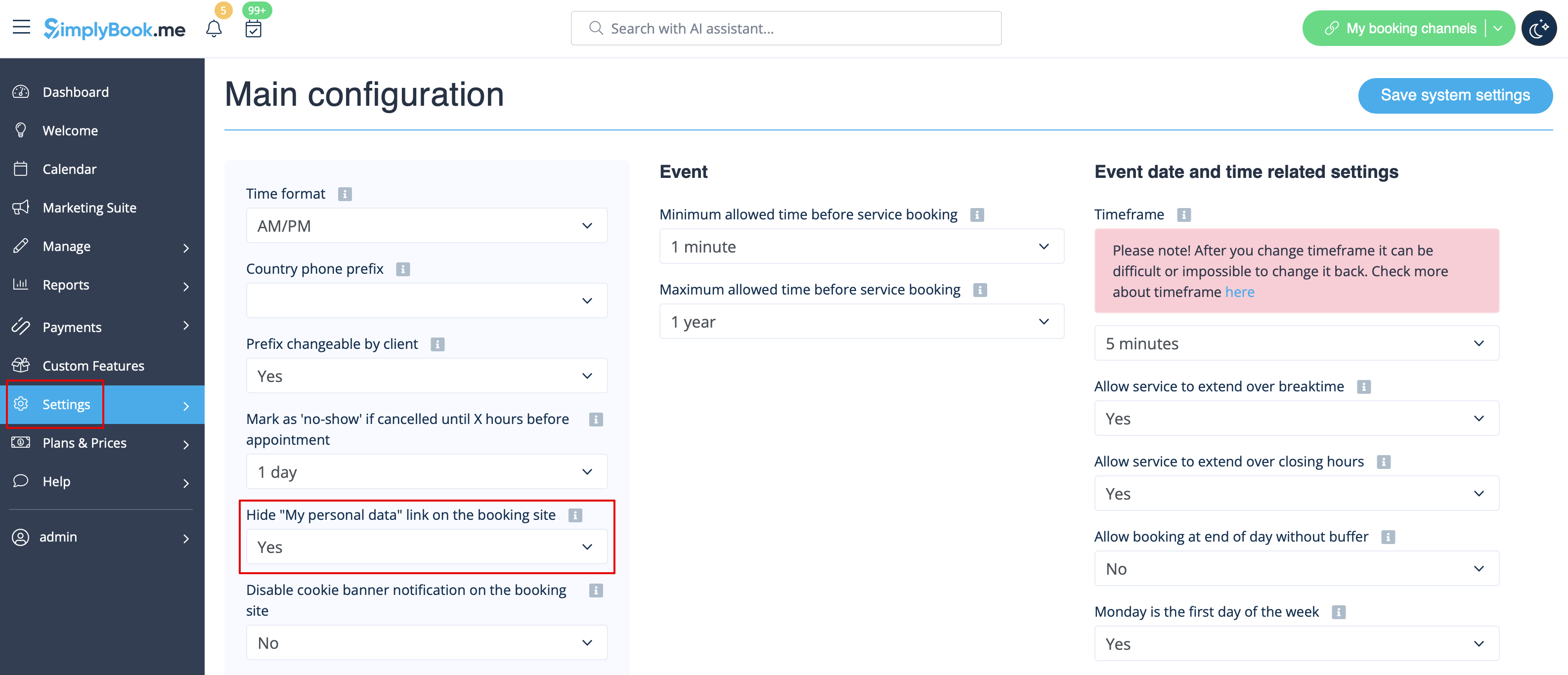
Перейдіть в Налаштування -> Основна конфігурація і виберіть Так у розділі Приховати посилання "Мої персональні дані" на сайті бронювання. збережіть налаштування.
"Мої персональні
Недоступні часові інтервали
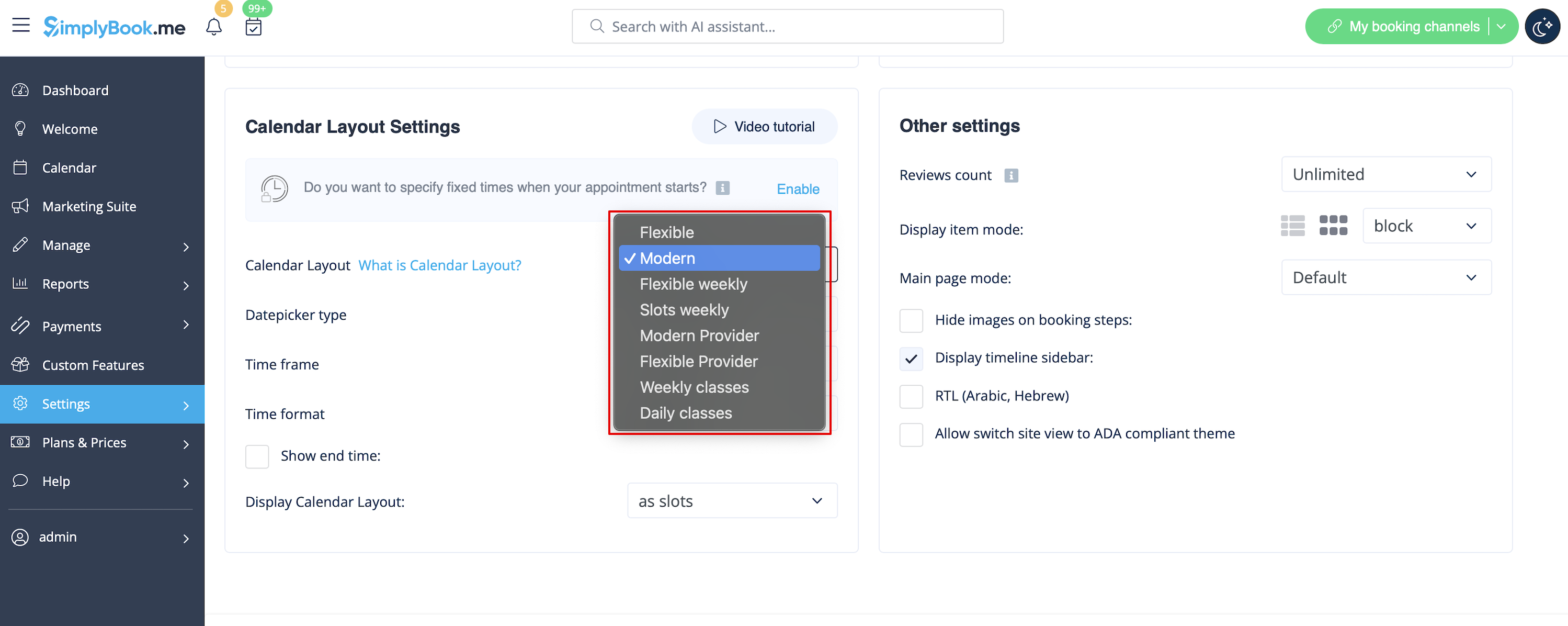
Будь ласка, виберіть сучасний, сучасний провайдер, щоденний (доступний з увімкненою функцією "Класи" ) або щотижневий макет календаря занять у розділі Налаштування -> Налаштування дизайну -> Макет ка лендаря -> Налаштування макета календаря -> Макет календаря.
Вимкнути сторінку бронювання (доступно лише для платних акаунтів)
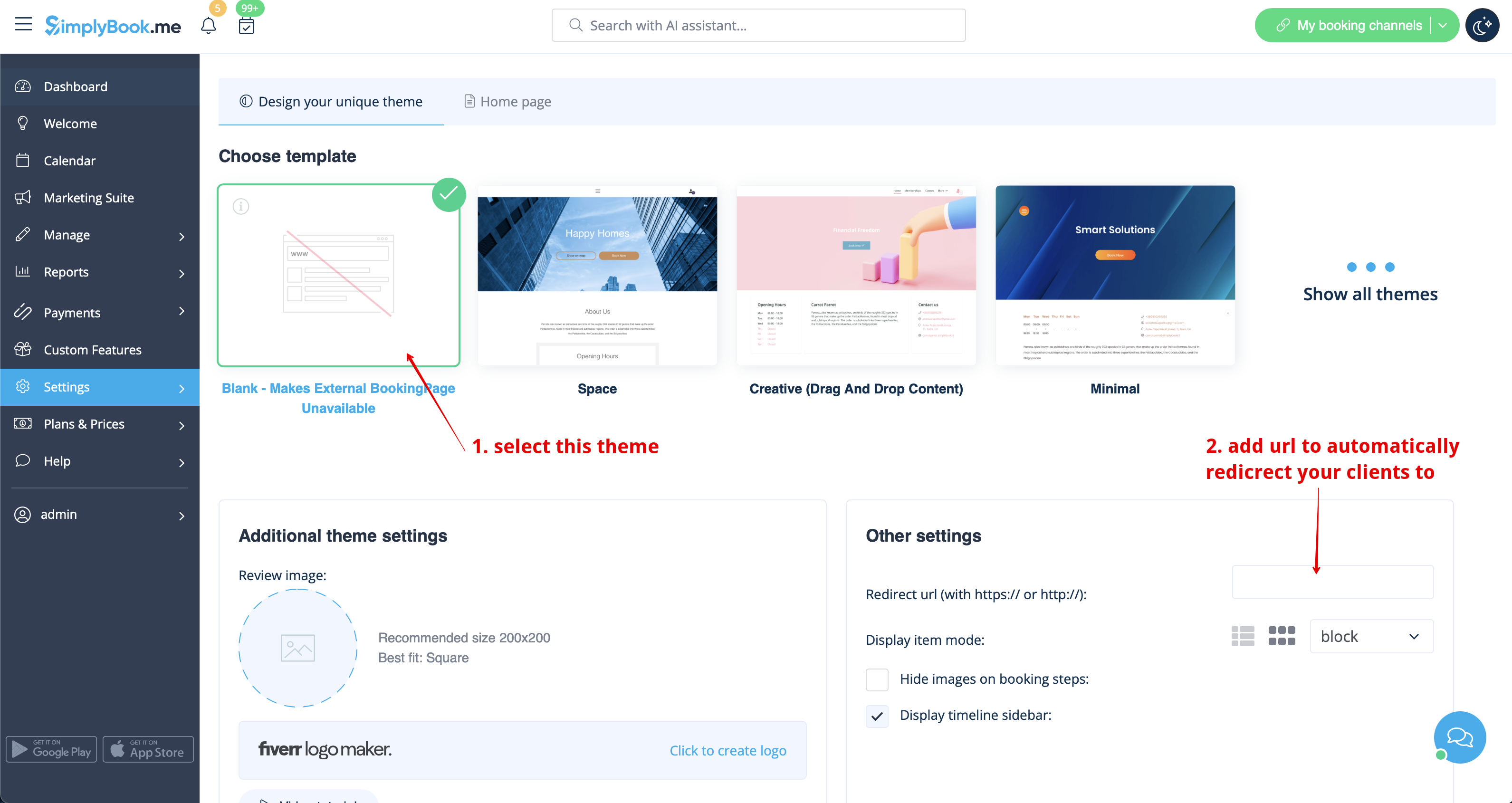
Щоб не показувати жодної інформації на сторінці бронювання (зробити її порожньою), ви можете встановити порожню тему для сторінки бронювання в Налаштуваннях -> Налаштування дизайну.
Виберіть показувати всі теми і виберіть останню без зображення, додайте посилання на сторінку, на яку повинні перенаправлятися ваші клієнти, якщо вони відкриють вашу сторінку бронювання, і збережіть налаштування.
Зверніть увагу! Навіть з порожньою темою ваша сторінка бронювання буде відображатися в Google і інформація буде показана в каталозі Booking.Page. Щоб видалити компанію з каталогу, натисніть на кнопку Видалити з маркетплейсу Налаштування -> Каталог.
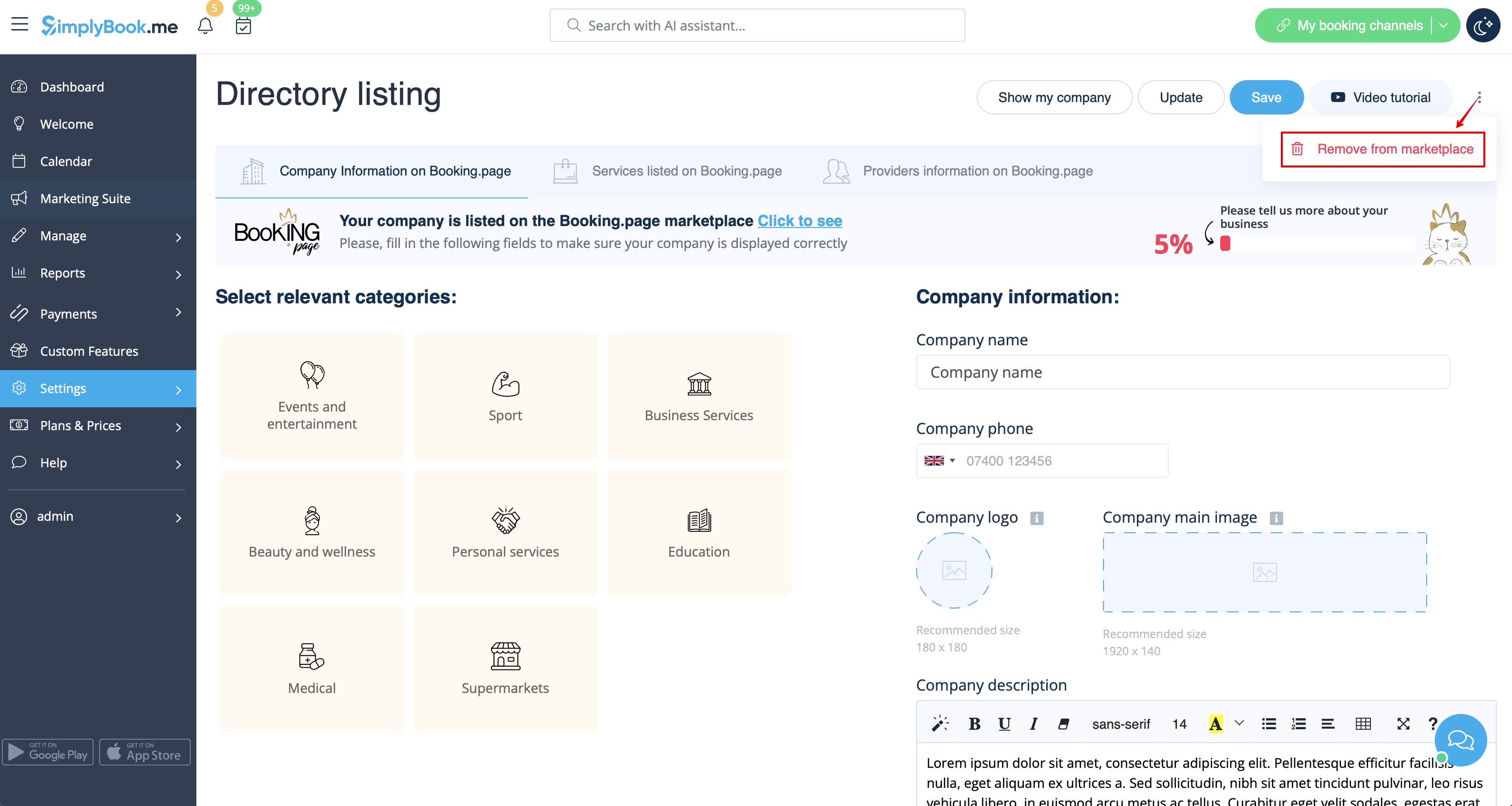
Видалення за допомогою кастомного CSS
- Зверніть увагу! Додайте код(и) для налаштування стилів на вкладку "CSS сторінок бронювання", якщо ви хочете редагувати сайт бронювання
- або "Widget CSS", якщо ви редагуєте віджет на вашому сайті.
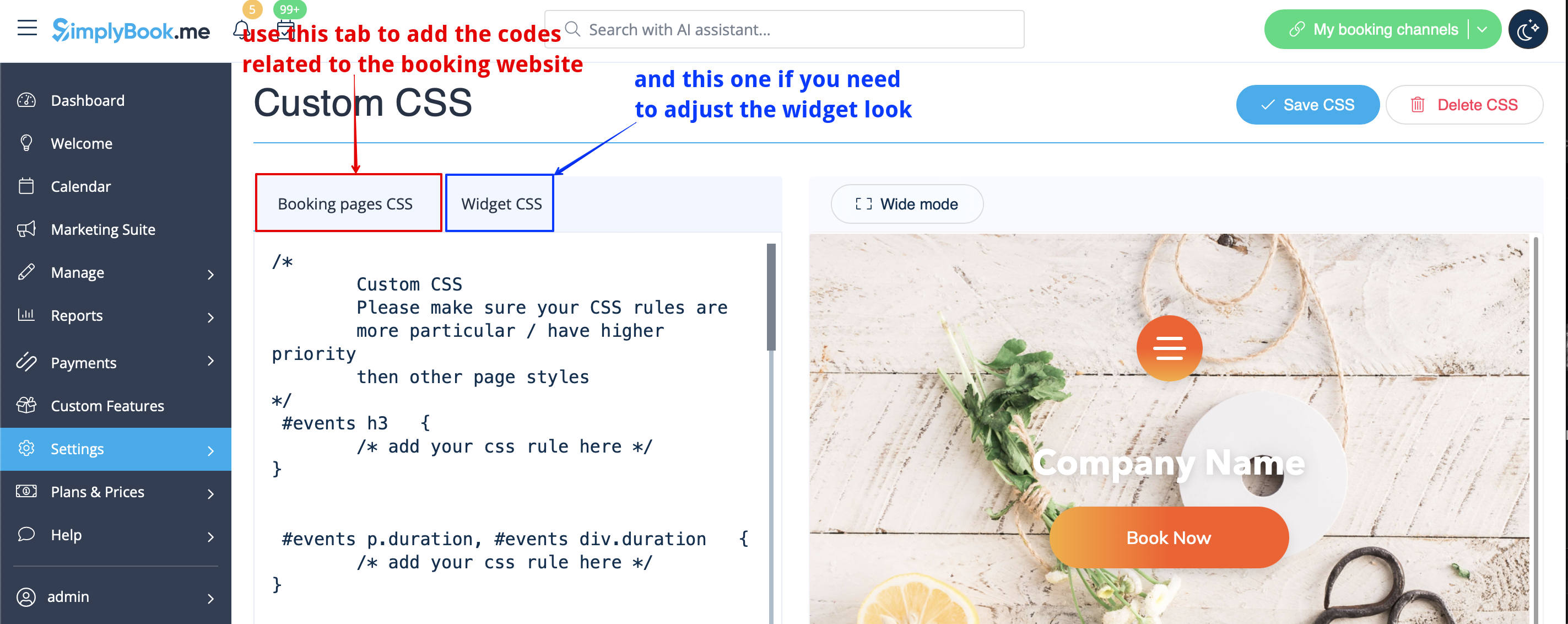
Поле для введення телефону
( Функціявходу дляклієнтів відключена)
- 1. Перейдіть в Налаштування -> Налаштування електронної пошти та SMS -> Налаштування сповіщень електронною поштою та SMS -> Обов'язкові поля реєстрації -> Email (щоб зробити телефон необов'язковим).
- 2. Будь ласка, перейдіть до Налаштувань -> Налаштовані функції та увімкніть функцію Налаштований CSS. Потім у Налаштуваннях цієї функції або в Налаштуваннях -> Кастомний CSS вставте у вікно CSS сторінок бронювання в самому верху наступний код:
.form-group.form-client-phone{
 display: none;
}
Поле електронної пошти
( Функція входу дляклієнтів відключена)
- 1. Перейдіть в Налаштування -> Налаштування електронної пошти та SMS -> Налаштування сповіщень електронною поштою та SMS -> Обов'язкові поля реєстрації -> Телефон (щоб зробити електронну пошту необов'язковою).
- 2. Будь ласка, перейдіть в Налаштування -> Налаштування та увімкніть функцію Налаштування CSS. Потім у Налаштуваннях цієї функції або в Кастомних функціях -> Кастомний CSS вставте у вікно CSS сторінок бронювання в самому верху наступний код:
.form-group.form-client-email{
 display: none;
}
Наш час
Будь ласка, перейдіть в Налаштування -> Налаштування і увімкніть функцію Налаштування CSS. Потім в налаштуваннях цієї функції або в Custom Features -> Custom CSS вставте у вікно CSS сторінки бронювання в самому верху наступний код:
div#sb_booking_company_time {
 display: none;
}
Дозвольте нам надсилати вам рекламні акції та актуальну інформацію
Будь ласка, перейдіть до Кастомних функцій -> Кастомні функції та увімкніть функцію Кастомний CSS. Потім в налаштуваннях цієї функції або в Custom Features -> Custom CSS вставте у вікно CSS сторінки бронювання в самому верху наступний код:
- Функція входу клієнта увімкнена:
#main
#client-login .custom-form #sb_terms_and_conditions .promotions-letter-flag label[role=button]{
display: none;
}
- Функція входу клієнта вимкнена:
#sb-main-container
#main #sb-timeline #steps #details .detail-step-wrap .detail-step .license-links-container .promotions-letter-flag label[role=button]{
display: none;

}
Filter by Services on Membership page
Please go to Custom Features -> Custom Features and enable Custom CSS feature. Then in this feature Settings or in Custom Features -> Custom CSS paste to Booking page CSS window at the very top the following code:
#membership-view #membership-filters {
   display: none;
}
Remove banner image
- Please note! "Book now" and other buttons that are displayed on top of banner will be hidden as well. The code may not work with some themes.
Please go to Custom Features -> Custom Features and enable Custom CSS feature. Then in this feature Settings or in Custom Features -> Custom CSS paste to Booking page CSS window at the very top the following code:
#main-buttons {
    display: none;
}
Remove some specific element
If you need to remove a specific element from your booking page, you will need to use Custom CSS feature and the corresponding code. If you don't know CSS, please contact support and they will create a request to check whether such change is possible.
Please note, that big requests may be done on a paid basis.
