Created page with "== Filtrera efter tjänster på sidan Medlemskap ==" Tags: Mobile edit Mobile web edit |
Created page with "Ta bort element från bokningssidan" |
||
| Line 170: | Line 170: | ||
< | <span id="Remove_banner_image"></span> | ||
== | == Ta bort bannerbild == | ||
:<span style="background-color:#ffe9e9; padding:5px; border-radius:5px;">'''Vänligen notera!''' "Boka nu" och andra knappar som visas på toppen av bannern kommer också att döljas. Koden kanske inte fungerar med vissa teman.</span> | |||
:<span style="background-color:#ffe9e9; padding:5px; border-radius:5px;">''' | Gå till <span style="background-color:#d4f8e5; padding:5px; border-radius:5px;">Anpassade</span> funktioner -> <span style="background-color:#d4f8e5; padding:5px; border-radius:5px;">Anpassade funktioner</span> och aktivera funktionen <span style="background-color:#d4f8e5; padding:5px; border-radius:5px;">Anpassad</span> <span style="background-color:#d4f8e5; padding:5px; border-radius:5px;">CSS.</span> Sedan i den här funktionen <span style="background-color:#d4f8e5; padding:5px; border-radius:5px;">Inställningar</span> eller i <span style="background-color:#d4f8e5; padding:5px; border-radius:5px;">Anpassade</span> funktioner -> <span style="background-color:#d4f8e5; padding:5px; border-radius:5px;">Anpassad</span> <span style="background-color:#d4f8e5; padding:5px; border-radius:5px;">CSS</span> klistra in i <span style="background-color:#d4f8e5; padding:5px; border-radius:5px;">CSS-fönstret för bokningssidan</span> högst upp följande kod:<br> | ||
<pre> | <pre> | ||
#main-buttons { | #main-buttons { | ||
display: none; | |||
} | } | ||
</pre> | </pre> | ||
== Ta bort ett specifikt element == | |||
== | Om du behöver ta bort ett specifikt element från din bokningssida måste du använda funktionen <span style="background-color:#d4f8e5; padding:5px; border-radius:5px;">Anpassad CSS</span> och motsvarande kod. Om du inte känner till CSS, vänligen kontakta support och de kommer att skapa en begäran för att kontrollera om en sådan ändring är möjlig.<br> | ||
<span style="background-color:#ffe9e9; padding:5px; border-radius:5px;">'''Observera''' att stora förfrågningar kan göras på betald basis.</span> | |||
<span style="background-color:#ffe9e9; padding:5px; border-radius:5px;">''' | |||
<br><br> | <br><br> | ||
Revision as of 10:08, 15 May 2025
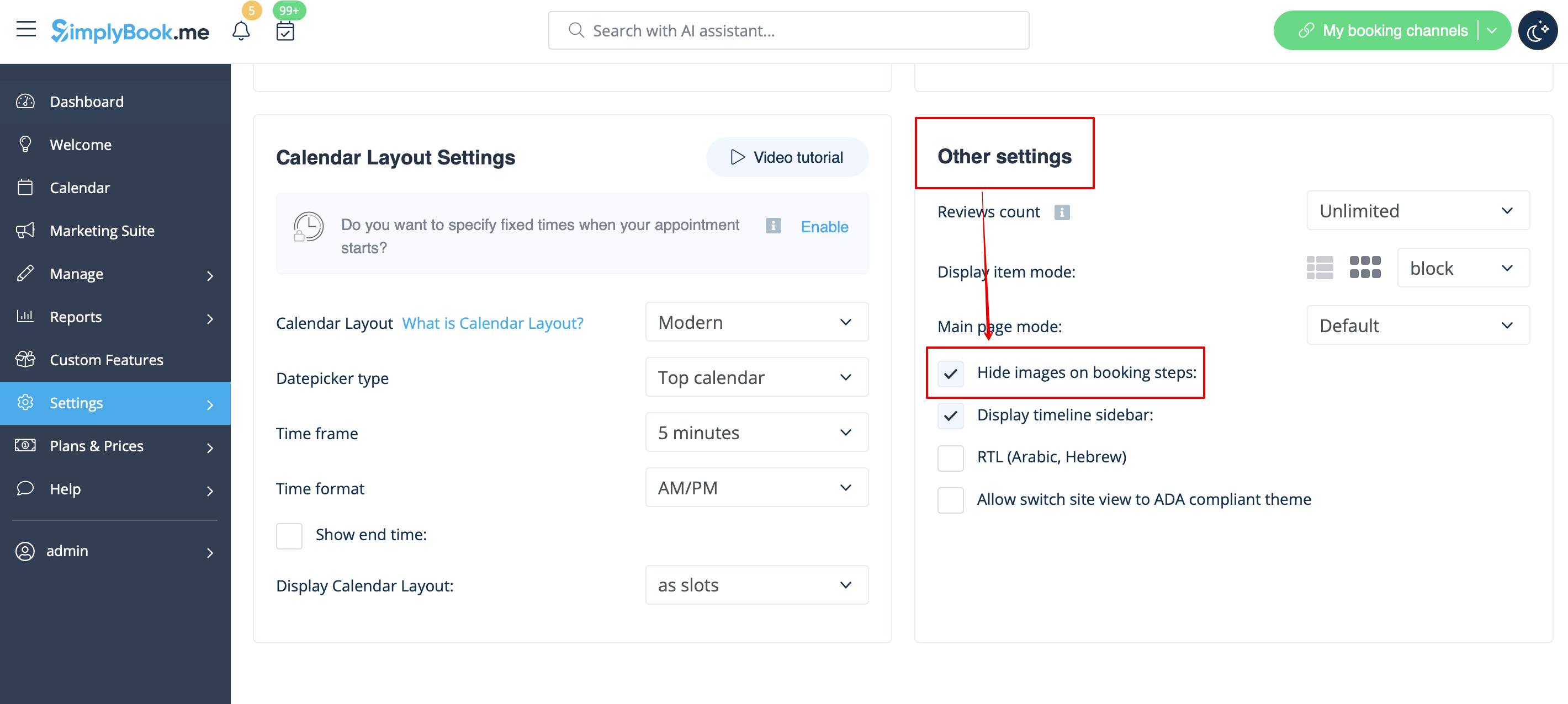
Bilder för stegen Tjänst, Tjänsteleverantör, Kategori och Plats
Gå till Inställningar -> Designinställningar -> Övriga inställningar och markera rutan Dölj bilder i bokningsstegen. Spara inställningarna.
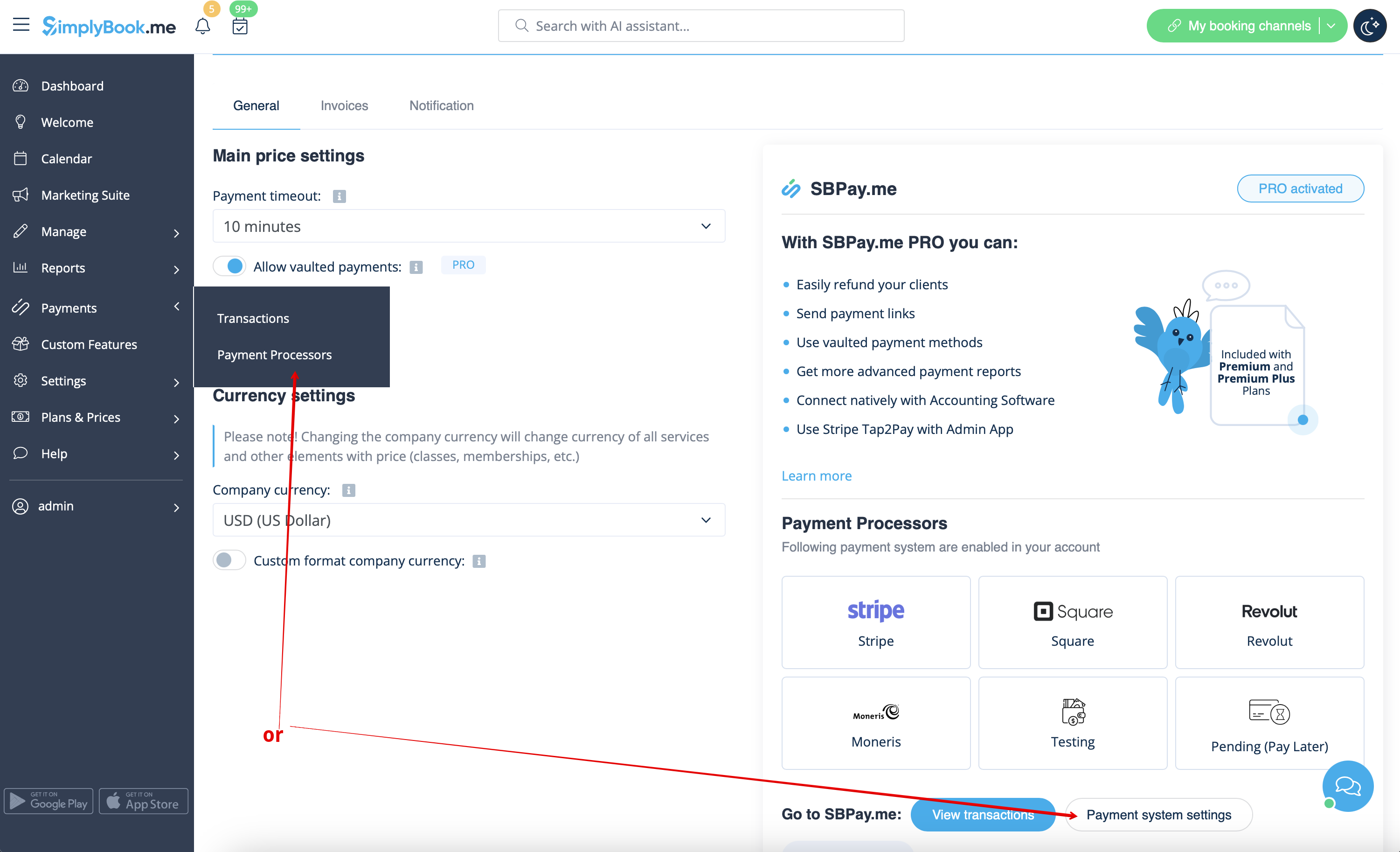
Möjlighet att betala senare
Vänligen navigera till Betalningar -> Betalningsprocessorer eller Anpassade funktioner -> Acceptera betalningar -> Inställningar -> Inställningar för betalningssystem för att gå till SBPay.me-gränssnittet och inaktivera alternativet Betala senare där.
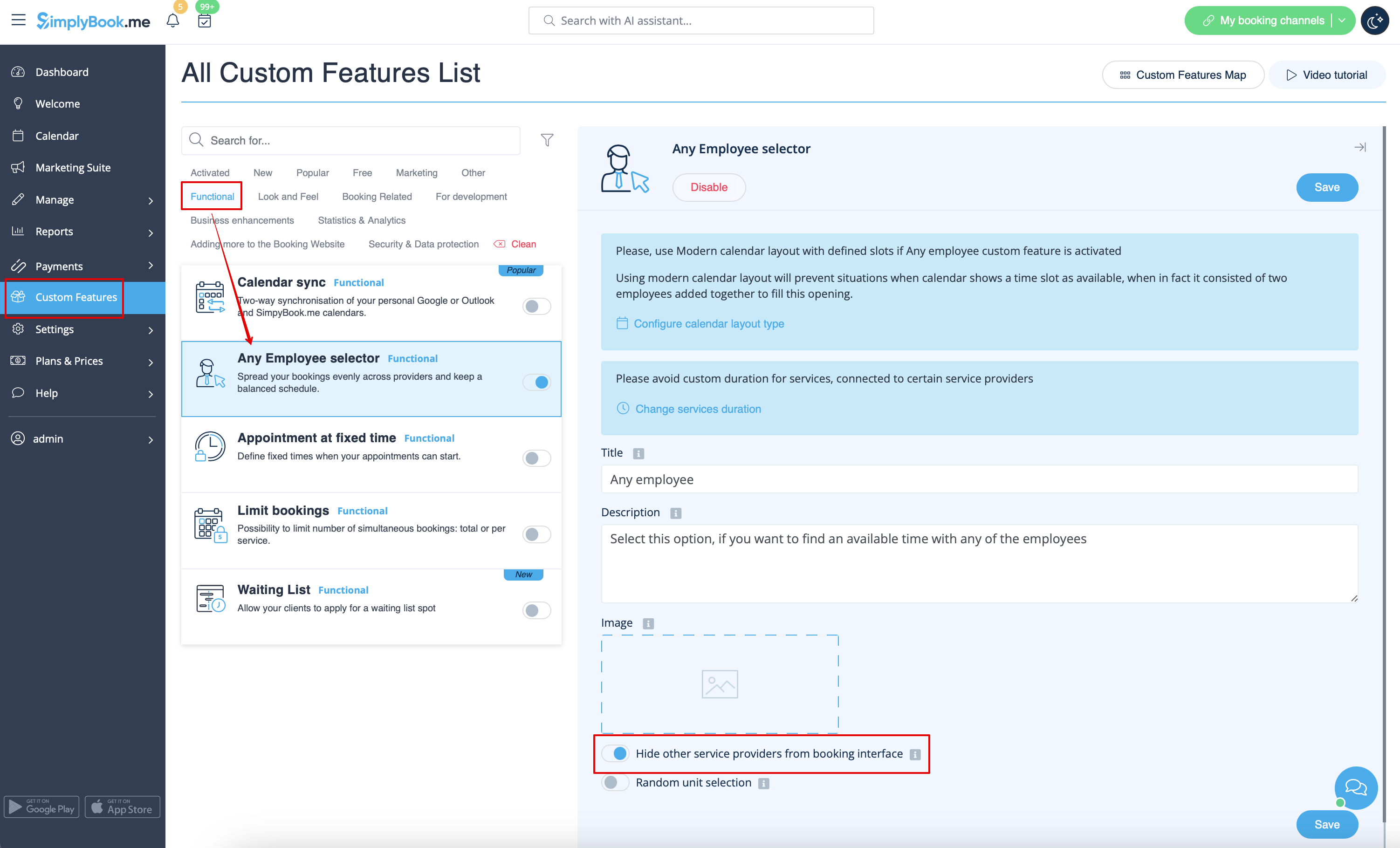
Anställd steg
Aktivera Alla anställda väljare i avsnittet Anpassade funktioner och i dess inställningar på höger sida av sidan aktivera Dölj andra tjänsteleverantörer från bokningsgränssnittet alternativ
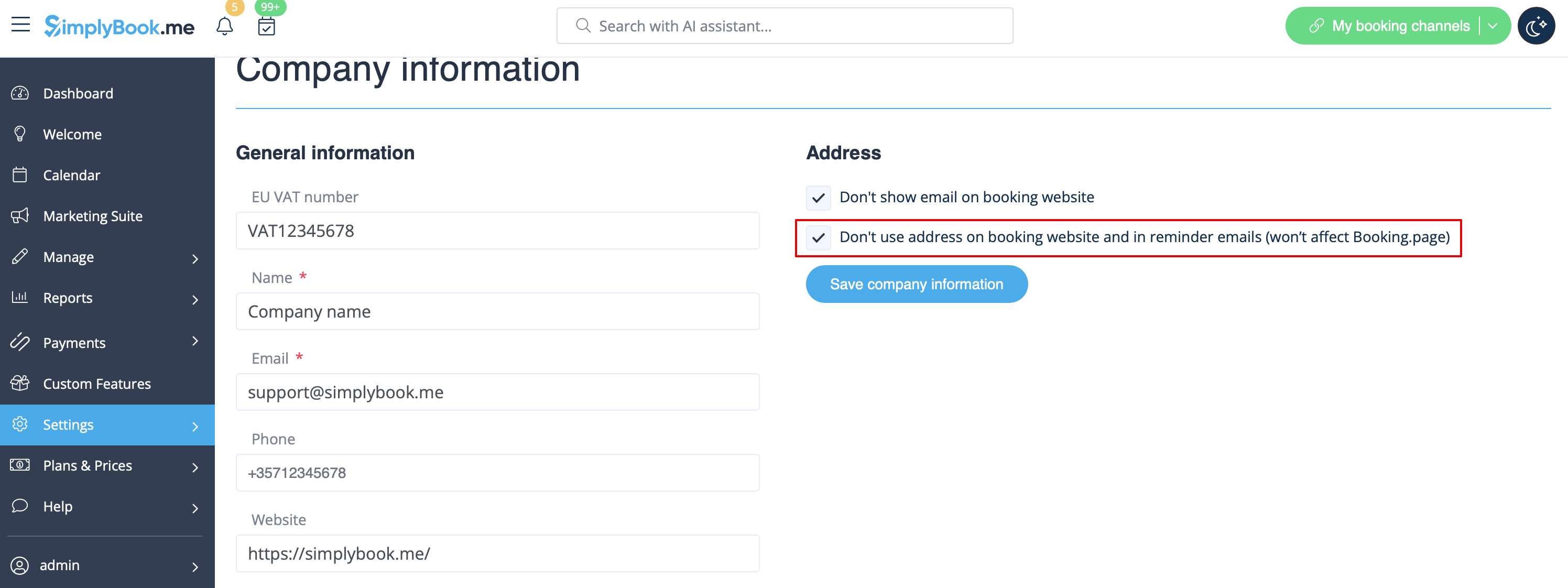
Karta
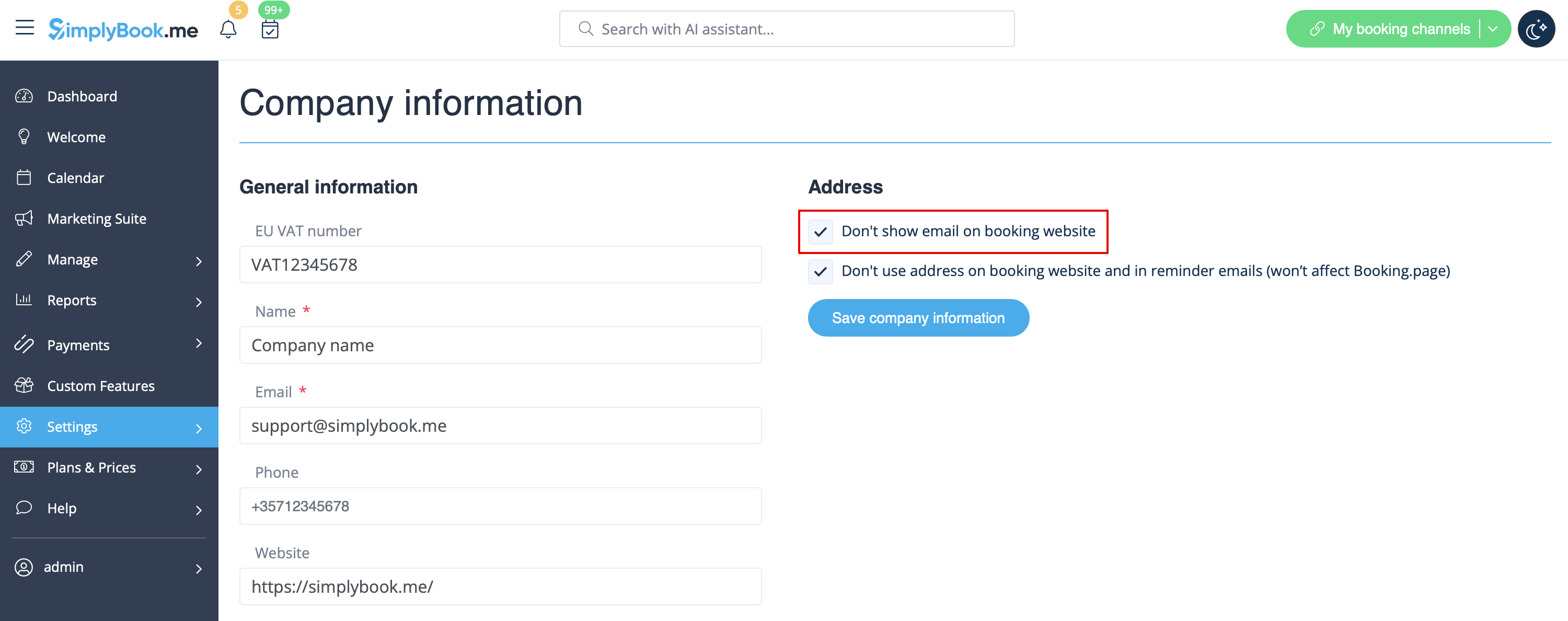
I Inställningar -> Företagsinformation -> Använd inte adress kryssrutan.
Företagets e-postadress
I Inställningar -> Företagsinformation -> Visa inte e-post på bokningssidan kryssruta.
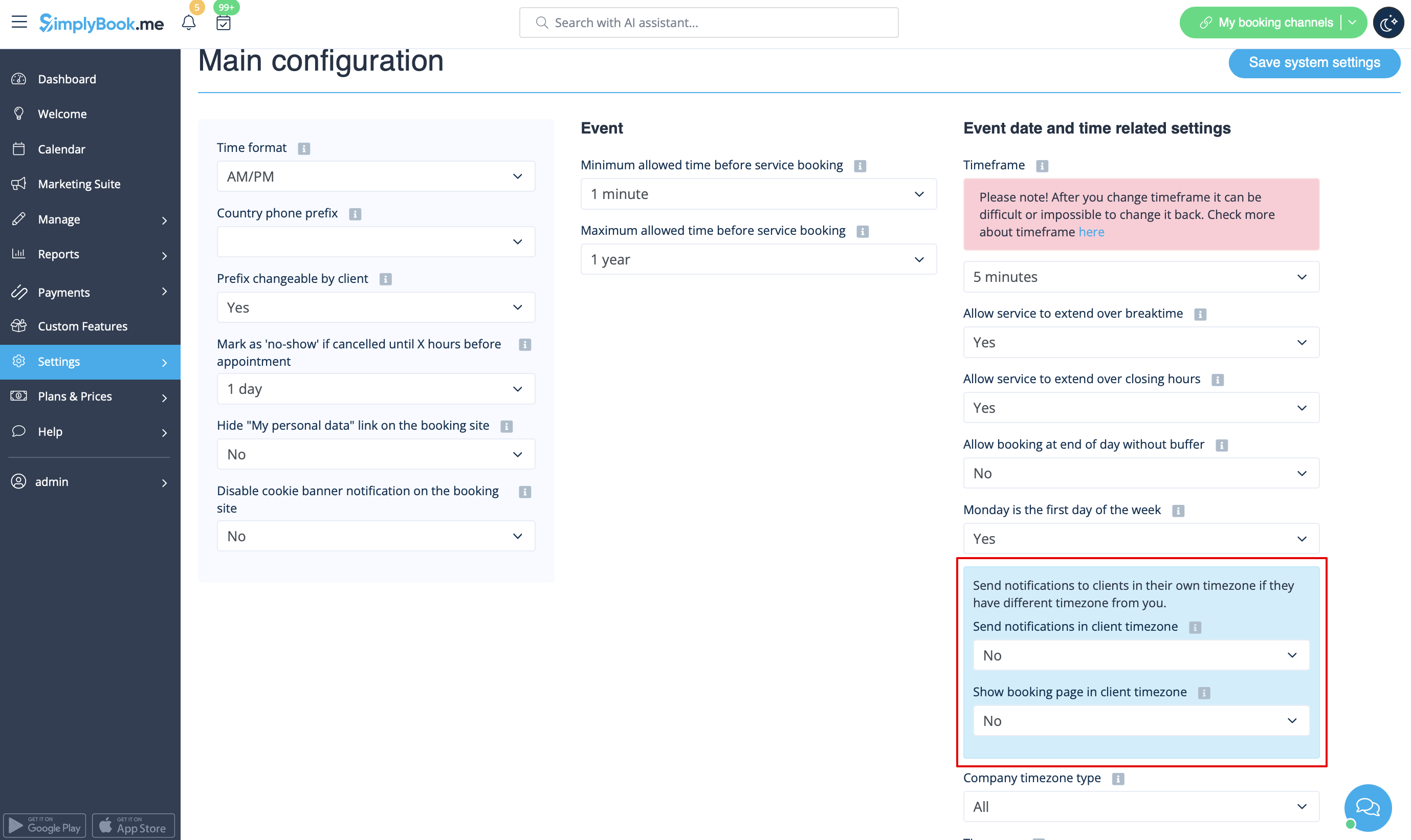
Alternativet "Ändra min tidszon"
I Inställningar -> Huvudkonfiguration ställer du in Visa bokningssida i kundens tidszon och Skicka meddelanden i kundens tidszon till Nej och sparar inställningarna.
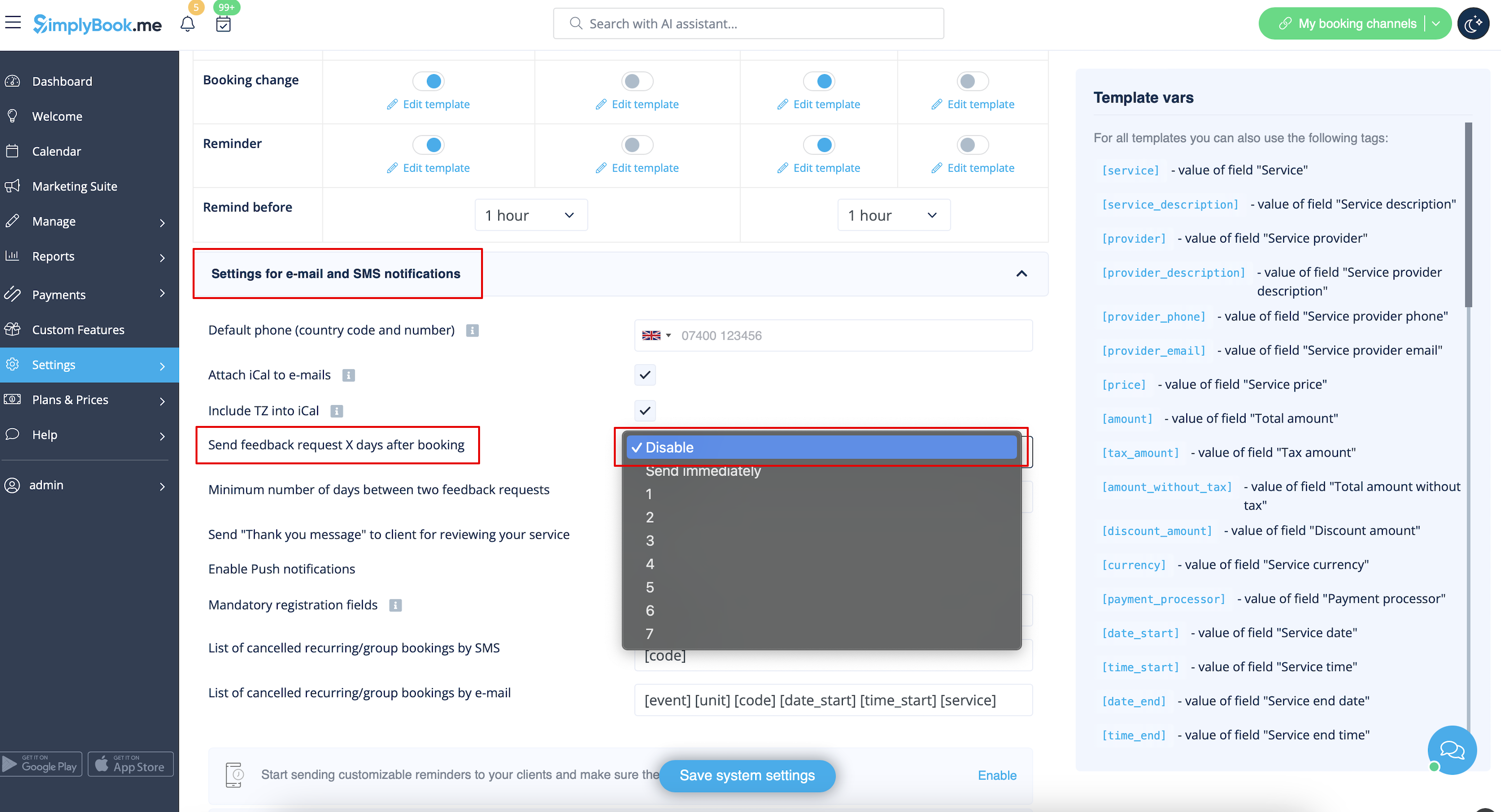
Recensioner
Du kan se alla dina recensioner på fliken Recensioner i menyn till vänster, under Rapporter. Du kan också ta bort recensioner där om det behövs. Om du vill ta bort möjligheten att lämna en recension på din bokningssida och inte skicka feedbackbegäran, i Inställningar -> E-post- och SMS-inställningar -> Inställningar för e-post- och SMS-aviseringar -> ställ in Skicka feedbackbegäran X dagar efter bokningen till Inaktivera
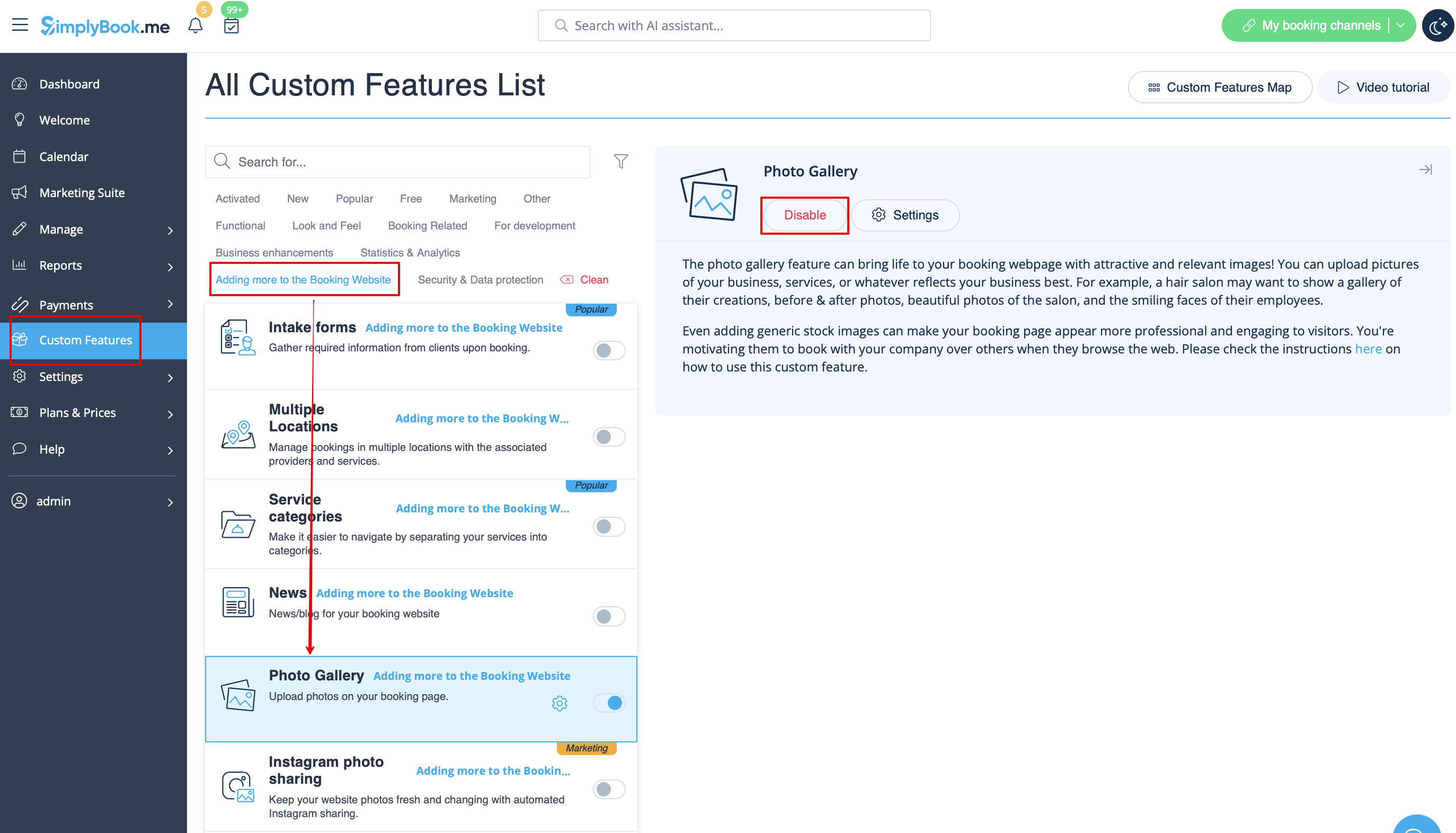
Galleri
I avsnittet Anpassade funktioner inaktiverar du fotogalleri.
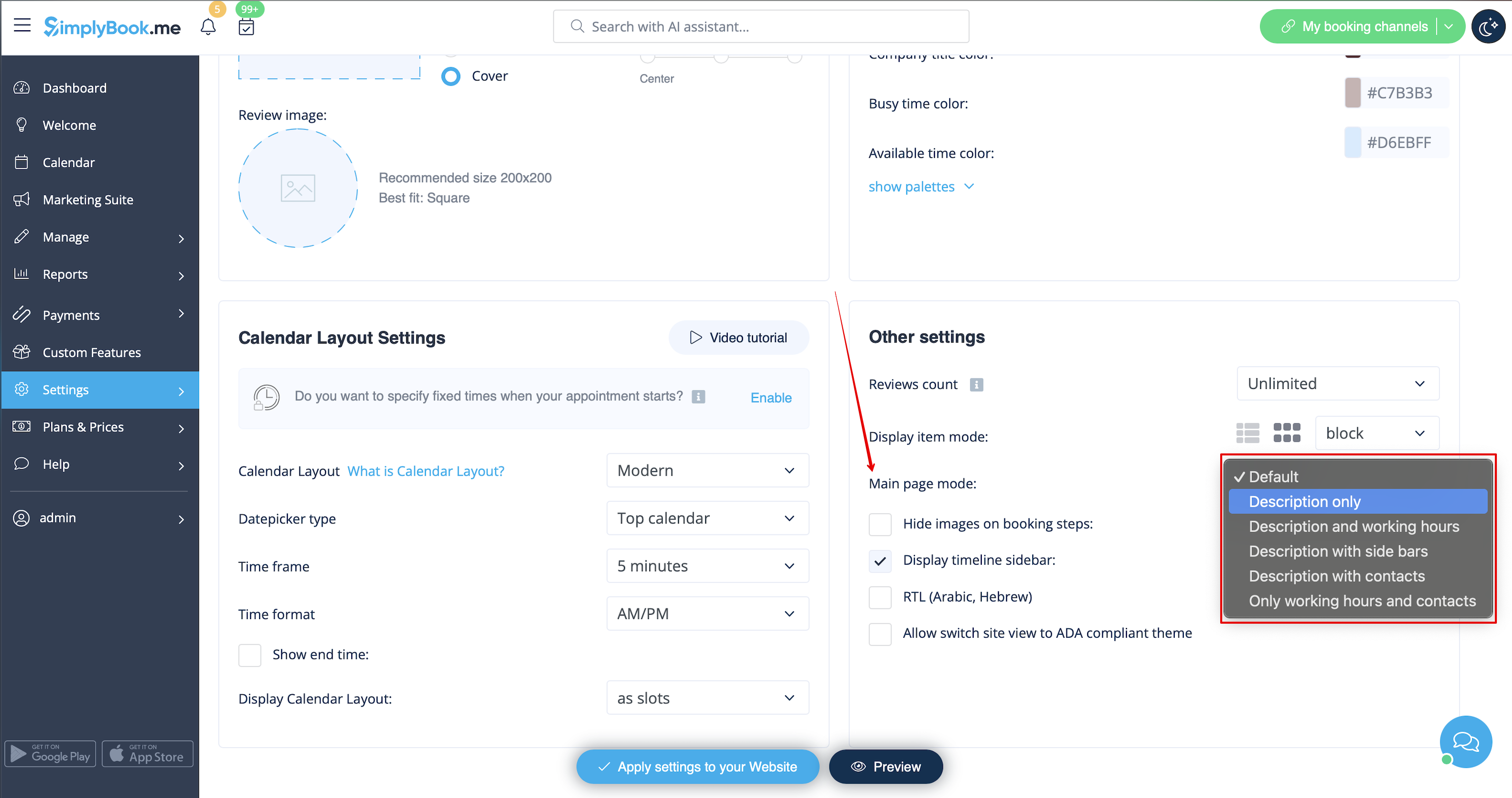
Arbetstid
Om du vill ta bort det här avsnittet för nya teman, gå till Inställningar -> Designinställningar -> Andra inställningar -> Huvudsidans läge och välj läge utan arbetstid.
SimplyBook.me Villkor och bestämmelser
- Observera att du måste bekräfta att du har lagt till information om SimplyBook.me Ltd. som leverantör till dina villkor.
För att ta bort kryssrutan måste du ha aktiverat och korrekt ställt in alla de alternativ som nämns:
Antingen:
1. SMTP + Anpassad domän + Villkor + tema som skiljer sig från tomt.
Eller:
2. SMTP + Villkor + tomt tema + Widget på din webbplats.
Efter det kommer du att kunna aktivera Jag bekräftar att jag har lagt till information om SimplyBook.me Ltd. som leverantör till mitt T & C-alternativ i Anpassade funktioner -> Villkor och villkor och efter att du har sparat inställningarna där kommer kryssrutan SimplyBook.me villkor att tas bort från bokningssidan.

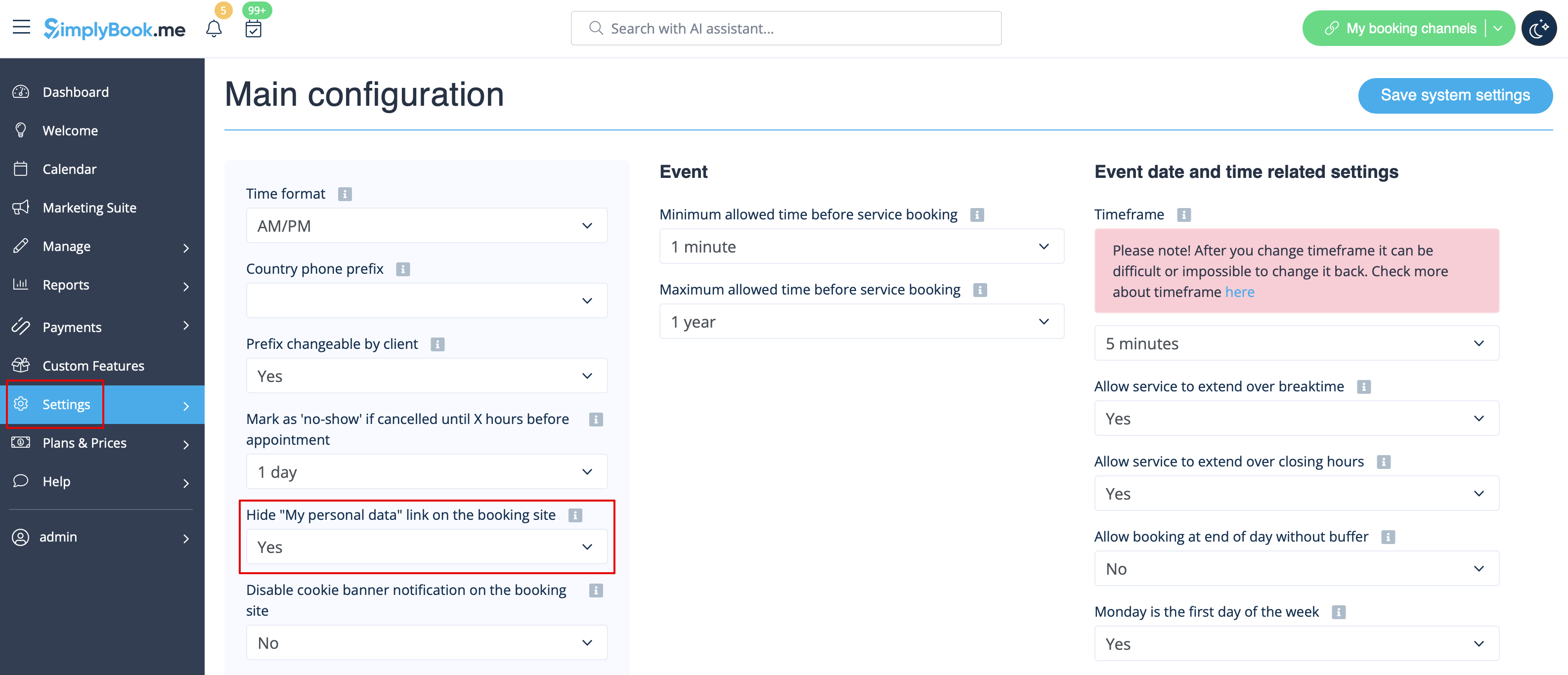
Länk till mina personuppgifter
Gå till Inställningar -> Huvudkonfiguration och välj Ja i Dölj länken "Mina personuppgifter" på bokningssidan. spara inställningarna.
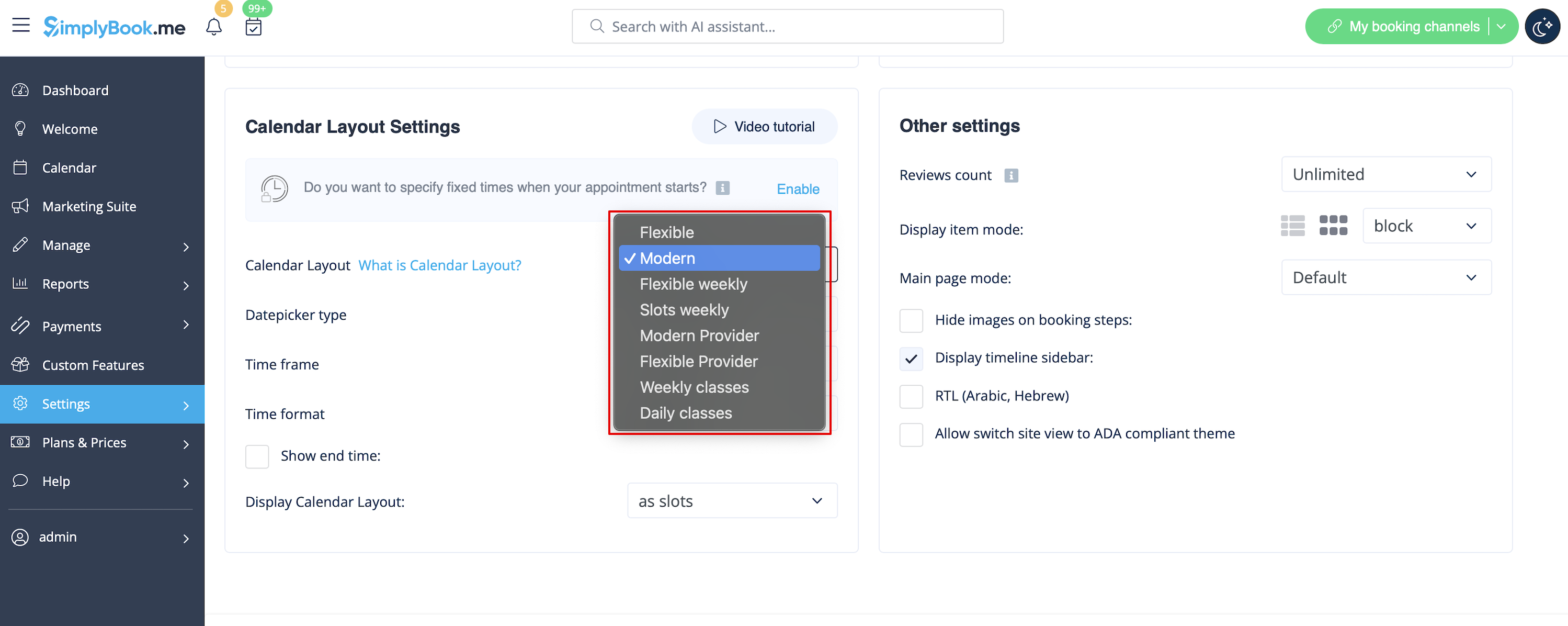
Otillgängliga tidsluckor
Välj modern, modern leverantör, daglig (tillgänglig med funktionen Klasser aktiverad) eller veckovis kalenderlayout för klasser i rullgardinsmenyn Inställningar -> Designinställningar -> Kalenderlayout -> Kalenderlayoutinställningar -> Kalenderlayout.
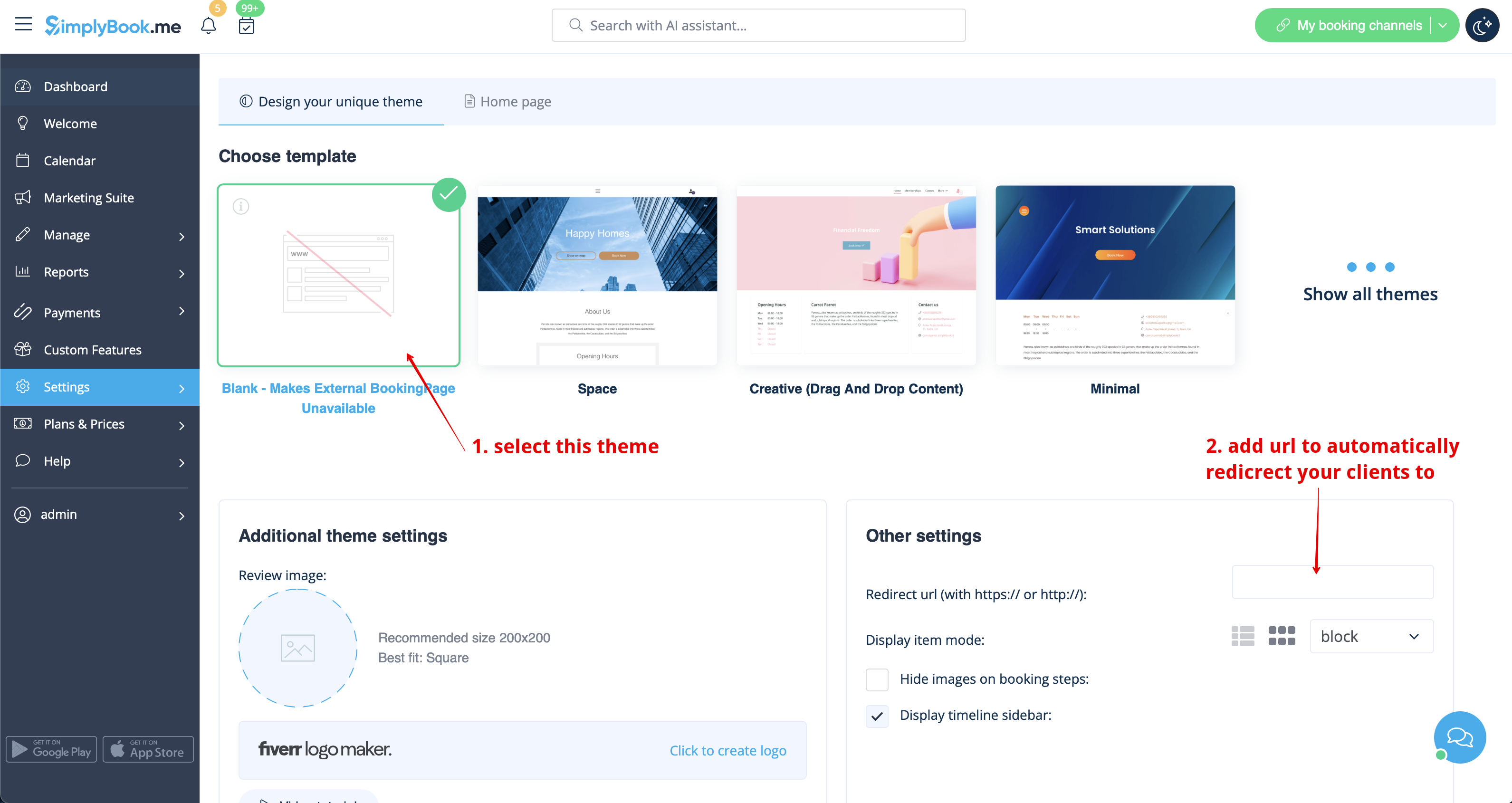
Inaktivera bokningssidan (endast tillgängligt för betalkonton)
För att inte visa någon information på din bokningssida (göra den tom) kan du lägga till ett tomt tema på din bokningssida i Inställningar -> Designinställningar.
Välj att visa alla teman och välj det sista utan bild, lägg till länken till den sida som dina kunder ska omdirigeras till om de öppnar din bokningssida och spara inställningarna.
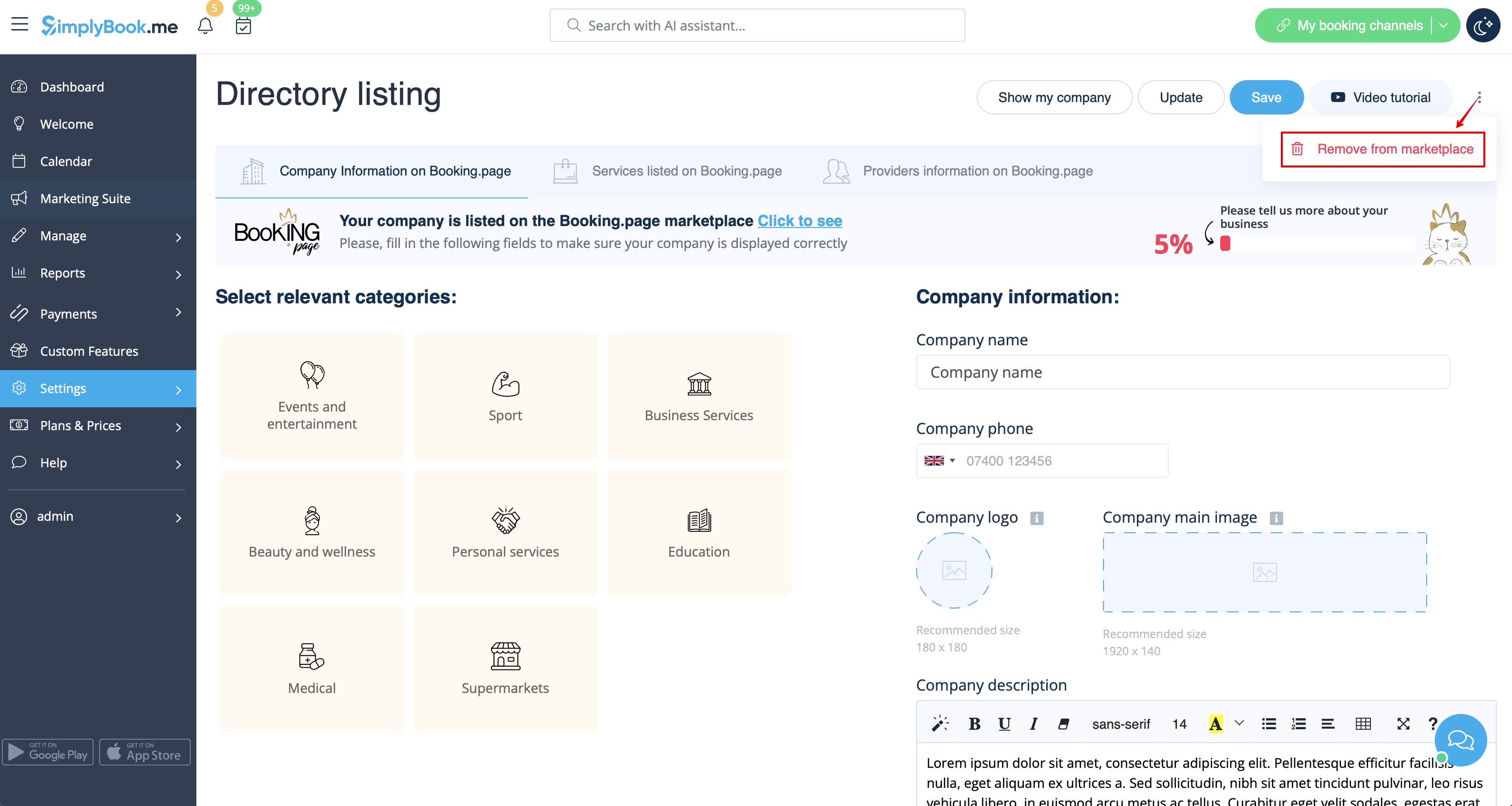
Vänligen notera! Även med tomt tema kommer din bokningssida att visas i Google och information kommer att visas i Booking.Page-katalogen. För att ta bort ditt företag från katalogen, klicka på Ta bort från marknadsplatsen knappen Inställningar -> Kataloglista
Ta bort med anpassad CSS
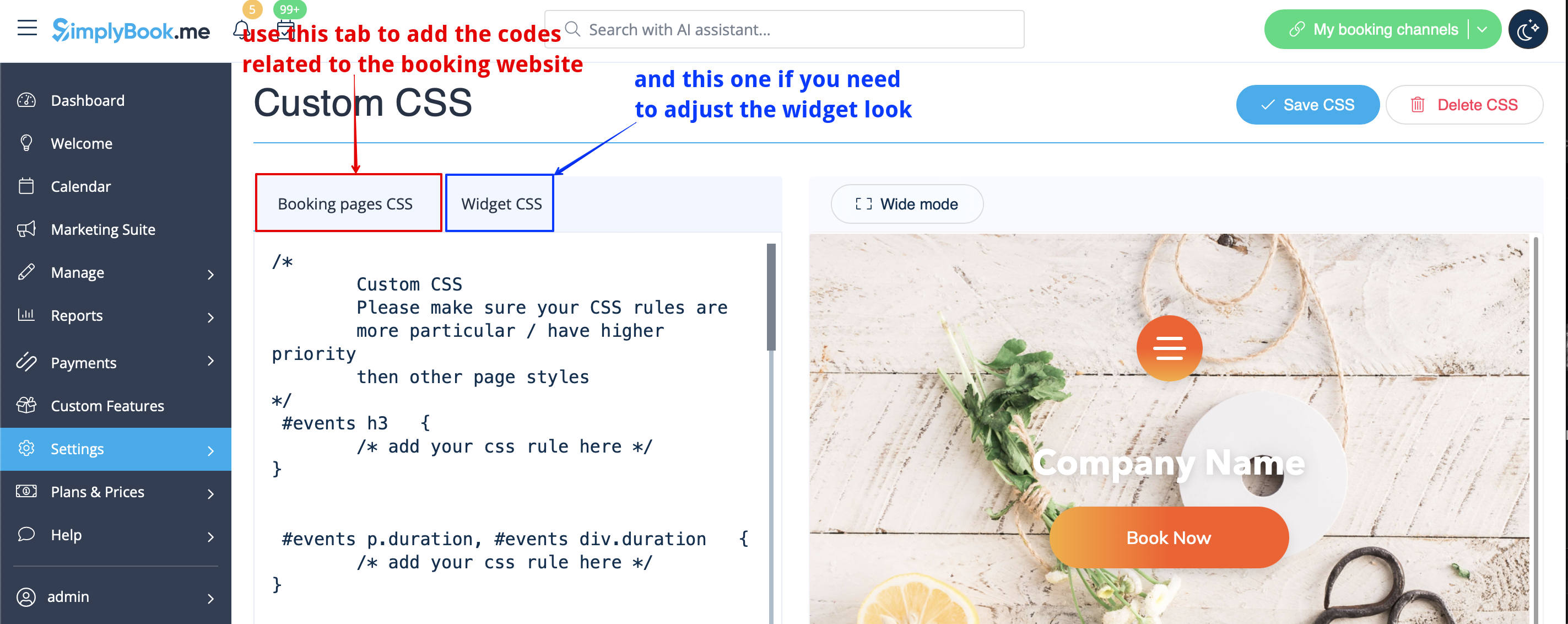
- Vänligen notera! Lägg till koden (er) för att justera stilarna till "Bokningssidor CSS" -fliken om du vill redigera bokningswebbplatsen
- eller "Widget CSS" om du redigerar widget på din webbplats.
Telefon fält
(Klientens inloggningsfunktion är inaktiverad)
- 1. Gå till Inställningar -> E-post- och SMS-inställningar -> Inställningar för e-post- och SMS-aviseringar -> Obligatoriska registreringsfält -> E-post (för att göra telefonen inte obligatorisk).
- 2. Vänligen gå till Anpassade funktioner -> Anpassade funktioner och aktivera Anpassad CSS-funktion. Sedan i den här funktionen Inställningar eller i Anpassade funktioner -> Anpassad CSS klistra in i CSS-fönstret för bokningssidor högst upp följande kod:
.form-group.form-client-phone{
 display: none;
}
E-postfält
(Klientens inloggningsfunktion är inaktiverad)
- 1. Gå till Inställningar -> E-post- och SMS-inställningar -> Inställningar för e-post- och SMS-aviseringar -> Obligatoriska registreringsfält -> Telefon (för att e-post inte ska vara obligatorisk).
- 2. Vänligen gå till Anpassade funktioner -> Anpassade funktioner och aktivera funktionen Anpassad CSS. Sedan i den här funktionen Inställningar eller i Anpassade funktioner -> Anpassad CSS klistra in i CSS-fönstret för bokningssidor högst upp följande kod:
.form-group.form-client-email{
 display: none;
}
Vår tid
Vänligen gå till Anpassade funktioner -> Anpassade funktioner och aktivera funktionen Anpassad CSS. Sedan i den här funktionen Inställningar eller i Anpassade funktioner -> Anpassad CSS klistra in i CSS-fönstret för bokningssidan högst upp följande kod:
div#sb_booking_company_time {
 display: none;
}
Får vi skicka kampanjer och relevant information till dig
Vänligen gå till Anpassade funktioner -> Anpassade funktioner och aktivera funktionen Anpassad CSS. Sedan i den här funktionen Inställningar eller i Anpassade funktioner -> Anpassad CSS klistra in i CSS-fönstret för bokningssidan högst upp följande kod:
- Klientinloggningsfunktion aktiverad
:
- Klientinloggningsfunktion aktiverad
#main
#client-login .custom-form #sb_terms_and_conditions .promotions-letter-flag label[role=button]{
display: none;
}
- Klientinloggningsfunktion inaktiverad:
#sb-main-container #main
#sb-timeline #steps #details .detail-step-wrap .detail-step .license-links-container .promotions-letter-flag label[role=button]{
display: none;

}
Filtrera efter tjänster på sidan Medlemskap
Vänligen gå till Anpassade funktioner -> Anpassade funktioner och aktivera funktionen Anpassad CSS. Sedan i den här funktionen Inställningar eller i Anpassade funktioner -> Anpassad CSS klistra in i CSS-fönstret för bokningssidan högst upp följande kod:
#membership-view #membership-filters {
 display: none;
}
Ta bort bannerbild
- Vänligen notera! "Boka nu" och andra knappar som visas på toppen av bannern kommer också att döljas. Koden kanske inte fungerar med vissa teman.
Gå till Anpassade funktioner -> Anpassade funktioner och aktivera funktionen Anpassad CSS. Sedan i den här funktionen Inställningar eller i Anpassade funktioner -> Anpassad CSS klistra in i CSS-fönstret för bokningssidan högst upp följande kod:
#main-buttons {
 display: none;
}
Ta bort ett specifikt element
Om du behöver ta bort ett specifikt element från din bokningssida måste du använda funktionen Anpassad CSS och motsvarande kod. Om du inte känner till CSS, vänligen kontakta support och de kommer att skapa en begäran för att kontrollera om en sådan ändring är möjlig.
Observera att stora förfrågningar kan göras på betald basis.
