From SimplyBook.me
Created page with "= Actualités = <br><br> Cette option permet d'ajouter des nouvelles fraîches à votre site de réservation. Pour l'activer, veuillez vous rendre dans <span style="background-color:#d4f8e5; padding:5px; border-radius:5px;">Custom Features</span> -> <span style="background-color:#d4f8e5; padding:5px; border-radius:5px;">Adding more to the booking website</span> -> <span style="background-color:#cdeffc; padding:5px; border-radius:5px;">[[Custom_Features#News| News ]..." |
No edit summary |
||
| Line 1: | Line 1: | ||
= Actualités = | =Actualités= | ||
<br><br> | <br><br> | ||
Cette option permet | Cette option permet d’ajouter des actualités à votre site de réservation. | ||
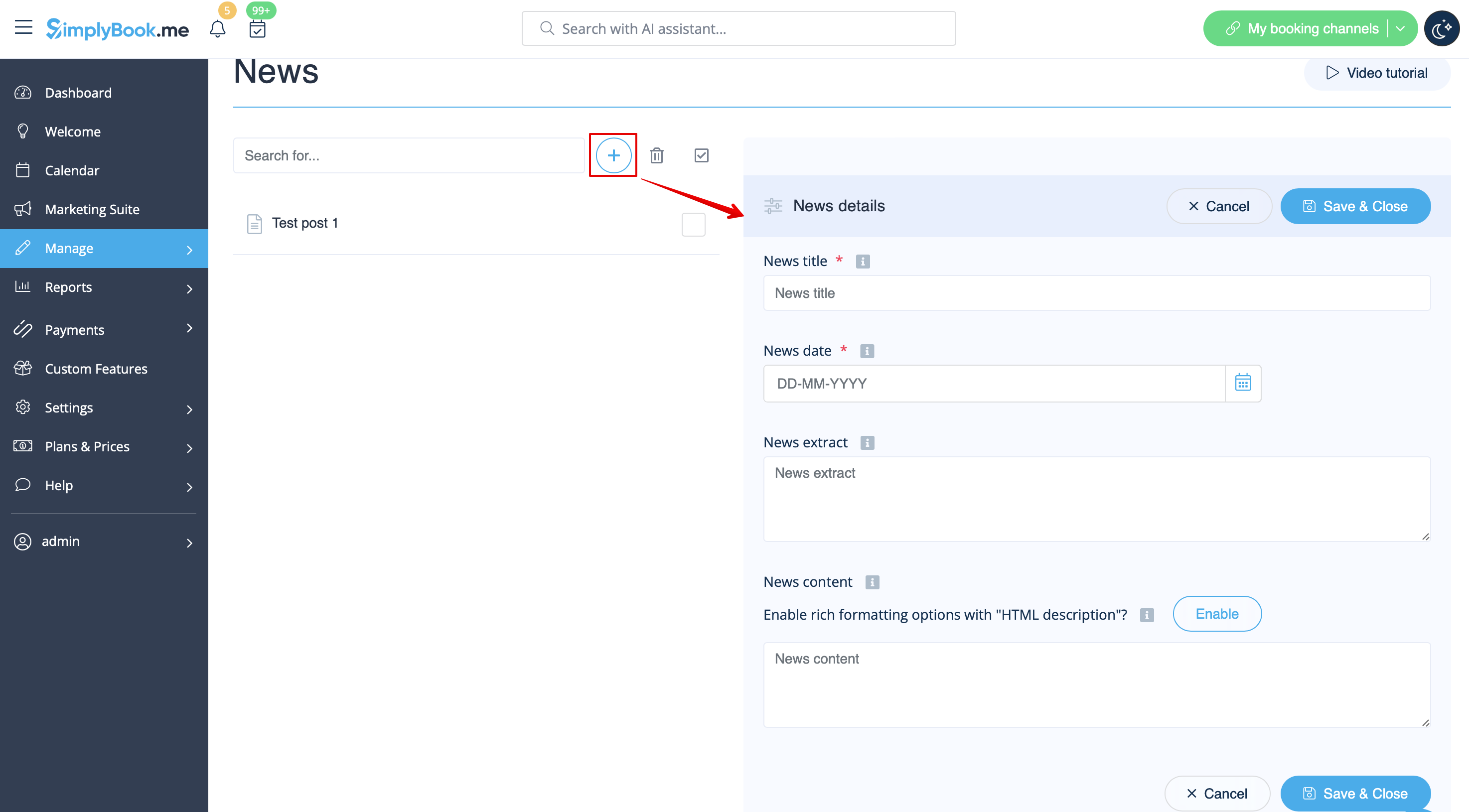
Pour | Pour l’activer, veuillez aller dans <span style="background-color:#d4f8e5; padding:5px; border-radius:5px;">Fonctionnalités personnalisées</span> -> <span style="background-color:#d4f8e5; padding:5px; border-radius:5px;">Ajouts pour le site de réservation</span> -> <span style="background-color:#cdeffc; padding:5px; border-radius:5px;">[[Custom_Features#News| Actualités ]]</span> -> <span style="background-color:#d4f8e5; padding:5px; border-radius:5px;">Activer</span> | ||
[[File:News enable path redesigned.png|1200px| border|center|link=https://help.simplybook.me/images/5/5c/News_enable_path_redesigned.png]] | [[File:News enable path redesigned.png|1200px| border|center|link=https://help.simplybook.me/images/5/5c/News_enable_path_redesigned.png]] | ||
<br><br> | <br><br> | ||
Une fois activée dans <span style="background-color:#d4f8e5; padding:5px; border-radius:5px;">Fonctionnalités personnalisées</span> -> <span style="background-color:#d4f8e5; padding:5px; border-radius:5px;">Actualités</span> -> <span style="background-color:#d4f8e5; padding:5px; border-radius:5px;">Paramètres</span>, vous pouvez créer des articles d’actualité qui s’afficheront dans un onglet séparé sur votre site de réservation. | |||
[[File:Create new news post redesigned.png|1200px | border|center|link=https://help.simplybook.me/images/2/2c/Create_new_news_post_redesigned.png]] | [[File:Create new news post redesigned.png|1200px | border|center|link=https://help.simplybook.me/images/2/2c/Create_new_news_post_redesigned.png]] | ||
<br><br> | <br><br> | ||
Latest revision as of 14:37, 9 June 2025
Actualités
Cette option permet d’ajouter des actualités à votre site de réservation.
Pour l’activer, veuillez aller dans Fonctionnalités personnalisées -> Ajouts pour le site de réservation -> Actualités -> Activer
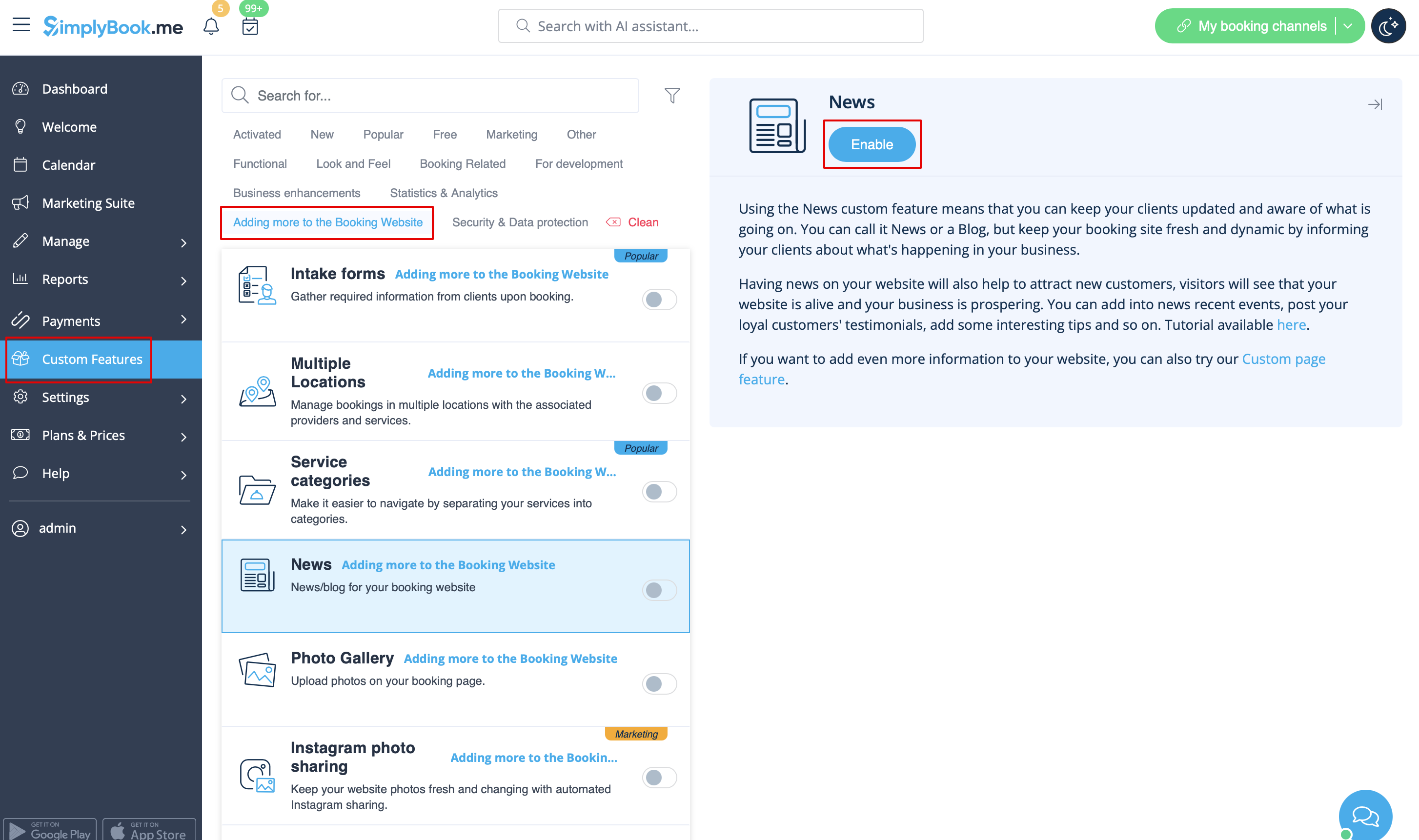
Une fois activée dans Fonctionnalités personnalisées -> Actualités -> Paramètres, vous pouvez créer des articles d’actualité qui s’afficheront dans un onglet séparé sur votre site de réservation.