Created page with "<br/><br/>" |
Updating to match new version of source page |
||
| Line 7: | Line 7: | ||
}} | }} | ||
<div class="mw-translate-fuzzy"> | |||
<br/><br/> | <br/><br/> | ||
[https://simplybook.me/ SimplyBook.me] ne propose pas d'option de réservation de jours, mais il existe une solution de contournement. Veuillez vérifier si ces options conviennent à votre entreprise. | [https://simplybook.me/ SimplyBook.me] ne propose pas d'option de réservation de jours, mais il existe une solution de contournement. Veuillez vérifier si ces options conviennent à votre entreprise. | ||
<br/> | <br/> | ||
:'''Tutoriel vidéo disponible ''' | :'''Tutoriel vidéo disponible ''' | ||
</div> | |||
<br/><br/> | <br/><br/> | ||
__TOC__ | __TOC__ | ||
| Line 19: | Line 20: | ||
1. Dans <span style="background-color:#d4f8e5; padding:5px; border-radius:5px;">Paramètres</span> -> <span style="background-color:#d4f8e5; padding:5px; border-radius:5px;">Configuration principale</span> -> définissez les options <span style="background-color:#d4f8e5; padding:5px; border-radius:5px;">Autoriser le service à s'étendre pendant les pauses</span> et <span style="background-color:#d4f8e5; padding:5px; border-radius:5px;">Autoriser le service à s'étendre pendant les heures de fermeture</span> sur <span style="background-color:#d4f8e5; padding:5px; border-radius:5px;">Oui</span> <span style="background-color:#d4f8e5; padding:5px; border-radius:5px;">,</span> puis enregistrez.<br/> | 1. Dans <span style="background-color:#d4f8e5; padding:5px; border-radius:5px;">Paramètres</span> -> <span style="background-color:#d4f8e5; padding:5px; border-radius:5px;">Configuration principale</span> -> définissez les options <span style="background-color:#d4f8e5; padding:5px; border-radius:5px;">Autoriser le service à s'étendre pendant les pauses</span> et <span style="background-color:#d4f8e5; padding:5px; border-radius:5px;">Autoriser le service à s'étendre pendant les heures de fermeture</span> sur <span style="background-color:#d4f8e5; padding:5px; border-radius:5px;">Oui</span> <span style="background-color:#d4f8e5; padding:5px; border-radius:5px;">,</span> puis enregistrez.<br/> | ||
[[File:Allow to extend over settings redesigned.png|1200px | center| | [[File:Allow to extend over settings redesigned.png|1200px | center|link=https://help.simplybook.me/images/1/1a/Allow_to_extend_over_settings_redesigned.png]] | ||
<!--T:6--> | |||
<br/><br/> | <br/><br/> | ||
2. Dans <span style="background-color:#d4f8e5; padding:5px; border-radius:5px;">Gérer</span> -> <span style="background-color:#d4f8e5; padding:5px; border-radius:5px;">Services</span> -> bouton <span style="background-color:#d4f8e5; padding:5px; border-radius:5px;">+</span>, créez un service dont la durée correspond au nombre de jours pendant lesquels votre service sera proposé (3 jours = 3 heures, 7 jours = 7 heures).<br/><br/> | 2. Dans <span style="background-color:#d4f8e5; padding:5px; border-radius:5px;">Gérer</span> -> <span style="background-color:#d4f8e5; padding:5px; border-radius:5px;">Services</span> -> bouton <span style="background-color:#d4f8e5; padding:5px; border-radius:5px;">+</span>, créez un service dont la durée correspond au nombre de jours pendant lesquels votre service sera proposé (3 jours = 3 heures, 7 jours = 7 heures).<br/><br/> | ||
[[File:3 days service duration redesigned.png|1200px |center| | [[File:3 days service duration redesigned.png|1200px |center| link=https://help.simplybook.me/images/a/a4/3_days_service_duration_redesigned.png]] | ||
<br/> <br/> | <br/> <br/> | ||
3. Dans <span style="background-color:#d4f8e5; padding:5px; border-radius:5px;">Paramètres</span> -> <span style="background-color:#d4f8e5; padding:5px; border-radius:5px;">Heures d'ouverture de l'entreprise</span> (lorsque vous n'avez qu'un seul service) ou dans les heures de travail de ce service (<span style="background-color:#d4f8e5; padding:5px; border-radius:5px;">Paramètres</span> -> <span style="background-color:#d4f8e5; padding:5px; border-radius:5px;">Horaires des services</span> ou <span style="background-color:#d4f8e5; padding:5px; border-radius:5px;">Gérer</span> -> <span style="background-color:#d4f8e5; padding:5px; border-radius:5px;">Services</span> -> sélectionnez le service -> <span style="background-color:#d4f8e5; padding:5px; border-radius:5px;">Horaires des services</span>), ouvrez seulement une heure par jour. | 3. Dans <span style="background-color:#d4f8e5; padding:5px; border-radius:5px;">Paramètres</span> -> <span style="background-color:#d4f8e5; padding:5px; border-radius:5px;">Heures d'ouverture de l'entreprise</span> (lorsque vous n'avez qu'un seul service) ou dans les heures de travail de ce service (<span style="background-color:#d4f8e5; padding:5px; border-radius:5px;">Paramètres</span> -> <span style="background-color:#d4f8e5; padding:5px; border-radius:5px;">Horaires des services</span> ou <span style="background-color:#d4f8e5; padding:5px; border-radius:5px;">Gérer</span> -> <span style="background-color:#d4f8e5; padding:5px; border-radius:5px;">Services</span> -> sélectionnez le service -> <span style="background-color:#d4f8e5; padding:5px; border-radius:5px;">Horaires des services</span>), ouvrez seulement une heure par jour. | ||
| Line 35: | Line 37: | ||
<span id="Single_service_with_the_use_of_Add-ons"></span> | <span id="Single_service_with_the_use_of_Add-ons"></span> | ||
<div class="mw-translate-fuzzy"> | |||
== Service unique avec utilisation de [[Special:MyLanguage/Custom_Features#Service_Add-ons |modules complémentaires]] == | == Service unique avec utilisation de [[Special:MyLanguage/Custom_Features#Service_Add-ons |modules complémentaires]] == | ||
</div> | |||
1. Dans <span style="background-color:#d4f8e5; padding:5px; border-radius:5px;">Paramètres</span> -> <span style="background-color:#d4f8e5; padding:5px; border-radius:5px;">Configuration principale</span> -> définissez les options <span style="background-color:#d4f8e5; padding:5px; border-radius:5px;">Autoriser le service à s'étendre pendant les pauses</span> et <span style="background-color:#d4f8e5; padding:5px; border-radius:5px;">Autoriser le service à s'étendre pendant les heures de fermeture</span> sur <span style="background-color:#d4f8e5; padding:5px; border-radius:5px;">Oui</span> <span style="background-color:#d4f8e5; padding:5px; border-radius:5px;">,</span> puis enregistrez.<br/> | 1. Dans <span style="background-color:#d4f8e5; padding:5px; border-radius:5px;">Paramètres</span> -> <span style="background-color:#d4f8e5; padding:5px; border-radius:5px;">Configuration principale</span> -> définissez les options <span style="background-color:#d4f8e5; padding:5px; border-radius:5px;">Autoriser le service à s'étendre pendant les pauses</span> et <span style="background-color:#d4f8e5; padding:5px; border-radius:5px;">Autoriser le service à s'étendre pendant les heures de fermeture</span> sur <span style="background-color:#d4f8e5; padding:5px; border-radius:5px;">Oui</span> <span style="background-color:#d4f8e5; padding:5px; border-radius:5px;">,</span> puis enregistrez.<br/> | ||
Revision as of 12:02, 22 September 2025
SimplyBook.me ne propose pas d'option de réservation de jours, mais il existe une solution de contournement. Veuillez vérifier si ces options conviennent à votre entreprise.
- Tutoriel vidéo disponible
Services multiples
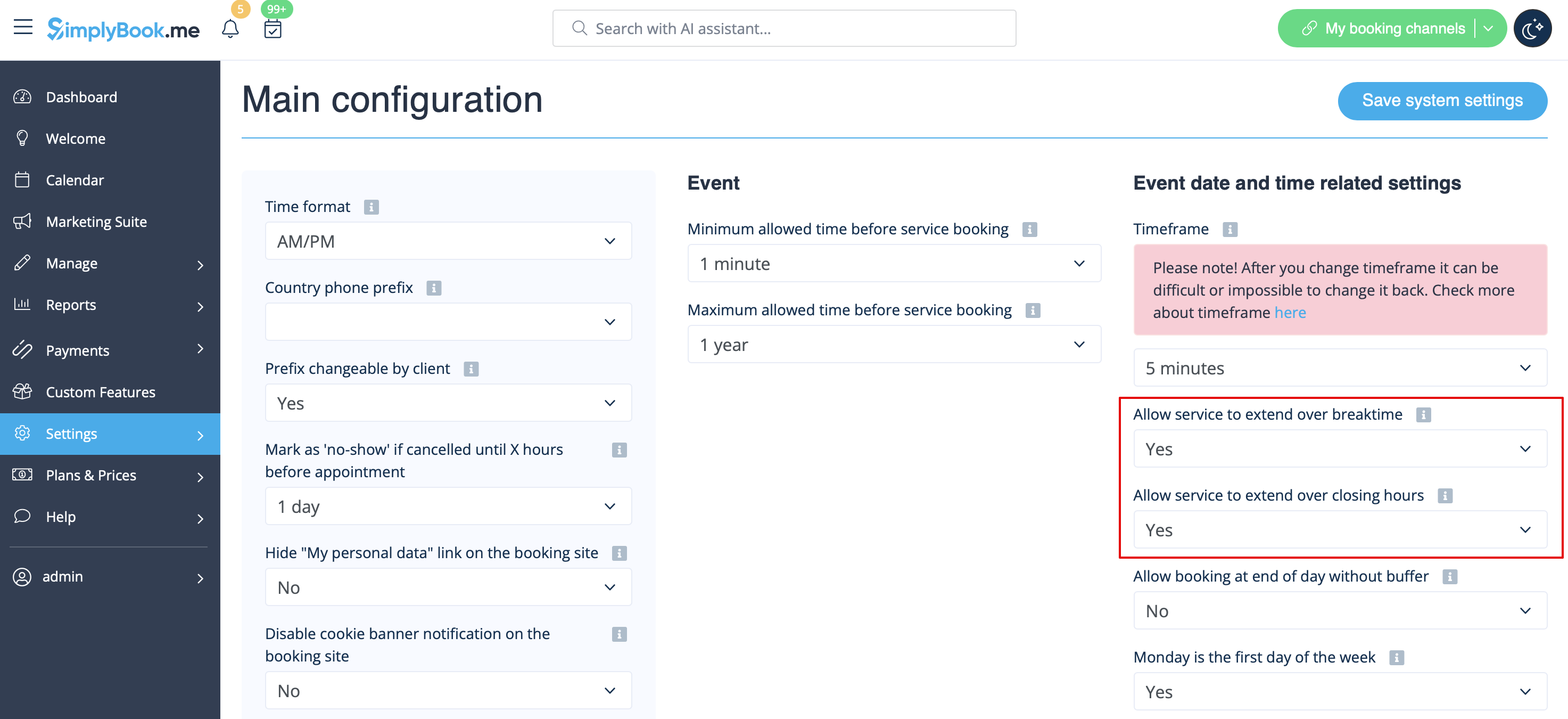
1. Dans Paramètres -> Configuration principale -> définissez les options Autoriser le service à s'étendre pendant les pauses et Autoriser le service à s'étendre pendant les heures de fermeture sur Oui , puis enregistrez.
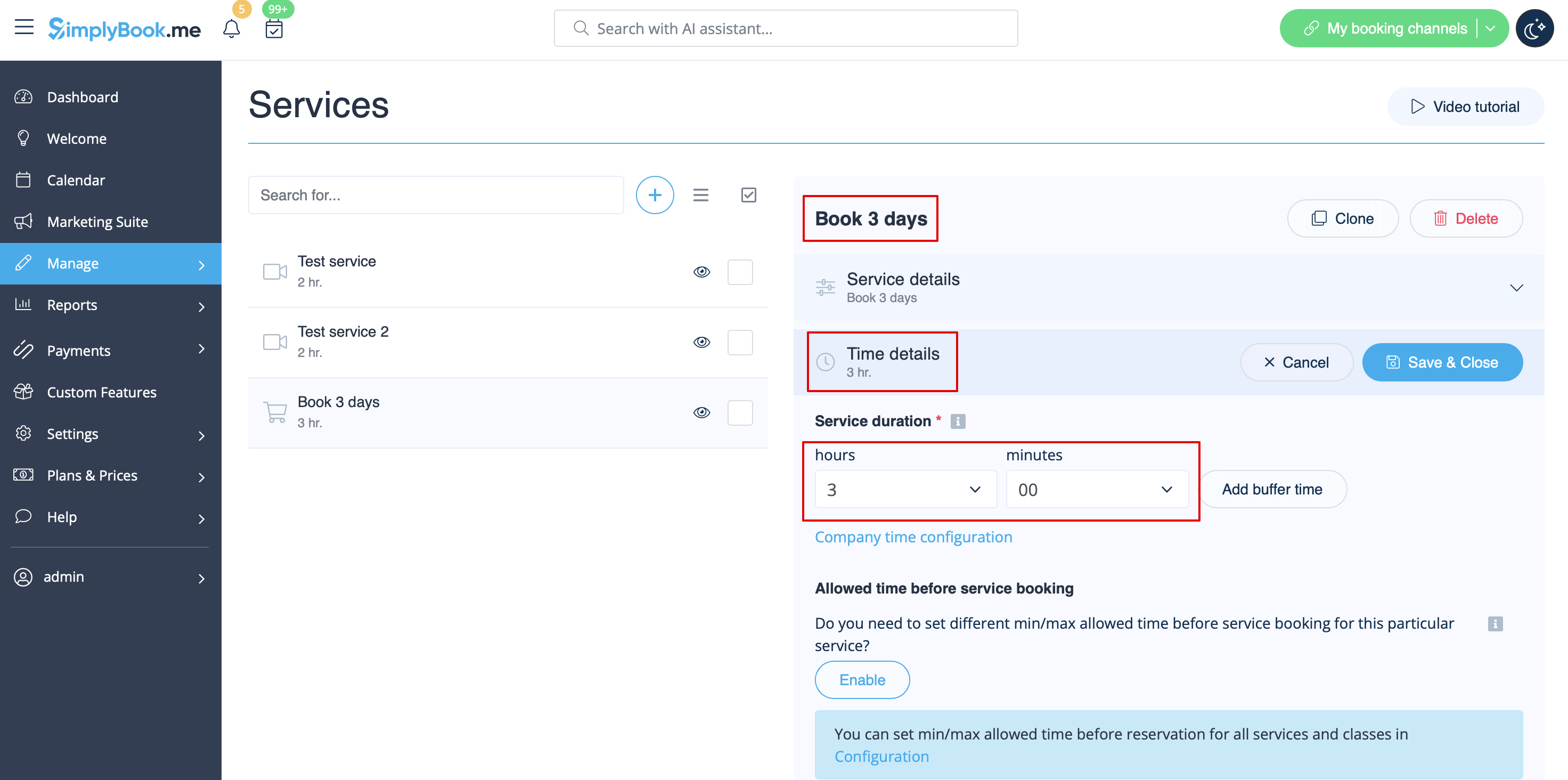
2. Dans Gérer -> Services -> bouton +, créez un service dont la durée correspond au nombre de jours pendant lesquels votre service sera proposé (3 jours = 3 heures, 7 jours = 7 heures).
3. Dans Paramètres -> Heures d'ouverture de l'entreprise (lorsque vous n'avez qu'un seul service) ou dans les heures de travail de ce service (Paramètres -> Horaires des services ou Gérer -> Services -> sélectionnez le service -> Horaires des services), ouvrez seulement une heure par jour.

4. Le système enregistrera alors le nombre d'heures indiqué dans la durée du service comme nombre de jours.

5. Pour vos clients, cette configuration se présentera comme suit :

Service unique avec utilisation de modules complémentaires
1. Dans Paramètres -> Configuration principale -> définissez les options Autoriser le service à s'étendre pendant les pauses et Autoriser le service à s'étendre pendant les heures de fermeture sur Oui , puis enregistrez.

2. Dans Gérer -> Services -> bouton +, créez un service dont la durée correspond au nombre de jours pendant lesquels votre service sera initialement proposé (3 jours = 3 heures, 7 jours = 7 heures).

3. Activez la fonctionnalité personnalisée « Service add-ons » dans l'onglet de la page Services ou dans la section « Custom features ».

4. Dans Gérer -> Modules complémentaires, créez toutes les options de durée supplémentaires souhaitées.

5. (facultatif) Associez les modules complémentaires aux services souhaités si nécessaire et si vous disposez d'options de durée supplémentaires spécifiques pour chaque service.

6. Dans Paramètres -> Heures d'ouverture de l'entreprise (lorsque vous n'avez qu'un seul service) ou dans les heures de travail de ce service (Paramètres -> Horaires des services ou Gérer -> Services -> sélectionnez le service -> Horaires des services), ouvrez seulement une heure par jour.
7. Voici à quoi cela ressemblera du côté client
(les utilisateurs sélectionneront d'abord le service principal, puis choisiront la durée supplémentaire s'ils le souhaitent) :

