From SimplyBook.me
Created page with ":2. Увімкніть «Зробити послугу повторюваною (пакет)?» тут 1200px| center|link=https://help.simplybook.me/images/1/10/Recurring_service_settings_redesigned.png <br><br>" |
Created page with ":4. Виберіть, коли ваша послуга буде повторюватися. Виберіть «Повторювати щотижня (виберіть дні тижня)» та день/дні тижня (наприклад, понеділок), коли надається ваша послуга. <br> :Якщо вам потрібні більш конкретні інтервали, ви можете вибрати «Або повторювати кож..." Tags: Mobile edit Mobile web edit |
||
| Line 14: | Line 14: | ||
[[File:Recurring service settings redesigned.png|1200px| center|link=https://help.simplybook.me/images/1/10/Recurring_service_settings_redesigned.png]] | [[File:Recurring service settings redesigned.png|1200px| center|link=https://help.simplybook.me/images/1/10/Recurring_service_settings_redesigned.png]] | ||
<br><br> | <br><br> | ||
:4. Виберіть, коли ваша послуга буде повторюватися. Виберіть «Повторювати щотижня (виберіть дні тижня)» та день/дні тижня (наприклад, понеділок), коли надається ваша послуга. <br> | |||
:4. | :Якщо вам потрібні більш конкретні інтервали, ви можете вибрати «Або повторювати кожні» і встановити, щоб ваша послуга повторювалася, наприклад, кожні 14 днів. | ||
: | |||
<div lang="en" dir="ltr" class="mw-content-ltr"> | <div lang="en" dir="ltr" class="mw-content-ltr"> | ||
Revision as of 09:25, 16 May 2025
Ви можете створювати повторювані послуги та надавати своїм клієнтам можливість замовляти певну кількість сеансів.
Як створити повторювану послугу:
- 1. Перейдіть до «Управління» // «Послуги» // вкладка «Деталі часу» для потрібної послуги.
- 2. Увімкніть «Зробити послугу повторюваною (пакет)?» тут
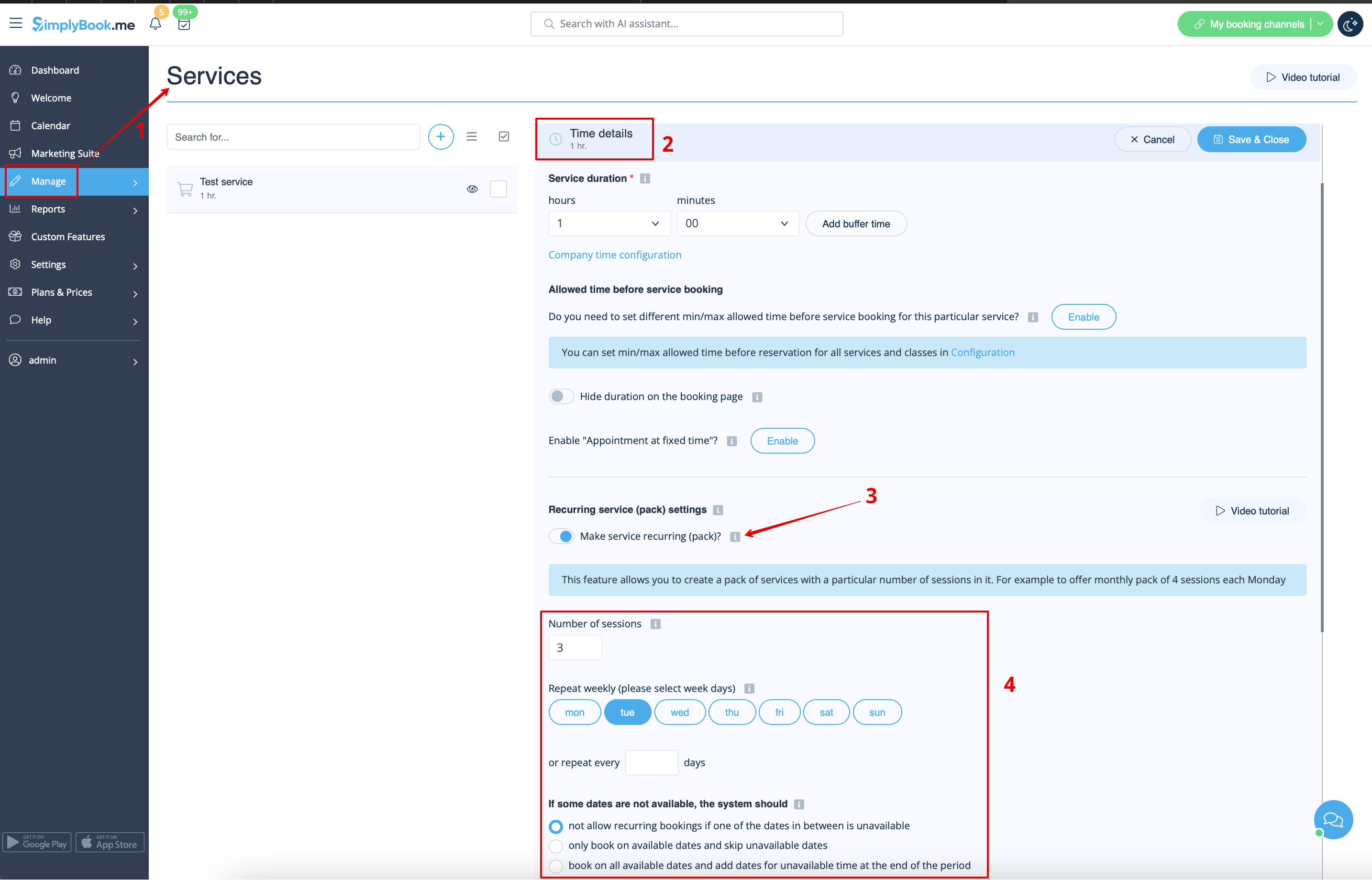
- 4. Виберіть, коли ваша послуга буде повторюватися. Виберіть «Повторювати щотижня (виберіть дні тижня)» та день/дні тижня (наприклад, понеділок), коли надається ваша послуга.
- Якщо вам потрібні більш конкретні інтервали, ви можете вибрати «Або повторювати кожні» і встановити, щоб ваша послуга повторювалася, наприклад, кожні 14 днів.
- 5. Choose the mode for the bookings. Available modes:
- Not allow - not allow recurring bookings if one of dates in between unavailable (Using the example below, if 15th is busy, the system will not allow to book 1st and 8th, only days after busy day).
- Book only on available date - only book on available dates and skip unavailable dates (Using the example below, if 15th is busy, the system will allow you to book 1st and 8th and 22nd (only 3 out of 4).
- Add appointments - book on all available dates and add dates behind for unavailable in between dates (Using the example below, if 15th is busy, the system will book 1 and 8th and 22nd + 1 day instead of busy 15th, which is August 29th).
- 6. Set the number of times your service will repeat in "Repeat count".
- Example: If you set up Mondays and repeat count 4, when clients book this service from booking page, they will book 4 Mondays at once.

Please note!
- If you make the recurring service paid, the amount that you set as the service price is the total for all the sessions.
It is currently not possible to set single session price for the recurring service packs.
That is why if you have single service and decide to make a recurring booking for it from the admin side/POS interface, its price will not be multiplied by the number of selected sessions.
- It is not possible to reschedule bookings related to recurring batch with Client rescheduling feature.
- When a client books a service set as recurring with a certain amount of sessions, the number of bookings that are created at one go equals the number of sessions you have set for such service.

