From SimplyBook.me
Created page with "== Book snart-notifikationssystem == Gør det muligt at sende påmindelser til kunder, der har booket tidligere, om at komme igen.<br> Skabeloner kan indstilles i <span style="background-color:#d4f8e5; padding:5px; border-radius:5px;">Tilpassede funktioner</span> -> Book snart-notifikationssystem -> <span style="background-color:#d4f8e5; padding:5px; border-radius:5px;..." |
No edit summary |
||
| Line 1: | Line 1: | ||
== [[ | == [[Special:MyLanguage/Book Soon Notification System custom feature|Book snart-notifikationssystem]] == | ||
Gør det muligt at sende påmindelser til kunder, der har booket tidligere, om at komme igen.<br> | Gør det muligt at sende påmindelser til kunder, der har booket tidligere, om at komme igen.<br> | ||
Skabeloner kan indstilles i <span style="background-color:#d4f8e5; padding:5px; border-radius:5px;">Tilpassede funktioner</span> -> [[ | Skabeloner kan indstilles i <span style="background-color:#d4f8e5; padding:5px; border-radius:5px;">Tilpassede funktioner</span> -> [[Special:MyLanguage/Book Soon Notification System custom feature|Book snart-notifikationssystem]] -> <span style="background-color:#d4f8e5; padding:5px; border-radius:5px;">Indstillinger</span> -> <span style="background-color:#d4f8e5; padding:5px; border-radius:5px;">Tilføj nyt</span> for at oprette en ny skabelon (e-mail og SMS). | ||
Du kan oprette adskillige specifikke skabeloner til bestemte tjenester/udbydere, og de vil blive sendt, når den angivne tid er gået fra kundens aftale. | Du kan oprette adskillige specifikke skabeloner til bestemte tjenester/udbydere, og de vil blive sendt, når den angivne tid er gået fra kundens aftale. | ||
[[File:Book soon template redesigned.png|1200px|border|center|link=https://help.simplybook.me/images/3/36/Book_soon_template_redesigned.png]] | [[File:Book soon template redesigned.png|1200px|border|center|link=https://help.simplybook.me/images/3/36/Book_soon_template_redesigned.png]] | ||
<br><br> | <br><br> | ||
:''[[ | :''[[Special:MyLanguage/Book Soon Notification System custom feature|Læs mere]] om brugen af denne tilpassede funktion.'' | ||
-------- | -------- | ||
Latest revision as of 13:58, 13 August 2025
Book snart-notifikationssystem
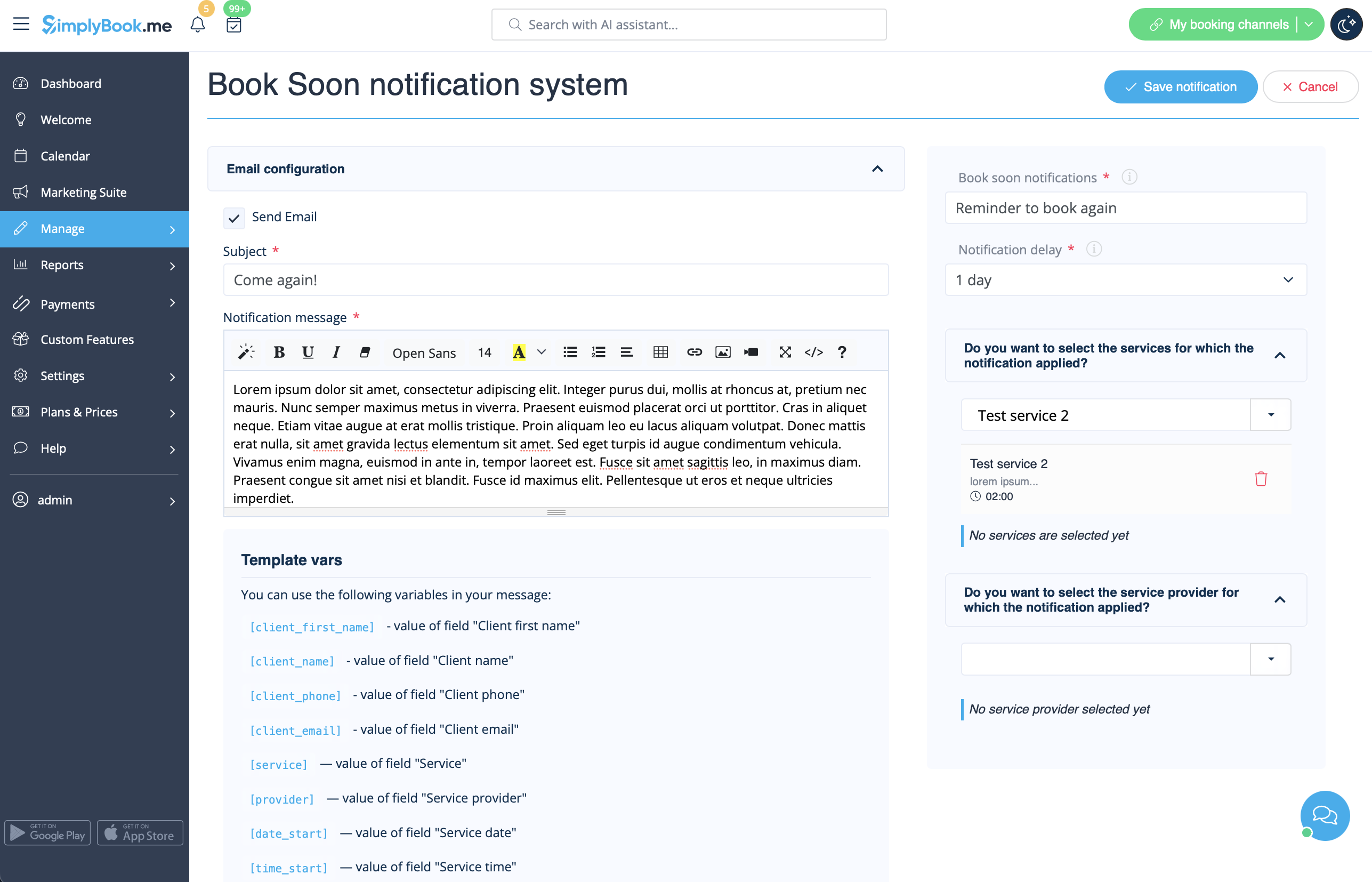
Gør det muligt at sende påmindelser til kunder, der har booket tidligere, om at komme igen.
Skabeloner kan indstilles i Tilpassede funktioner -> Book snart-notifikationssystem -> Indstillinger -> Tilføj nyt for at oprette en ny skabelon (e-mail og SMS).
Du kan oprette adskillige specifikke skabeloner til bestemte tjenester/udbydere, og de vil blive sendt, når den angivne tid er gået fra kundens aftale.
- Læs mere om brugen af denne tilpassede funktion.
