From SimplyBook.me
Created page with "== Medische test == Wanneer u deze aangepaste functie gebruikt, moet u de testresultaten zeker naar de e-mailadressen van de patiënten sturen.<br> In <span style="background-color:#d4f8e5; padding:5px; border-radius:5px;">Aangepaste functies</span> -> <span style="background-color:#d4f8e5; padding:5px; border-radius:5px;">Medische test</span> -> aan de <span style="background-color:#d4f8e5; padding:5px; border-radius:5px;">rechterka..." |
No edit summary |
||
| Line 1: | Line 1: | ||
== [[ | == [[Special:MyLanguage/Medical test custom feature|Medische test]] == | ||
Wanneer u deze aangepaste functie gebruikt, moet u de testresultaten zeker naar de e-mailadressen van de patiënten sturen.<br> | Wanneer u deze aangepaste functie gebruikt, moet u de testresultaten zeker naar de e-mailadressen van de patiënten sturen.<br> | ||
In <span style="background-color:#d4f8e5; padding:5px; border-radius:5px;">Aangepaste functies</span> -> <span style="background-color:#d4f8e5; padding:5px; border-radius:5px;">Medische test</span> -> aan de <span style="background-color:#d4f8e5; padding:5px; border-radius:5px;">rechterkant</span> van de pagina kunt u de volgende sjablonen in- of uitschakelen of bewerken: | In <span style="background-color:#d4f8e5; padding:5px; border-radius:5px;">Aangepaste functies</span> -> <span style="background-color:#d4f8e5; padding:5px; border-radius:5px;">Medische test</span> -> aan de <span style="background-color:#d4f8e5; padding:5px; border-radius:5px;">rechterkant</span> van de pagina kunt u de volgende sjablonen in- of uitschakelen of bewerken: | ||
| Line 8: | Line 8: | ||
Als u het sjabloon voor testresultaten wilt aanpassen, gebruikt u de optie <span style="background-color:#d4f8e5; padding:5px; border-radius:5px;">Aangepast sjabloon voor resultaten</span> boven de sjablonen. | Als u het sjabloon voor testresultaten wilt aanpassen, gebruikt u de optie <span style="background-color:#d4f8e5; padding:5px; border-radius:5px;">Aangepast sjabloon voor resultaten</span> boven de sjablonen. | ||
<br><br> | <br><br> | ||
:''[[ | :''[[Special:MyLanguage/Medical test custom feature|Lees meer]] over het gebruik van deze aangepaste functie.'' | ||
-------- | -------- | ||
Latest revision as of 13:34, 13 August 2025
Medische test
Wanneer u deze aangepaste functie gebruikt, moet u de testresultaten zeker naar de e-mailadressen van de patiënten sturen.
In Aangepaste functies -> Medische test -> aan de rechterkant van de pagina kunt u de volgende sjablonen in- of uitschakelen of bewerken:
- positieve resultaten (e-mail- en sms-sjablonen);
- negatieve resultaten (e-mail- en sms-sjablonen);
- onduidelijke resultaten (e-mail- en sms-sjablonen).
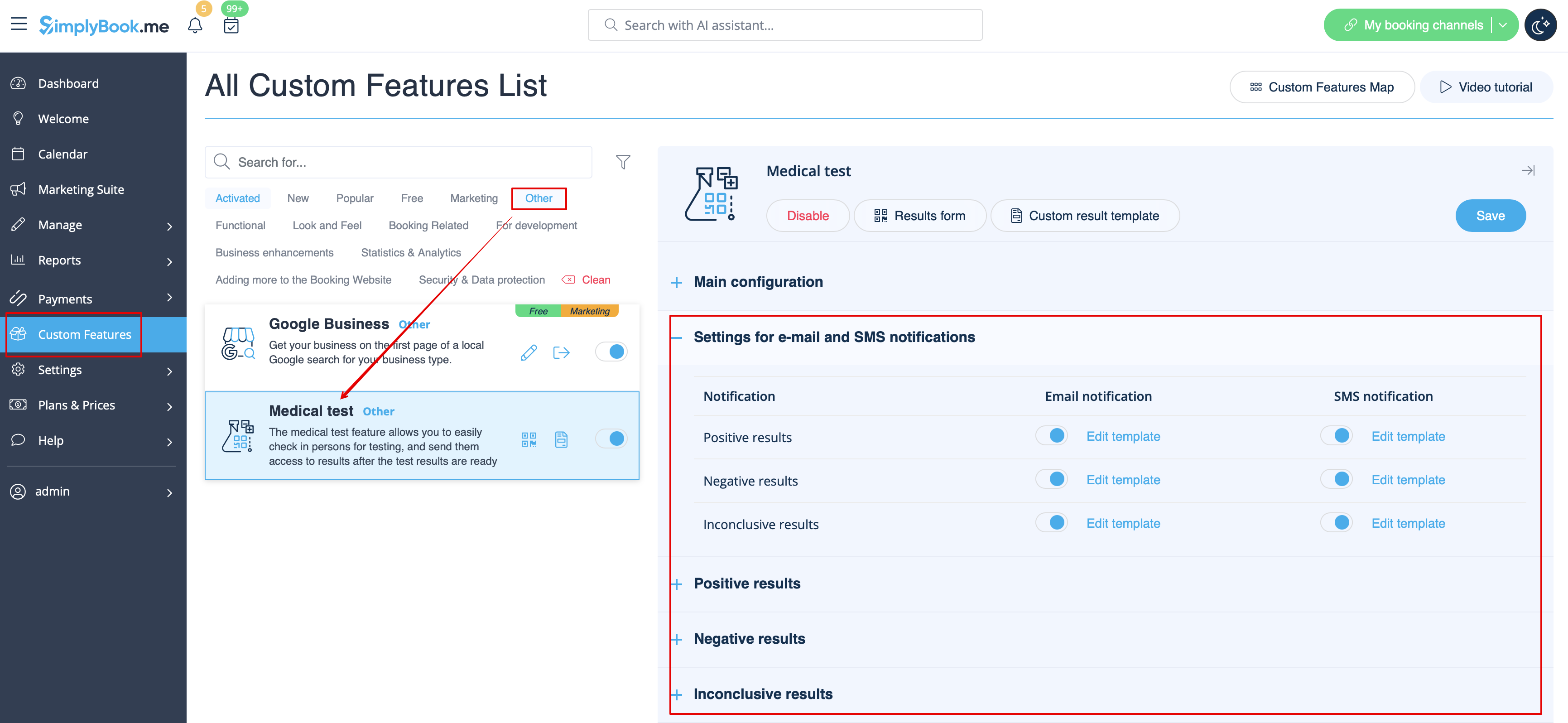
Als u het sjabloon voor testresultaten wilt aanpassen, gebruikt u de optie Aangepast sjabloon voor resultaten boven de sjablonen.
- Lees meer over het gebruik van deze aangepaste functie.
