Created page with "== Coupons et cartes-cadeaux == Vous pouvez envoyer des notifications spécifiques dans les cas suivants lorsque vous utilisez cette fonctionnalité personnalisée : *le client achète une carte cadeau sur le site web de réservation (modèles d'e-mails et de SMS) Ce modèle de notification peut être activé/désactivé et modifié dans <span style="background-color:#d4f8e5; padding:5px; border-radius:5px;">Fonctionnalités pers..." Tags: Mobile edit Mobile web edit |
Created page with "== Rapport quotidien == Lorsque vous activez et configurez cette fonctionnalité personnalisée, un rapport par e-mail concernant les rendez-vous nouveaux, à venir et annulés est automatiquement envoyé à l'adresse e-mail de votre entreprise.<br> Il n'y a pas de modèle à modifier en tant que tel, mais vous pouvez ajuster les éléments inclus dans <span style="background-color:#d4f8e5; padding:5px; border-radius:5px;">Fonctionnalités..." |
||
| Line 117: | Line 117: | ||
-------- | -------- | ||
== [[Membership_custom_feature|Adhésion]] == | |||
==[[Membership_custom_feature| | Lorsque vous vendez des adhésions sur le site web de réservation, vous devrez peut-être également informer vos clients des différents points.<br> | ||
Cette fonctionnalité personnalisée permet d'envoyer : | |||
*notification d'activation de l'adhésion (modèles d'e-mail et de SMS) | |||
* | *notification de paiement récurrent (modèles d'e-mail et de SMS) | ||
* | *erreur de paiement récurrent (modèles d'e-mail et de SMS) | ||
* | *paiement récurrent réussi (modèles d'e-mail et de SMS) | ||
* | *fin de la période d'adhésion (modèles d'e-mail et de SMS) | ||
* | *l'adhésion expire aujourd'hui (modèles d'e-mail et de SMS) | ||
* | *notification d'expiration de l'adhésion (modèles d'e-mail et de SMS) | ||
* | Vous pouvez modifier les modèles ainsi qu'activer/désactiver certains types de notifications dans <span style="background-color:#d4f8e5; padding:5px; border-radius:5px;">Fonctionnalités personnalisées</span> -> [[Membership_custom_feature|Adhésion]] -> à <span style="background-color:#d4f8e5; padding:5px; border-radius:5px;">droite de</span> la page. | ||
[[File:Memberships notifications path redesigned.png|1200px|border|center|link=https://help.simplybook.me/images/6/6e/Memberships_notifications_path_redesigned.png]] | [[File:Memberships notifications path redesigned.png|1200px|border|center|link=https://help.simplybook.me/images/6/6e/Memberships_notifications_path_redesigned.png]] | ||
<br><br> | <br><br> | ||
:''[[Membership_custom_feature| | :''[[Membership_custom_feature|En savoir plus]] sur l'utilisation de cette fonctionnalité personnalisée.'' | ||
-------- | -------- | ||
== [[Flexible_Notifications_custom_feature|Notifications flexibles]] == | |||
==[[Flexible_Notifications_custom_feature| | Cette fonctionnalité personnalisée permet de personnaliser les notifications liées à la réservation pour un service, un prestataire ou les deux.<br> | ||
Les types suivants peuvent être utilisés : | |||
*confirmation de réservation au client (modèles d'e-mail et de SMS) | |||
* | *confirmation de réservation au prestataire (modèles d'e-mail et de SMS) | ||
* | *rappel au client (modèles d'e-mail et de SMS) | ||
* | *rappel au prestataire (modèles d'e-mail et de SMS) | ||
* | *notification d'annulation au client (modèles d'e-mail et de SMS) | ||
* | *notification d'annulation au prestataire (modèles d'e-mail et de SMS) | ||
* | *notification de modification de réservation au client (modèles d'e-mail et de SMS) | ||
* | *notification de modification de réservation au prestataire (modèles d'e-mail et de SMS) | ||
* | *confirmation d'événement récurrent au client (modèles d'e-mail et Modèles SMS) | ||
* | *confirmation d'événement récurrent au prestataire (modèles d'e-mails et de SMS) | ||
* | *notification d'annulation groupée au client (modèles d'e-mails et de SMS) | ||
* | *notification d'annulation groupée au prestataire (modèles d'e-mails et de SMS) | ||
* | * confirmation[[Multiple_Bookings_custom_feature|de réservation]] groupée[[Multiple_Bookings_custom_feature|de plusieurs réservations]] au client (modèles d'e-mails et de SMS) | ||
* [[Multiple_Bookings_custom_feature| | * rappel d'événement[[Multiple_Bookings_custom_feature|de plusieurs réservations]] au client (modèles d'e-mails et de SMS) | ||
* [[Multiple_Bookings_custom_feature| | * confirmation[[Group_Bookings_custom_feature|de réservation groupée de réservations de groupe]] au client (modèles d'e-mails et de SMS) | ||
* [[Group_Bookings_custom_feature| | * confirmation[[Group_Bookings_custom_feature|de réservation groupée]][[Group_Bookings_custom_feature|de réservations de groupe]] au prestataire (modèles d'e-mails et de SMS) | ||
* [[Group_Bookings_custom_feature| | * rappel[[Group_Bookings_custom_feature|de réservations de groupe]] au client (modèles d'e-mails et SMS) | ||
* [[Group_Bookings_custom_feature| | * rappel[[Group_Bookings_custom_feature|des réservations de groupe]] au prestataire (modèles d'e-mails et de SMS) | ||
* [[Group_Bookings_custom_feature| | Vous pouvez créer tous les modèles souhaités dans <span style="background-color:#d4f8e5; padding:5px; border-radius:5px;">Fonctionnalités personnalisées</span> -> [[Flexible_Notifications_custom_feature|Notifications flexibles]] -> <span style="background-color:#d4f8e5; padding:5px; border-radius:5px;">Gérer.</span> | ||
[[File:Flexible notifications path redesigned.png|1200px|border|center|link=https://help.simplybook.me/images/5/56/Flexible_notifications_path_redesigned.png]] | [[File:Flexible notifications path redesigned.png|1200px|border|center|link=https://help.simplybook.me/images/5/56/Flexible_notifications_path_redesigned.png]] | ||
<br><br> | <br><br> | ||
Si vous devez activer/désactiver certains de ces types de notifications, veuillez vous rendre dans <span style="background-color:#d4f8e5; padding:5px; border-radius:5px;">Paramètres</span> -> <span style="background-color:#d4f8e5; padding:5px; border-radius:5px;">Paramètres e-mail et SMS</span> -> et <span style="background-color:#d4f8e5; padding:5px; border-radius:5px;">utiliser le tableau</span> en haut de la page.<br> | |||
''' | '''Remarque :''' il s'agit des paramètres généraux des notifications de réservation. Si vous désactivez certains d'entre eux, cela aura également une incidence sur les types similaires liés à d'autres fonctionnalités (par exemple, si vous désactivez les confirmations de réservation aux prestataires, les confirmations courantes, ainsi que les notifications de confirmation de groupes et de lots récurrents seront également désactivées)''.'' | ||
<br><br> | <br><br> | ||
:''[[Flexible_Notifications_custom_feature| | :''[[Flexible_Notifications_custom_feature|Pour en savoir plus]] sur l'utilisation de cette fonctionnalité personnalisée,[[Flexible_Notifications_custom_feature|consultez]]'' | ||
-------- | -------- | ||
== [[Packages_custom_feature|Forfaits]] == | |||
==[[Packages_custom_feature| | Lorsque vous vendez des forfaits de services/classes/produits/options supplémentaires ou que vous émettez des forfaits depuis l'interface d'administration, il est également possible d'envoyer automatiquement aux clients une notification d'activation du forfait (par e-mail et/ou SMS).<br> | ||
Pour modifier le texte du modèle ou activer/désactiver les notifications, veuillez vous rendre dans <span style="background-color:#d4f8e5; padding:5px; border-radius:5px;">Fonctionnalités personnalisées</span> -> [[Packages_custom_feature|Forfaits]] -> <span style="background-color:#d4f8e5; padding:5px; border-radius:5px;">à droite</span> de la page. | |||
[[File:Packages notification path redesigned.png|1200px|border|center|link=https://help.simplybook.me/images/f/fd/Packages_notification_path_redesigned.png]] | [[File:Packages notification path redesigned.png|1200px|border|center|link=https://help.simplybook.me/images/f/fd/Packages_notification_path_redesigned.png]] | ||
<br><br> | <br><br> | ||
:''[[Packages_custom_feature| | :''[[Packages_custom_feature|En savoir plus]] sur l'utilisation de cette fonctionnalité personnalisée.'' | ||
-------- | -------- | ||
== [[Tickets_custom_feature|Tickets]] == | |||
==[[Tickets_custom_feature|Tickets]]== | Par défaut, le ticket est automatiquement envoyé à l'adresse e-mail du client avec l'e-mail de confirmation du service correspondant.<br> | ||
Toutefois, si vous utilisez les paiements en ligne et que vous autorisez l'option « <span style="background-color:#d4f8e5; padding:5px; border-radius:5px;">payer plus tard</span> » sur le site web de réservation et que le client la sélectionne,<br> | |||
le billet sera envoyé dans un e-mail séparé. | |||
Vous pouvez également <span style="background-color:#d4f8e5; padding:5px; border-radius:5px;">renvoyer le billet</span> au client dans certains cas (cela est possible dans <span style="background-color:#d4f8e5; padding:5px; border-radius:5px;">Rapports</span> -> <span style="background-color:#d4f8e5; padding:5px; border-radius:5px;">Rapport sur les billets).</span> | |||
Les deux modèles de notification peuvent être modifiés dans <span style="background-color:#d4f8e5; padding:5px; border-radius:5px;">Fonctionnalités personnalisées</span> -> [[Tickets_custom_feature|Billets]] -> sur le <span style="background-color:#d4f8e5; padding:5px; border-radius:5px;">côté droit</span> de la page. Seuls les types d'e-mails sont disponibles. | |||
[[File:Tickets notificatons path redesigned.png|1200px|border|center|link=https://help.simplybook.me/images/e/ea/Tickets_notificatons_path_redesigned.png]] | [[File:Tickets notificatons path redesigned.png|1200px|border|center|link=https://help.simplybook.me/images/e/ea/Tickets_notificatons_path_redesigned.png]] | ||
<br><br> | <br><br> | ||
:''[[Tickets_custom_feature| | :''[[Tickets_custom_feature|En savoir plus]] sur l'utilisation de cette fonctionnalité personnalisée.'' | ||
-------- | -------- | ||
== [[Custom_Email_custom_feature|E-mail personnalisé]] == | |||
==[[Custom_Email_custom_feature| | Permet de personnaliser la conception des notifications par e-mail afin qu'elles correspondent à votre image de marque et à vos goûts.<br> | ||
Pour créer vos designs, rendez-vous dans <span style="background-color:#d4f8e5; padding:5px; border-radius:5px;">Fonctionnalités personnalisées</span> -> [[Custom_Email_custom_feature|E-mail personnalisé]] -> <span style="background-color:#d4f8e5; padding:5px; border-radius:5px;">Créer un modèle.</span><br> | |||
[[File:Custom email template path redesigned.png|1200px|border|center|link=https://help.simplybook.me/images/4/49/Custom_email_template_path_redesigned.png]] | [[File:Custom email template path redesigned.png|1200px|border|center|link=https://help.simplybook.me/images/4/49/Custom_email_template_path_redesigned.png]] | ||
<br><br> | <br><br> | ||
Grâce à cette fonctionnalité personnalisée, vous pouvez modifier l'apparence des types de notifications suivants : | |||
* | *notifications courantes liées aux réservations dans Paramètres -> Paramètres e-mail et SMS ; | ||
* | *e-mails de facturation de la fonctionnalité personnalisée « [[Accept_payments_custom_feature|Accepter les paiements]] » ; | ||
* [[Group_Bookings_custom_feature| | * notifications[[Group_Bookings_custom_feature|de la]] fonctionnalité personnalisée «[[Group_Bookings_custom_feature|Réservations de groupe]] » ; | ||
* [[Multiple_Bookings_custom_feature| | * notifications[[Multiple_Bookings_custom_feature|de la fonctionnalité]] personnalisée[[Multiple_Bookings_custom_feature|« Réservations multiples]] » ; | ||
* [[Client_Login_custom_feature|client | * notifications[[Client_Login_custom_feature|de]] la fonctionnalité personnalisée «[[Client_Login_custom_feature|Connexion client]] » ; | ||
* [[Membership_custom_feature| | * notifications[[Membership_custom_feature|de la]] fonctionnalité personnalisée «[[Membership_custom_feature|Adhésion]] » ; | ||
* [[Packages_custom_feature| | * notifications[[Packages_custom_feature|de la fonctionnalité]] personnalisée «[[Packages_custom_feature|Forfaits]] » ; | ||
* [[Tickets_custom_feature| | * notifications[[Tickets_custom_feature|de la fonctionnalité]] personnalisée «[[Tickets_custom_feature|Billets]] » ; | ||
* [[Coupons_and_Gift_Cards_custom_feature| | * notifications de la fonctionnalité[[Coupons_and_Gift_Cards_custom_feature|personnalisée « Coupons et cartes cadeaux]] » ; | ||
* [[Medical_test_custom_feature| | *[[Medical_test_custom_feature|notifications de]] la fonctionnalité personnalisée[[Medical_test_custom_feature|« Test médical]] » ; | ||
* [[Book_Soon_Notification_System_custom_feature| | * notifications[[Book_Soon_Notification_System_custom_feature|de la fonctionnalité]] personnalisée «[[Book_Soon_Notification_System_custom_feature|Système de notification de réservation rapide]] ». | ||
Cette fonctionnalité permet de tester chaque type de notification avec le design pré-créé. | |||
[[File:Custom email notification types list redesigned.png|1200px|border|center|link=https://help.simplybook.me/images/c/c2/Custom_email_notification_types_list_redesigned.png]] | [[File:Custom email notification types list redesigned.png|1200px|border|center|link=https://help.simplybook.me/images/c/c2/Custom_email_notification_types_list_redesigned.png]] | ||
La balise <nowiki>{{content}}</nowiki> qui contient les informations de réservation/achat peut être modifiée dans les paramètres de la fonctionnalité correspondante. | |||
<br><br> | <br><br> | ||
:''[[Custom_Email_custom_feature| | :''[[Custom_Email_custom_feature|En savoir plus]] sur l'utilisation de cette fonctionnalité personnalisée.'' | ||
-------- | -------- | ||
== [[SMTP_custom_feature|SMTP]] == | |||
==[[SMTP_custom_feature|SMTP]]== | Cette fonctionnalité vous permet d'utiliser votre propre serveur SMTP pour envoyer les e-mails.<br> | ||
Elle ne dispose que d'un seul modèle pour tester cette fonctionnalité après avoir saisi les paramètres.<br> | |||
Vous pouvez modifier et utiliser le modèle d'e-mail de test dans <span style="background-color:#d4f8e5; padding:5px; border-radius:5px;">Fonctionnalités personnalisées</span> -> <span style="background-color:#d4f8e5; padding:5px; border-radius:5px;">SMTP</span> -> sur le <span style="background-color:#d4f8e5; padding:5px; border-radius:5px;">côté droit</span> de la page. | |||
[[File:Smtp email path redesigned.png|1200px|border|center|link=https://help.simplybook.me/images/e/e4/Smtp_email_path_redesigned.png]] | [[File:Smtp email path redesigned.png|1200px|border|center|link=https://help.simplybook.me/images/e/e4/Smtp_email_path_redesigned.png]] | ||
<br><br> | <br><br> | ||
:''[[SMTP_custom_feature| | :''[[SMTP_custom_feature|En savoir plus]] sur l'utilisation de cette fonctionnalité personnalisée.'' | ||
-------- | -------- | ||
== [[Daily_Report_custom_feature|Rapport quotidien]] == | |||
==[[Daily_Report_custom_feature| | Lorsque vous activez et configurez cette fonctionnalité personnalisée, un rapport par e-mail concernant les rendez-vous nouveaux, à venir et annulés est automatiquement envoyé à l'adresse e-mail de votre entreprise.<br> | ||
Il n'y a pas de modèle à modifier en tant que tel, mais vous pouvez ajuster les éléments inclus dans <span style="background-color:#d4f8e5; padding:5px; border-radius:5px;">Fonctionnalités personnalisées</span> -> [[Daily_Report_custom_feature|Rapport quotidien]] -> sur le <span style="background-color:#d4f8e5; padding:5px; border-radius:5px;">côté droit</span> de la page. | |||
[[File:Daily report settings path redesigned.png|1200px|border|center|link=https://help.simplybook.me/images/e/e2/Daily_report_settings_path_redesigned.png]] | [[File:Daily report settings path redesigned.png|1200px|border|center|link=https://help.simplybook.me/images/e/e2/Daily_report_settings_path_redesigned.png]] | ||
<br><br> | <br><br> | ||
:''[[Daily_Report_custom_feature| | :''[[Daily_Report_custom_feature|En savoir plus]] sur l'utilisation de cette fonctionnalité personnalisée.'' | ||
-------- | -------- | ||
== [[HIPAA_custom_feature|HIPAA]] == | |||
==[[HIPAA_custom_feature|HIPAA]]== | Il s'agit d'une fonctionnalité personnalisée liée à la sécurité qui permet d'envoyer des notifications par e-mail lorsque quelqu'un se connecte à votre système.<br> | ||
Elle ne contient aucun modèle d'e-mail à modifier et peut être activée/désactivée en ajoutant/supprimant l'adresse e-mail dans <span style="background-color:#d4f8e5; padding:5px; border-radius:5px;">Fonctionnalités personnalisées</span> -> [[HIPAA_custom_feature|HIPAA]] -> <span style="background-color:#d4f8e5; padding:5px; border-radius:5px;">à droite</span> de la page -> <span style="background-color:#d4f8e5; padding:5px; border-radius:5px;">Notifier par e-mail.</span> | |||
[[File:Hipaa notifications settings path redesigned.png|1200px|border|center|link=https://help.simplybook.me/images/6/66/Hipaa_notifications_settings_path_redesigned.png]] | [[File:Hipaa notifications settings path redesigned.png|1200px|border|center|link=https://help.simplybook.me/images/6/66/Hipaa_notifications_settings_path_redesigned.png]] | ||
<br><br> | <br><br> | ||
:''[[HIPAA_custom_feature| | :''[[HIPAA_custom_feature|En savoir plus]] sur l'utilisation de cette fonctionnalité personnalisée.'' | ||
-------- | -------- | ||
== [[Contact_Widget_custom_feature|Widget de contact]] == | |||
==[[Contact_Widget_custom_feature| | Comme cette fonctionnalité personnalisée permet d'ajouter un formulaire de contact à votre site web de réservation ou de créer un widget de bouton de contact, il existe également une notification par e-mail/SMS envoyée à l'entreprise lorsque quelqu'un laisse un message sur le site de réservation ou le widget, afin que vous puissiez répondre immédiatement. | ||
Il n'y a pas de modèle à modifier, mais vous pouvez désactiver ces notifications dans <span style="background-color:#d4f8e5; padding:5px; border-radius:5px;">Paramètres</span> -> <span style="background-color:#d4f8e5; padding:5px; border-radius:5px;">Paramètres e-mail et SMS</span> -> <span style="background-color:#d4f8e5; padding:5px; border-radius:5px;">Notifications du widget de contact.</span> | |||
[[File:Contact widget notifications enable path redesigned.png|1200px|border|center|link=https://help.simplybook.me/images/b/b5/Contact_widget_notifications_enable_path_redesigned.png]] | [[File:Contact widget notifications enable path redesigned.png|1200px|border|center|link=https://help.simplybook.me/images/b/b5/Contact_widget_notifications_enable_path_redesigned.png]] | ||
<br><br> | <br><br> | ||
:''[[Contact_Widget_custom_feature| | :''[[Contact_Widget_custom_feature|En savoir plus]] sur l'utilisation de cette fonctionnalité personnalisée.'' | ||
-------- | -------- | ||
== [[Medical_test_custom_feature|Test médical]] == | |||
==[[Medical_test_custom_feature| | Lorsque vous utilisez cette fonctionnalité personnalisée, vous devez impérativement envoyer les résultats des tests aux patients par e-mail.<br> | ||
Dans <span style="background-color:#d4f8e5; padding:5px; border-radius:5px;">Fonctionnalités personnalisées</span> -> <span style="background-color:#d4f8e5; padding:5px; border-radius:5px;">Test médical</span> -> sur le <span style="background-color:#d4f8e5; padding:5px; border-radius:5px;">côté droit</span> de la page, vous pouvez activer/désactiver ou modifier les modèles suivants : | |||
*résultats positifs (modèles d'e-mail et de SMS) ; | |||
* | *résultats négatifs (modèles d'e-mail et de SMS) ; | ||
* | *résultats non concluants (modèles d'e-mail et de SMS). | ||
* | |||
[[File:Medical test notifications path redesigned.png|1200px|border|center|link=https://help.simplybook.me/images/4/49/Medical_test_notifications_path_redesigned.png]] | [[File:Medical test notifications path redesigned.png|1200px|border|center|link=https://help.simplybook.me/images/4/49/Medical_test_notifications_path_redesigned.png]] | ||
Si vous devez modifier le modèle de résultat du test, veuillez utiliser l'option <span style="background-color:#d4f8e5; padding:5px; border-radius:5px;">Modèle de résultat personnalisé</span> au-dessus des modèles. | |||
<br><br> | <br><br> | ||
:''[[Medical_test_custom_feature| | :''[[Medical_test_custom_feature|Pour en savoir plus]] sur l'utilisation de cette fonctionnalité personnalisée,[[Medical_test_custom_feature|consultez]]'' | ||
-------- | -------- | ||
< | <span id="What_are_variables"></span> | ||
= | = Que sont les variables ? = | ||
<div lang="en" dir="ltr" class="mw-content-ltr"> | <div lang="en" dir="ltr" class="mw-content-ltr"> | ||
Revision as of 10:02, 16 May 2025
Comment activer/désactiver les notifications de réservation et ajuster vos modèles
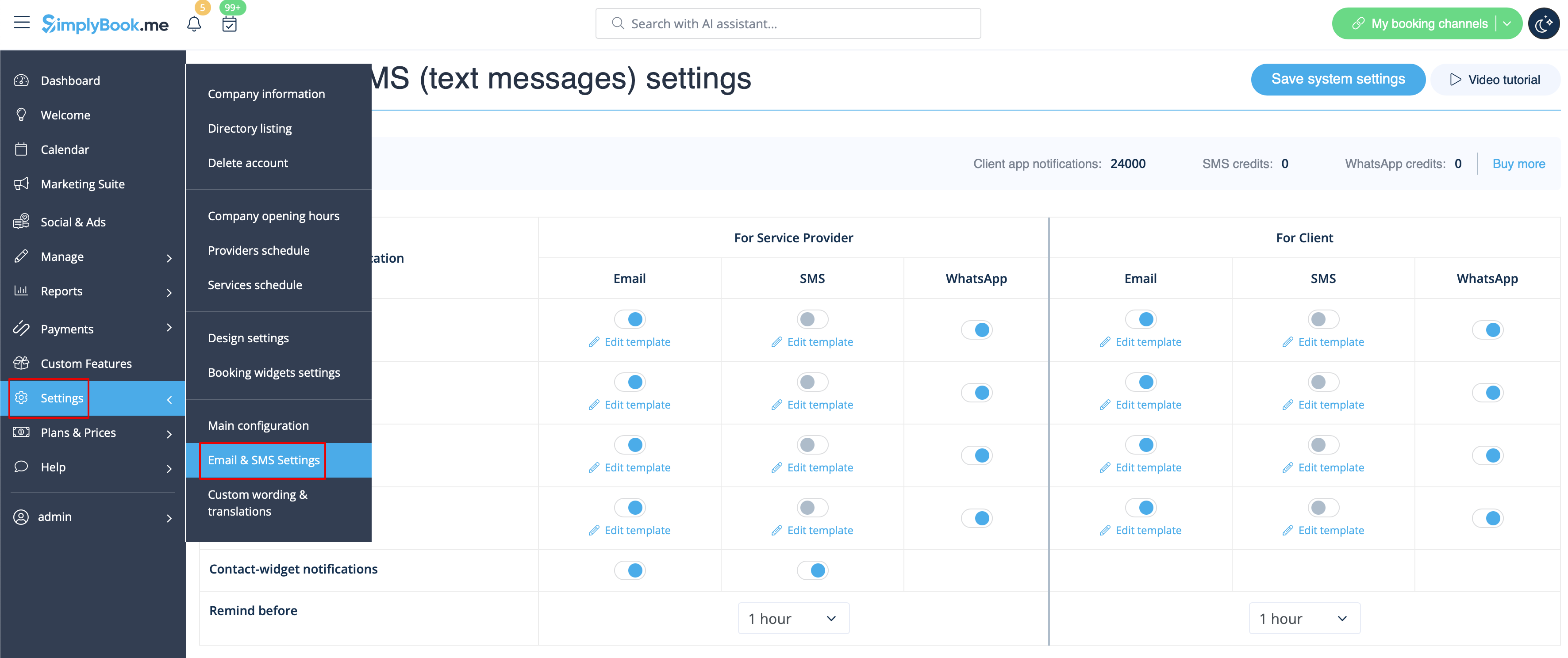
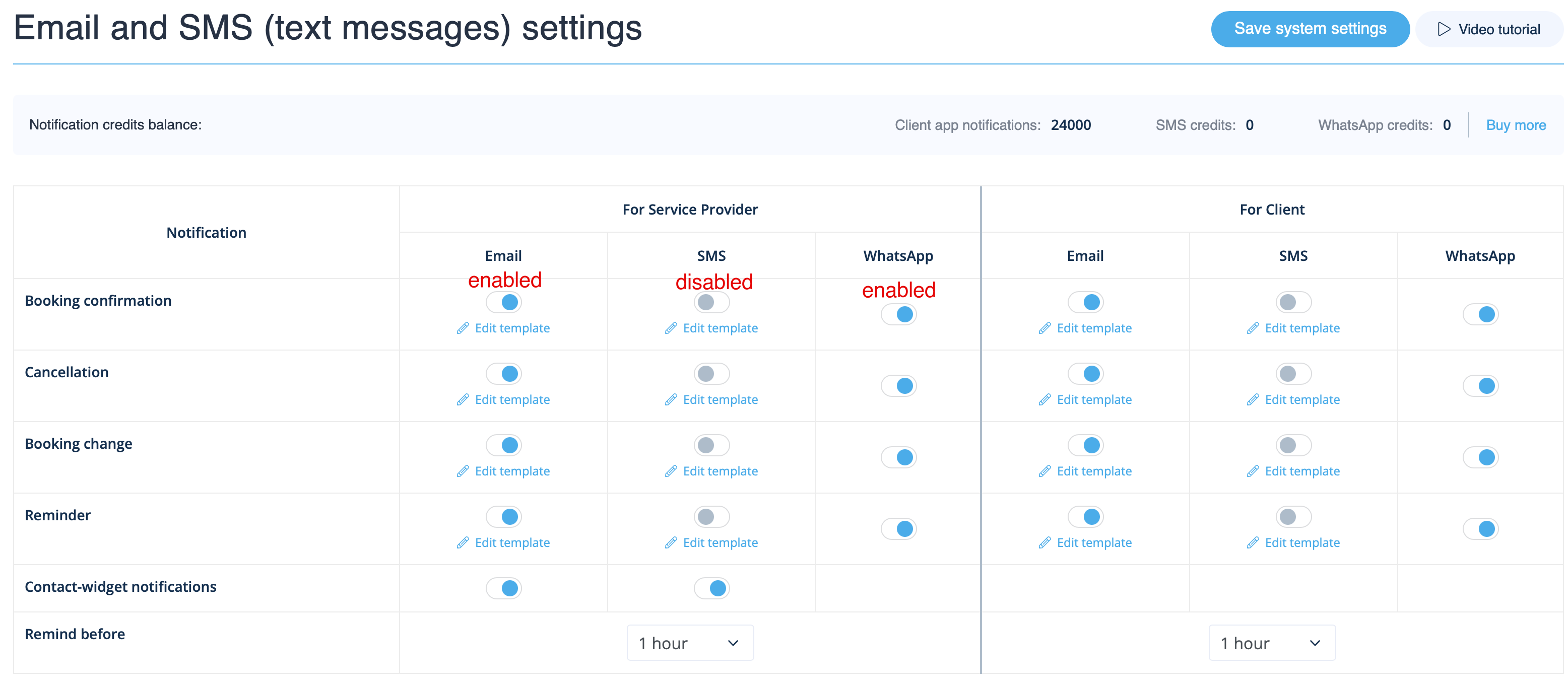
Allez dans Paramètres -> Paramètres e-mail et SMS et cochez/décochez les cases correspondantes pour envoyer/ne pas envoyer les notifications. Vous pouvez modifier le texte des notifications pour mieux l'adapter à vos besoins en cliquant sur Modifier le modèle, en apportant les modifications souhaitées et en enregistrant les paramètres système.
Notifications WhatsApp
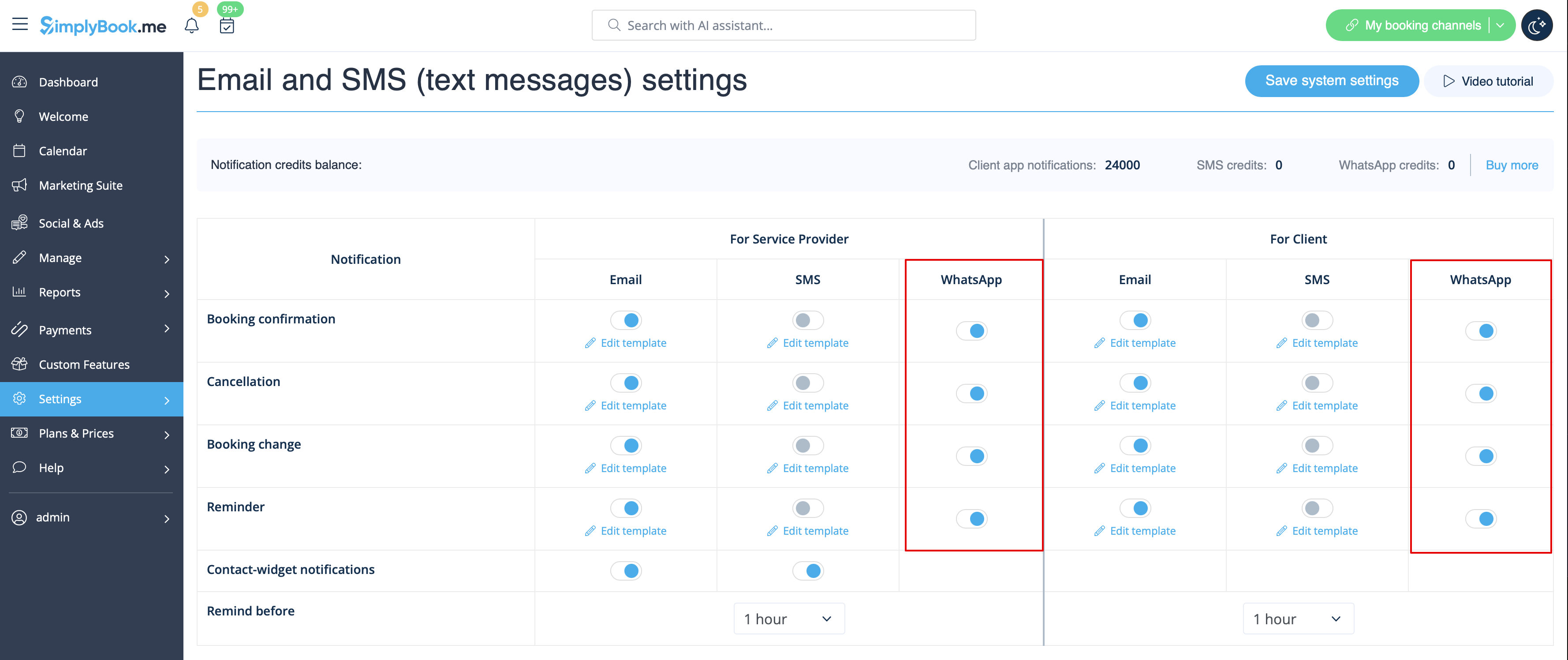
Si vous et vos clients utilisez activement WhatsApp Messenger, vous pouvez recevoir des notifications relatives aux réservations sur cette plateforme.
- Comment utiliser
1. Activez les types de notifications WhatsApp souhaités dans Paramètres -> Paramètres e-mail et SMS
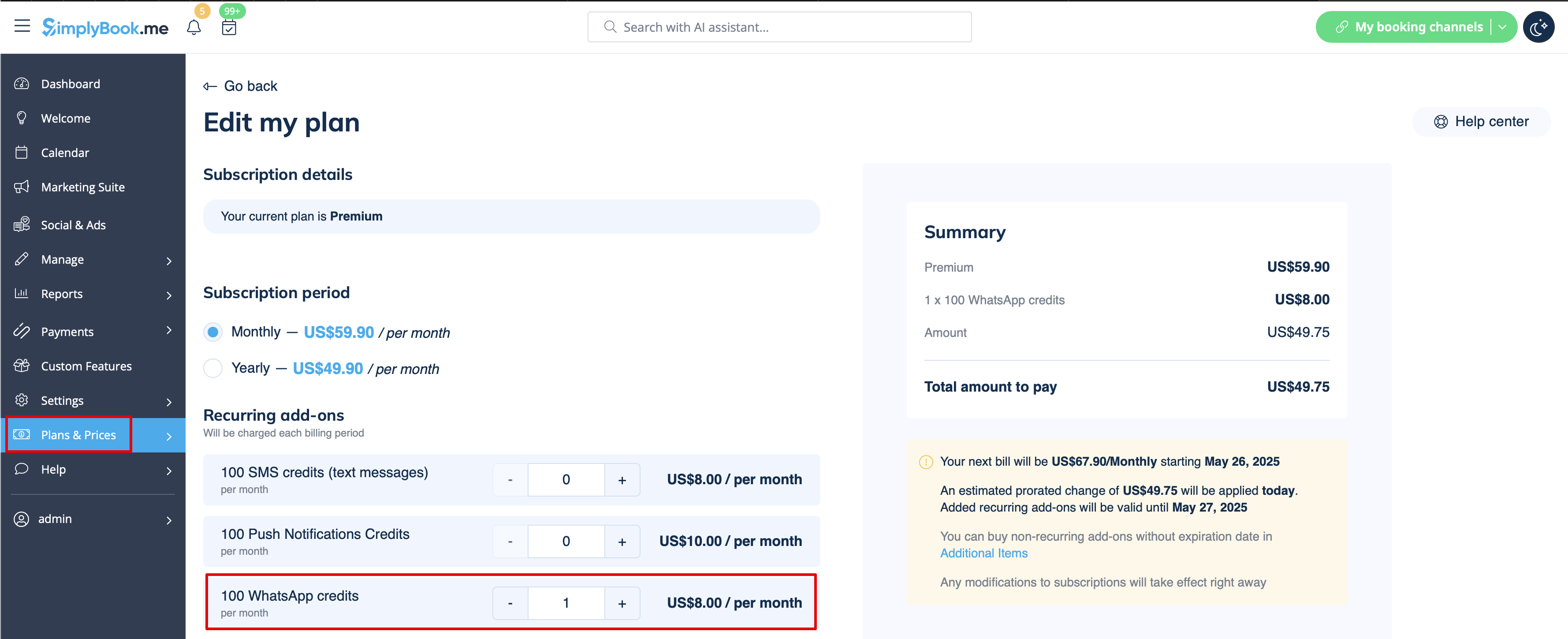
2. Achetez des crédits WhatsApp dans Plans et tarifs -> Abonnements ou Éléments supplémentaires selon que vous souhaitez que les crédits soient renouvelés automatiquement avec votre abonnement ou que vous préférez un achat unique.
(Vous pourrez également consulter les messages envoyés par le système ainsi que le nombre de crédits utilisés dans Rapports -> SMS (messages texte) -> Notifications WhatsApp)
Remarque importante ! Conformément à la politique de WhatsApp, les messages utilisent des modèles préapprouvés et ne peuvent pas être personnalisés. Ces modèles couvrent les informations essentielles de manière claire et professionnelle.
Application mobile Admin
Si vous utilisez l'application mobile Admin, vous pouvez recevoir des notifications relatives aux réservations, telles que les confirmations, les rappels, les modifications et les annulations.
Pour activer/désactiver ces notifications, veuillez vous rendre dans l'onglet Paramètres -> Gérer les notifications dans l'application mobile Admin.
Comment désactiver les commentaires
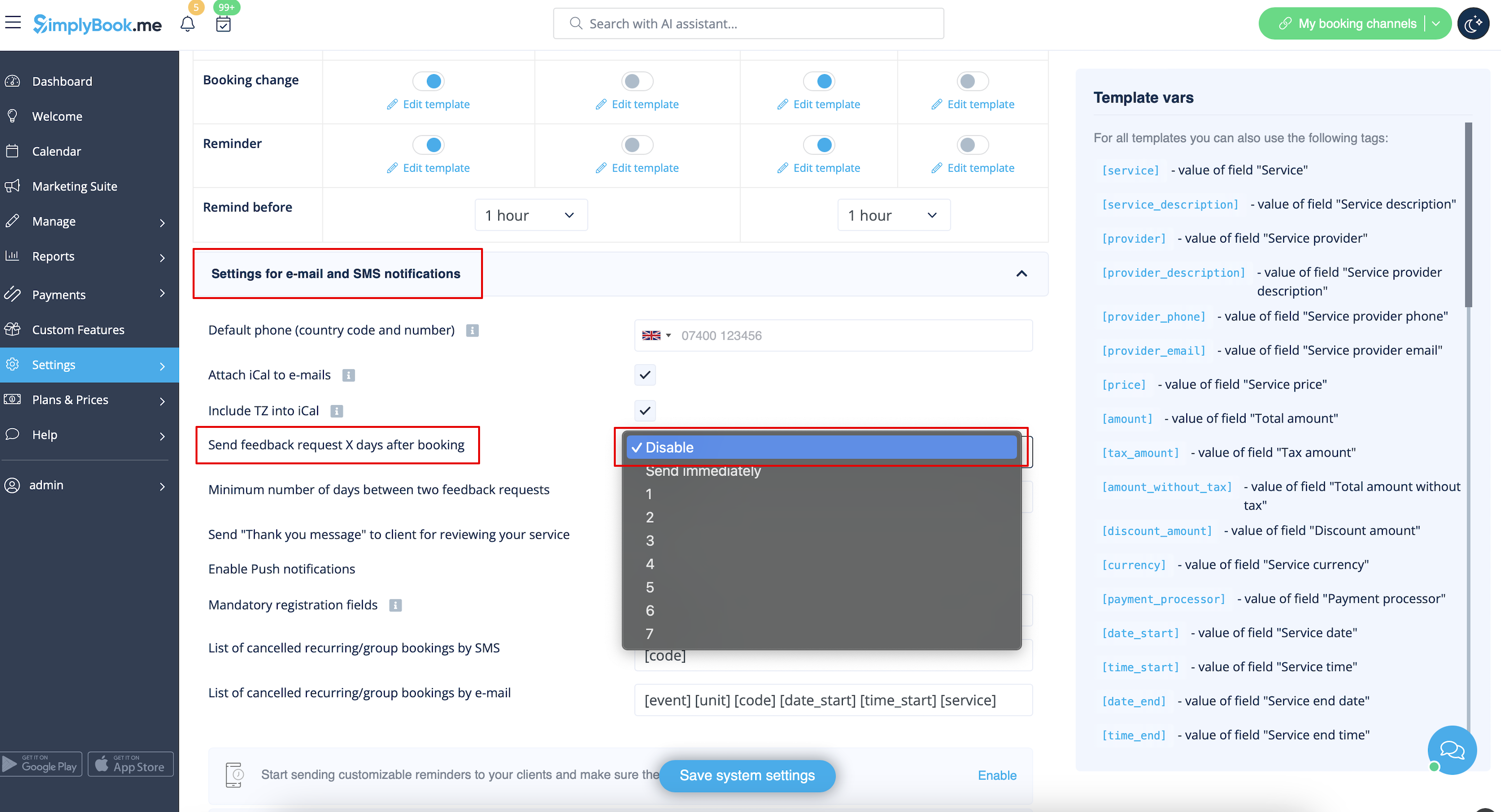
Vous pouvez consulter tous vos avis dans l'onglet Rapports -> Avis dans le menu de gauche, les supprimer ou y répondre. Si vous souhaitez supprimer la possibilité de laisser un avis et ne pas envoyer de demande de commentaires, allez dans Paramètres -> Paramètres e-mail et SMS -> Paramètres pour les notifications par e-mail et SMS -> définissez le nombre de jours avant l'envoi de la demande de commentaires au client sur Désactiver.
Notifications liéesaux fonctionnalités personnalisées
Les fonctionnalités personnalisées suivantes ont leurs propres types de notifications ou peuvent influencer les messages envoyés par le système :
Accepter les paiements
Permet d'envoyer :
- Factures aux clients (modèle d'e-mail)
- Notifications de paiements échoués au client (modèle d'e-mail)
- Notifications de paiements échoués à l'entreprise (modèle d'e-mail)
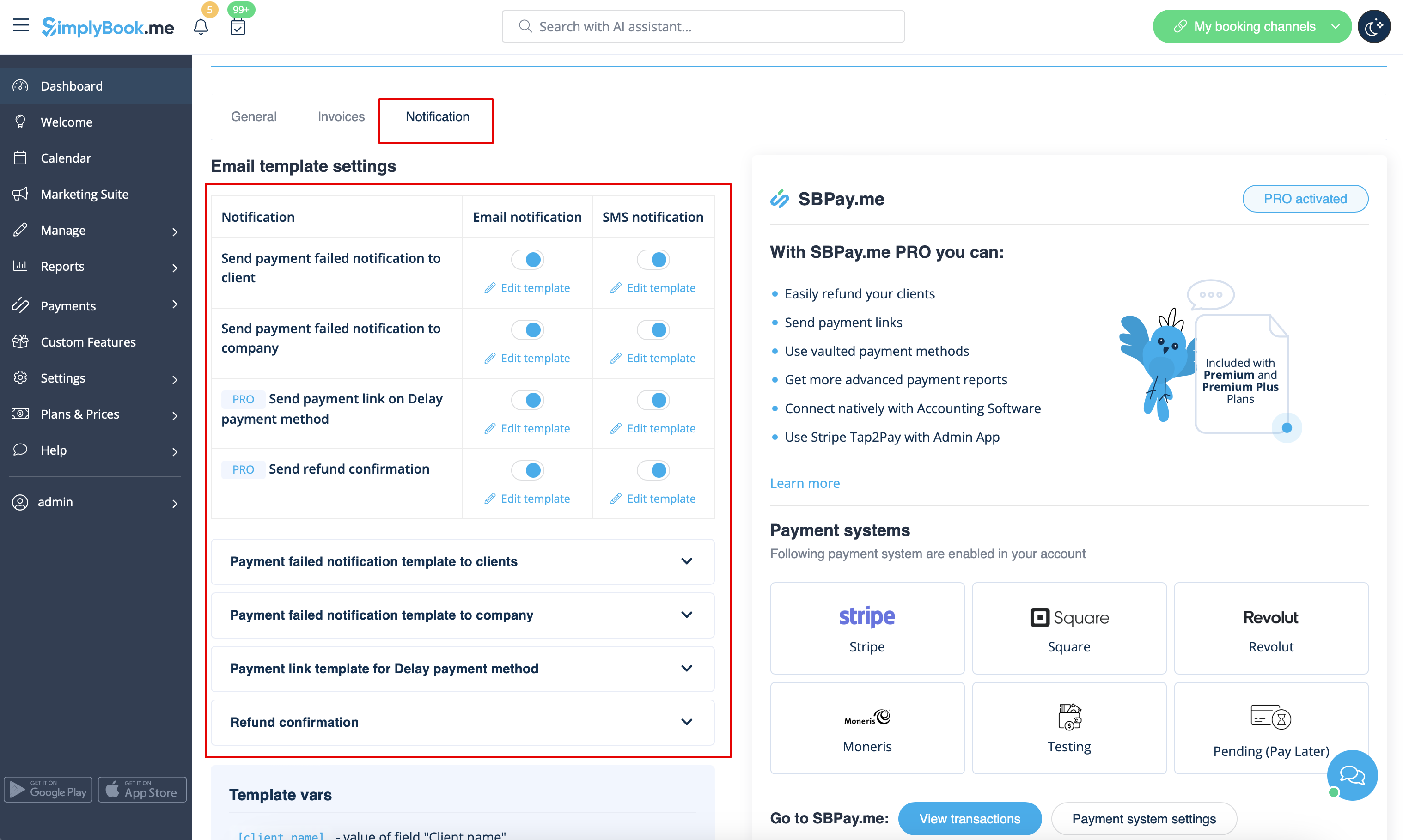
Tous ces modèles peuvent être modifiés dans Fonctionnalités personnalisées -> Accepter les paiements -> Paramètres -> Paramètres du modèle d'e-mail.
- En savoir plus sur l'utilisation de cette fonctionnalité personnalisée.
Réservations multiples
Dispose de ses propres modèles pour :
- Notification de confirmation de réservation au client (modèles d'e-mail et de SMS)
- Notification de rappel de réservation au client (modèles d'e-mail et de SMS)
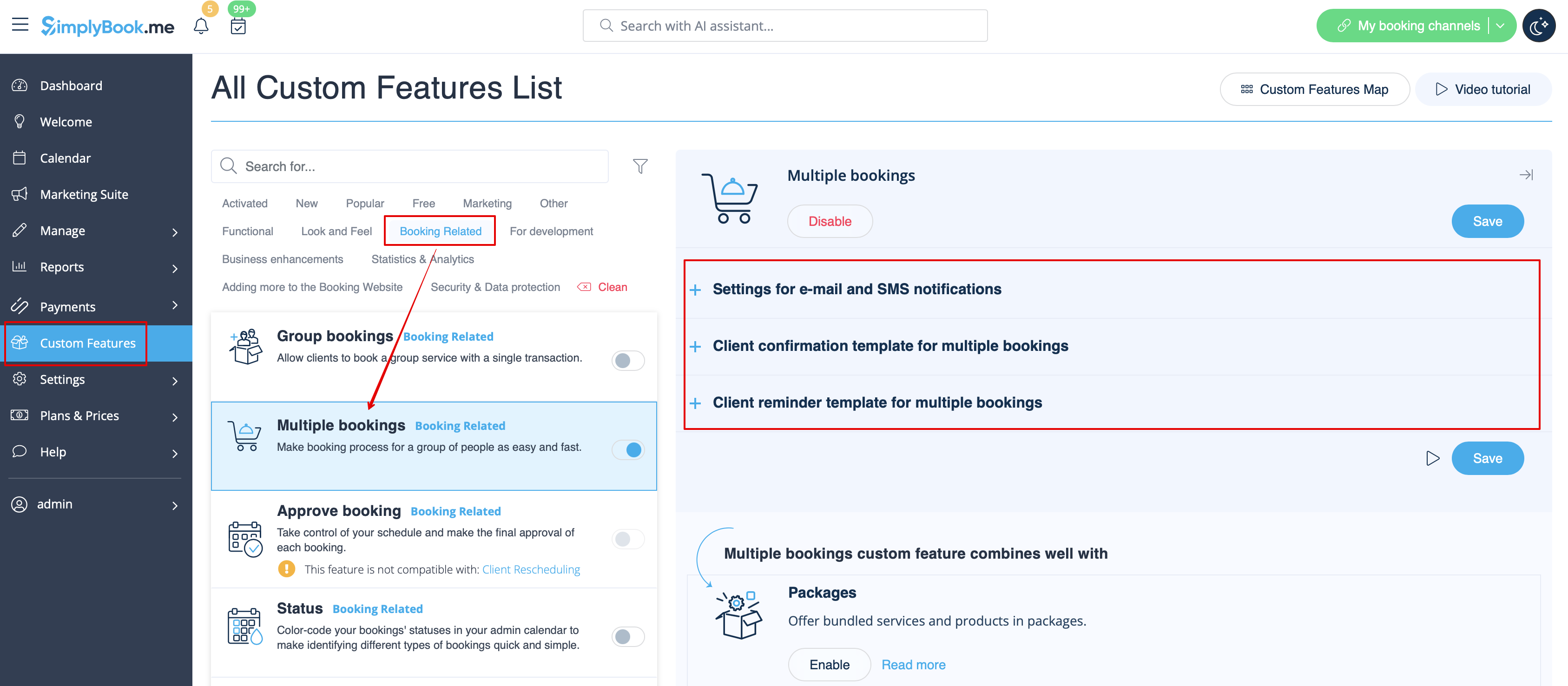
Les deux types sont automatiquement appliqués lorsque cette fonctionnalité personnalisée est activée et que les clients prennent plusieurs rendez-vous à la fois à l'aide du bouton « Ajouter un autre service » lors du paiement. Les textes des modèles peuvent être modifiés dans Fonctionnalités personnalisées -> Réservations multiples -> sur le côté droit de la page.
- En savoir plus sur l'utilisation de cette fonctionnalité personnalisée.
Réservations de groupe
Il existe des modèles spéciaux pour les types suivants :
- Notification de confirmation de réservation au client (modèles d'e-mail et de SMS)
- Notification de rappel de réservation au client (modèles d'e-mail et de SMS)
- Notification de confirmation de réservation au prestataire (modèles d'e-mail et de SMS)
- Notification de rappel de réservation au prestataire (modèles d'e-mail et de SMS)
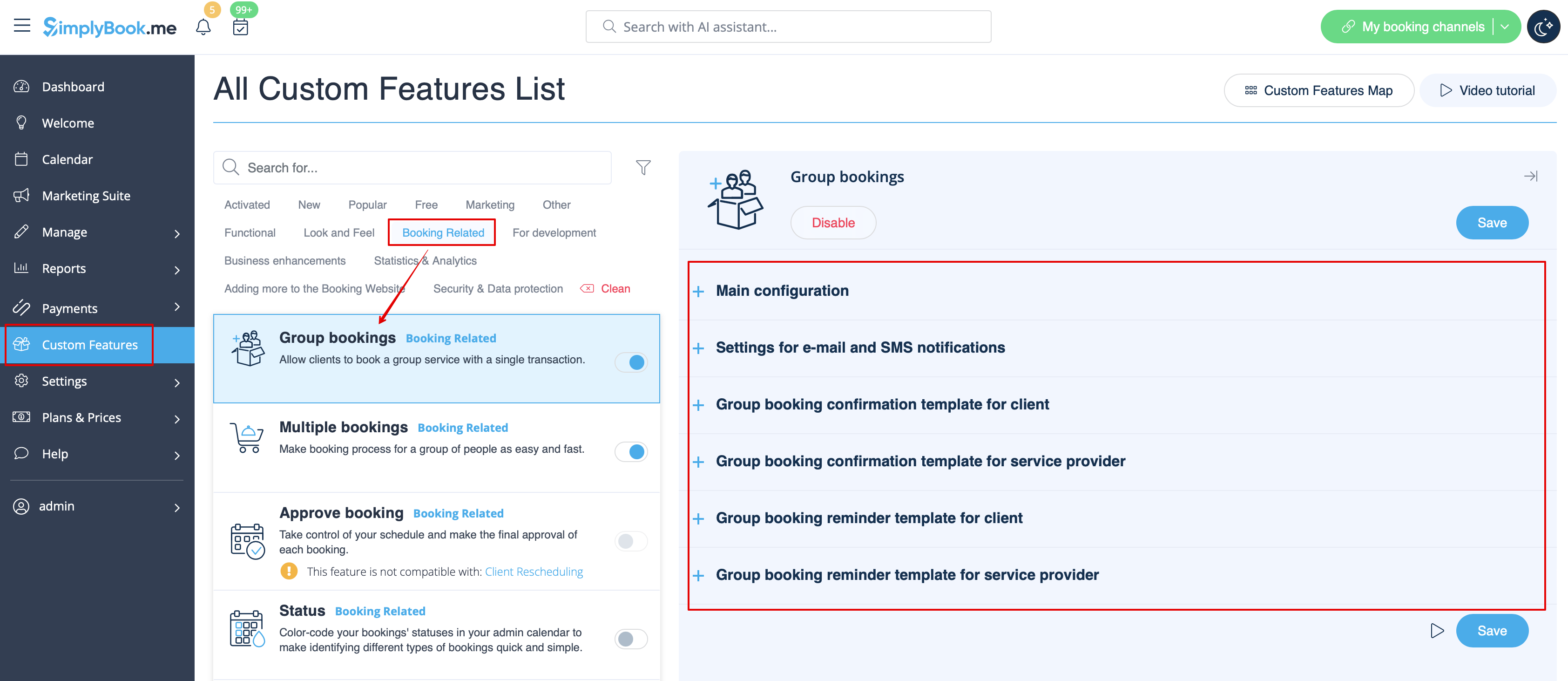
Ils seront automatiquement appliqués lorsque cette fonctionnalité personnalisée est activée et que le client réserve un rendez-vous en sélectionnant plusieurs participants à l'étape du service du processus de réservation. Tous les modèles peuvent être modifiés dans Fonctionnalités personnalisées -> Réservations de groupe -> à droite de la page.
- En savoir plus sur l'utilisation de cette fonctionnalité personnalisée.
Système de notification « Réservez bientôt »
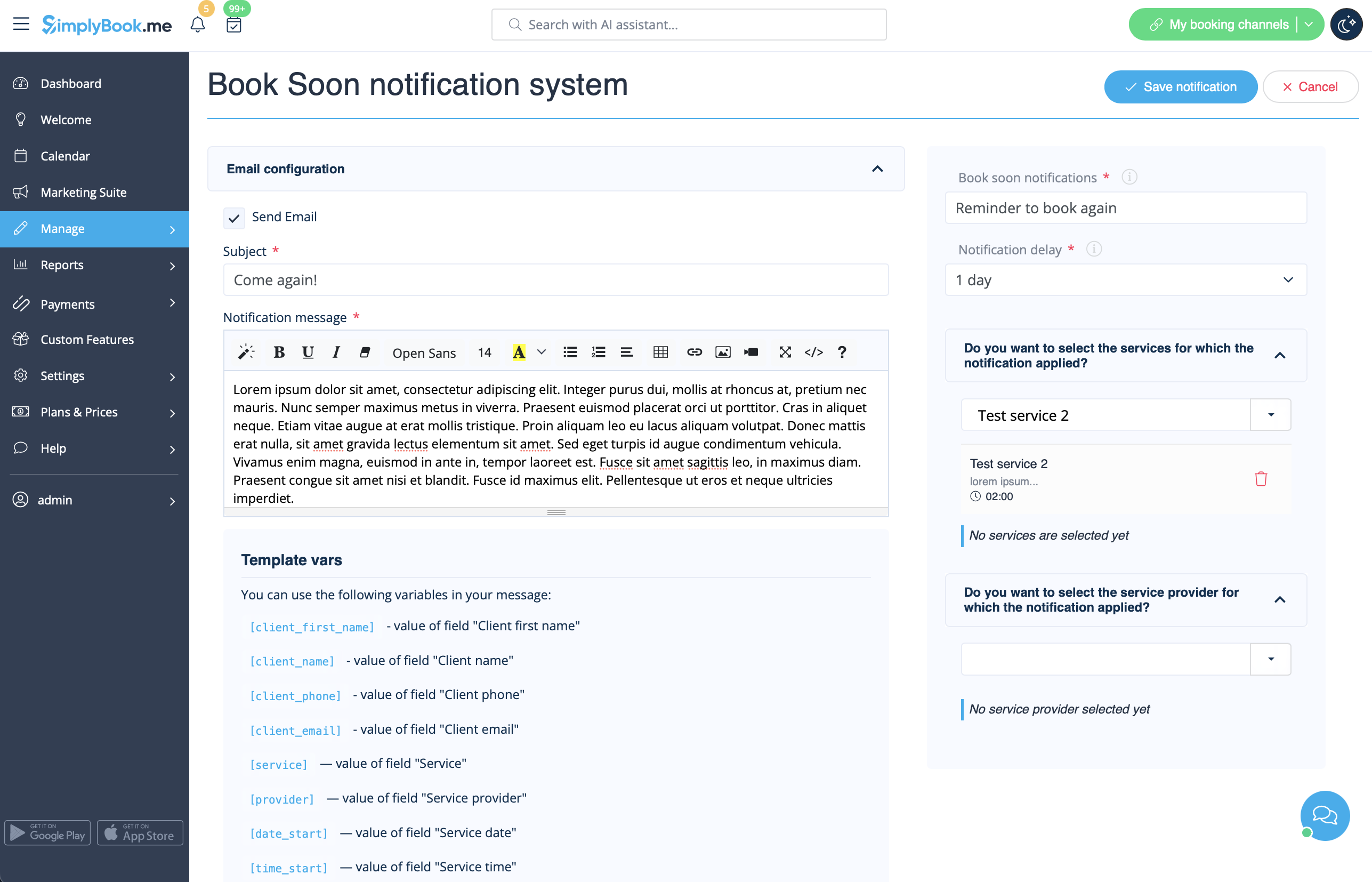
Permet d'envoyer des rappels aux clients qui ont déjà réservé afin qu'ils reviennent.
Les modèles peuvent être définis dans Fonctionnalités personnalisées -> Système de notification « Réservez rapidement » -> Paramètres -> Ajouter nouveau pour créer un nouveau modèle (e-mail et SMS).
Vous pouvez créer de nombreux modèles spécifiques pour certains services/prestataires. Ils seront envoyés lorsque le délai indiqué depuis le rendez-vous du client aura expiré.
- En savoir plus sur l'utilisation de cette fonctionnalité personnalisée.
Coupons et cartes-cadeaux
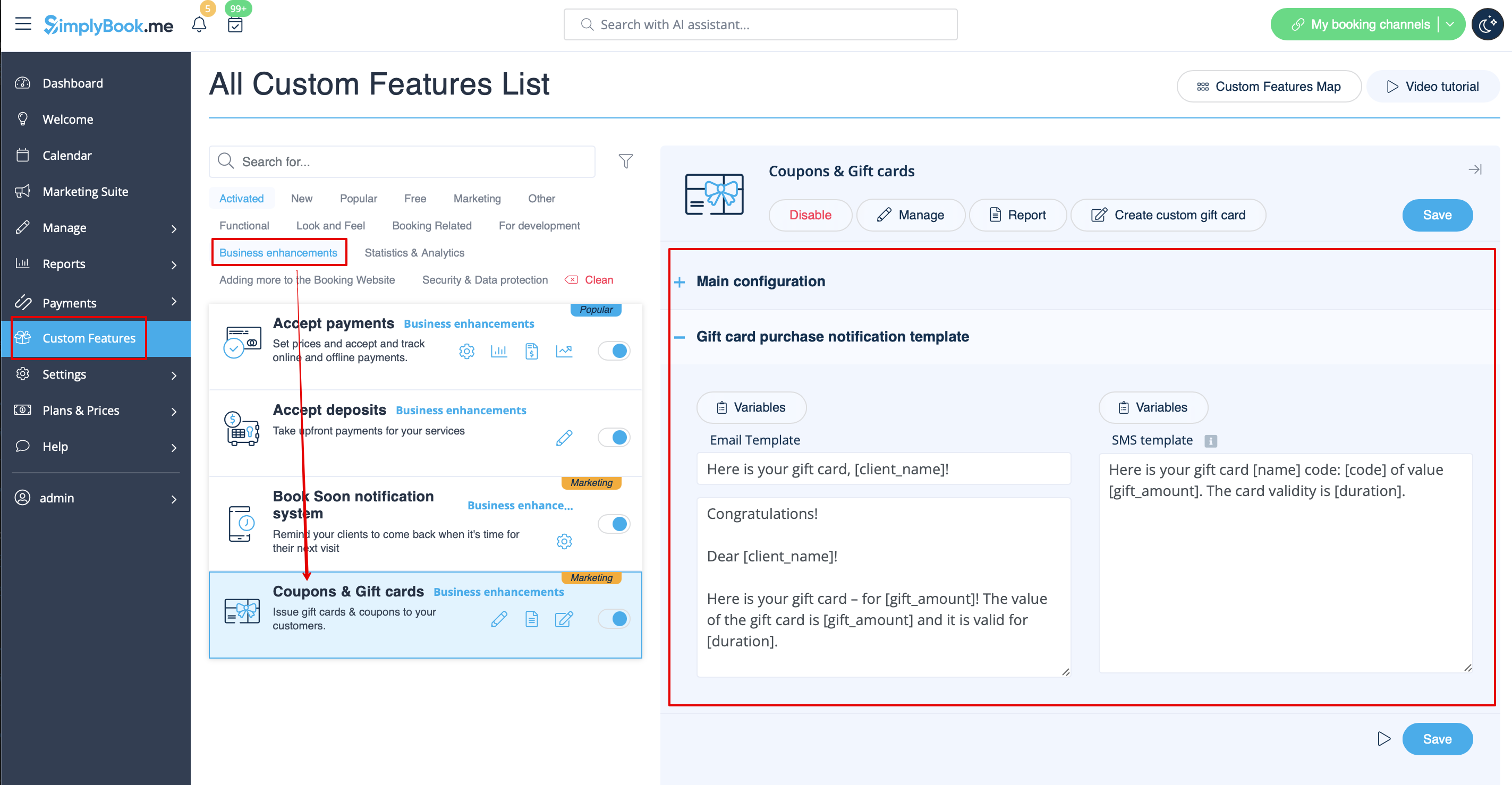
Vous pouvez envoyer des notifications spécifiques dans les cas suivants lorsque vous utilisez cette fonctionnalité personnalisée :
- le client achète une carte cadeau sur le site web de réservation (modèles d'e-mails et de SMS)
Ce modèle de notification peut être activé/désactivé et modifié dans Fonctionnalités personnalisées -> Coupons et cartes cadeaux -> sur le côté droit de la page.
De même, si vous émettez manuellement une carte-cadeau ou un coupon à vos clients, le modèle qui sera utilisé dans ce cas est accessible dans Gérer -> Coupons et cartes-cadeaux -> Émettre la carte-cadeau / Envoyer le message du coupon pour la carte-cadeau/le coupon souhaité -> Envoyer un e-mail/Envoyer un SMS.
- En savoir plus sur l'utilisation de cette fonctionnalité personnalisée.
Application mobile client
Si cette fonctionnalité est activée et que le client a autorisé les notifications, l'application mobile enverra des notifications push liées aux réservations.
Il n'est pas possible de modifier le modèle, mais vous pouvez consulter le rapport des notifications dans Rapports -> Rapport des notifications push.
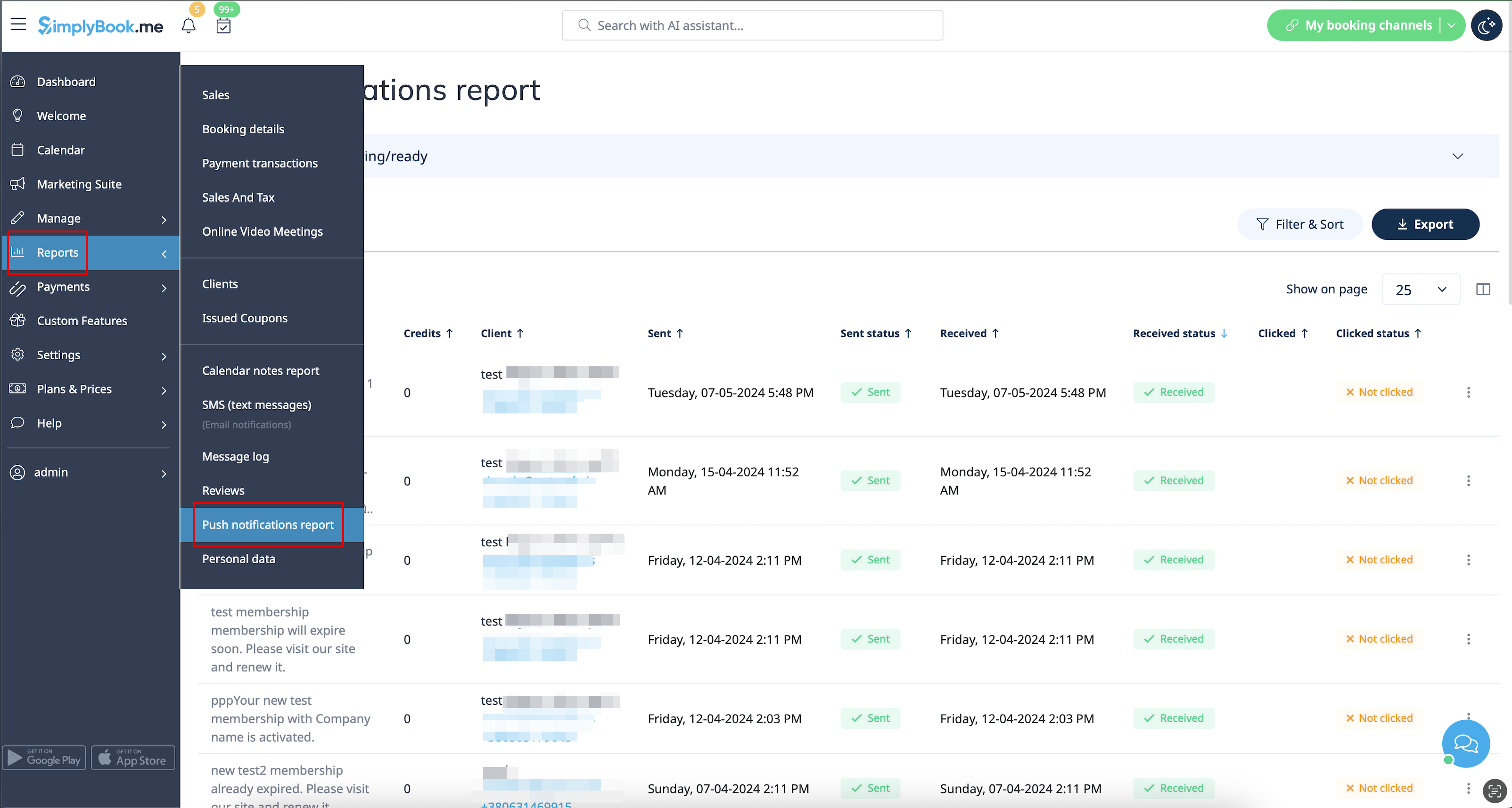
Remarque : vous devez disposer d'un nombre suffisant de crédits de notifications push pour pouvoir envoyer ces notifications aux clients.
- Pour en savoir plus sur l'utilisation de cette fonctionnalité personnalisée,consultez
Connexion client
Si vous exigez que les clients se connectent/s'inscrivent pour pouvoir réserver des rendez-vous ou effectuer des achats sur votre site web de réservation et que vous avez activé la fonctionnalité personnalisée de connexion client,
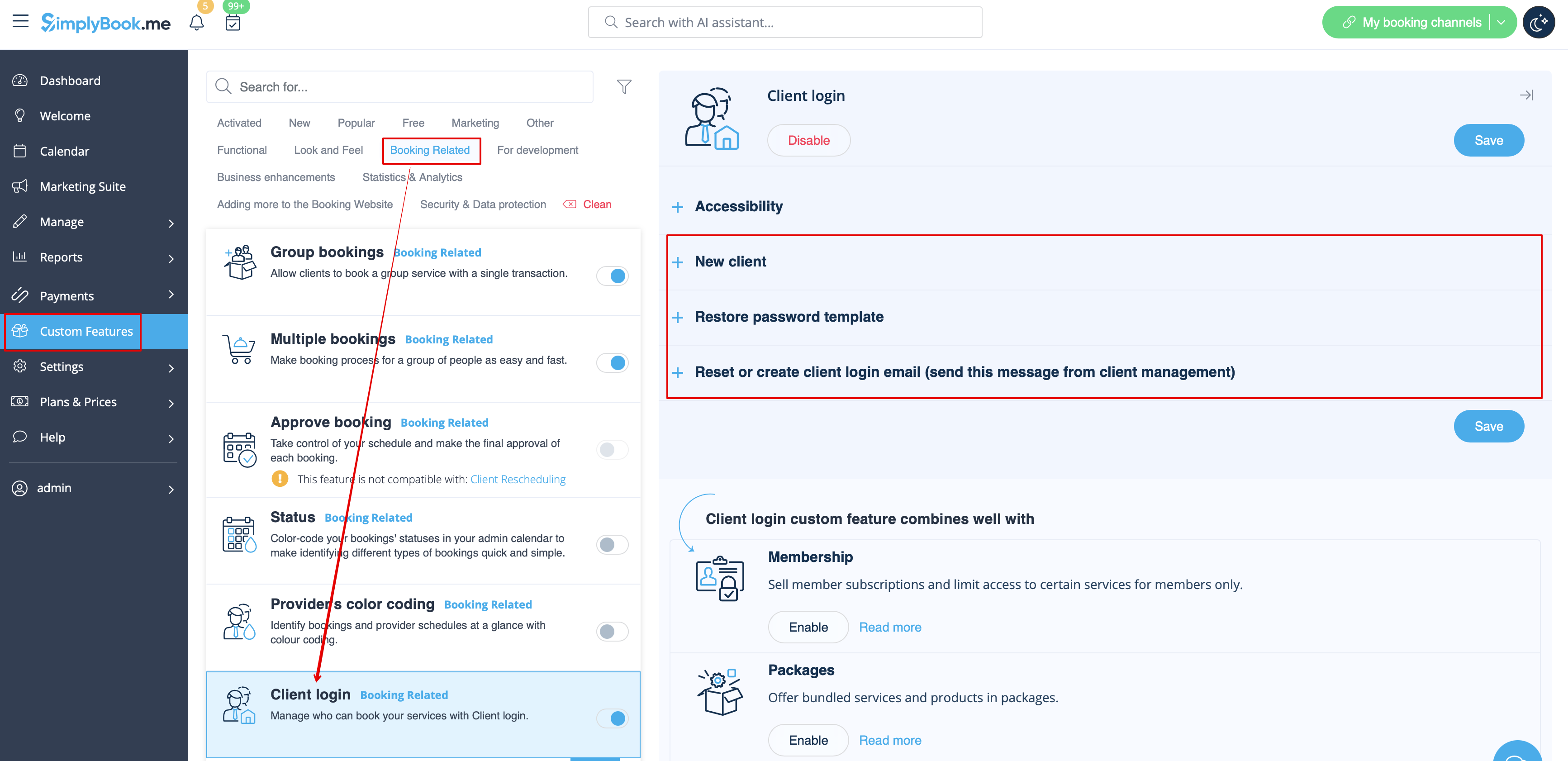
trois types de notifications peuvent être envoyés à vos clients (elles ne peuvent pas être désactivées) :
- inscription d'un nouveau client (e-mail)
- réinitialisation du mot de passe (e-mail)
- réinitialisation du mot de passe ou création d'un client à partir de l'interface d'administration (e-mail)
Vous pouvez modifier les modèles dans Fonctionnalités personnalisées -> Connexion client -> sur le côté droit de la page.
- En savoir plus sur l'utilisation de cette fonctionnalité personnalisée.
Adhésion
Lorsque vous vendez des adhésions sur le site web de réservation, vous devrez peut-être également informer vos clients des différents points.
Cette fonctionnalité personnalisée permet d'envoyer :
- notification d'activation de l'adhésion (modèles d'e-mail et de SMS)
- notification de paiement récurrent (modèles d'e-mail et de SMS)
- erreur de paiement récurrent (modèles d'e-mail et de SMS)
- paiement récurrent réussi (modèles d'e-mail et de SMS)
- fin de la période d'adhésion (modèles d'e-mail et de SMS)
- l'adhésion expire aujourd'hui (modèles d'e-mail et de SMS)
- notification d'expiration de l'adhésion (modèles d'e-mail et de SMS)
Vous pouvez modifier les modèles ainsi qu'activer/désactiver certains types de notifications dans Fonctionnalités personnalisées -> Adhésion -> à droite de la page.
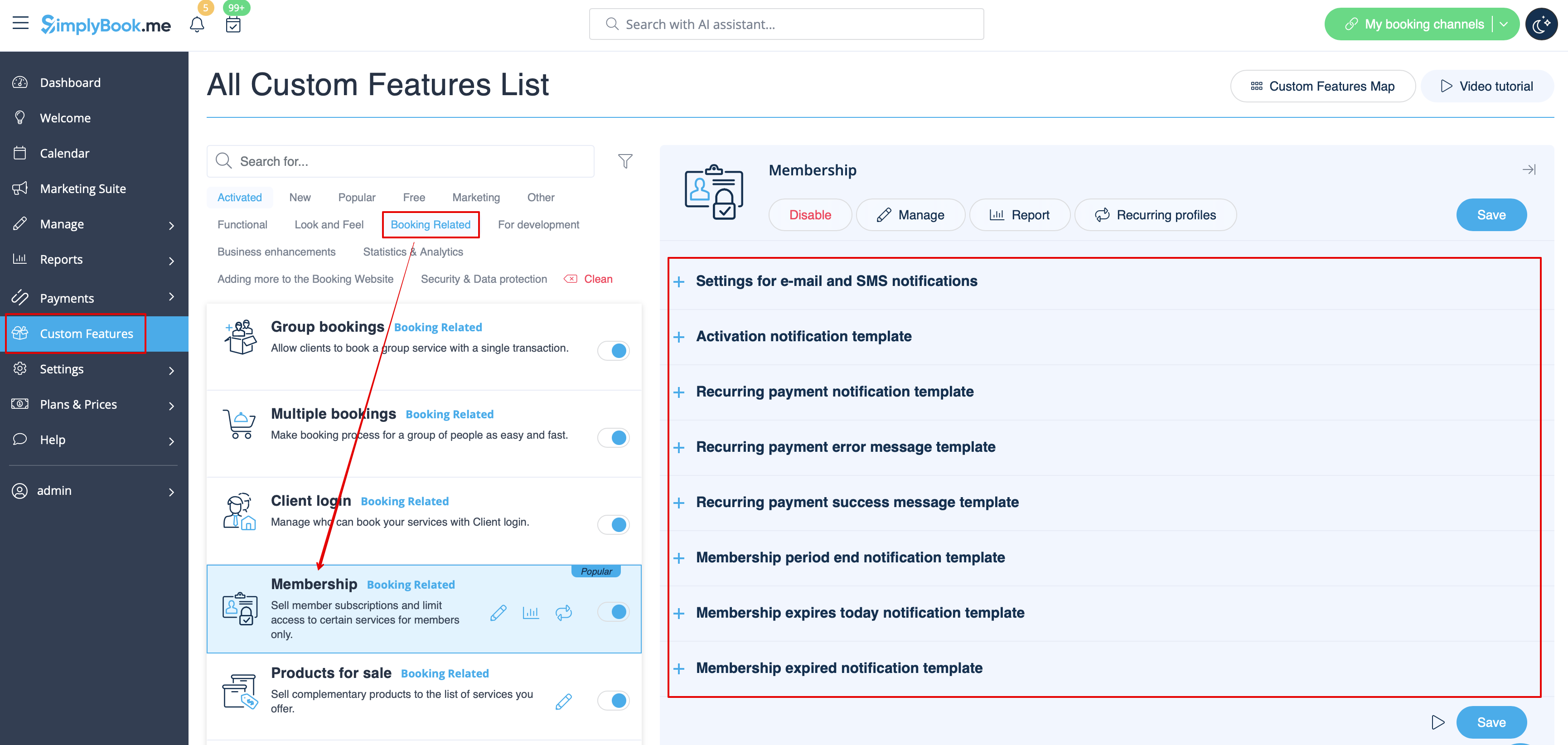
- En savoir plus sur l'utilisation de cette fonctionnalité personnalisée.
Notifications flexibles
Cette fonctionnalité personnalisée permet de personnaliser les notifications liées à la réservation pour un service, un prestataire ou les deux.
Les types suivants peuvent être utilisés :
- confirmation de réservation au client (modèles d'e-mail et de SMS)
- confirmation de réservation au prestataire (modèles d'e-mail et de SMS)
- rappel au client (modèles d'e-mail et de SMS)
- rappel au prestataire (modèles d'e-mail et de SMS)
- notification d'annulation au client (modèles d'e-mail et de SMS)
- notification d'annulation au prestataire (modèles d'e-mail et de SMS)
- notification de modification de réservation au client (modèles d'e-mail et de SMS)
- notification de modification de réservation au prestataire (modèles d'e-mail et de SMS)
- confirmation d'événement récurrent au client (modèles d'e-mail et Modèles SMS)
- confirmation d'événement récurrent au prestataire (modèles d'e-mails et de SMS)
- notification d'annulation groupée au client (modèles d'e-mails et de SMS)
- notification d'annulation groupée au prestataire (modèles d'e-mails et de SMS)
- confirmationde réservation groupéede plusieurs réservations au client (modèles d'e-mails et de SMS)
- rappel d'événementde plusieurs réservations au client (modèles d'e-mails et de SMS)
- confirmationde réservation groupée de réservations de groupe au client (modèles d'e-mails et de SMS)
- confirmationde réservation groupéede réservations de groupe au prestataire (modèles d'e-mails et de SMS)
- rappelde réservations de groupe au client (modèles d'e-mails et SMS)
- rappeldes réservations de groupe au prestataire (modèles d'e-mails et de SMS)
Vous pouvez créer tous les modèles souhaités dans Fonctionnalités personnalisées -> Notifications flexibles -> Gérer.
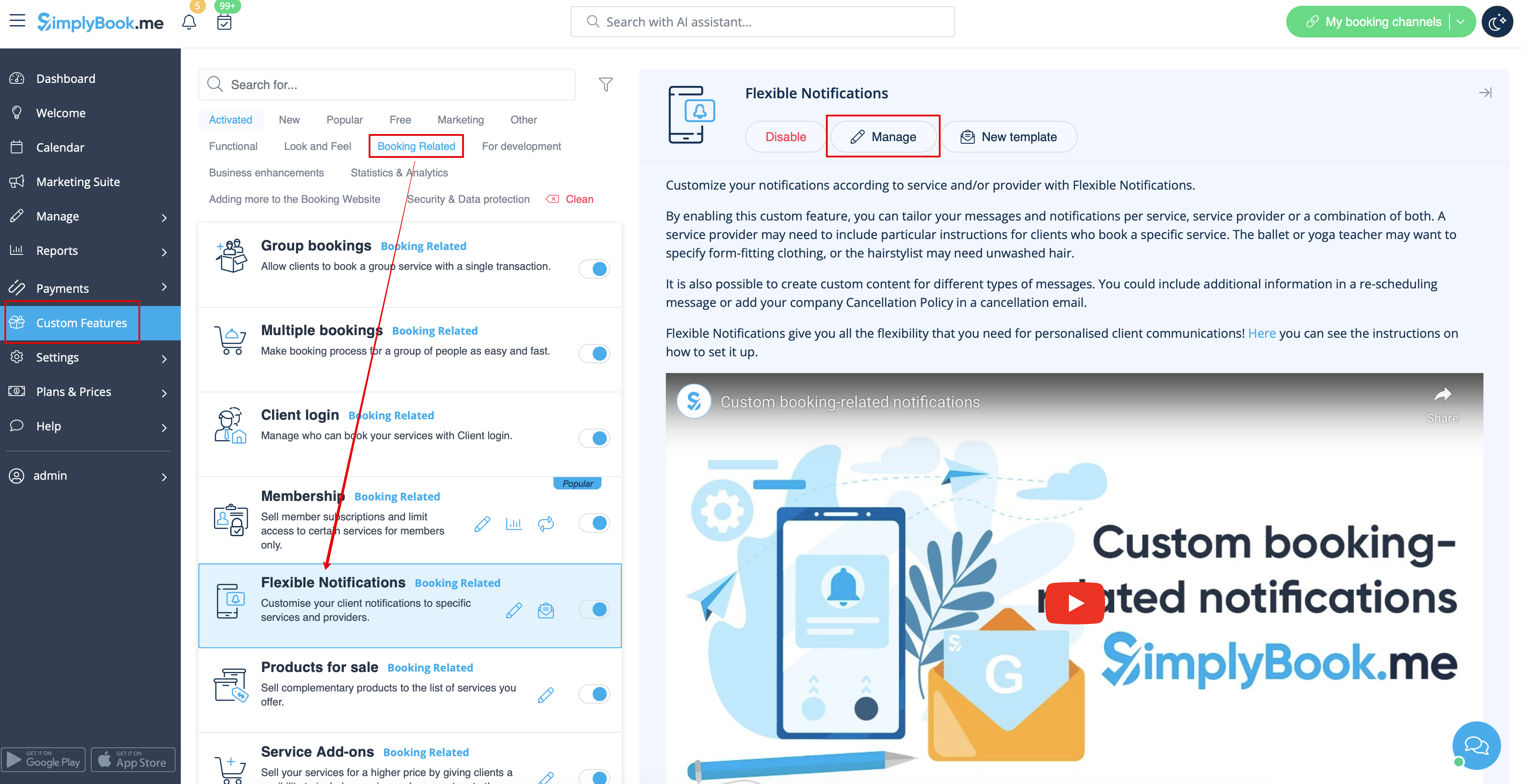
Si vous devez activer/désactiver certains de ces types de notifications, veuillez vous rendre dans Paramètres -> Paramètres e-mail et SMS -> et utiliser le tableau en haut de la page.
Remarque : il s'agit des paramètres généraux des notifications de réservation. Si vous désactivez certains d'entre eux, cela aura également une incidence sur les types similaires liés à d'autres fonctionnalités (par exemple, si vous désactivez les confirmations de réservation aux prestataires, les confirmations courantes, ainsi que les notifications de confirmation de groupes et de lots récurrents seront également désactivées).
- Pour en savoir plus sur l'utilisation de cette fonctionnalité personnalisée,consultez
Forfaits
Lorsque vous vendez des forfaits de services/classes/produits/options supplémentaires ou que vous émettez des forfaits depuis l'interface d'administration, il est également possible d'envoyer automatiquement aux clients une notification d'activation du forfait (par e-mail et/ou SMS).
Pour modifier le texte du modèle ou activer/désactiver les notifications, veuillez vous rendre dans Fonctionnalités personnalisées -> Forfaits -> à droite de la page.
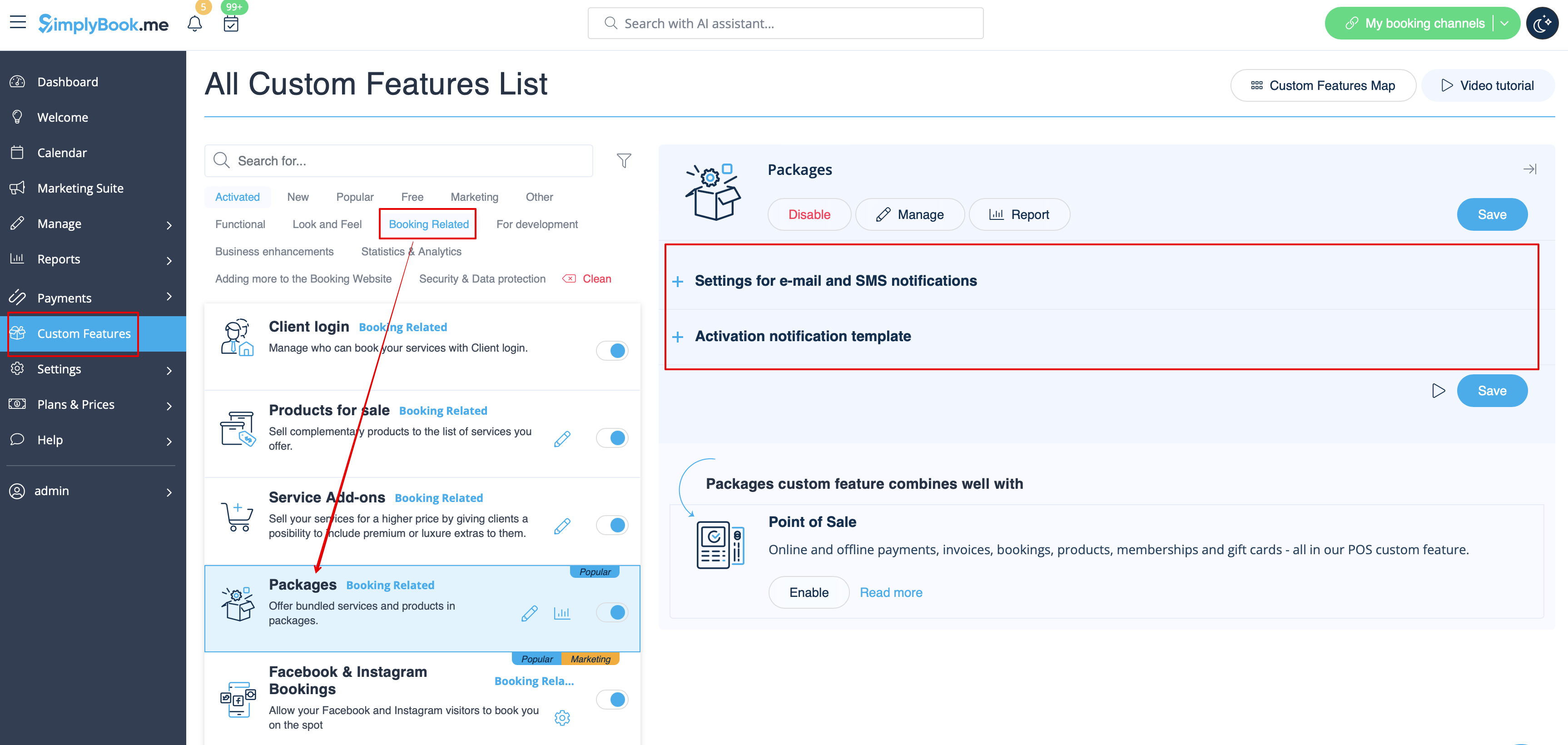
- En savoir plus sur l'utilisation de cette fonctionnalité personnalisée.
Tickets
Par défaut, le ticket est automatiquement envoyé à l'adresse e-mail du client avec l'e-mail de confirmation du service correspondant.
Toutefois, si vous utilisez les paiements en ligne et que vous autorisez l'option « payer plus tard » sur le site web de réservation et que le client la sélectionne,
le billet sera envoyé dans un e-mail séparé.
Vous pouvez également renvoyer le billet au client dans certains cas (cela est possible dans Rapports -> Rapport sur les billets).
Les deux modèles de notification peuvent être modifiés dans Fonctionnalités personnalisées -> Billets -> sur le côté droit de la page. Seuls les types d'e-mails sont disponibles.
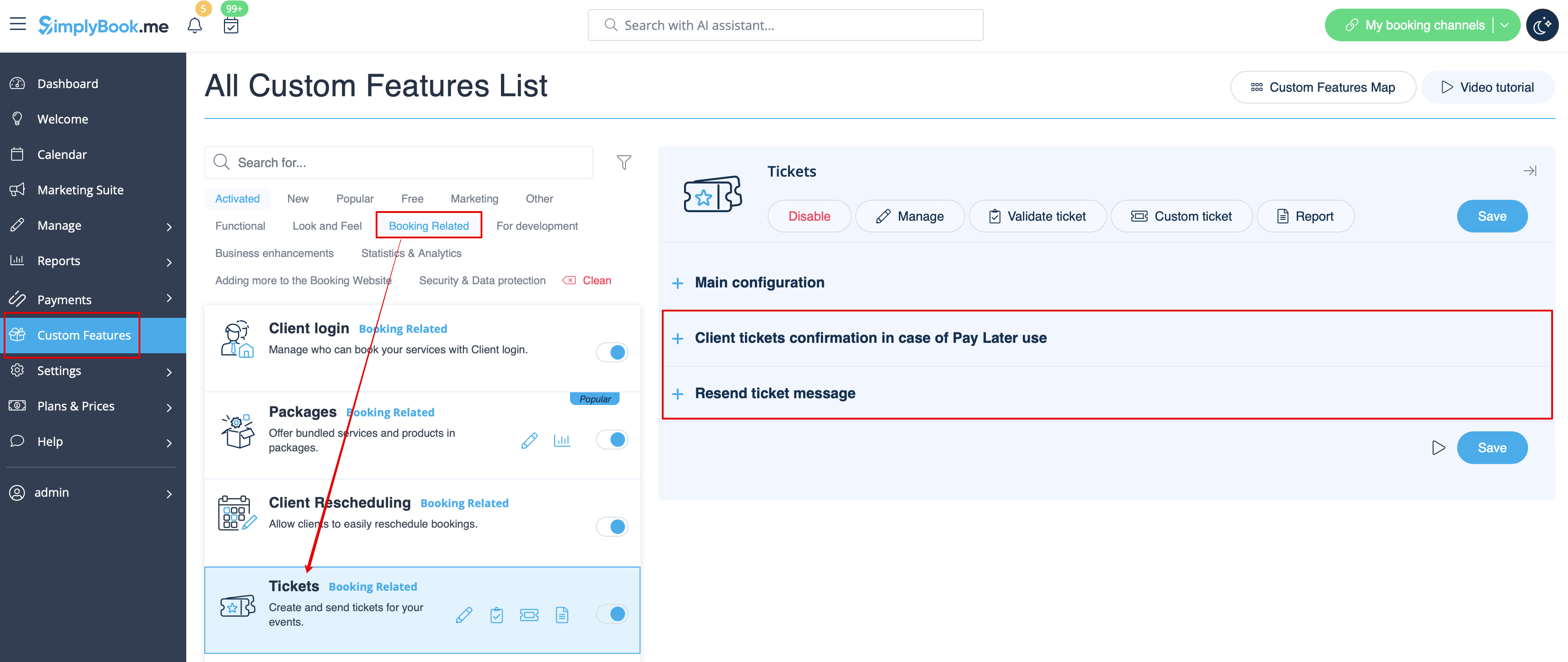
- En savoir plus sur l'utilisation de cette fonctionnalité personnalisée.
E-mail personnalisé
Permet de personnaliser la conception des notifications par e-mail afin qu'elles correspondent à votre image de marque et à vos goûts.
Pour créer vos designs, rendez-vous dans Fonctionnalités personnalisées -> E-mail personnalisé -> Créer un modèle.
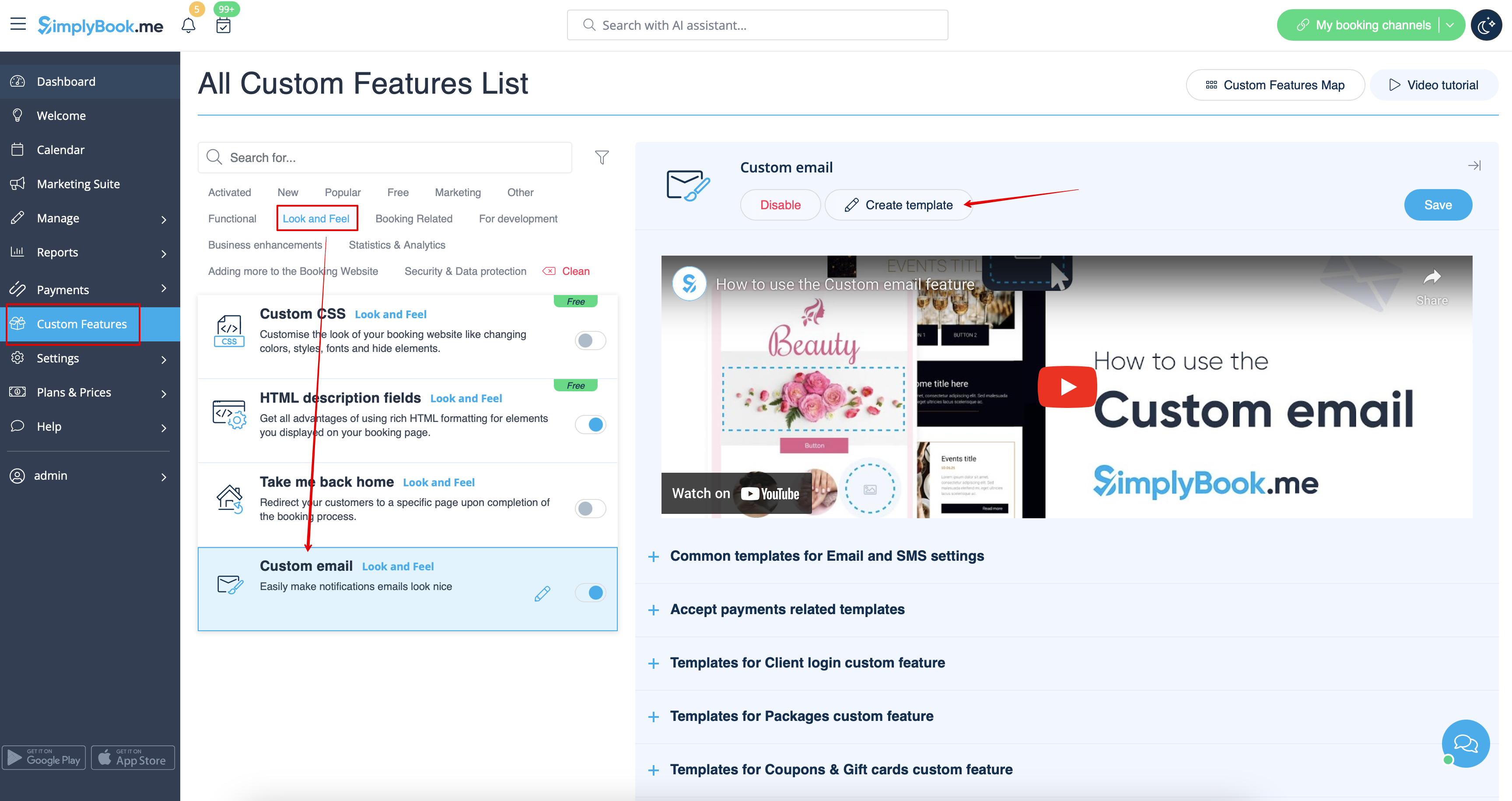
Grâce à cette fonctionnalité personnalisée, vous pouvez modifier l'apparence des types de notifications suivants :
- notifications courantes liées aux réservations dans Paramètres -> Paramètres e-mail et SMS ;
- e-mails de facturation de la fonctionnalité personnalisée « Accepter les paiements » ;
- notificationsde la fonctionnalité personnalisée «Réservations de groupe » ;
- notificationsde la fonctionnalité personnalisée« Réservations multiples » ;
- notificationsde la fonctionnalité personnalisée «Connexion client » ;
- notificationsde la fonctionnalité personnalisée «Adhésion » ;
- notificationsde la fonctionnalité personnalisée «Forfaits » ;
- notificationsde la fonctionnalité personnalisée «Billets » ;
- notifications de la fonctionnalitépersonnalisée « Coupons et cartes cadeaux » ;
- notifications de la fonctionnalité personnalisée« Test médical » ;
- notificationsde la fonctionnalité personnalisée «Système de notification de réservation rapide ».
Cette fonctionnalité permet de tester chaque type de notification avec le design pré-créé.
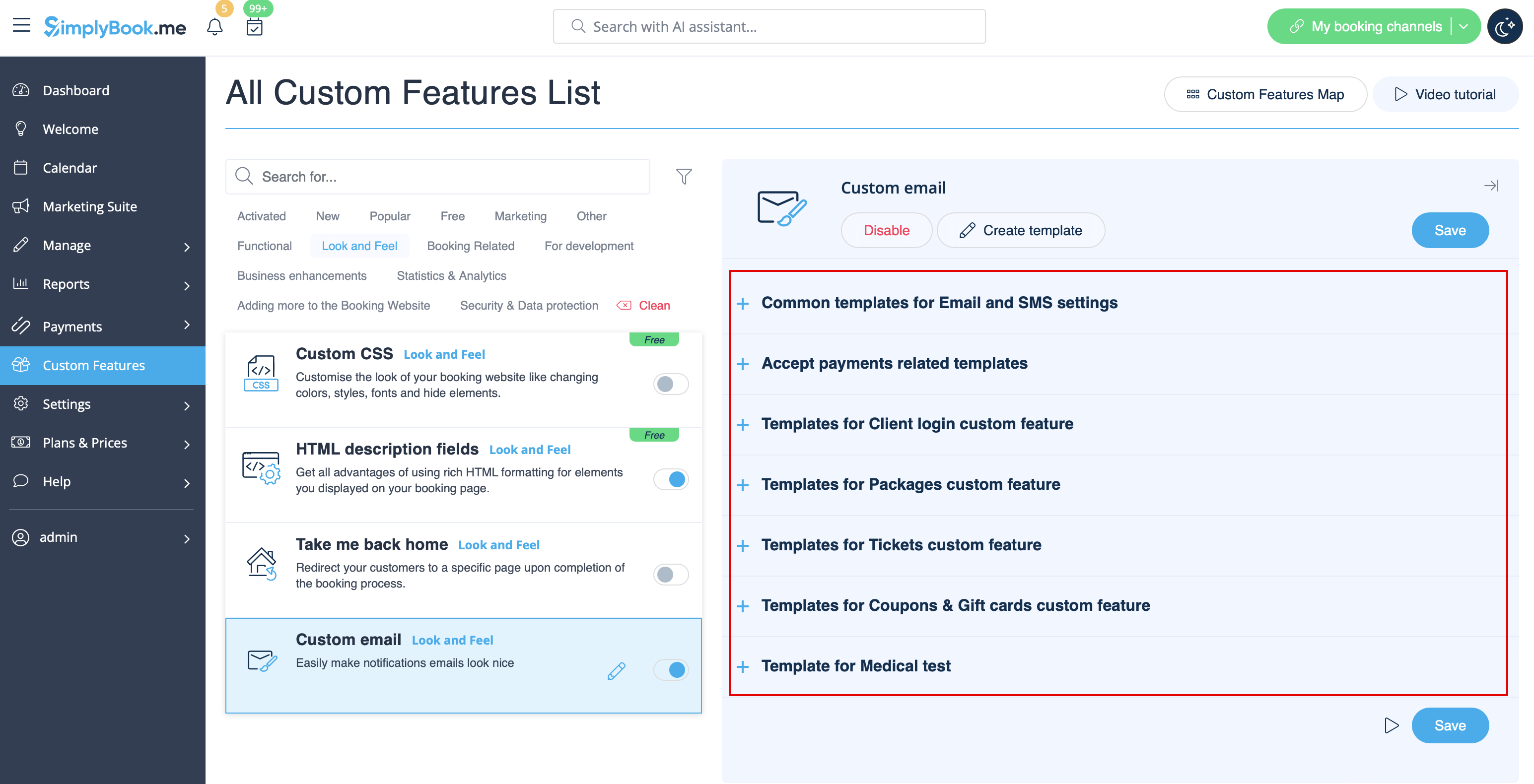
La balise {{content}} qui contient les informations de réservation/achat peut être modifiée dans les paramètres de la fonctionnalité correspondante.
- En savoir plus sur l'utilisation de cette fonctionnalité personnalisée.
SMTP
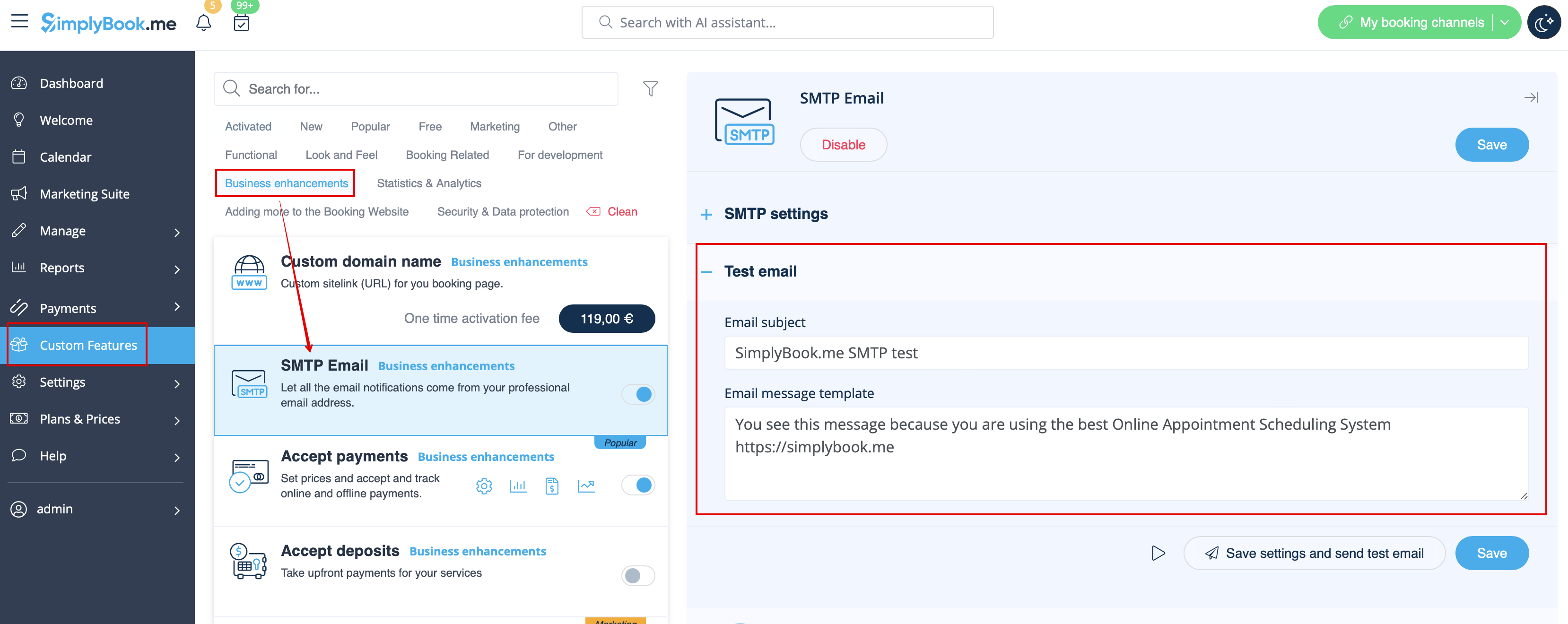
Cette fonctionnalité vous permet d'utiliser votre propre serveur SMTP pour envoyer les e-mails.
Elle ne dispose que d'un seul modèle pour tester cette fonctionnalité après avoir saisi les paramètres.
Vous pouvez modifier et utiliser le modèle d'e-mail de test dans Fonctionnalités personnalisées -> SMTP -> sur le côté droit de la page.
- En savoir plus sur l'utilisation de cette fonctionnalité personnalisée.
Rapport quotidien
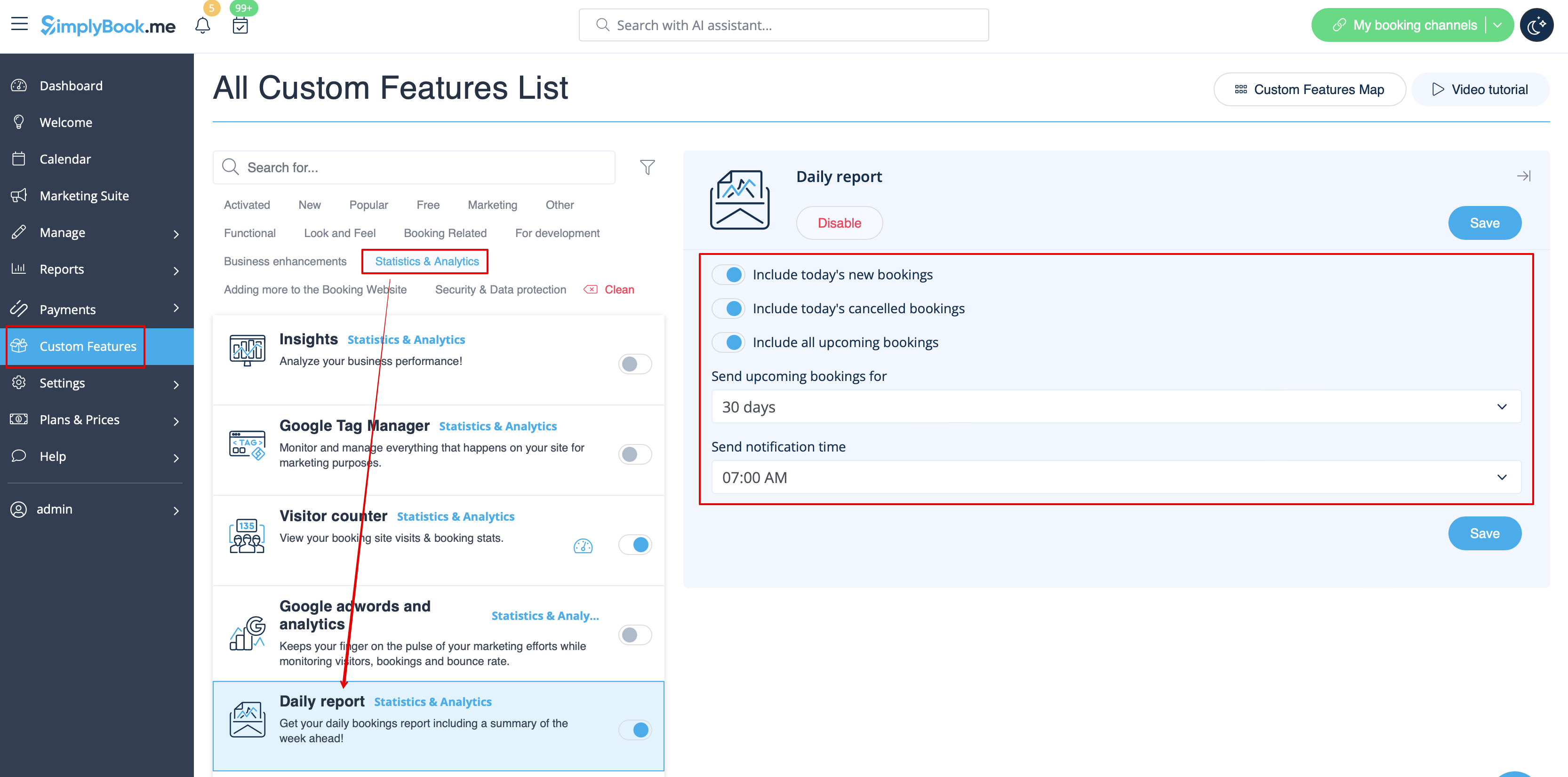
Lorsque vous activez et configurez cette fonctionnalité personnalisée, un rapport par e-mail concernant les rendez-vous nouveaux, à venir et annulés est automatiquement envoyé à l'adresse e-mail de votre entreprise.
Il n'y a pas de modèle à modifier en tant que tel, mais vous pouvez ajuster les éléments inclus dans Fonctionnalités personnalisées -> Rapport quotidien -> sur le côté droit de la page.
- En savoir plus sur l'utilisation de cette fonctionnalité personnalisée.
HIPAA
Il s'agit d'une fonctionnalité personnalisée liée à la sécurité qui permet d'envoyer des notifications par e-mail lorsque quelqu'un se connecte à votre système.
Elle ne contient aucun modèle d'e-mail à modifier et peut être activée/désactivée en ajoutant/supprimant l'adresse e-mail dans Fonctionnalités personnalisées -> HIPAA -> à droite de la page -> Notifier par e-mail.
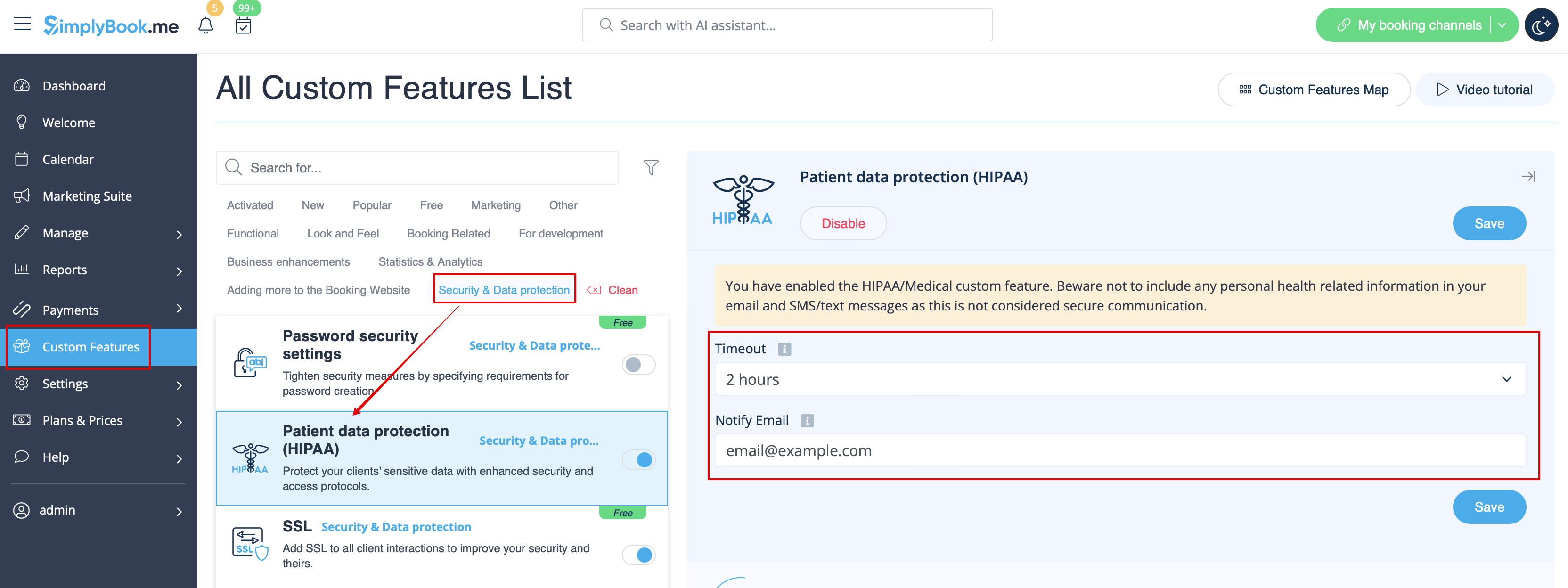
- En savoir plus sur l'utilisation de cette fonctionnalité personnalisée.
Widget de contact
Comme cette fonctionnalité personnalisée permet d'ajouter un formulaire de contact à votre site web de réservation ou de créer un widget de bouton de contact, il existe également une notification par e-mail/SMS envoyée à l'entreprise lorsque quelqu'un laisse un message sur le site de réservation ou le widget, afin que vous puissiez répondre immédiatement. Il n'y a pas de modèle à modifier, mais vous pouvez désactiver ces notifications dans Paramètres -> Paramètres e-mail et SMS -> Notifications du widget de contact.
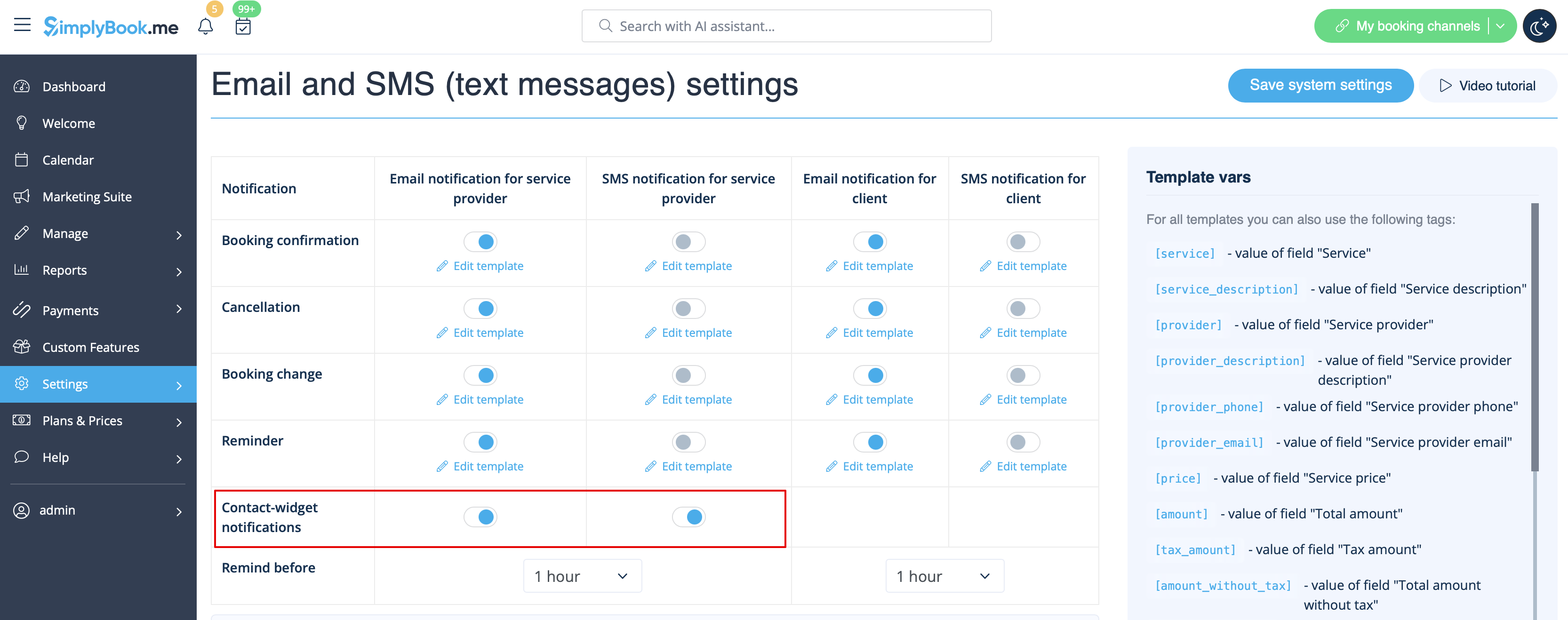
- En savoir plus sur l'utilisation de cette fonctionnalité personnalisée.
Test médical
Lorsque vous utilisez cette fonctionnalité personnalisée, vous devez impérativement envoyer les résultats des tests aux patients par e-mail.
Dans Fonctionnalités personnalisées -> Test médical -> sur le côté droit de la page, vous pouvez activer/désactiver ou modifier les modèles suivants :
- résultats positifs (modèles d'e-mail et de SMS) ;
- résultats négatifs (modèles d'e-mail et de SMS) ;
- résultats non concluants (modèles d'e-mail et de SMS).
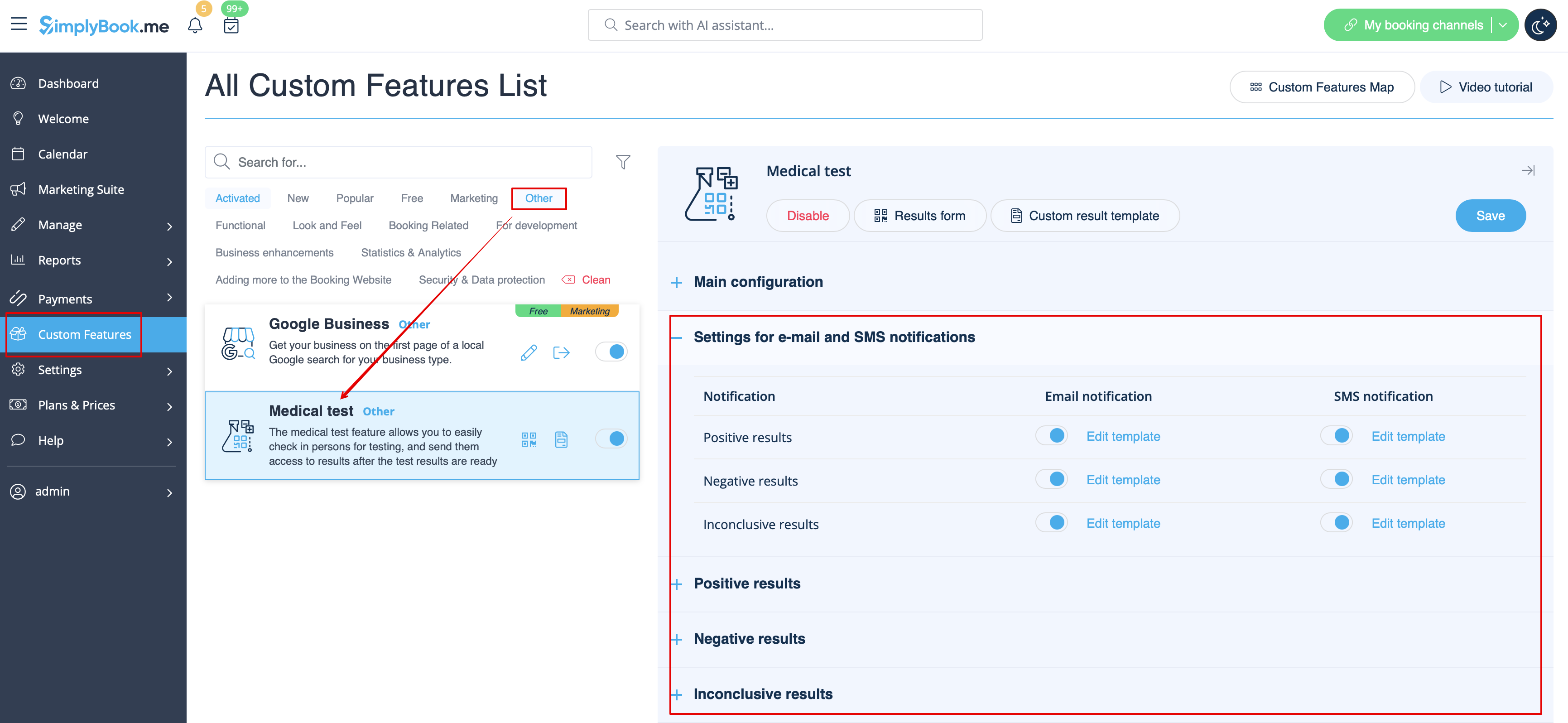
Si vous devez modifier le modèle de résultat du test, veuillez utiliser l'option Modèle de résultat personnalisé au-dessus des modèles.
- Pour en savoir plus sur l'utilisation de cette fonctionnalité personnalisée,consultez
Que sont les variables ?
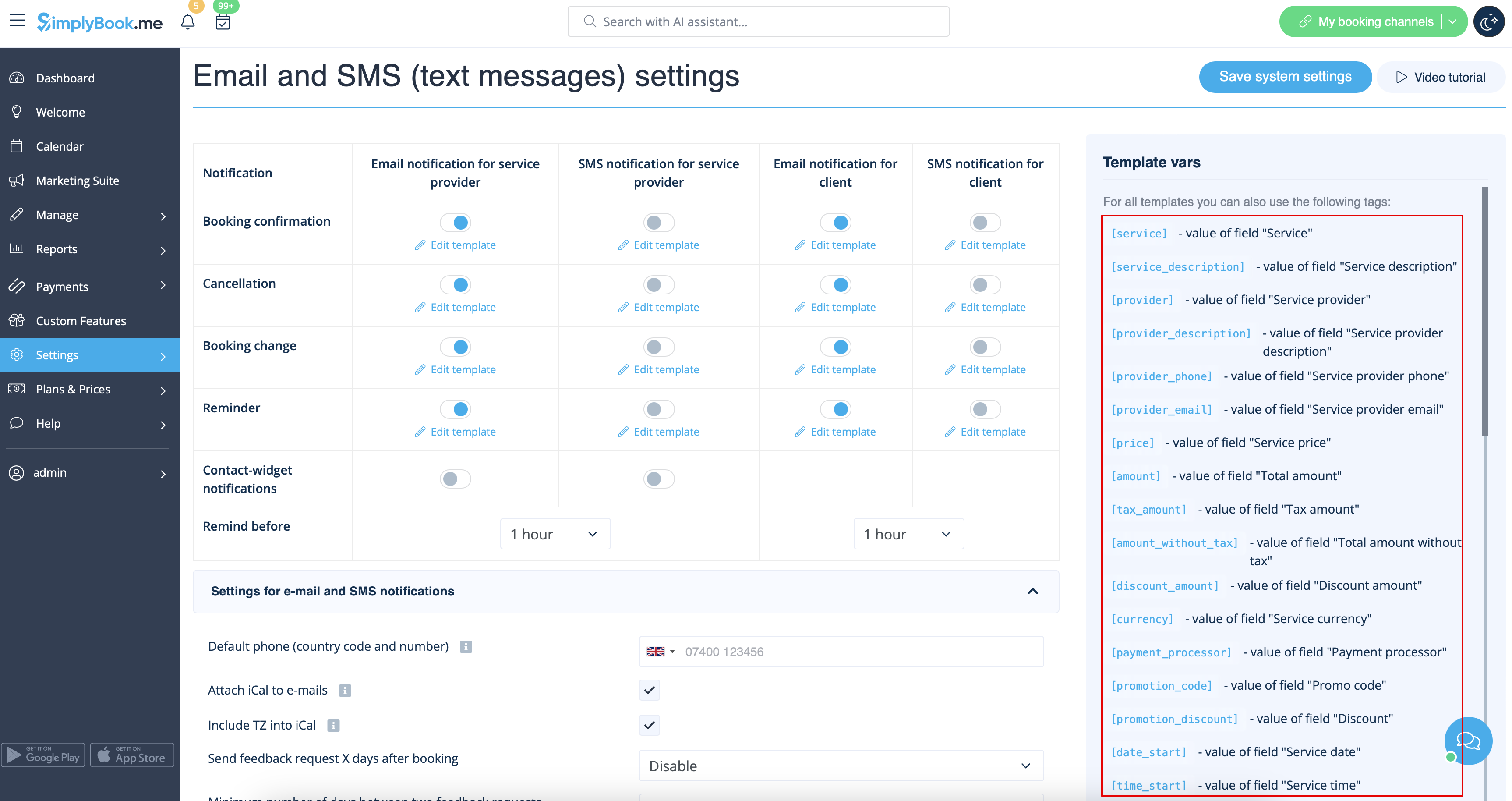
Variables are elements that can be inserted in email and sms templates (Settings -> Email and SMS settings). These variables will denote the chosen item after the booking is made. For example you have 2 providers: Mary and John. In email template you insert text "You have booked a service with [provider]". If the client chose on the booking page provider Mary, they would receive the following text "You have booked a service with Mary", if they chose John, they would receive the text "You have booked a service with John."
You can always find the variables that can be used with the certain notification type near the template either on the right side of the page or in the popup that can be access by click on "Variables" button.
iCals and how to use them
In Settings -> Email and SMS settings you can check the box Attach iCal to e-mails and then emails will contain file of .isc format. After clicking that file, it will open in one of your calendars (Google calendar, iCalendar,etc)
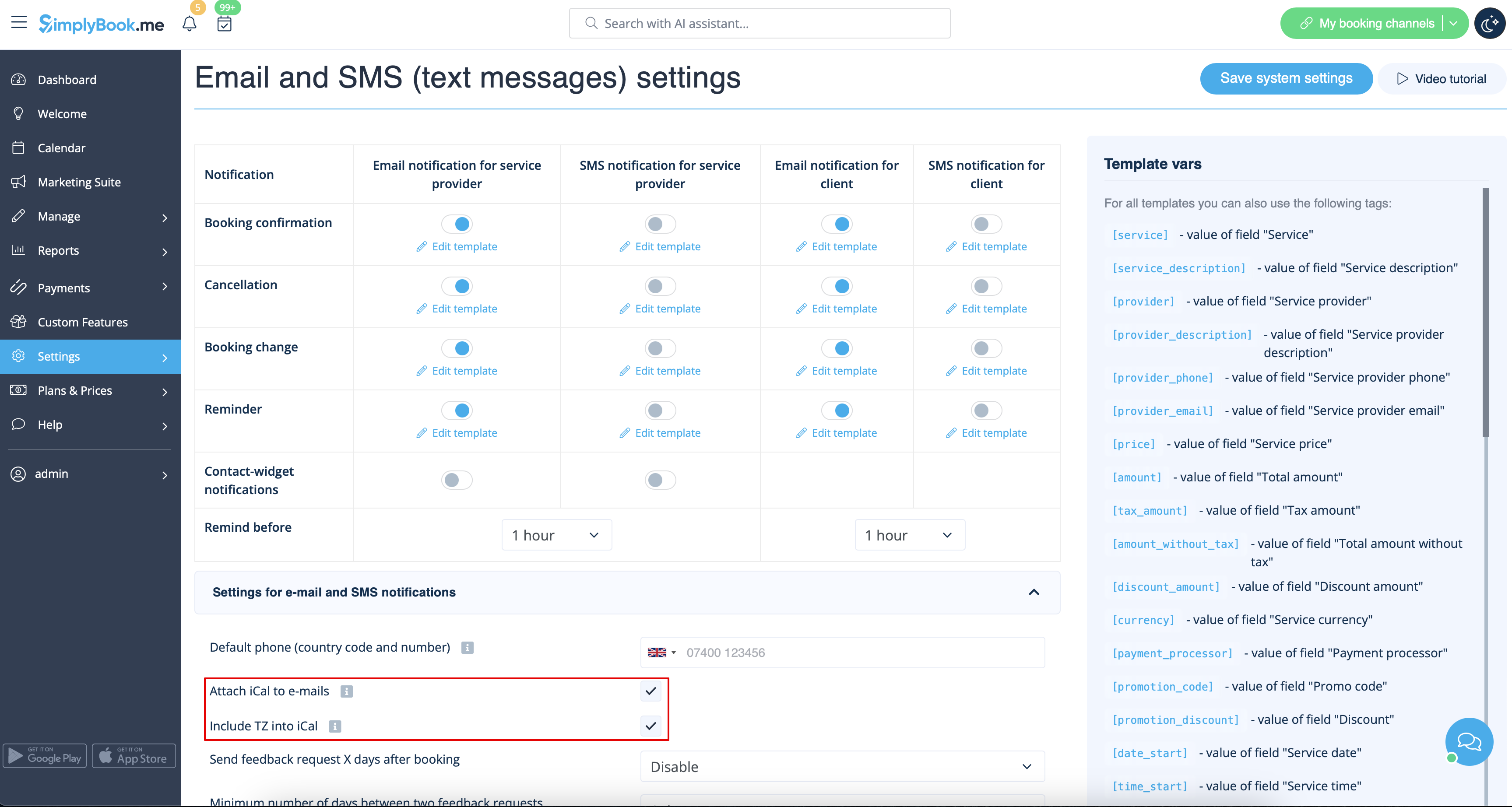
- Please note, that iCal files do not have set timezone so the time in that file will be displayed according to the IP address/device settings.
Clients/Providers do not receive notifications
- Possible reasons
- 1. Corresponding boxes in Settings -> Email and SMS settings are not checked.
- 2. Client/provider entered wrong email or phone.
- 3. Email went to junk (Spam) folder or to Social tab. Please check Whitelisting instructions here.
- 4. SMTP custom feature is not set correctly.
- 5. If sms are not coming, check your sms balance in Plans&Prices -> Subscriptions at the bottom of the page.
Clients/Providers receive wrong notifications
- 1. Please check if you have Multiple Bookings or Group Bookings Custom Feature enabled. These Custom Features have their own templates.
- Multiple bookings template (Custom Features -> Multiple bookings -> on the right side of the page)
- Group bookings template (Custom Features -> Group bookings -> on the right side of the page)
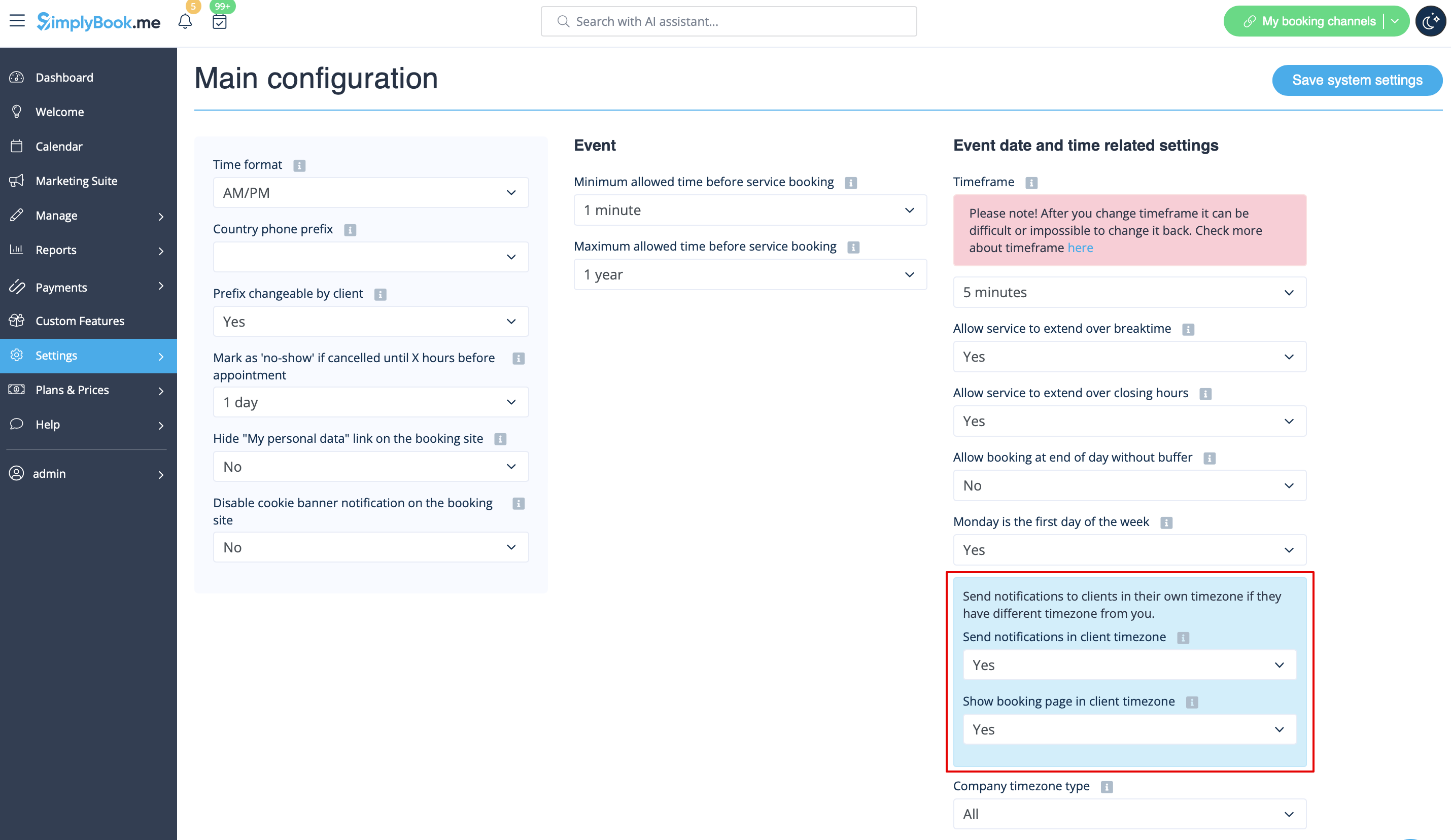
- 2. Check if you have Time Zone settings on in Settings -> Main configuration, in this case client may have selected wrong time zone and received notification in wrong time zone too.
Email whitelisting instructions
So here are a few things that you can do to make sure you get those all important emails from the team here at SimplyBook.me.
You can expect system notifications such as when your subscription is up for renewal, notices about bookings, and helpful information on various things such as how to get the most out of your SimplyBook.me service.
As great as technology is, it isn’t perfect, and sometimes email systems and internet service providers mistake legitimate email for spam. To ensure that you don’t miss important communication from us, please take the following steps:
Please whitelist any emails that come from the @simplybook.me domain.
Why? Because that tells your email service or program that you actually want emails from this domain, so that they can then make sure you get them.
How? Well, this differs between email services and programs but below you can see information about some of the main ones. If you aren’t using one of these, please refer to the help section for yourservice for information.
Using Gmail or Gsuite
Filter messages from @simplybook.me and tell the system to never send it to spam:
- 1. Go to Settings (click the gear icon at the top to the right)

- 2. Select the Filters and Blocked Addresses tab

- 3. Towards the bottom of the tab, click the Create a new filter link

- 4. In the From field write @simplybook.me
- 5. Click Create filter with this search to the bottom right of the window

- 6. Tick the box next to Never send it to Spam
- 7. Click the blue button that says Create filter

Great! Now you won’t miss anything from us!
And to ensure that our emails don’t get lost in that Updates or Promotions tab:
- 1. Find an email from SimplyBook.me in your inbox
- 2. Click and drag it to the Primary tab in your inbox

- 3. You’ll be asked whether you want to do this for future emails, so tell them yes

Using Yahoo! mail
- 1. When you open an email message, hover your mouse on the Sender's name.
- 2. Click the the three dots in the Sender's info window that appears and click Add to contacts.

- 3. When Add Contact form comes up, click Save.

Using Mac Mail
- 1. From the top menu select Mail -> Preferences

- 2. Then select the Rules icon, click Add Rule and type a name for the rule in the description field. Use the following settings:

- 3. “If any of the following conditions are met: From Contains”. In the text field besides Contains type @simplybook.me

- 4. Select Move Message and Inbox from the drop down menus and then click OK to save the rule.
Using Outlook
- 1. Right-click on the message in your inbox.
- 2. Select Junk E-mail from the menu.
- 3. Click Never Block Sender or Never Block Sender's Domain (@example.com).

Great, you’re all set! We look forward to being in touch and seeing your business blossom!
