Created page with "1200px|border | center|link=https://help.simplybook.me/images/f/fc/Multiple_bookings_notifications_path_redesigned.png <br><br> :'''Modèle de réservations de groupe''' (<span style="background-color:#d4f8e5; padding:5px; border-radius:5px;">Fonctionnalités personnalisées</span> -> <span style="background-color:#d4f8e5; padding:5px; border-radius:5px;">Réservations de groupe</span> -> <span style="bac..." |
Created page with "center <br><br> :3. Lorsque le formulaire <span style="background-color:#d4f8e5; padding:5px; border-radius:5px;">Ajouter un contact</span> s'affiche, cliquez sur <span style="background-color:#d4f8e5; padding:5px; border-radius:5px;">Enregistrer.</span>" |
||
| Line 412: | Line 412: | ||
:2. Sélectionnez <span style="background-color:#d4f8e5; padding:5px; border-radius:5px;">Courrier indésirable</span> dans le menu. | :2. Sélectionnez <span style="background-color:#d4f8e5; padding:5px; border-radius:5px;">Courrier indésirable</span> dans le menu. | ||
:3. Cliquez sur <span style="background-color:#d4f8e5; padding:5px; border-radius:5px;">Ne jamais bloquer l'expéditeur</span> ou <span style="background-color:#d4f8e5; padding:5px; border-radius:5px;">Ne jamais bloquer le domaine de l'expéditeur (@exemple.com).</span> | |||
:3. | |||
[[File:Outlook not junk.jpg|center]] | |||
[[File:Outlook not junk.jpg| center]] | |||
<br><br> | <br><br> | ||
Super, tout est prêt ! Nous sommes impatients de vous contacter et de voir votre entreprise prospérer ! | |||
Revision as of 10:03, 16 May 2025
Comment activer/désactiver les notifications de réservation et ajuster vos modèles
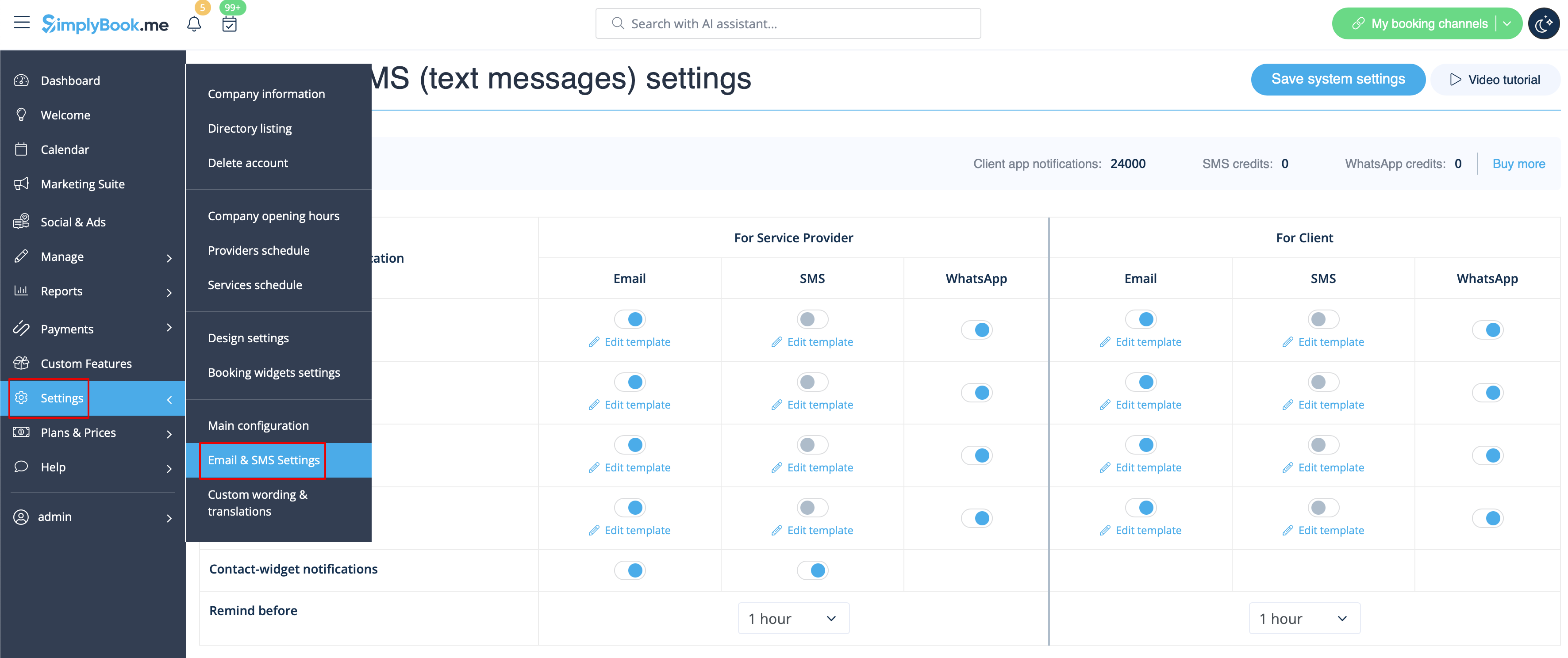
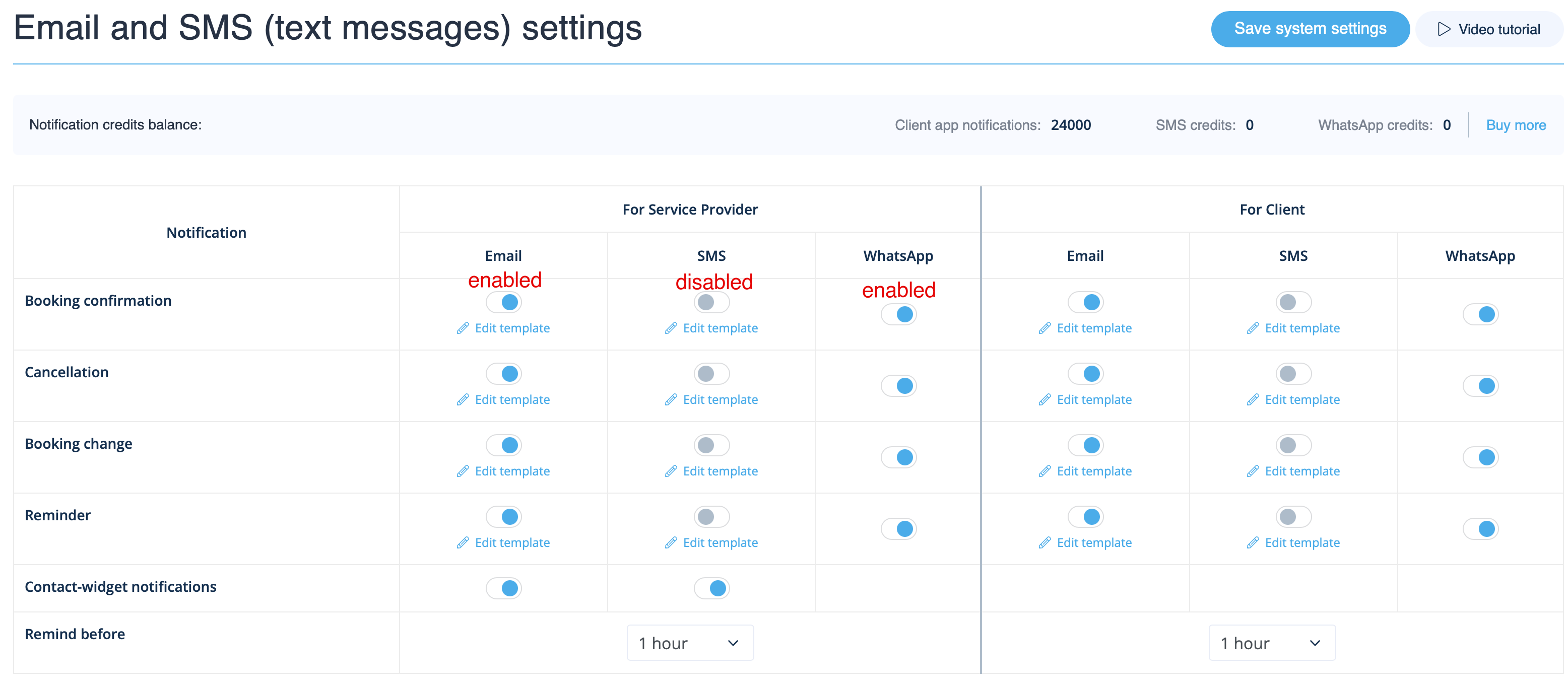
Allez dans Paramètres -> Paramètres e-mail et SMS et cochez/décochez les cases correspondantes pour envoyer/ne pas envoyer les notifications. Vous pouvez modifier le texte des notifications pour mieux l'adapter à vos besoins en cliquant sur Modifier le modèle, en apportant les modifications souhaitées et en enregistrant les paramètres système.
Notifications WhatsApp
Si vous et vos clients utilisez activement WhatsApp Messenger, vous pouvez recevoir des notifications relatives aux réservations sur cette plateforme.
- Comment utiliser
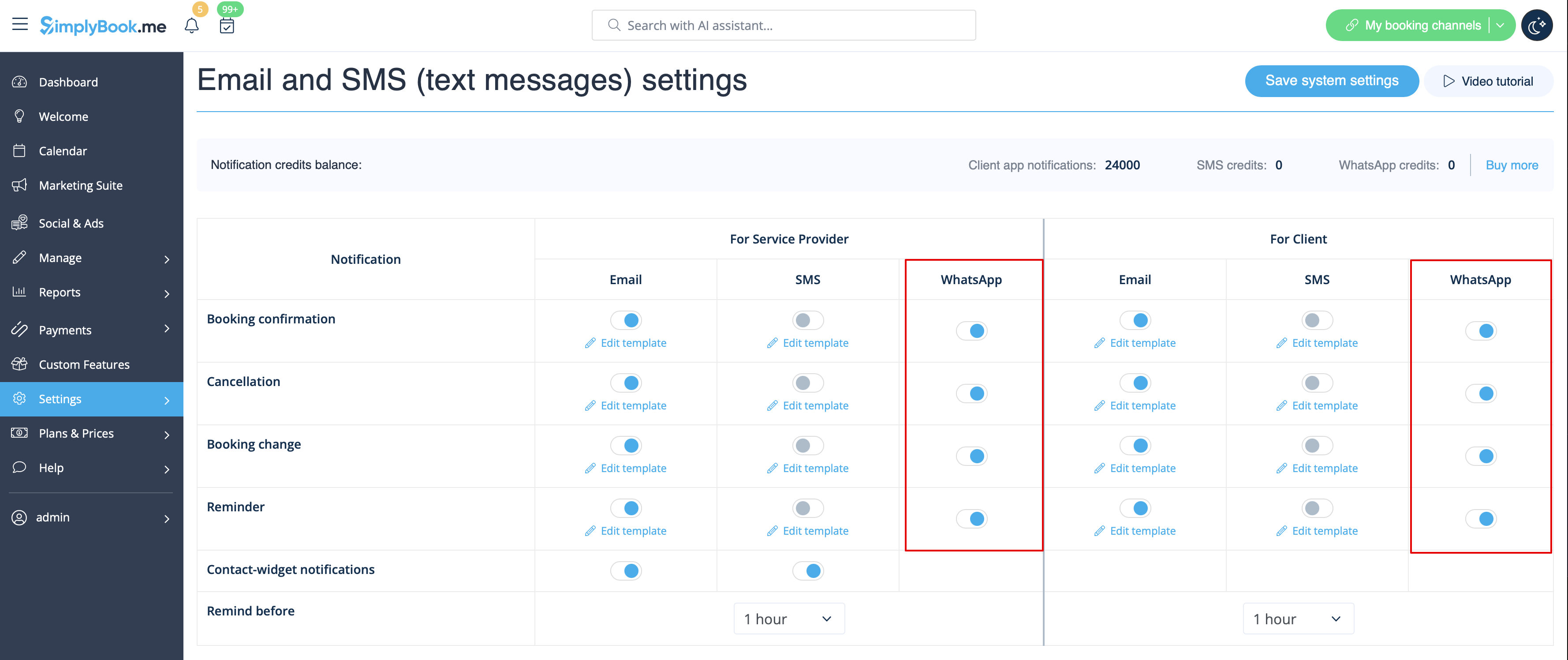
1. Activez les types de notifications WhatsApp souhaités dans Paramètres -> Paramètres e-mail et SMS
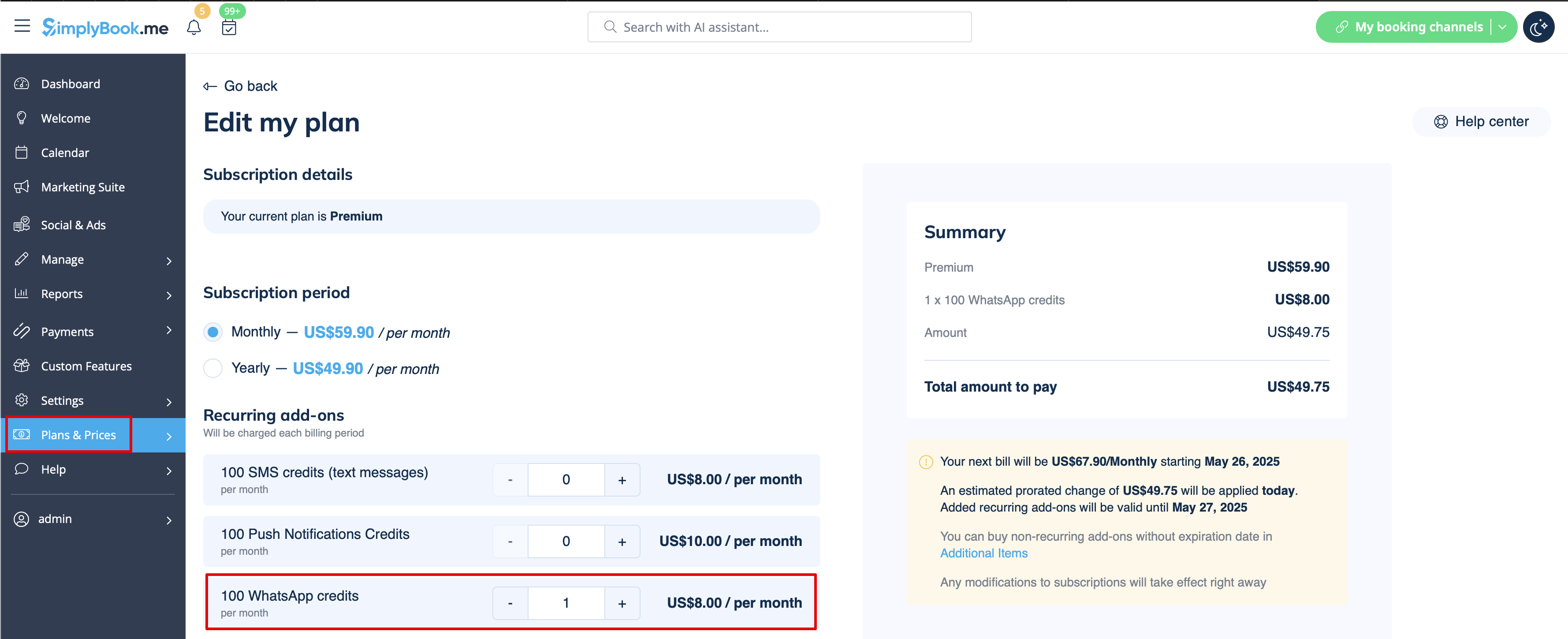
2. Achetez des crédits WhatsApp dans Plans et tarifs -> Abonnements ou Éléments supplémentaires selon que vous souhaitez que les crédits soient renouvelés automatiquement avec votre abonnement ou que vous préférez un achat unique.
(Vous pourrez également consulter les messages envoyés par le système ainsi que le nombre de crédits utilisés dans Rapports -> SMS (messages texte) -> Notifications WhatsApp)
Remarque importante ! Conformément à la politique de WhatsApp, les messages utilisent des modèles préapprouvés et ne peuvent pas être personnalisés. Ces modèles couvrent les informations essentielles de manière claire et professionnelle.
Application mobile Admin
Si vous utilisez l'application mobile Admin, vous pouvez recevoir des notifications relatives aux réservations, telles que les confirmations, les rappels, les modifications et les annulations.
Pour activer/désactiver ces notifications, veuillez vous rendre dans l'onglet Paramètres -> Gérer les notifications dans l'application mobile Admin.
Comment désactiver les commentaires
Vous pouvez consulter tous vos avis dans l'onglet Rapports -> Avis dans le menu de gauche, les supprimer ou y répondre. Si vous souhaitez supprimer la possibilité de laisser un avis et ne pas envoyer de demande de commentaires, allez dans Paramètres -> Paramètres e-mail et SMS -> Paramètres pour les notifications par e-mail et SMS -> définissez le nombre de jours avant l'envoi de la demande de commentaires au client sur Désactiver.
Notifications liéesaux fonctionnalités personnalisées
Les fonctionnalités personnalisées suivantes ont leurs propres types de notifications ou peuvent influencer les messages envoyés par le système :
Accepter les paiements
Permet d'envoyer :
- Factures aux clients (modèle d'e-mail)
- Notifications de paiements échoués au client (modèle d'e-mail)
- Notifications de paiements échoués à l'entreprise (modèle d'e-mail)
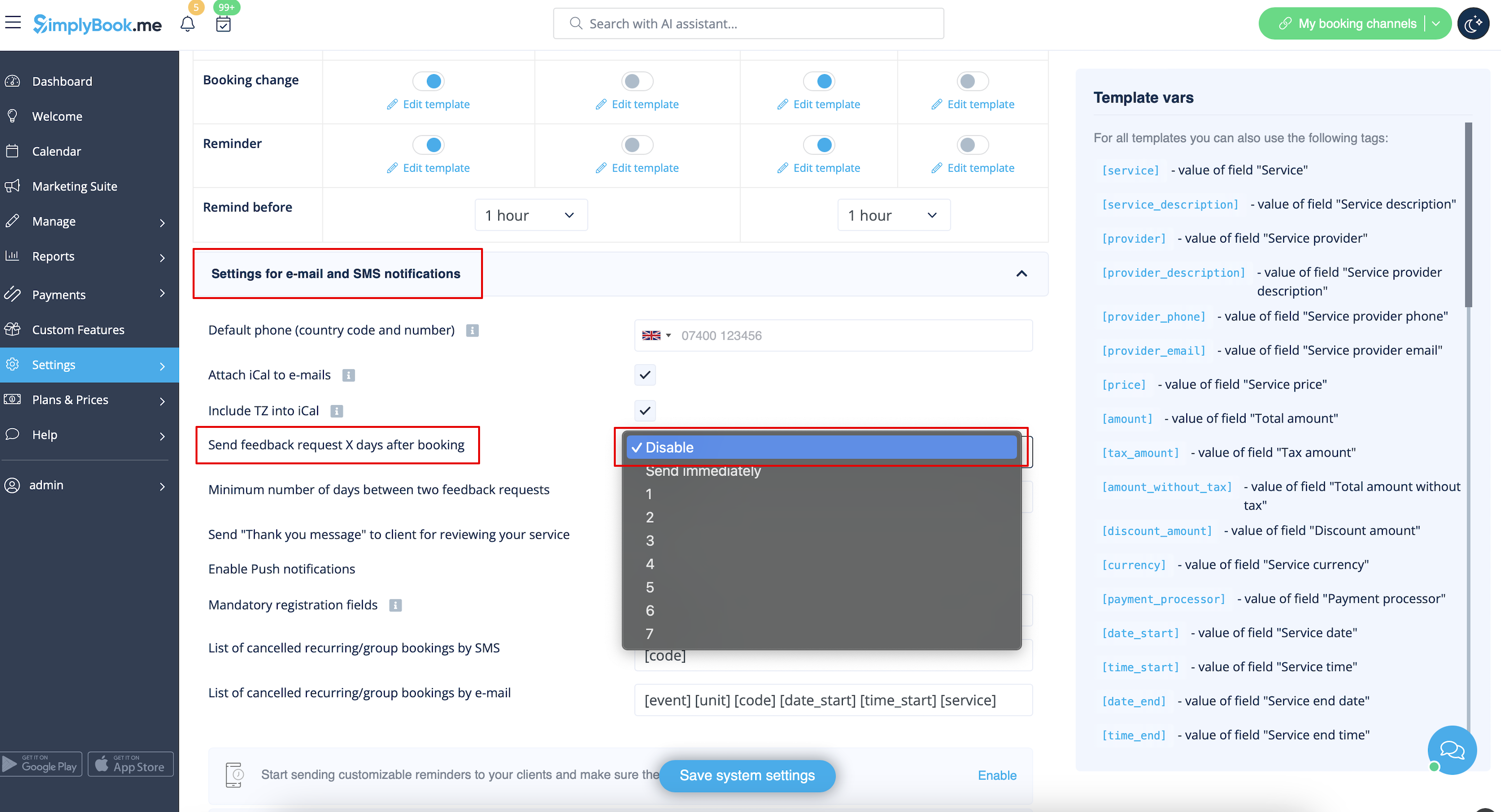
Tous ces modèles peuvent être modifiés dans Fonctionnalités personnalisées -> Accepter les paiements -> Paramètres -> Paramètres du modèle d'e-mail.
- En savoir plus sur l'utilisation de cette fonctionnalité personnalisée.
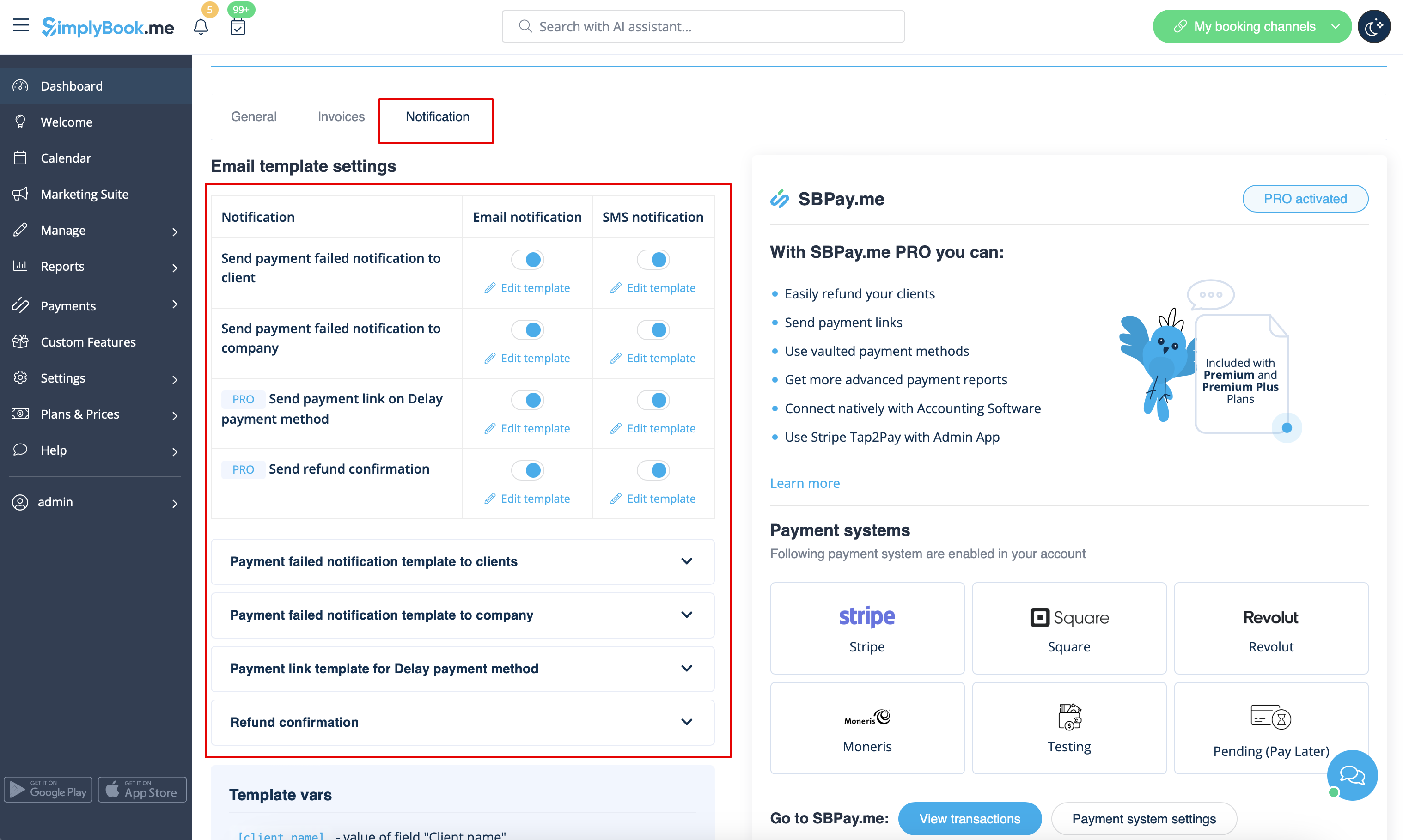
Réservations multiples
Dispose de ses propres modèles pour :
- Notification de confirmation de réservation au client (modèles d'e-mail et de SMS)
- Notification de rappel de réservation au client (modèles d'e-mail et de SMS)
Les deux types sont automatiquement appliqués lorsque cette fonctionnalité personnalisée est activée et que les clients prennent plusieurs rendez-vous à la fois à l'aide du bouton « Ajouter un autre service » lors du paiement. Les textes des modèles peuvent être modifiés dans Fonctionnalités personnalisées -> Réservations multiples -> sur le côté droit de la page.
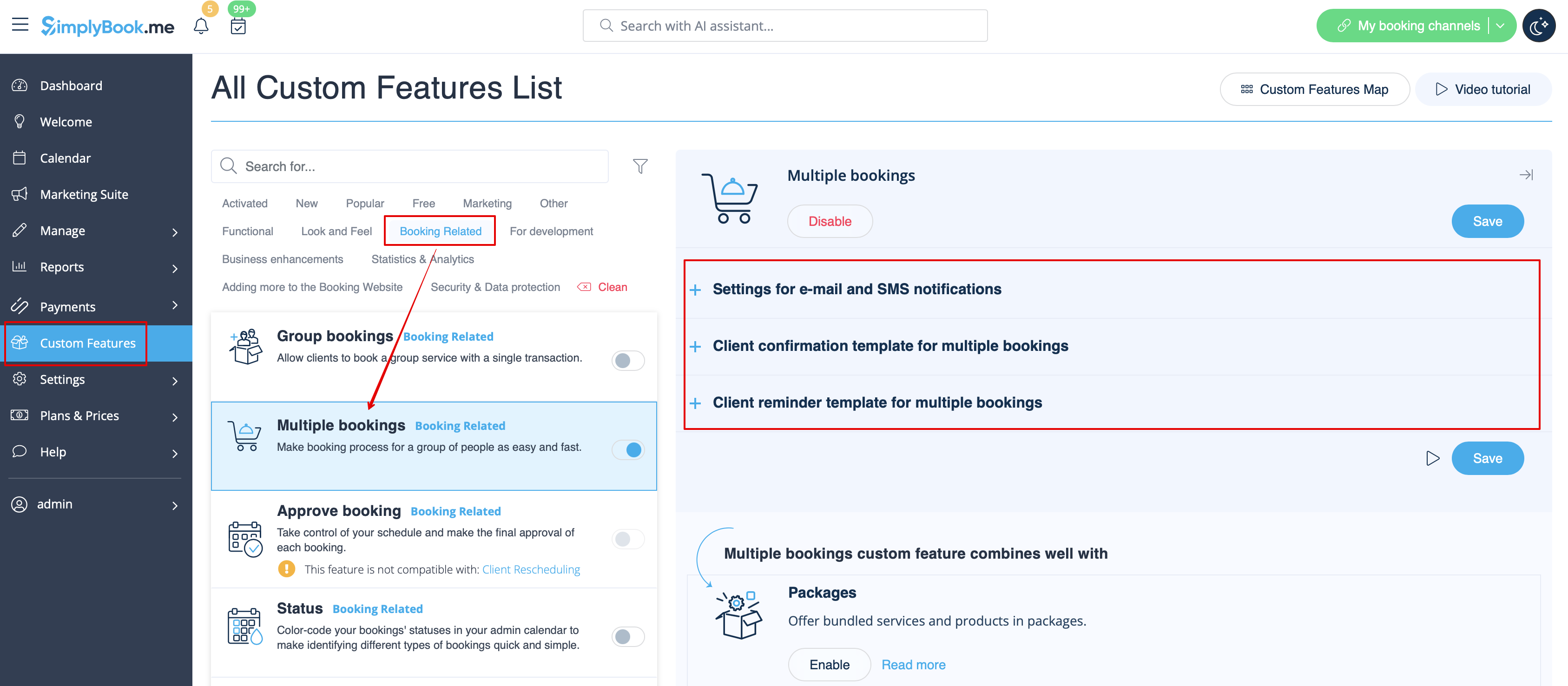
- En savoir plus sur l'utilisation de cette fonctionnalité personnalisée.
Réservations de groupe
Il existe des modèles spéciaux pour les types suivants :
- Notification de confirmation de réservation au client (modèles d'e-mail et de SMS)
- Notification de rappel de réservation au client (modèles d'e-mail et de SMS)
- Notification de confirmation de réservation au prestataire (modèles d'e-mail et de SMS)
- Notification de rappel de réservation au prestataire (modèles d'e-mail et de SMS)
Ils seront automatiquement appliqués lorsque cette fonctionnalité personnalisée est activée et que le client réserve un rendez-vous en sélectionnant plusieurs participants à l'étape du service du processus de réservation. Tous les modèles peuvent être modifiés dans Fonctionnalités personnalisées -> Réservations de groupe -> à droite de la page.
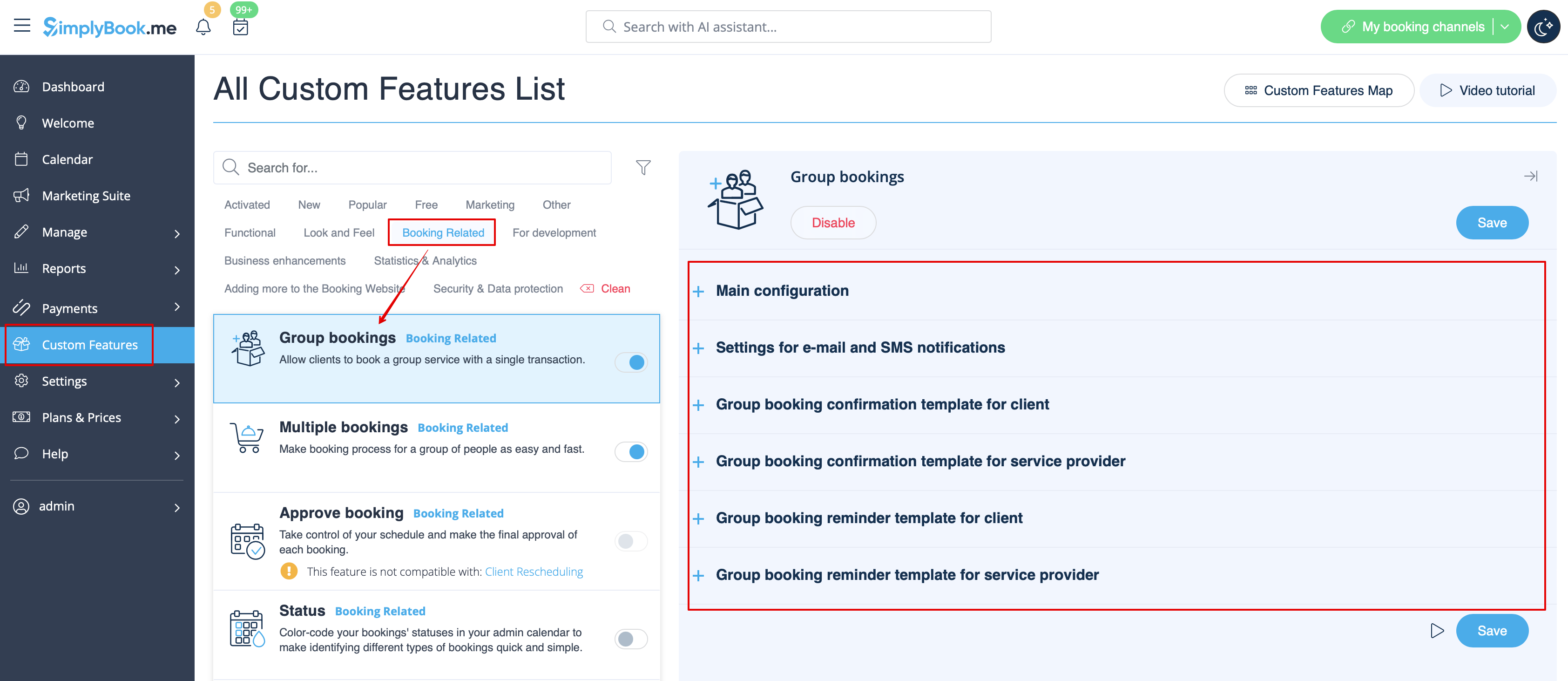
- En savoir plus sur l'utilisation de cette fonctionnalité personnalisée.
Système de notification « Réservez bientôt »
Permet d'envoyer des rappels aux clients qui ont déjà réservé afin qu'ils reviennent.
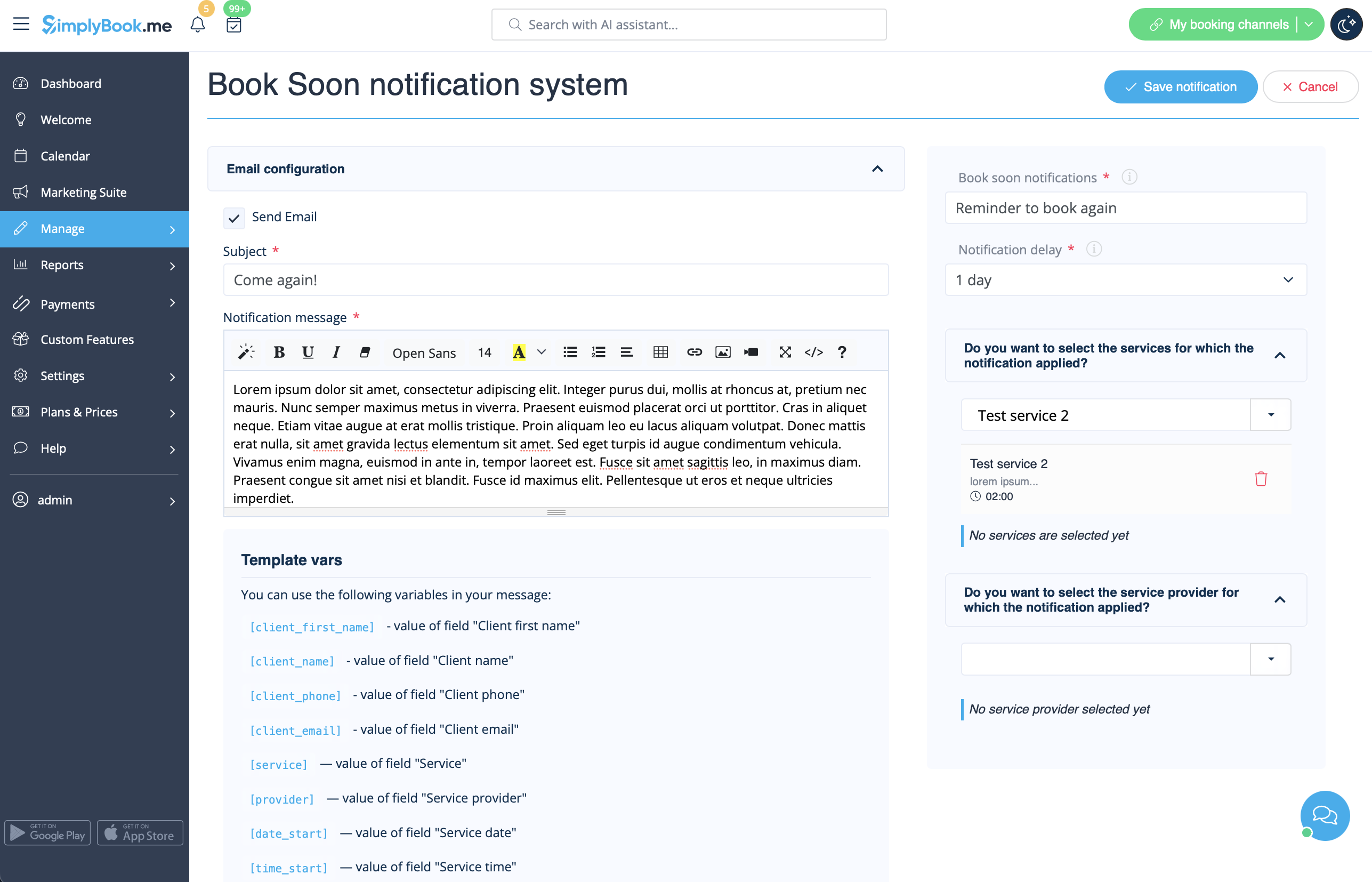
Les modèles peuvent être définis dans Fonctionnalités personnalisées -> Système de notification « Réservez rapidement » -> Paramètres -> Ajouter nouveau pour créer un nouveau modèle (e-mail et SMS).
Vous pouvez créer de nombreux modèles spécifiques pour certains services/prestataires. Ils seront envoyés lorsque le délai indiqué depuis le rendez-vous du client aura expiré.
- En savoir plus sur l'utilisation de cette fonctionnalité personnalisée.
Coupons et cartes-cadeaux
Vous pouvez envoyer des notifications spécifiques dans les cas suivants lorsque vous utilisez cette fonctionnalité personnalisée :
- le client achète une carte cadeau sur le site web de réservation (modèles d'e-mails et de SMS)
Ce modèle de notification peut être activé/désactivé et modifié dans Fonctionnalités personnalisées -> Coupons et cartes cadeaux -> sur le côté droit de la page.
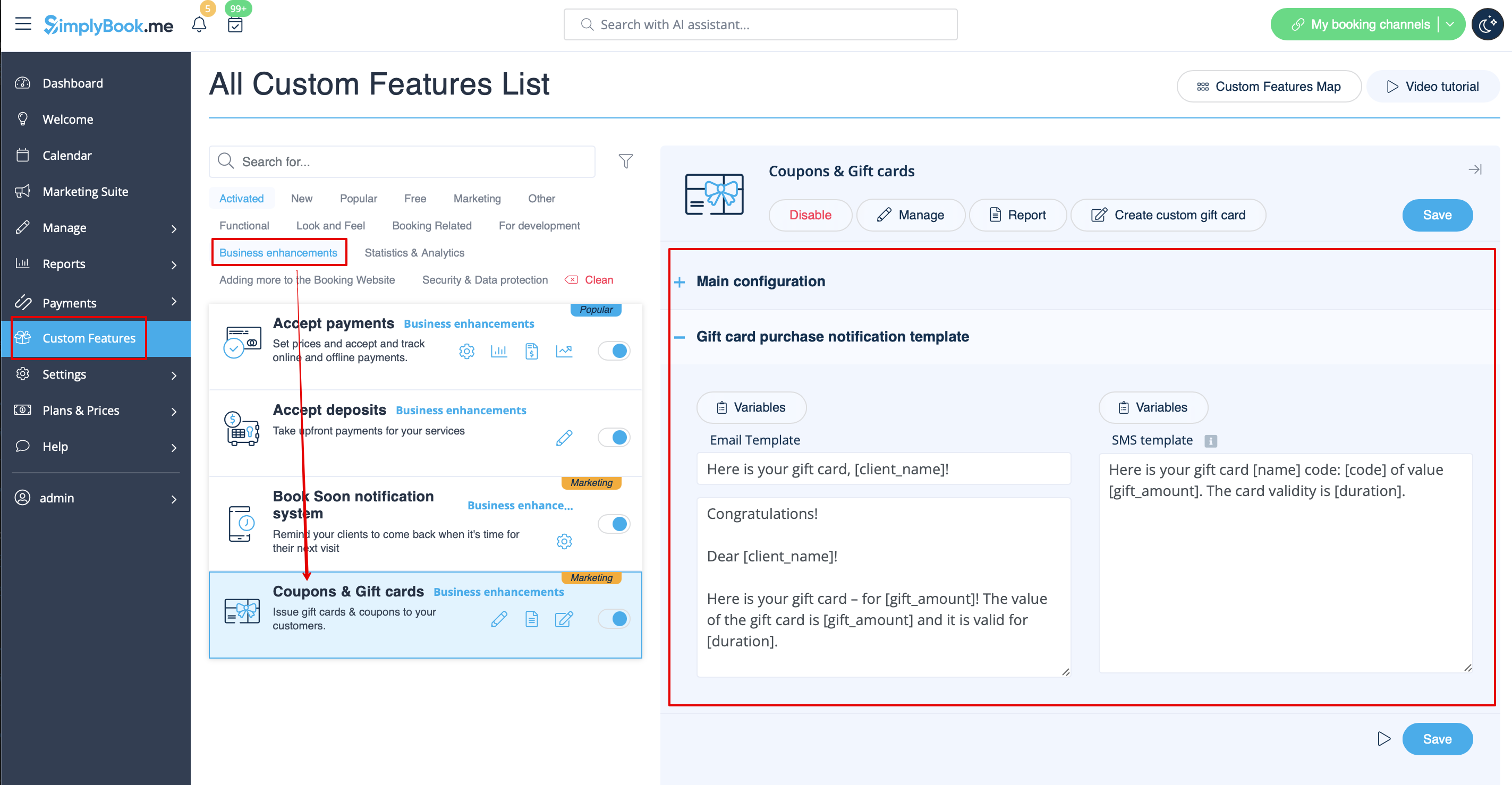
De même, si vous émettez manuellement une carte-cadeau ou un coupon à vos clients, le modèle qui sera utilisé dans ce cas est accessible dans Gérer -> Coupons et cartes-cadeaux -> Émettre la carte-cadeau / Envoyer le message du coupon pour la carte-cadeau/le coupon souhaité -> Envoyer un e-mail/Envoyer un SMS.
- En savoir plus sur l'utilisation de cette fonctionnalité personnalisée.
Application mobile client
Si cette fonctionnalité est activée et que le client a autorisé les notifications, l'application mobile enverra des notifications push liées aux réservations.
Il n'est pas possible de modifier le modèle, mais vous pouvez consulter le rapport des notifications dans Rapports -> Rapport des notifications push.
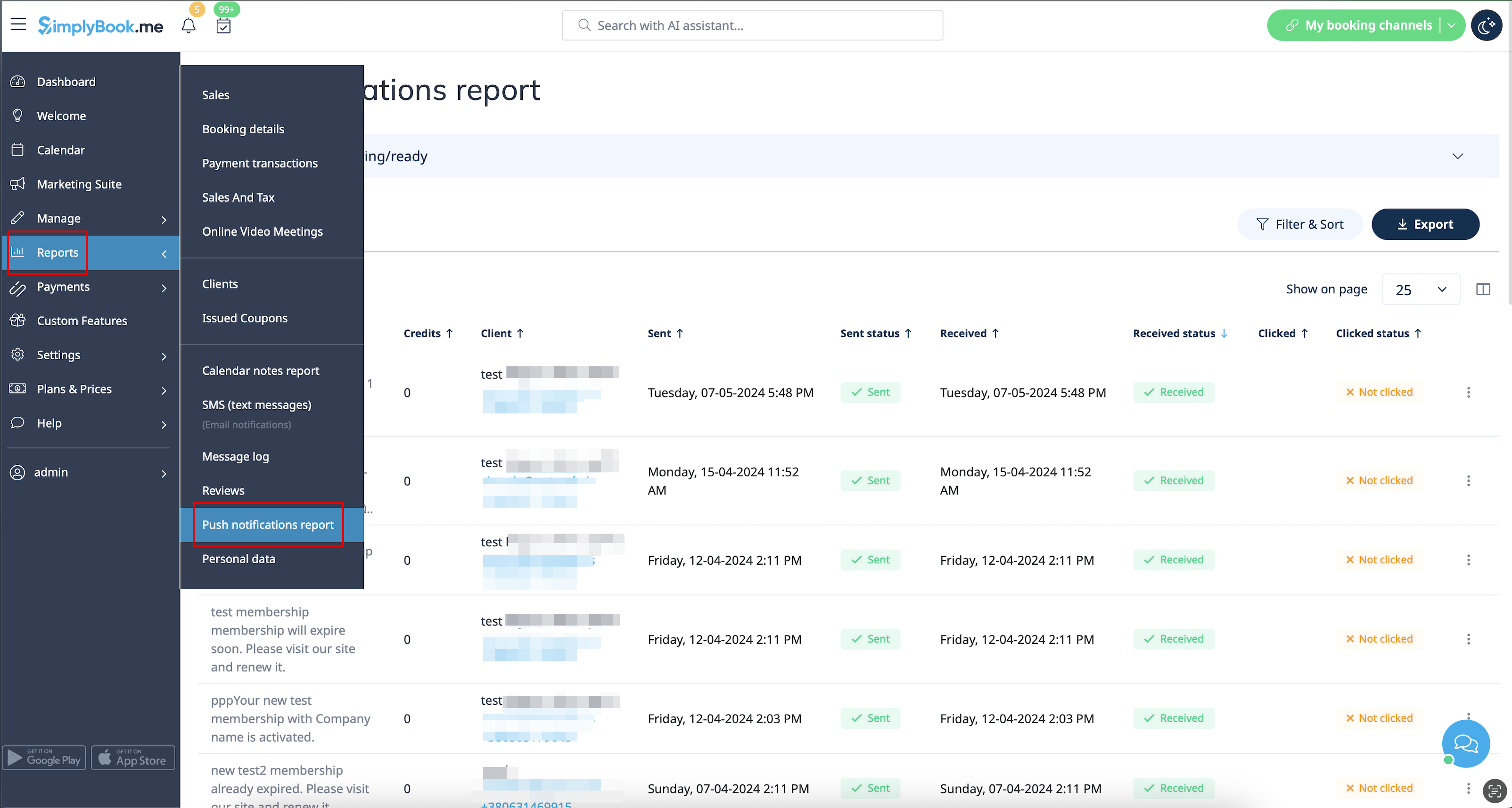
Remarque : vous devez disposer d'un nombre suffisant de crédits de notifications push pour pouvoir envoyer ces notifications aux clients.
- Pour en savoir plus sur l'utilisation de cette fonctionnalité personnalisée,consultez
Connexion client
Si vous exigez que les clients se connectent/s'inscrivent pour pouvoir réserver des rendez-vous ou effectuer des achats sur votre site web de réservation et que vous avez activé la fonctionnalité personnalisée de connexion client,
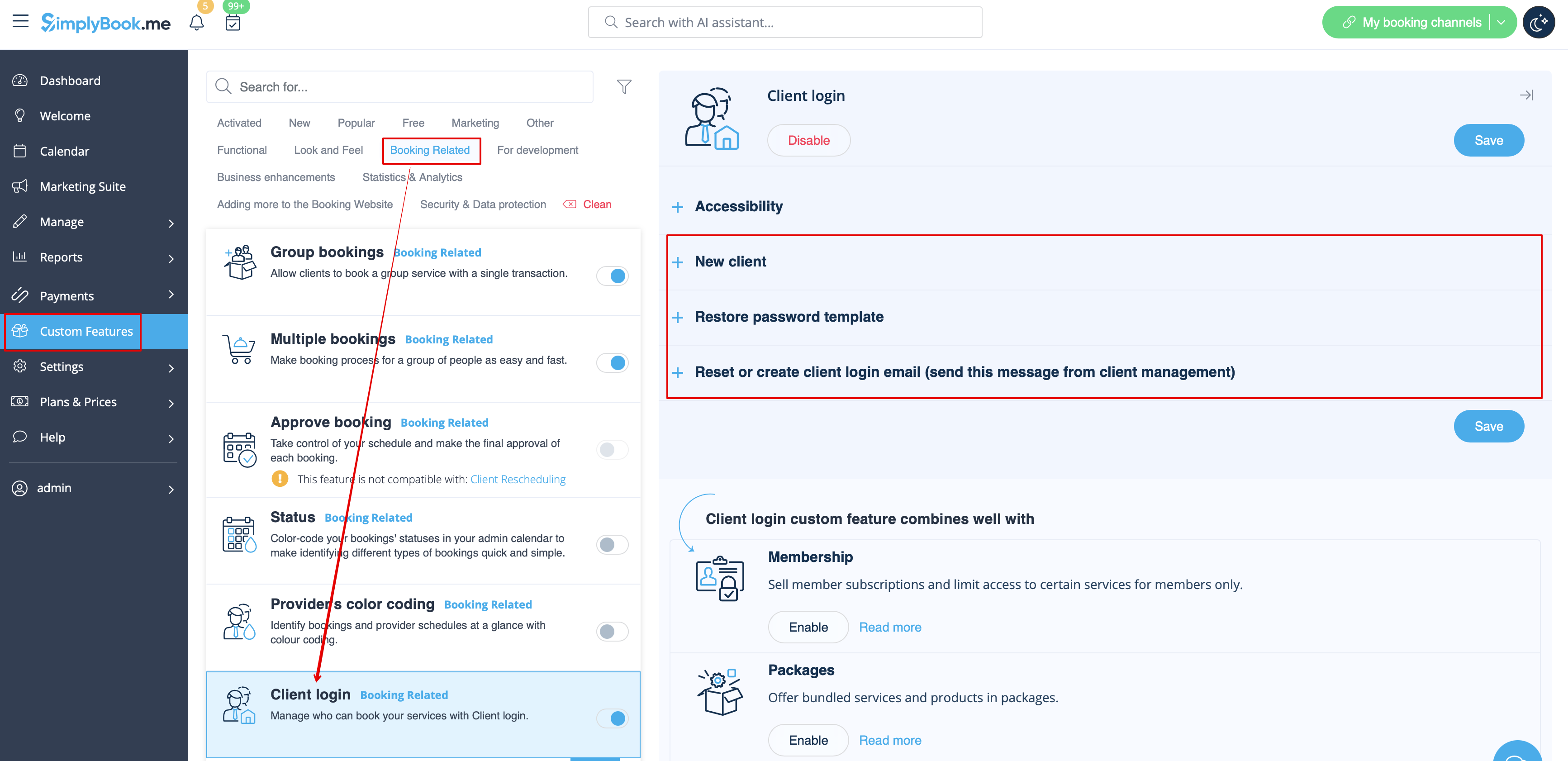
trois types de notifications peuvent être envoyés à vos clients (elles ne peuvent pas être désactivées) :
- inscription d'un nouveau client (e-mail)
- réinitialisation du mot de passe (e-mail)
- réinitialisation du mot de passe ou création d'un client à partir de l'interface d'administration (e-mail)
Vous pouvez modifier les modèles dans Fonctionnalités personnalisées -> Connexion client -> sur le côté droit de la page.
- En savoir plus sur l'utilisation de cette fonctionnalité personnalisée.
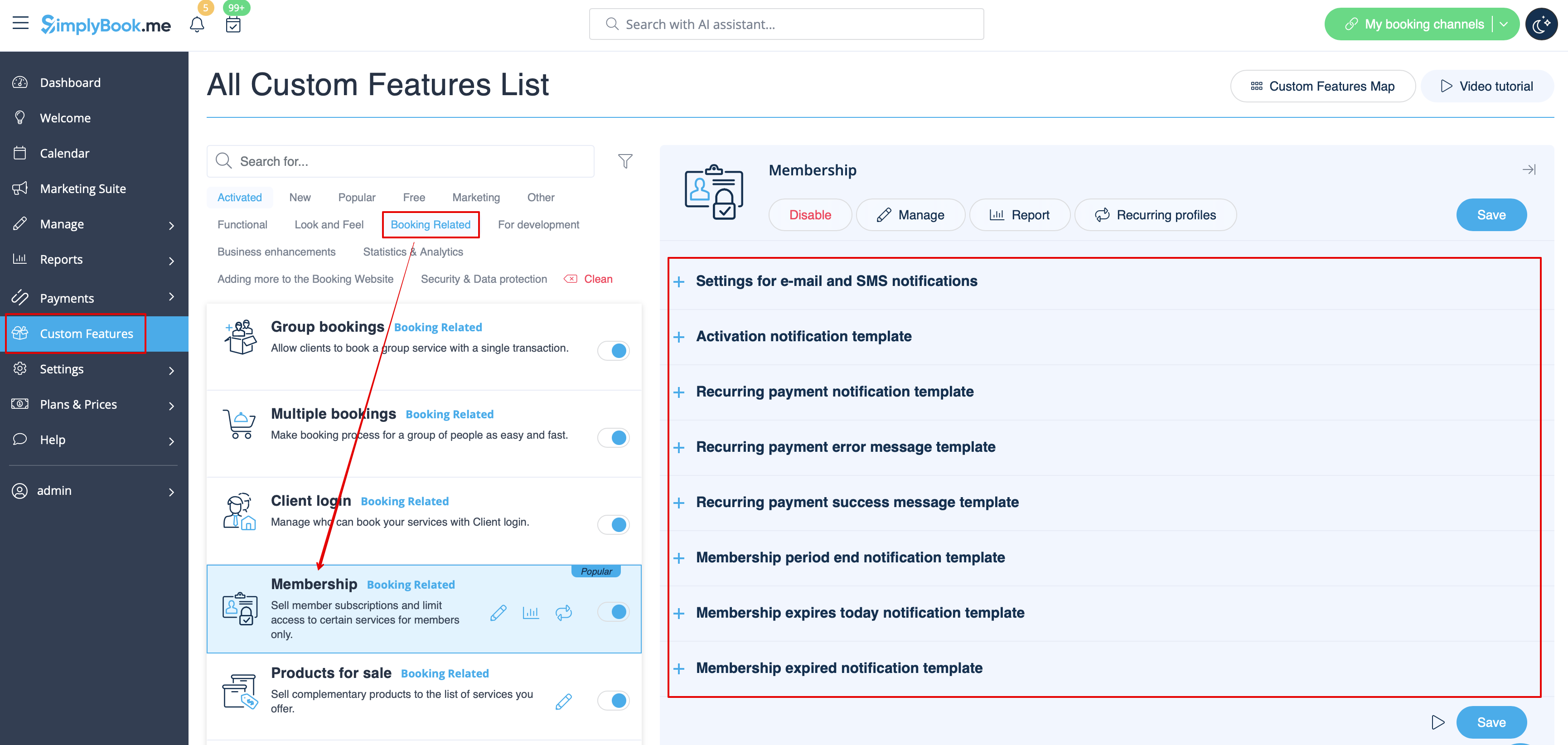
Adhésion
Lorsque vous vendez des adhésions sur le site web de réservation, vous devrez peut-être également informer vos clients des différents points.
Cette fonctionnalité personnalisée permet d'envoyer :
- notification d'activation de l'adhésion (modèles d'e-mail et de SMS)
- notification de paiement récurrent (modèles d'e-mail et de SMS)
- erreur de paiement récurrent (modèles d'e-mail et de SMS)
- paiement récurrent réussi (modèles d'e-mail et de SMS)
- fin de la période d'adhésion (modèles d'e-mail et de SMS)
- l'adhésion expire aujourd'hui (modèles d'e-mail et de SMS)
- notification d'expiration de l'adhésion (modèles d'e-mail et de SMS)
Vous pouvez modifier les modèles ainsi qu'activer/désactiver certains types de notifications dans Fonctionnalités personnalisées -> Adhésion -> à droite de la page.
- En savoir plus sur l'utilisation de cette fonctionnalité personnalisée.
Notifications flexibles
Cette fonctionnalité personnalisée permet de personnaliser les notifications liées à la réservation pour un service, un prestataire ou les deux.
Les types suivants peuvent être utilisés :
- confirmation de réservation au client (modèles d'e-mail et de SMS)
- confirmation de réservation au prestataire (modèles d'e-mail et de SMS)
- rappel au client (modèles d'e-mail et de SMS)
- rappel au prestataire (modèles d'e-mail et de SMS)
- notification d'annulation au client (modèles d'e-mail et de SMS)
- notification d'annulation au prestataire (modèles d'e-mail et de SMS)
- notification de modification de réservation au client (modèles d'e-mail et de SMS)
- notification de modification de réservation au prestataire (modèles d'e-mail et de SMS)
- confirmation d'événement récurrent au client (modèles d'e-mail et Modèles SMS)
- confirmation d'événement récurrent au prestataire (modèles d'e-mails et de SMS)
- notification d'annulation groupée au client (modèles d'e-mails et de SMS)
- notification d'annulation groupée au prestataire (modèles d'e-mails et de SMS)
- confirmationde réservation groupéede plusieurs réservations au client (modèles d'e-mails et de SMS)
- rappel d'événementde plusieurs réservations au client (modèles d'e-mails et de SMS)
- confirmationde réservation groupée de réservations de groupe au client (modèles d'e-mails et de SMS)
- confirmationde réservation groupéede réservations de groupe au prestataire (modèles d'e-mails et de SMS)
- rappelde réservations de groupe au client (modèles d'e-mails et SMS)
- rappeldes réservations de groupe au prestataire (modèles d'e-mails et de SMS)
Vous pouvez créer tous les modèles souhaités dans Fonctionnalités personnalisées -> Notifications flexibles -> Gérer.
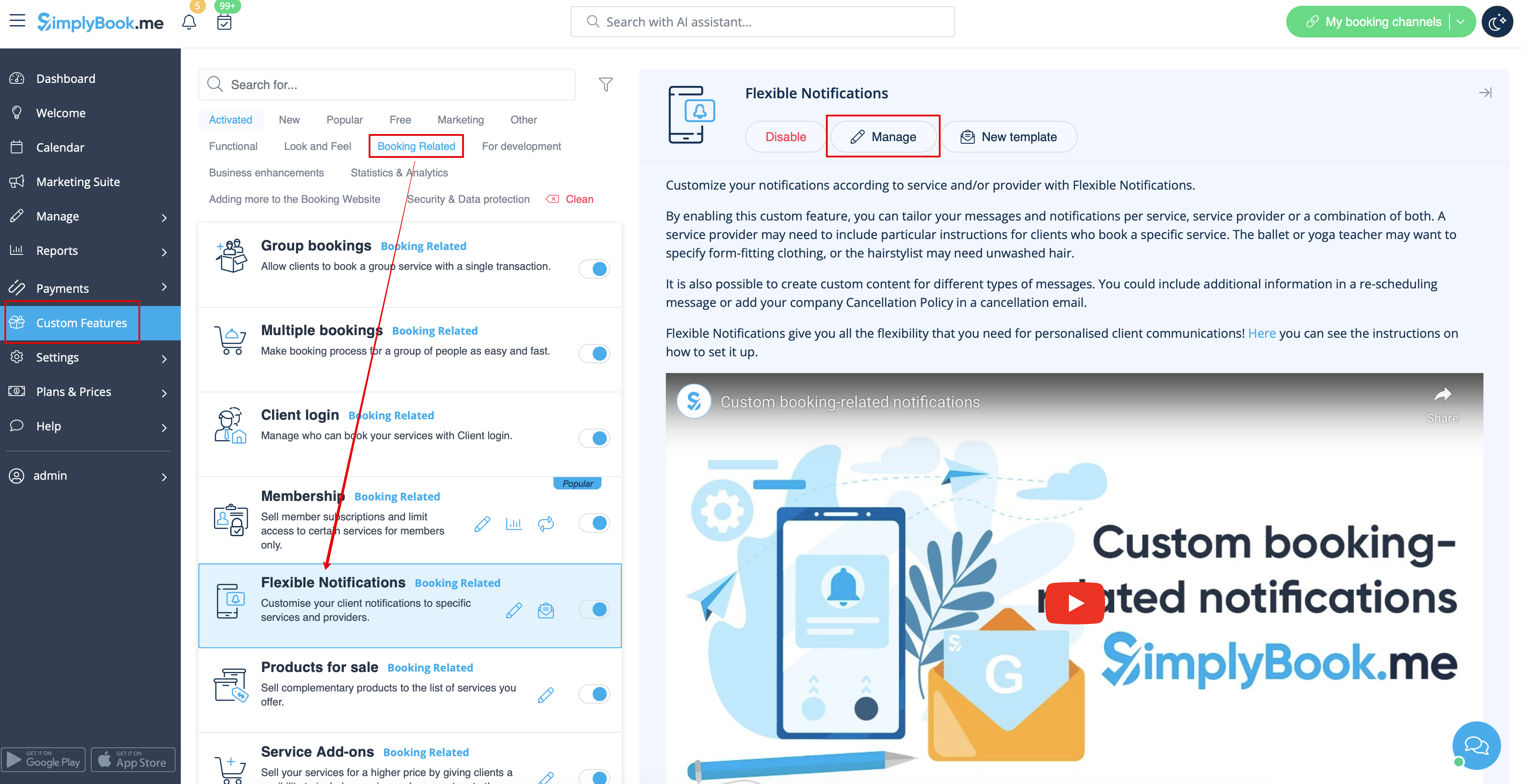
Si vous devez activer/désactiver certains de ces types de notifications, veuillez vous rendre dans Paramètres -> Paramètres e-mail et SMS -> et utiliser le tableau en haut de la page.
Remarque : il s'agit des paramètres généraux des notifications de réservation. Si vous désactivez certains d'entre eux, cela aura également une incidence sur les types similaires liés à d'autres fonctionnalités (par exemple, si vous désactivez les confirmations de réservation aux prestataires, les confirmations courantes, ainsi que les notifications de confirmation de groupes et de lots récurrents seront également désactivées).
- Pour en savoir plus sur l'utilisation de cette fonctionnalité personnalisée,consultez
Forfaits
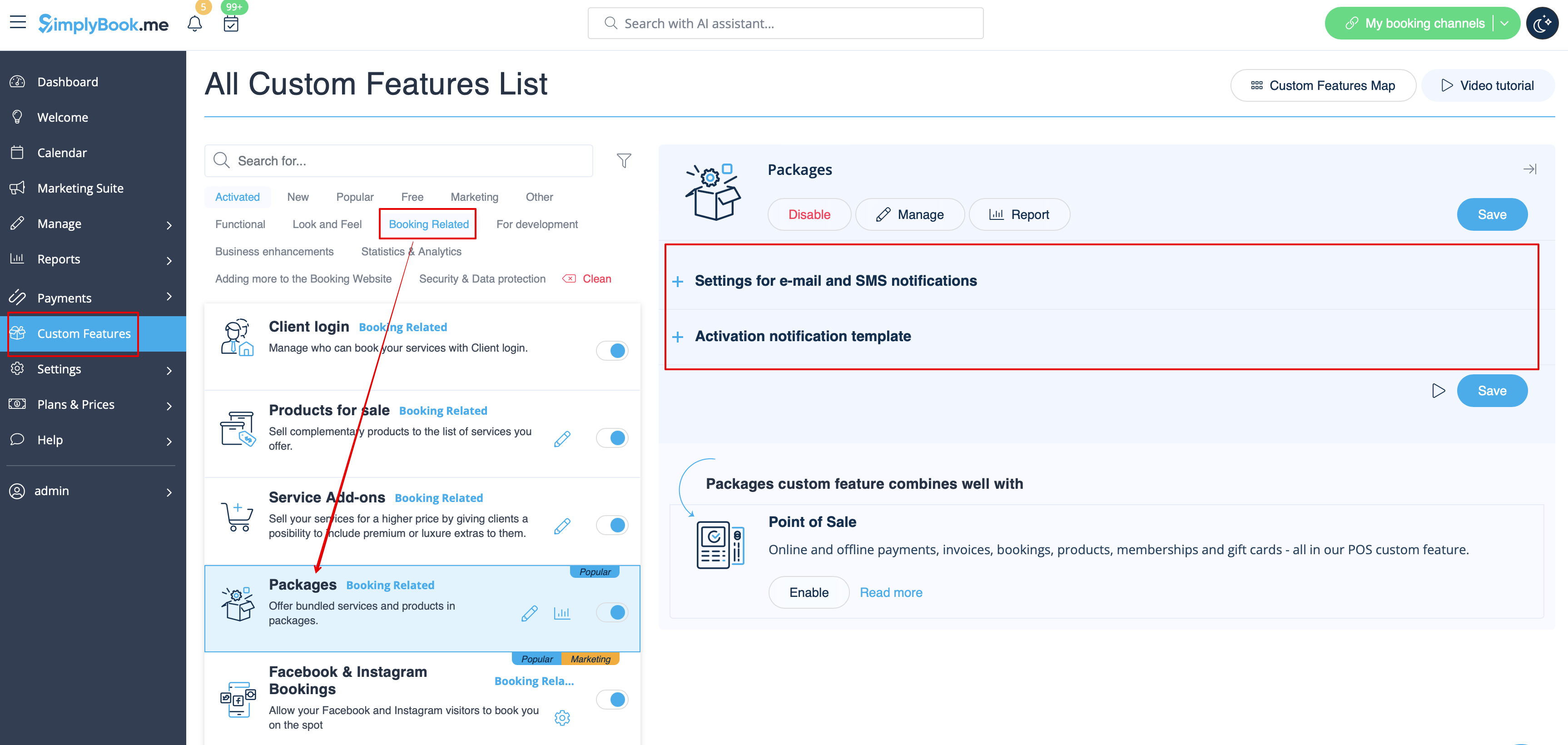
Lorsque vous vendez des forfaits de services/classes/produits/options supplémentaires ou que vous émettez des forfaits depuis l'interface d'administration, il est également possible d'envoyer automatiquement aux clients une notification d'activation du forfait (par e-mail et/ou SMS).
Pour modifier le texte du modèle ou activer/désactiver les notifications, veuillez vous rendre dans Fonctionnalités personnalisées -> Forfaits -> à droite de la page.
- En savoir plus sur l'utilisation de cette fonctionnalité personnalisée.
Tickets
Par défaut, le ticket est automatiquement envoyé à l'adresse e-mail du client avec l'e-mail de confirmation du service correspondant.
Toutefois, si vous utilisez les paiements en ligne et que vous autorisez l'option « payer plus tard » sur le site web de réservation et que le client la sélectionne,
le billet sera envoyé dans un e-mail séparé.
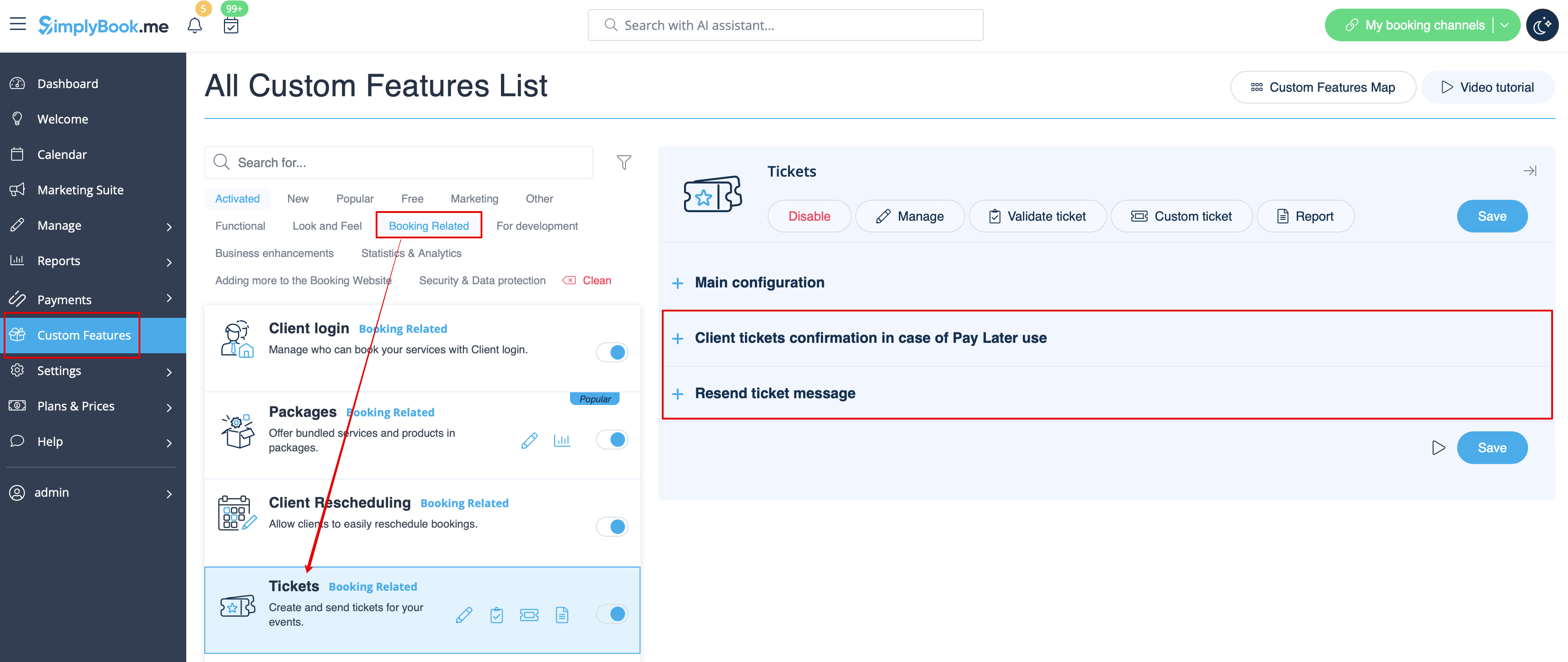
Vous pouvez également renvoyer le billet au client dans certains cas (cela est possible dans Rapports -> Rapport sur les billets).
Les deux modèles de notification peuvent être modifiés dans Fonctionnalités personnalisées -> Billets -> sur le côté droit de la page. Seuls les types d'e-mails sont disponibles.
- En savoir plus sur l'utilisation de cette fonctionnalité personnalisée.
E-mail personnalisé
Permet de personnaliser la conception des notifications par e-mail afin qu'elles correspondent à votre image de marque et à vos goûts.
Pour créer vos designs, rendez-vous dans Fonctionnalités personnalisées -> E-mail personnalisé -> Créer un modèle.
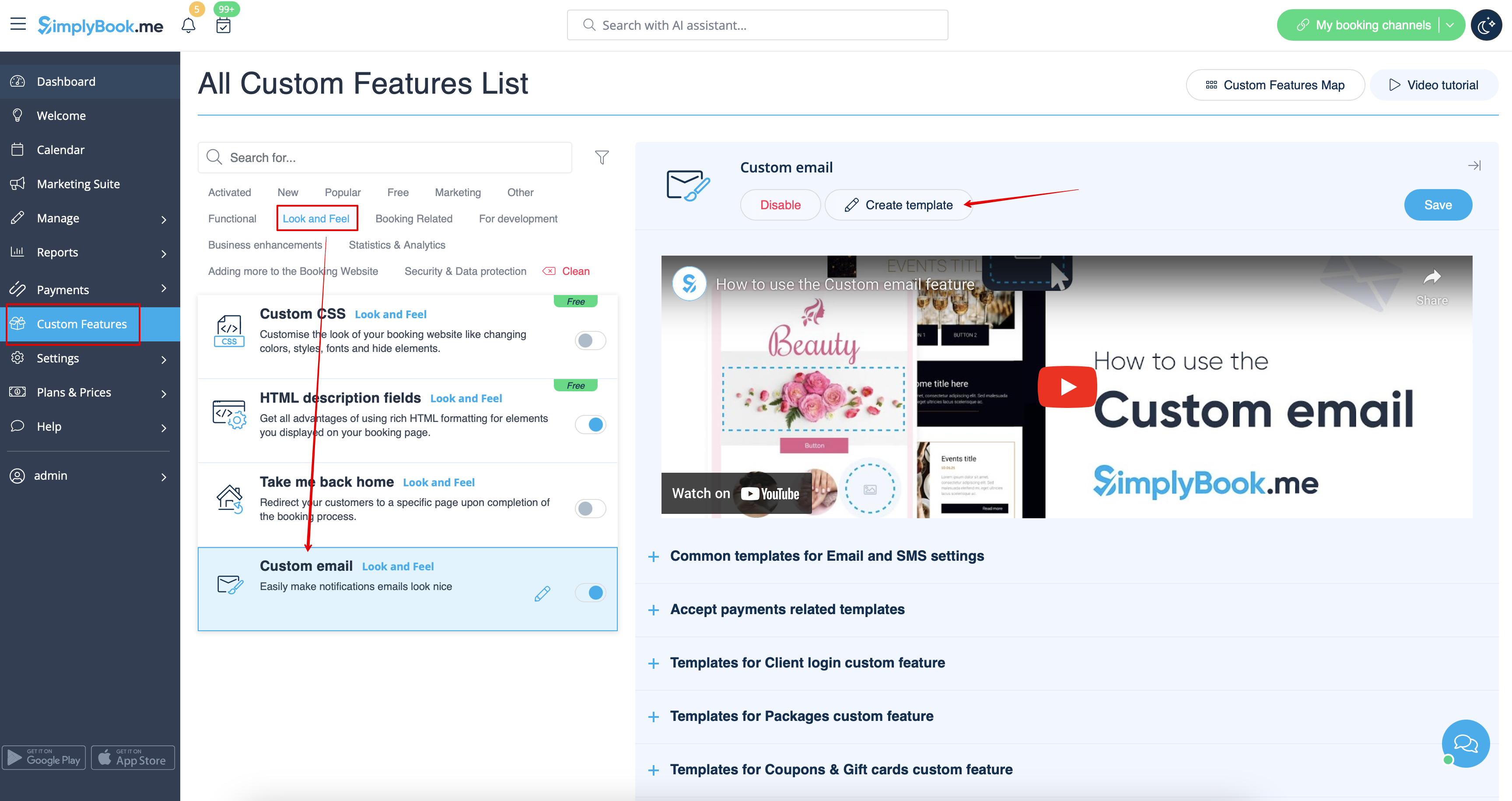
Grâce à cette fonctionnalité personnalisée, vous pouvez modifier l'apparence des types de notifications suivants :
- notifications courantes liées aux réservations dans Paramètres -> Paramètres e-mail et SMS ;
- e-mails de facturation de la fonctionnalité personnalisée « Accepter les paiements » ;
- notificationsde la fonctionnalité personnalisée «Réservations de groupe » ;
- notificationsde la fonctionnalité personnalisée« Réservations multiples » ;
- notificationsde la fonctionnalité personnalisée «Connexion client » ;
- notificationsde la fonctionnalité personnalisée «Adhésion » ;
- notificationsde la fonctionnalité personnalisée «Forfaits » ;
- notificationsde la fonctionnalité personnalisée «Billets » ;
- notifications de la fonctionnalitépersonnalisée « Coupons et cartes cadeaux » ;
- notifications de la fonctionnalité personnalisée« Test médical » ;
- notificationsde la fonctionnalité personnalisée «Système de notification de réservation rapide ».
Cette fonctionnalité permet de tester chaque type de notification avec le design pré-créé.
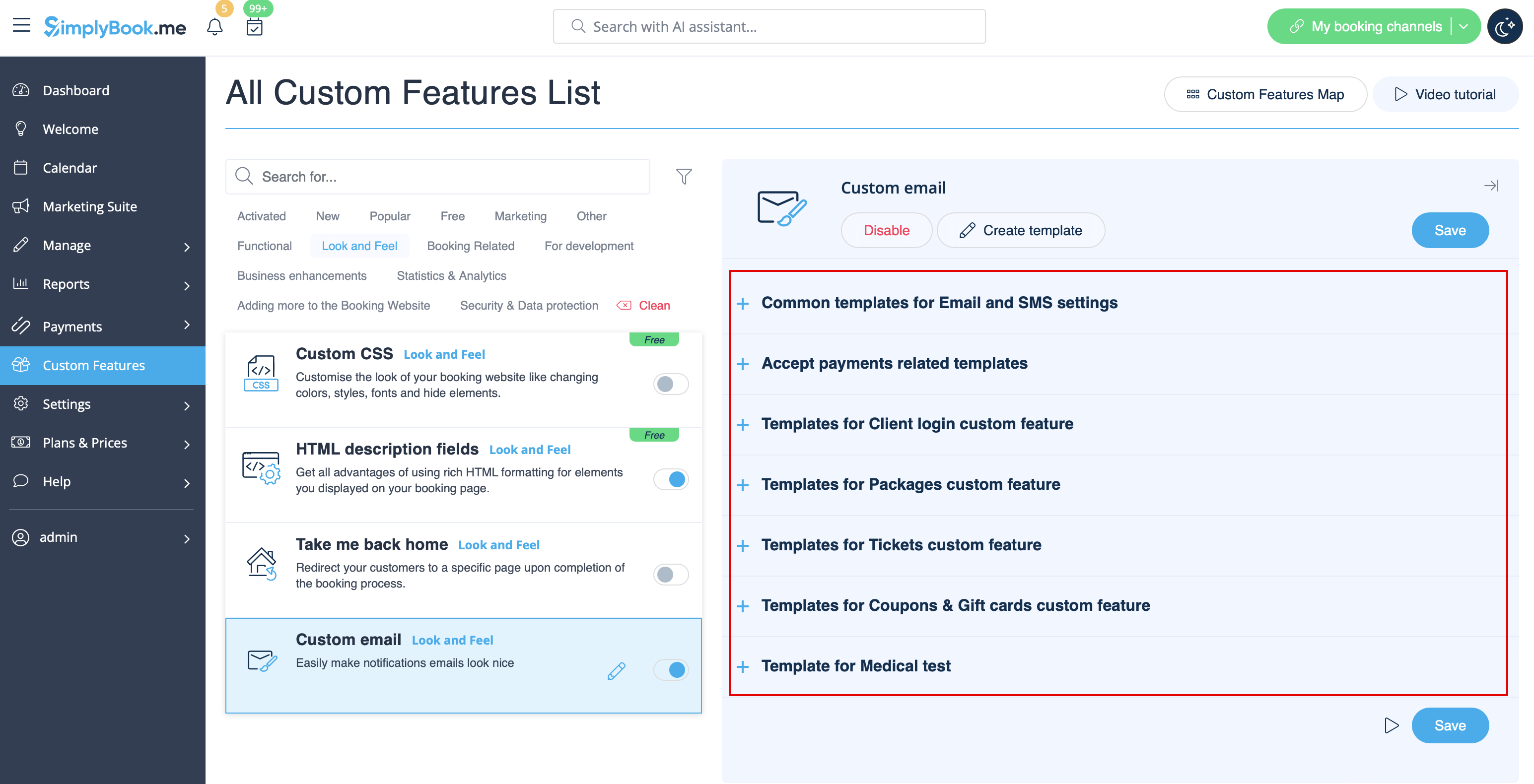
La balise {{content}} qui contient les informations de réservation/achat peut être modifiée dans les paramètres de la fonctionnalité correspondante.
- En savoir plus sur l'utilisation de cette fonctionnalité personnalisée.
SMTP
Cette fonctionnalité vous permet d'utiliser votre propre serveur SMTP pour envoyer les e-mails.
Elle ne dispose que d'un seul modèle pour tester cette fonctionnalité après avoir saisi les paramètres.
Vous pouvez modifier et utiliser le modèle d'e-mail de test dans Fonctionnalités personnalisées -> SMTP -> sur le côté droit de la page.
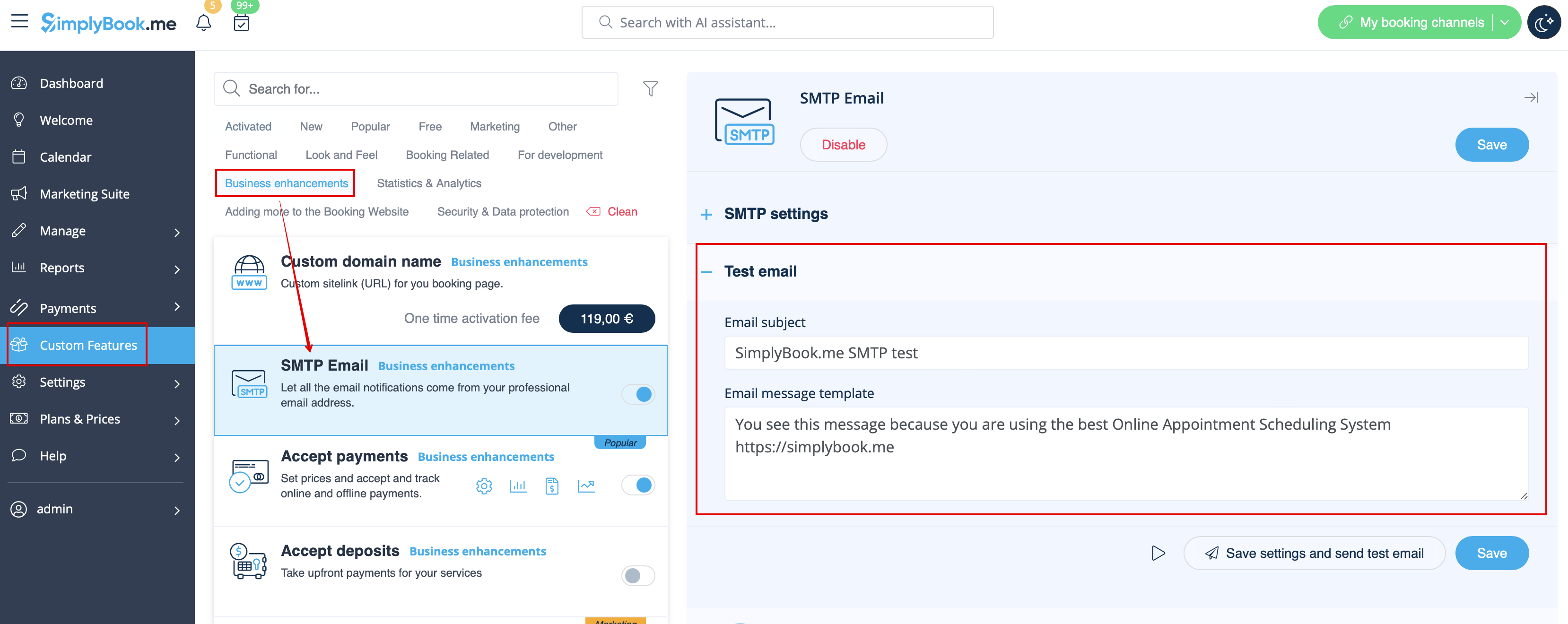
- En savoir plus sur l'utilisation de cette fonctionnalité personnalisée.
Rapport quotidien
Lorsque vous activez et configurez cette fonctionnalité personnalisée, un rapport par e-mail concernant les rendez-vous nouveaux, à venir et annulés est automatiquement envoyé à l'adresse e-mail de votre entreprise.
Il n'y a pas de modèle à modifier en tant que tel, mais vous pouvez ajuster les éléments inclus dans Fonctionnalités personnalisées -> Rapport quotidien -> sur le côté droit de la page.
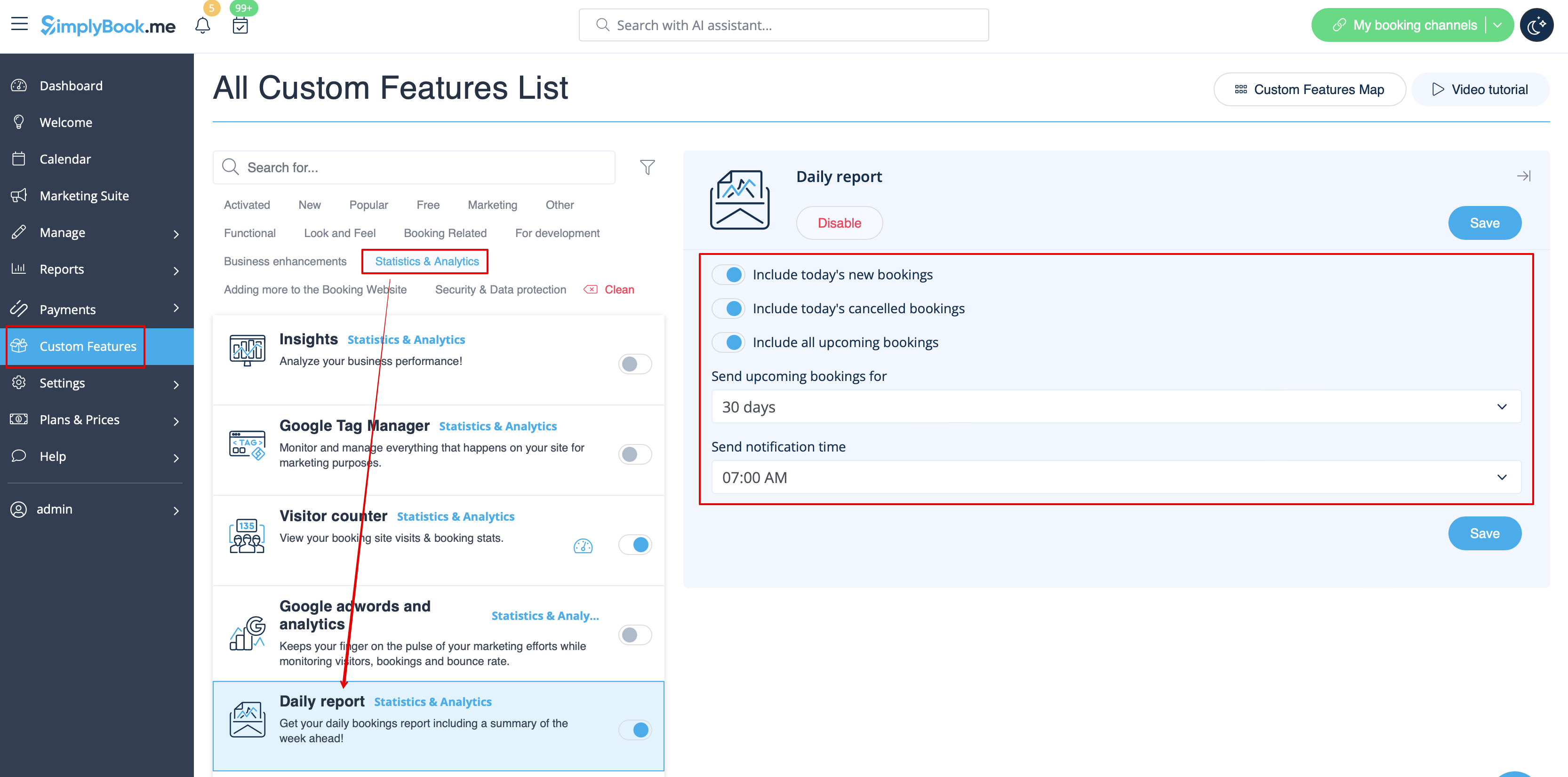
- En savoir plus sur l'utilisation de cette fonctionnalité personnalisée.
HIPAA
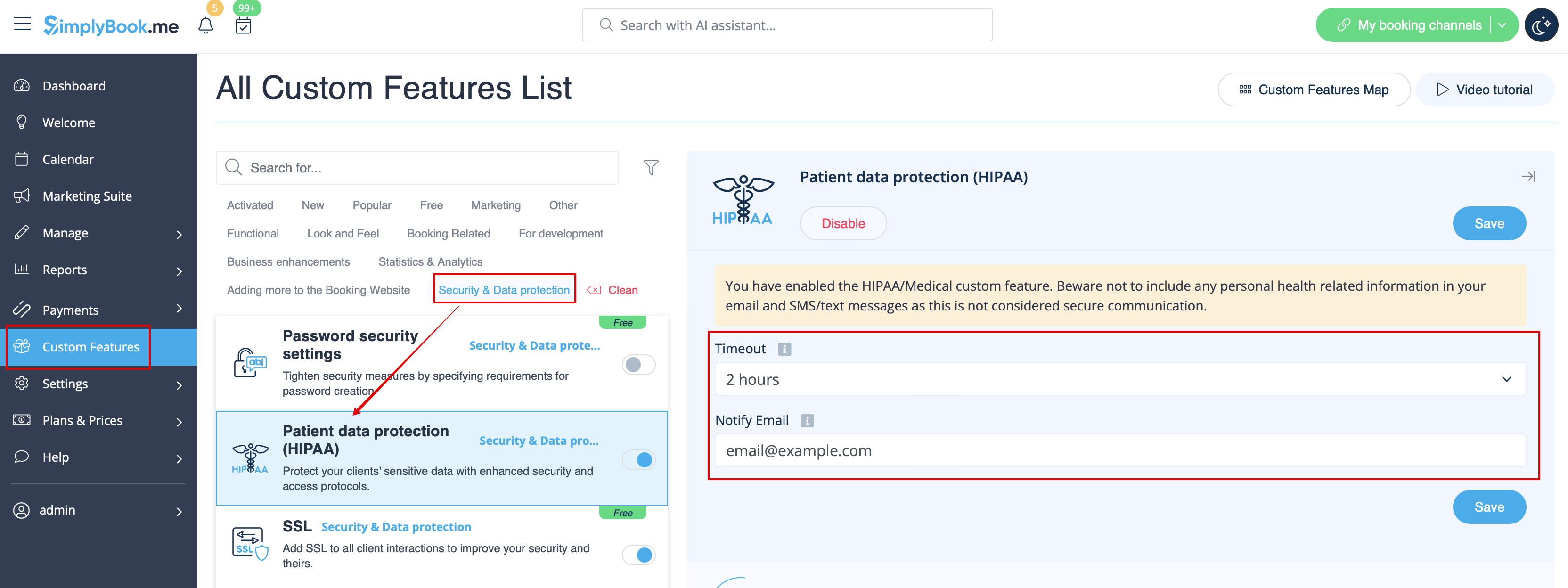
Il s'agit d'une fonctionnalité personnalisée liée à la sécurité qui permet d'envoyer des notifications par e-mail lorsque quelqu'un se connecte à votre système.
Elle ne contient aucun modèle d'e-mail à modifier et peut être activée/désactivée en ajoutant/supprimant l'adresse e-mail dans Fonctionnalités personnalisées -> HIPAA -> à droite de la page -> Notifier par e-mail.
- En savoir plus sur l'utilisation de cette fonctionnalité personnalisée.
Widget de contact
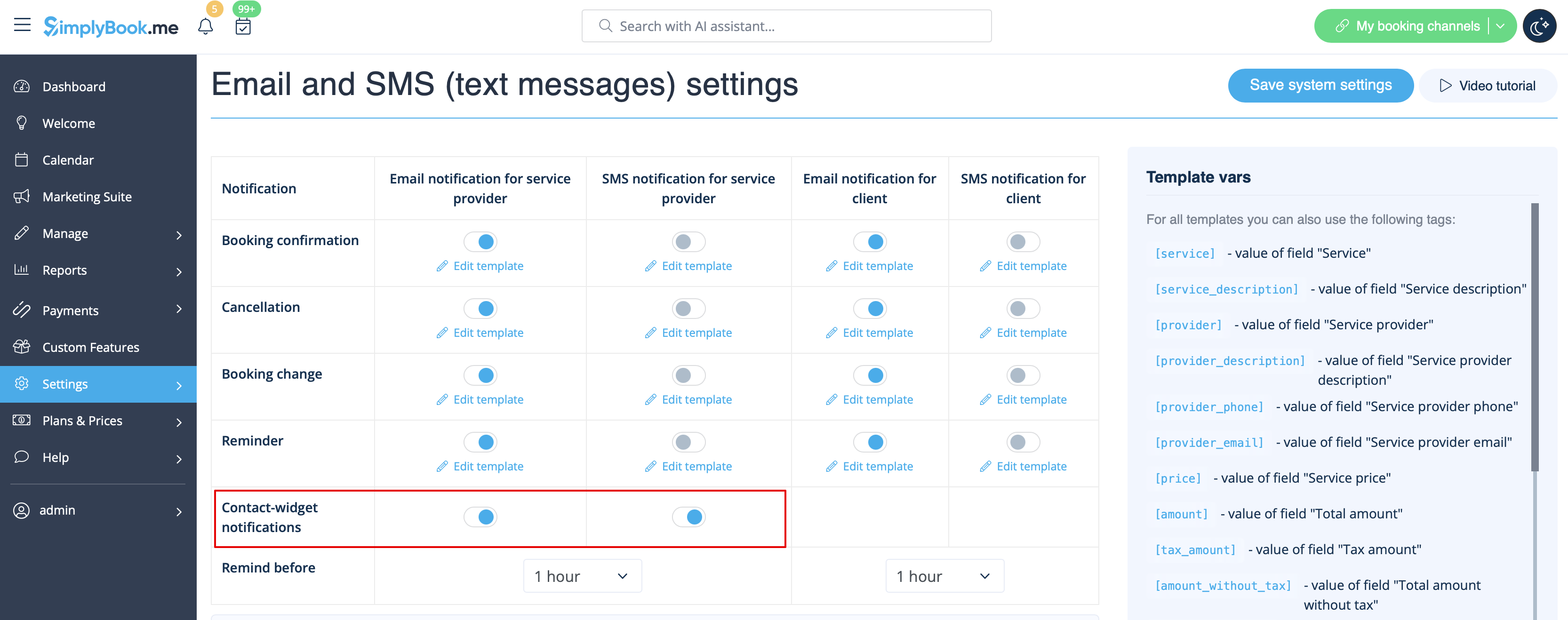
Comme cette fonctionnalité personnalisée permet d'ajouter un formulaire de contact à votre site web de réservation ou de créer un widget de bouton de contact, il existe également une notification par e-mail/SMS envoyée à l'entreprise lorsque quelqu'un laisse un message sur le site de réservation ou le widget, afin que vous puissiez répondre immédiatement. Il n'y a pas de modèle à modifier, mais vous pouvez désactiver ces notifications dans Paramètres -> Paramètres e-mail et SMS -> Notifications du widget de contact.
- En savoir plus sur l'utilisation de cette fonctionnalité personnalisée.
Test médical
Lorsque vous utilisez cette fonctionnalité personnalisée, vous devez impérativement envoyer les résultats des tests aux patients par e-mail.
Dans Fonctionnalités personnalisées -> Test médical -> sur le côté droit de la page, vous pouvez activer/désactiver ou modifier les modèles suivants :
- résultats positifs (modèles d'e-mail et de SMS) ;
- résultats négatifs (modèles d'e-mail et de SMS) ;
- résultats non concluants (modèles d'e-mail et de SMS).
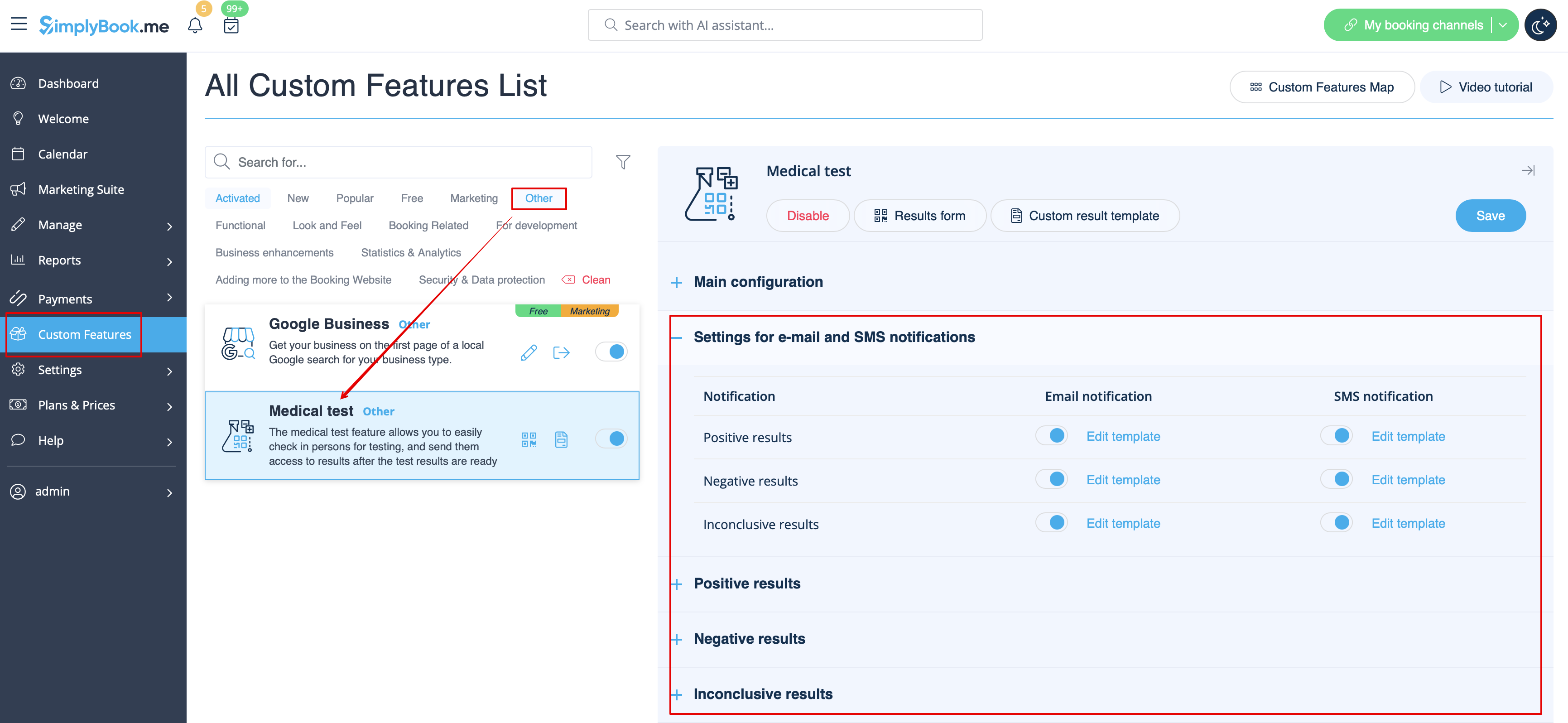
Si vous devez modifier le modèle de résultat du test, veuillez utiliser l'option Modèle de résultat personnalisé au-dessus des modèles.
- Pour en savoir plus sur l'utilisation de cette fonctionnalité personnalisée,consultez
Que sont les variables ?
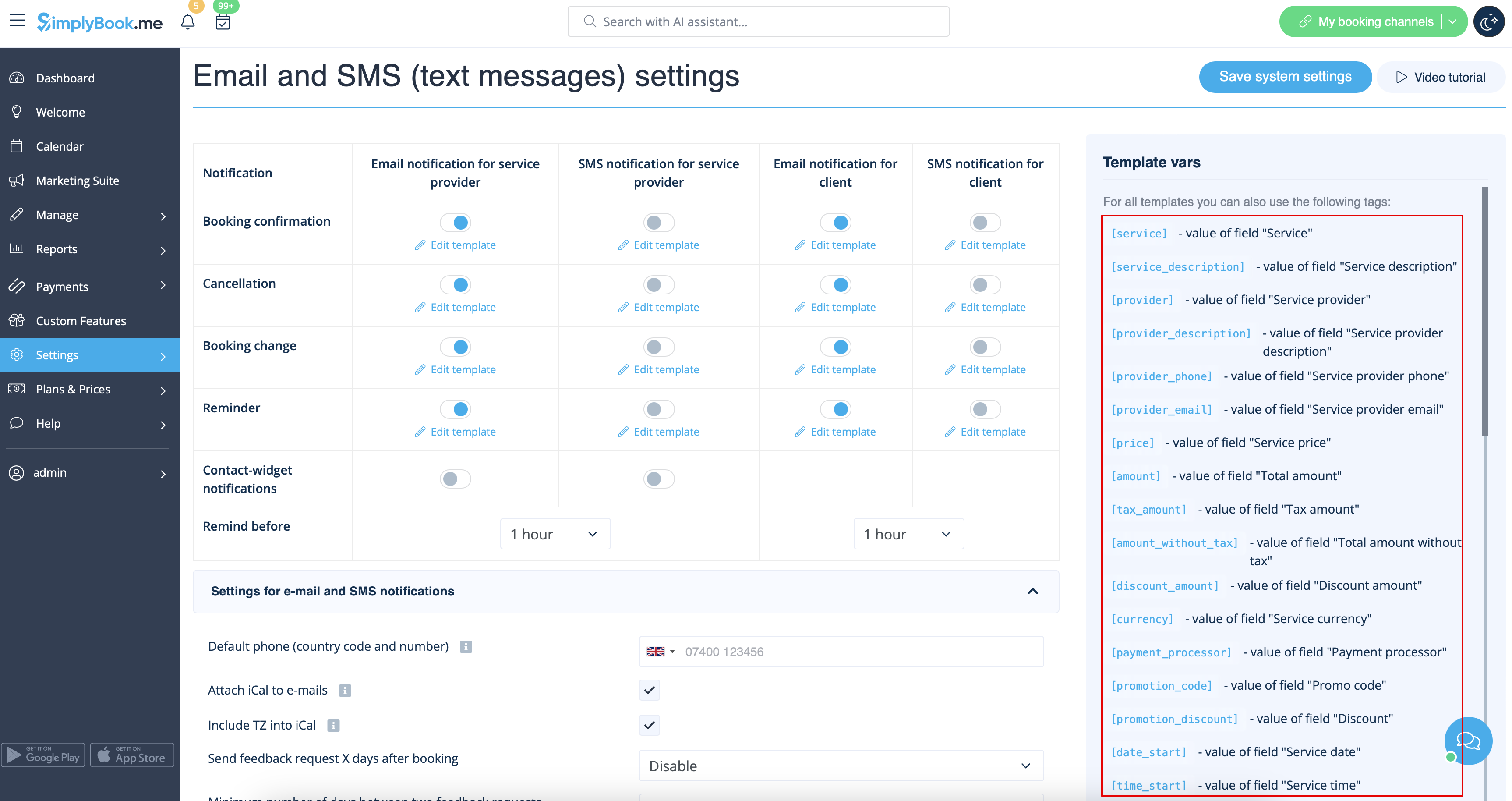
Les variables sont des éléments qui peuvent être insérés dans les modèles d'e-mails et de SMS (Paramètres -> Paramètres e-mail et SMS). Ces variables désigneront l'élément choisi après la réservation. Par exemple, vous avez deux prestataires : Marie et Jean. Dans le modèle d'e-mail, vous insérez le texte « Vous avez réservé un service avec [prestataire] ». Si le client a choisi Marie sur la page de réservation, il recevra le texte suivant : « Vous avez réservé un service avec Marie ». S'il a choisi Jean, il recevra le texte « Vous avez réservé un service avec Jean »
Vous pouvez toujours trouver les variables pouvant être utilisées avec un certain type de notification à côté du modèle, soit à droite de la page, soit dans la fenêtre contextuelle accessible en cliquant sur le bouton « Variables ».
iCals et comment les utiliser
Dans Paramètres -> Paramètres e-mail et SMS, vous pouvez cocher la case Joindre iCal aux e-mails. Les e-mails contiendront alors un fichier au format .isc. Lorsque vous cliquez sur ce fichier, il s'ouvre dans l'un de vos calendriers (Google Agenda, iCalendar, etc.)
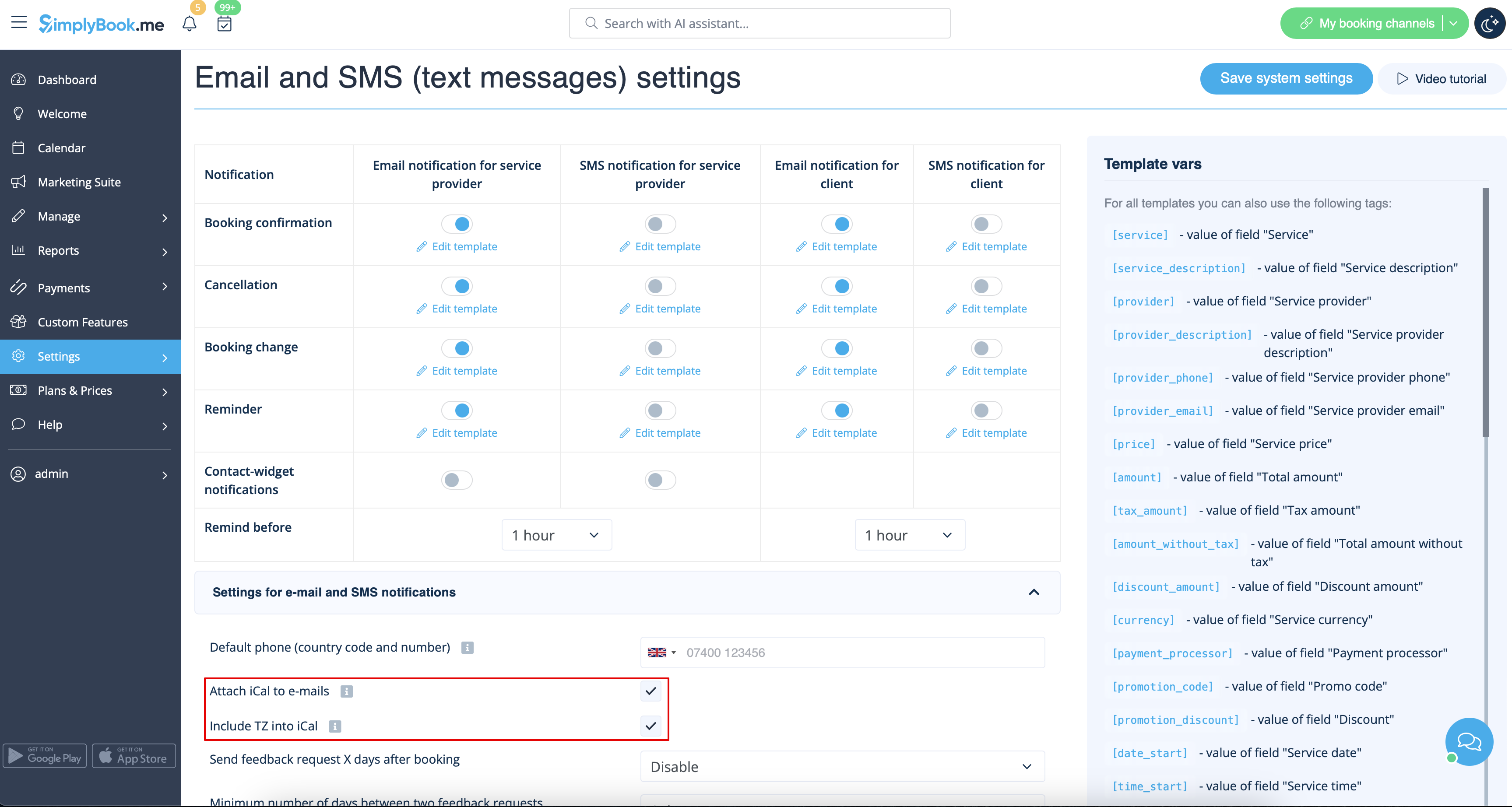
- Veuillez noter que les fichiers iCal n'ont pas de fuseau horaire défini, donc l'heure dans ce fichier sera affichée en fonction de l'adresse IP/des paramètres de l'appareil.
Les clients/prestataires ne reçoivent pas de notifications
- Raisons possibles
- 1. Les cases correspondantes dans Paramètres -> Paramètres e-mail et SMS ne sont pas cochées.
- 2. Le client/prestataire a saisi une adresse e-mail ou un numéro de téléphone erroné.
- 3. L'e-mail a été envoyé dans le dossier Courrier indésirable (Spam) ou dans l'onglet Réseaux sociaux. Veuillez consulter les instructions pour ajouter l'adresse à la liste blanche ici.
- 4. La fonctionnalité personnalisée SMTP n'est pas configurée correctement.
- 5. Si vous ne recevez pas de SMS, vérifiez votre solde SMS dans Plans et tarifs -> Abonnements en bas de la page.
Les clients/prestataires reçoivent des notifications erronées
- 1. Veuillez vérifier si vous avez activé la fonctionnalité personnalisée Réservations multiples ou Réservations de groupe. Ces fonctionnalités personnalisées ont leurs propres modèles.
- Modèle de réservations multiples (Fonctionnalités personnalisées -> Réservations multiples -> à droite de la page)
- Modèle de réservations de groupe (Fonctionnalités personnalisées -> Réservations de groupe -> à droite de la page)
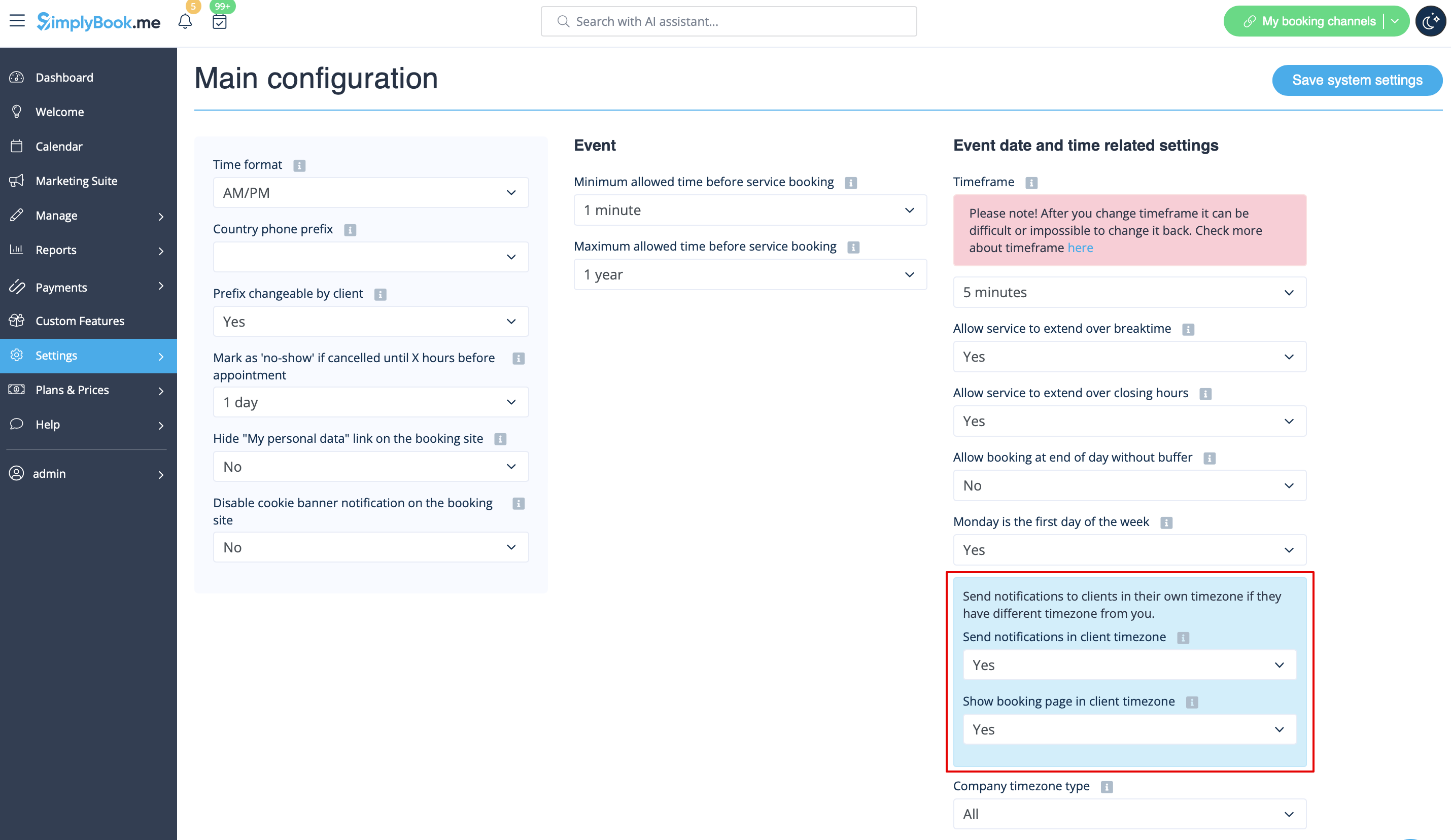
- 2. Vérifiez si le paramètre « Fuseau horaire » est activé dans Paramètres -> Configuration principale. Dans ce cas , le client a peut-être sélectionné un fuseau horaire incorrect et reçu une notification dans le mauvais fuseau horaire.
Instructions pour ajouter SimplyBook.me à la liste blanche de votre messagerie
Voici quelques mesures que vous pouvez prendre pour vous assurer de recevoir tous les e-mails importants de l'équipe SimplyBook.me.
Vous pouvez vous attendre à recevoir des notifications du système, par exemple lorsque votre abonnement arrive à expiration, des avis concernant vos réservations et des informations utiles sur divers sujets, tels que la manière de tirer le meilleur parti du service SimplyBook.me.
Aussi performante soit-elle, la technologie n'est pas parfaite, et il arrive parfois que les systèmes de messagerie électronique et les fournisseurs d'accès à Internet confondent des e-mails légitimes avec des spams. Afin de ne manquer aucune communication importante de notre part, veuillez suivre les étapes suivantes :
Veuillez ajouter à votre liste blanche tous les e-mails provenant du domaine @simplybook.me.
Pourquoi ? Parce que cela indique à votre service de messagerie ou à votre programme que vous souhaitez réellement recevoir des e-mails provenant de ce domaine, afin qu'il puisse s'assurer que vous les recevrez bien.
Comment ? Cela diffère selon les services de messagerie électronique et les programmes, mais vous trouverez ci-dessous des informations sur certains des principaux. Si vous n'utilisez pas l'un d'entre eux, veuillez vous reporter à la section d'aide de votre service pour plus d'informations.
Utilisation de Gmail ou Gsuite
Filtrez les messages provenant de @simplybook.me et indiquez au système de ne jamais les envoyer dans le dossier spam :
- 1. Accédez aux paramètres (cliquez sur l'icône en forme de roue dentée en haut à droite)

- 2. Sélectionnez l'onglet Filtres et adresses bloquées

- 3. Vers le bas de l'onglet, cliquez sur le lien Créer un nouveau filtre

- 4. Dans le champ « De », écrivez @simplybook.me
- 5. Cliquez sur « Créer un filtre avec cette recherche » en bas à droite de la fenêtre

- 6. Cochez la case à côté de Ne jamais envoyer dans le dossier Spam
- 7. Cliquez sur le bouton bleu Créer un filtre

Parfait ! Vous ne manquerez plus rien de notre part !
Et pour vous assurer que nos e-mails ne se perdent pas dans l'onglet « Mises à jour » ou « Promotions » :
- 1. Recherchez un e-mail de SimplyBook.me dans votre boîte de réception
- 2. Cliquez dessus et faites-le glisser vers l'onglet « Principal » dans votre boîte de réception

- 3. Il vous sera demandé si vous souhaitez appliquer cette action aux futurs e-mails. Répondez oui

Utilisation de Yahoo! Mail
- 1. Lorsque vous ouvrez un e-mail, passez votre souris sur le nom de l'expéditeur.
- 2. Cliquez sur les trois points dans la fenêtre d'informations de l'expéditeur qui s'affiche, puis cliquez sur Ajouter aux contacts.

- 3. Lorsque le formulaire Ajouter un contact s'affiche, cliquez sur Enregistrer.

Utilisation de Mac Mail
- 1. Dans le menu supérieur, sélectionnez Mail -> Préférences

- 2. Sélectionnez ensuite l'icône Règles, cliquez sur Ajouter une règle et saisissez un nom pour la règle dans le champ Description. Utilisez les paramètres suivants :

- 3. « Si l'une des conditions suivantes est remplie : From Contains ». Dans le champ de texte à côté de Contains, tapez @simplybook.me

- 4. Sélectionnez Déplacer le message et Boîte de réception dans les menus déroulants, puis cliquez sur OK pour enregistrer la règle.
Utilisation d'Outlook
- 1. Cliquez avec le bouton droit de la souris sur le message dans votre boîte de réception.
- 2. Sélectionnez Courrier indésirable dans le menu.
- 3. Cliquez sur Ne jamais bloquer l'expéditeur ou Ne jamais bloquer le domaine de l'expéditeur (@exemple.com).

Super, tout est prêt ! Nous sommes impatients de vous contacter et de voir votre entreprise prospérer !

