Created page with ":3. Виберіть <span style="background-color:#d4f8e5; padding:5px; border-radius:5px;">«Скасувати повторення</span> » та підтвердіть дію." Tags: Mobile edit Mobile web edit |
Created page with ":2. У <span style="background-color:#d4f8e5; padding:5px; border-radius:5px;">блоці опцій планів</span> натисніть <span style="background-color:#d4f8e5; padding:5px; border-radius:5px;">«Понизити»</span> під бажаним планом. (Зверніть увагу! Понизити тариф можна, якщо нижчий тарифний план відповідає всім активованим у вашому обліко..." |
||
| Line 36: | Line 36: | ||
:1. Перейдіть до сторінки <span style="background-color:#d4f8e5; padding:5px; border-radius:5px;">«Плани та ціни»</span> -> <span style="background-color:#d4f8e5; padding:5px; border-radius:5px;">«Підписки»</span> у своєму обліковому записі. | :1. Перейдіть до сторінки <span style="background-color:#d4f8e5; padding:5px; border-radius:5px;">«Плани та ціни»</span> -> <span style="background-color:#d4f8e5; padding:5px; border-radius:5px;">«Підписки»</span> у своєму обліковому записі. | ||
:2. У <span style="background-color:#d4f8e5; padding:5px; border-radius:5px;">блоці опцій планів</span> натисніть <span style="background-color:#d4f8e5; padding:5px; border-radius:5px;">«Понизити»</span> під бажаним планом. | |||
:2. | (Зверніть увагу! Понизити тариф можна, якщо нижчий тарифний план відповідає всім активованим у вашому обліковому записі пунктам) | ||
( | |||
[[File:Downgrade plan path redesigned.png|1200px|center|link=https://help.simplybook.me/images/f/f4/Downgrade_plan_path_redesigned.png]] | [[File:Downgrade plan path redesigned.png|1200px|center|link=https://help.simplybook.me/images/f/f4/Downgrade_plan_path_redesigned.png]] | ||
<br><br> | <br><br> | ||
:3. | :3. Перевірте дані компанії в лівій частині сторінки (вони будуть використані для виставлення рахунку) і виберіть спосіб оплати. | ||
[[File:Confirm subscription update redesigned.png|1200px|center|link=https://help.simplybook.me/images/e/e3/Confirm_subscription_update_redesigned.png]] | [[File:Confirm subscription update redesigned.png|1200px|center|link=https://help.simplybook.me/images/e/e3/Confirm_subscription_update_redesigned.png]] | ||
<br><br> | <br><br> | ||
:4. | :4. Після здійснення оплати та її успішного отримання системою новий тарифний план почне діяти. | ||
<br><br> | <br><br> | ||
<div lang="en" dir="ltr" class="mw-content-ltr"> | <div lang="en" dir="ltr" class="mw-content-ltr"> | ||
Revision as of 12:21, 16 May 2025
У міру розвитку вашого бізнесу ваш план передплати може перестати відповідати вашим вимогам. Не хвилюйтеся! Ви маєте право:
- Легко скасуйте профіль оплати періодичної передплати.
- Оберіть інший план, який краще відповідає вашим потребам.
- Заблокуйте свій обліковий запис, доки він не знадобиться знову.
- Отримайте більш спрощене рішення для бронювання SimplyMeet.me, якщо SimplyBook.me занадто розширений для ваших потреб
Ми тут, щоб забезпечити вам безперебійну та гнучку роботу. Якщо у вас є питання або вам потрібна допомога, наша команда підтримки готова допомогти.
Як скасувати платну підписку
Якщо ви хоча б один раз придбали платний план, обліковий запис не буде автоматично видалено після скасування передплати, навіть якщо ви не користуєтеся ним протягом певного періоду.
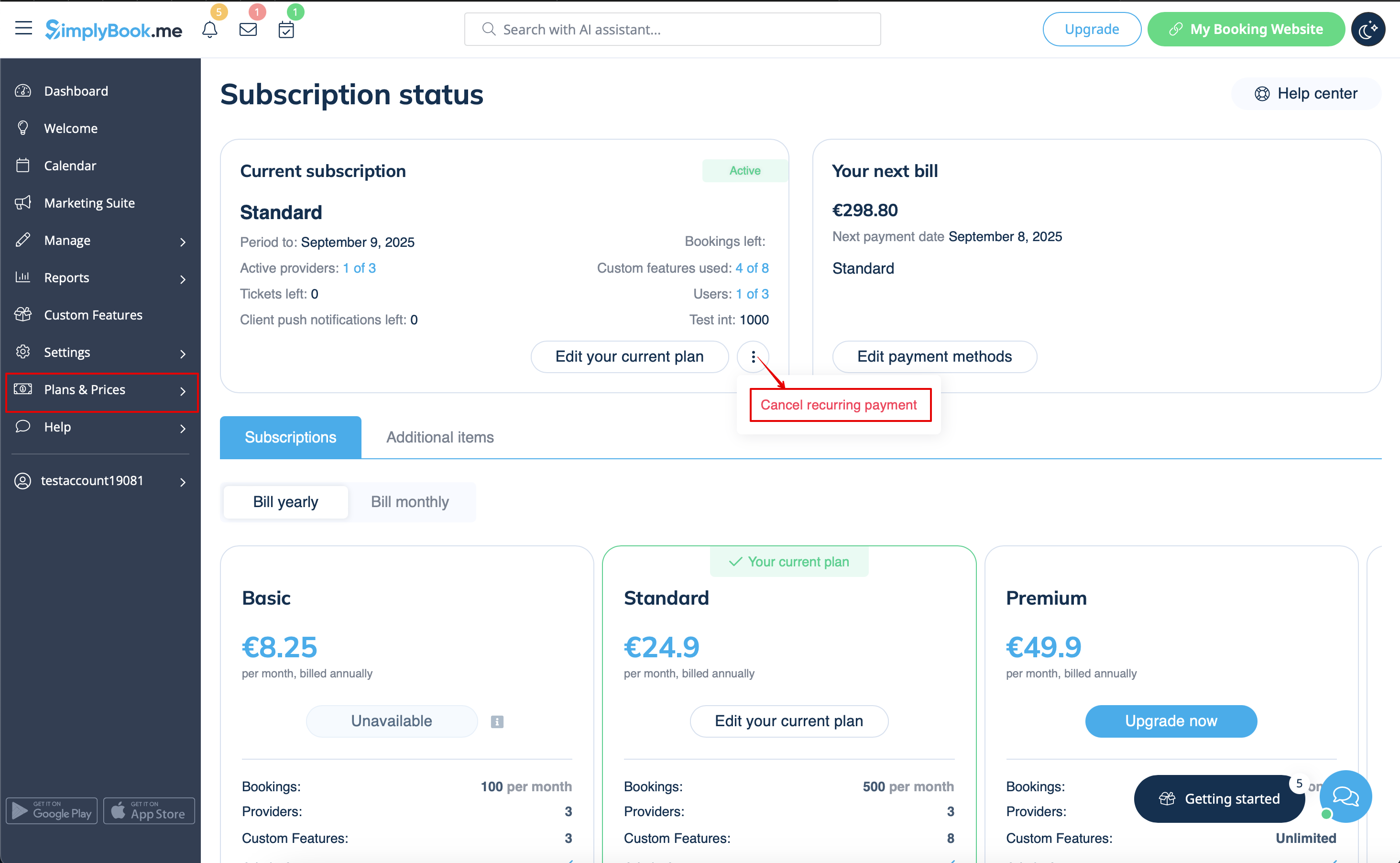
Щоб скасувати регулярні платежі, виконайте такі дії:
- 1. Перейдіть на сторінку «Тарифи та ціни» -> «Підписки» у вашому обліковому записі.
- 2. У верхньому блоці з деталями підписки натисніть на меню дій з трьома крапками.
- 3. Виберіть «Скасувати повторення » та підтвердіть дію.
- 4. В результаті додаткових витрат не буде. Ви зможете користуватися всіма опціями до закінчення поточного періоду.
- Ви зможете придбати бажаний план у розділі «Плани та ціни» -> «Підписки» в будь-який час і встановити новий профіль повторення для безперебійного використання системи.
Як понизити рівень передплати
Зверніть увагу! Повернення до безкоштовного тарифу неможливе.
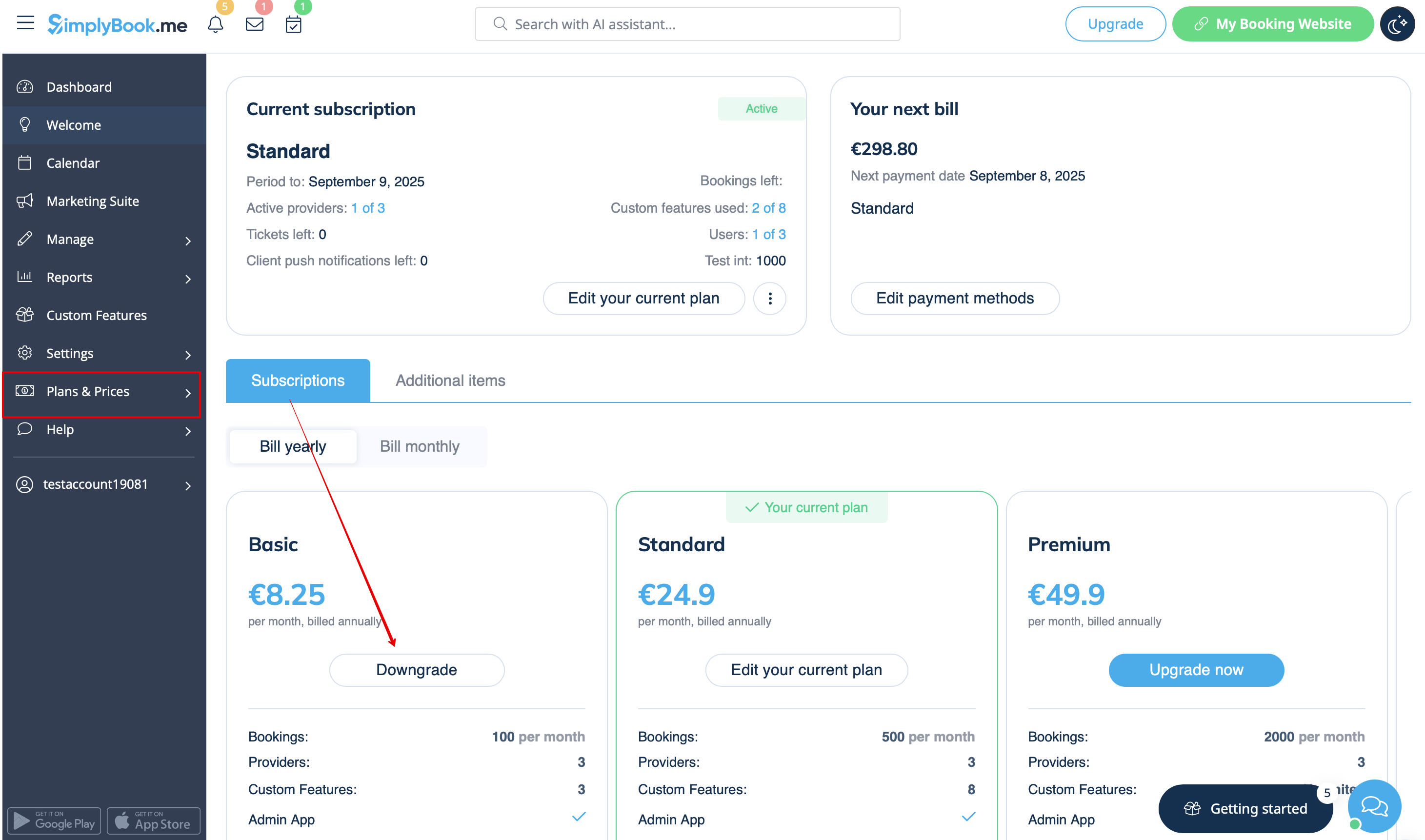
- 1. Перейдіть до сторінки «Плани та ціни» -> «Підписки» у своєму обліковому записі.
- 2. У блоці опцій планів натисніть «Понизити» під бажаним планом.
(Зверніть увагу! Понизити тариф можна, якщо нижчий тарифний план відповідає всім активованим у вашому обліковому записі пунктам)
- 3. Перевірте дані компанії в лівій частині сторінки (вони будуть використані для виставлення рахунку) і виберіть спосіб оплати.
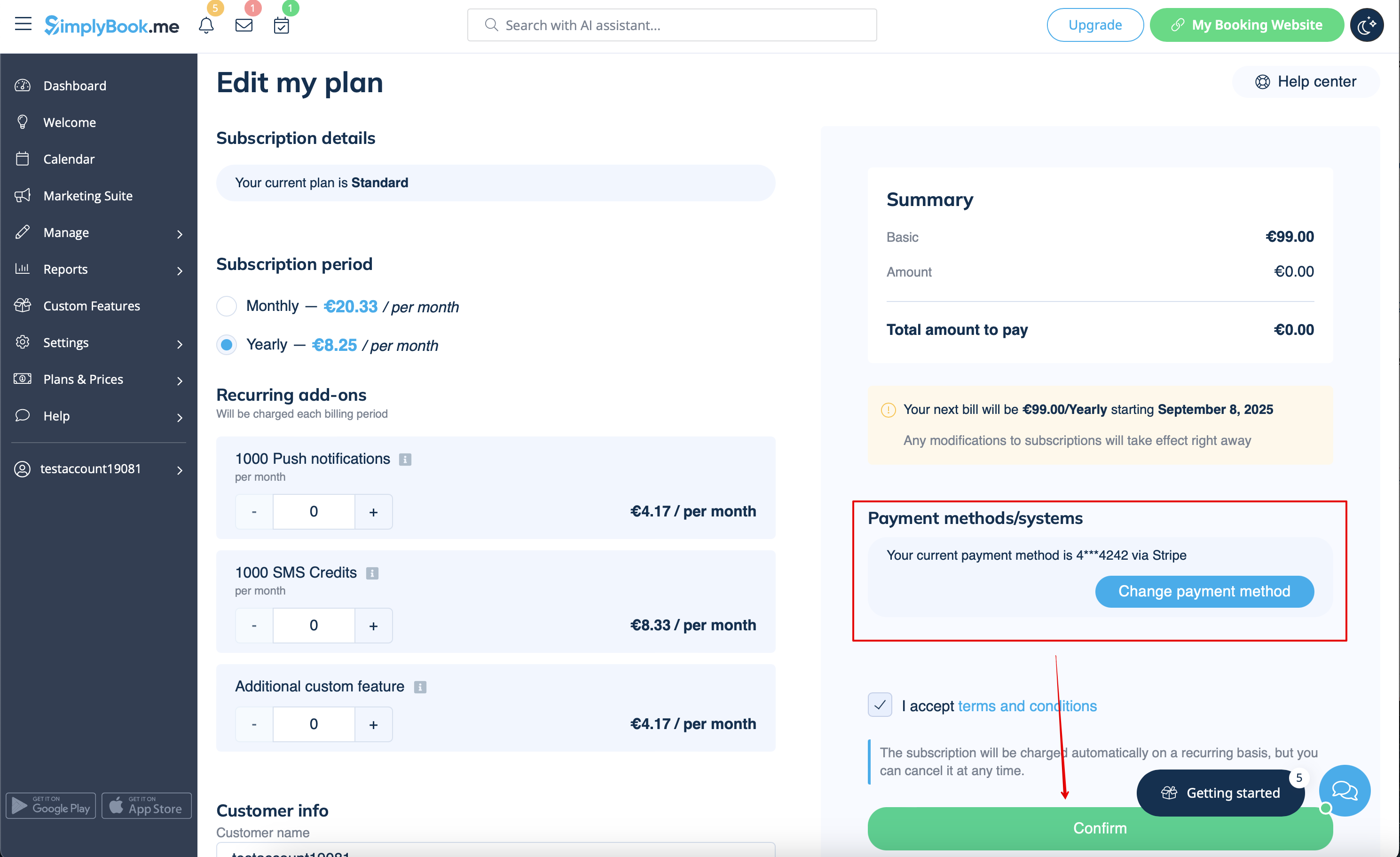
- 4. Після здійснення оплати та її успішного отримання системою новий тарифний план почне діяти.
Need a simpler solution?
Please contact our support either in LiveChat directly from your account or send an email to support@simplybook.me and we will be happy to help you to choose the best matching plan for your business.
You can also check our SimplyMeet.me solution, a simple meeting scheduling tool with easy setup and a variety of tools at your disposal.
How to delete the account
Before the account removal you may also consider canceling the subscription to not be charged if you have a pause in your business or have a seasonal occupation instead of deleting it.
If that's the case please check the steps for recurring payment cancellation.
Or, if the subscription does not currently fit your needs, you can buy another one according to this.
Of course you can always contact our support for assistance with selecting a new subscription plan to match your current business needs in the best way.
If you are sure that you want to delete the account please follow these simple steps:
- 1. Go to Settings and click on Delete account.
- 2. Select the reason for deletion, confirm your agreement for data deletion, and proceed with the action.
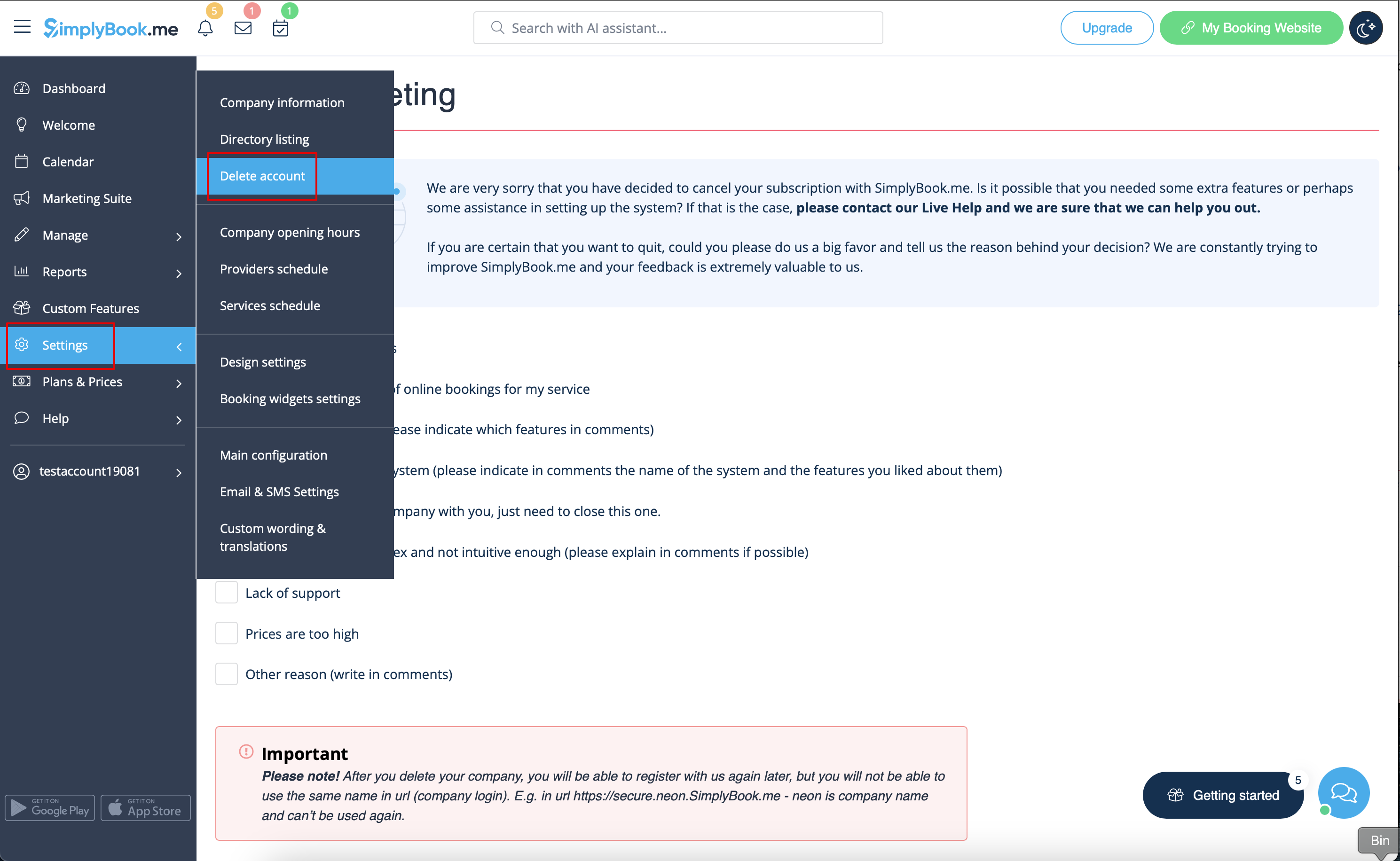
Once completed, your account will be deleted. For a certain period, you'll have the option to restore it. If not, it will be permanently removed from our databases.
