Created page with "<div class="mw-collapsible mw-collapsed" data-expandtext="Show" data-collapsetext="Hide" style="width:800px;"> <span class="qa"> Klasser</span> <div class="mw-collapsible-content"> Se den utökade handledningen om klasser för onlinebokning här <br><br> Och videohandledning om hur man säljer medlemskapsrelaterade klasser link=https://vimeo.com/236888588 here <br><br> </div> </div> <br/>..." |
Created page with "<div class="mw-collapsible mw-collapsed" data-expandtext="Show" data-collapsetext="Hide" style="width:800px;"> <span class="qa"> 24/7-tjänster eller tjänster efter kl. 00.00</span> <div class="mw-collapsible-content"> Om dina tjänster sträcker sig över midnatt måste du, efter att du har ställt in din tillgänglighet, se till att "Tillåt tjänster att sträcka..." |
||
| Line 152: | Line 152: | ||
</div> | </div> | ||
<br/> | <br/> | ||
<div class="mw-collapsible mw-collapsed" data-expandtext="Show" data-collapsetext="Hide" style="width:800px;"> | <div class="mw-collapsible mw-collapsed" data-expandtext="Show" data-collapsetext="Hide" style="width:800px;"> | ||
<span class="qa">[[Adding_services,_providers_and_availability(new_interface)#How_to_set_24.2F7_or_after_00.00_services | 24/7 | <span class="qa">[[Adding_services,_providers_and_availability(new_interface)#How_to_set_24.2F7_or_after_00.00_services | 24/7-tjänster eller tjänster efter kl. 00.00]]</span> | ||
<div class="mw-collapsible-content"> | <div class="mw-collapsible-content"> | ||
Om dina tjänster sträcker sig över midnatt måste du, efter att du har ställt in din tillgänglighet, se till att "Tillåt tjänster att sträcka sig över stängningstider" är inställt på "Ja" i Inställningar//Huvudkonfiguration. | |||
</div> | </div> | ||
</div> | </div> | ||
<br/> | <br/> | ||
<div class="mw-collapsible mw-collapsed" data-expandtext="Show" data-collapsetext="Hide" style="width:800px;"> | <div class="mw-collapsible mw-collapsed" data-expandtext="Show" data-collapsetext="Hide" style="width:800px;"> | ||
<span class="qa">[[Custom_Features#Multiple_Locations | | <span class="qa">[[Custom_Features#Multiple_Locations | Olika kliniker/salonger under ett konto]]</span> | ||
<div class="mw-collapsible-content"> | <div class="mw-collapsible-content"> | ||
Om du har flera kliniker/salonger/gym/etc kan du använda [[Custom_Features#Multiple_Locations| anpassningsfunktionen för platser]] och göra varje klinik eller salong till en plats. Du kan tilldela leverantörer som arbetar på den platsen och när kunderna bokar dina tjänster väljer de först plats och sedan tjänst och leverantör. | |||
</div> | </div> | ||
</div> | </div> | ||
<br/> | <br/> | ||
<div class="mw-collapsible mw-collapsed" data-expandtext="Show" data-collapsetext="Hide" style="width:800px;"> | <div class="mw-collapsible mw-collapsed" data-expandtext="Show" data-collapsetext="Hide" style="width:800px;"> | ||
<span class="qa">[[Services limited to the amount of rooms or items]]</span> | <span class="qa">[[Services limited to the amount of rooms or items|Tjänster begränsade till antalet rum eller artiklar]]</span> | ||
<div class="mw-collapsible-content"> | <div class="mw-collapsible-content"> | ||
För företag som har begränsat antal rum eller artiklar rekommenderar vi att du kollar in [[Custom_Features#Limit_Bookings | anpassningsfunktionen Limit Bookings]]. | |||
Denna anpassningsfunktion låter dig begränsa antalet bokningar som kan göras samtidigt. Denna anpassningsbara funktion är användbar när dina tjänster kräver ytterligare saker som tandläkarstol eller rum i studion etc. När bokningsgränsen är nådd kommer motsvarande tidsintervall att se ut som en paus på bokningssidan (och i admin-gränssnittet om du inte har ställt in att dessa begränsningar ska ignoreras för administratörer). Det är möjligt att begränsa antalet bokningar samtidigt generellt, och du kan också ställa in en viss gräns för varje tjänst separat. | |||
<br/><br/> | <br/><br/> | ||
<div lang="en" dir="ltr" class="mw-content-ltr"> | <div lang="en" dir="ltr" class="mw-content-ltr"> | ||
Or as another option you can use [[Related_Resources_custom_feature|Related Resources]] custom feature as it allows to connect equipment, rooms or anything else that is limited in quantity to a service. Different resources can be connected to the same service when needed. You can create all the necessary equipment, define the number of items required for each appointment per service/class and the resources will be automatically attached during the booking process. | Or as another option you can use [[Related_Resources_custom_feature|Related Resources]] custom feature as it allows to connect equipment, rooms or anything else that is limited in quantity to a service. Different resources can be connected to the same service when needed. You can create all the necessary equipment, define the number of items required for each appointment per service/class and the resources will be automatically attached during the booking process. | ||
Revision as of 10:32, 19 May 2025
Företag inom skönhetsbranschen
- Videohandledning finns tillgänglig
- 1.

- 2.
- 3.
för quest roomsSimplybook är ett perfekt onlinebokningssystem för olika typer av quest rooms och escape rooms. Det gör det möjligt för kunder att välja rum och boka en specifik tidpunkt för när spelet ska äga rum. Kunderna kan lämna feedback på företagets bokningssida efter uppföljningsmejlet.
För att kunna använda Simplybook.me på ett effektivt sätt rekommenderar vi följande inställningar:
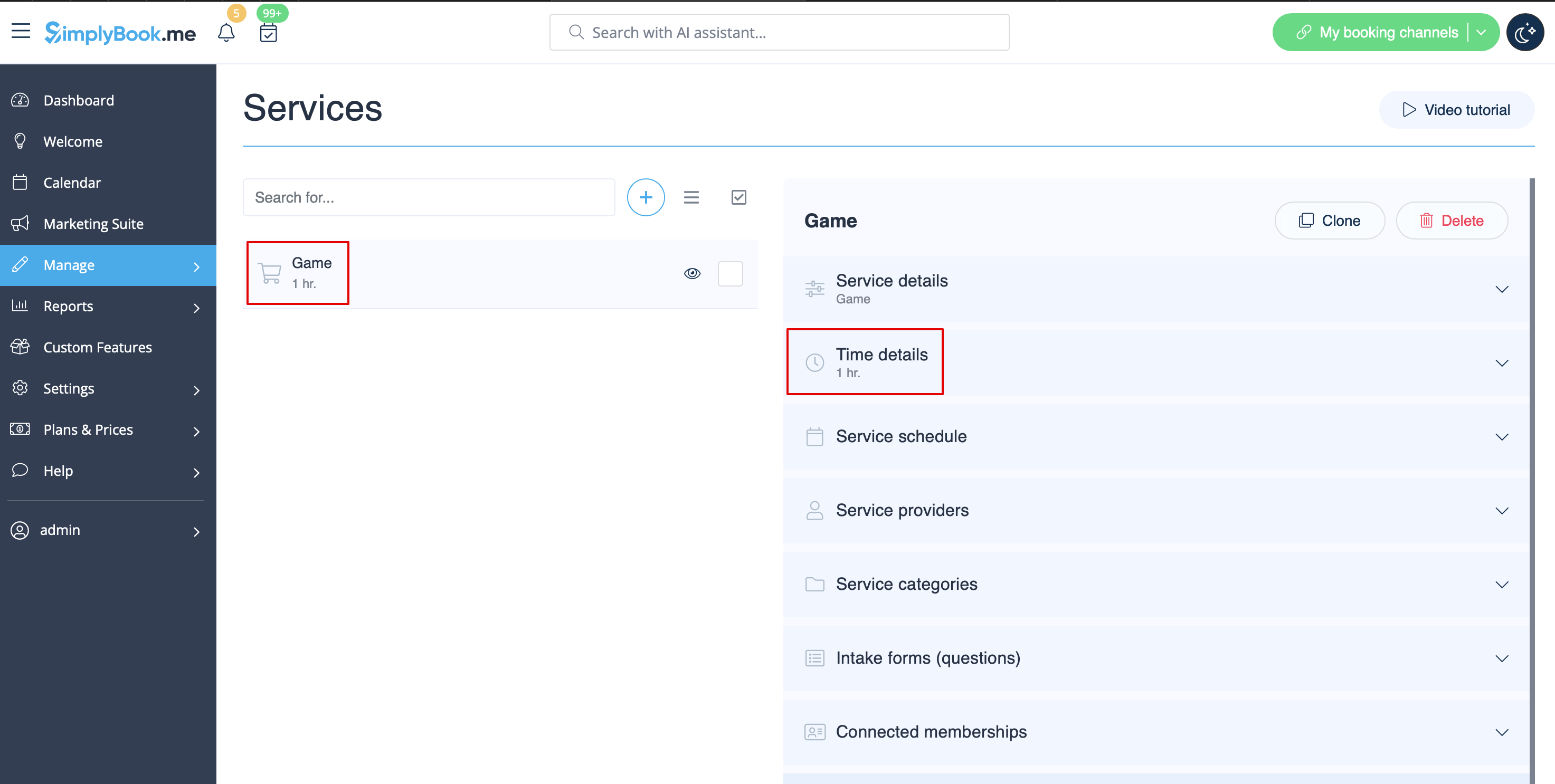
- 1. Skapa en tjänst som spel med motsvarande varaktighet i Hantera // Tjänster // "+". Använd Hantera // Tjänster // Tidsdetaljer för att redigera tjänstens varaktighet.
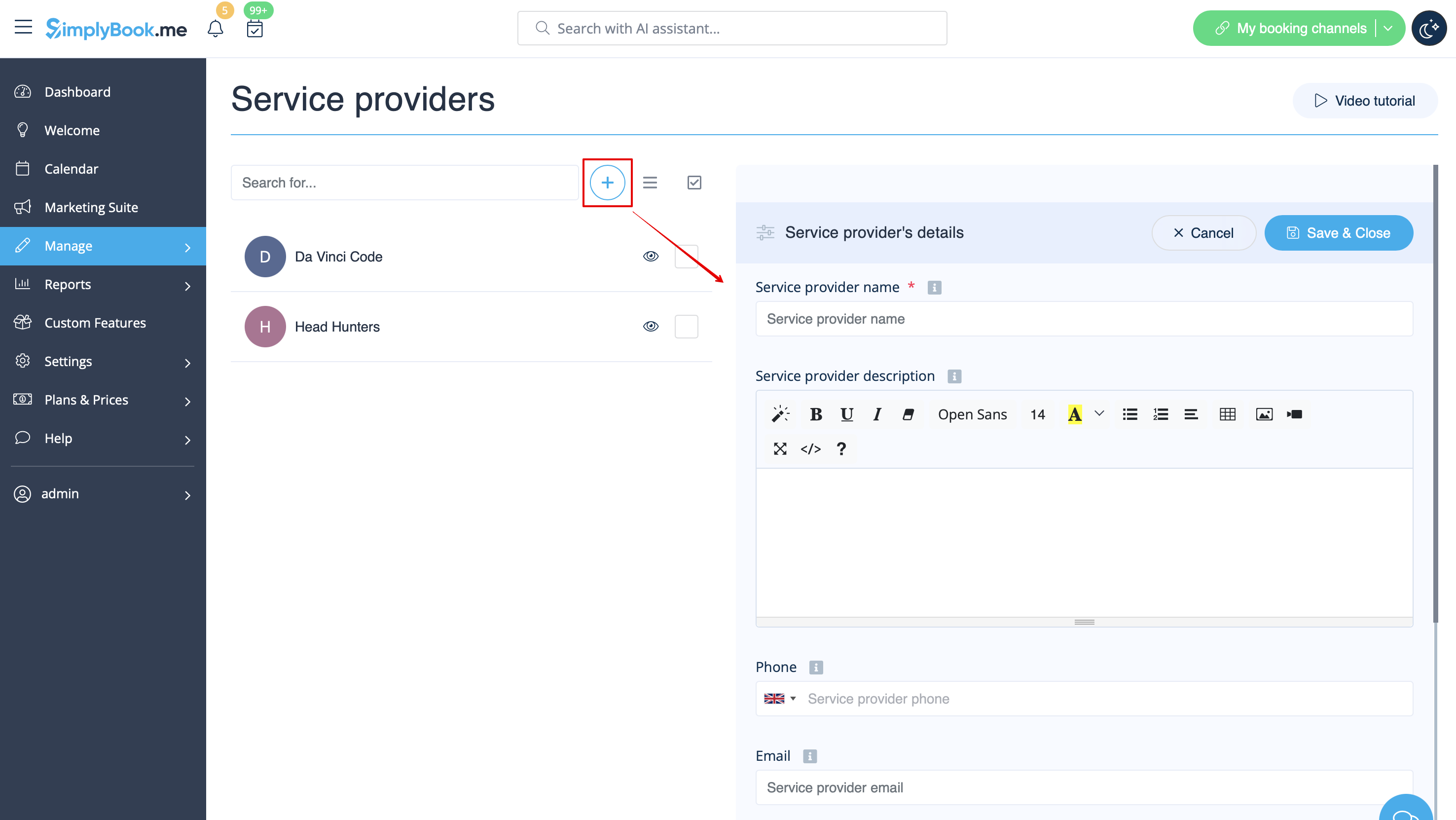
- 2. Skapa leverantörer som rum. I Hantera // Tjänsteleverantörer // "+" för att lägga till en ny tjänsteleverantör – skapa lika många leverantörer som du har rum.
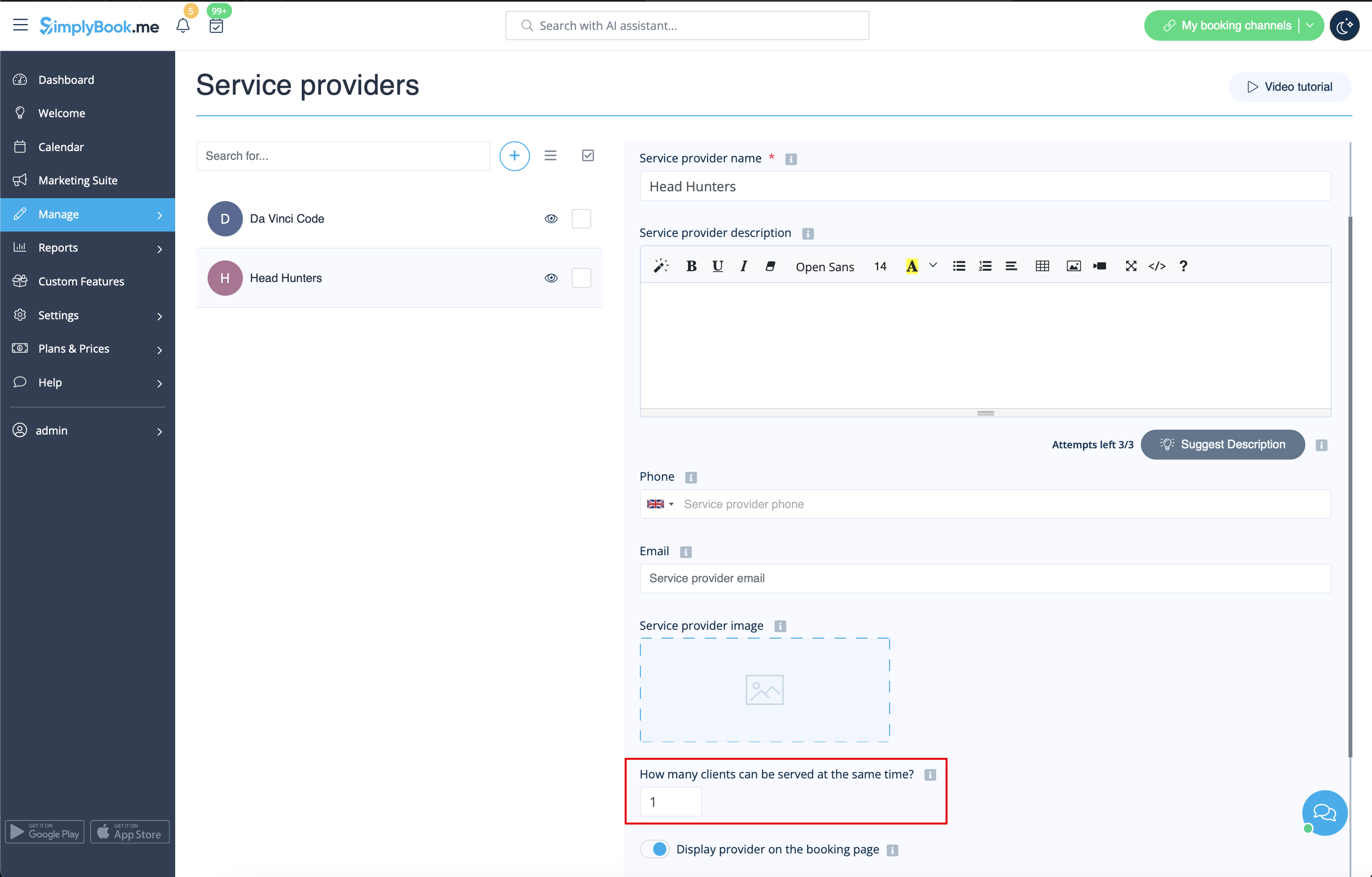
- 3. Se till att varje leverantör kan betjäna 1 klient åt gången.
- 4. Du kan också ställa in specifik tillgänglighet för det rummet genom att klicka på "Anpassa tidsinställningar för denna leverantör" på fliken "Tjänsteleverantörens schema" i Hantera // Tjänsteleverantörer.
- 5. Byt namn på ordet "Anställd" på bokningssidan till "Rum" eller "Spel" i Inställningar // Anpassade formuleringar och översättningar.

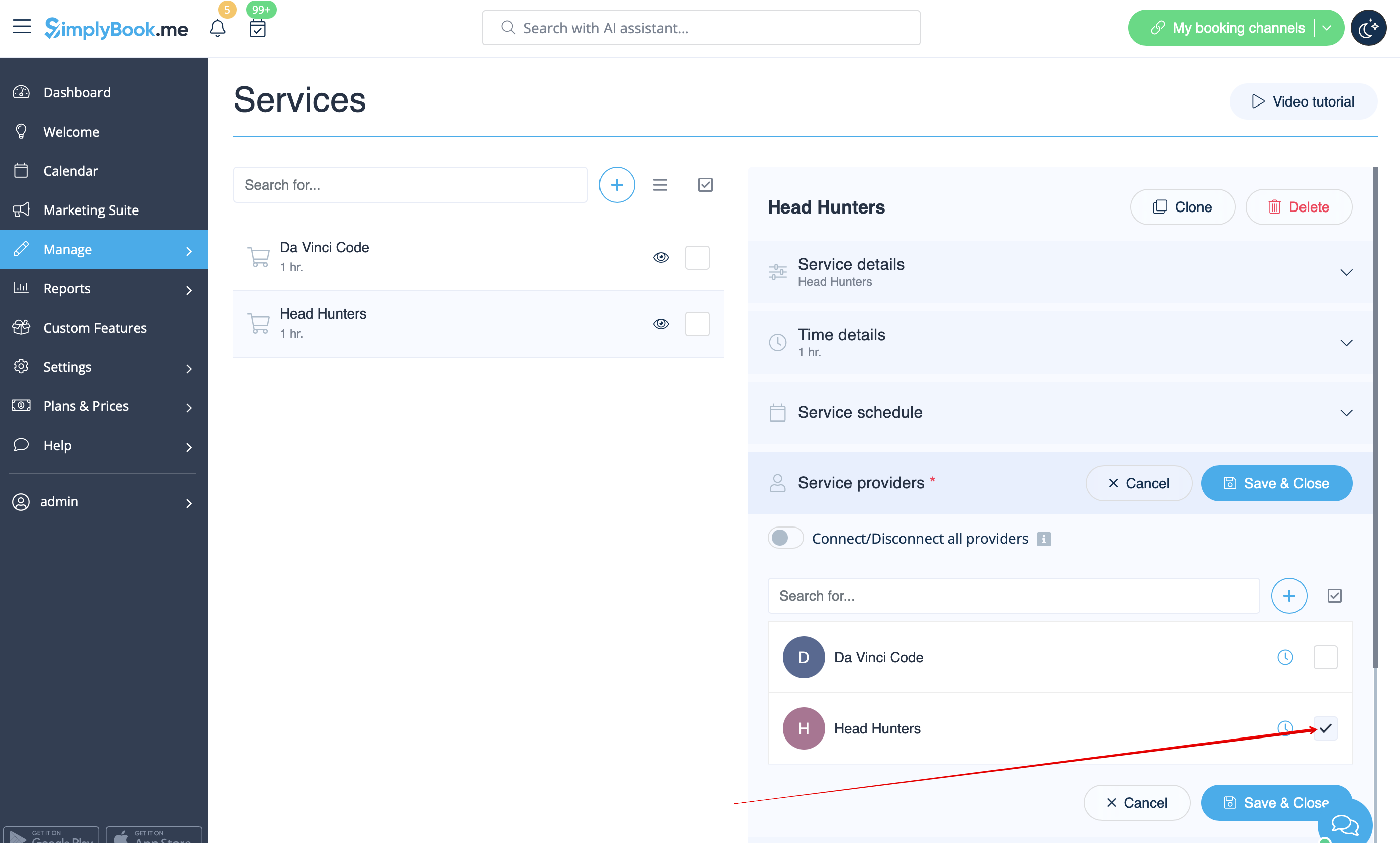
- 6. Om varje rum har olika priser och du planerar att acceptera betalningar online med vår anpassade funktion Acceptera betalningar, skapa fler tjänster i Hantera // Tjänster // Lägg till tjänst, ange pris för dessa tjänster och koppla dem till rum genom att markera motsvarande rutor i fliken "Tjänsteleverantörer".
- 7. Om priserna för morgonspel skiljer sig från priserna för kvälls-/helgspel, lägg till tjänsterna Morgonspel och Kvälls-/helgspel i Hantera // Tjänster och ange motsvarande pris för varje tjänst. Skapa sedan två leverantörer för varje spel i Hantera // Tjänsteleverantörer och ange tillgängliga tider för leverantörerna på fliken "Tjänsteleverantörens schema".
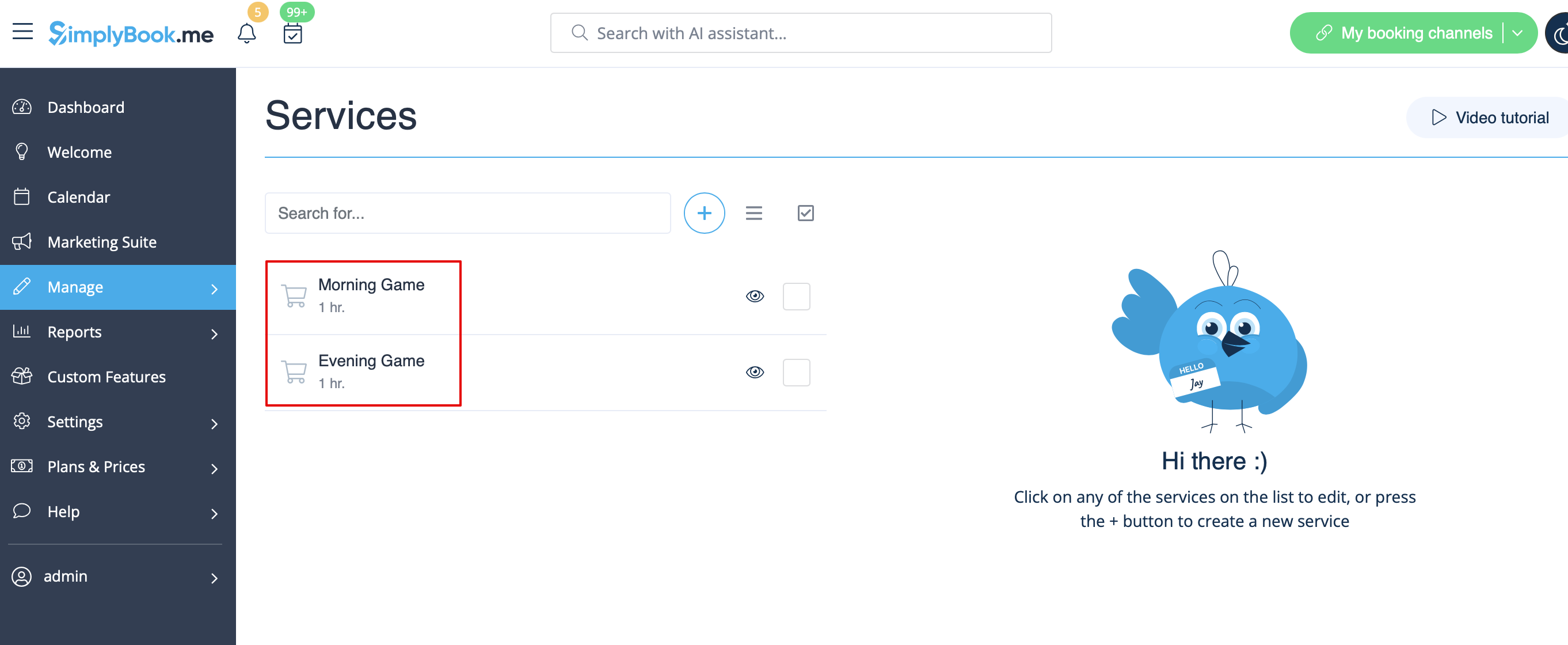
- 8. Koppla leverantörer till motsvarande tjänster
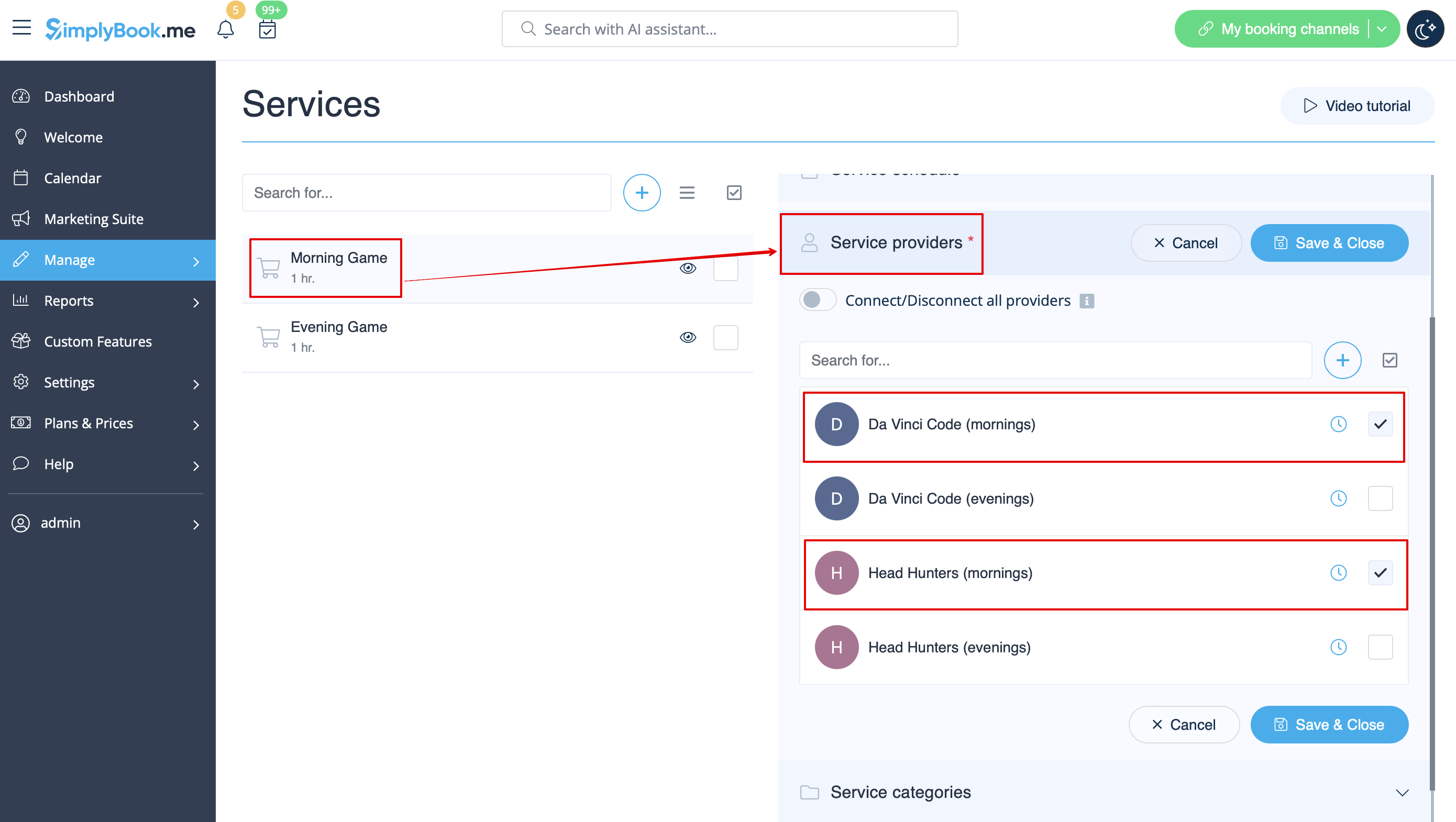
- 9. På bokningssidan väljer kunderna morgon-/helgtider, väljer spel och ser sedan tillgängliga tider.

- 10. Om du har ett fast schema kan du behöva den anpassade funktionen Avtalad tid, där du kan ställa in specifika starttider för var och en av dina tjänster.
- 11. Med hjälp av den anpassade funktionen Intake Forms kan du begära ytterligare information från kunder, till exempel hur många kunder som kommer att vara i en grupp.
- Videohandledning tillgänglig
- Videohandledning tillgänglig
- Videohandledning tillgänglig
- Videohandledning tillgänglig
- Videohandledning tillgänglig
- Videohandledning tillgänglig
- Videohandledning tillgänglig
- Videohandledning tillgänglig
för uthyrning Om du erbjuder uthyrningstjänster kan Simplybook vara ett lämpligt bokningsprogram för dig.
om du hyr ut föremål per timme:
- Gör dina föremål till leverantörer. Om du till exempel hyr ut musikinstrument skapar du leverantörerna Flöjt, Bas, Violin osv.
- Om du hyr ut för olika tidsperioder måste du skapa flera tjänster med olika varaktighet. Till exempel: Hyra 1 timme, Hyra 2 timmar, Hyra 6 timmar osv.
Om du hyr ut föremål per dag
- 1. I Inställningar // Huvudkonfiguration ställer du både "Tillåt att tjänsten förlängs över pauser" och "Tillåt att tjänsten förlängs över stängningstider" på "Ja".
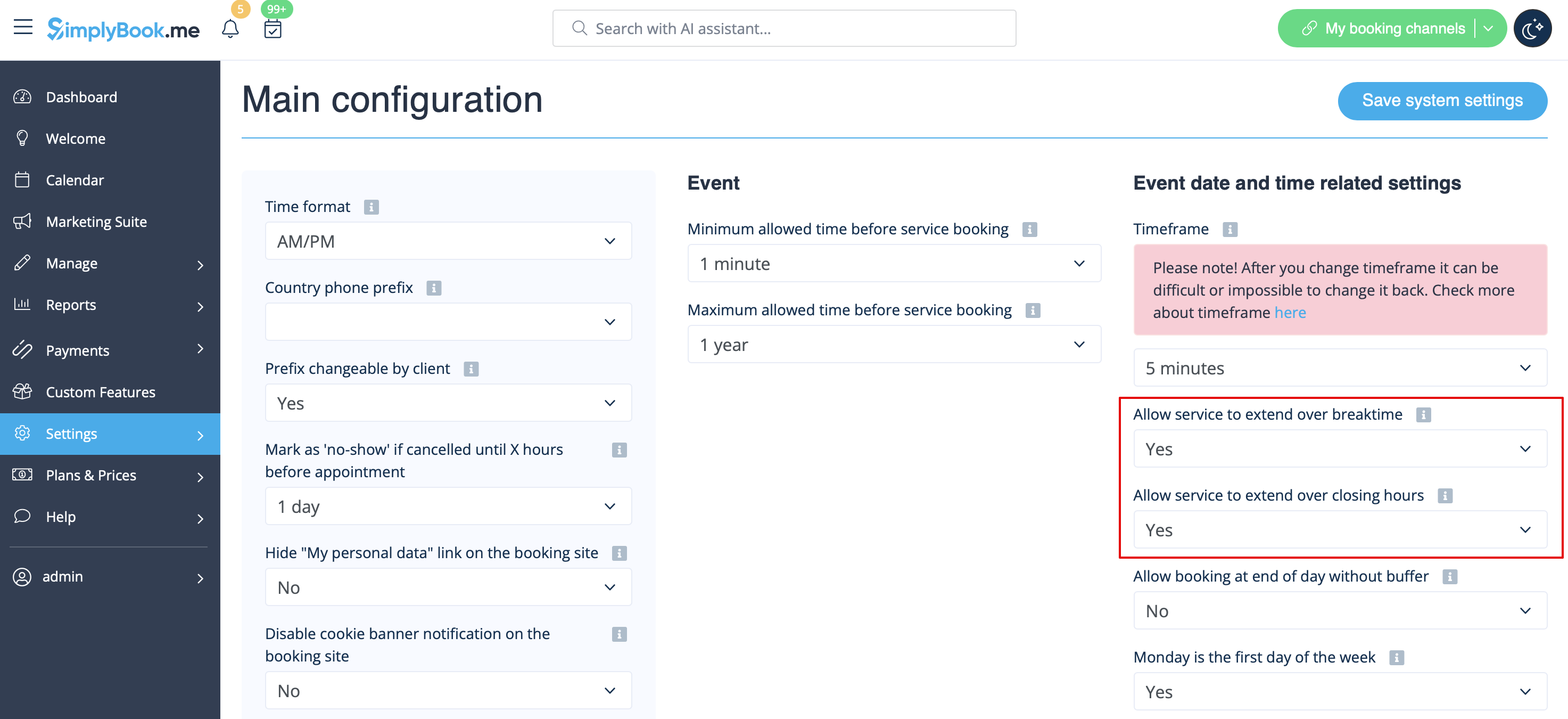
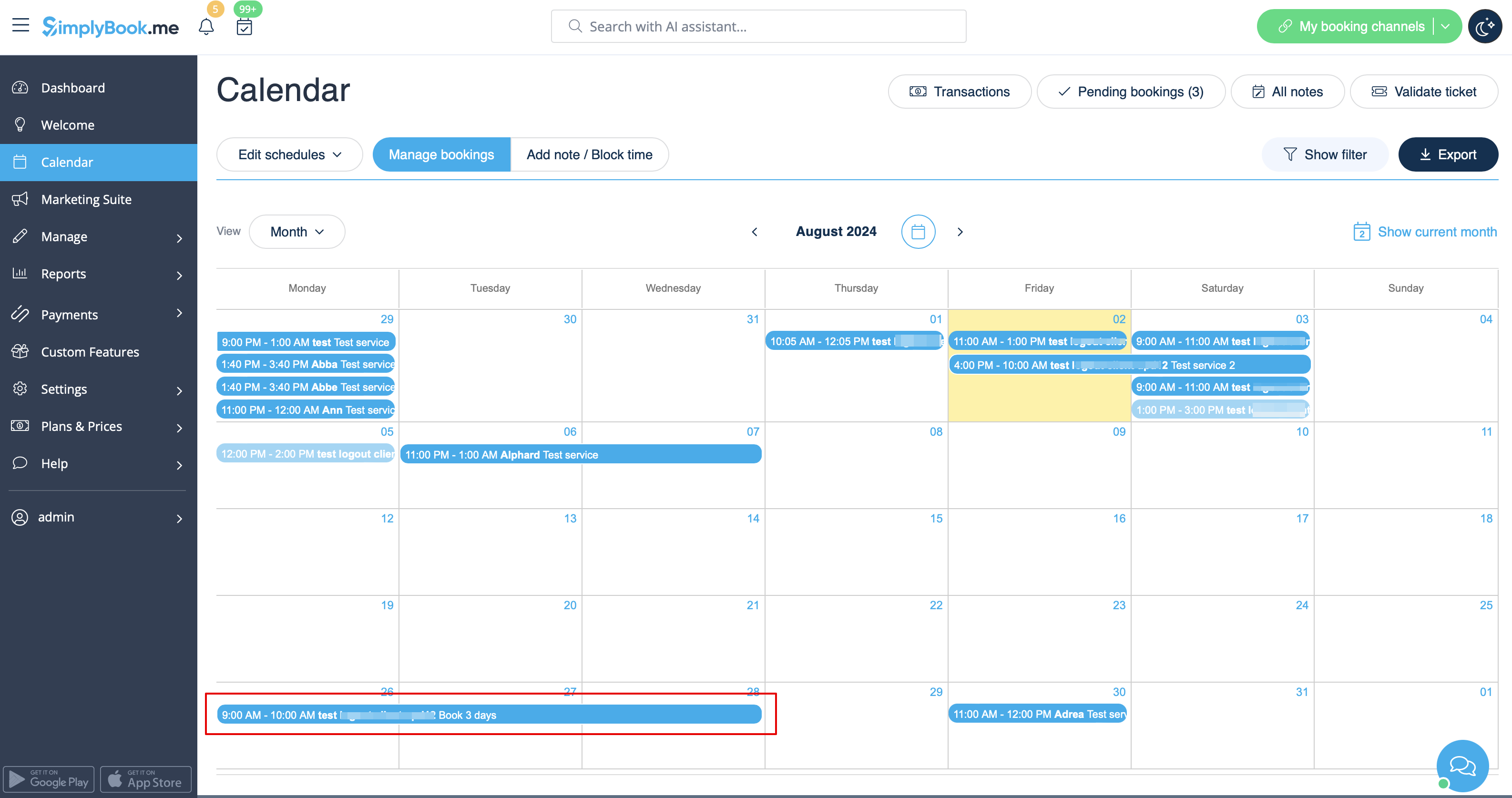
- 2. I Hantera // Tjänster // "+" skapar du en tjänst med den varaktighet som motsvarar antalet dagar som din tjänst kommer att erbjudas (3 dagar = 3 timmar, 7 dagar = 7 timmar).
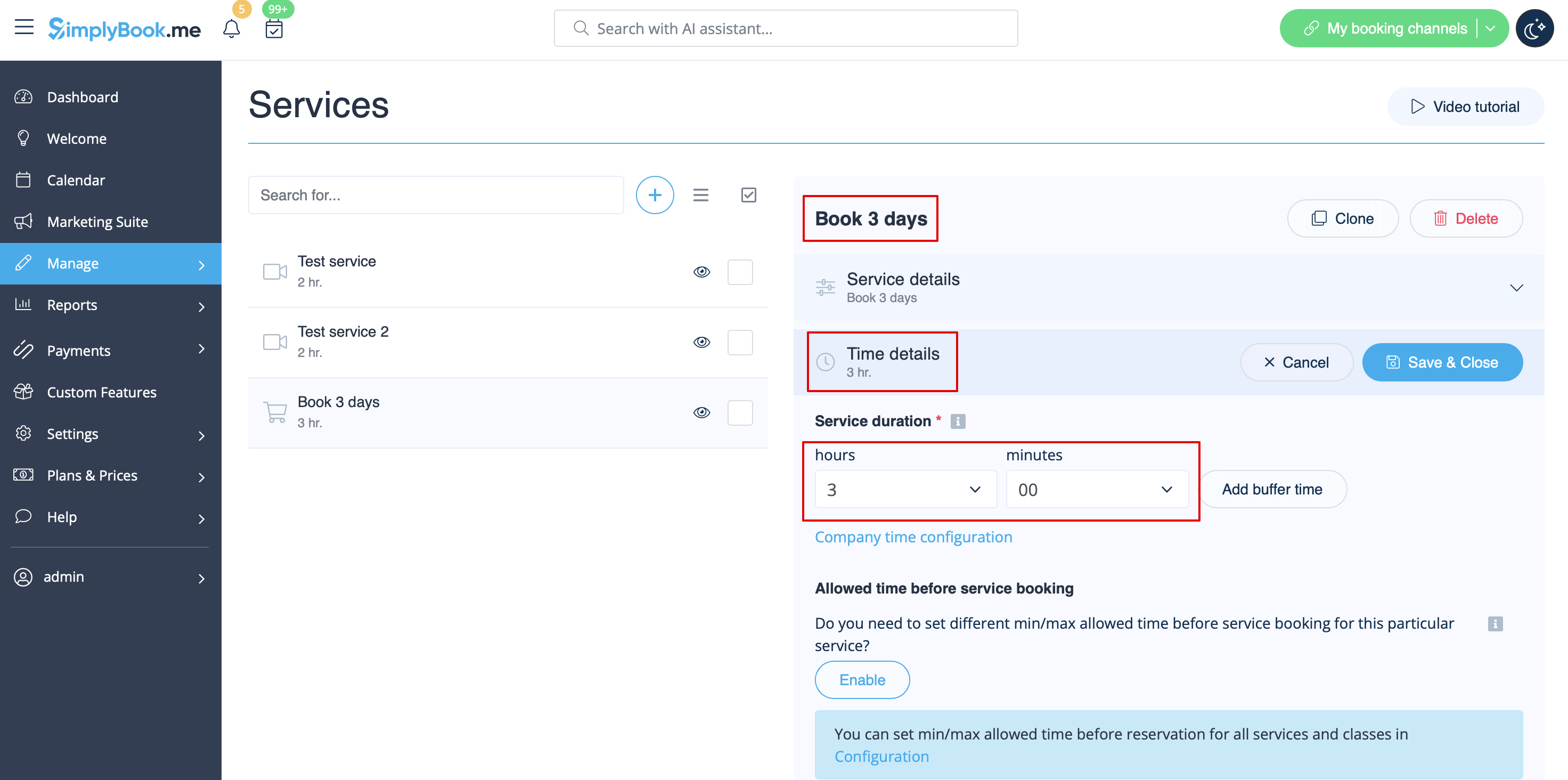
- 3. I Inställningar // Företagets öppettider (när du bara har 1 tjänst) eller i tjänstens arbetstider (Hantera // Tjänster // Tjänstschema) öppnar du bara 1 timme per dag.
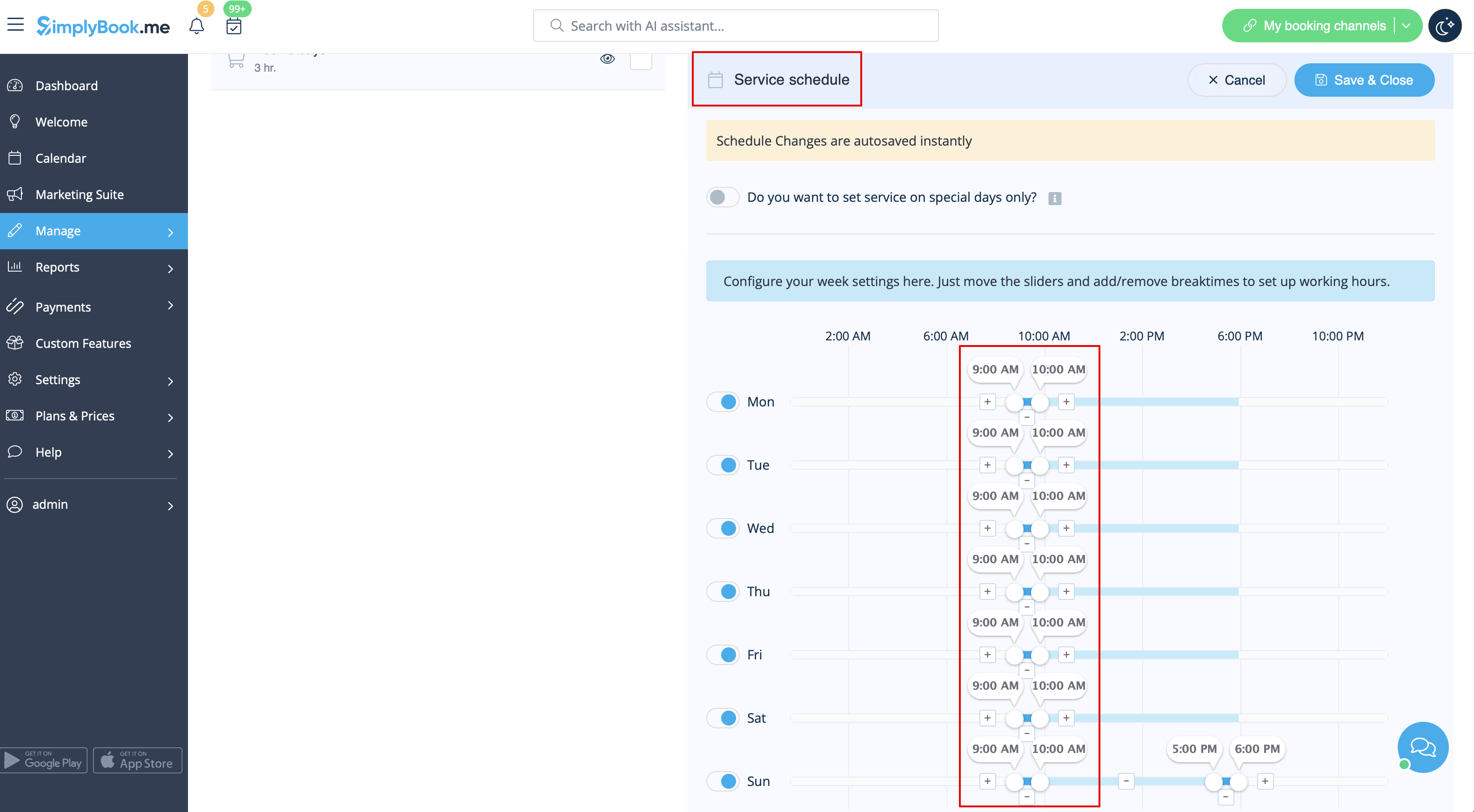
- 4. Systemet bokar sedan det antal timmar som anges i tjänstens varaktighet som antal dagar.
Se den utökade handledningen om klasser för onlinebokning här
Och videohandledning om hur man säljer medlemskapsrelaterade klasser 
- Videohandledning tillgänglig
Video tillgänglig
Om du planerar att ha ett eller flera evenemang utan regelbundna tjänster bör du göra följande:
- 1. Stäng alla företagets öppettider i Inställningar // Företagets öppettider – ställ omkopplarna bredvid veckodagarna till läge "av".
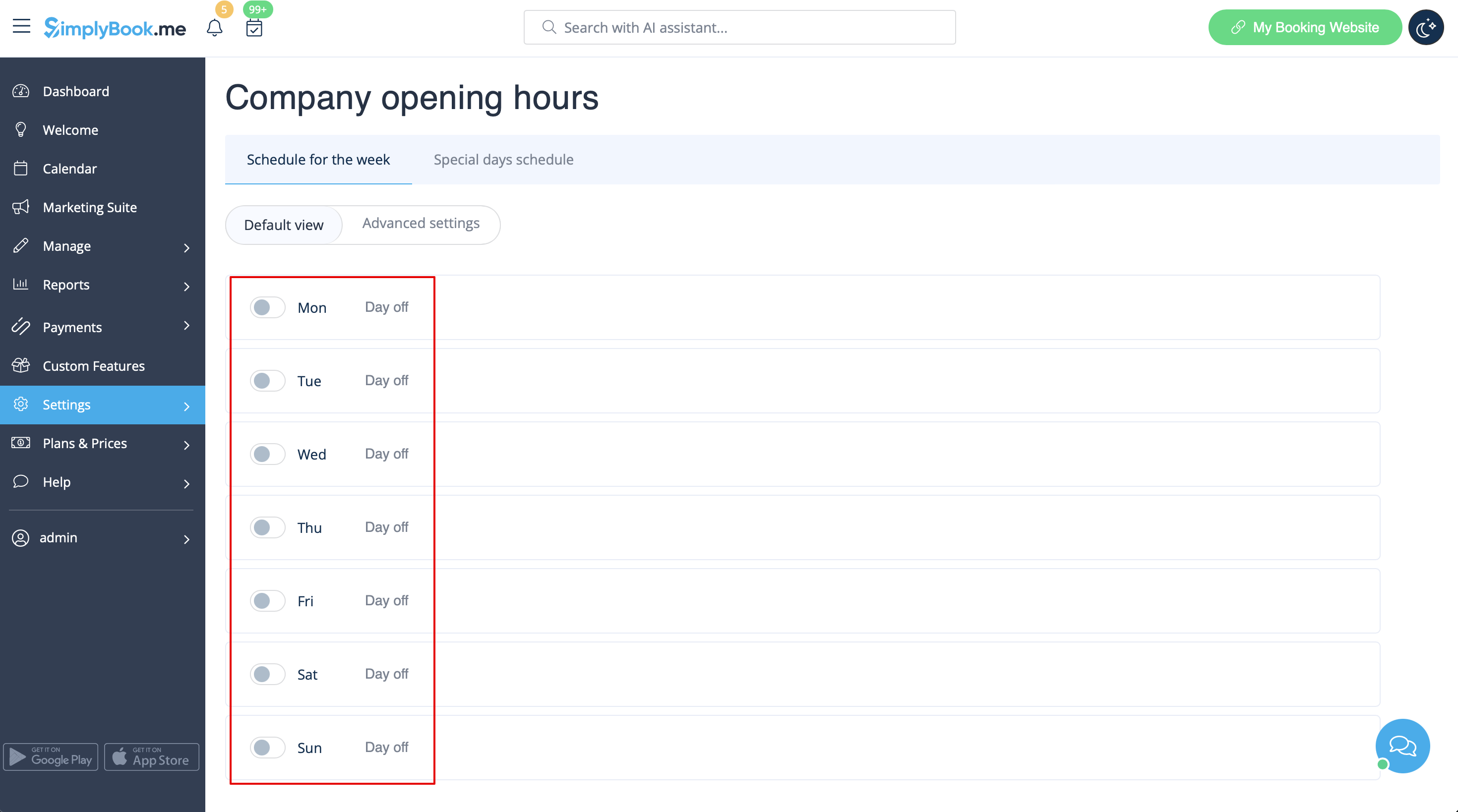
- 2. Skapa de evenemang du behöver i Hantera // Tjänster // "+". Se detaljerad handledning om evenemang här.
24/7-tjänster eller tjänster efter kl. 00.00
Om dina tjänster sträcker sig över midnatt måste du, efter att du har ställt in din tillgänglighet, se till att "Tillåt tjänster att sträcka sig över stängningstider" är inställt på "Ja" i Inställningar//Huvudkonfiguration.
Olika kliniker/salonger under ett konto
Om du har flera kliniker/salonger/gym/etc kan du använda anpassningsfunktionen för platser och göra varje klinik eller salong till en plats. Du kan tilldela leverantörer som arbetar på den platsen och när kunderna bokar dina tjänster väljer de först plats och sedan tjänst och leverantör.
Tjänster begränsade till antalet rum eller artiklar
För företag som har begränsat antal rum eller artiklar rekommenderar vi att du kollar in anpassningsfunktionen Limit Bookings.
Denna anpassningsfunktion låter dig begränsa antalet bokningar som kan göras samtidigt. Denna anpassningsbara funktion är användbar när dina tjänster kräver ytterligare saker som tandläkarstol eller rum i studion etc. När bokningsgränsen är nådd kommer motsvarande tidsintervall att se ut som en paus på bokningssidan (och i admin-gränssnittet om du inte har ställt in att dessa begränsningar ska ignoreras för administratörer). Det är möjligt att begränsa antalet bokningar samtidigt generellt, och du kan också ställa in en viss gräns för varje tjänst separat.
Or as another option you can use Related Resources custom feature as it allows to connect equipment, rooms or anything else that is limited in quantity to a service. Different resources can be connected to the same service when needed. You can create all the necessary equipment, define the number of items required for each appointment per service/class and the resources will be automatically attached during the booking process.
