From SimplyBook.me
Created page with "comment utiliser l' :1. Activez cette fonctionnalité dans la section Fonctionnalités personnalisées. 1200px | center|link=https://help.simplybook.me/images/1/1f/Clean_history_enable_path_redesigned.png <br><br> :2. Accédez aux paramètres à droite pour définir vos préférences et sélectionner le moment où les réservations doivent être supprimées. File:Clean history settings redesigned.png|1200px | center|lin..." |
Updating to match new version of source page |
||
| Line 4: | Line 4: | ||
{{#seo: | {{#seo: | ||
|title=Clean History custom feature - SimplyBook.me | |title=Clean History custom feature - SimplyBook.me | ||
<div class="mw-translate-fuzzy"> | |||
|description=Supprimez les données obsolètes grâce à la fonctionnalité d'historique propre. Gardez votre système organisé. Découvrez comment activer cette fonctionnalité ! | |description=Supprimez les données obsolètes grâce à la fonctionnalité d'historique propre. Gardez votre système organisé. Découvrez comment activer cette fonctionnalité ! | ||
</div> | |||
|titlemode=append | |titlemode=append | ||
|keywords=faq, frequently asked questions, booking software, appointment system questions, appointments online, calendar software, booking system, booking calendar, scheduling software, online appointment scheduling, online scheduling, plugins, custom features, delete bookings, delete appointments, delete old bookings, delete old appointments, delete test bookings, delete test appointments | |keywords=faq, frequently asked questions, booking software, appointment system questions, appointments online, calendar software, booking system, booking calendar, scheduling software, online appointment scheduling, online scheduling, plugins, custom features, delete bookings, delete appointments, delete old bookings, delete old appointments, delete test bookings, delete test appointments | ||
Revision as of 17:18, 30 January 2026

Utilisez cette fonctionnalité personnalisée pour supprimer toutes les anciennes réservations du système. Vous pouvez définir quand les réservations doivent être supprimées, puis la fonctionnalité personnalisée veillera à ce qu'aucune réservation plus ancienne que celle que vous avez définie ne soit conservée dans les archives. Veuillez l'utiliser avec précaution, car nous ne pouvons pas récupérer les réservations supprimées ! Cette fonctionnalité fonctionne et supprime les réservations sélectionnées jusqu'à ce que vous la désactiviez.
Fonctionnalité personnalisée gratuite !
Remarque importante :
- Cette fonctionnalité personnalisée n'est pas compatible avec : les coupons et cartes cadeaux, le système de fidélité, les forfaits et les abonnements
- Elle commence à fonctionner le lendemain de son activation et supprime les réservations une fois par jour, tous les jours, jusqu'à ce que vous la désactiviez.
- Si vous avez des clients qui n'ont aucune réservation à venir, leurs dossiers seront également supprimés, ainsi que leur dernière réservation.
comment utiliser l'
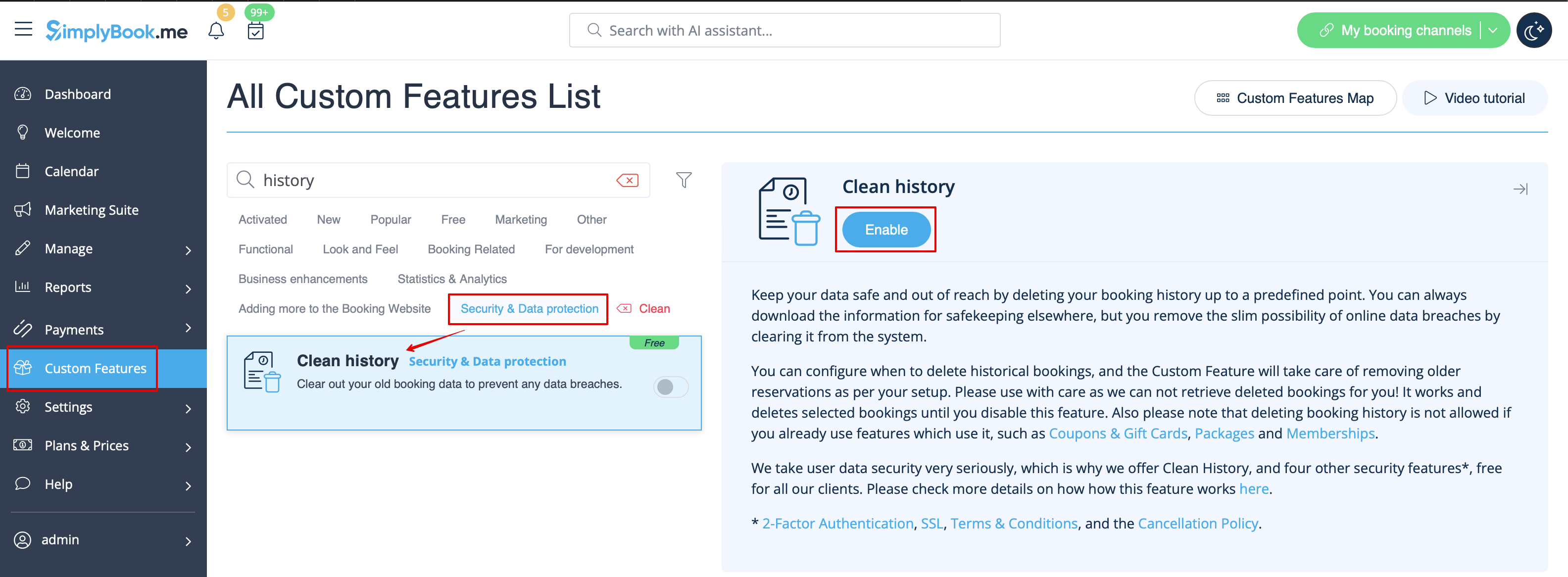
- 1. Activez cette fonctionnalité dans la section Fonctionnalités personnalisées.
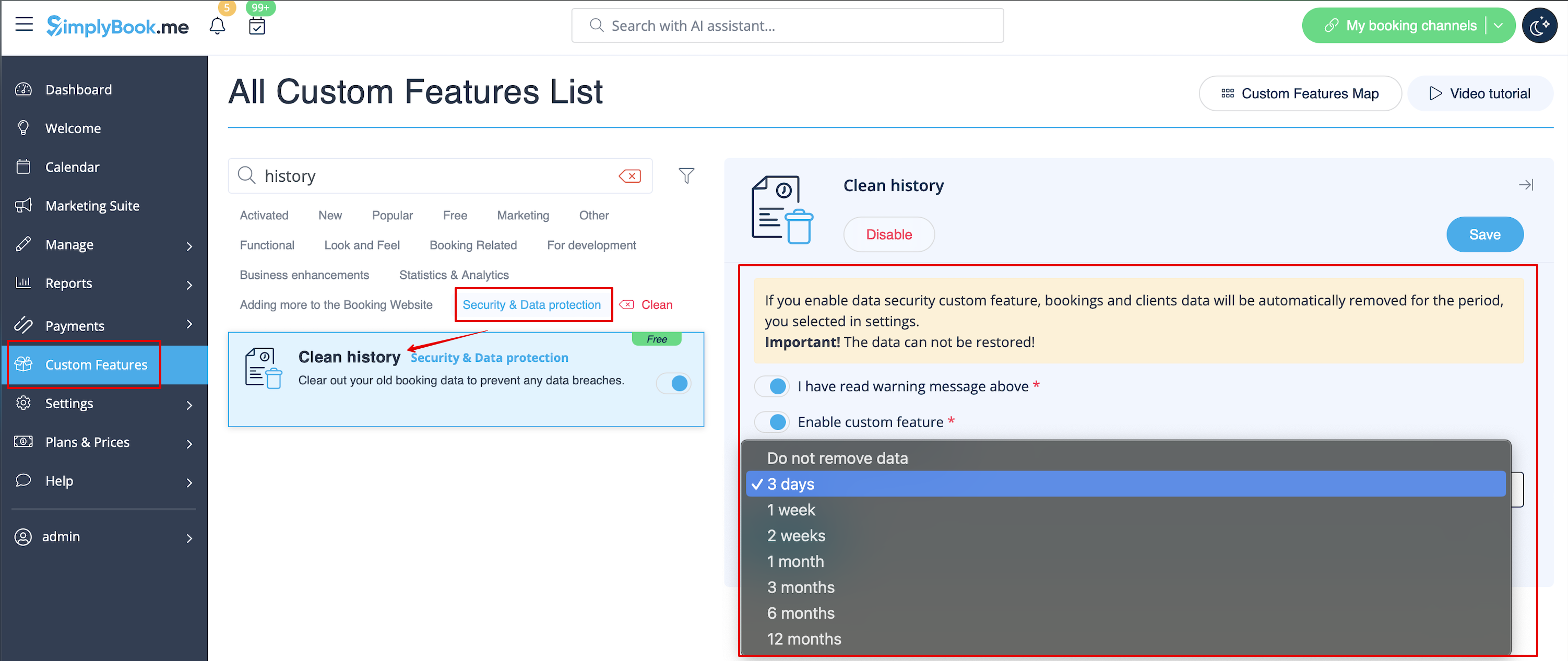
- 2. Accédez aux paramètres à droite pour définir vos préférences et sélectionner le moment où les réservations doivent être supprimées.