From SimplyBook.me
Created page with "Налаштована функція «Налаштований домен»" |
Created page with "<br> left" |
||
| Line 2: | Line 2: | ||
{{#seo: | {{#seo: | ||
|title=Custom Domain custom feature - SimplyBook.me | |title=Custom Domain custom feature - SimplyBook.me | ||
<div class="mw-translate-fuzzy"> | |||
|description=Використовуйте власний домен для сторінки бронювання. Посильте присутність вашого бренду в Інтернеті. Дізнайтеся, як це налаштувати, тут! | |description=Використовуйте власний домен для сторінки бронювання. Посильте присутність вашого бренду в Інтернеті. Дізнайтеся, як це налаштувати, тут! | ||
</div> | |||
| Line 20: | Line 19: | ||
<br><br> | <br><br> | ||
<div class="mw-translate-fuzzy"> | |||
як користуватися функцією « | як користуватися функцією « | ||
:» 1. Увімкніть цю функцію за одноразовою оплатою (точну ціну ви побачите у своєму обліковому записі) на сторінці «Custom features» (Налаштування). | :» 1. Увімкніть цю функцію за одноразовою оплатою (точну ціну ви побачите у своєму обліковому записі) на сторінці «Custom features» (Налаштування). | ||
| Line 38: | Line 38: | ||
*[[Cookie Banners: Essentials and Tips for Removal|Банери cookie: основні відомості та поради щодо видалення]] | *[[Cookie Banners: Essentials and Tips for Removal|Банери cookie: основні відомості та поради щодо видалення]] | ||
<br><br> | <br><br> | ||
</div> | |||
<div lang="en" dir="ltr" class="mw-content-ltr"> | |||
:3. Then in your Domain controller, you need to find where you set the DNS records and set A-record to IP mentioned in this feature settings. | |||
:'''Please note!''' AAAA (IPv6) record must not be set, otherwise SSL certificate cannot be issued. | |||
[[File:Custom domain settings overview redesigned.png|1200px | center|link=https://help.simplybook.me/images/5/5b/Custom_domain_settings_overview_redesigned.png]] | |||
<br><br> | |||
:After A-records are set enter domain name you wish to use in its settings and save.<br> | |||
:Then we will automatically receive the request and apply the settings on our side(it may take some time - usually around 24-48h). As soon as they are applied your domain name starts working for the booking site.<br><br> | |||
:''If you wish to change Custom Domain name to different one from the one set before it can be done for additional price as new SSL certificates need to be created. There will be a button in this custom feature settings that will allow you to process the change if needed. For additional information please contact support.'' | |||
<br><br> | |||
</div> | |||
<div lang="en" dir="ltr" class="mw-content-ltr"> | |||
Useful links: | |||
*[[Cookie Banners: Essentials and Tips for Removal|Cookie Banners: Essentials and Tips for Removal]] | |||
<br><br> | |||
</div> | |||
Revision as of 14:43, 19 May 2025
{{#seo: |title=Custom Domain custom feature - SimplyBook.me
|description=Використовуйте власний домен для сторінки бронювання. Посильте присутність вашого бренду в Інтернеті. Дізнайтеся, як це налаштувати, тут!

Ця опція дозволяє встановити власне посилання (URL) на сторінку бронювання з підключенням через захищений канал. Якщо ви маєте власний домен, тепер ви можете просто використовувати сайт бронювання з цією назвою або піддомен цієї назви (частина URL-адреси сайту бронювання /v2/ не може бути змінена).
Зверніть увагу! Ця функція не сумісна з налаштуванням «Інформація про клієнта» у Facebook.
Відеоурок 
як користуватися функцією «
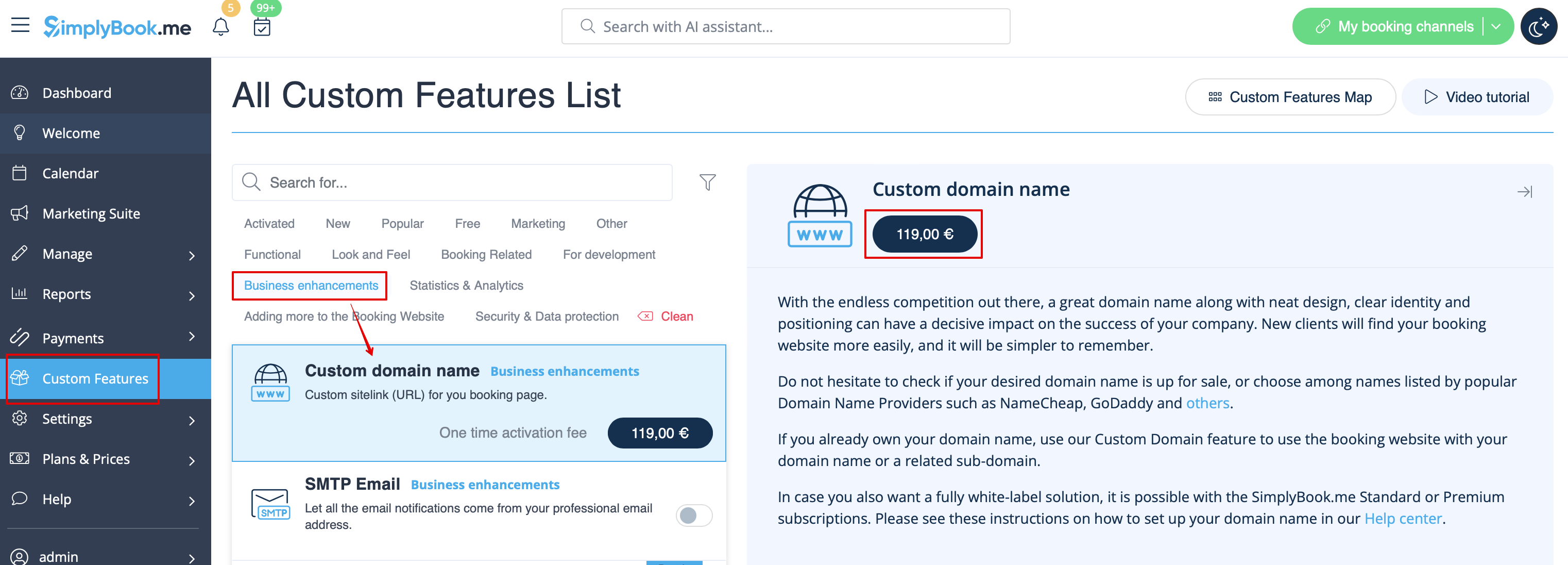
- » 1. Увімкніть цю функцію за одноразовою оплатою (точну ціну ви побачите у своєму обліковому записі) на сторінці «Custom features» (Налаштування).
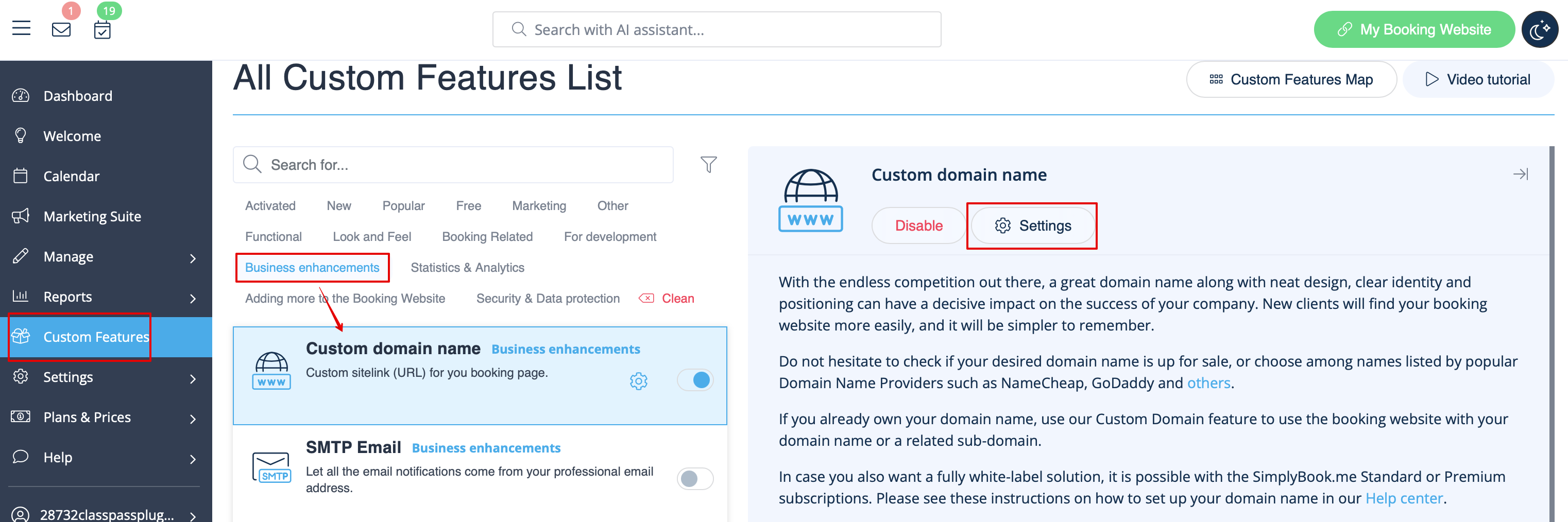
- 2. Перейдіть до «Settings» (Налаштування), вибравши відповідну опцію в правій частині сторінки.
- 3. Потім у контролері домену потрібно знайти місце, де ви встановили записи DNS, і встановити запис A на IP-адресу, зазначену в налаштуваннях цієї функції.
- Зверніть увагу! Запис AAAA (IPv6) не можна встановлювати, інакше SSL-сертифікат не буде видано.
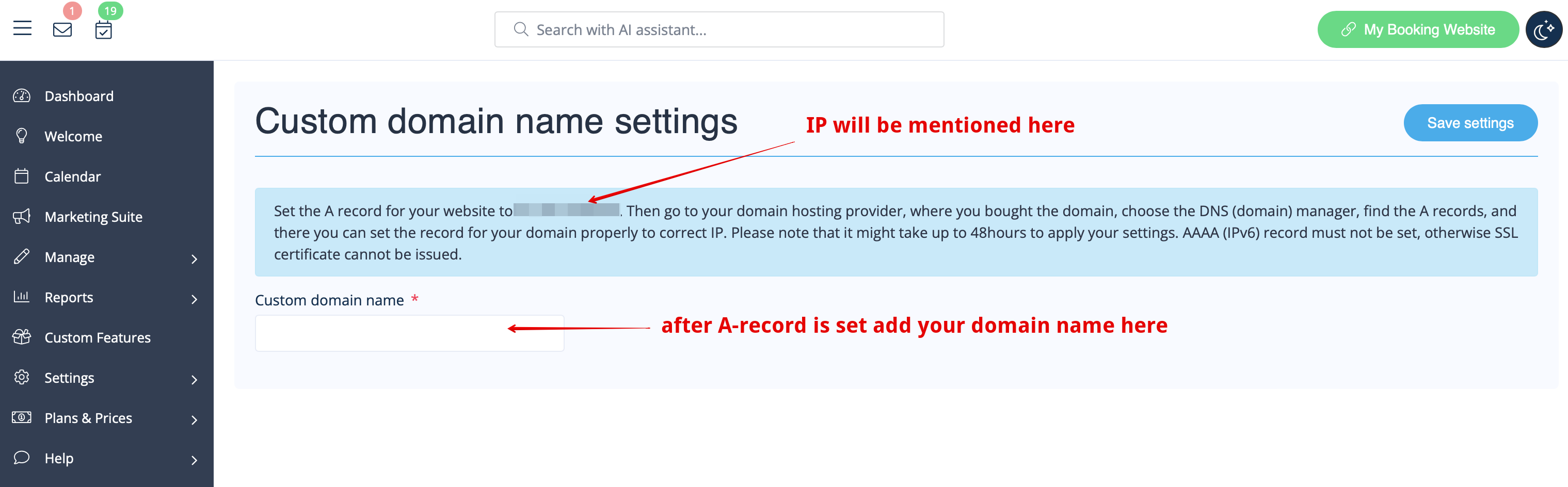
- Після встановлення записів A введіть ім'я домену, яке ви хочете використовувати, у його налаштуваннях і збережіть.
- Після цього ми автоматично отримаємо запит і застосуємо налаштування на нашому боці (це може зайняти деякий час — зазвичай близько 24-48 годин). Як тільки вони будуть застосовані, ваше доменне ім'я почне працювати для сайту бронювання.
- Якщо ви бажаєте змінити ім'я власного домену на інше, відмінне від раніше встановленого, це можна зробити за додаткову плату, оскільки потрібно створити нові SSL-сертифікати. У налаштуваннях цієї функції буде кнопка, яка дозволить вам обробити зміну, якщо це необхідно. Для отримання додаткової інформації зверніться до служби підтримки.
Корисні посилання:
- 3. Then in your Domain controller, you need to find where you set the DNS records and set A-record to IP mentioned in this feature settings.
- Please note! AAAA (IPv6) record must not be set, otherwise SSL certificate cannot be issued.
- After A-records are set enter domain name you wish to use in its settings and save.
- Then we will automatically receive the request and apply the settings on our side(it may take some time - usually around 24-48h). As soon as they are applied your domain name starts working for the booking site.
- If you wish to change Custom Domain name to different one from the one set before it can be done for additional price as new SSL certificates need to be created. There will be a button in this custom feature settings that will allow you to process the change if needed. For additional information please contact support.
