From SimplyBook.me
Created page with "'''Videohandledning link=https://youtu.be/x4ieBYMKTbU''' <br><br>" |
No edit summary |
||
| Line 2: | Line 2: | ||
{{#seo: | {{#seo: | ||
|title=Custom Domain custom feature - SimplyBook.me | |title=Custom Domain custom feature - SimplyBook.me | ||
|description=Använd en anpassad domän för din bokningssida. Stärk ditt varumärkes närvaro online. Läs mer om hur du gör det här! | |||
|description=Använd en anpassad domän för din bokningssida. Stärk ditt varumärkes närvaro online. Läs mer om hur du gör här! | |titlemode=append | ||
|keywords=faq, vanliga frågor, bokningsprogramvara, frågor om bokningssystem, onlinebokningar, kalenderprogramvara, bokningssystem, bokningskalender, schemaläggningsprogramvara, onlinebokning, onlinebokning, plugins, anpassade funktioner, anpassad bokningssidelänk, domännamn, anpassat domännamn, anpassad webbadress | |||
}} | |||
| Line 19: | Line 20: | ||
<br><br> | <br><br> | ||
hur använder man | hur använder man | ||
:1. Aktivera denna funktion genom en engångsbetalning (du ser det exakta priset i ditt konto) på sidan Anpassade funktioner. | :1. Aktivera denna funktion genom en engångsbetalning (du ser det exakta priset i ditt konto) på sidan Anpassade funktioner. | ||
| Line 27: | Line 27: | ||
[[File:Custom domain settings path redesigned.png|1200px| center|link=https://help.simplybook.me/images/e/ef/Custom_domain_settings_path_redesigned.png]] | [[File:Custom domain settings path redesigned.png|1200px| center|link=https://help.simplybook.me/images/e/ef/Custom_domain_settings_path_redesigned.png]] | ||
<br><br> | <br><br> | ||
<div lang="en" dir="ltr" class="mw-content-ltr"> | <div lang="en" dir="ltr" class="mw-content-ltr"> | ||
:3. Then in your Domain controller, you need to find where you set the DNS records and set A-record to IP mentioned in this feature settings. | :3. Then in your Domain controller, you need to find where you set the DNS records and set A-record to IP mentioned in this feature settings. | ||
Revision as of 14:43, 19 May 2025

Med det här alternativet kan du ställa in din egen webbadress (URL) för din bokningssida med anslutning via ett säkert lager. Om du har ett eget domännamn kan du nu enkelt använda bokningssidan med detta namn eller en underdomän till detta namn (/v2/ i bokningssidans URL kan inte ändras).
Observera! Denna funktion är inte kompatibel med den anpassade funktionen Facebook Client Info.
Videohandledning 
hur använder man
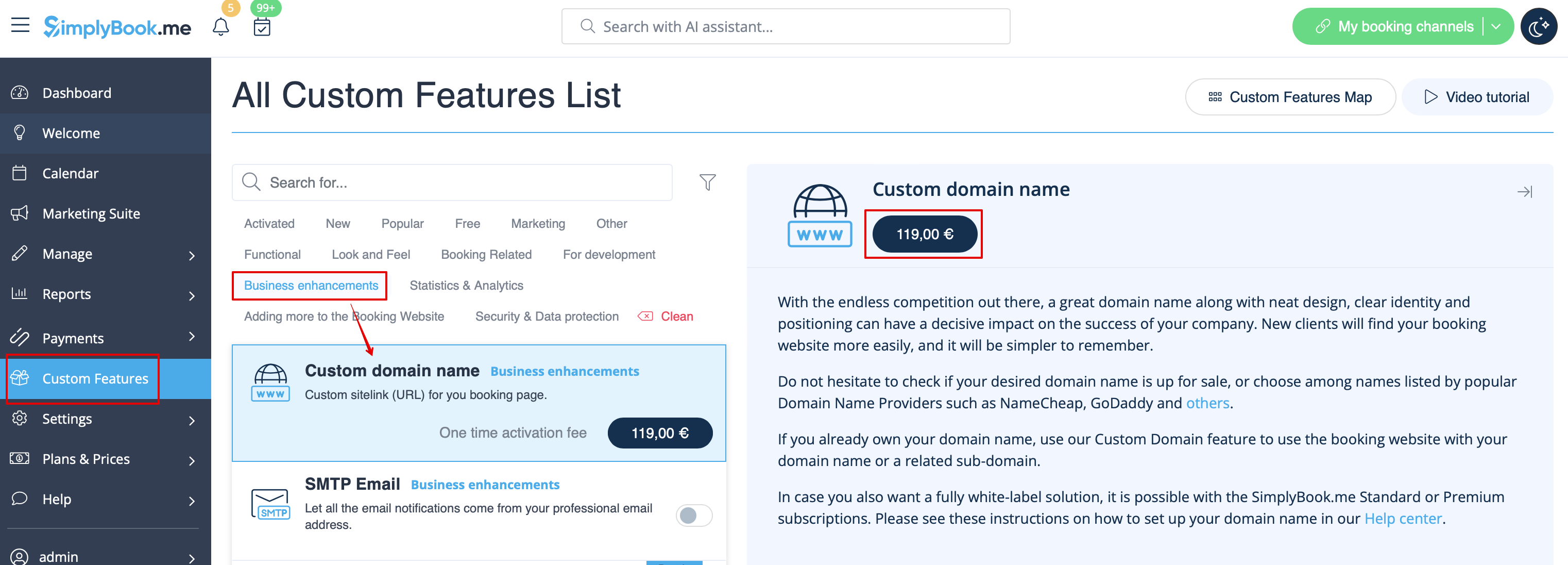
- 1. Aktivera denna funktion genom en engångsbetalning (du ser det exakta priset i ditt konto) på sidan Anpassade funktioner.
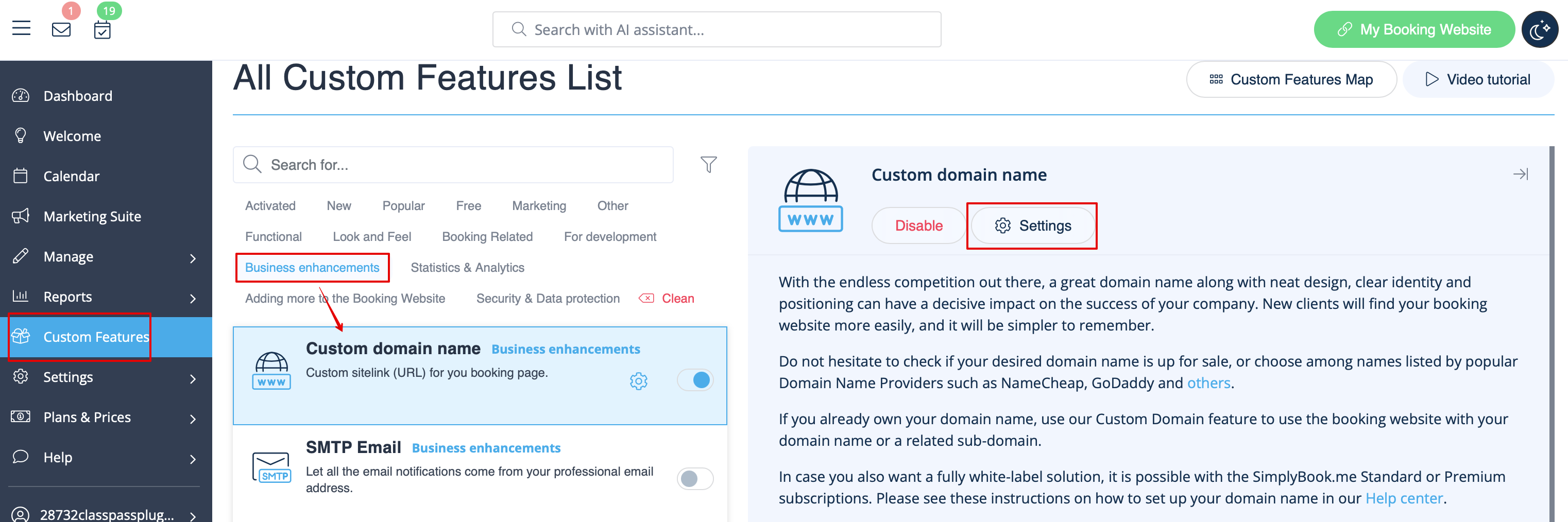
- 2. Gå till "Inställningar" genom att välja motsvarande alternativ på höger sida av sidan.
- 3. Then in your Domain controller, you need to find where you set the DNS records and set A-record to IP mentioned in this feature settings.
- Please note! AAAA (IPv6) record must not be set, otherwise SSL certificate cannot be issued.
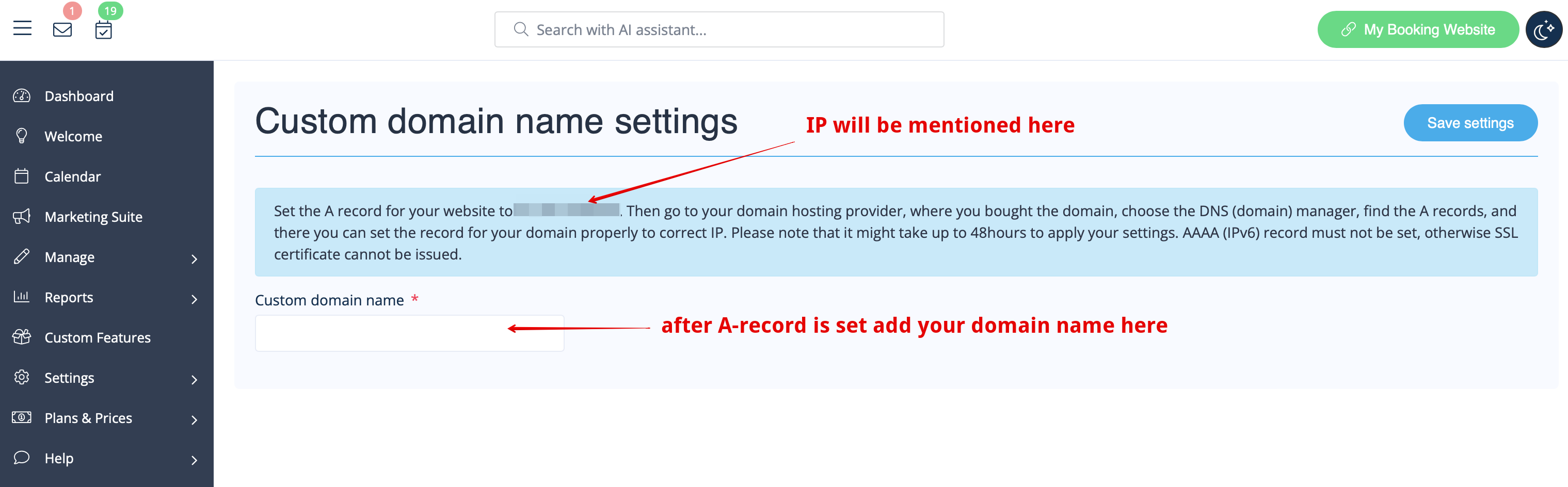
- After A-records are set enter domain name you wish to use in its settings and save.
- Then we will automatically receive the request and apply the settings on our side(it may take some time - usually around 24-48h). As soon as they are applied your domain name starts working for the booking site.
- If you wish to change Custom Domain name to different one from the one set before it can be done for additional price as new SSL certificates need to be created. There will be a button in this custom feature settings that will allow you to process the change if needed. For additional information please contact support.

