From SimplyBook.me
Created page with "|description=Створіть форми для збору інформації про клієнтів перед зустрічами. Персоналізуйте процес бронювання. Активуйте вже сьогодні!" |
Created page with "Налаштування форм для прийому клієнтів" |
||
| Line 9: | Line 9: | ||
<br> | <br> | ||
[[File:Additional field new icon.png |left]] | [[File:Additional field new icon.png |left]] | ||
<br> | <br> | ||
Функція «Налаштування форм для нових клієнтів» дозволяє запитувати додаткову інформацію від клієнтів під час процесу бронювання. Ви можете задати кілька питань, на які можна відповісти в різних полях, таких як текстові рядки, випадаючі списки, текстові поля тощо. | |||
<br> | <br> | ||
як користуватися | |||
:1. Увімкніть спеціальну функцію «Форми прийому» в розділі «Спеціальні функції//Додавання додаткових елементів на сторінку бронювання». | |||
:1. | |||
[[File:Intake forms enable path redesigned.png|1200px | center|link=https://help.simplybook.me/images/d/d7/Intake_forms_enable_path_redesigned.png]] | [[File:Intake forms enable path redesigned.png|1200px | center|link=https://help.simplybook.me/images/d/d7/Intake_forms_enable_path_redesigned.png]] | ||
<br><br> | <br><br> | ||
:2. | :2. Перейдіть до його управління або на сторінку «Управління//Форми для прийому». | ||
[[File:Intake forms settings path redesinged.png|1200px | center|link=https://help.simplybook.me/images/6/64/Intake_forms_settings_path_redesinged.png]] | [[File:Intake forms settings path redesinged.png|1200px | center|link=https://help.simplybook.me/images/6/64/Intake_forms_settings_path_redesinged.png]] | ||
<br><br> | <br><br> | ||
:3. | :3. Натисніть кнопку «+» в налаштуваннях «Налаштовані функції», щоб створити нову форму. | ||
[[File:New intake form form redesigned.png|1200px | center|link=https://help.simplybook.me/images/1/1c/New_intake_form_form_redesigned.png]] | [[File:New intake form form redesigned.png|1200px | center|link=https://help.simplybook.me/images/1/1c/New_intake_form_form_redesigned.png]] | ||
<br><br> | <br><br> | ||
:4. | :4. У полі «Заголовок питання» введіть питання, на яке ви хочете отримати відповідь від клієнтів. Наприклад: Вік, уподобання, Чи є у вас проблеми зі здоров'ям? тощо. | ||
:5. | :5. Виберіть тип поля: | ||
:'''digits only''' - | :'''digits only''' - дозволяє вводити тільки цифри. Корисно, коли вам потрібно знати вік, зріст або будь-яку іншу інформацію, яка вимагає тільки цифр. | ||
:'''single line''' - | :'''single line''' - зазвичай використовується для коротких відповідей | ||
:'''multiple lines''' - | :'''multiple lines''' - використовуйте цей тип поля, якщо ви очікуєте від своїх клієнтів довгих пояснень | ||
:'''checkbox''' - | :'''checkbox''' - створює поле, яке клієнти повинні або позначити, або залишити непозначеним. Корисно для питань, що вимагають бінарної відповіді, наприклад «Мені потрібні додаткові послуги». | ||
:'''dropdown selection''' - | :'''dropdown selection''' - створює список, що розкривається, з можливістю вибрати тільки 1 варіант. Щоб створити це поле, вам потрібно створити список значень у розділі «Параметри списку, що розкривається, і варіант за замовчуванням». Також ви можете вибрати значення за замовчуванням, яке буде присвоєно, якщо нічого не буде вибрано зі списку. | ||
:'''date''' - | :'''date''' - створює опцію вибору дати з календарем. | ||
:'''barcode''' - | :'''barcode''' - дозволяє сканувати штрих-коди за допомогою мобільного додатку адміністратора та отримувати значення зі сканування. Також дозволяє вводити простий текст, як у однорядкових формах для прийому. | ||
:'''custom HTML''' - | :'''custom HTML''' - дозволяє додавати візуальні роздільники або додатковий текст біля форми для прийому. Не можна використовувати для введення даних клієнтом. | ||
:'''file uploader - Google Drive''' - | :'''file uploader - Google Drive''' - доступно, якщо увімкнено [[File Uploader - Google Drive custom feature|спеціальну функцію File Uploader - Google Drive]]. Дозволяє завантажувати файли, які ви зможете побачити в спеціальній папці на вашому Google Drive. | ||
[[File:Intake forms types redesigned.png|1200px|border |center|link=https://help.simplybook.me/images/1/1b/Intake_forms_types_redesigned.png]] | [[File:Intake forms types redesigned.png|1200px|border |center|link=https://help.simplybook.me/images/1/1b/Intake_forms_types_redesigned.png]] | ||
<br><br> | <br><br> | ||
:6. | :6. Зробіть це обов'язковим або необов'язковим за допомогою перемикача «опціонально». | ||
: | :Додайте поле (будуть включені як заголовок, так і відповідь) до рахунків-фактур клієнтів, якщо це необхідно і якщо ви використовуєте спеціальну функцію [[Special:MyLanguage/Accept_payments_custom_feature|«Приймати платежі]] ». | ||
:7. | :7. Якщо ви хочете пов'язати форму з певними послугами, виберіть вкладку «Послуги, пов'язані з цим полем» і встановіть прапорці біля відповідних послуг. | ||
[[File:Connect intake form to services redesigned.png|1200px| center|link=https://help.simplybook.me/images/6/66/Connect_intake_form_to_services_redesigned.png]] | [[File:Connect intake form to services redesigned.png|1200px| center|link=https://help.simplybook.me/images/6/66/Connect_intake_form_to_services_redesigned.png]] | ||
<br><br> | <br><br> | ||
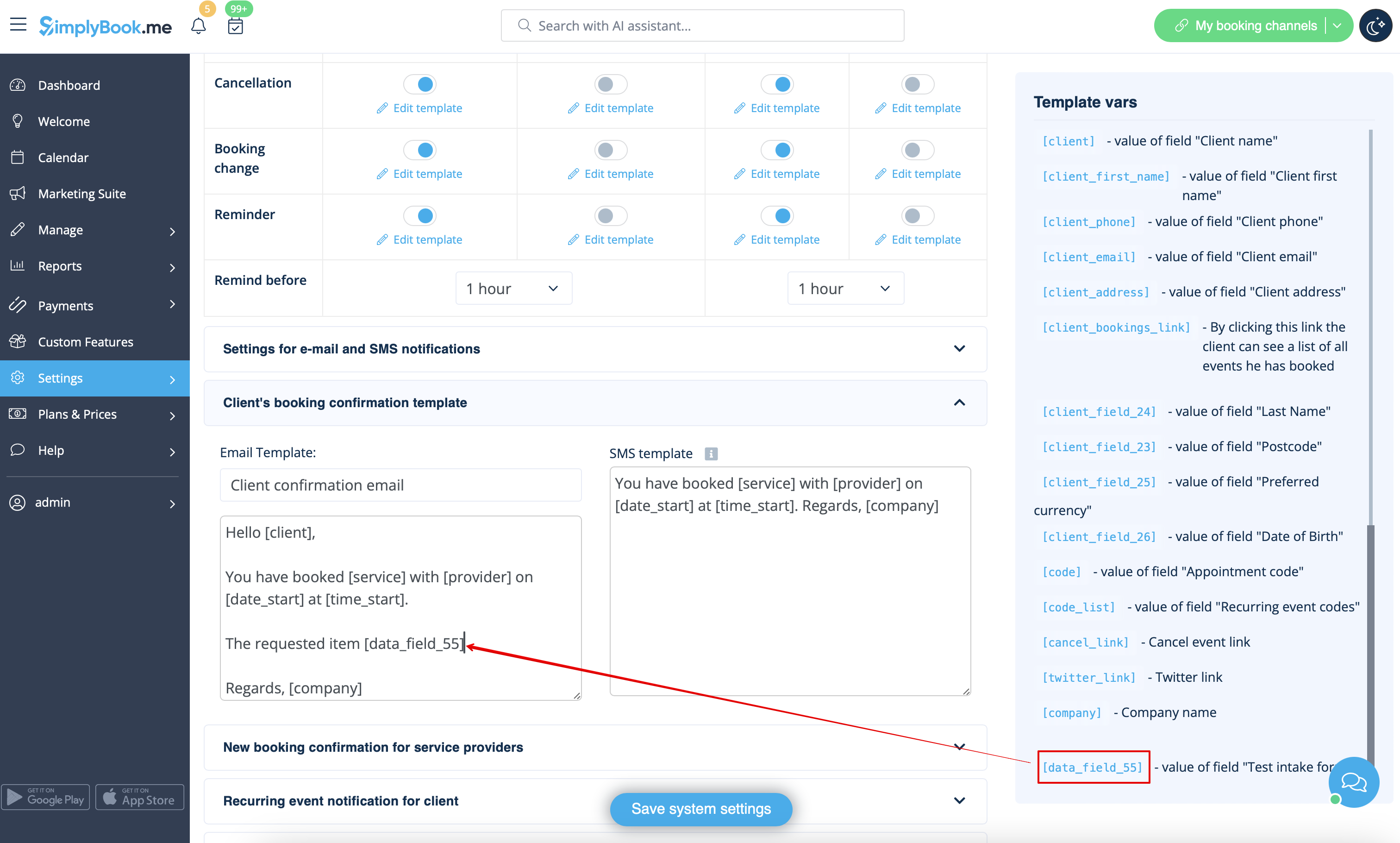
:8. | :8. Якщо ви хочете включити інформацію з форми прийому в шаблони електронних листів, знайдіть змінні форми прийому та додайте їх до шаблонів у налаштуваннях «Налаштування електронної пошти та SMS». | ||
[[File:Add notification variable to template intake form redesigned.png|1200px | center|link=https://help.simplybook.me/images/5/59/Add_notification_variable_to_template_intake_form_redesigned.png]] | [[File:Add notification variable to template intake form redesigned.png|1200px | center|link=https://help.simplybook.me/images/5/59/Add_notification_variable_to_template_intake_form_redesigned.png]] | ||
<br><br> | <br><br> | ||
Revision as of 15:27, 19 May 2025

Функція «Налаштування форм для нових клієнтів» дозволяє запитувати додаткову інформацію від клієнтів під час процесу бронювання. Ви можете задати кілька питань, на які можна відповісти в різних полях, таких як текстові рядки, випадаючі списки, текстові поля тощо.
як користуватися
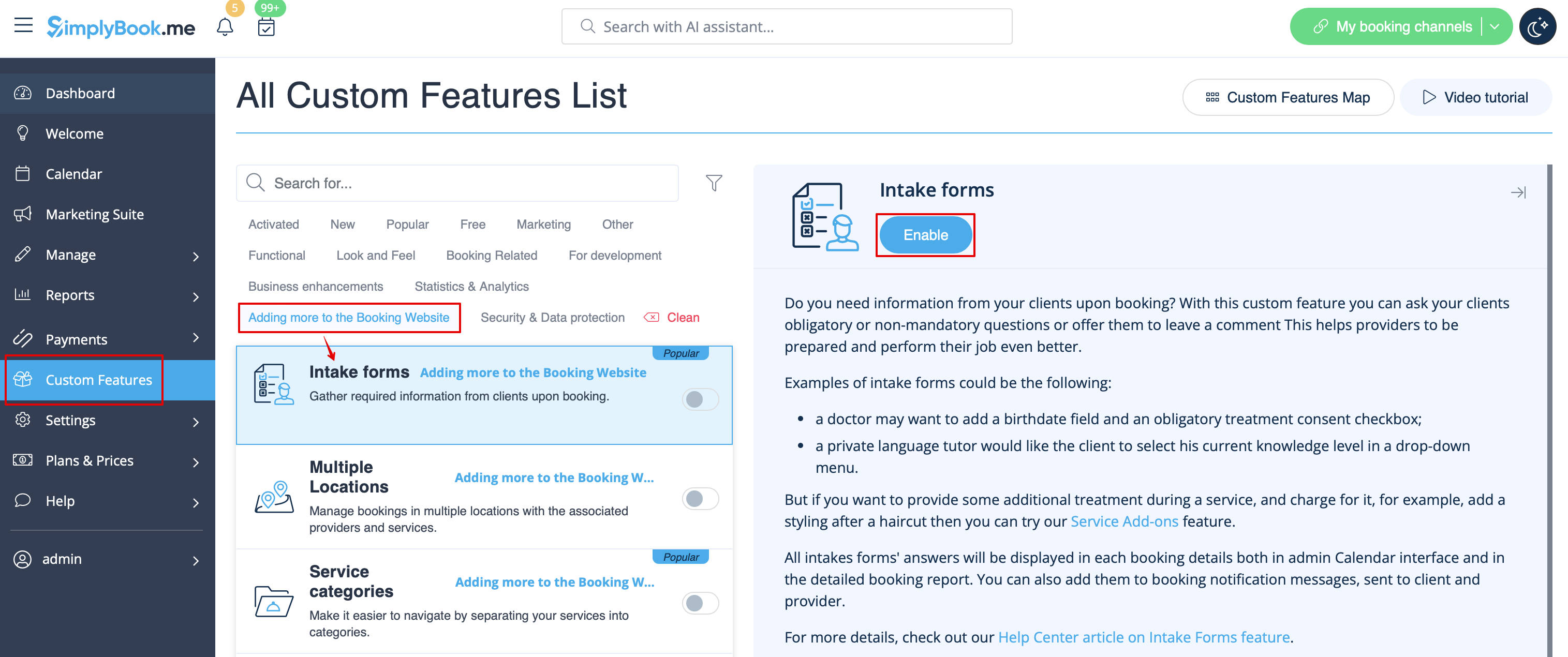
- 1. Увімкніть спеціальну функцію «Форми прийому» в розділі «Спеціальні функції//Додавання додаткових елементів на сторінку бронювання».
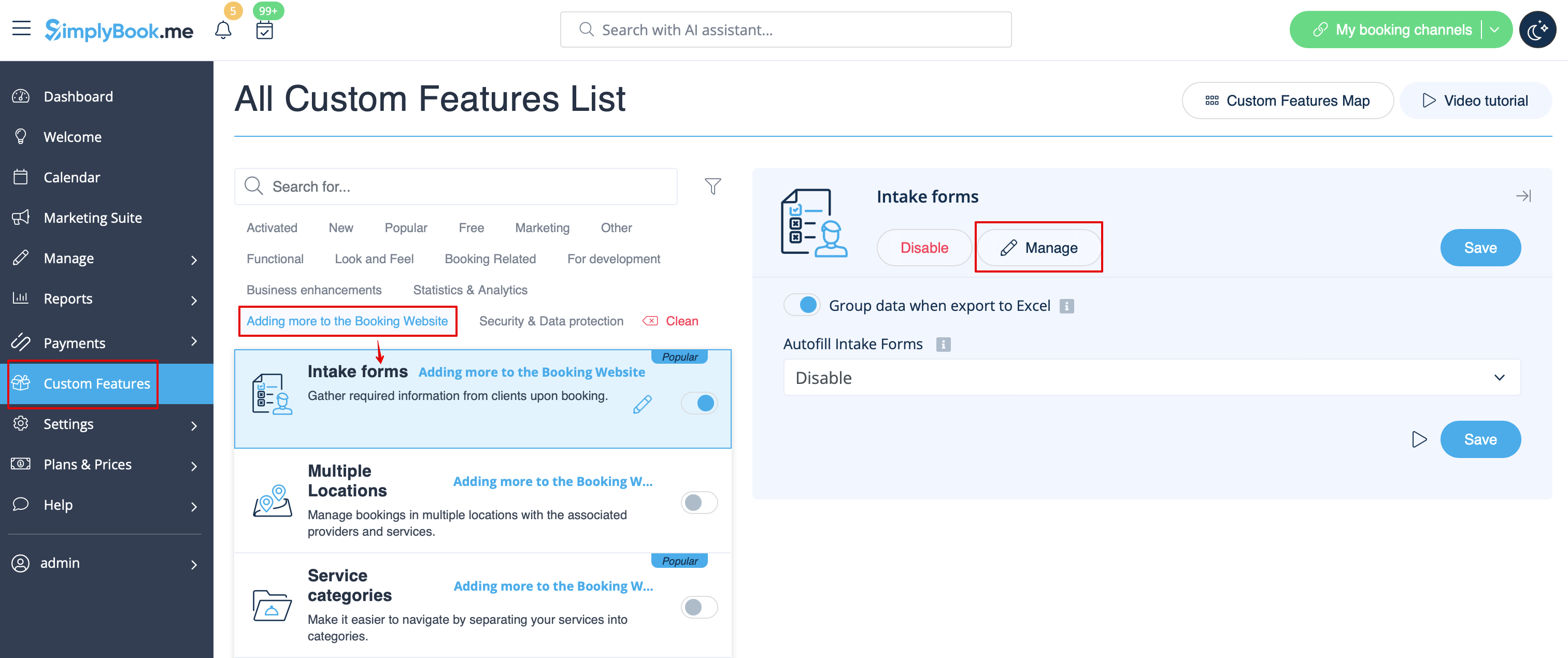
- 2. Перейдіть до його управління або на сторінку «Управління//Форми для прийому».
- 3. Натисніть кнопку «+» в налаштуваннях «Налаштовані функції», щоб створити нову форму.
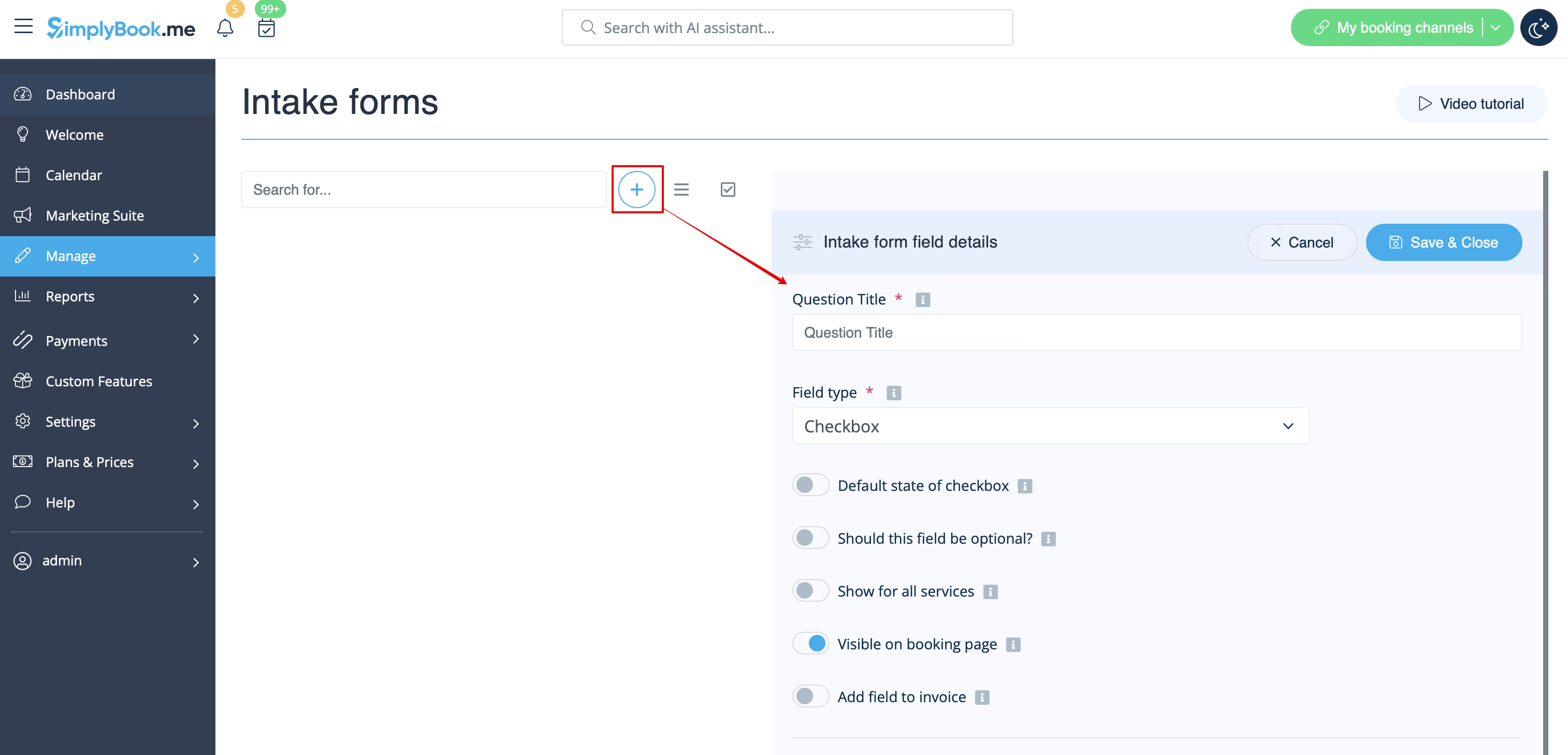
- 4. У полі «Заголовок питання» введіть питання, на яке ви хочете отримати відповідь від клієнтів. Наприклад: Вік, уподобання, Чи є у вас проблеми зі здоров'ям? тощо.
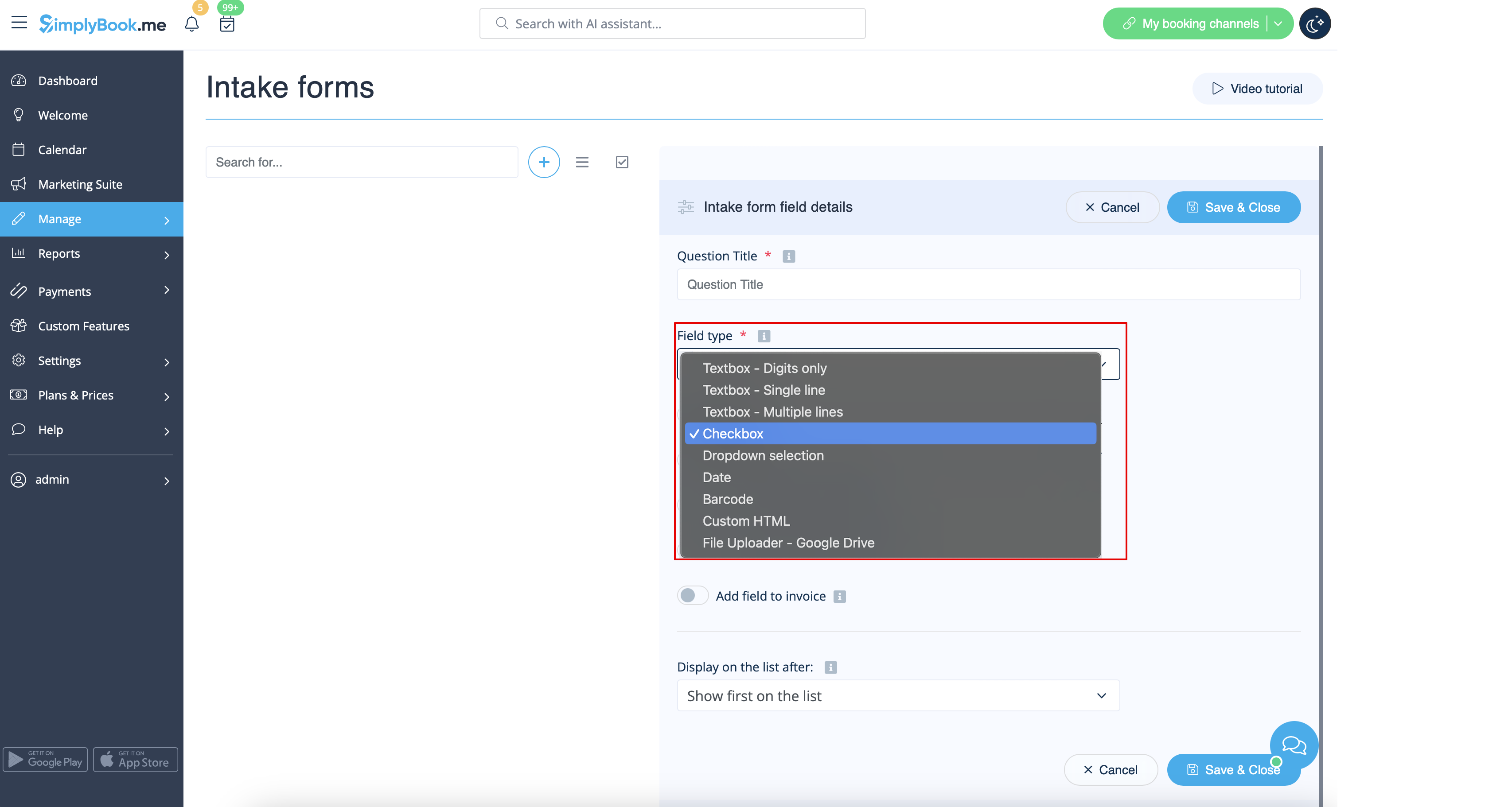
- 5. Виберіть тип поля:
- digits only - дозволяє вводити тільки цифри. Корисно, коли вам потрібно знати вік, зріст або будь-яку іншу інформацію, яка вимагає тільки цифр.
- single line - зазвичай використовується для коротких відповідей
- multiple lines - використовуйте цей тип поля, якщо ви очікуєте від своїх клієнтів довгих пояснень
- checkbox - створює поле, яке клієнти повинні або позначити, або залишити непозначеним. Корисно для питань, що вимагають бінарної відповіді, наприклад «Мені потрібні додаткові послуги».
- dropdown selection - створює список, що розкривається, з можливістю вибрати тільки 1 варіант. Щоб створити це поле, вам потрібно створити список значень у розділі «Параметри списку, що розкривається, і варіант за замовчуванням». Також ви можете вибрати значення за замовчуванням, яке буде присвоєно, якщо нічого не буде вибрано зі списку.
- date - створює опцію вибору дати з календарем.
- barcode - дозволяє сканувати штрих-коди за допомогою мобільного додатку адміністратора та отримувати значення зі сканування. Також дозволяє вводити простий текст, як у однорядкових формах для прийому.
- custom HTML - дозволяє додавати візуальні роздільники або додатковий текст біля форми для прийому. Не можна використовувати для введення даних клієнтом.
- file uploader - Google Drive - доступно, якщо увімкнено спеціальну функцію File Uploader - Google Drive. Дозволяє завантажувати файли, які ви зможете побачити в спеціальній папці на вашому Google Drive.
- 6. Зробіть це обов'язковим або необов'язковим за допомогою перемикача «опціонально».
- Додайте поле (будуть включені як заголовок, так і відповідь) до рахунків-фактур клієнтів, якщо це необхідно і якщо ви використовуєте спеціальну функцію «Приймати платежі ».
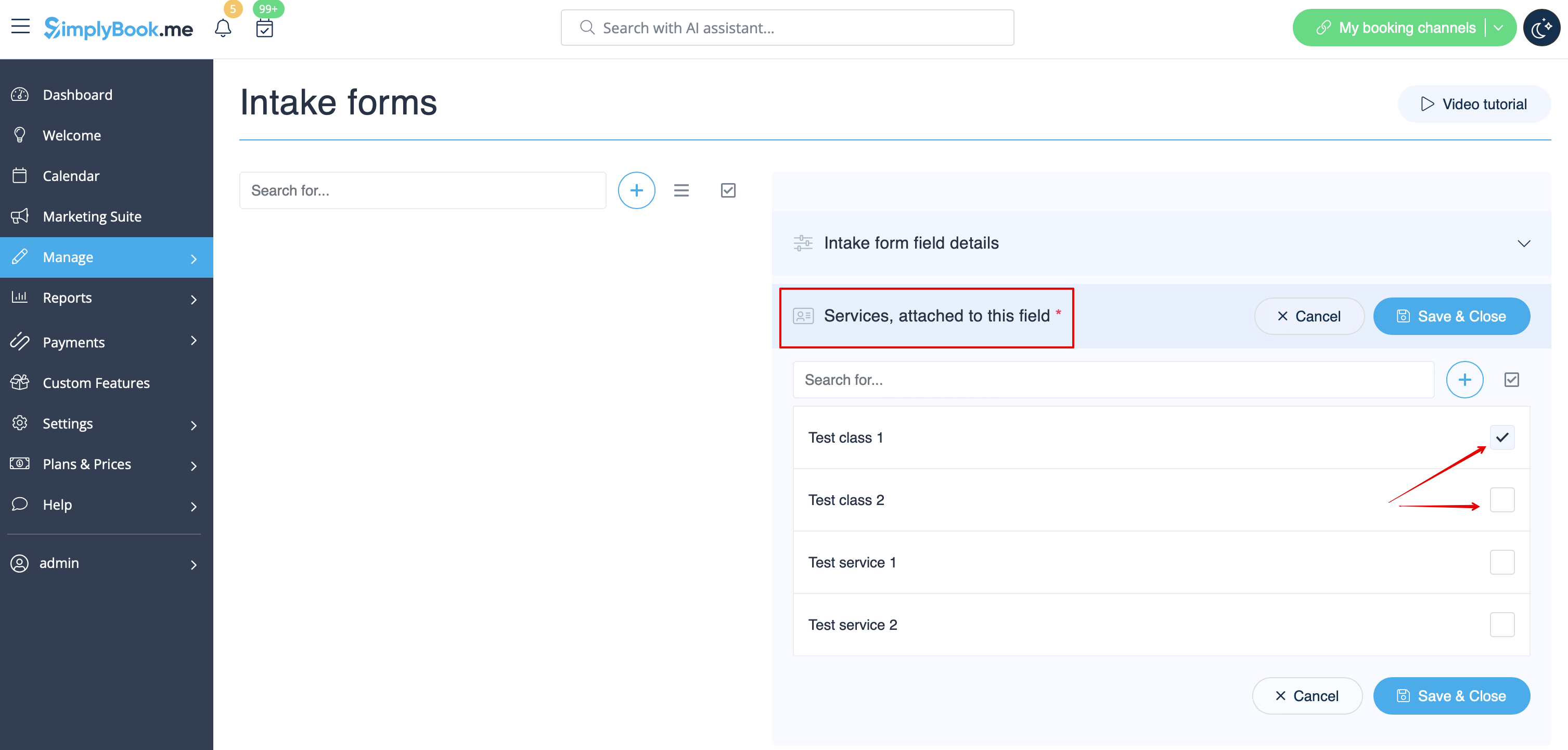
- 7. Якщо ви хочете пов'язати форму з певними послугами, виберіть вкладку «Послуги, пов'язані з цим полем» і встановіть прапорці біля відповідних послуг.
- 8. Якщо ви хочете включити інформацію з форми прийому в шаблони електронних листів, знайдіть змінні форми прийому та додайте їх до шаблонів у налаштуваннях «Налаштування електронної пошти та SMS».