Created page with "|beskrivelse=Indstil reservationsgrænser for at kontrollere antallet af aftaler pr. kunde. Administrer kapaciteten effektivt. Aktiver i dag!" |
Updating to match new version of source page |
||
| Line 12: | Line 12: | ||
[[File:Limit bookings new icon.png |left]] | [[File:Limit bookings new icon.png |left]] | ||
<div class="mw-translate-fuzzy"> | |||
Denne tilpassede funktion giver dig mulighed for at begrænse det antal bookinger, der kan bookes på samme tid. Denne tilpassede funktion er nyttig, når dine tjenester kræver ekstra ting som tandlægestol eller plads i studiet osv. (En anden måde at begrænse antallet af bookinger på grund af begrænsede ressourcer er at bruge funktionen [[Special:MyLanguage/Related_Resources_custom_feature|Relaterede ressourcer]] i stedet). Når reservationsgrænsen er nået, vil det tilsvarende tidsinterval se ud som en pause på reservationssiden (og i admin-grænsefladen, hvis du ikke har valgt at springe denne begrænsning over for admin). Det er muligt at begrænse antallet af reservationer på samme tid generelt, og du kan også indstille en bestemt grænse for hver tjeneste separat. | Denne tilpassede funktion giver dig mulighed for at begrænse det antal bookinger, der kan bookes på samme tid. Denne tilpassede funktion er nyttig, når dine tjenester kræver ekstra ting som tandlægestol eller plads i studiet osv. (En anden måde at begrænse antallet af bookinger på grund af begrænsede ressourcer er at bruge funktionen [[Special:MyLanguage/Related_Resources_custom_feature|Relaterede ressourcer]] i stedet). Når reservationsgrænsen er nået, vil det tilsvarende tidsinterval se ud som en pause på reservationssiden (og i admin-grænsefladen, hvis du ikke har valgt at springe denne begrænsning over for admin). Det er muligt at begrænse antallet af reservationer på samme tid generelt, og du kan også indstille en bestemt grænse for hver tjeneste separat. | ||
<br> | <br> | ||
| Line 37: | Line 38: | ||
[[File:Limit bookings per service redesigned.png|1200px | center|link=https://help.simplybook.me/images/e/e6/Limit_bookings_per_service_redesigned.png]] | [[File:Limit bookings per service redesigned.png|1200px | center|link=https://help.simplybook.me/images/e/e6/Limit_bookings_per_service_redesigned.png]] | ||
<br><br> | <br><br> | ||
</div> | |||
<div lang="en" dir="ltr" class="mw-content-ltr"> | |||
<br><br> | |||
;How to use | |||
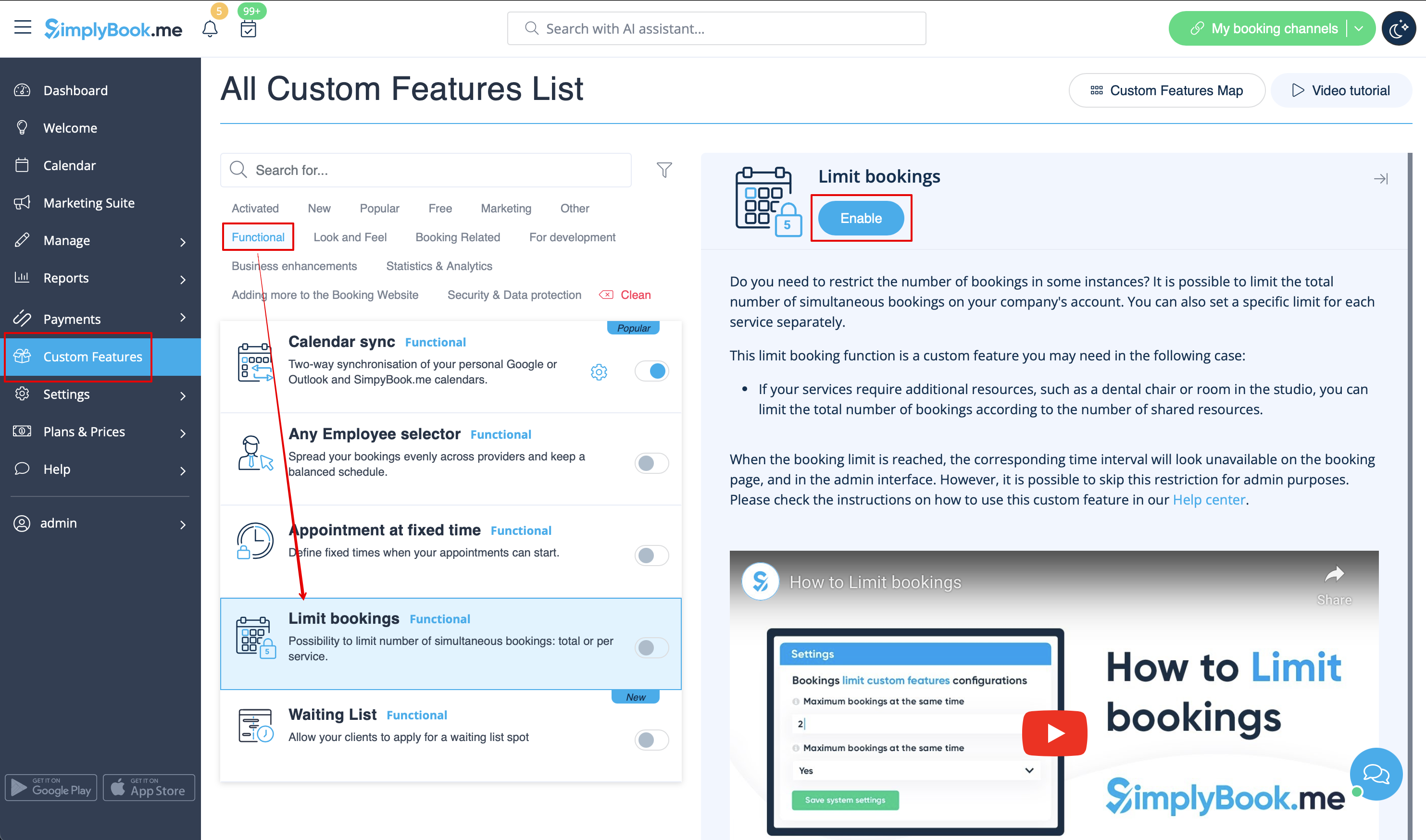
:1. Enable this custom feature on your Custom Features page. | |||
[[File:Limit bookings enable path redesigned.png|1200px| center|link=https://help.simplybook.me/images/a/a4/Limit_bookings_enable_path_redesigned.png]] | |||
<br><br> | |||
:2. Go to its settings on the right if you need to limit number of bookings for the whole system. | |||
:3. If you need to set the limit per timeslot for the whole system please expand the first "Common bookings limit" block and indicate the desired number. As the result the bookings will be limited to this amount for all the services and classes you have. | |||
[[File:Limit bookings common limit per system.png|1200px | center|link=https://help.simplybook.me/images/6/68/Limit_bookings_common_limit_per_system.png]] | |||
<br><br> | |||
:4. In case you would like to add client limitations please use the second block there "Client Restrictions" and set the desired pattern. | |||
[[File:Limit bookings client restrictions per system.png|1200px | center|link=https://help.simplybook.me/images/4/48/Limit_bookings_client_restrictions_per_system.png]] | |||
<br><br> | |||
The available options: | |||
* The '''Existing bookings overlap''' option prevents a client from booking a service if its time slot overlaps with any other active booking they already have. This ensures a client cannot have two active bookings concurrently, preventing double-bookings. | |||
* The '''Same Day''' option prevents a client from booking a new service if they already have any active booking on the same calendar day. This limits a client to one booking per day, regardless of the time or duration of the appointment. | |||
* The '''Same Week''' option prevents a client from booking a new service if they already have any active booking within the same calendar week. This limits a client to one booking per week, regardless of the specific day or time. | |||
* The '''Custom Period''' option prevents a client from booking new services for a specified duration both before and after their existing bookings. For instance, if a client has a booking from 10:00 AM to 11:00 AM and the restriction is 2 hours, they won't be able to make new reservations between 8:00 AM and 1:00 PM on that day. This helps manage booking frequency and ensures adequate spacing between appointments. | |||
<br><br> | |||
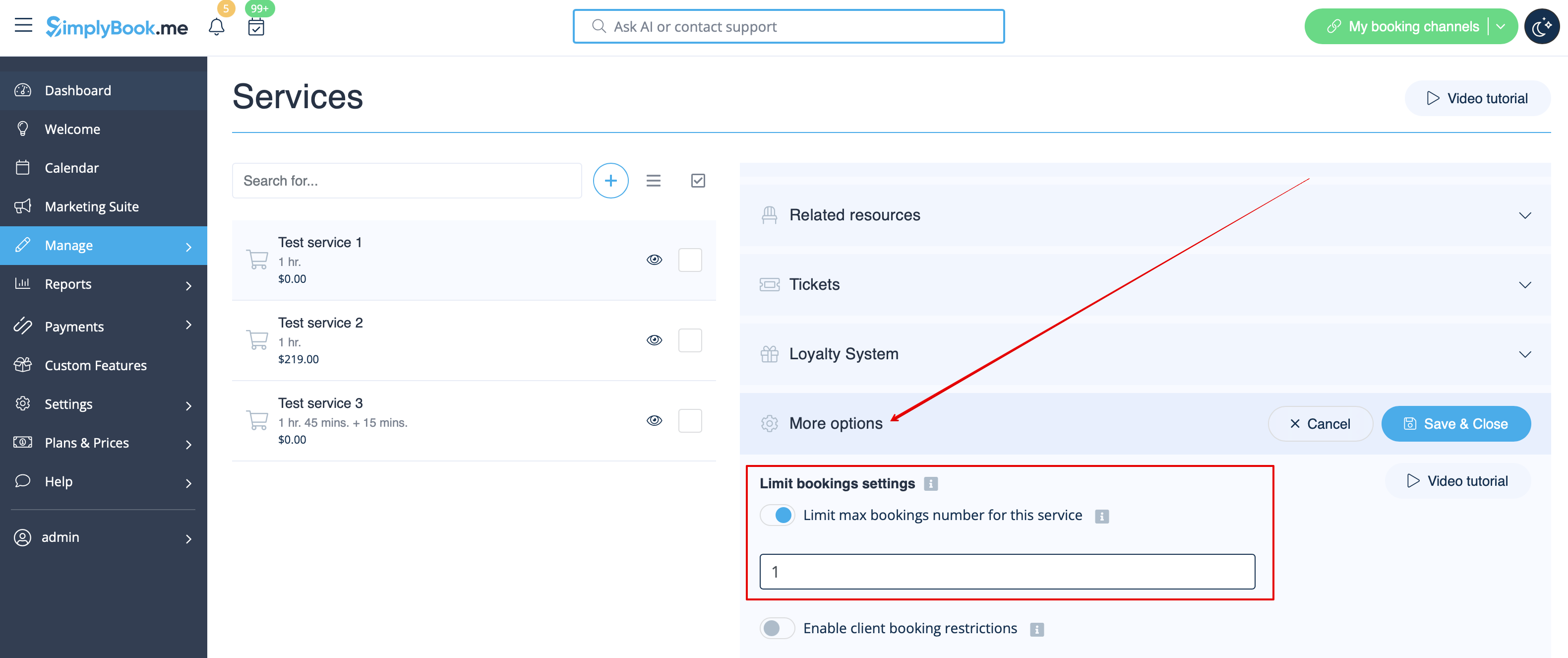
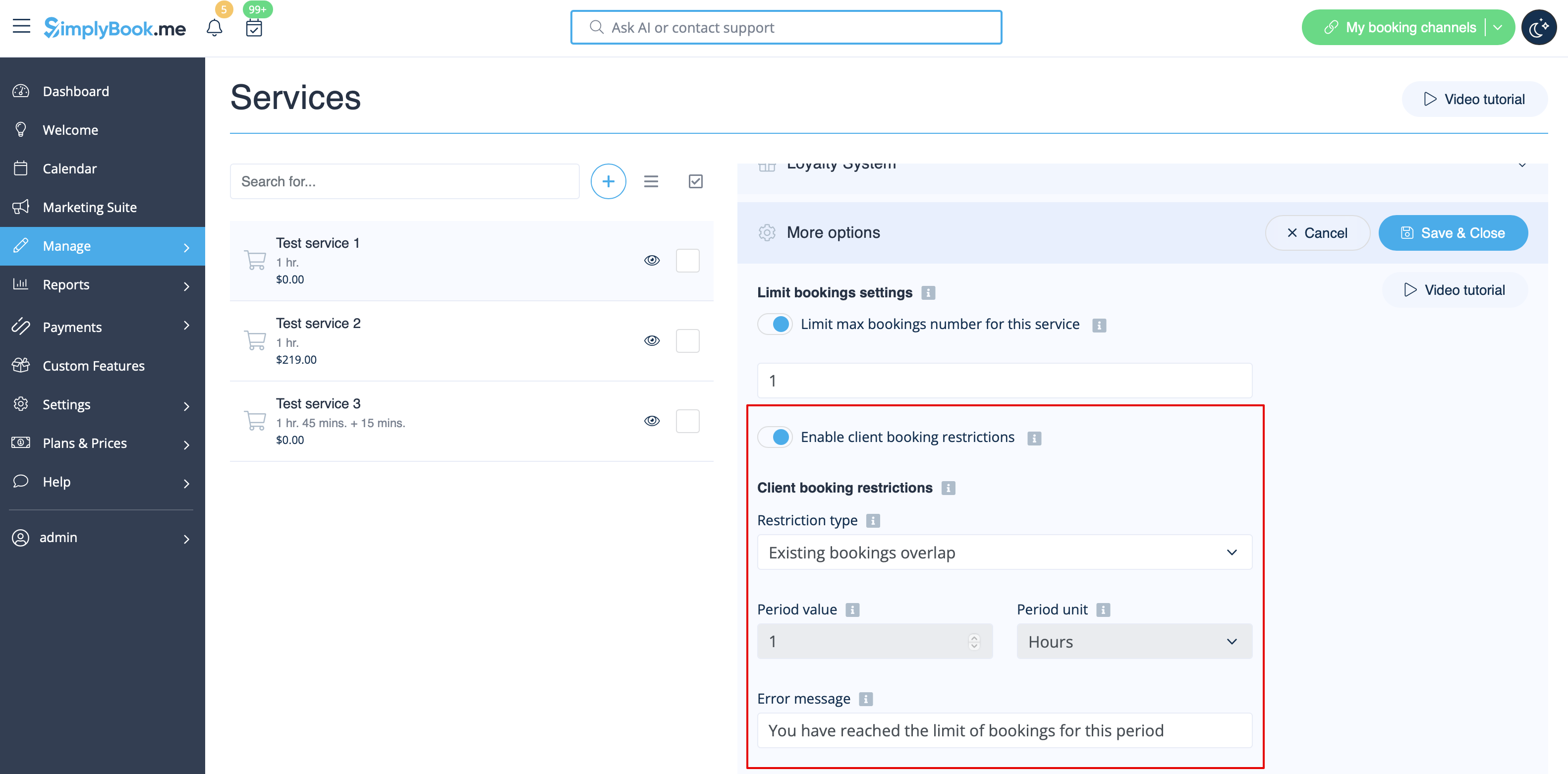
:5. If you need to set the limit for certain service please navigate to Manage//Services(Classes) page, choose "More options" tab and set the desired number per service/class. You fill find both options there: per timeslot and per client | |||
[[File:Limit bookings per service new.png|1200px | center|link=https://help.simplybook.me/images/a/aa/Limit_bookings_per_service_new.png]] | |||
[[File:Limit bookings per client per service.png|1200px | center|link=https://help.simplybook.me/images/0/06/Limit_bookings_per_client_per_service.png]] | |||
<br><br> | |||
</div> | |||
Revision as of 11:40, 31 July 2025

Denne tilpassede funktion giver dig mulighed for at begrænse det antal bookinger, der kan bookes på samme tid. Denne tilpassede funktion er nyttig, når dine tjenester kræver ekstra ting som tandlægestol eller plads i studiet osv. (En anden måde at begrænse antallet af bookinger på grund af begrænsede ressourcer er at bruge funktionen Relaterede ressourcer i stedet). Når reservationsgrænsen er nået, vil det tilsvarende tidsinterval se ud som en pause på reservationssiden (og i admin-grænsefladen, hvis du ikke har valgt at springe denne begrænsning over for admin). Det er muligt at begrænse antallet af reservationer på samme tid generelt, og du kan også indstille en bestemt grænse for hver tjeneste separat.
For eksempel har du 2 udbydere og 1 rum, og begge dine udbydere er tilgængelige kl. 10.00.
Hver udbyder er indstillet til at betjene 1 person ad gangen, og i alt kan 2 personer booke tjenesten kl. 10.00.
Men du skal begrænse dette antal til 1 person, da der kun er 1 rum tilgængeligt.
Du skal aktivere den brugerdefinerede funktion Begræns bookinger og indstille den til 1.
På denne måde vil denne tid være lukket for en anden udbyder, når nogen booker kl. 10.00.
Bemærk!
- Denne funktion er ikke kompatibel med Vis resterende pladser
- Denne funktion er udviklet til at begrænse bookinger pr. service pr. tidsinterval og tillader ikke indstilling af begrænsninger på antallet af bookinger, en kunde kan foretage inden for et bestemt tidsrum. For at kontrollere kundernes bookinger over en bestemt tidsramme kan du overveje at bruge den tilpassede funktion Anti-svindel/spam-beskyttelse.
- Sådan bruges
- 1. Aktivér denne tilpassede funktion på siden Tilpassede funktioner.
- 2. Gå til indstillingerne til højre, hvis du har brug for at begrænse antallet af bookinger ad gangen for hele systemet.
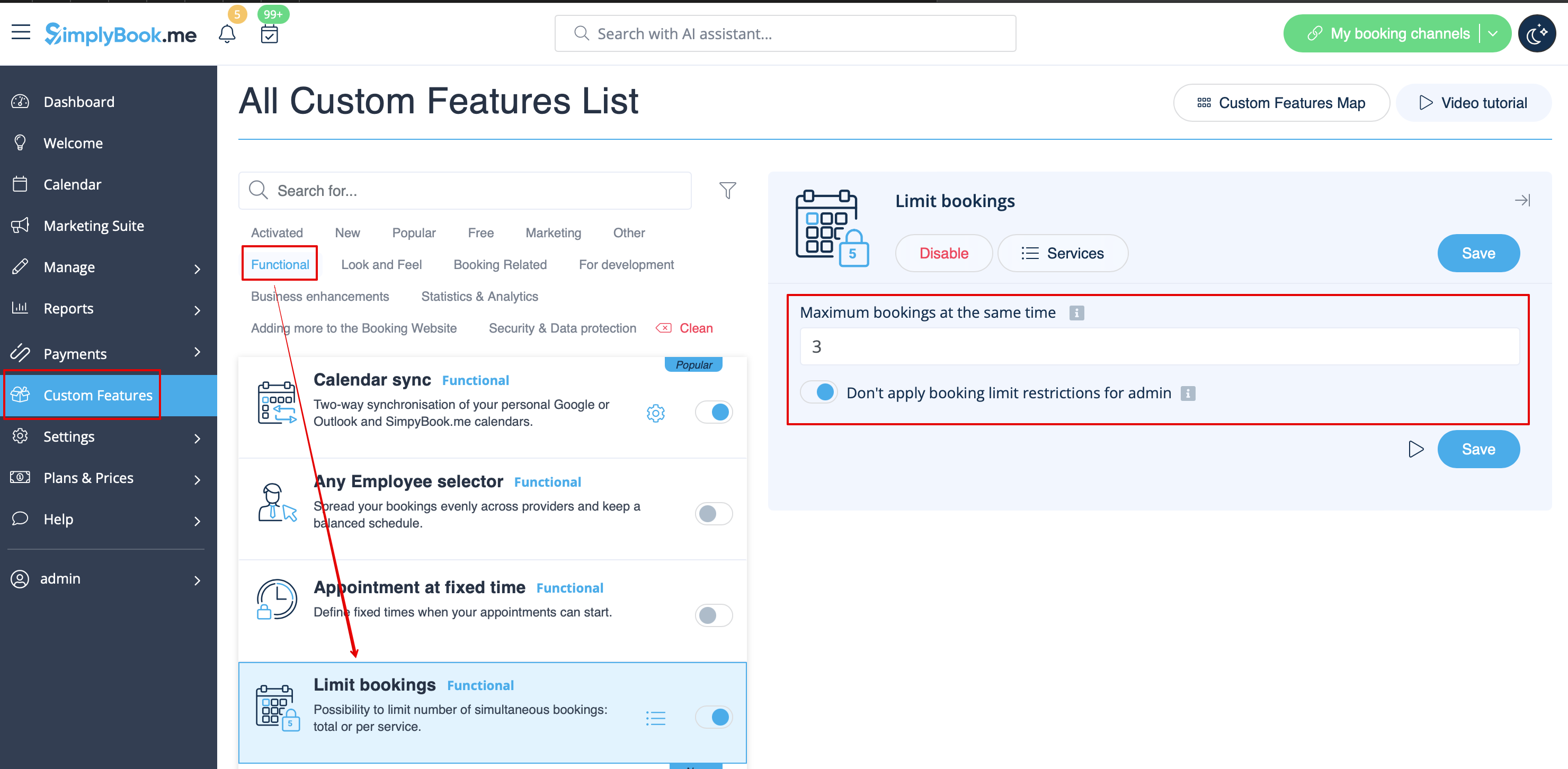
- 3. Angiv det ønskede antal i det relevante felt.
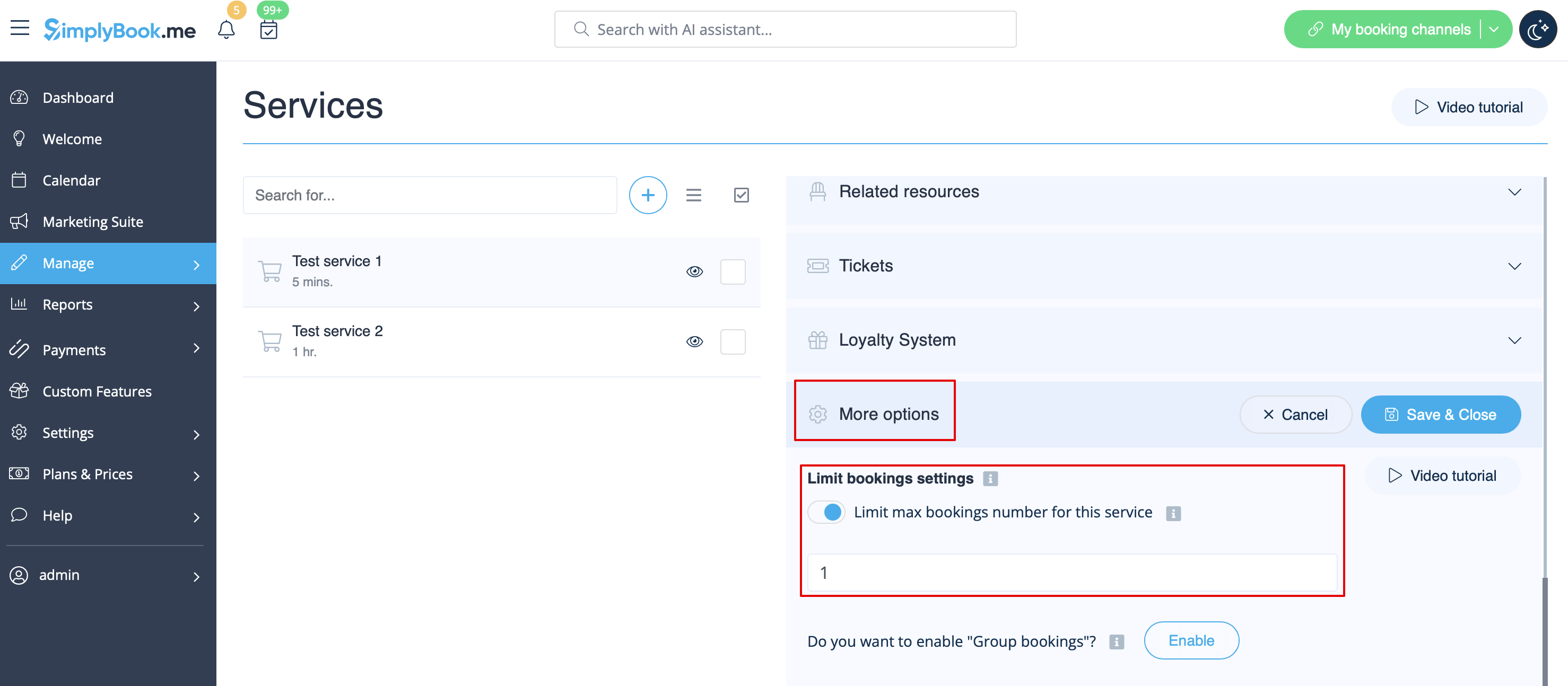
- 4. Hvis du har brug for at indstille en begrænsning for en bestemt service, skal du gå til siden Administrer//Services (klasser), vælge fanen Flere indstillinger og indstille det ønskede antal pr. service/klasse.
- How to use
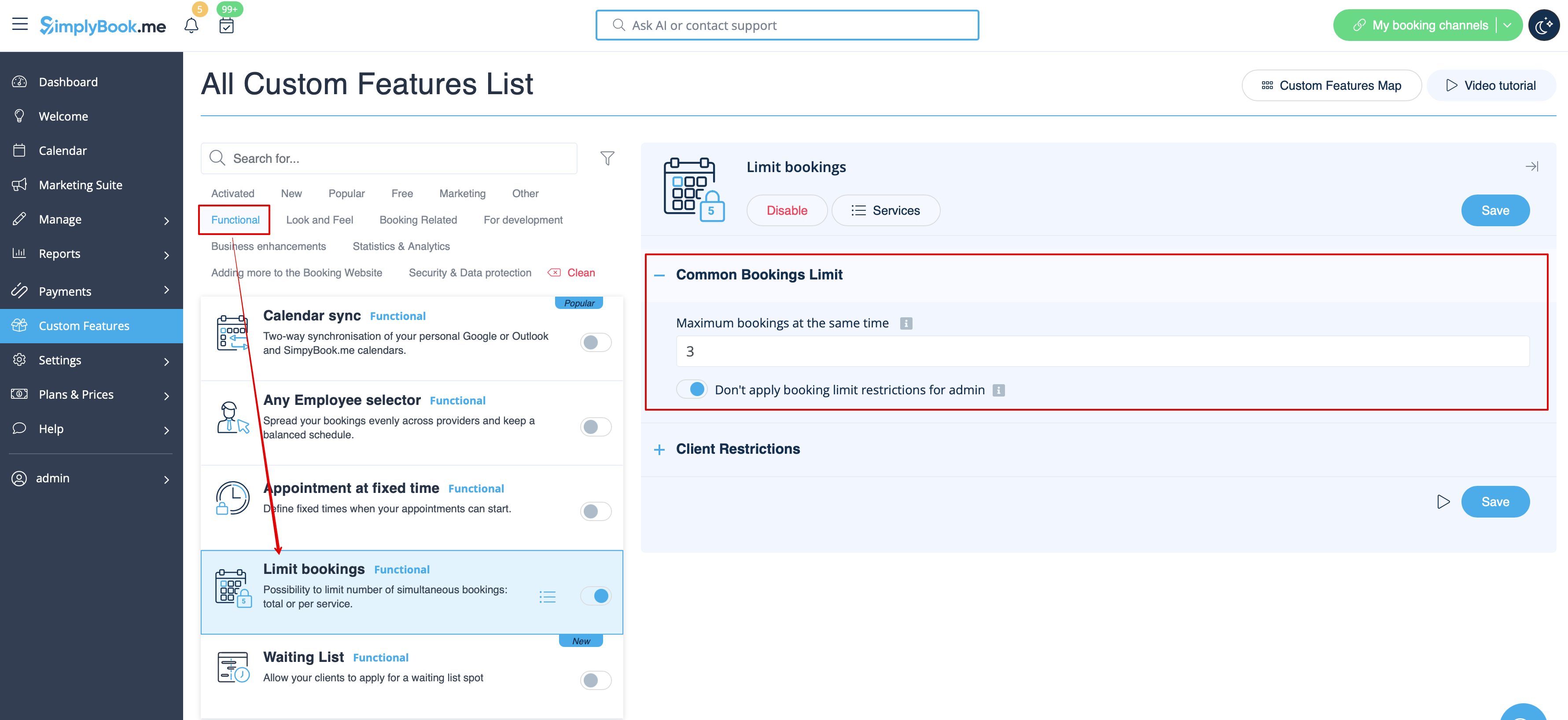
- 1. Enable this custom feature on your Custom Features page.
- 2. Go to its settings on the right if you need to limit number of bookings for the whole system.
- 3. If you need to set the limit per timeslot for the whole system please expand the first "Common bookings limit" block and indicate the desired number. As the result the bookings will be limited to this amount for all the services and classes you have.
- 4. In case you would like to add client limitations please use the second block there "Client Restrictions" and set the desired pattern.
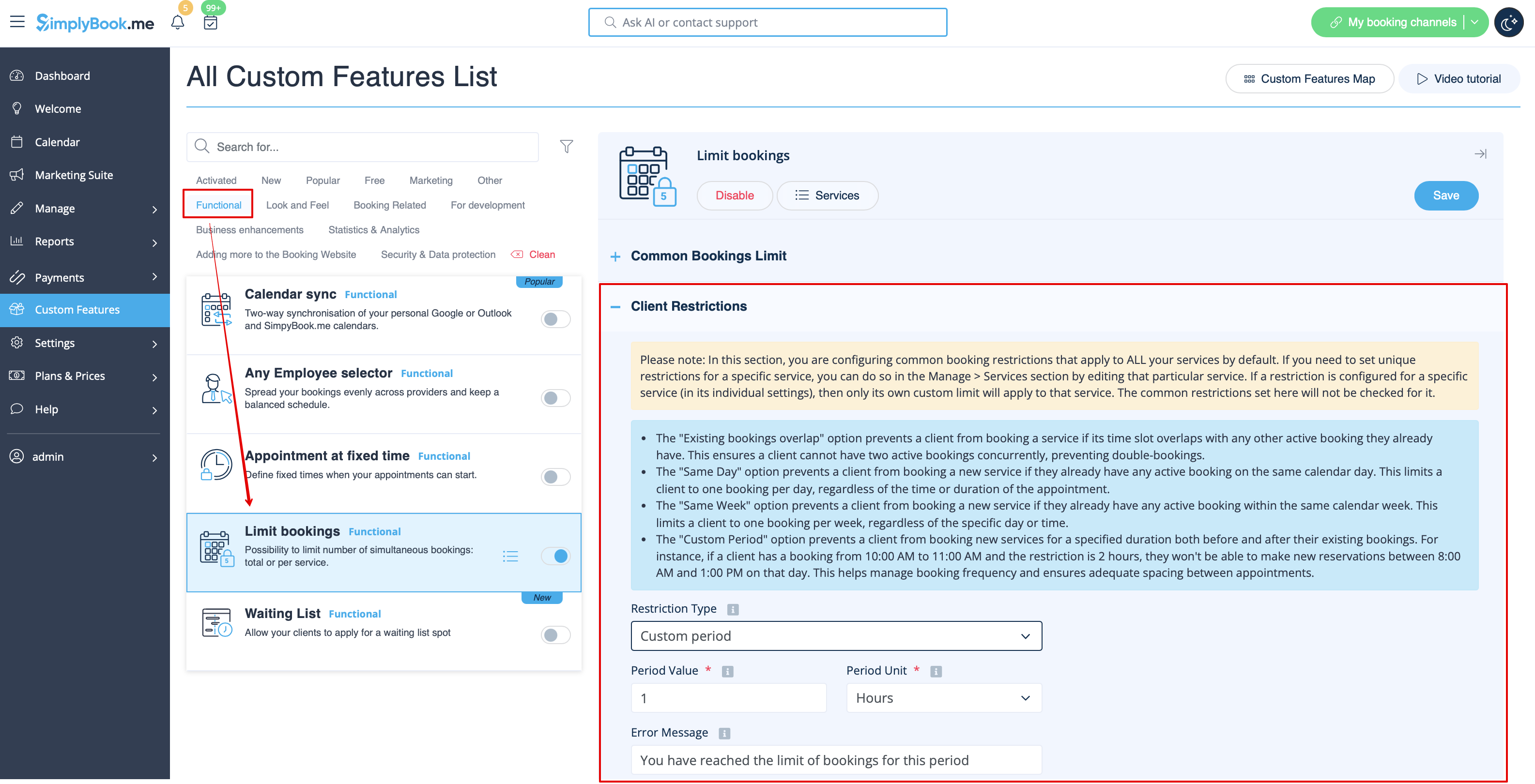
The available options:
- The Existing bookings overlap option prevents a client from booking a service if its time slot overlaps with any other active booking they already have. This ensures a client cannot have two active bookings concurrently, preventing double-bookings.
- The Same Day option prevents a client from booking a new service if they already have any active booking on the same calendar day. This limits a client to one booking per day, regardless of the time or duration of the appointment.
- The Same Week option prevents a client from booking a new service if they already have any active booking within the same calendar week. This limits a client to one booking per week, regardless of the specific day or time.
- The Custom Period option prevents a client from booking new services for a specified duration both before and after their existing bookings. For instance, if a client has a booking from 10:00 AM to 11:00 AM and the restriction is 2 hours, they won't be able to make new reservations between 8:00 AM and 1:00 PM on that day. This helps manage booking frequency and ensures adequate spacing between appointments.
- 5. If you need to set the limit for certain service please navigate to Manage//Services(Classes) page, choose "More options" tab and set the desired number per service/class. You fill find both options there: per timeslot and per client