From SimplyBook.me
Created page with "<span style="background-color:#ffe9e9; padding:5px; border-radius:5px;">'''Let op!'''</span> *<span style="background-color:#ffe9e9; padding:5px; border-radius:5px;">Deze functie is niet compatibel met de volgende <span style="background-color:#cdeffc; padding:5px; border-radius:5px;">kalenderindelingstypen</span>: flexibel, flexibel wekelijks en flexibele aanbieder.</span> *<span style="background-color:#ff..." |
Created page with ";Gebruiksaanwijzing: :1. Schakel deze functie in op uw pagina <span style="background-color:#d4f8e5; padding:5px; border-radius:5px;">Aangepaste functies</span> -> Sectie <span style="background-color:#d4f8e5; padding:5px; border-radius:5px;">Boekingsgerelateerd</span>. 1200px|center|link=https://help.simplybook.me/images/b/b7/Make_me_look_busy_enable_path_redesigned.png <br><br> :2. Geef aan <span style="backgroun..." |
||
| Line 6: | Line 6: | ||
*<span style="background-color:#ffe9e9; padding:5px; border-radius:5px;">Deze functie is niet compatibel met de volgende <span style="background-color:#cdeffc; padding:5px; border-radius:5px;">[[How_to_change_the_way_time_slots_are_shown#Calendar_Layouts|kalenderindelingstypen]]</span>: flexibel, flexibel wekelijks en flexibele aanbieder.</span> | *<span style="background-color:#ffe9e9; padding:5px; border-radius:5px;">Deze functie is niet compatibel met de volgende <span style="background-color:#cdeffc; padding:5px; border-radius:5px;">[[How_to_change_the_way_time_slots_are_shown#Calendar_Layouts|kalenderindelingstypen]]</span>: flexibel, flexibel wekelijks en flexibele aanbieder.</span> | ||
*<span style="background-color:#ffe9e9; padding:5px; border-radius:5px;">Als u hebt ingeschakeld om de boekingswebsite in de tijdzone van de klant weer te geven en deze verschilt van de tijdzone van het bedrijf, kan dit ertoe leiden dat er meer slots per dag worden weergegeven dan is ingesteld in deze aangepaste functie-instellingen.</span> | *<span style="background-color:#ffe9e9; padding:5px; border-radius:5px;">Als u hebt ingeschakeld om de boekingswebsite in de tijdzone van de klant weer te geven en deze verschilt van de tijdzone van het bedrijf, kan dit ertoe leiden dat er meer slots per dag worden weergegeven dan is ingesteld in deze aangepaste functie-instellingen.</span> | ||
<br><br> | <br><br>;Gebruiksaanwijzing: | ||
; | :1. Schakel deze functie in op uw pagina <span style="background-color:#d4f8e5; padding:5px; border-radius:5px;">Aangepaste functies</span> -> Sectie <span style="background-color:#d4f8e5; padding:5px; border-radius:5px;">Boekingsgerelateerd</span>. | ||
:1. | |||
[[File:Make me look busy enable path redesigned.png|1200px|center|link=https://help.simplybook.me/images/b/b7/Make_me_look_busy_enable_path_redesigned.png]] | [[File:Make me look busy enable path redesigned.png|1200px|center|link=https://help.simplybook.me/images/b/b7/Make_me_look_busy_enable_path_redesigned.png]] | ||
<br><br> | <br><br> | ||
:2. | :2. Geef aan <span style="background-color:#d4f8e5; padding:5px; border-radius:5px;">hoeveel tijdvakken</span> u per dag als beschikbaar wilt weergeven op uw boekingswebsite. | ||
: | :Dit is het aantal tijdvakken dat per datum per combinatie van dienst en aanbieder wordt weergegeven. | ||
[[File:Make me look busy limit timeslots redesigned.png|1200px|center|link=https://help.simplybook.me/images/a/a7/Make_me_look_busy_limit_timeslots_redesigned.png]] | [[File:Make me look busy limit timeslots redesigned.png|1200px|center|link=https://help.simplybook.me/images/a/a7/Make_me_look_busy_limit_timeslots_redesigned.png]] | ||
<br><br | <br><br><div lang="en" dir="ltr" class="mw-content-ltr"> | ||
:3. If you wish to show the timeslots that are close to the already booked times you can enable "Prioritize slots closest to existing bookings" option. | :3. If you wish to show the timeslots that are close to the already booked times you can enable "Prioritize slots closest to existing bookings" option. | ||
[[File:Prioritize slots next to bookings redesigned.png|1200px|center|link=https://help.simplybook.me/images/5/57/Prioritize_slots_next_to_bookings_redesigned.png]] | [[File:Prioritize slots next to bookings redesigned.png|1200px|center|link=https://help.simplybook.me/images/5/57/Prioritize_slots_next_to_bookings_redesigned.png]] | ||
Revision as of 08:57, 18 June 2025

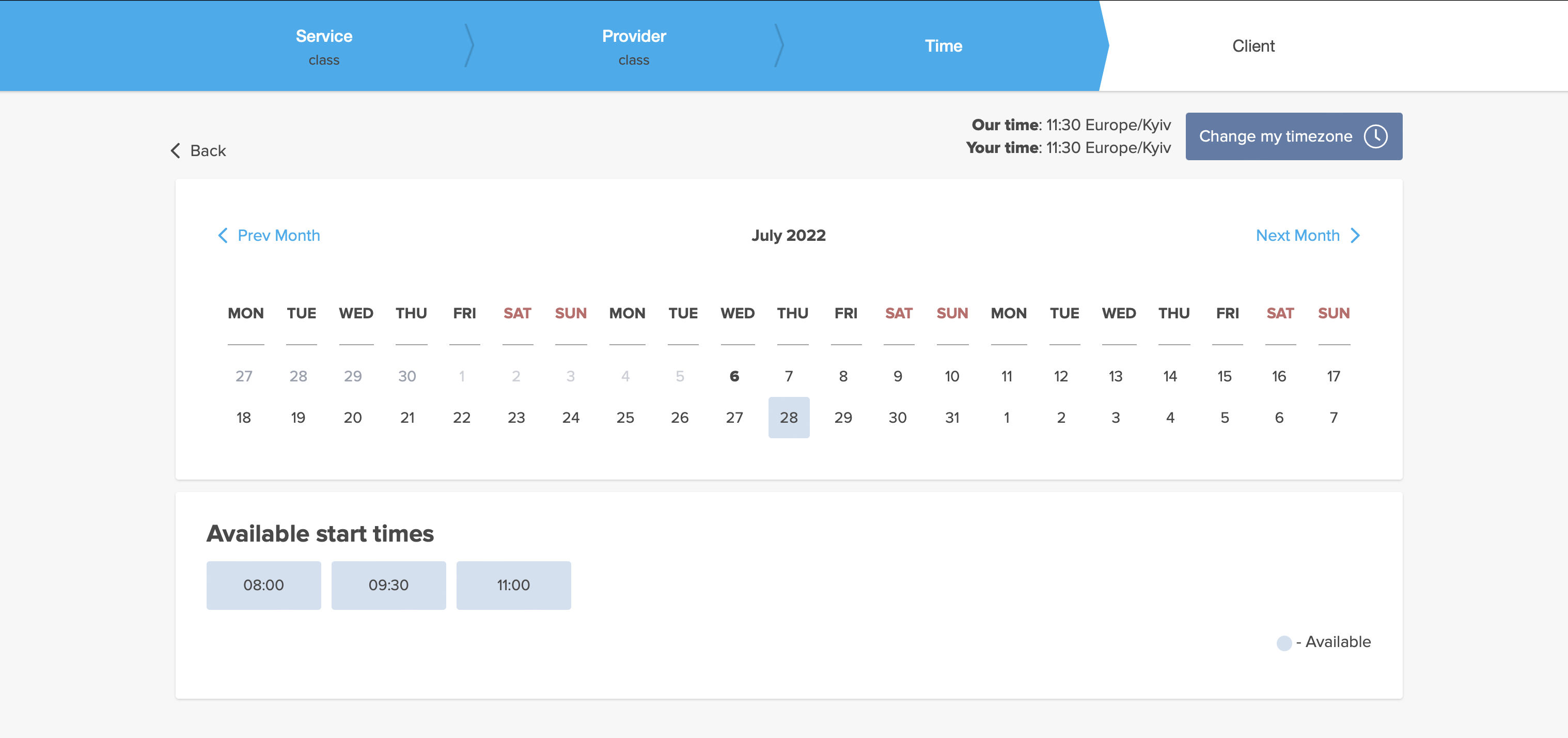
Met deze functie zien slots er bezet uit wanneer klanten uw site bezoeken, terwijl ze toch beschikbaar blijven, zodat ze iets kunnen vinden om te boeken. U kunt zelf bepalen hoeveel slots er elke dag beschikbaar moeten zijn.
Let op!
- Deze functie is niet compatibel met de volgende kalenderindelingstypen: flexibel, flexibel wekelijks en flexibele aanbieder.
- Als u hebt ingeschakeld om de boekingswebsite in de tijdzone van de klant weer te geven en deze verschilt van de tijdzone van het bedrijf, kan dit ertoe leiden dat er meer slots per dag worden weergegeven dan is ingesteld in deze aangepaste functie-instellingen.
;Gebruiksaanwijzing:
- 1. Schakel deze functie in op uw pagina Aangepaste functies -> Sectie Boekingsgerelateerd.
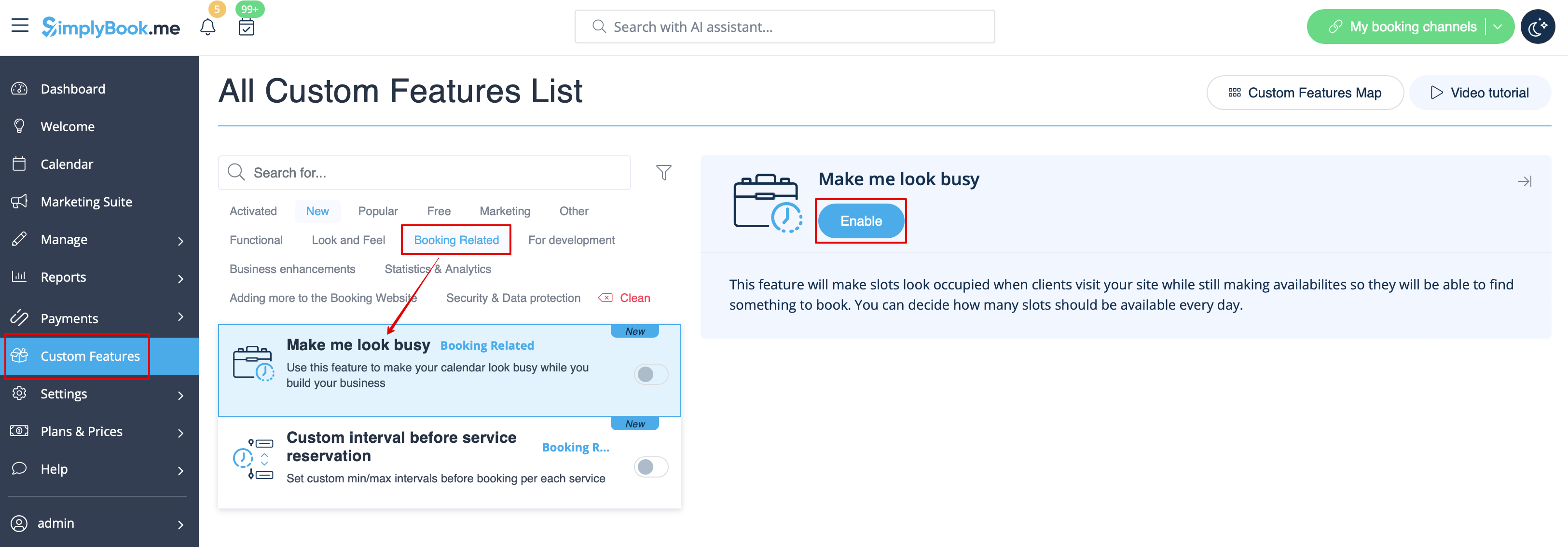
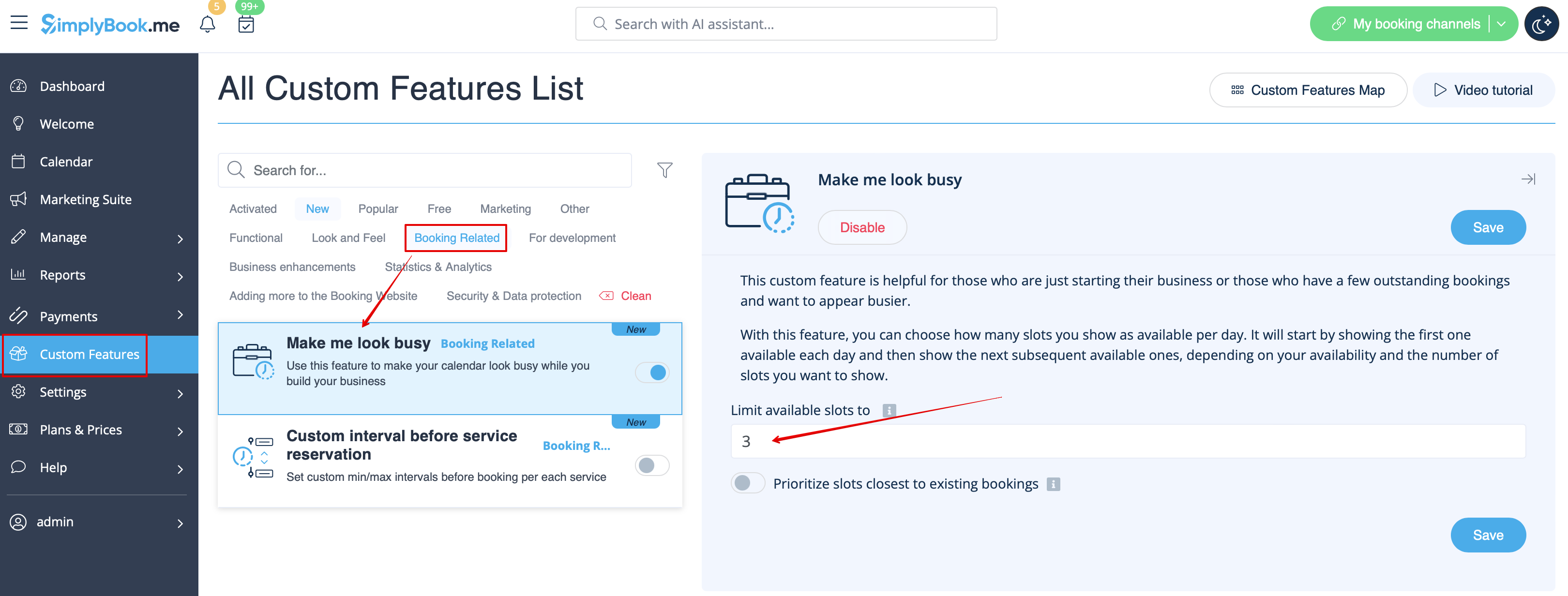
- 2. Geef aan hoeveel tijdvakken u per dag als beschikbaar wilt weergeven op uw boekingswebsite.
- Dit is het aantal tijdvakken dat per datum per combinatie van dienst en aanbieder wordt weergegeven.
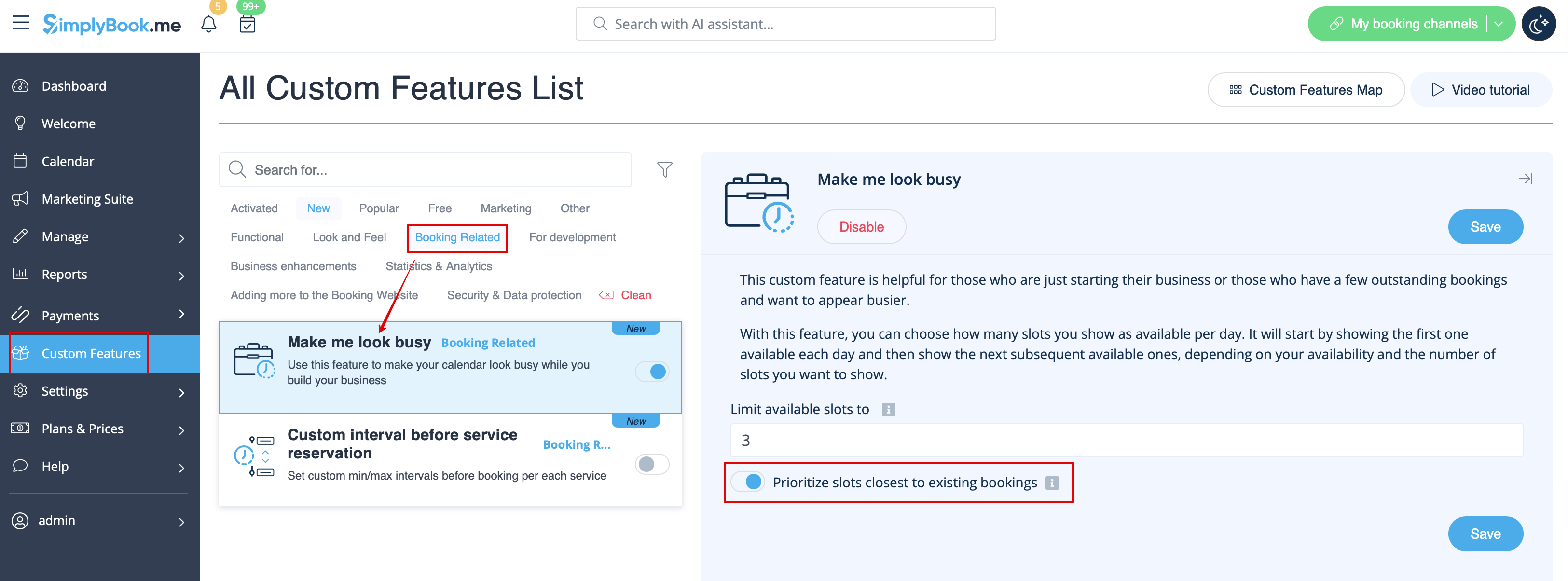
- 3. If you wish to show the timeslots that are close to the already booked times you can enable "Prioritize slots closest to existing bookings" option.
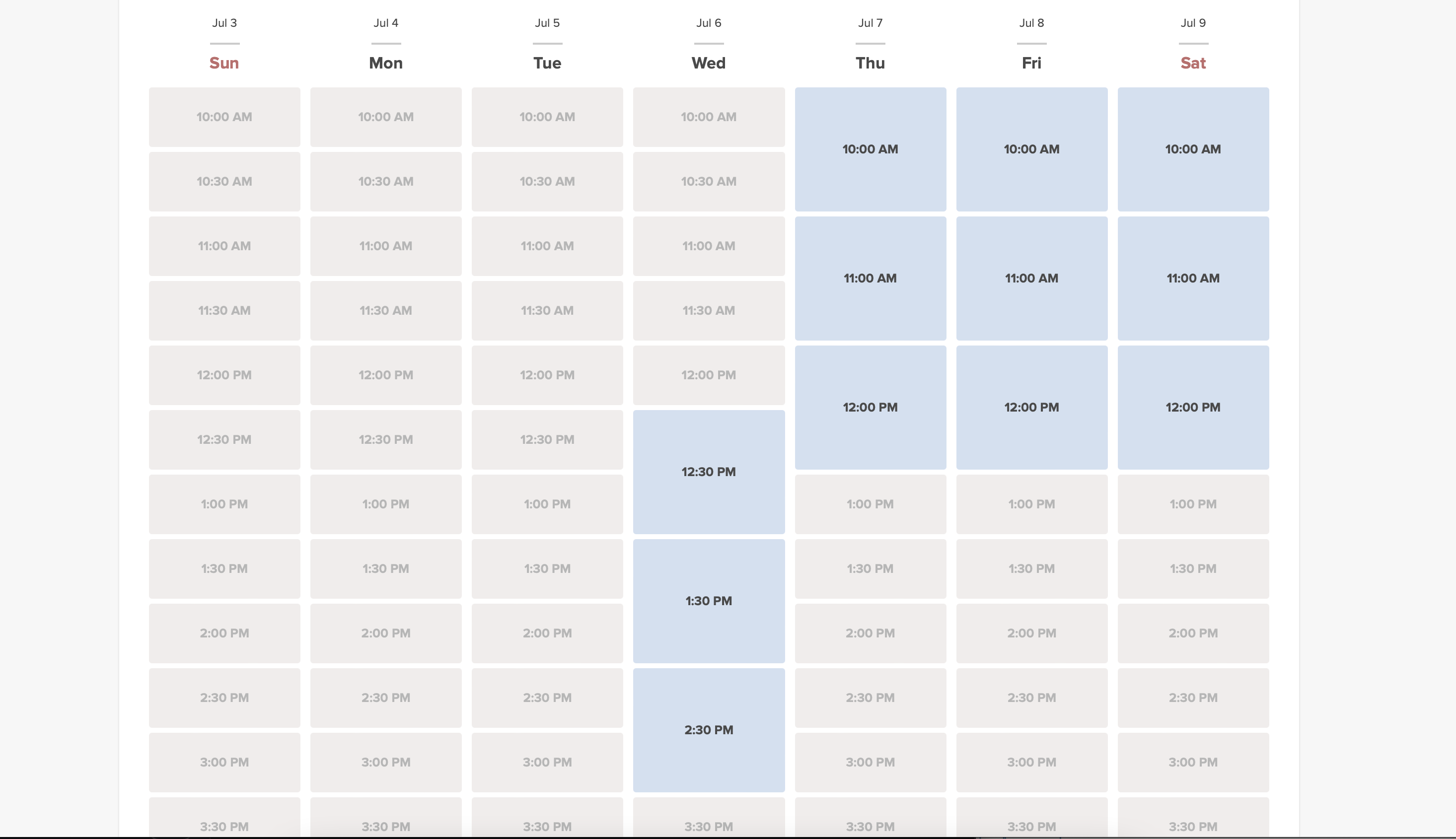
- 4. Here are some examples of how it may look on the client side.
- When some timeslot is booked the system will automatically open the next one depending on the scheduled that you have set in your account.
- modern calendar layout:
- slots weekly calendar layout: