No edit summary Tags: Mobile edit Mobile web edit |
Created page with "== Comment le configurer et l'utiliser avec [https://simplybook.me/ SimplyBook.me] ==" Tags: Mobile edit Mobile web edit |
||
| Line 164: | Line 164: | ||
Tutoriel vidéo [[File:Youtube-Logo.png|link=https://www.youtube.com/playlist?list=PLM9QxGer1Y2rKQwKDx4TmfnTYtuZDbN7r]] | Tutoriel vidéo [[File:Youtube-Logo.png|link=https://www.youtube.com/playlist?list=PLM9QxGer1Y2rKQwKDx4TmfnTYtuZDbN7r]] | ||
< | <span id="How_to_set_and_use_it_with_SimplyBook.me"></span> | ||
== | == Comment le configurer et l'utiliser avec [https://simplybook.me/ SimplyBook.me] == | ||
:1. Tout d'abord, comme vous prévoyez d'utiliser le paiement en ligne, vous devez activer la fonctionnalité personnalisée « <span style="background-color:#cdeffc; padding:5px; border-radius:5px;">[[Special:MyLanguage/Accept payments custom feature|Accepter les paiements]]</span> » dans votre compte [https://simplybook.me/ SimplyBook.me]. | :1. Tout d'abord, comme vous prévoyez d'utiliser le paiement en ligne, vous devez activer la fonctionnalité personnalisée « <span style="background-color:#cdeffc; padding:5px; border-radius:5px;">[[Special:MyLanguage/Accept payments custom feature|Accepter les paiements]]</span> » dans votre compte [https://simplybook.me/ SimplyBook.me]. | ||
Revision as of 12:01, 19 September 2025
SBPay.me est la fonctionnalité de gestion des paiements de SimplyBook.me qui vous permet d'accepter et de gérer les paiements via plusieurs prestataires de paiement, tout en simplifiant les paiements en ligne et hors ligne, l'envoi de liens de paiement, la facturation des cartes enregistrées et les remboursements.
Voir le tutoriel vidéo
Liste des processeurs de paiement actuellement pris en charge:
| Système de paiement pris en charge | Récurrent | Refacturation |
|---|---|---|
| Stripe(SCA) | ✔ |
✔ |
| ECPay | − |
− |
| PayPal | ✔ |
✔ |
| SafeCharge | ✔ |
✔ |
| 2Checkout | − |
− |
| Mollie | ✔ |
✔ |
| Authorize | ✔ |
✔ |
| Squareup (Square) | ✔ |
✔ |
| Worldpay | ✔ |
✔ |
| Adyen | ✔ |
✔ |
| LiqPay | ✔ |
✔ |
| Skrill | ✔ |
✔ |
| Asiapay | ✔ |
✔ |
| Borgun | ✔ |
✔ |
| Paytabs | ✔ |
✔ |
| Rapyd | ✔ |
✔ |
| Payfast | ✔ |
✔ |
| PayULatam | − |
− |
| Paymentasia | − |
− |
| Newebpay | − |
− |
| PinPayments | ✔ |
✔ |
| Swish | − |
− |
| Braintree | ✔ |
✔ |
| TapPay | ✔ |
✔ |
| Line Pay | ✔ |
✔ |
| TwoCheckout [Verifone] | − |
− |
| CCAvenue | − |
− |
| Revolut | ✔ |
✔ |
| Sumup | − |
− |
| Payrexx | − |
− |
| JCC | ✔ |
✔ |
| Pagar.me | − |
− |
| PayPal Checkout | − |
− |
| Monobank | − |
− |
| Moneris | − |
− |
Comment définir des processeurs de paiement spécifiques
Tutoriel vidéo 
Comment le configurer et l'utiliser avec SimplyBook.me
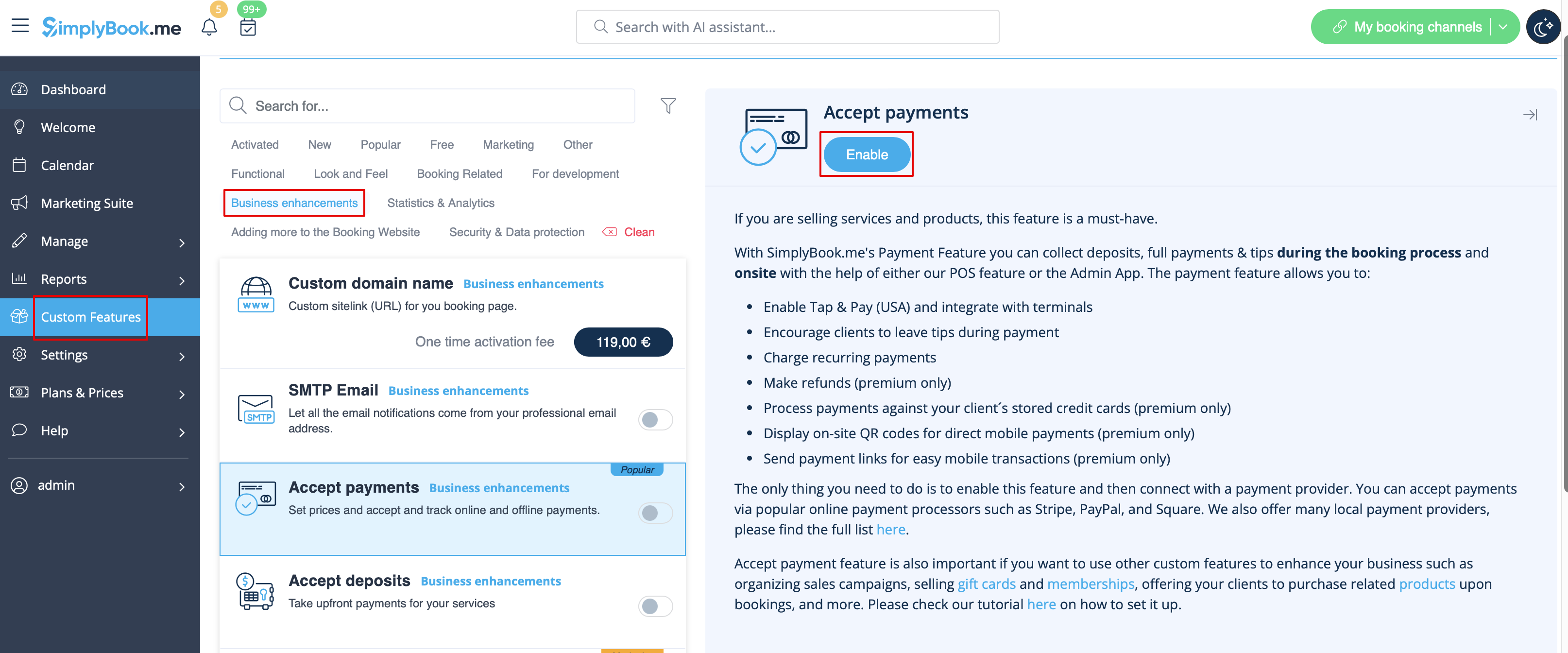
- 1. Tout d'abord, comme vous prévoyez d'utiliser le paiement en ligne, vous devez activer la fonctionnalité personnalisée « Accepter les paiements » dans votre compte SimplyBook.me.
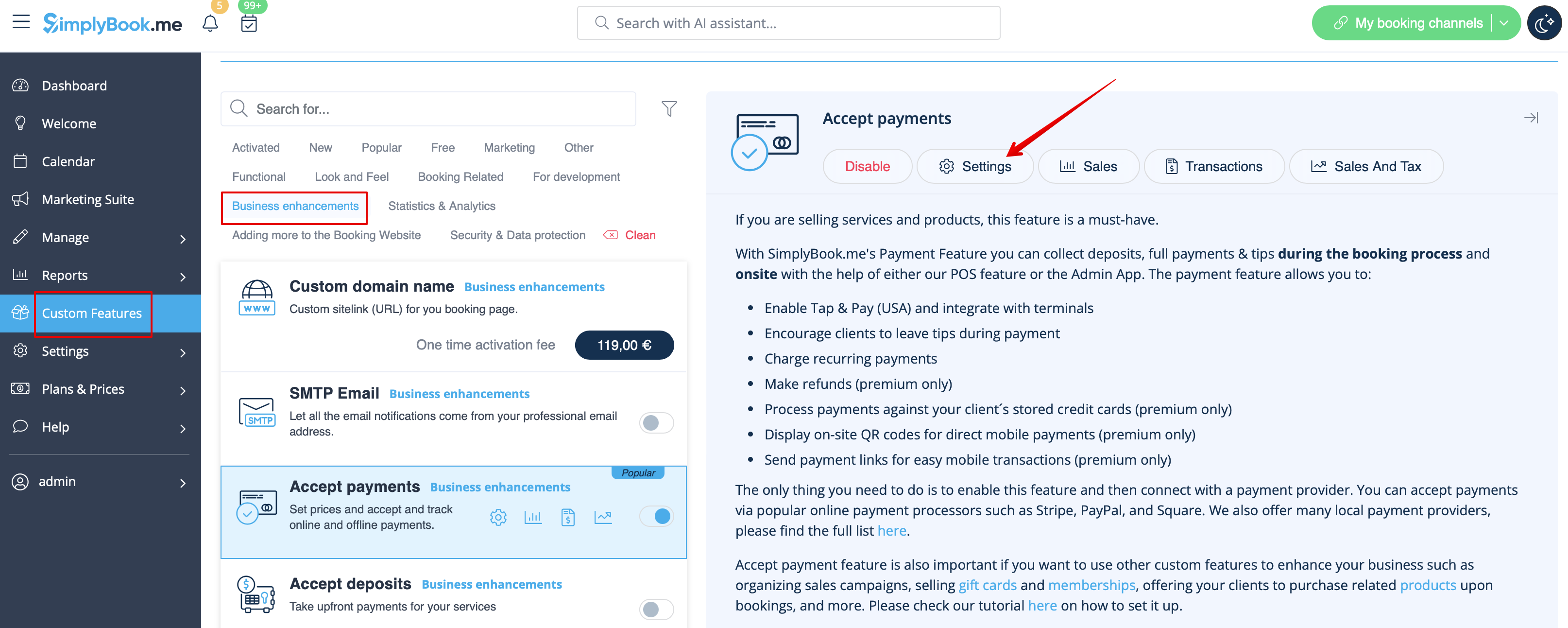
- 2. Cliquez sur le bouton « Paramètres » sur la page des fonctionnalités personnalisées, à côté de la fonctionnalité « Accepter les paiements ».
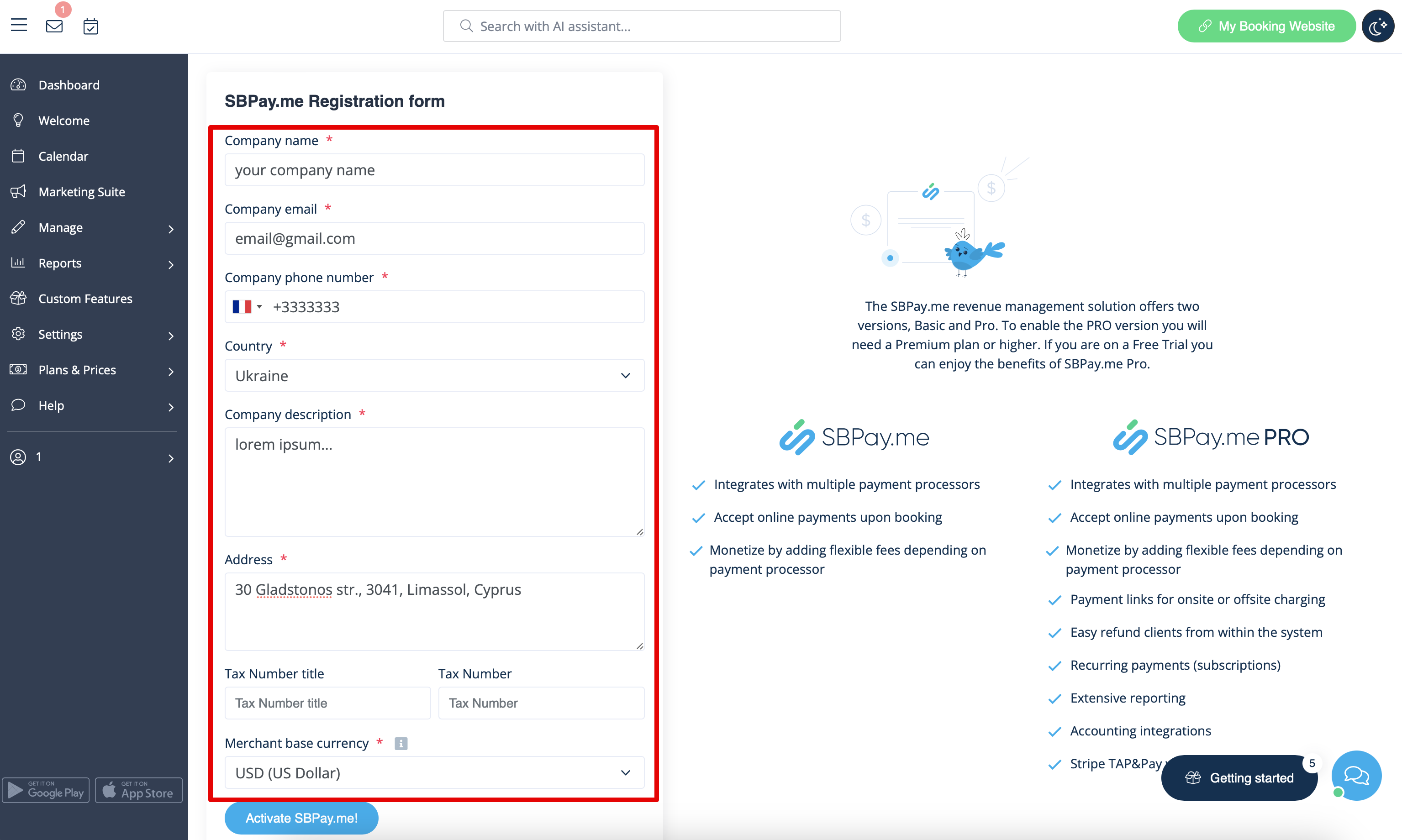
- 3. Modifiez les informations relatives à votre entreprise dans le formulaire d'inscription si nécessaire.
- (Les informations relatives à votre entreprise déjà enregistrées dans votre système seront automatiquement renseignées).
- Cliquez sur le bouton Activer SBPay.me ci-dessous.
- Félicitations ! Votre compte SBPay.me est créé !
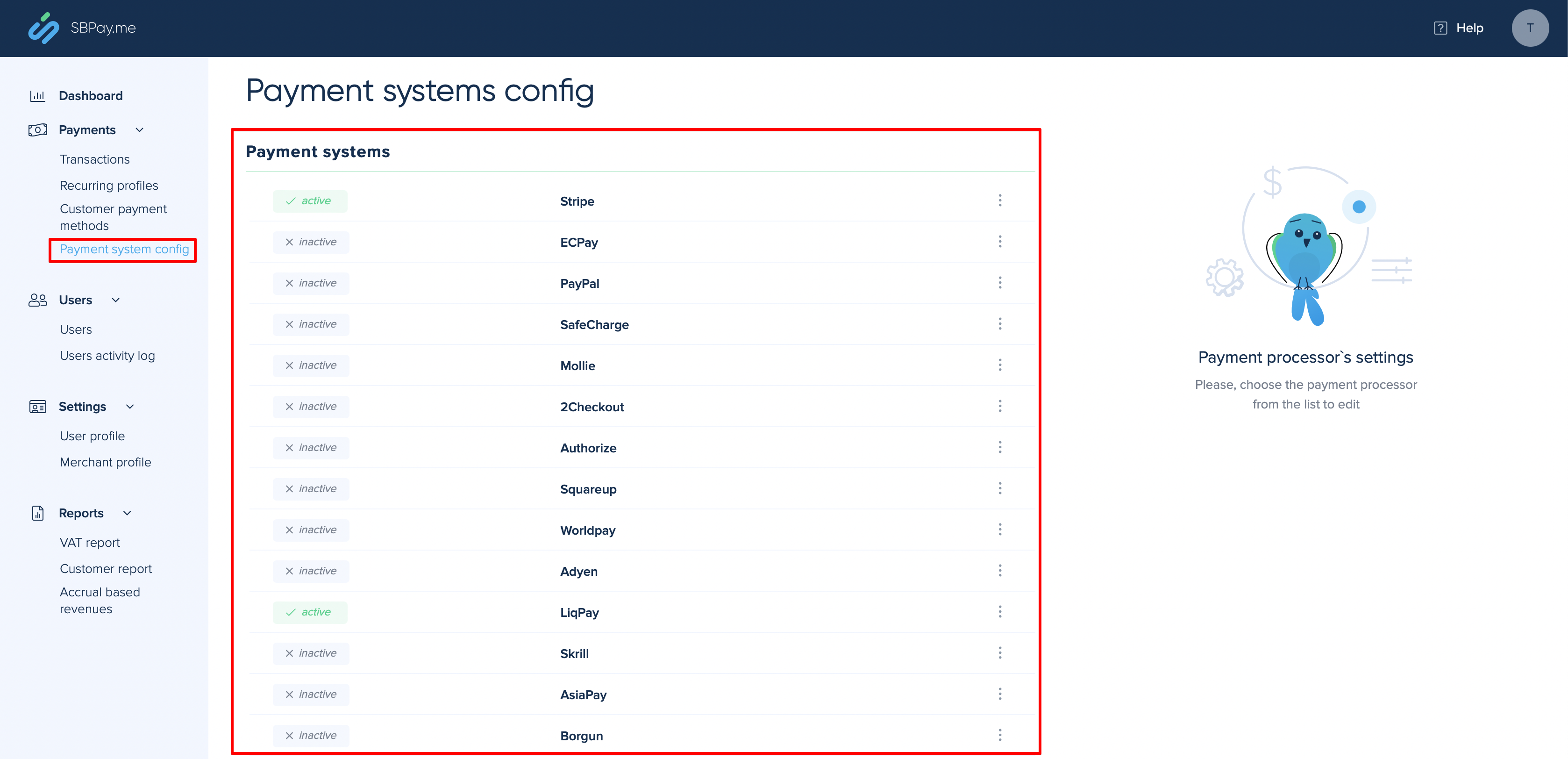
- 4. Accédez aux paramètres du système de paiement et ajoutez les informations d'identification de la passerelle de paiement que vous prévoyez d'utiliser pour les paiements en ligne.
- Si vous disposiez déjà de certaines informations relatives au système de paiement avant d'activer l'intégration SBPay.me, celles-ci ont peut-être été copiées dans SBPay.me, mais il se peut que le flux de paiement ait subi quelques modifications. Vous devrez donc vérifier que tous les paramètres ont bien été ajoutés afin de garantir le bon déroulement des paiements en ligne.
- 5. Une fois que vous avez configuré les processeurs de paiement, vous pourrez également voir ceux qui sont actifs sur SimplyBook.me.
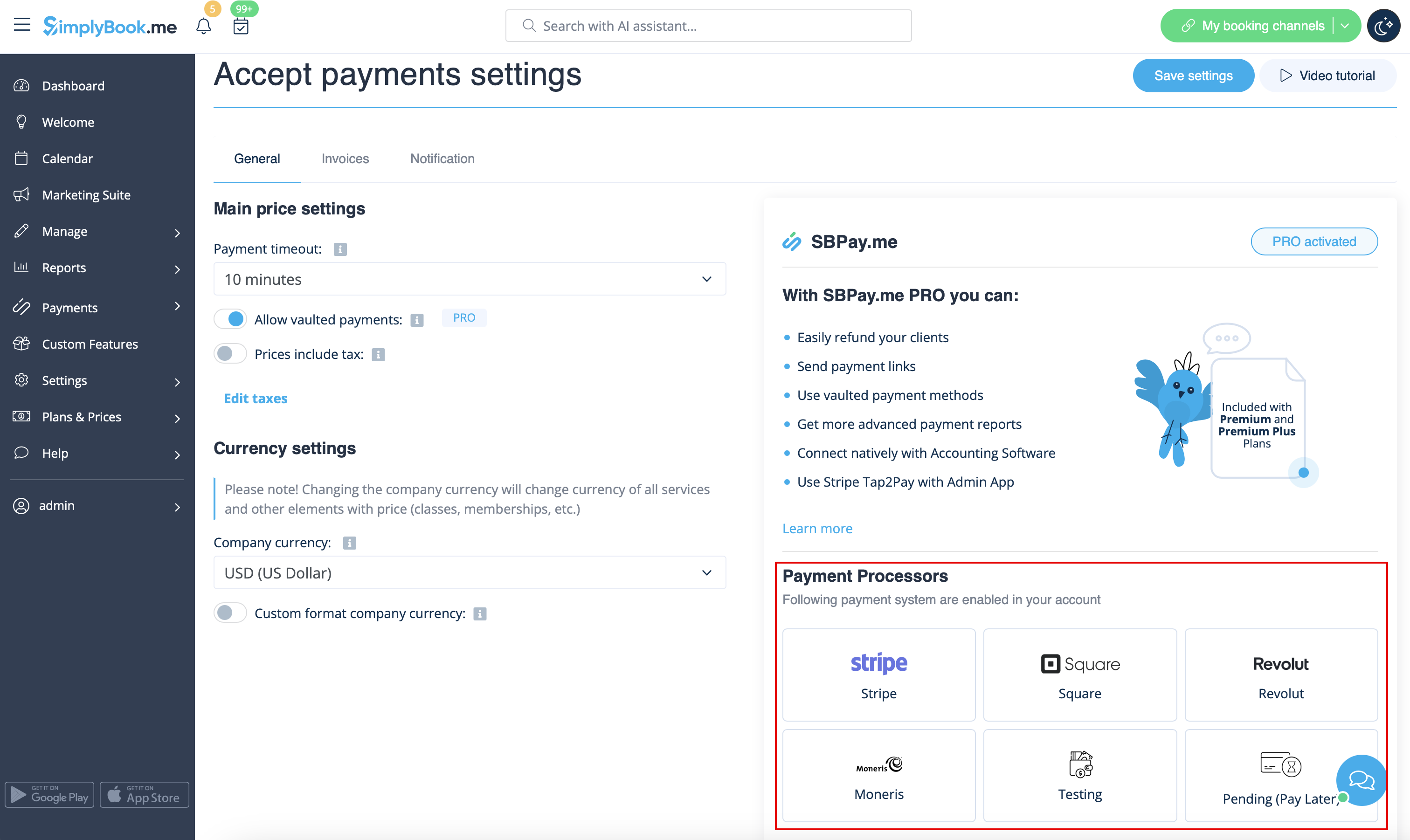
- 6. Définissez les prix de vos services, cours, forfaits, abonnements, cartes-cadeaux, produits ou services supplémentaires dans votre compte SimplyBook.me et vous êtes prêt à recevoir des paiements en ligne.
Utilisation des fonctionnalités de la version PRO
Si vous disposez d'un abonnement supérieur dans votre compte SimplyBook.me, la version PRO de SBPay.me est activée par défaut, ce qui vous permet d'accéder à la liste des options supplémentaires telles que les paiements sécurisés, les remboursements et les liens de paiement.
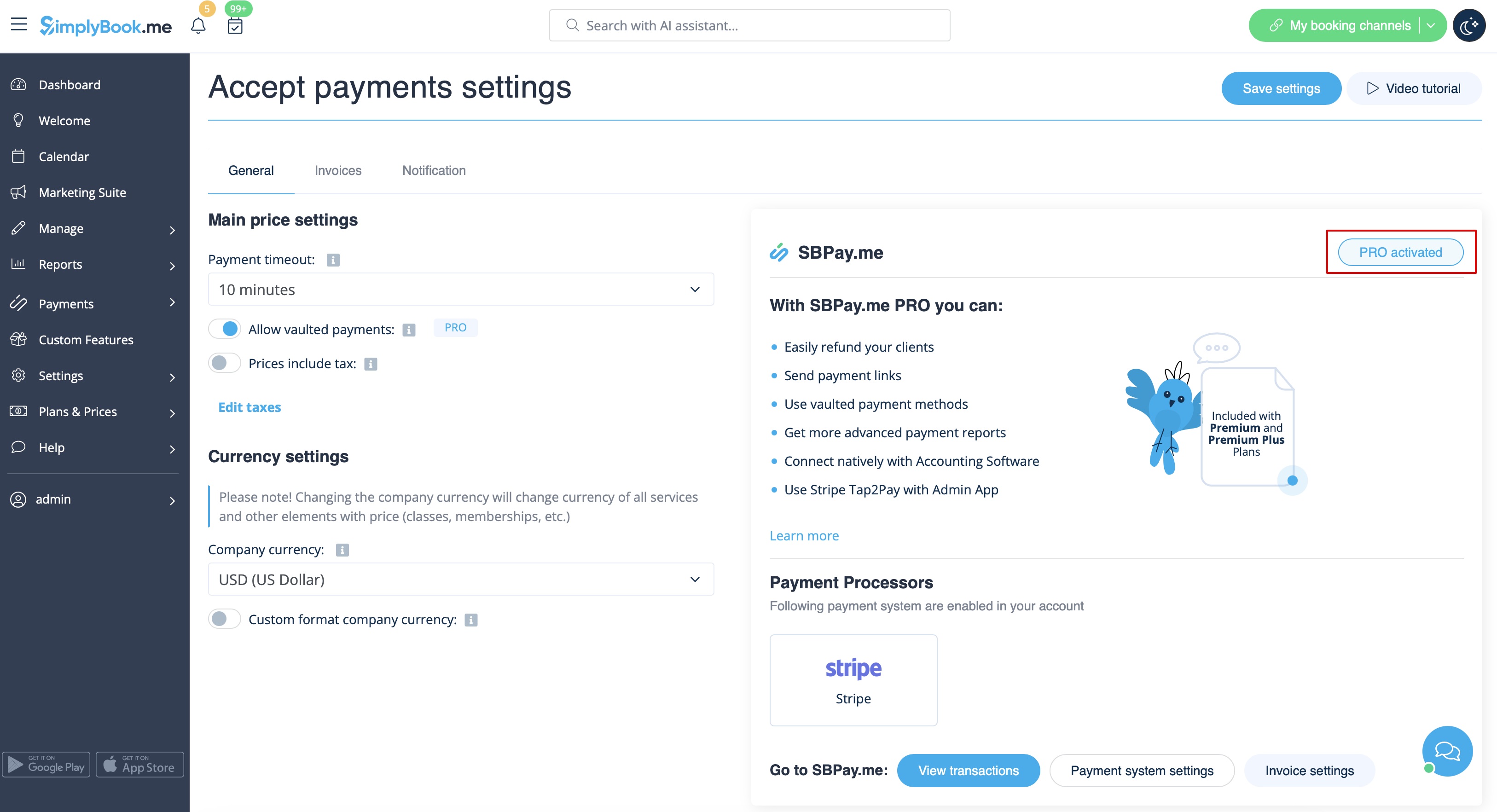
Si vous ne prévoyez pas d'utiliser les options supplémentaires énumérées ci-dessous, vous pouvez facilement désactiver la version « PRO » en désactivant le bouton.
Paiements sécurisés
Remarque importante !
- La fonctionnalité personnalisée de connexion client doit être activée pour pouvoir utiliser cette fonctionnalité.
- Toutes les passerelles de paiement ne prennent pas en charge cette fonctionnalité. Veuillez vérifier la disponibilité de cette option dans le tableau et/ou en contactant l'assistance de votre passerelle de paiement, car cela peut nécessiter quelques ajustements de leur part.
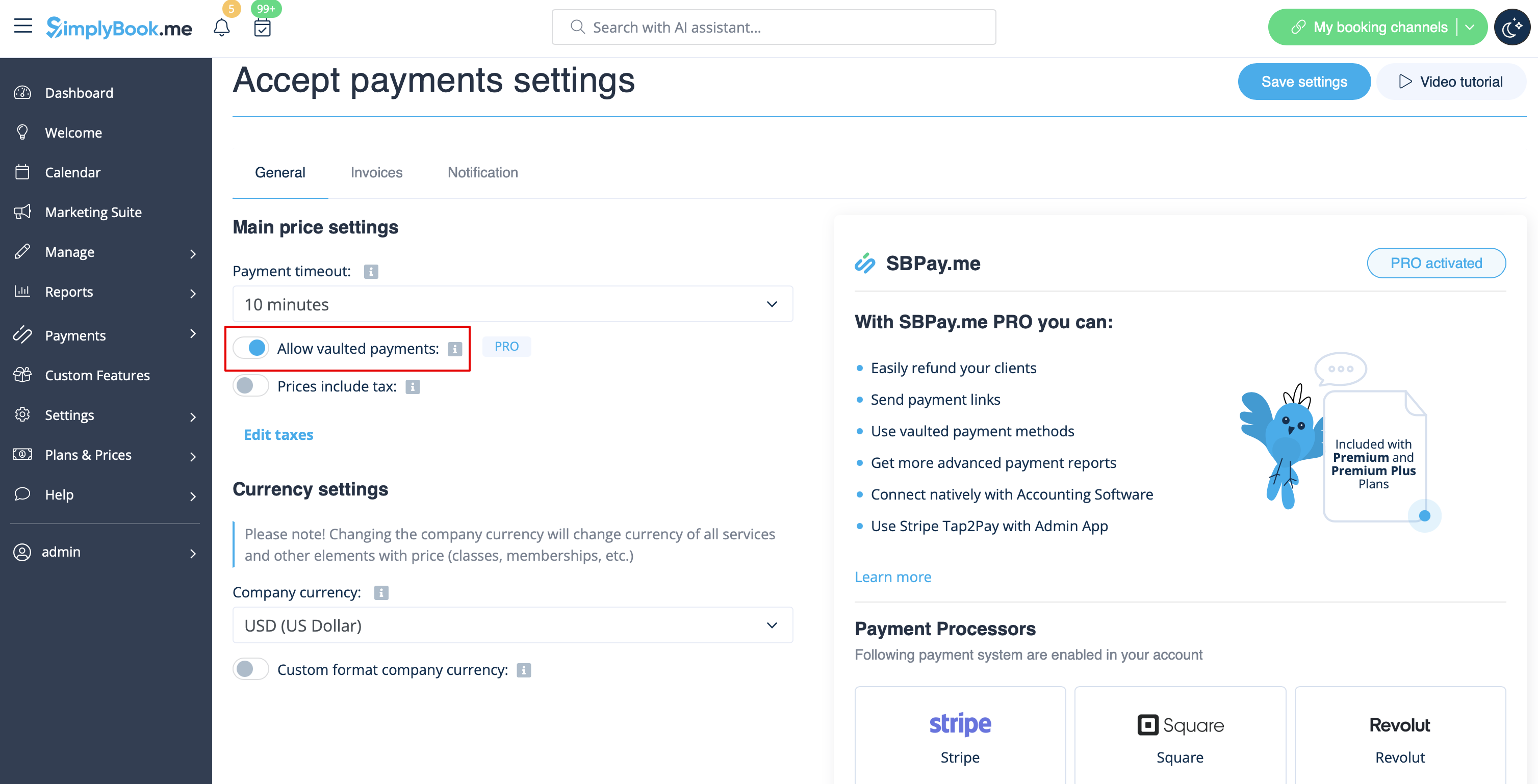
- 1. Activez l'option Autoriser les paiements enregistrés dans vos paramètres Accepter les paiements.
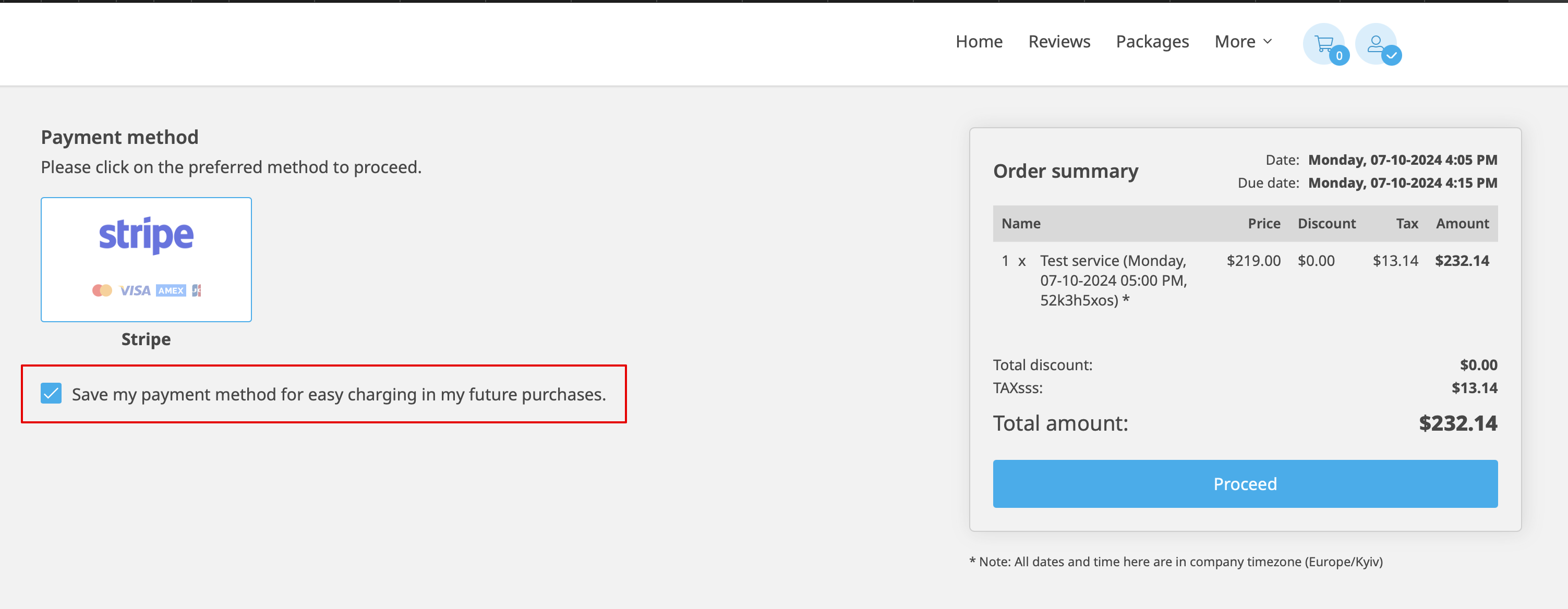
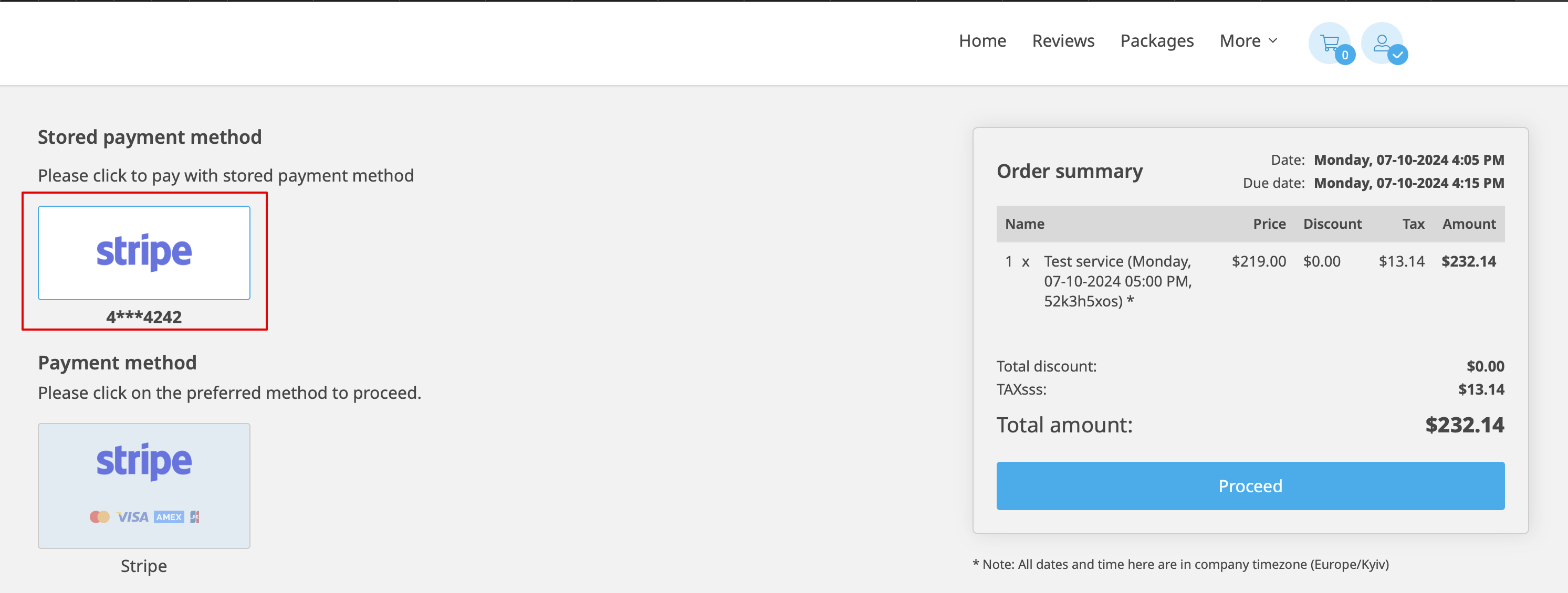
- 2. Le client pourra alors cocher la case Enregistrer mon mode de paiement pour faciliter le paiement de mes futurs achats lors du paiement sur le site de réservation et ses informations de paiement seront associées à son profil client.
- 3. Lors de son prochain achat ou de sa prochaine réservation, le client pourra choisir de confirmer la commande avec le mode de paiement déjà enregistré ou de sélectionner la nouvelle option.
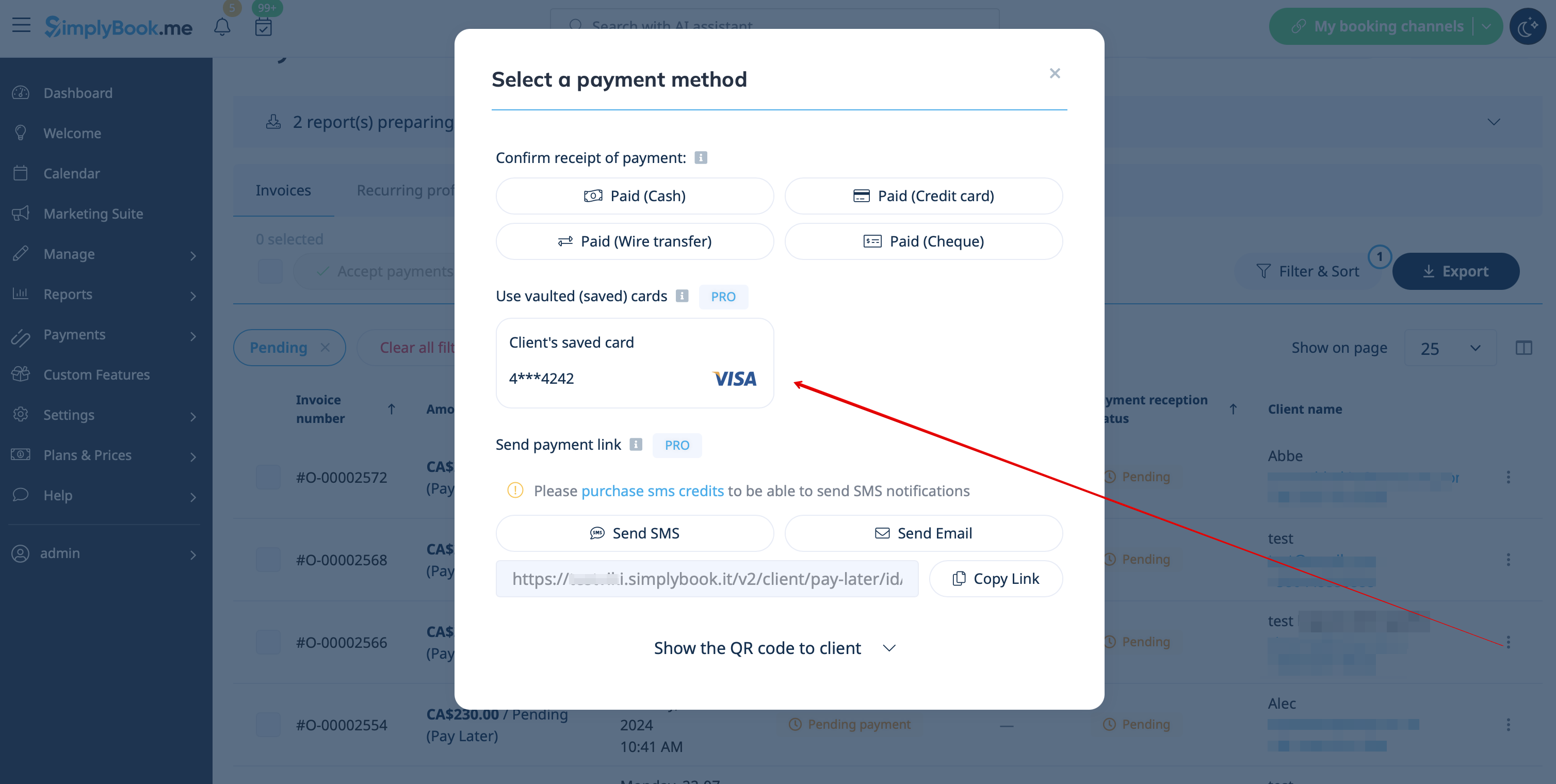
- 4. Lors de la validation du paiement dans le rapport des transactions de paiement ou la gestion des ventes dans l'interface POS côté administrateur, vous pourrez également utiliser le mode de paiement enregistré du client.

Liens de paiement
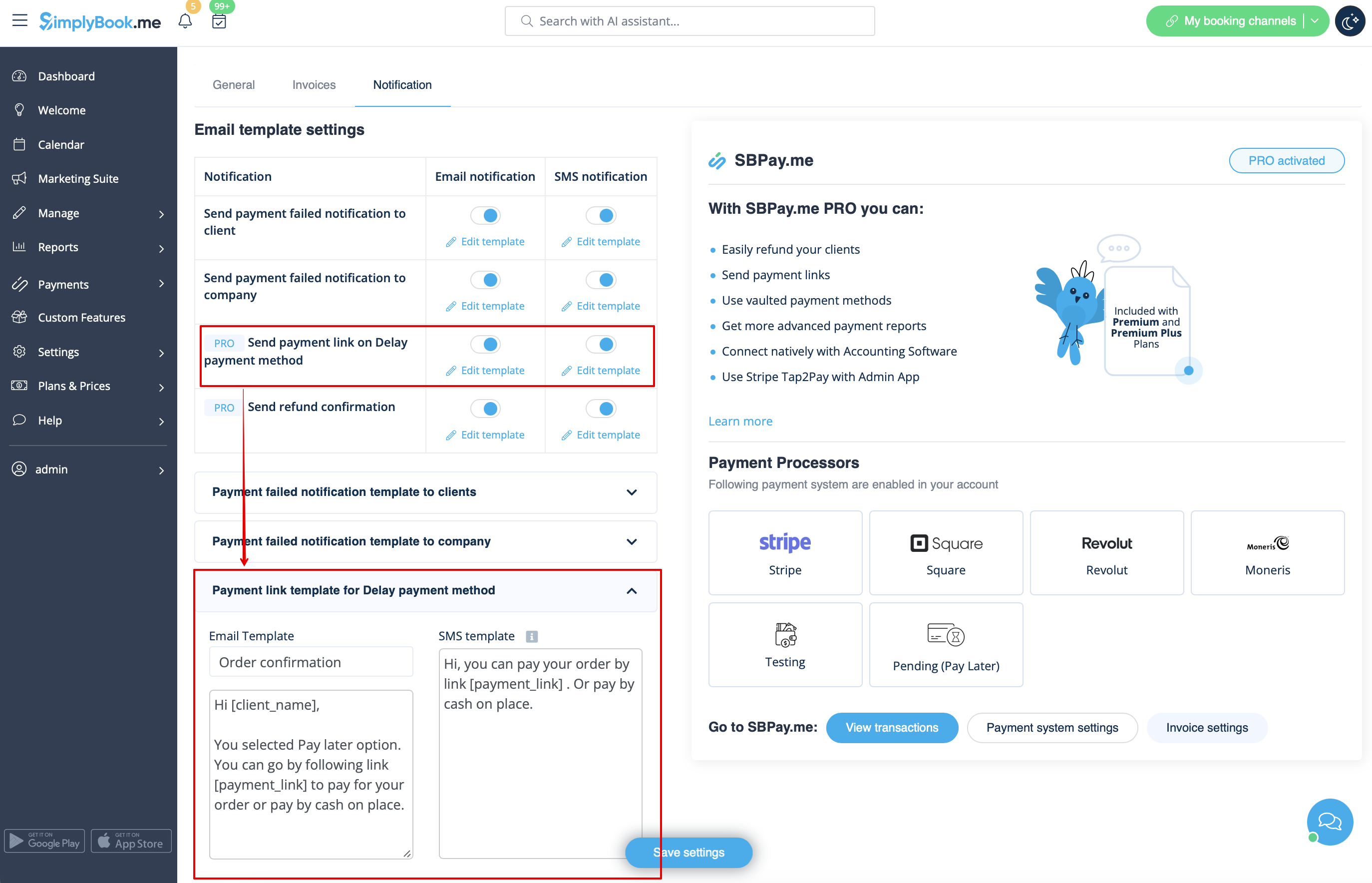
- 1. Activez l'option Envoyer le lien de paiement sur le mode de paiement différé dans les paramètres de la fonctionnalité personnalisée Accepter les paiements, dans le bloc Paramètres du modèle d'e-mail, puis adaptez le modèle à vos besoins.
- N'oubliez pas d'ajouter la variable [payment_link] pour que le client puisse facilement accéder au paiement.
- 2. Après avoir créé la commande depuis l'interface administrateur ou depuis l'interface POS avec l'option « Payer plus tard » sélectionnée comme mode de paiement, ou si le client sélectionne « Payer plus tard » lors de l'étape de paiement sur le site web de réservation, le système enverra automatiquement un e-mail/SMS avec le lien pour payer la vente (les modes de paiement enregistrés peuvent également être utilisés dans ce cas).
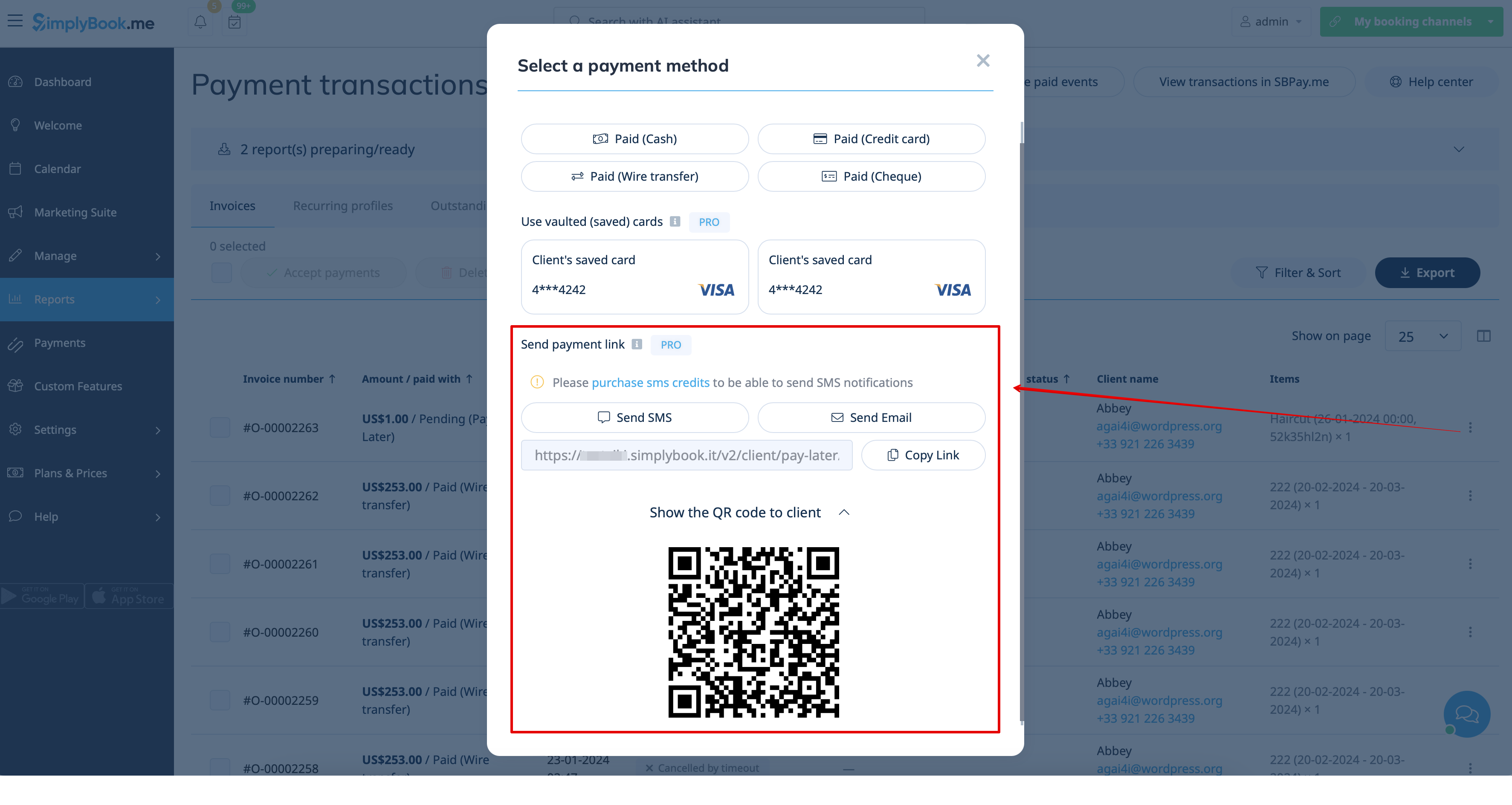
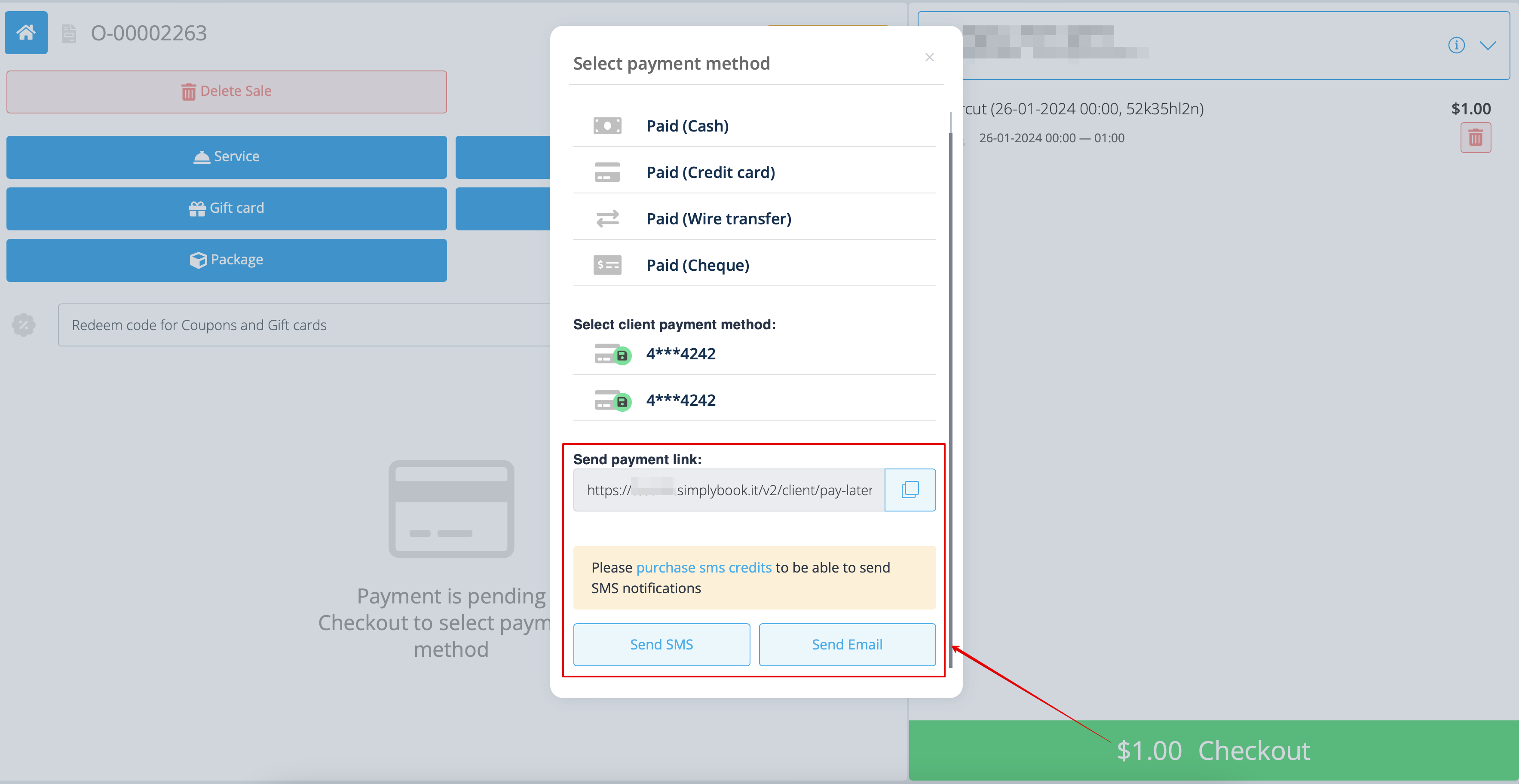
- 3. Vous pouvez également déclencher l'envoi du lien de paiement à partir du rapport des transactions de paiement ou de l'interface POS, ou simplement copier le lien de paiement correspondant à la commande spécifique et l'envoyer à votre client via vos propres canaux de communication.
- De même, si le client se trouve chez vous, vous pouvez lui montrer le code QR à scanner avec l'appareil photo de son téléphone pour être redirigé vers la page de paiement et finaliser la commande. Vous le trouverez dans Rapports -> Transactions de paiement -> Recevoir le paiement.
Paiements mobiles faciles depuis l'application: tutoriel vidéo
Remboursements
Il peut arriver que vous deviez rembourser votre client pour une raison quelconque. Il est désormais possible de gérer facilement ces cas grâce à l'intégration de SBPay.me PRO.
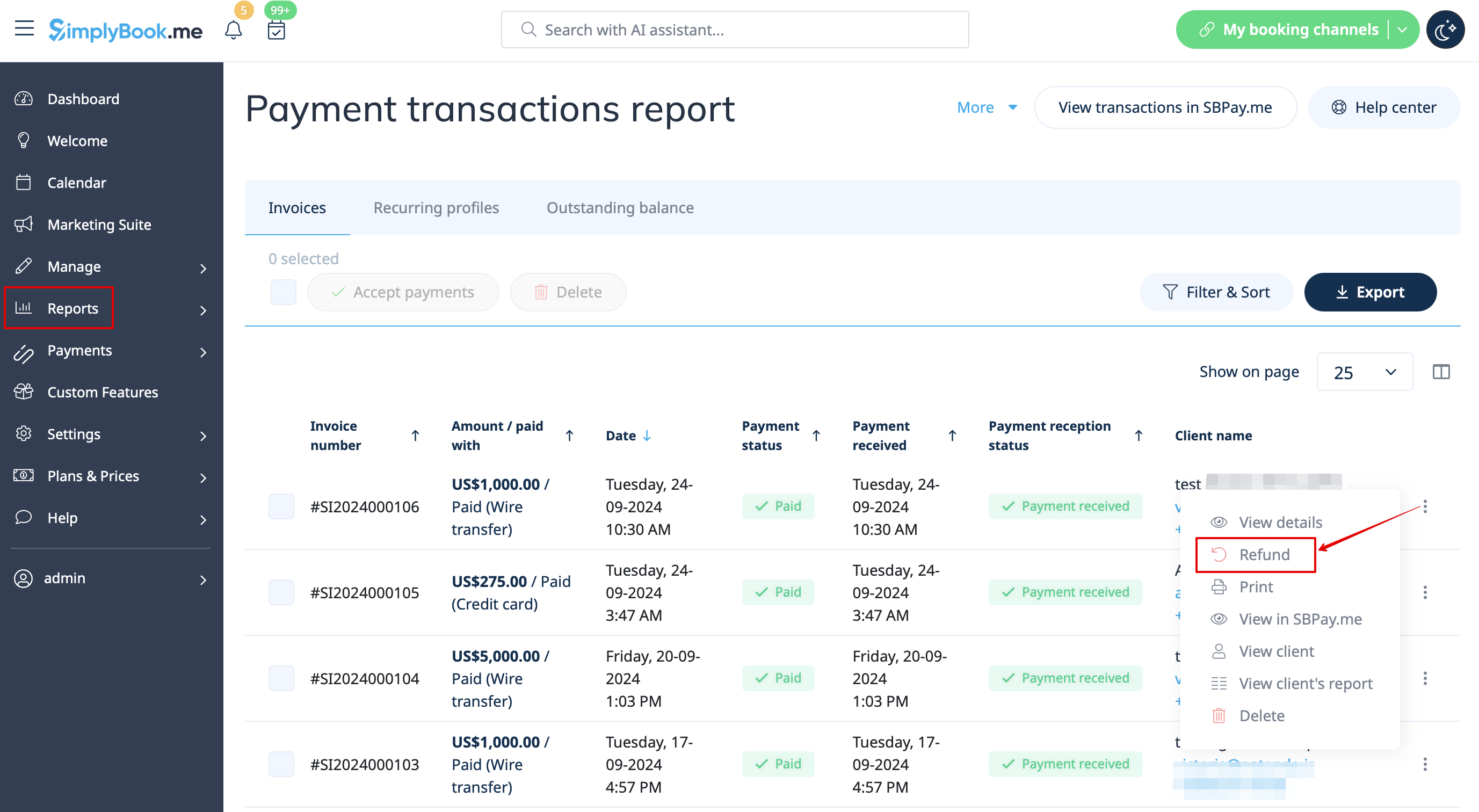
- 1. Après avoir activé l'intégration de SBPay.me dans votre compte SimplyBook.me, il vous suffit de vous rendre dans Rapports -> Transactions de paiement -> trouver la facture correspondante -> cliquer sur Actions et sélectionner Remboursement dans le menu déroulant. Confirmez l'action et le remboursement sera automatiquement effectué sur le compte du client correspondant.
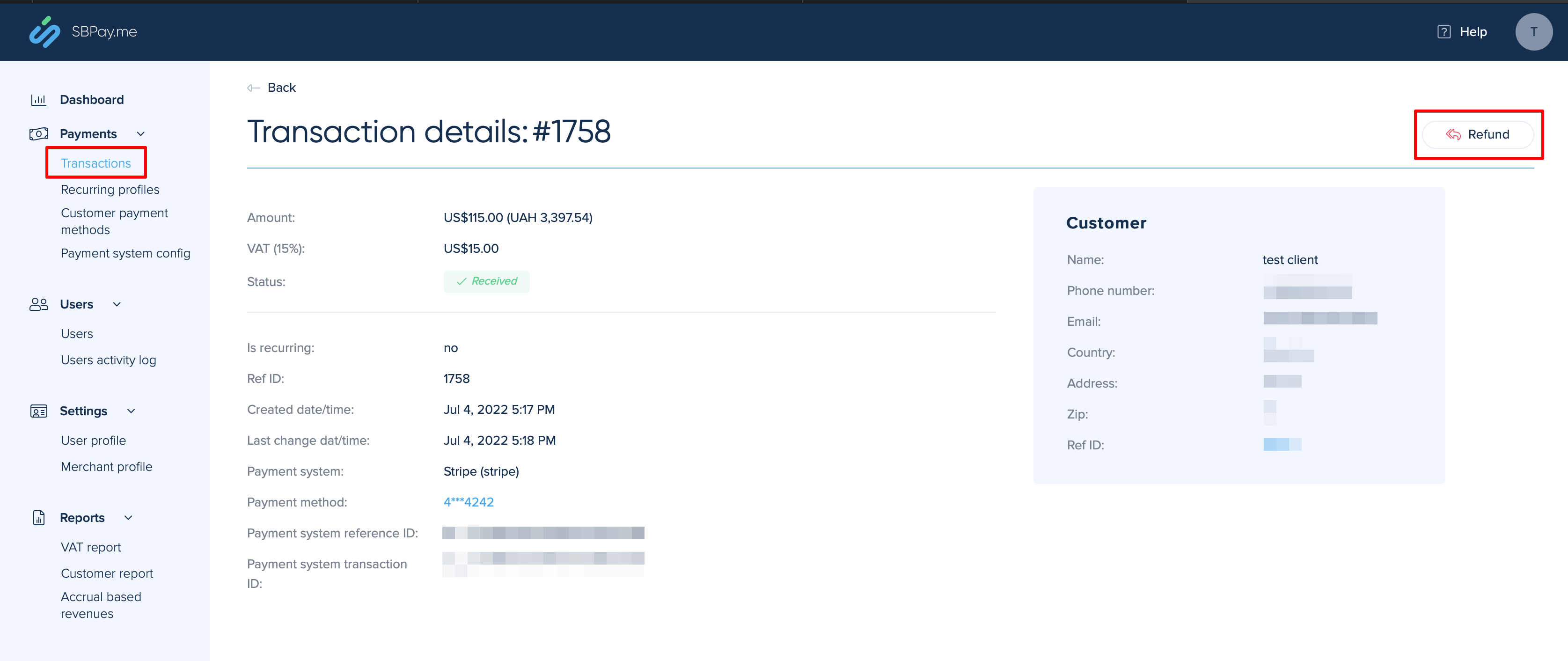
- 2. Vous pouvez également vous rendre directement dans l'interface SBPay.me -> Transactions -> ouvrir l'enregistrement nécessaire et sélectionner Rembourser.
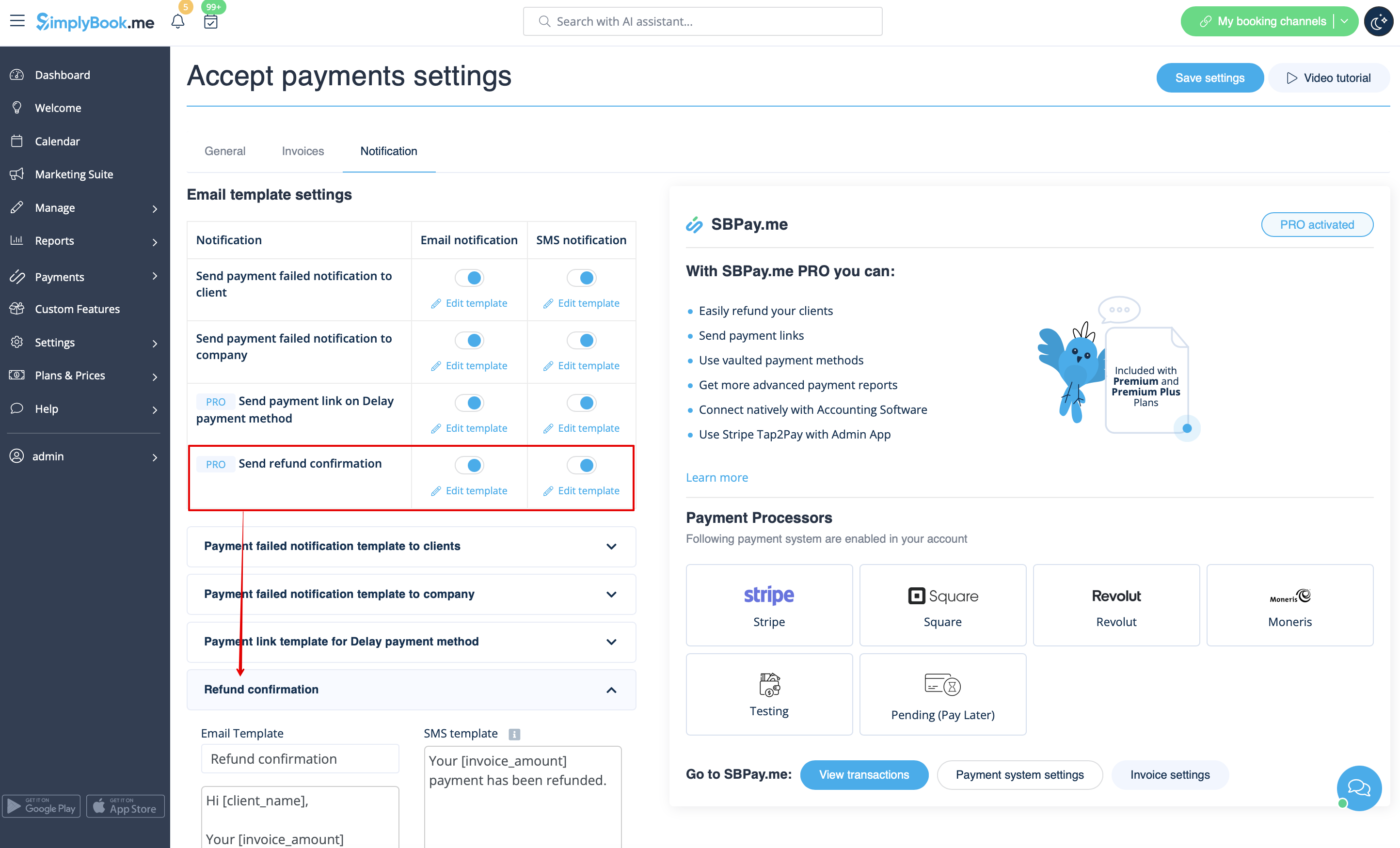
- 3. Dans les paramètres de la fonctionnalité personnalisée Accepter les paiements, vous pouvez également activer l'option Envoyer une confirmation de remboursement et ajuster les modèles afin d'informer automatiquement vos clients par e-mail et/ou SMS des remboursements.
Factures SBPay.me
Vous pouvez désormais facilement ajuster les paramètres des factures à vos besoins et les envoyer à vos clients après tout achat.
- Comment utiliser l'
- 1. Activez l'option correspondante sur votre page « Fonctionnalités personnalisées ».
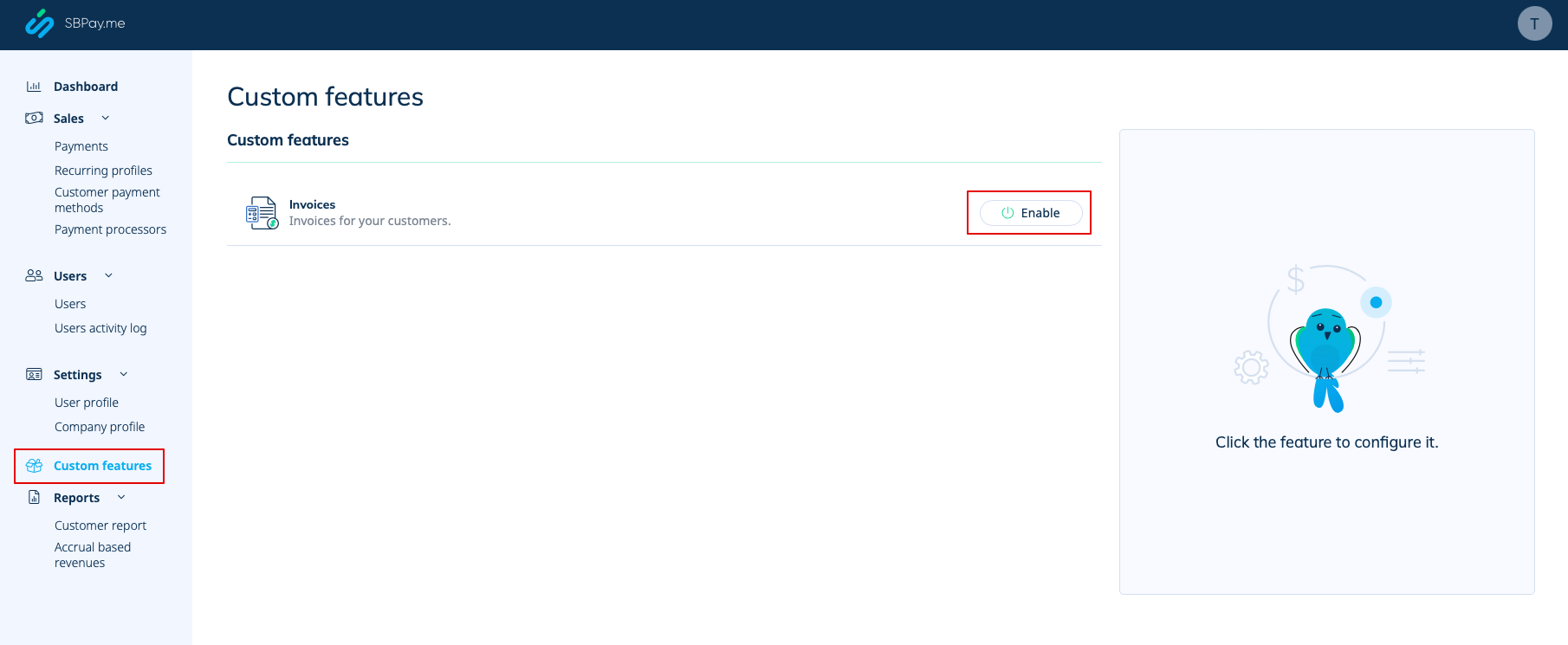
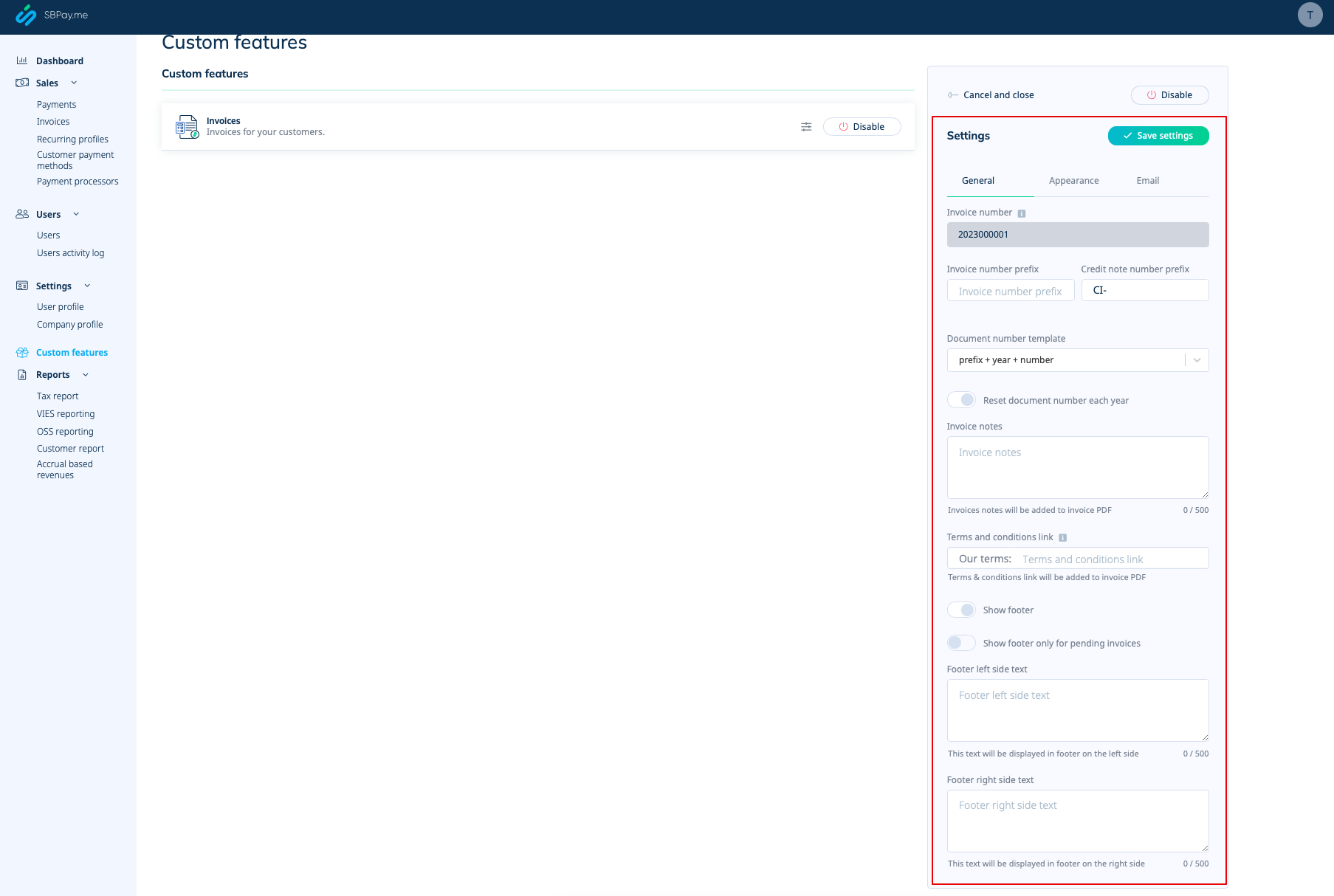
- 2. Ajustez les paramètres généraux à vos besoins : format de numérotation des factures et des notes de crédit, ajoutez des notes, ajoutez un lien vers vos conditions générales et les informations de pied de page si nécessaire.
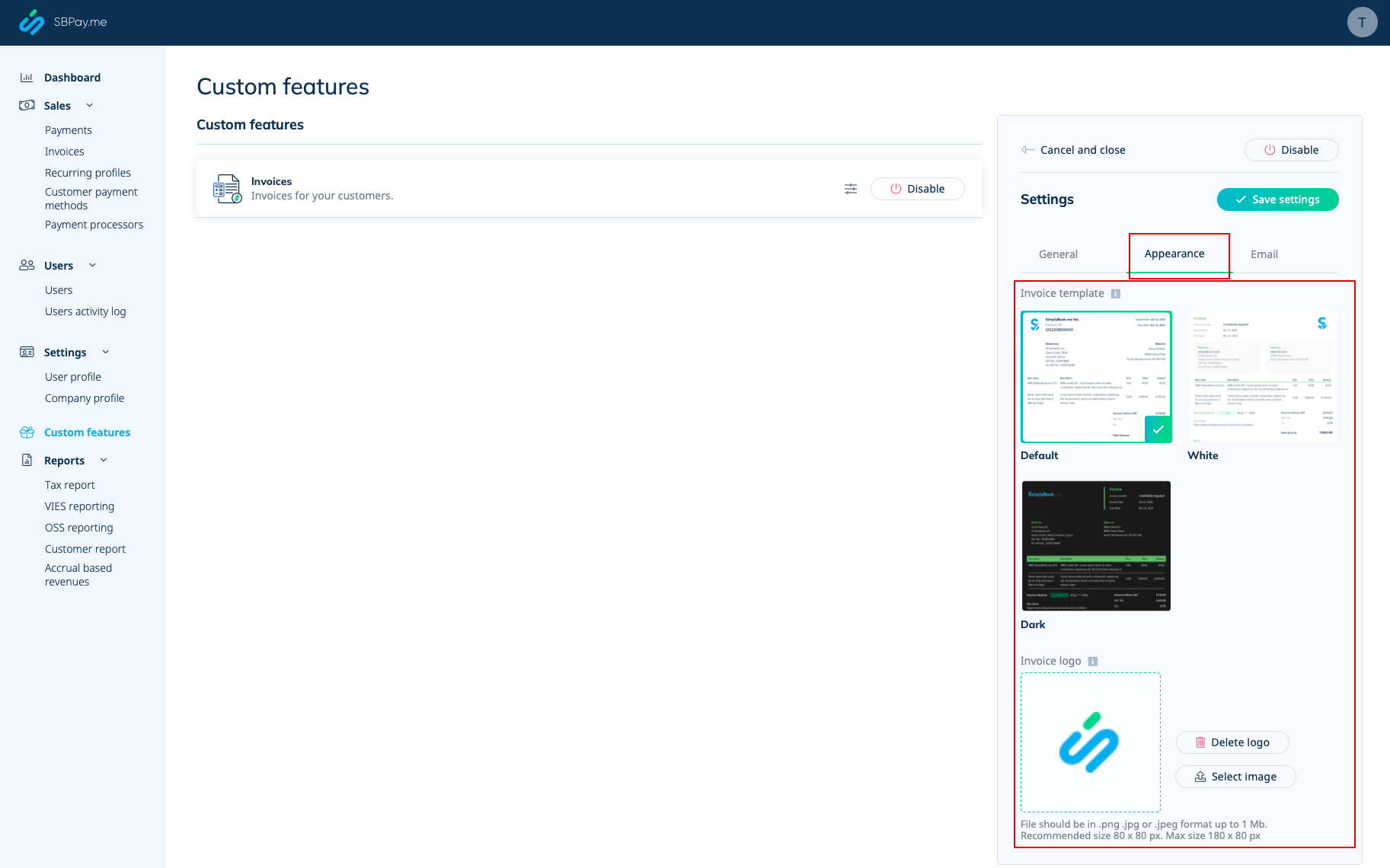
- 3. Définissez l'apparence souhaitée dans l'onglet « Apparence » et téléchargez le logo de votre entreprise.
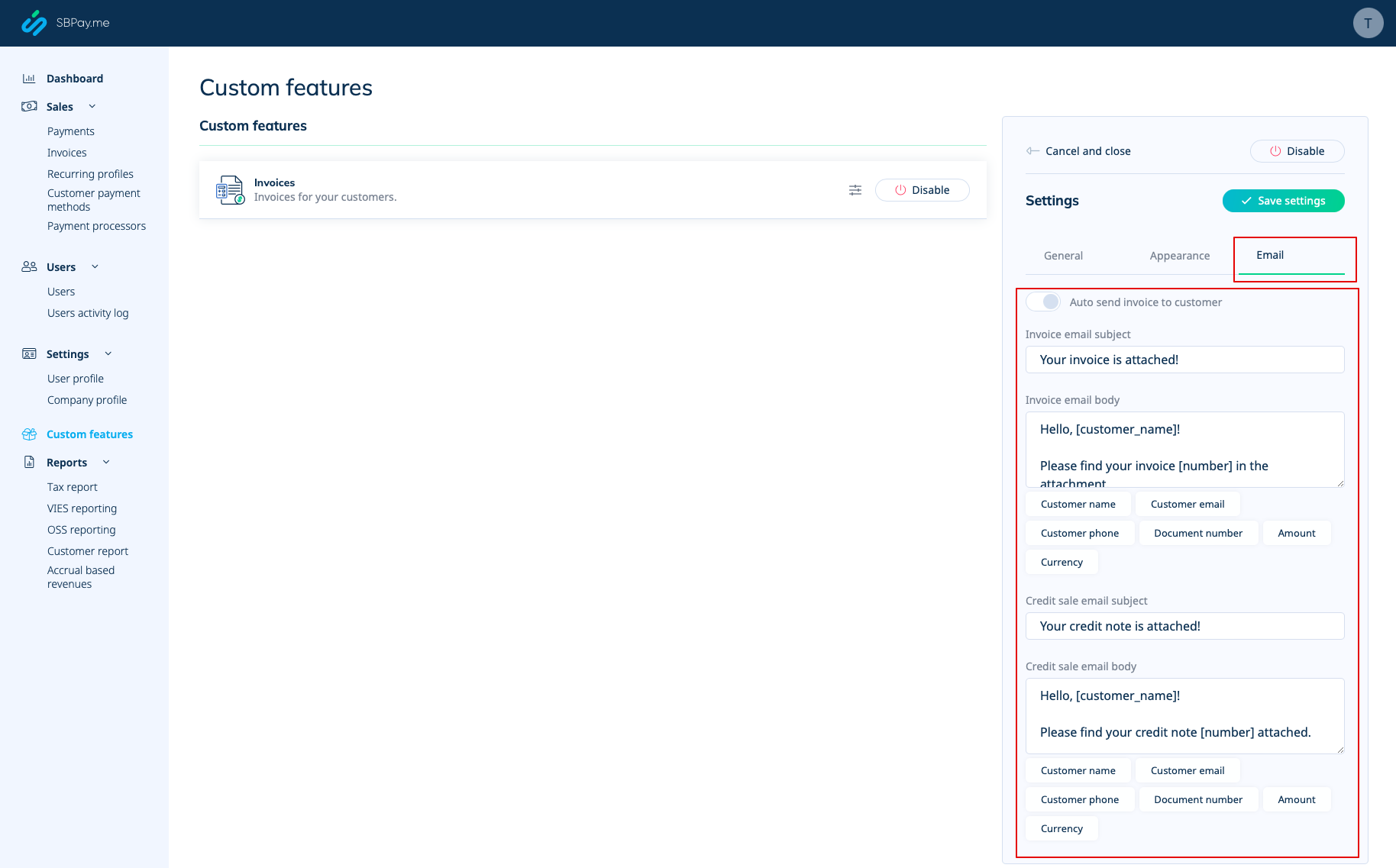
- 4. Passez au troisième onglet, « E-mail », et définissez les modèles de notifications. Vous pouvez utiliser plusieurs variables mentionnées sous le formulaire. Enregistrez vos paramètres.
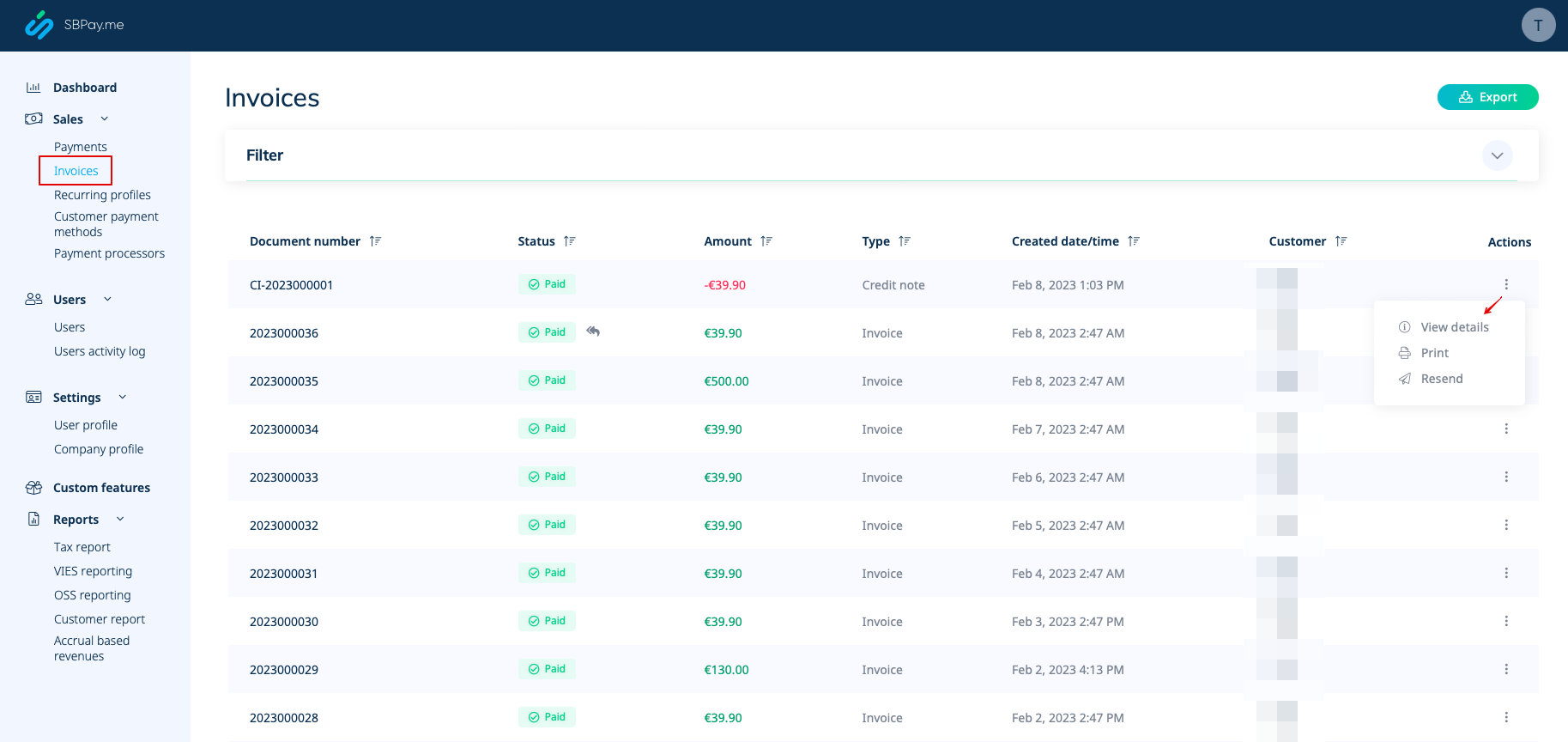
- 5. Dans Ventes -> Factures, vous pouvez voir la liste des factures et des notes de crédit créées. Vous pouvez les renvoyer aux clients si nécessaire, émettre des notes de crédit, les imprimer ou simplement consulter les détails.
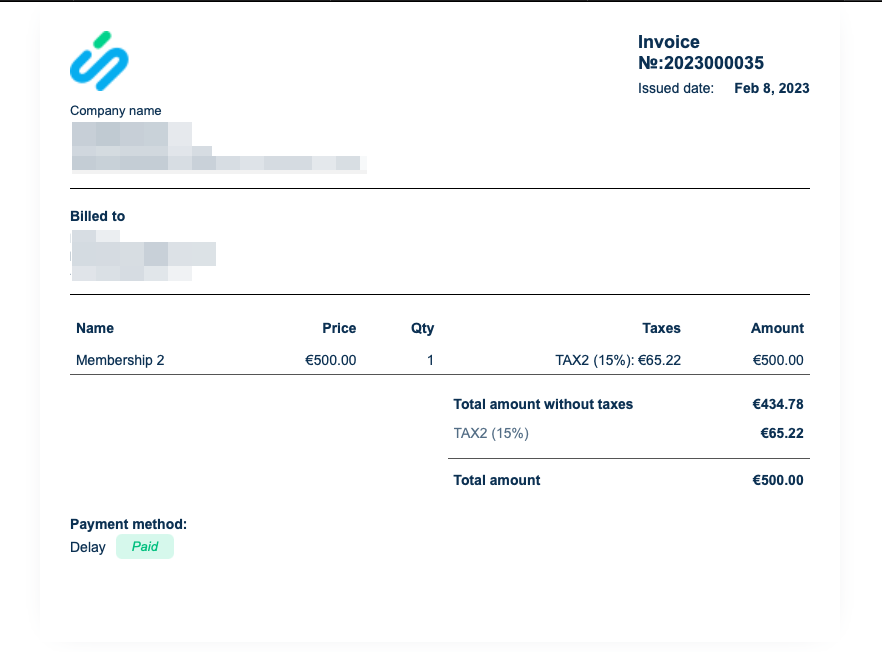
- 6. Voici un exemple de ce à quoi peut ressembler la version imprimée d'une facture.
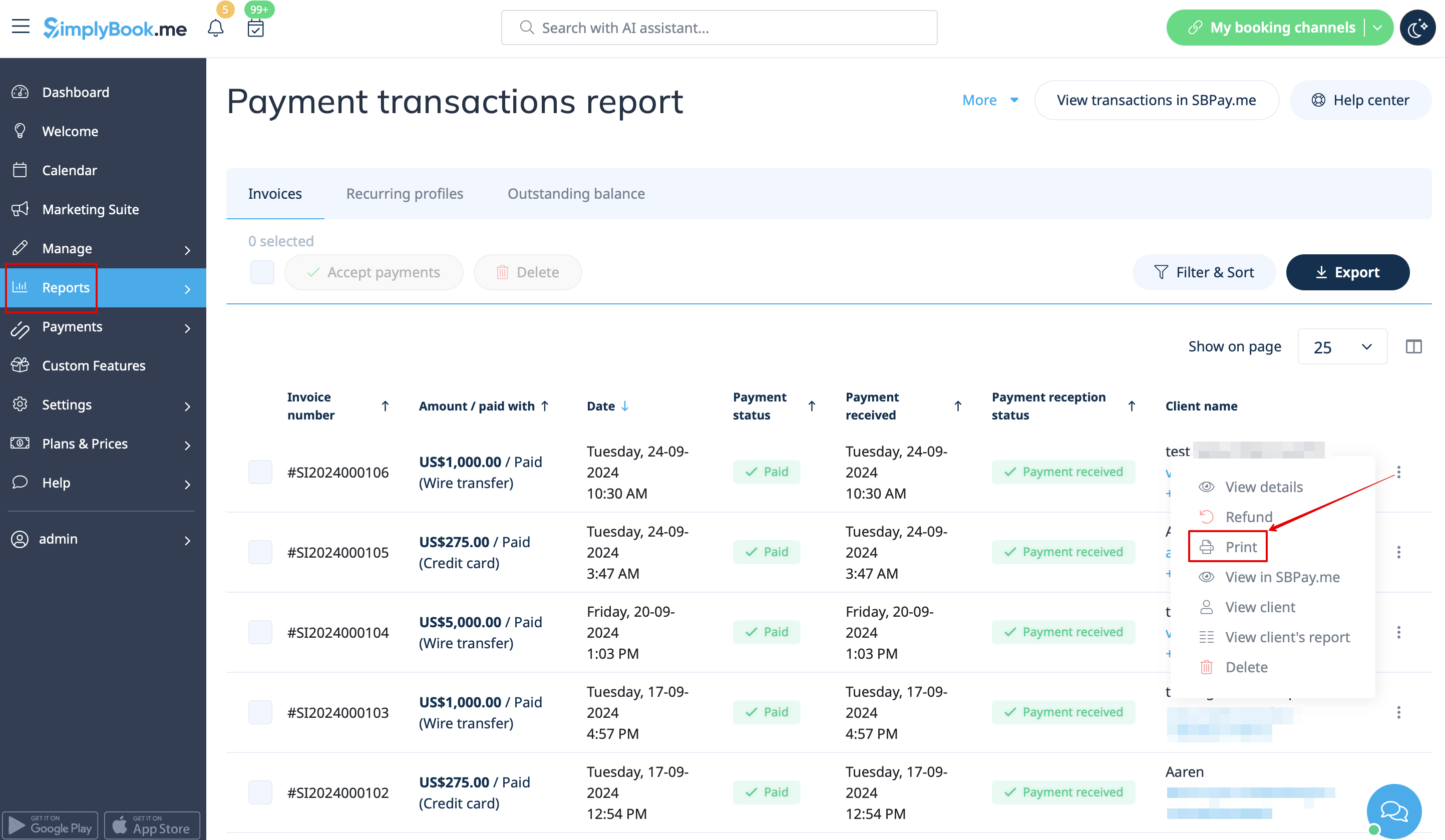
- 7. Vous pouvez également imprimer les factures directement à partir du système SimplyBook.me, sous Rapports -> Transactions de paiement, en sélectionnant l'action correspondante pour chaque enregistrement.
Remarque importante ! L'importation directe de factures depuis des plateformes externes vers le système n'est pas prise en charge. Cependant, SimplyBook.me offre des options d'intégration avec divers logiciels de comptabilité, notamment Xero, QuickBooks et FreshBooks. Vous pouvez gérer efficacement vos factures dans votre système de comptabilité préféré.
SBPay.me Reports
SBPay.me vient de démarrer, mais propose déjà plusieurs rapports utiles que vous pouvez utiliser pour suivre vos paiements :
- 1. Tableau de bord - contient les devises, les revenus, les systèmes de paiement et les graphiques de balises.
- 2. Paiements - permet de consulter, confirmer ou rembourser des commandes.
- 3. Factures - apparaît lorsque la fonctionnalité personnalisée correspondante est activée et permet de consulter, renvoyer des factures et émettre des notes de crédit.
- 4. Profils récurrents - contient les informations sur les profils récurrents des abonnements. Vous pouvez facilement consulter, prolonger ou annuler les profils sur cette page.
- 5. Modes de paiement des clients - permet de consulter la liste des modes de paiement enregistrés de vos clients, de vérifier la liste des paiements associés et de désactiver les profils si nécessaire.
- 6. Rapport fiscal - permet de consulter la liste de toutes vos ventes dans chaque pays (si vos ventes sont effectuées dans plusieurs pays) ainsi que les montants des taxes et le nombre total de transactions.
- 7. Rapport VIES - L'objectif d'un rapport fiscal VIES (système d'échange d'informations sur la TVA) est de garantir le respect de la réglementation européenne en matière de TVA en permettant aux entreprises de déclarer et de vérifier les transactions transfrontalières au sein de l'Union européenne. Ce rapport est particulièrement important pour les entreprises engagées dans le commerce transfrontalier B2B au sein de l'UE. Ce rapport vous présente une liste de vos clients, y compris leurs coordonnées, leurs numéros d'identification fiscale, leur lieu de résidence et le montant des ventes réalisées auprès de chacun d'entre eux.
- 8. Rapport OSS - L'objectif d'un rapport fiscal OSS (One Stop Shop) est de simplifier la déclaration de TVA pour les entreprises qui vendent des biens ou des services à des clients dans plusieurs pays de l'UE. Il permet aux entreprises de gérer leurs obligations en matière de TVA en un seul endroit, sans avoir à s'enregistrer à la TVA dans chaque pays où elles vendent. Le rapport OSS est particulièrement utile pour les entreprises de commerce électronique et les prestataires de services qui vendent à des clients dans plusieurs pays de l'UE. Ce rapport vous indique le montant total des ventes et le montant taxé dans chacun des pays où vous vendez, le taux de TVA dans chacun des pays ainsi que le nombre total de transactions dans chaque pays.
- 9. Rapport client - vous présente un tableau comprenant le nom de chaque client, ses coordonnées, la date à laquelle il est devenu votre client, le nombre de paiements réussis, le nombre de paiements erronés, la date de son dernier achat et le statut de son dernier paiement (reçu, en attente, erroné). Le rapport vous permet également de sélectionner un client spécifique et de voir tous les détails le concernant.
- 10. Revenu basé sur l'accumulation - est lié au revenu gagné/comptabilisé par une entreprise pour lequel la facture n'a pas encore été envoyée au client.
- 11. Indicateurs d'abonnement - permet de suivre les tendances de vos clients ayant un abonnement récurrent. Consultez des graphiques indiquant les clients actifs, les tendances des ventes mensuelles et une comparaison entre les nouveaux clients et ceux qui ont quitté l'entreprise.
- 12. Rapport MRR Snowball - tableau détaillé indiquant les tendances de vos revenus récurrents. Consultez facilement le nombre de clients actifs, les nouvelles inscriptions, les annulations et le nombre total de clients récurrents actifs à la fin de chaque période.
Créer des demandes de paiement
Tutoriel vidéo
En quelques clics, les utilisateurs peuvent facilement générer des liens de paiement qui peuvent être partagés avec leurs clients par e-mail, en envoyant le lien direct ou un code QR. Cette fonctionnalité permet aux entrepreneurs et aux particuliers de percevoir facilement les paiements pour leurs biens ou services, sans avoir besoin d'un site web ou d'une boutique en ligne.
En outre, elle permet aux utilisateurs de mettre en place des paiements récurrents, afin de pouvoir facturer automatiquement leurs clients à intervalles réguliers. Cette fonctionnalité est utile pour les entreprises qui proposent des services par abonnement ou une facturation récurrente.
Les utilisateurs peuvent également choisir parmi une large sélection de processeurs de paiement pour effectuer leurs paiements ou sélectionner un mode de paiement précédemment enregistré, ce qui permet aux clients fidèles de payer leurs achats rapidement et en toute sécurité.
Pour les entreprises qui ont besoin de suivre leurs paiements, SBPay.me offre la possibilité de répertorier des descriptions détaillées des articles vendus, y compris les taxes ou remises supplémentaires. Cette fonctionnalité permet aux utilisateurs de surveiller facilement leurs ventes et de conserver des registres précis.
Enfin, SBPay.me permet aux utilisateurs de marquer les paiements afin de les regrouper lors de la création de rapports. Cette fonctionnalité offre un moyen organisé de gérer les données de paiement et de générer des rapports complets. Dans l'ensemble, SBPay.me est un système de paiement puissant qui offre un moyen simple mais efficace de gérer les paiements et d'augmenter les revenus.
D'autres fonctionnalités sont à venir !
