Translations:Adjusting notifications/4/da: Difference between revisions

From SimplyBook.me
No edit summary
No edit summary
 
Line 1: Line 1:
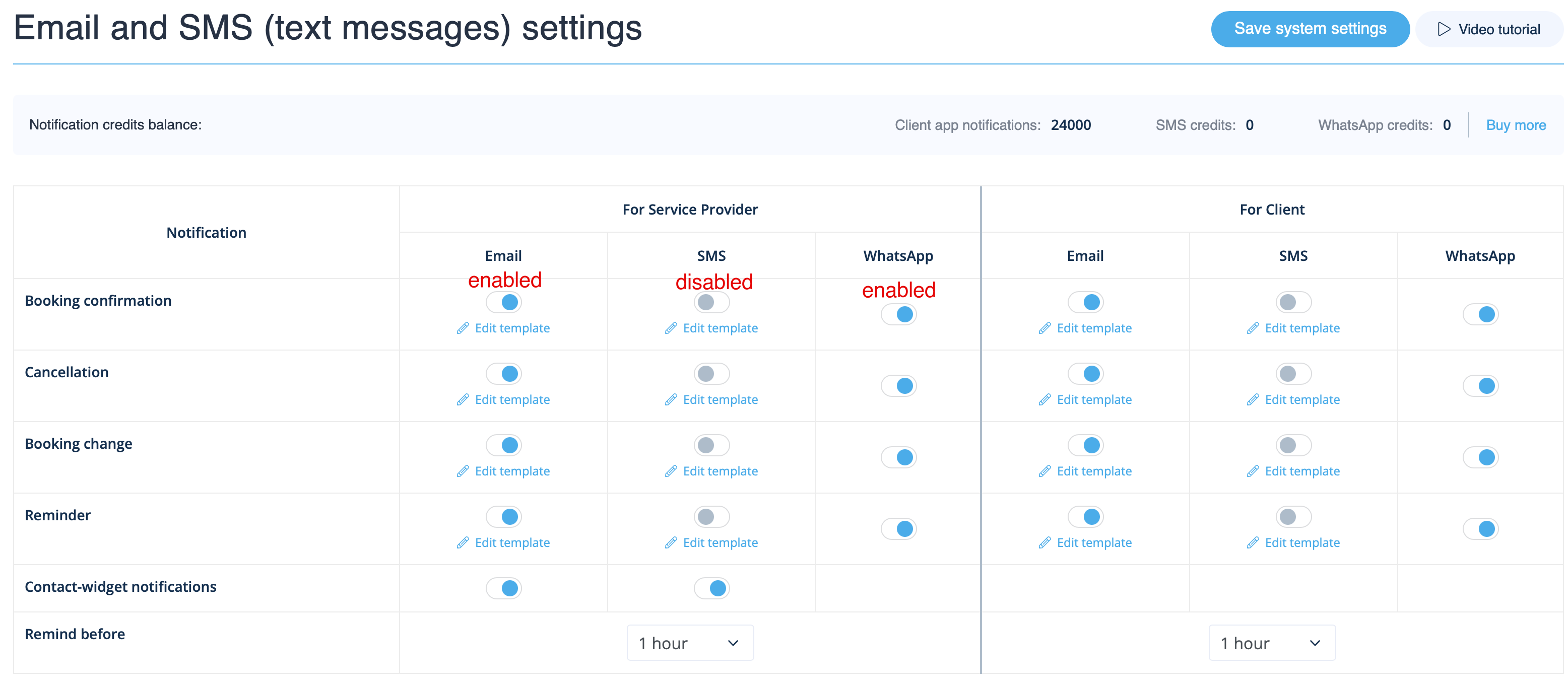
Gå til <span style="background-color:#d4f8e5; padding:5px; border-radius:5px;">Indstillinger</span> -&gt; <span style="background-color:#d4f8e5; padding:5px; border-radius:5px;">E-mail- og SMS-indstillinger</span> og <span style="background-color:#d4f8e5; padding:5px; border-radius:5px;">marker</span> de relevante felter <span style="background-color:#d4f8e5; padding:5px; border-radius:5px;">til/fra</span> for at sende/ikke sende notifikationer. Du kan tilpasse teksten i notifikationerne efter dine behov ved at klikke på <span style="background-color:#d4f8e5; padding:5px; border-radius:5px;">Rediger skabelon</span> <span style="background-color:#d4f8e5; padding:5px; border-radius:5px;">,</span> foretage ændringer og gemme systemindstillingerne.
Gå til <span style="background-color:#d4f8e5; padding:5px; border-radius:5px;">Indstillinger</span> -> <span style="background-color:#d4f8e5; padding:5px; border-radius:5px;">E-mail- og SMS-indstillinger</span> og <span style="background-color:#d4f8e5; padding:5px; border-radius:5px;">marker/afmarkér</span> de tilsvarende felter for at sende/ikke sende notifikationer. Du kan ændre teksterne i notifikationerne, så de bedre passer til dine behov, ved at klikke på <span style="background-color:#d4f8e5; padding:5px; border-radius:5px;">rediger skabelon,</span> foretage ændringerne og gemme systemindstillingerne.<br>
[[File:Email and sms settings path redesigned upd.png|1200px|border| center|link=https://help.simplybook.me/images/a/a4/Email_and_sms_settings_path_redesigned_upd.png]]
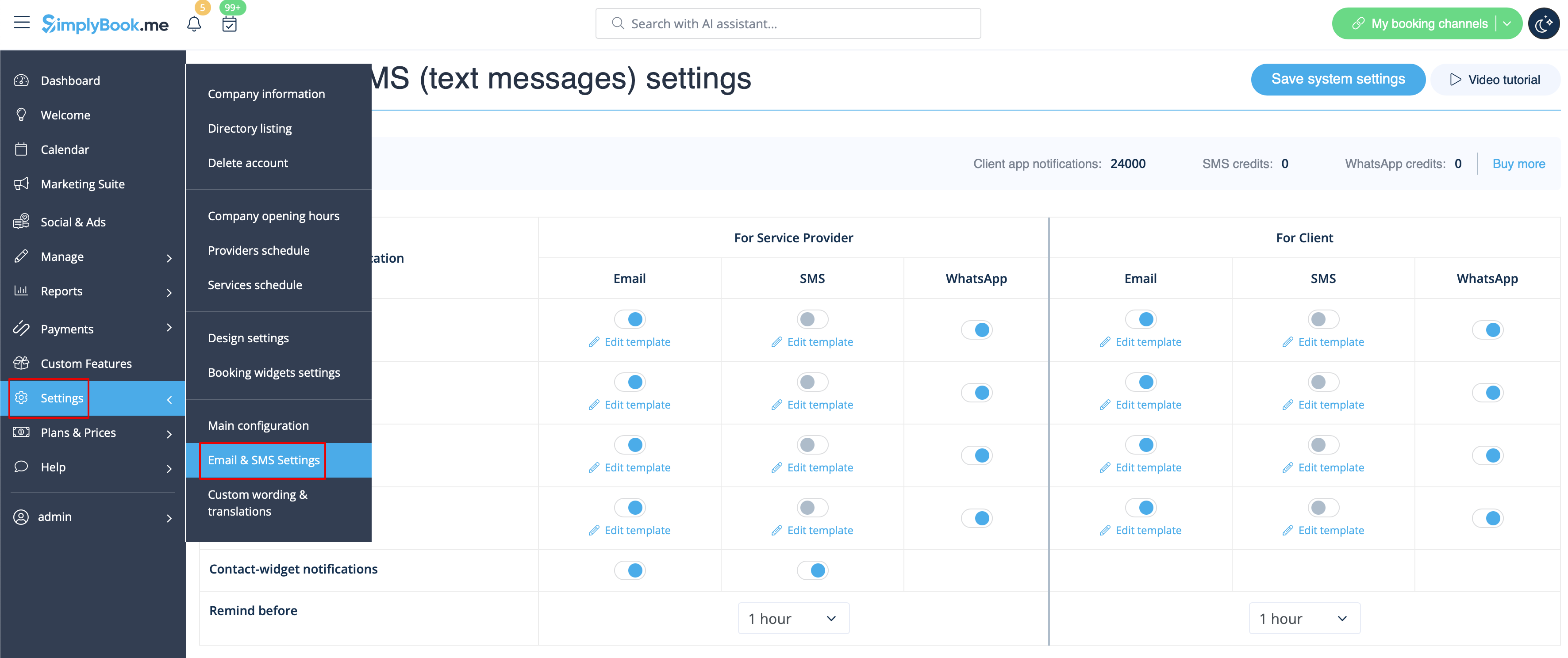
Du kan også opsætte op til tre påmindelser for både dine kunder og medarbejdere – indstil blot tidspunktet, og systemet sender dem automatisk i henhold til skabelonteksterne, der er angivet for den valgte type påmindelsesnotifikation.
[[File:Notifications options with multiple reminders.png|1200px|border| center|link=https://help.simplybook.me/images/a/a4/Email_and_sms_settings_path_redesigned_upd.png]]
<br><br>
<br><br>
[[File:Notifications statuses upd.png|1200px| center|link=https://help.simplybook.me/images/e/e2/Notifications_statuses_upd.png]]
[[File:Notifications statuses upd.png|1200px| center|link=https://help.simplybook.me/images/e/e2/Notifications_statuses_upd.png]]
<br><br>
<br><br>

Latest revision as of 13:07, 16 March 2026

Information about message (contribute)
This message has no documentation. If you know where or how this message is used, you can help other translators by adding documentation to this message.
Message definition (Adjusting notifications)
Go to <span style="background-color:#d4f8e5; padding:5px; border-radius:5px;">Settings</span> -> <span style="background-color:#d4f8e5; padding:5px; border-radius:5px;">Email and SMS settings</span> and <span style="background-color:#d4f8e5; padding:5px; border-radius:5px;">check/uncheck</span> the corresponding boxes to send/not send notifications. You can change the texts of notifications to better suit your needs by clicking <span style="background-color:#d4f8e5; padding:5px; border-radius:5px;">edit template,</span> making changes and saving system settings.<br>
As well you can set up to three reminders for both your clients and employees - just set the timing and the system will automatically send them according to the template texts for set for reminder notification type.
[[File:Notifications options with multiple reminders.png|1200px|border| center|link=https://help.simplybook.me/images/a/a4/Email_and_sms_settings_path_redesigned_upd.png]]
<br><br>
[[File:Notifications statuses upd.png|1200px| center|link=https://help.simplybook.me/images/e/e2/Notifications_statuses_upd.png]]

Gå til Indstillinger -> E-mail- og SMS-indstillinger og marker/afmarkér de tilsvarende felter for at sende/ikke sende notifikationer. Du kan ændre teksterne i notifikationerne, så de bedre passer til dine behov, ved at klikke på rediger skabelon, foretage ændringerne og gemme systemindstillingerne.
Du kan også opsætte op til tre påmindelser for både dine kunder og medarbejdere – indstil blot tidspunktet, og systemet sender dem automatisk i henhold til skabelonteksterne, der er angivet for den valgte type påmindelsesnotifikation.