Marked this version for translation |
No edit summary |
||
| Line 30: | Line 30: | ||
;'''How to use''' | ;'''How to use''' | ||
:1. Enable <span style="background-color:#d4f8e5; padding:5px; border-radius:5px;">Client mobile app</span> feature on your <span style="background-color:#d4f8e5; padding:5px; border-radius:5px;">Custom features</span> page in <span style="background-color:#d4f8e5; padding:5px; border-radius:5px;">Business enhancements</span> section. | :1. Enable <span style="background-color:#d4f8e5; padding:5px; border-radius:5px;">Client mobile app</span> feature on your <span style="background-color:#d4f8e5; padding:5px; border-radius:5px;">Custom features</span> page in <span style="background-color:#d4f8e5; padding:5px; border-radius:5px;">Business enhancements</span> section. | ||
[[File:Client app enable path.png|border|center]] | [[File:Client app enable path redesigned.png|1200px|border|center|link=https://help.simplybook.me/images/c/cb/Client_app_enable_path_redesigned.png]] | ||
<br><br> | <br><br> | ||
:2. And it is ready to use. Some reports options become available to you. | :2. And it is ready to use. Some reports options become available to you. | ||
[[File:Client app | [[File:Client app free verion redesigned.png|1200px|border|center|link=https://help.simplybook.me/images/e/ef/Client_app_free_verion_redesigned.png]] | ||
<br><br> | <br><br> | ||
:3.'''(available for Premium subscriptions only)''' Add own application name, set brand color, select the preferable <span style="background-color:#cdeffc; padding:5px; border-radius:5px;">[[Special:MyLanguage/How_to_change_the_way_time_slots_are_shown|calendar layout]]</span>, upload the logo and banner images. | :3.'''(available for Premium subscriptions only)''' Add own application name, set brand color, select the preferable <span style="background-color:#cdeffc; padding:5px; border-radius:5px;">[[Special:MyLanguage/How_to_change_the_way_time_slots_are_shown|calendar layout]]</span>, upload the logo and banner images. | ||
:It is important to use square image for the logo, different dimensions will not be saved. | :It is important to use square image for the logo, different dimensions will not be saved. | ||
:As well we recommend using brighter and/or darker colors for background for better customer experience. | :As well we recommend using brighter and/or darker colors for background for better customer experience. | ||
[[File:Client app | [[File:Client app options paid redesigned.png|1200px|border|center|link=https://help.simplybook.me/images/8/8d/Client_app_options_paid_redesigned.png]] | ||
<br><br> | <br><br> | ||
:4. Send your booking website URL(banner is not shown on widgets) to your clients so that they will be able to install the application on their phones by clicking on the corresponding <span style="background-color:#d4f8e5; padding:5px; border-radius:5px;">banner.</span> | :4. Send your booking website URL(banner is not shown on widgets) to your clients so that they will be able to install the application on their phones by clicking on the corresponding <span style="background-color:#d4f8e5; padding:5px; border-radius:5px;">banner.</span> | ||
| Line 56: | Line 56: | ||
[[File:Client app notifications system.png|border|center]] | [[File:Client app notifications system.png|border|center]] | ||
<br><br> | <br><br> | ||
*From '''admin side''' it is possible to see all push notifications sent to customers in <span style="background-color:#d4f8e5; padding:5px; border-radius:5px;">Reports</span> -> <span style="background-color:#d4f8e5; padding:5px; border-radius:5px;"> | *From '''admin side''' it is possible to see all push notifications sent to customers in <span style="background-color:#d4f8e5; padding:5px; border-radius:5px;">Reports</span> -> <span style="background-color:#d4f8e5; padding:5px; border-radius:5px;">Push notifications</span> as well as whether they were received and clicked by client. | ||
[[File:Client app | [[File:Client app push notifications report redesigned.png|1200px|border|center|link=https://help.simplybook.me/images/c/cc/Client_app_push_notifications_report_redesigned.png]] | ||
<br><br><br><br> | <br><br><br><br> | ||
</translate> | </translate> | ||
Revision as of 12:27, 22 August 2024

Let your clients download your own personalised client app. With the app on their mobile they can easily book, reschedule, purchase packages, memberships and gift cards as well as access your business directly from their phones.
The Client app is available for all paying SimplyBook.me users who use Client Login, and if you have a premium subscription you can personalise it with your own logo and brand color. Ask your clients to go to your booking website on a mobile device, and from there they will be invited to download the app on their mobile.
It's as simple as that!
Client Mobile App operates as a Progressive Web App (PWA), which means it cannot be downloaded from traditional app stores like the App Store or Play Market. Instead, your clients can access the app's features directly through a web browser on their mobile devices. This approach offers flexibility, easy updates, and compatibility across different devices.
- Please note!
- When you turn this feature on Client Login custom feature will be enabled as well;
- It currently works with weekly classes, modern and flexible calendar layouts only;
- The following functionality is not currently present in the client application: News, Photo gallery,, Reviews, Custom page, Google translate, main page mode change, end time display, hiding images on booking steps, RTL orientation, Contact widget, busy and available slots color adjustments.
- Video tutorials available
- How to set up the Client mobile app

- How to use the Client mobile app
- How to set up the Client mobile app
- How to use
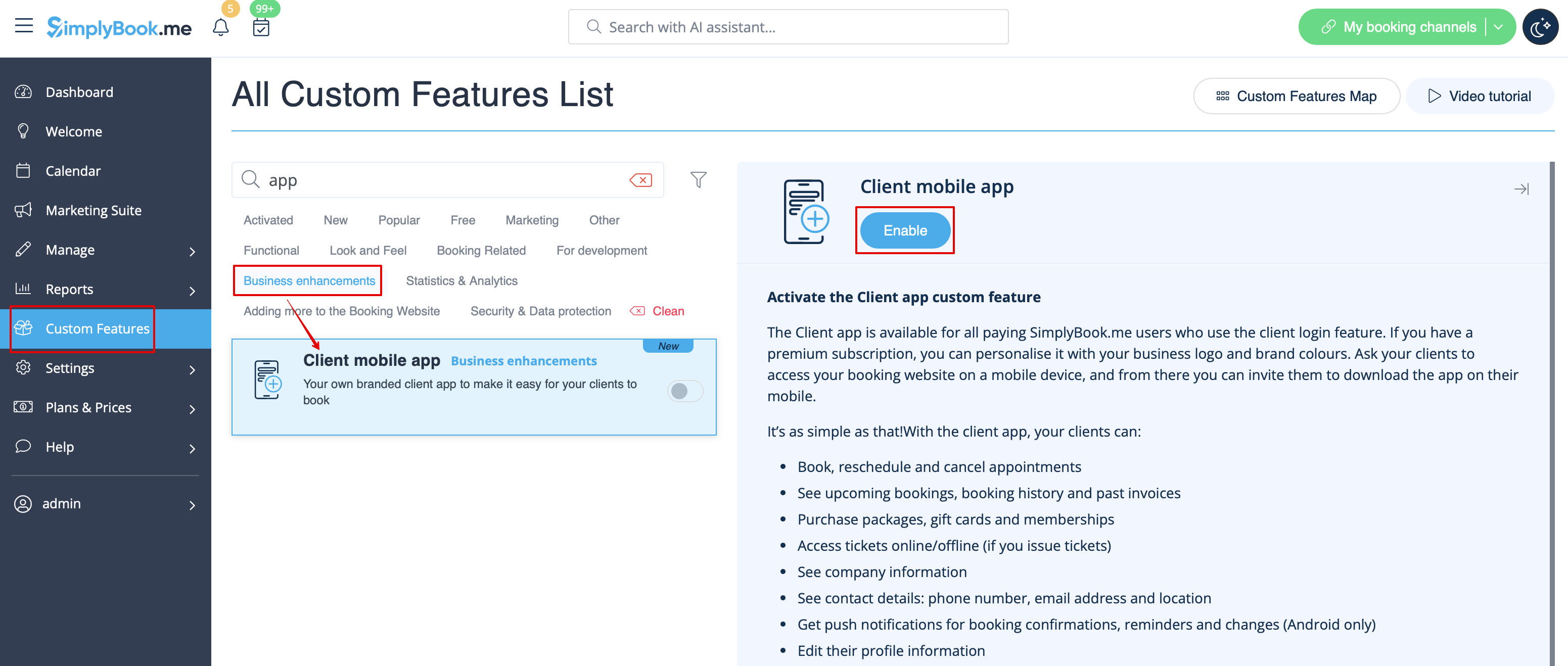
- 1. Enable Client mobile app feature on your Custom features page in Business enhancements section.
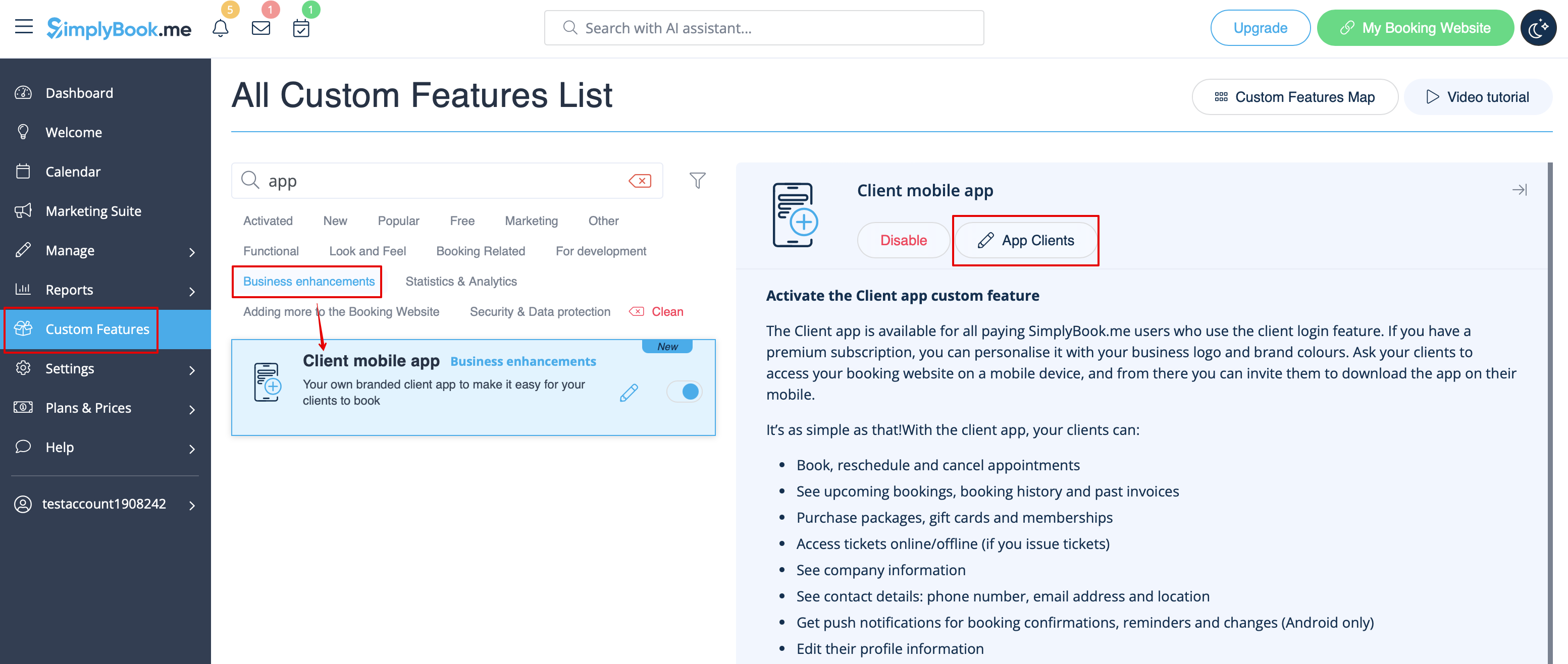
- 2. And it is ready to use. Some reports options become available to you.
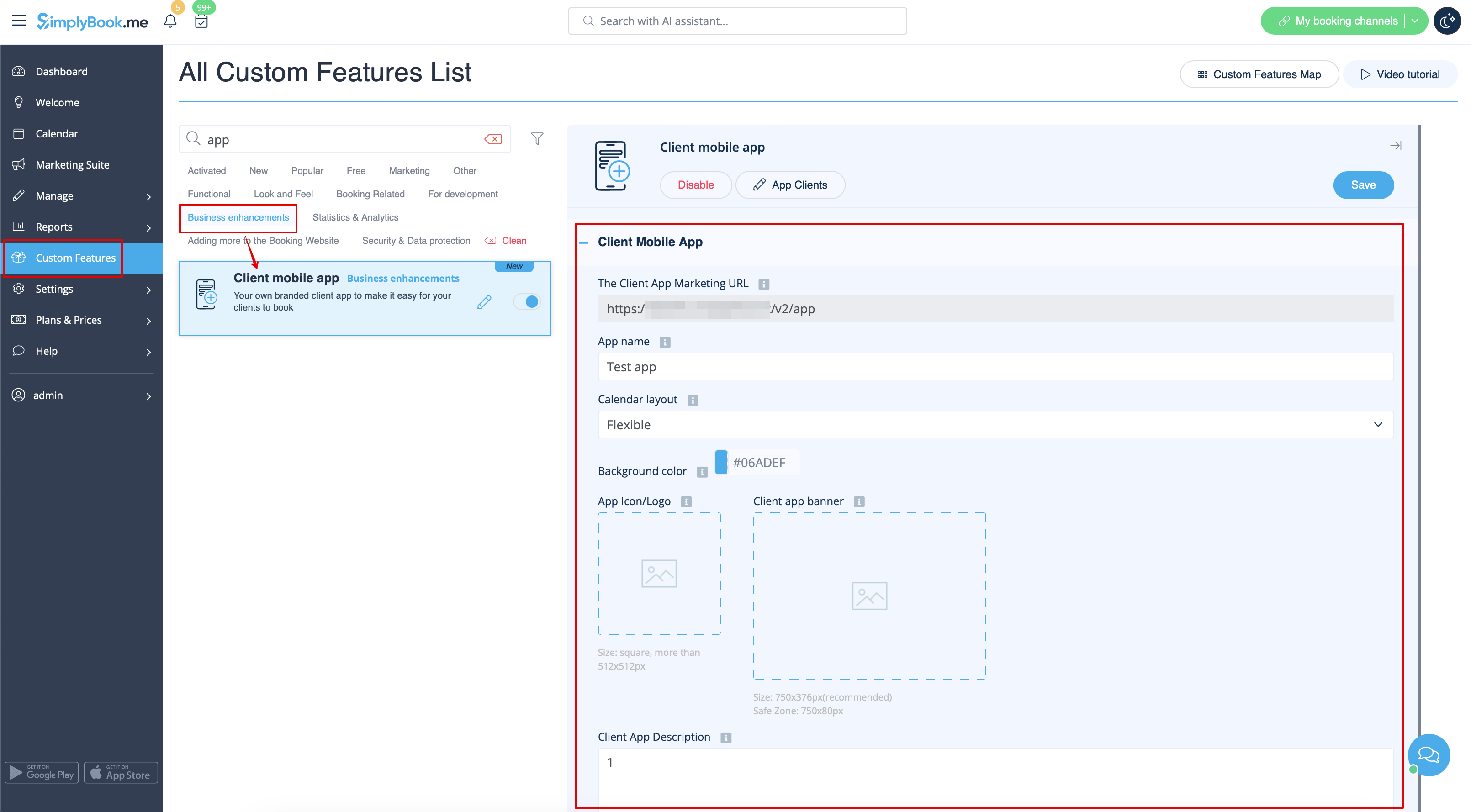
- 3.(available for Premium subscriptions only) Add own application name, set brand color, select the preferable calendar layout, upload the logo and banner images.
- It is important to use square image for the logo, different dimensions will not be saved.
- As well we recommend using brighter and/or darker colors for background for better customer experience.
- 4. Send your booking website URL(banner is not shown on widgets) to your clients so that they will be able to install the application on their phones by clicking on the corresponding banner.
- (Invitation installation banner may not be displayed in built-in mobile browsers, it is recommended to use Chrome instead)
- Please note! IOS devices users will need to open your booking website in full Safari version to have the installation invitation banner and then simply use Add to home screen option.

- 5. As the result they will be able to book online, see their appointments(this option is available even in offline mode), reschedule or cancel them, buy gift cards, memberships and packages, view invoices and update own details if necessary.

- Push notifications
- Users can also get push notifications about new bookings or cancellations on their devices.
- For that it will only be necessary to enable notifications in the application after sign up/sign in and in a standard system dialogue.

- In case the notifications are turned on, but the push messages do not come it is necessary to check if Chrome system notifications(Android) or Safari(IOS) are enabled inside the device settings.

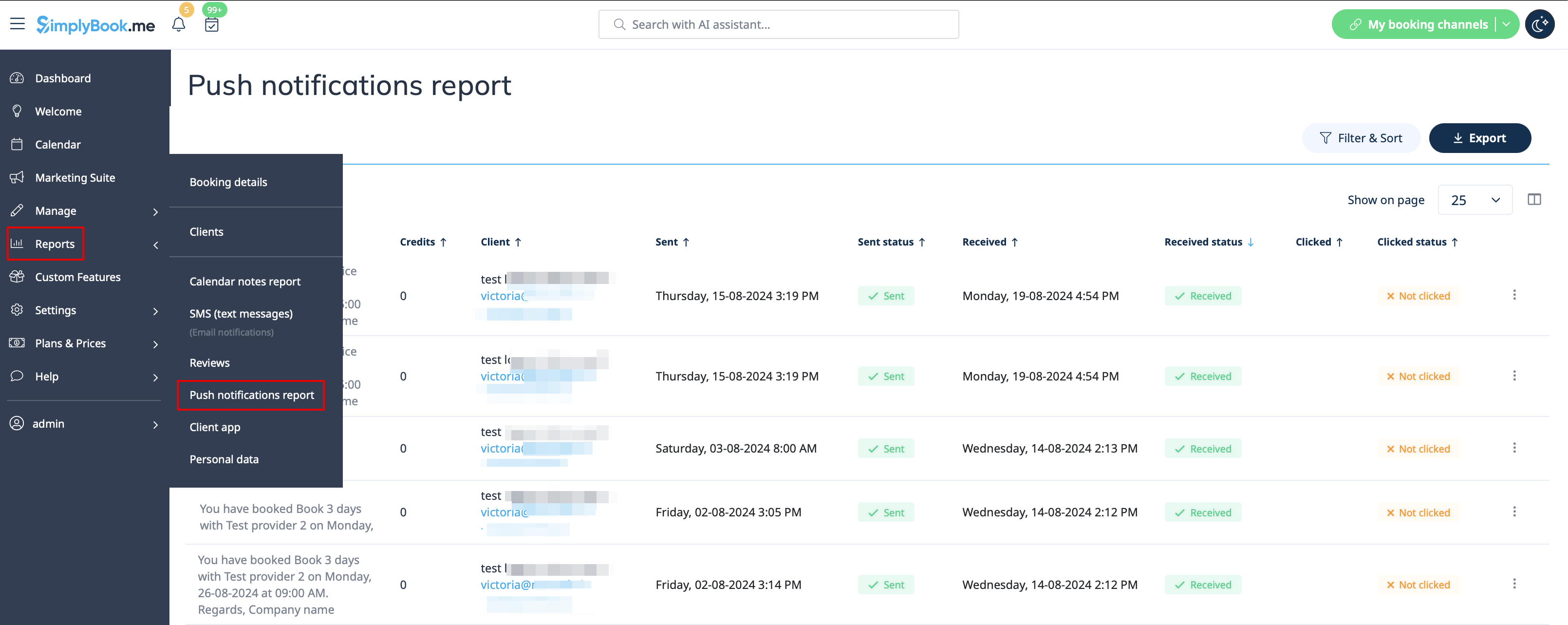
- From admin side it is possible to see all push notifications sent to customers in Reports -> Push notifications as well as whether they were received and clicked by client.